10 Number Systems and Data Units

More
Depth: Practitioner
Progress saves as you read. Mark sections complete as you go; your progress appears in the sidebar.
10.1 In 60 Seconds
This section: In 60 Seconds — Picture a device counter that rolls from a large positive value to a negative one after months in service.
Decode One Counter at Its Limit
Picture a device counter that rolls from a large positive value to a negative one after months in service. The bits arrived, but the sender and receiver used different limits.
Firmware means the program stored on a device to control its hardware. A payload means the part of a message that carries the application data.
Encode zero, the largest allowed value, the next value, and a known bit pattern in old and new versions. Keep notation, width, signedness, raw payload, firmware version, decoded value, and rejection or rollover result.
This test covers named boundaries, not every numeric format. The deeper sections connect binary, decimal, hexadecimal, width, range, and conversion checks.
Computers store every value as bits, but people read and write numbers in several notations. Binary, decimal, and hexadecimal are three ways to write the same quantity, and a data type is a fixed-width container with a known range. Choosing the right notation to read a value, and the right width to store it, prevents a large class of IoT bugs where a number is technically present but quietly wrong.
10.2 Start With the Story
This section: Start With the Story — You will convert sensor values between number systems and select an integer width that covers their valid range.
You will convert sensor values between number systems and select an integer width that covers their valid range. Start with one quantity, then separate its notation from its signedness and storage limits.
Follow one quantity through four beats to separate its notation from the contract that gives it a safe range and meaning.
-

Data Dora: “One quantity can wear binary, decimal, or hexadecimal notation.”
-

Bex: “Without width and signedness, a valid pattern can hit the wrong range.”
-

The team: “Fix the units, width, signedness, and conversion rule first.”
-

Test Tessa: “Every notation now resolves to the same in-range quantity.”
Read the story panels from the three notations to the aligned result. Binary, decimal, and hexadecimal can describe one quantity, but the next panel shows that a bit pattern alone does not establish a usable range. Width, signedness, units, and the conversion rule supply that missing contract. The matching gauges at the end confirm the chapter’s point: notation is presentation, whereas interpretation depends on shared numeric constraints.
10.3 Same Quantity, Different Notation
This section: Same Quantity, Different Notation — A length of two meters is the same length whether you write it in meters or in feet; only the label changes.
A length of two meters is the same length whether you write it in meters or in feet; only the label changes. Number bases work the same way. The quantity eighty can be written as 80 in decimal, 0x50 in hexadecimal, or 01010000 in binary. The amount never changes, but the notation does, and reading one notation as if it were another is a common mistake.
The important idea is that a digital field has a fixed size, and that size is a budget. Eight bits can hold exactly 256 different values. Choosing a data type means choosing how many values a field can ever represent, and what happens when a value tries to exceed that limit.
A notation change does not change the stored quantity. In Figure 10.1, the dashboard view writes the sensor reading as decimal 42. The machine-state view shows the same value as binary 00101010, while the packet or register view writes it as hexadecimal 0x2A. The lower strip pairs each hex digit with four bits, which is why hex is a compact way to inspect a byte. A reader should identify the base before interpreting a dump or report. Width, signedness, and units still belong to the data contract; the three panels only change how one value is written.
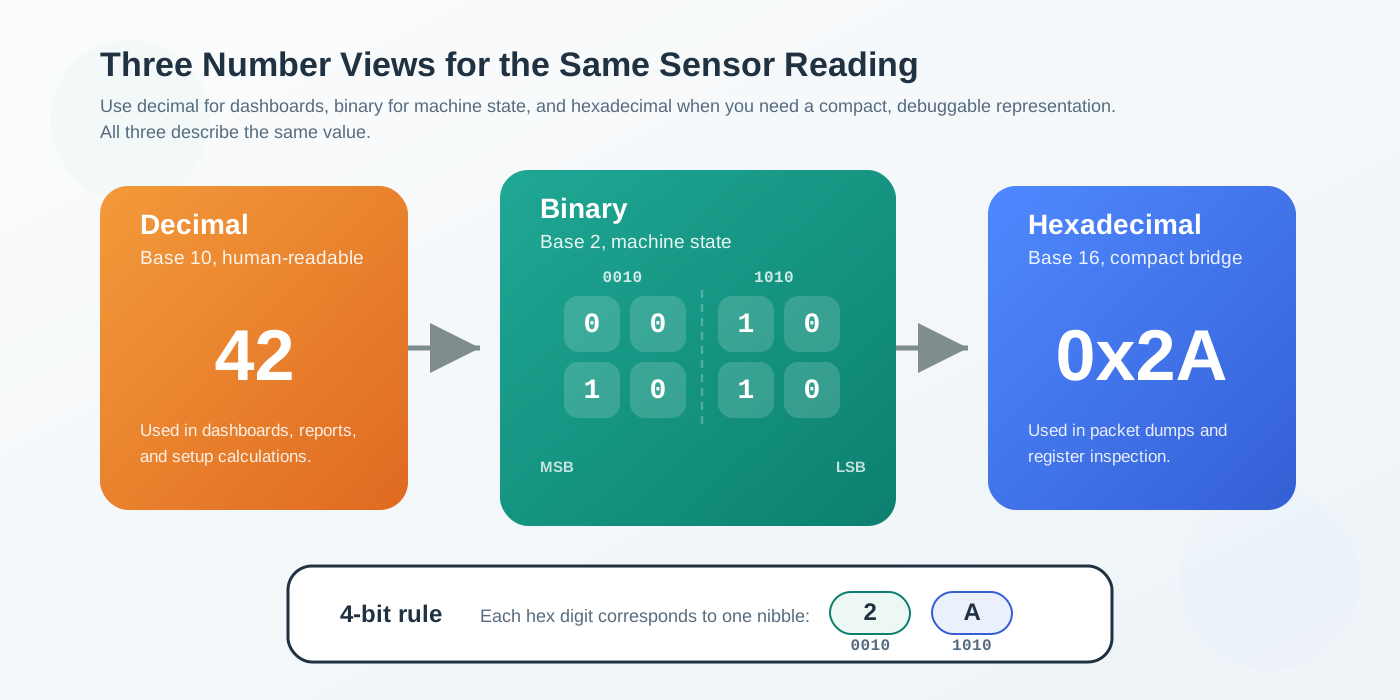
Read across Figure 10.1 from decimal to binary to hexadecimal; each panel represents the same quantity. The lower strip pairs each hex digit with its matching nibble. This makes packet dumps shorter to read without changing the value stored in the bits.
Inspect Figure 10.2 and ask which set bits contribute to the value 0xA6.
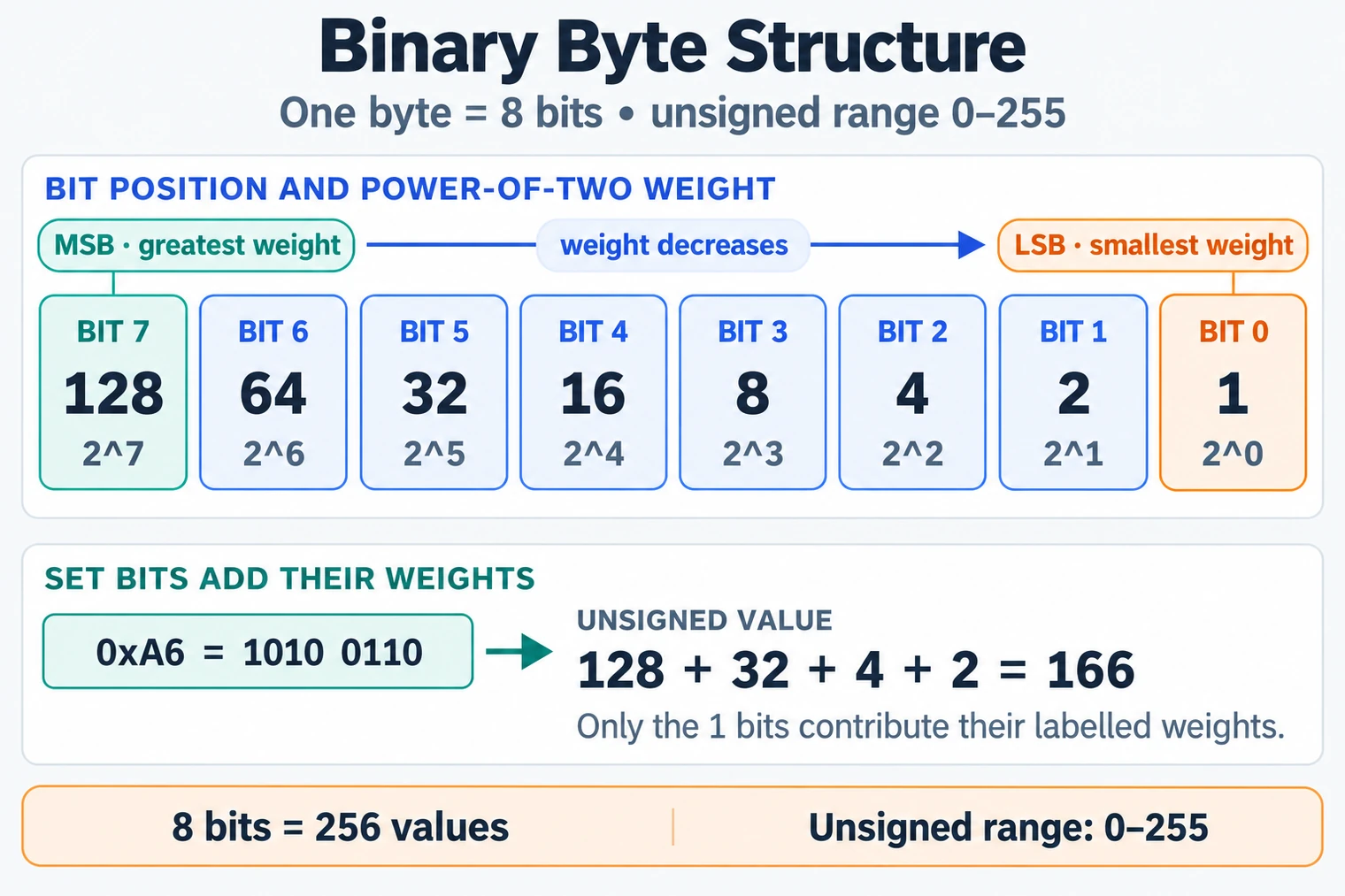
Follow Figure 10.2 from bit 7 to bit 0 as each position’s power-of-two weight falls. In 0xA6, the binary pattern is 1010 0110, so only weights under the one bits contribute: . Eight bits create combinations, numbered 0 through 255 for an unsigned byte. The most significant bit carries the greatest weight, while the least significant bit carries one. This reading supports the number-systems chapter because it turns a byte from a printed symbol into place-value arithmetic, preparing the learner to interpret fields, masks, signed encodings, and multi-byte order without guessing from decimal appearance.
That byte budget is why a counter, status field, or scaled sensor value must be sized before it is trusted. If a value can need bit 8, an 8-bit field cannot represent it; the next storage width is part of the data contract, not an implementation detail.
The core rule is simple: binary is how hardware stores values, hexadecimal is the compact human shorthand for those bits, and decimal is what people usually read. Always confirm which notation you are looking at before trusting a number, and remember that every field has a maximum it cannot exceed.
Hexadecimal is popular because it lines up neatly with bits: one hex digit is exactly four bits, so two hex digits describe one byte. That tidy mapping is why register dumps, MAC addresses, and packet hex views are written in hexadecimal rather than decimal.
Consider a status byte printed by a sensor board as 0xA6. The first step is not to read it as decimal one hundred six; the prefix says it is hexadecimal. Split it into nibbles: A is binary 1010, and 6 is binary 0110, so the byte is 10100110. If the firmware documentation says bit 7 means "fault present," bit 5 means "battery low," bits 2-1 encode the operating mode, and bit 0 means "sample ready," the same byte becomes a field map. The notation did not change the value; it made the byte practical to inspect without writing eight separate bits.
The One-Minute View
Binary is the storage
Hardware holds values as bits. Everything else is a more readable way of writing the same bits.
Hex is the shorthand
One hex digit equals four bits, so hexadecimal is the compact, exact view used for bytes and registers.
Width is a budget
A field's bit width fixes its range. Pick a type that fits the values you expect, with room to spare.
Beginner Examples
- The hex byte
0x50is decimal 80, because the digit 5 is in the sixteens place: five times sixteen plus zero. - A single byte can hold 256 distinct values, written as 0 to 255 unsigned.
- The binary number
1111is decimal 15, which is exactly one hexadecimal digit,0xF.
Byte Range Knowledge Check
The next design move is to connect that byte budget to an actual field range, signedness, and scale.
10.4 Apply It: Choose a Data Type That Fits
This section: Apply It: Choose a Data Type That Fits — Choosing an integer type is a budgeting decision.
Choosing an integer type is a budgeting decision. Pick the smallest width that comfortably holds every value the field can take, including the extremes, with a margin for growth. Too small risks overflow; needlessly large wastes bytes on constrained links.
Walkthrough: Sizing a Field
- State the value range. Find the minimum and maximum the field can ever hold, including error and boundary cases.
- Decide signedness. If the value can be negative, you need a signed type, which spends one bit on the sign.
- Apply any scaling. If you store a fraction as a scaled integer, scale the range too. Tenths of a degree multiplies the range by ten.
- Pick the smallest fitting width. Choose the standard width whose range covers the scaled, signed range with margin.
- Record the choice. Document width, signedness, scale, and units so every system decodes the field identically.
Common Widths and Ranges
Worked Example: A Scaled Temperature Field
A sensor reports temperature from -40.0 to 125.0 degrees, stored in tenths of a degree. Scaling by ten gives an integer range of -400 to 1250. Because the low end is negative, the field must be signed. A signed 8-bit type only reaches -128 to 127, far too small. A signed 16-bit type spans -32768 to 32767, which comfortably covers -400 to 1250 with large margin, so signed 16-bit is the smallest safe fit.
range -40.0 .. 125.0 C, stored as tenths
  scaled integer range: -400 .. 1250
  signed 8-bit  (-128 .. 127)    -> too small
  signed 16-bit (-32768 .. 32767) -> fits with margin  [choose this]
Incremental Practice
Beginner
Convert 0x2A to decimal and to binary, and confirm all three notations describe the same quantity.
Intermediate
A counter must hold up to fifty thousand events before reset. Decide whether unsigned 16-bit is safe and justify the margin.
Advanced
A field stores a voltage from 0.00 to 3.30 volts in hundredths. Choose a width and signedness, and explain why a smaller type would fail.
Type Sizing Knowledge Check
A field-size decision is complete only when the range, signedness, scale, and margin are written into the data contract.
10.5 Under the Hood: Ranges, Signedness, and Overflow
This section: Under the Hood: Ranges, Signedness, and Overflow — The selection rules above come straight from positional notation and modular arithmetic.
The selection rules above come straight from positional notation and modular arithmetic. Understanding them lets you predict exactly what a field can hold and what happens when it cannot.
Positional Value
In any base, a digit's contribution is the digit times the base raised to its position. The hex byte 0x50 is the digit 5 in the sixteens place plus 0 in the ones place:
0x50 = (5 x 16) + (0 x 1) = 80
0xFF = (15 x 16) + (15 x 1) = 255
binary 1111 = 8 + 4 + 2 + 1 = 15 = 0xF
Range Formulas
For a width of N bits, the representable ranges are fixed:
unsigned:  0 .. 2^N - 1
signed:   -2^(N-1) .. 2^(N-1) - 1   (two's complement)
Signedness costs one bit of magnitude, which is why a signed 8-bit field reaches 127 instead of 255. The negative side reaches one further than the positive side, to -128, because zero occupies one of the non-negative codes.
Unsigned Wraparound and Signed Overflow
Unsigned N-bit results wrap modulo 2 to the power N rather than clamping. Signed arithmetic does not have a universal wrap rule: in C, an overflowing signed expression is undefined, and conversion of an out-of-range value into a signed field is implementation-defined. Specify and test a wrap policy if the protocol requires one.
unsigned 8-bit: 255 + 1 -> 0        (wraps to minimum)
signed   8-bit: 127 + 1 -> -128     (only with a defined wrap policy)
unsigned 16-bit: 65535 + 1 -> 0
These boundary failures explain counters that appear to reset, timers that jump backward, and accumulators that suddenly turn negative. Choose a width with headroom, or detect and handle the out-of-range result according to the declared policy.
Hex and Nibble Alignment
Because four bits form one hexadecimal digit, conversion between binary and hex is grouping, not calculation. Split the bits into groups of four from the right and map each group to one hex digit. This is why hex dumps are the natural way to inspect packed fields and bit flags.
Common Pitfalls
- Reading hex as decimal. Without confirming the base,
0x20can be mistaken for 20 instead of 32. - Choosing a type at its edge. A field at the edge of its range overflows on the first larger-than-expected value.
- Forgetting the sign bit. A signed type holds half the positive range of an unsigned type of the same width.
- Ignoring scaling in the range. Storing tenths multiplies the integer range by ten, which can push a value past a small type's limit.
Overflow Knowledge Check
In production, number systems are about budgets and boundaries. Confirm the base before reading, size each field with margin, document signedness and scale, and treat overflow as a designed-for case rather than a surprise.
10.6 Checkpoint: Summary
This section: Checkpoint: Summary
- Binary, decimal, and hexadecimal are three notations for the same quantity; always confirm which one you are reading.
- Hexadecimal aligns with bits because one hex digit equals exactly four bits, which is why bytes and registers are shown in hex.
- A data type is a fixed-width budget: an N-bit unsigned field holds 0 to 2^N minus 1, and a signed field holds -2^(N-1) to 2^(N-1) minus 1.
- Signedness costs one bit of magnitude, so a signed 8-bit field reaches 127, not 255.
- Choose the smallest width that fits the full, scaled, signed range with margin.
- Unsigned fixed-width results wrap modulo 2^N rather than clamping, which can make counters and timers jump; signed overflow needs an explicit policy.
Reading a number starts with knowing its base, and storing a number starts with knowing its range. Pick a width that fits every value with headroom, document signedness and scale, and plan for overflow instead of being surprised by it.
10.7 See Also
This section: See Also
Data Representation Fundamentals
See how number systems fit into the wider decode contract for IoT fields.
Bitwise Operations and Endianness
Use masks, shifts, and byte order to pack and unpack the fields you already sized.
Binary Data Formats for IoT
Apply ranges and widths to CBOR, Protobuf, and custom binary payloads.
Find help
3 reviewed answers.
Where should I start in a module?
Open the module page from the sidebar to see its chapters in order. Use the module map to return to a topic you need.
Modules and pathsReviewed
What can I try when a project does not work?
Check the symptom, then work through the diagnostic steps. Keep the error message and the smallest example that reproduces it.
When you are stuckReviewed
How do interactive examples work?
Use the interactive guide to check how examples and simulations work before changing your project.
Interactive examples guideReviewed