23 Sending Readings Over the Link
More
Depth: Practitioner
Progress saves as you read. Mark sections complete as you go; your progress appears in the sidebar.
23.1 In 60 Seconds
This section: In 60 Seconds — Picture a freezer sensor sending a warning through a wall to a staff screen.
Trace One Reading Until the Receiver Can Defend It
Picture a freezer sensor sending a warning through a wall to a staff screen. A radio burst is not the result; the result is a fresh, correctly labelled reading at the right receiver. The first design question is which evidence survives the whole trip.
An analog-to-digital converter is a circuit that turns a measured voltage into a number; ADC is its short name. A gateway means a device or service that joins two message paths. A payload means the useful reading or command carried inside a message.
Record source identity, time, unit, quality, payload version, link attempt, and receiver state. Block the path, delay a packet, repeat it, restart the gateway, and reject stale or duplicate data. Keep the local warning active when remote delivery cannot be proved.
This runway does not prove that one radio or retry rule fits every site. The deeper sections cover link choice, complete transaction cost, hand-offs, retries, freshness, and delivery evidence.
Transmission is the final stage where a prepared packet has to survive the real path: link behavior, gateway or peer handoff, retry policy, and receiver evidence. Choose the link from range, freshness, cadence, payload, power, ownership, and reliability needs, then measure the whole transaction rather than only the over-the-air burst.
23.2 Start With the Story
This section: Start With the Story — You will choose a link, estimate the whole transaction cost, and check whether readings actually reach the receiver.
You will choose a link, estimate the whole transaction cost, and check whether readings actually reach the receiver. Start with delivery requirements, including delay, energy, and behavior during an outage.
Follow one assembled packet across four beats to see why the link decision includes the whole transaction and its delivery evidence.
-

Packet Pete: “The packet is ready; now the link must fit the real delivery need.”
-

Bex: “The payload is only one part of the airtime, energy, and retry cost.”
-

The team: “Choose the link from requirements and budget the complete exchange.”
-

Test Tessa: “The path is defensible when delivery and failure evidence are both visible.”
The mathematical gist. Radio-on energy is . For this chapter’s extra byte at 5,470 bit/s and a 0.33 W radio, eight extra bits take 1.46 ms and cost 0.483 mJ per reading. At 96 readings per day, that is 46.3 mJ/day; over five years it is 0.0235 Wh, or 23.5 mWh, spent carrying one unnecessary precision byte.

23.3 Transmission Is a Transaction, Not a Burst
This section: Transmission Is a Transaction, Not a Burst — The final pipeline stage moves a prepared packet across a real communication path.
The final pipeline stage moves a prepared packet across a real communication path. The useful question is not "which radio is fastest or longest range." It is whether the link can meet the application's range, update interval, latency, power source, reliability, coverage, and operations needs.
The important idea is that sending a message is a whole transaction, not a single over-the-air burst. A device may wake, set up a session, transmit, listen for an acknowledgement, retry, hand off through a gateway, and only then sleep. The best link is the one whose real transaction behavior matches the value of the data and the constraints of the deployment.
If you only need the intuition, this layer is enough: start from the assembled packet and its delivery requirement, match the link to range, cadence, payload, power, and reliability, then account for the full transaction rather than the transmit time alone.
Think of mailing a parcel. The postage on the box is only part of the cost; the trip to the depot, the wait in line, the handoffs, and the proof-of-delivery slip are the rest. A radio works the same way: airtime is one line item in a longer transaction.
For example, a greenhouse soil sensor may send a 24-byte reading every 15 minutes and a frost alarm within 30 seconds. A wall-powered Wi-Fi gateway can afford association and broker handoff differently from a battery probe using LoRaWAN or LTE-M. The packet is small in every case, but the transaction is not the same: one design pays for local infrastructure and keepalive behavior, another pays for long-range link budget, receive windows, backoff, and gateway or carrier dependence. The transmission stage asks which complete path can deliver the value while preserving battery, freshness, and recoverability.
The path in Figure 23.1 tracks a packet from wake to handoff; check proof after send.
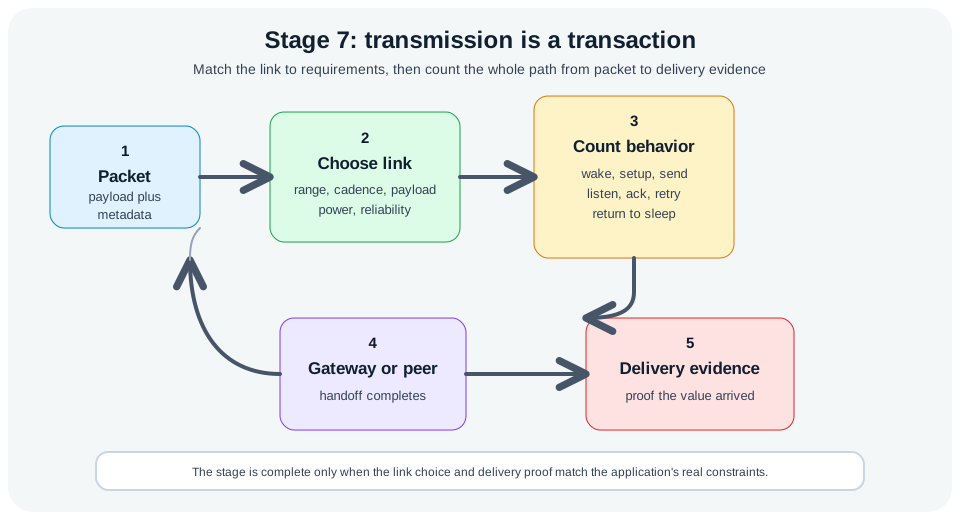
Three labelled stops organise Figure 23.1. Packet uses Packet to show the next hand-off; moving to payload plus shows where it uses payload plus to show the next hand-off; ending at range, cadence, payload shows where it uses range, cadence, payload to show the next hand-off. Together they explain why Stage seven: start from the assembled packet, match the link to range, cadence, payload, power, and reliability, then count the whole transaction through gateway or peer handoff to delivery evidence matters to Transmission Is a Transaction, Not a Burst.
The One-Minute View
Start from the packet
The payload already has meaning and metadata. Transmission decides whether it can move and what proves it arrived.
Match link to requirements
Choose from range, cadence, payload size, power source, coverage, ownership, and reliability, not from a single headline spec.
Count the whole transaction
Wake, session setup, listen, acknowledge, and retry can cost more time and energy than the transmit burst itself.
Beginner Examples
- A slow status update does not need the same link behavior as a low-latency control message; the choice starts from value and timing.
- A packet can fit a link's payload limit yet still drain the battery if retries keep the radio awake.
- A deployment in difficult terrain needs coverage evidence and a fallback rather than a data-sheet range number.
Transmission Fit Knowledge Check
If this gives you the model, you can stop here. Continue to Practitioner to choose a link and account for its transaction cost.
23.4 Apply It: Choose the Link, Then Cost the Transaction
This section: Apply It: Choose the Link, Then Cost the Transaction — Wireless and wired options make different trade-offs.
Wireless and wired options make different trade-offs. Avoid ranking link families as universally good or bad; instead, record what the application actually needs and let the requirement choose.
A useful first pass is a three-column comparison: application need, link behavior, and operational owner. For a freezer monitor, the need may be immediate alarm delivery and frequent health checks; the link behavior can tolerate Wi-Fi association because mains power is available; the owner is the building network team. For a remote tank probe, the need may be one hourly value plus a daily battery report; the link behavior must favor sleep time, long range, and controlled retries; the owner may be the team paying for a gateway or cellular service. For a wearable, the need may be short-range pairing with a phone; the owner is the user-facing app path. That comparison keeps the link decision tied to the deployed system rather than to a headline throughput number.
Before committing, capture one measured transaction from each finalist: current trace, retry count, acknowledgement timing, gateway handoff, and receiver timestamp. The comparison becomes concrete when every candidate is judged by the same message and failure condition.
Link Choice Starts With Requirements
Before selecting a link, write down the maximum acceptable message age, the update interval and event frequency, the payload size after formatting, the power source and maintenance interval, the range, obstruction, mobility, and antenna constraints, who owns the gateway or carrier or peer, the acknowledgement, retry, buffering, and data-loss tolerance, and the security and provisioning needs.
The map in Figure 23.2 lists link needs from reach to upkeep; choose from those needs.
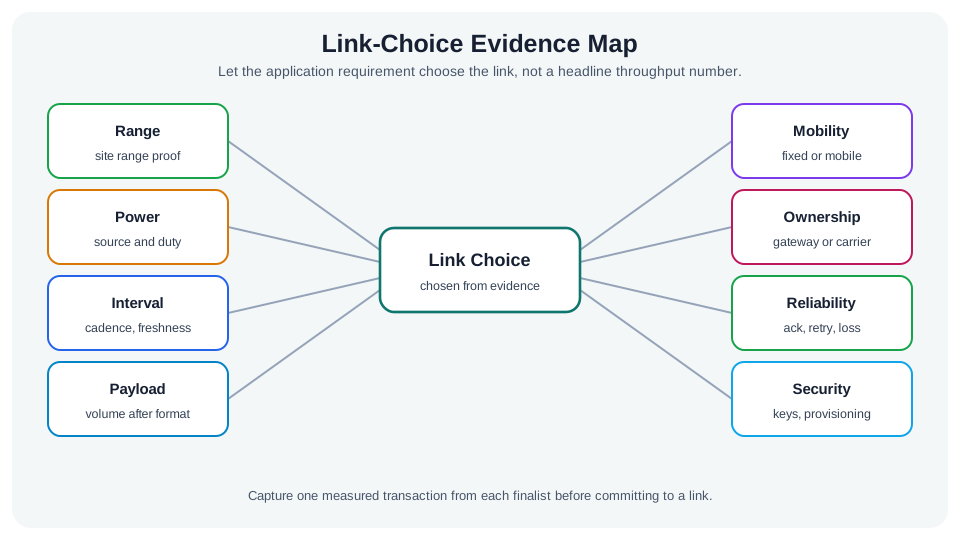
Figure Figure 23.2 turns link choice into a record of application needs. Range needs site proof, while power records the source and duty cycle. Interval and payload show how fresh the message must be and how much data the formatted message carries. Mobility and ownership identify where a fixed site, gateway, or carrier affects the choice. Reliability asks for acknowledgement, retry, and loss evidence; security adds keys and provisioning. The figure ends by asking for one measured transaction from each finalist. That check ties the link decision to the same message and failure condition used in the section’s comparison.
Local, high throughput
Use when the device has power, infrastructure is near, and the payload or update rate is larger than constrained links should carry.
Short range, personal area
Use when a phone, wearable, gateway, or nearby controller is part of the system and updates are small and frequent.
Long range, sparse telemetry
Use when coverage distance matters more than throughput and the system tolerates small payloads, duty cycling, and occasional delay.
Operator or public network
Use when owning gateways is impractical, but record coverage, service dependency, provisioning, data plan, and failure-mode assumptions.
Do not choose the radio first. A wall-powered gateway sensor, a phone-tethered wearable, a mobile asset tracker, and a remote soil probe can all report "temperature," yet their transmission requirements are entirely different systems.
Turn that list into a short comparison before any protocol name wins. A wall-powered freezer monitor beside an access point might use Wi-Fi and MQTT because the site already owns the network, maintenance can troubleshoot the gateway, and alarm latency matters more than sleep current. A remote tank-level probe may instead prefer a long-range telemetry path because the collector is far away, truck rolls are expensive, and the hourly reading remains useful after a delayed retry. A wearable sensor can be better served by BLE because the phone is the intended peer and local pairing is part of the product. These choices are not interchangeable; each one follows from range, ownership, freshness, and operating evidence.
Cost the Whole Transaction
One message can involve far more than a transmit burst: a device may wake, synchronize, listen, acquire the channel, transmit, wait for an acknowledgement, retry, receive a downlink, and return to sleep. That is why byte count alone does not predict energy or latency.
A radio transaction consumes time and energy outside the transmit burst. In Figure 23.3, the node wakes and powers up before it prepares a packet. Sending uses airtime, but the node may then listen for an acknowledgement, retry, or wait for a handoff toward the server. Only after that path can it return to sleep. The retry arrow loops through send and listen again, so a poor link can change the cost of one useful reading. Measure the whole wake-to-sleep trace when comparing links or estimating battery life; a payload byte count cannot show these waiting and retry costs.
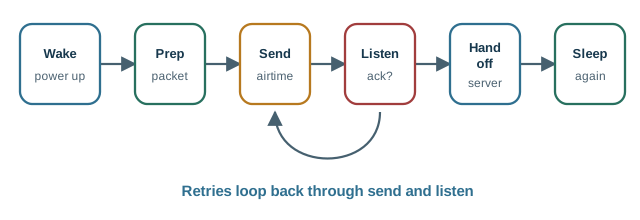
Inspect Figure 23.3 at Wake and note that it highlights Wake. Compare power up, which uses power up to expose operating cost, before reading Prep as the place that highlights Prep. The comparison turns A transaction timeline: wake, prepare, transmit, listen, retry or acknowledge, hand off, and sleep into a bounded Cost the Whole Transaction choice.
An end-to-end latency budget should be treated as a measured trace for one deployment, not as a protocol datasheet. The useful pattern is the split: local preparation may be small while gateway handling, broker reachability, WAN transport, cloud rules, dashboard rendering, retries, or queueing dominate the user-visible delay. That is why a transmission review should ask where the time went before optimizing the device code alone.
Read the latency bar in Figure 23.4 from local preparation through the gateway, transport, and cloud stages. Compare segment widths to find which part of this illustrative transaction consumes the most time.
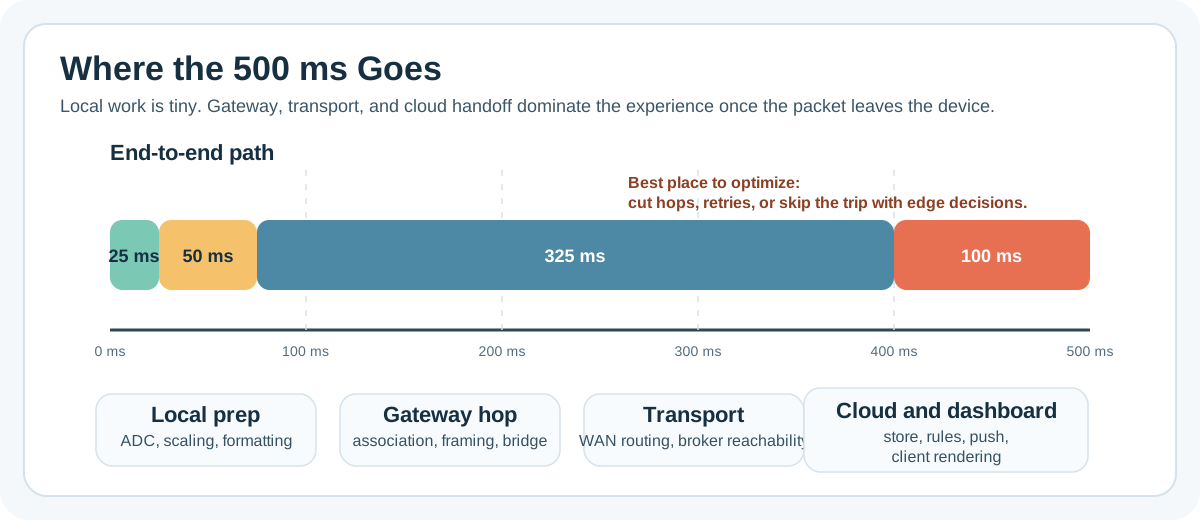
The transport segment dominates Figure 23.4, while local preparation occupies the smallest part of the bar. The labels below identify work inside each segment, helping you locate useful reductions in hops, retries, or remote processing.
Optimize packet count before packet size. Suppressing an unneeded routine message removes the whole transaction: wake, channel access, transmit, listen, retry exposure, and downstream handling. For slow-changing measurements, a smarter send rule often beats a denser encoding.
Transaction Cost Knowledge Check
If you can pick a link and budget its transaction, you can stop here. Continue to Under the Hood for resilience and delivery evidence.
23.5 Under the Hood: Resilience and Delivery Evidence
This section: Under the Hood: Resilience and Delivery Evidence — Field connectivity is imperfect.
Field connectivity is imperfect. A complete transmission design states what the system does when links are weak, receivers are down, packets arrive twice, or stale data returns after a gap. Resilience is part of the design, not an afterthought.
Consider a parking-lot flood sensor that normally reports every ten minutes but may lose gateway coverage during heavy rain. The device should not retry continuously until the battery is exhausted. A better design stores a bounded queue with sequence numbers and timestamps, backs off after failed acknowledgements, expires routine readings that are no longer useful, and keeps the most recent alarm state until it is delivered or replaced by a newer state. When the gateway returns, the receiver can detect gaps, ignore duplicates, and distinguish a current alarm from stale backlog. That behavior matters more than shaving a few bytes from a packet, because the field failure is a delivery semantics problem.
The evidence should come from both sides of the path. Device logs show wake time, retry count, buffer depth, sequence number, and battery state. Gateway or server logs show first-seen time, duplicate suppression, acknowledgement timing, and whether the application accepted, expired, or escalated the reading. Comparing those two views prevents a misleading conclusion such as "the device sent it" when the receiver never accepted a fresh value.
That paired evidence also defines the recovery contract: how many values may queue, how old an alarm may be, when a retry stops, and which component reports the gap to the operator. It turns link outages into visible system behavior.
The flood-sensor loop in Figure 23.5 tracks send, retry, and expiry; compare both ends of the link.
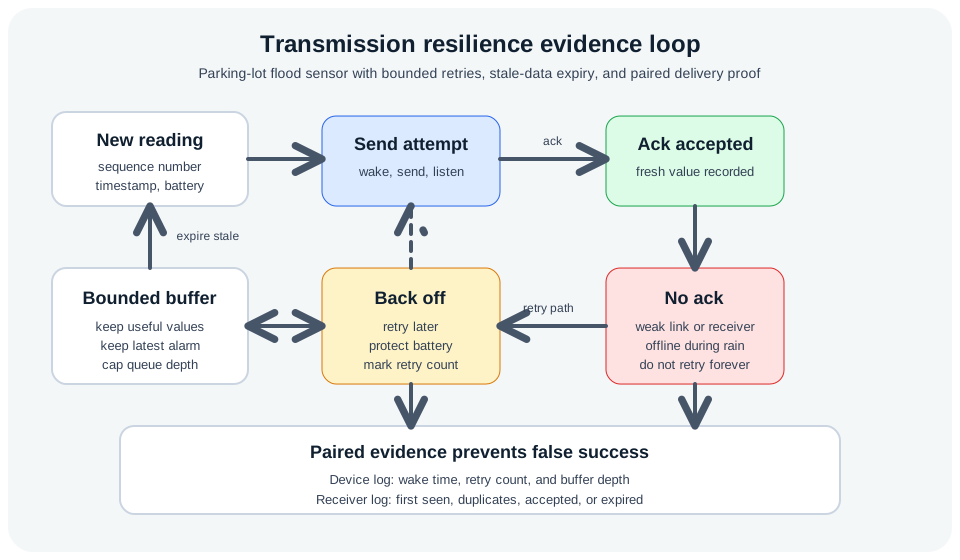
Follow a new reading through the buffer and send attempt in Figure 23.5. Acceptance ends the attempt; missing acknowledgement leads to backoff, while stale readings expire. Compare the paired logs below to distinguish attempted delivery from a fresh value recorded by the receiver.
Buffer
Keep unsent values only while they remain useful. A stale value must not masquerade as a current measurement.
Back off
Retry policy should protect both the battery and the network. Continuous retries can be worse than a controlled data gap.
Prove delivery
Use sequence numbers, timestamps, acknowledgements, or receiver-side audits when the application needs proof of arrival.
Transmission Review Workflow
Common Pitfalls
- Treating coverage as yes-or-no. Real sites have dead zones, moving obstructions, antenna-orientation issues, and gateways under maintenance. Record coverage evidence and repeat coverage checks when the site changes.
- Counting only transmit airtime. Wake time, session setup, listen windows, acknowledgements, retries, and backhaul delays can dominate the result.
- Letting retries erase the power budget. Unbounded retries drain a device and congest the network. Retry policy needs backoff, expiry, and a rule for when data is no longer worth sending.
Resilience Evidence Knowledge Check
At this depth, transmission is reviewed from the field backward: what must arrive, how fresh it must be, what happens when the link fails, and what evidence proves the system behaved correctly. The best optimization is usually fewer useful packets, then clear contracts, then the right link.
23.6 Summary
This section: Summary
- Transmission is a transaction, not only an over-the-air burst.
- Link choice starts from requirements: range, freshness, cadence, payload volume, power source, ownership, and reliability.
- Energy and latency budgets need categories so device behavior and infrastructure delay are not confused.
- Resilience is part of the design: buffering, retry, backoff, expiry, duplicate detection, and delivery evidence should be deliberate.
- The best optimization is often fewer useful packets, followed by clear payload contracts and an appropriate link.
Review stage seven from the field transaction backward: what must arrive, how fresh it must be, what happens when the link fails, and what evidence proves the system behaved correctly.
23.7 See Also
This section: See Also
Pipeline Processing and Formatting
Review stages four to six, where the packet becomes meaningful before it enters the link.
Protocol Selection Framework
Choose a link family from deployment evidence using a systematic selection method.
Packet and Protocol Overhead
Connect packet bytes, wrappers, and the transaction cost that dominates energy and latency.
Find help
3 reviewed answers.
Where should I start in a module?
Open the module page from the sidebar to see its chapters in order. Use the module map to return to a topic you need.
Modules and pathsReviewed
What can I try when a project does not work?
Check the symptom, then work through the diagnostic steps. Keep the error message and the smallest example that reproduces it.
When you are stuckReviewed
How do interactive examples work?
Use the interactive guide to check how examples and simulations work before changing your project.
Interactive examples guideReviewed