22 Processing Readings Into Packets
More
Depth: Practitioner
Progress saves as you read. Mark sections complete as you go; your progress appears in the sidebar.
22.1 In 60 Seconds
This section: In 60 Seconds — Picture a vibration sensor that turns many samples into one warning value.
Rebuild One Packet Back to the Processed Reading
Picture a vibration sensor that turns many samples into one warning value. A compact packet is useful only if the receiver can recover which input, rule, unit, time, and version created it. The first check runs one known trace through every middle step.
An analog-to-digital converter is a circuit that turns a measured voltage into a number; ADC is its short name. Firmware is stored device software. A payload means the useful reading or command carried inside a message.
Keep the raw samples, processed result, field map, packet bytes, and decoded output. Change a rule, omit a unit, repeat an old packet, corrupt one field, and restart the receiver. Reject a plausible number whose processing path or version is missing.
This runway does not prove that one filter, encoding, or packet size fits every signal. The deeper sections cover device processing, data meaning, packet assembly, compression, batching, and end-to-end evidence.
A digital sample becomes reviewable evidence only after firmware gives it meaning, the payload gives it a contract, and packet assembly gives it the wrapper needed for delivery. Optimize the middle pipeline in that order: process the value correctly, encode it clearly, then reduce traffic and bytes where the link cost makes that worth doing.
22.2 Start With the Story
This section: Start With the Story — You will turn acquired readings into packets while preserving their units, meaning, and decoding rules.
You will turn acquired readings into packets while preserving their units, meaning, and decoding rules. Start with a raw count and identify the processing needed before choosing the payload format.
Follow one acquired reading across four beats to see how processing, formatting, and packet assembly preserve network-ready evidence.
-

Data Dora: “The samples are digital, but they are not yet network-ready evidence.”
-

Bex: “A handoff can lose the connection between the processed reading and its packet.”
-

The team: “Carry the reading and its evidence through every transformation.”
-

Test Tessa: “The packet is ready when its value still matches the processing evidence.”
The mathematical gist. A 12-bit converter has codes, but a code is not a temperature until a declared transfer function gives it meaning. With a 3.3 V reference, code 2361 means V; a TMP36-style rule reads that as about 140 °C, while a scale-by-100 payload reads the same bits as 23.6 °C. The 117 °C disagreement is why units, scale, and calibration must travel with the value.

22.3 A Digital Sample Is Not Yet Evidence
This section: A Digital Sample Is Not Yet Evidence — The first three pipeline stages turn a physical condition into a digital sample.
The first three pipeline stages turn a physical condition into a digital sample. Stages four through six decide what that sample means, how it is encoded, and how it is wrapped for delivery. A raw converter count is not yet something a receiver can trust; it becomes evidence only after processing, formatting, and packet assembly.
The important idea is not "send everything you measure." The important idea is that these middle stages decide what the network is asked to carry, so a good design sends calibrated, well-labeled values only when the system actually needs them.
If you only need the intuition, this layer is enough: convert raw counts into meaningful values with units, encode them so the receiver can decode them, and add delivery metadata only when it helps. Optimize in this order: avoid unnecessary packets first, keep the payload contract clear, then reduce bytes where the link makes byte count matter.
Think of a lab measurement on its way to a colleague. The number alone is not enough; it needs a unit, a label, and an addressed envelope before it is useful at the other end. Stages four through six are that labeling and packaging step.
A common mistake is to treat these stages as a simple serialization step. They are really where the device turns a measurement into a promise. A value such as 2361 might be a 12-bit ADC count, a register value from a digital sensor, or a scaled integer that already means 23.61 degrees C. The receiver cannot tell which one is true unless the firmware and payload contract make the meaning explicit.
This is also where the system can reduce traffic without hiding important behavior. Firmware may average a noisy stream, suppress unchanged readings, or send only when a threshold or state transition occurs. Those choices are safe only when the review record explains the filter, the send rule, and the event that must still be preserved.
Before A Digital Sample Is Not Yet Evidence, inspect the figure Figure 22.1. Compare ADC with Process; their difference reveals Stages four to six: processing decides meaning, formatting decides the contract, and assembly decides the wrapper. This gives A Digital Sample Is Not Yet Evidence evidence to revisit.
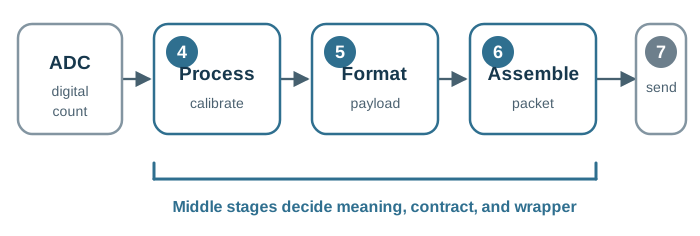
Follow the ADC count across Figure 22.1 through processing, formatting, and assembly. These stages establish the measurement’s meaning, payload contract, and packet wrapper before transmission.
Sensor pipeline narrated tour
Narrated audio tour. The full transcript is below.
Play the tour to open the simulator. Pause, replay a beat, or read the full transcript below.
Some beats explain situations this teaching model cannot show; those beats keep the existing frame and provide captions only.
Full transcript — Sensor pipeline (8 beats)
B1 — Factory monitoring
You are the engineer responsible for vibration monitoring in a smart factory. Sensors keep sending machine health readings. Stop commands must protect the machinery, while useful history reaches storage. Your task is to reduce the stream leaving the factory while preserving important events.
Model caption: Your factory: machine health readings, local stop commands, cloud history. Reduce traffic while preserving important events.
B2 — Sample to packet
Acquisition turns a reading into a digital sample. Processing gives the sample meaning. Calibration supplies a value with units; cleaning handles noise. A send rule decides whether to create a message. Formatting makes the value readable by the receiver. Packet assembly wraps the value for delivery. Processing, formatting, and packet assembly determine what the network carries.
Model caption: Acquisition → digital sample. Processing → meaning and a send decision. Formatting → decodable value. Packet assembly → delivery wrapper.
B3 — Edge fog cloud
The factory model spreads work across three places. The edge works closest to sensors and removes noise or duplicates. Fog combines nearby device streams into smaller site summaries. The cloud receives what remains and stores history. Local processing changes the amount forwarded upstream.
Model caption: Edge: closest processing. Fog: site summaries. Cloud: remaining stream and history.
B4 — Raw stream
Take the model's factory settings: two thousand four hundred events each second, with eight kilobytes per event. Multiply two thousand four hundred by eight to get nineteen thousand two hundred kilobytes per second. Divide by one thousand twenty four, using the model's conversion, to get eighteen point seven five megabytes per second before local filtering.
Model caption: Model convention: 2400 events/s × 8 KB ÷ 1024 = 18.75 MB/s. Live label rounds to 18.8 MB/s.
B5 — Successive reductions
Edge filtering removes eighty two percent of the raw stream, leaving eighteen percent. The remaining rate is three point three seven five megabytes per second. Fog aggregation removes eighty eight percent of the remaining stream, leaving twelve percent. Cloud input becomes zero point four zero five megabytes per second. Each reduction acts on the stream reaching its own stage.
Model caption: 18.75 × (1 − 82/100) = 3.375 MB/s; 3.375 × (1 − 88/100) = 0.405 MB/s to cloud. Live labels: 3.38 MB/s and 414.7 KB/s.
B6 — Raw path and commands
Forwarding the raw stream instead bypasses both reductions. With the same event rate and payload size, the cloud receives eighteen point seven five megabytes per second. Control also has a return path: commands go back to actuators, the devices being controlled, from the part of the system making the decision. In the factory model, the edge handles stop commands.
Model caption: Bypass local reductions: cloud input = 18.75 MB/s (live: 18.8 MB/s). Commands return from the deciding tier; the factory model assigns stop commands to edge.
B7 — Preserve events
A common mistake is to assume a smaller stream means the filtering suits the factory, but filtering must balance traffic reduction against preserving important events. A moving average combines several recent readings into one average. It can reduce random noise, but it can also delay a fast event.
Model caption: More filtering is always better — misconception. A moving average can reduce noise and delay a fast event. Preserve the event that matters.
B8 — Shrink upstream
Preserve the event, carry its meaning, and shrink the stream before sending it upstream.
Model caption: Preserve the event, carry its meaning, and shrink the stream before sending it upstream.
The One-Minute View
Process the sample
Convert raw counts into engineering values, apply calibration and filtering, and decide whether the reading is worth sending at all.
Format the payload
Choose a data contract: field meaning, units, scale, version, and byte layout the receiver can decode now and after a small change.
Assemble the packet
Wrap the payload with the addressing, ordering, integrity, and security metadata the chosen path actually needs.
Beginner Examples
- A temperature sensor should not ship a bare ADC count. Processing turns it into a calibrated value with units before formatting.
- A compact binary payload can be a fine choice, but only if its schema, scale, signedness, and byte order are recorded.
- A battery node that filters noise and sends only state changes still has to prove that its filtering preserves the event of interest.
Sample Context Knowledge Check
If this gives you the mental model, you can stop here. Continue to Practitioner when you need to build or debug the processing and formatting stages.
22.4 Apply It: Process the Value, Then Choose the Contract
This section: Apply It: Process the Value, Then Choose the Contract — The practical work splits cleanly: stage four decides what value is eligible to leave the device, and stage five decides how that value is encoded so a receiver can decode it.
The practical work splits cleanly: stage four decides what value is eligible to leave the device, and stage five decides how that value is encoded so a receiver can decode it.
Stage 4: Digital Processing
Digital processing starts with an ADC count or a digital sensor register and turns it into a calibrated quantity, then decides what to do with it.
Start the implementation by naming the source of the number. For an analog channel, record the ADC resolution, voltage reference, sampling interval, analog front-end range, and any hardware gain before writing the conversion formula. For a digital sensor, record the register map, manufacturer scaling rule, update rate, and error or status bits that travel with the reading. This prevents a later decoder from treating a count, a scaled integer, and a physical unit as interchangeable values.
Then separate three decisions that are often mixed together in firmware. Calibration explains how the raw value becomes an engineering value. Cleaning explains which samples are ignored, smoothed, clamped, or marked invalid. The send rule explains when one processed value becomes a network message. Keeping those decisions separate makes code review easier because a battery-saving change to the send rule should not silently change the calibration or hide an out-of-range sensor condition.
The practitioner evidence should be boring and replayable: a known input, the raw observation, the processed output, the payload bytes, and the decoded cloud value. When those five artifacts agree, a gateway, test fixture, or future firmware maintainer can prove the middle pipeline still means the same thing after a schema update or calibration change. This record is also the fastest way to isolate whether a field issue came from sensing, firmware math, gateway decoding, or cloud ingestion.
Calibrate
Apply scale, offset, units, and sensor-specific correction so downstream systems see engineering values, not converter counts.
Clean
Filter noise, reject impossible spikes, and respect settling time before creating alerts or summary values.
Decide
Send on threshold, trend, event, schedule, or state change. Not every valid sample needs to become a packet.
The basic conversion is a linear calibration:
Engineering Value = Raw Count x Scale + OffsetThat formula is only trustworthy when the review record also states the ADC reference, bit depth, sensor range, unit, calibration method or date, and expected uncertainty. If a payload carries a raw count on purpose, the contract must carry enough metadata for the receiver to reconstruct the same conversion.
For a simple analog channel, the implementation record should let another engineer replay the conversion. Record whether the input was sampled as a 10-bit, 12-bit, or 16-bit value, which voltage reference or full-scale range was used, and whether the sensor output is linear over the operating range. If the firmware applies a two-point calibration, keep the two known inputs, the observed counts, and the resulting scale and offset with the firmware version that used them.
Filtering also needs a testable reason. A moving average can reduce random noise, but it can delay a fast event. A median filter can reject a single spike, but it can also hide a short pulse if the window is too long. A threshold with hysteresis can prevent repeated alarms near a boundary, but the chosen high and low limits should be traceable to the physical behavior being monitored. The processing stage is reviewable when the team can point to the failure it prevents and the event it still allows through.
Finally, the send decision should be written as a rule, not as an intuition. Examples include "send every 10 minutes," "send when temperature changes by at least 0.5 degrees C," "send when the door state changes," or "send the minimum, maximum, and mean for each one-minute window." Each rule creates a different packet pattern, so it affects battery life, gateway load, and how much evidence is available during an incident review.
A processed reading needs a trail from input to send rule. In Figure 22.2, the raw count first passes through a cleaning step that can filter noise or reject a spike. Calibration applies scale, offset, and units so the value has physical meaning. The local decision then sends, stores, or suppresses it under a stated threshold or schedule. The review record keeps the formula, units, and rule beside that decision. This matters because a filter can delay an event, and an unchanged value may not create a packet. A receiver should be able to explain both a sent reading and a deliberate absence.
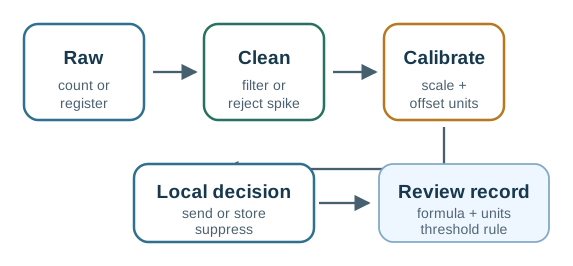
Follow the raw count across Figure 22.2 through cleaning and calibration, then down to the local decision. The review record preserves the formula, units, and threshold rule needed to explain why a reading was sent or suppressed.
Stage 5: Data Formatting
Formatting turns a processed value into a payload contract. The choice controls debugging, decoder behavior, compatibility, and how future fields are added, not just byte size.
Readable payload
Text formats are easy to inspect at APIs, logs, and early prototypes. They cost more bytes and still need units, versioning, and field-name discipline.
Structured binary
Self-describing binary such as CBOR-style maps cuts overhead while keeping typed fields. Teams still need decoders, tests, and schema-change rules.
Fixed binary layout
Compact byte layouts work when the schema is stable and every receiver shares the same version, units, signedness, width, and byte order.
Evidence for Stage 5: Data Formatting starts at Figure 22.3 with 1. Is the link bandwidth-limited or power-limited?. Contrast Readable against it to make Format choice runs from readable text to structured binary to compact fixed layouts, each with its own maintenance cost reviewable rather than assumed.
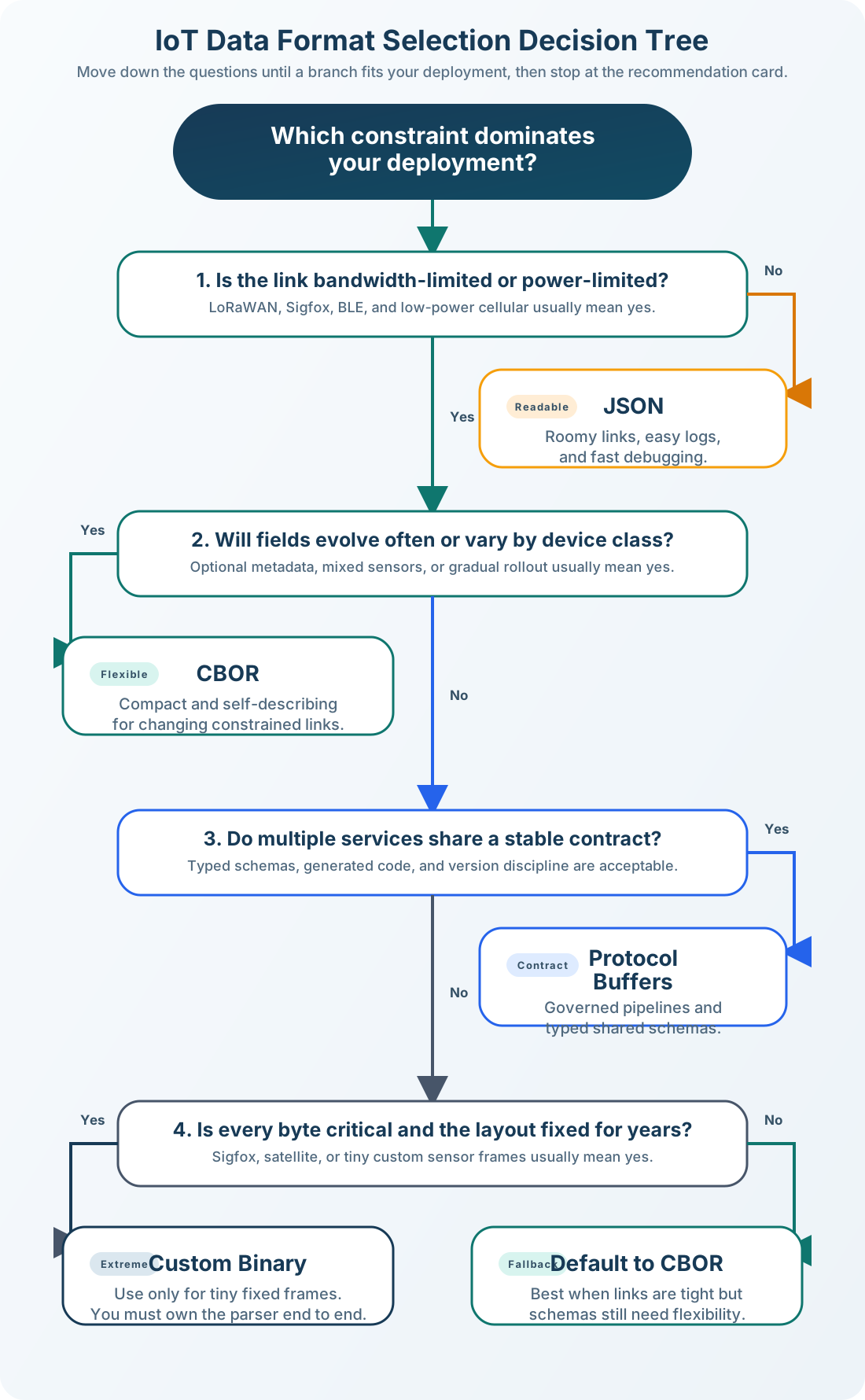
Within the visual Figure 22.3, 1. Is the link bandwidth-limited or power-limited? establishes the opening checkpoint because it uses 1. Is the link bandwidth-limited or power-limited? to locate a communication boundary. Readable develops the Stage 5: Data Formatting reading by showing how it highlights Readable; JSON completes it by showing where it highlights JSON. The sequence makes Format choice runs from readable text to structured binary to compact fixed layouts, each with its own maintenance cost auditable for Stage 5: Data Formatting.
Before a format is treated as stable, the payload contract should record field names or byte offsets, units and scaling, signedness, width and byte order for numeric fields, timestamp meaning and clock source, schema version and optional-field policy, how missing or invalid or saturated values are represented, and decoder tests using known example payloads.
The format choice should match the boundary. JSON is useful when humans inspect API logs, browser tools, or early prototype traces. CBOR-style typed maps can keep field names or numeric keys while reducing the byte cost. A fixed binary layout is appropriate only when every receiver has the same decoder and the team can afford stricter migration rules. Moving from one form to another at a gateway is often cleaner than forcing the same representation onto a tiny radio hop and a cloud debugging workflow.
payload_version: 2
temperature_c:  int16,  scale 0.01 C per count
humidity_pct:   uint16, scale 0.01 percent per count
status_flags:   uint8
timestamp_s:    uint32, device monotonic seconds
byte_order:     network (big-endian)
For the sample contract above, the decoder should include at least one golden payload with expected decoded values. That fixture catches byte-order mistakes, signedness mistakes, missing scale factors, and schema-version drift. It is especially important when a field such as temperature_c is stored as an integer count but presented to users as a decimal engineering value.
A gateway is a natural translation boundary: keep the constrained device hop compact and documented, then re-encode to a readable, inspectable contract where humans and cloud services consume the data. The gateway should preserve the original packet time, device identity, schema version, and any status flags so the cloud record can still be traced back to the device-side evidence.
Formatting Boundary Knowledge Check
If you can process a value and choose a defensible contract, you can stop here. Continue to Under the Hood for packet assembly and the whole-transaction view.
22.5 Under the Hood: Packet Assembly and the Whole Transaction
This section: Under the Hood: Packet Assembly and the Whole Transaction — Packet assembly wraps the payload with the metadata the chosen path needs.
Packet assembly wraps the payload with the metadata the chosen path needs. Headers are not automatically waste: they carry addressing, type, length, sequence, reliability, integrity, and security context. The design question is whether each wrapper is needed at that boundary.
Different stacks put this information in different places. MQTT commonly uses a topic and message metadata above TCP/IP. CoAP commonly uses a method, path, message ID, token, and UDP/IP headers. BLE GATT uses services, characteristics, attributes, and link-layer behavior. LoRaWAN separates the application payload from MAC and network-session metadata. The exact names change, but the review question stays the same: which layer tells the receiver what the payload is, who sent it, whether it is fresh, and whether it arrived intact?
Sequence numbers and timestamps are not just bookkeeping. A sequence number helps a receiver detect a lost or duplicated packet even when the payload value looks normal. A timestamp or monotonic sample counter helps distinguish "the room is still 21.4 degrees C" from "the gateway is replaying an old reading." If the application suppresses unchanged readings, these fields become even more important because absence of a packet is part of the signal.
Packet assembly should also be idempotent from the receiver's point of view. If a retry arrives after the first copy was accepted, the application should have enough identity, sequence, or sample-time information to avoid counting the same physical event twice. That is why "smallest packet" is not the same as "best packet": a few bytes of identity can prevent bad analytics, duplicate alerts, and confusing incident timelines.
A payload is only one part of the packet contract. In Figure 22.4, the encoded value sits inside application metadata such as type and topic, which tells the receiver how to interpret it. Delivery metadata adds sequence and retry context so a delayed or repeated reading can be recognized. The link layer supplies addressing and a check for the transport step. The outer packet therefore carries the value plus the fields needed at each boundary. When choosing a compact format, ask which layer supplies freshness, identity, and integrity before removing bytes that a receiver or incident review still needs.
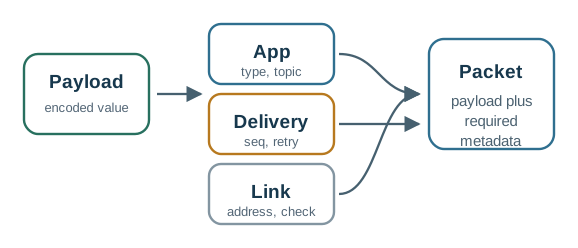
Inspect Figure 22.4 at Payload and note that it uses Payload to show the next hand-off. Compare App, which highlights App, before reading Delivery as the place that highlights Delivery. The comparison turns Packet assembly: a payload wrapped with application, delivery, and protection metadata into a bounded Under the Hood: Packet Assembly and the Whole Transaction choice.
Application metadata
Topic, resource path, message type, schema version, device ID, and content type tell the receiver what the payload means.
Delivery metadata
Sequence numbers, acknowledgements, retry behavior, and timestamps reveal missing, duplicated, delayed, or stale readings.
Protection metadata
Integrity checks, authentication, encryption, and replay protection depend on the threat model and the protocol boundary.
Payload Size Is Not the Whole Transaction
When reviewing overhead, measure the entire transaction, not just payload bytes:
- radio or interface wake time;
- association, join, or session setup when it recurs often;
- request and response behavior, plus acknowledgement and retry policy;
- receive windows or listening time;
- security handshake and key-refresh behavior;
- the number of packets created by one useful event.
The practical rule: if the system sends the same routine value every few seconds, reducing packet count usually beats shaving a few bytes. If it sends rare but latency-sensitive events, preserve clear identifiers, timestamps, and reliability metadata even when that adds bytes.
Byte count still matters, but it is only one part of the cost model. A shorter payload can be a bad trade if it removes the schema version or status flags needed to debug the system later. A longer payload can be acceptable if messages are rare and the added fields prevent unsafe ambiguity. A good packet budget therefore records the useful application bytes, the wrapper bytes, the number of packets per useful event, and the receive or acknowledgement behavior that happens around the transmission.
Security metadata should be reviewed at the same boundary as the transport decision. A local debug UART, a BLE connection to a phone, a LoRaWAN uplink, and an MQTT message over TLS expose different risks and different trust anchors. Integrity checks, message authentication codes, encryption, replay windows, and key rotation all add operational cost. Removing them to save bytes is only defensible when the threat model and deployment boundary make that safe.
Middle-Pipeline Review Record
Common Pitfalls
- Shipping raw counts without a contract. They are valid only when receivers know reference, bit depth, scale, offset, unit, and calibration. Otherwise they are small but ambiguous.
- Choosing a format by byte count alone. Consider who debugs it, how the schema evolves, which libraries exist, and where a gateway can translate between compact and readable forms.
- Treating every header as waste. Remove unnecessary wrappers, but keep the addressing, ordering, integrity, and security metadata the real failure modes demand.
Transaction Cost Knowledge Check
At this depth, the middle pipeline turns measurements into evidence. The best design is not the smallest byte string; it is the smallest reviewable record that preserves meaning, supports maintenance, and avoids unnecessary transmissions.
22.6 Summary
This section: Summary
- Digital processing converts raw counts into calibrated, filtered, decision-ready values with units.
- Send rules should suppress redundant packets while preserving the events that matter.
- Data formatting is a contract: units, scale, version, byte order, and worked examples matter as much as byte count.
- Packet assembly adds the addressing, ordering, integrity, and security context the chosen path needs.
- A gateway can keep constrained links compact while giving cloud systems readable, inspectable records.
- Overhead should be measured across the whole transaction, not just the payload bytes.
Stages four to six turn measurements into evidence. The best middle-pipeline design is the smallest reviewable record that preserves meaning, supports maintenance, and avoids unnecessary transmissions.
22.7 See Also
This section: See Also
Pipeline and Signal Acquisition
Review stages one to three: physical measurement, signal conditioning, and ADC conversion.
Pipeline Transmission
Continue to stage seven: link choice, transaction cost, latency, retries, and delivery evidence.
Data Formats for IoT
Go deeper on text, structured binary, fixed binary, and schema-evolution choices for the payload contract.
Find help
3 reviewed answers.
Where should I start in a module?
Open the module page from the sidebar to see its chapters in order. Use the module map to return to a topic you need.
Modules and pathsReviewed
What can I try when a project does not work?
Check the symptom, then work through the diagnostic steps. Keep the error message and the smallest example that reproduces it.
When you are stuckReviewed
How do interactive examples work?
Use the interactive guide to check how examples and simulations work before changing your project.
Interactive examples guideReviewed