13 Binary Data Formats for IoT

More
Depth: Practitioner
Progress saves as you read. Mark sections complete as you go; your progress appears in the sidebar.
13.1 In 60 Seconds
This section: In 60 Seconds — Picture a compact sensor record whose receiver swaps the byte order and reports the wrong temperature.
Make One Message Small Without Making It Ambiguous
Picture a compact sensor record whose receiver swaps the byte order and reports the wrong temperature. Saving bytes was not useful because the meaning was no longer shared.
JavaScript Object Notation, or JSON, is a text format built from named values. A protocol means shared rules for exchanging messages. A binary format must define equally clear field boundaries and meaning.
Encode one known record, change its version, truncate it, corrupt one byte, and decode it with another implementation. Keep schema, bytes, size, checks, result, and rejection reason.
This runway does not prove that one format fits every link. The deeper sections compare compact formats, schemas, framing, byte order, checks, versioning, tooling, and ownership costs.
Binary formats help when bytes, power, or storage are constrained, but the format is a contract. Keep JSON when people and generic tools need to read the wire, use CBOR or MessagePack when a self-describing compact payload is enough, use Protocol Buffers when a shared schema is worth the tooling, and reserve custom binary for severe limits you own end to end.
13.2 Start With the Story
This section: Start With the Story — You will compare compact encodings and choose a format whose decoder and version rules your system can support.
You will compare compact encodings and choose a format whose decoder and version rules your system can support. Start with one sensor reading and the bytes available on its link.
Follow the message across four beats to see why compactness matters only after boundaries, schema, and checks are clear.
-

Packet Pete: “The receiver needs boundaries, fields, and a check before it can parse.”
-

Data Dora: “Smaller is not safer when the schema is unclear.”
-

The team: “Draw the fields, mark payload and check, then compare formats.”
-

Test Tessa: “The chosen message crosses compactly and parses with evidence.”
Read the story panels from the unparsed message to the verified receiver. The first panel establishes that boundaries and an integrity check are prerequisites, while the second exposes the risk of optimizing size before defining meaning. The team then fixes the field contract and compares formats against it. The final parse is therefore evidence that compactness served the communication contract, not a substitute for that contract.
13.3 How to Use: How It Works: Pick the Encoding Contract
This section: How to Use: How It Works: Pick the Encoding Contract — Choose a binary format by deciding what decoding contract the receiver can reliably hold, not by chasing the smallest byte count first.
Choose a binary format by deciding what decoding contract the receiver can reliably hold, not by chasing the smallest byte count first.
- Name who must read the raw message: people, generic tools, generated code, or one purpose-built decoder.
- Decide whether the payload may depend on a schema file or must describe itself on the wire.
- Estimate whether the link, battery, and storage pressure are strong enough to justify coordination cost.
- Record the versioning rule before deployment, because compact formats fail quietly when old and new decoders disagree.
13.4 What Compact Binary Buys
This section: What Compact Binary Buys — A text format such as JSON is easy to read because it spells everything out: the field names, the punctuation, and every number written as digits.
A text format such as JSON is easy to read because it spells everything out: the field names, the punctuation, and every number written as digits. That readability rides along on every single message. A binary data format keeps the same facts but stores them as typed bytes instead of text, so the message gets much smaller.
The important idea is not "always make messages smaller." The important idea is a trade: binary formats save bytes only when both the sender and the receiver share the rules for decoding them. A compact payload that nobody can interpret is worse than a slightly larger one that everybody can.
The core trade-off is enough to guide most choices: binary formats shrink a message by replacing readable text with typed bytes. They pay off when bandwidth, power, or storage are tight and both ends agree on a schema or decoding contract. When the link is comfortable and humans need to inspect data, readable text is often the better default.
Think of taking notes in an interview. Full sentences are clear to anyone but slow and bulky. Shorthand is far more compact, but only readers who know your shorthand can recover the meaning. Binary formats are the shorthand of the wire: smaller, faster, and dependent on a shared key.
For example, a battery soil-moisture node on LoRaWAN may send temperature, relative humidity, battery voltage, and a timestamp every half hour. JSON can spend more bytes on names such as "temperature" and punctuation than on the readings themselves. CBOR can keep the message self-describing while shrinking the encoding, while a custom layout might store temperature as signed centidegrees and battery voltage as millivolts. That last step is only sensible if the gateway, decoder tests, and version notes are owned by the same deployment.
Exact byte counts change with field names, numeric ranges, and identifiers. The stable pattern is what matters: JSON repeats readable structure, CBOR keeps typed structure with less text overhead, and raw binary removes nearly everything except the values and the decoder contract.
Inspect Figure 13.1 and ask how many complete readings each representation fits into the same 51-byte uplink.
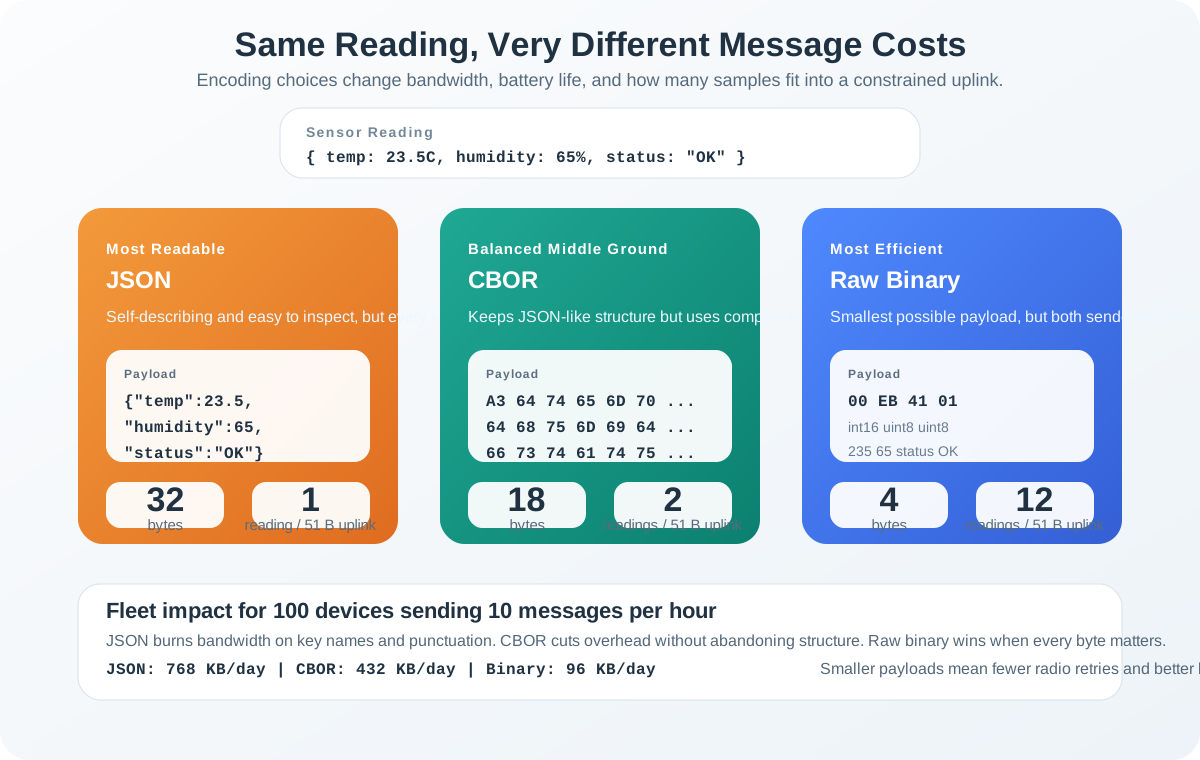
Read and compare the three columns in Figure 13.1 while holding temperature, humidity, and status constant. JSON keeps field names and punctuation visible at roughly 32 bytes, so and only one complete reading fits. CBOR retains typed structure at about 18 bytes, fitting two. Raw binary uses about 4 bytes, fitting twelve, but moves field order, scaling, byte order, status meaning, and schema version into an external contract. The capacity gain is therefore not a free ranking. It supports the chapter’s selection rule: choose the most inspectable representation that meets the link budget and ensure every compact byte remains decodable across versions.
The One-Minute View
Text is readable but heavy
JSON carries field names, quotes, and digits as text on every message. Great for debugging, expensive for constrained radios.
Binary is compact but needs a contract
Typed bytes drop most of the textual overhead, but the receiver must know the types, field meaning, and byte order.
Match the format to the reader
Choose by who decodes the data and how tight the link is, not by chasing the smallest possible number of bytes.
Beginner Examples
- A device on Wi-Fi or Ethernet sending to a dashboard can keep JSON, because bandwidth and battery are not the binding constraint.
- A LoRaWAN or Sigfox node with a tiny per-message budget benefits from a compact format, because every byte is airtime and energy.
- Smaller is not automatically better. An opaque eight-byte payload that no current tool can decode is a liability, not an optimization.
Binary Format Knowledge Check
The key decision is practical: pick the most compact format that the deployed receiver can still parse, validate, debug, and evolve.
13.5 Apply It: Choose and Apply a Binary Format
This section: Apply It: Choose and Apply a Binary Format — Four families cover almost every IoT decision.
Four families cover almost every IoT decision. The first job is to place your payload on the spectrum from self-describing to schema-dependent, because that choice decides how much coordination each end needs.
CBOR and MessagePack: Self-Describing Binary
CBOR (Concise Binary Object Representation, IETF RFC 8949) is "binary JSON": the same data model of maps, arrays, numbers, strings, and booleans, encoded as typed bytes. It is self-describing, so a receiver can decode the structure without a separate schema file, and it still carries field-name strings. CBOR has a registered CoAP Content-Format and is a strong default for LoRaWAN and NB-IoT. MessagePack occupies the same niche: schema-free binary with a JSON-like model, popular for cross-language messaging.
Protocol Buffers: Schema-Defined Binary
Protocol Buffers (Protobuf) is defined by a .proto schema. Each field is identified by a small field number instead of a name, so field names never travel on the wire. That makes it very compact and very fast to parse with generated code, but it is not self-describing: both ends need the schema to decode a message. It is the usual choice for high-volume pipelines, gRPC services, and long-lived contracts between teams.
Custom Binary: Hand-Packed Bytes
Custom binary defines a fixed byte layout that your code packs and unpacks directly. It produces the smallest messages and the fastest parsing, but there is no tooling, no self-description, and no automatic schema evolution. It is justified only on extremely constrained links such as Sigfox, and only when you own the parser, the documentation, the tests, and the migration plan.
Follow the questions down Figure 13.2 before choosing a hand-packed layout. Each branch asks what the receiver needs, making parser ownership part of the format decision.
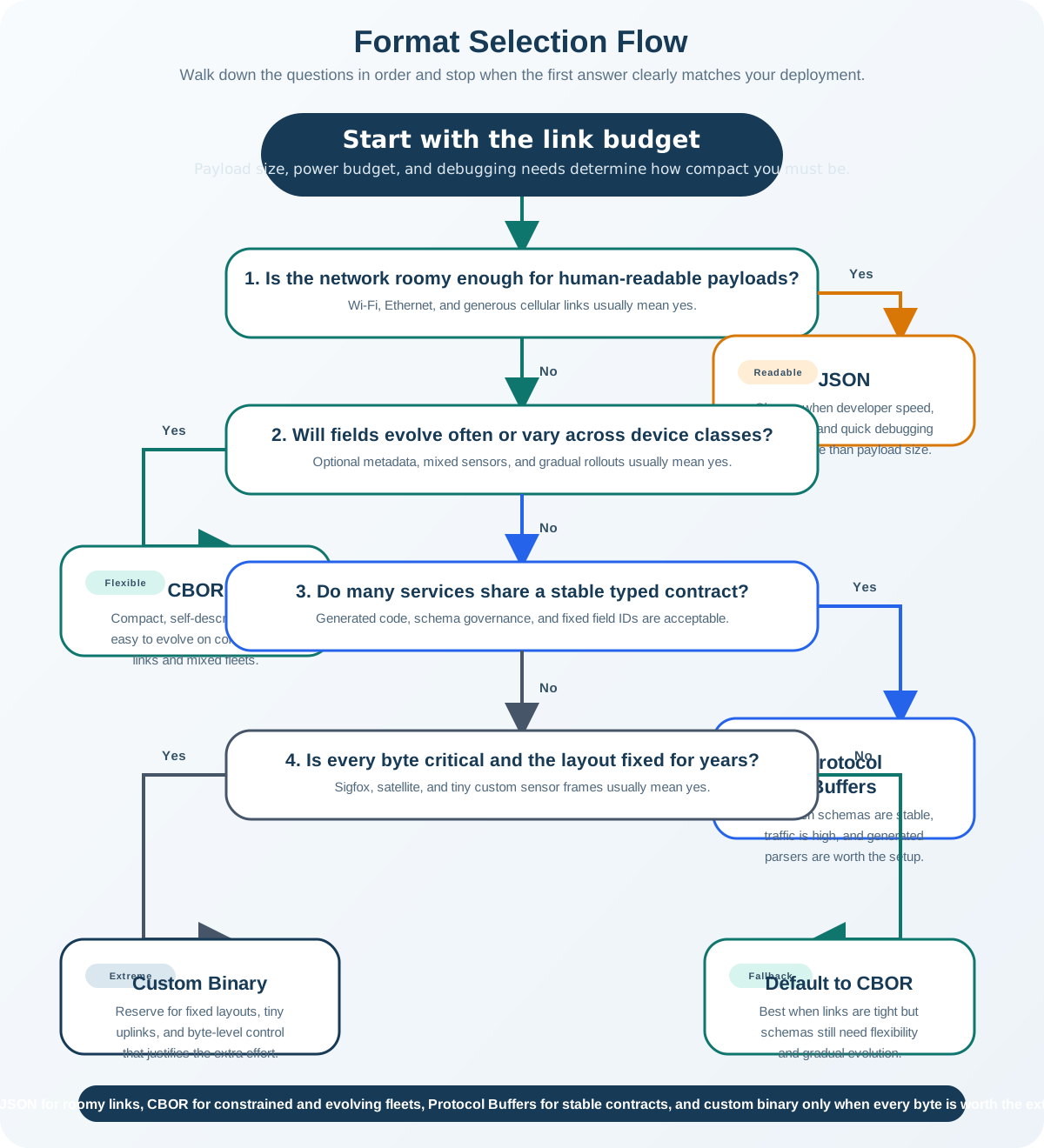
Read from the link budget in Figure 13.2, then check readability, schema-free decoding, and support for generated code. These questions lead to JSON, CBOR or MessagePack, and Protocol Buffers respectively. Custom binary appears last because owning its byte layout also means owning documentation, tests, and migration.
Worked Example: One Reading, Four Formats
Take a four-field reading: deviceId = "sensor-001", temp = 23.5, humidity = 65, and timestamp = 1702834567. The sizes below are approximate and specific to this payload, but the ranking holds in general.
.proto schema on both ends.Most of the savings appear in the first two steps: dropping textual punctuation, then dropping field names. Notice that much of Protobuf's remaining size here is the ten-character device-ID string; a numeric device ID would shrink it further. The last jump to custom binary buys only a few more bytes while taking on the most maintenance risk.
Choosing in Practice
Start with JSON
Use it for prototyping, REST and web integration, and any link where bandwidth is comfortable and debugging speed matters.
Move to CBOR
Use it when bandwidth tightens but you still want JSON-like flexibility with no schema coordination, including CoAP payloads.
Reach for Protobuf
Use it for high-volume or multi-team systems where a shared schema, strong typing, and fast parsing repay the setup cost.
Format Selection Knowledge Check
Once the format family is chosen, document the decoder, schema or byte layout, version rule, and fallback behavior before firmware ships.
13.6 Under the Hood: How the Bytes Are Built
This section: Under the Hood: How the Bytes Are Built — Each format reaches its size by removing a different layer of overhead.
Each format reaches its size by removing a different layer of overhead. Understanding the encoding lets you estimate payload sizes, debug wire-format problems, and evolve a schema without breaking deployed devices.
CBOR Encoding
Every CBOR item begins with one byte whose top three bits select a major type (unsigned integer, negative integer, byte string, text string, array, map, tag, or float and simple values). The low bits either hold a small value directly or say how many following bytes hold it. Integers are compact: values 0 to 23 fit in the initial byte, then one extra byte covers up to 255, two cover up to 65535, and four or eight cover larger values. Floats can be stored as 16, 32, or 64 bits, so a low-precision reading can use a two-byte half-float. Tags add semantics, for example tag 1 marks an integer as a Unix epoch time.
A4                        # map with 4 key/value pairs
  68 6465766963654964     # text(8)  "deviceId"
  6A 73656E736F722D303031 # text(10) "sensor-001"
  64 74656D70             # text(4)  "temp"
  F9 4DE0                 # float16  23.5
  68 68756D6964697479     # text(8)  "humidity"
  18 41                   # uint8    65
  69 74696D657374616D70   # text(9)  "timestamp"
  1A 657F3187             # uint32   1702834567
This map is 55 bytes. The field-name strings are now the largest part, which is exactly the overhead Protobuf removes next.
Protocol Buffers Encoding
A Protobuf message is a series of fields. Each field starts with a tag byte computed as (field_number << 3) | wire_type, so the tag encodes both which field and how to read its value. The four common wire types are 0 for varints, 1 for fixed 64-bit values, 2 for length-delimited data such as strings and sub-messages, and 5 for fixed 32-bit values.
message SensorReading {
  string deviceId  = 1;   // tag 0x0A : (1 << 3) | 2  (length-delimited)
  float  temp      = 2;   // tag 0x15 : (2 << 3) | 5  (32-bit)
  uint32 humidity  = 3;   // tag 0x18 : (3 << 3) | 0  (varint)
  uint64 timestamp = 4;   // tag 0x20 : (4 << 3) | 0  (varint)
}
Varints store integers seven bits per byte, using the high bit of each byte as a "more bytes follow" flag, least-significant group first. Small numbers take one byte; a 64-bit value can take up to ten. For example, 300 encodes as two bytes, AC 02: the low group 0101100 with the continuation bit set, then 0000010.
Schema Evolution
Long-lived fleets change. Forward- and backward-compatible changes let new and old code share a wire format:
- Add a field with a new field number; readers that do not know it skip the unknown field instead of failing.
- Never reuse a retired field number. Mark removed numbers as
reservedso a future field cannot accidentally inherit old data. - Change types only between compatible encodings, such as widening an integer that keeps the same wire type.
Custom Binary Patterns
When you own the layout, a few patterns do the work: scaled fixed-point integers replace floats (store tenths of a degree as an integer), bit packing places several small fields in one byte, delta encoding sends differences for slow-changing series, and short numeric codes replace repeated strings. A leading version or sync byte lets a decoder detect the layout and frame the message. The same control demands discipline.
Common Pitfalls
- Assuming a library fits the device. A tree-building CBOR parser can need far more RAM than a streaming one. Test the chosen library on the real hardware before committing.
- Judging a format by payload size alone. Parsing speed and memory matter too; the fastest decoder is sometimes worth a few extra bytes.
- Shipping custom binary without a contract. Without documented field order, width, signedness, scaling, byte order, and a version field, small payloads become ambiguous and corrupt silently.
- Reusing Protobuf field numbers. A recycled number lets a new field decode stale data as if it were valid. Reserve retired numbers.
Schema Evolution Knowledge Check
At this depth, format choice is a chain of trade-offs: textual overhead, field-name overhead, schema coordination, parsing cost, and long-term evolution. The right format records each of these instead of treating "smaller" as the only goal.
13.7 Checkpoint: Summary
This section: Checkpoint: Summary
- Binary formats shrink messages by replacing readable text with typed bytes, but only pay off when both ends share a decoding contract.
- CBOR (RFC 8949) and MessagePack are self-describing binary with a JSON-like model; CBOR has a registered CoAP Content-Format.
- Protocol Buffers uses a shared
.protoschema and field numbers for very compact, fast, strongly typed messages that cannot be decoded without the schema. - Custom binary is the smallest and the most fragile; reserve it for ultra-constrained links you fully control.
- Most savings come from dropping punctuation and then field names; the last few bytes cost the most in maintenance.
- Judge a format by size, parsing cost, memory, schema coordination, and how it will evolve, not by byte count alone.
Choose the format by who must decode the data and how constrained the link is. The best choice is the smallest payload that both ends can still parse, validate, and evolve.
13.8 See Also
This section: See Also
Data Formats for IoT
Apply the JSON, CBOR, Protobuf, and custom-binary trade-offs to concrete deployment scenarios.
Bitwise Operations and Endianness
Review byte order, masks, shifts, and packed fields behind every custom binary layout.
Packet Anatomy
See how encoded payloads sit inside headers, framing, and validation on the wire.
Find help
3 reviewed answers.
Where should I start in a module?
Open the module page from the sidebar to see its chapters in order. Use the module map to return to a topic you need.
Modules and pathsReviewed
What can I try when a project does not work?
Check the symptom, then work through the diagnostic steps. Keep the error message and the smallest example that reproduces it.
When you are stuckReviewed
How do interactive examples work?
Use the interactive guide to check how examples and simulations work before changing your project.
Interactive examples guideReviewed