38 Protocol Selector Wizard

More
Depth: Practitioner
Progress saves as you read. Mark sections complete as you go; your progress appears in the sidebar.
38.1 In 60 Seconds
This section: In 60 Seconds
38.1.1 Eliminate Bad Fits Before Ranking
A field monitor must report a water level for two years on one battery. It sits behind a stone wall and has no nearby mains power. The project meeting begins with a favourite technology, but the site has already set the real rules. A choice that fails range or energy cannot be rescued by a high score elsewhere.
Write the hard limits first. State the distance, wall and ground conditions, message size, acceptable delay, update rate, power source, local equipment, service cost, and who will maintain the link. Mark each limit as fixed or negotiable. Reject any option that misses a fixed limit before giving points for convenience or team experience.
Test the two best survivors at the real site. Try the basement, field edge, wet weather, busy hour, and a dead zone. Measure delivery delay and energy at the device. Remove local equipment and restore it. Check how missed and repeated readings appear to the operator. Keep the losing result and its reason in the decision record.
The wizard narrows a choice; it cannot certify coverage or battery life from catalogue values. The deeper sections compare range, power, capacity, cost, and security, then show weighted scoring and field checks. A future reviewer should be able to repeat the assumptions and reopen the choice when the site changes.
Selecting the right IoT protocol means matching your project’s range, power, bandwidth, latency, and cost requirements to one of 14+ wireless technologies. No single protocol is “best” — the optimal choice depends on your specific constraints, and the most important first filter is usually range (short vs. long) followed by power budget (battery years vs. mains-powered).
38.2 Start With the Story
This section: Start With the Story — You will use the wizard to narrow protocol options and record the assumptions that still need field testing.
You will use the wizard to narrow protocol options and record the assumptions that still need field testing. Start with your deployment’s range, power, payload, and operating constraints.
Follow the wizard across four beats to see how it structures evidence without replacing engineering validation.
-

Bex: “Start the wizard with the deployment, not the protocol name.”
-

Test Tessa: “Every constraint makes the recommendation more specific and auditable.”
-

Packet Pete: “The wizard filters; the evidence still decides between survivors.”
-

The team: “A recommendation becomes a decision only after the field check.”
The mathematical gist. The chapter’s mAh assumption becomes Wh only after a named 3.7 V chemistry assumption. Its mA burst causes just mV sag in the stated model, but a catalog-typical monthly self-discharge averages mAh/day—about the chapter’s mAh/day radio load—so the solar path must cover more than radio use.
38.3 Protocol Selector Wizard
This section: Protocol Selector Wizard — Treat the Protocol Selector Wizard as an ordered review rather than a scoring shortcut.
Treat the Protocol Selector Wizard as an ordered review rather than a scoring shortcut. Begin by writing the non-negotiable constraints: required range, power source, payload, latency, infrastructure, and operating cost. Eliminate candidates that cannot satisfy those boundaries before assigning weights to the remaining trade-offs. Then compare the finalists with measured battery, coverage, capacity, and fee evidence, and record why the preferred option and fallback survived. The score supports the decision; it does not replace field validation. That sequence keeps the wizard connected to the chapter’s running argument: a protocol choice is defensible only when another reviewer can reproduce its assumptions, evidence, rejected alternatives, and recheck triggers.
By using this interactive tool, you will be able to:
- Systematically evaluate IoT protocol options against your project requirements using weighted scoring criteria
- Analyse trade-offs between range, power, bandwidth, latency, and cost for competing protocol families
- Select and justify a connectivity stack for a given IoT deployment scenario with quantitative reasoning
- Compare protocols side-by-side by mapping detailed technical specifications to application constraints
- Apply decision frameworks (flowcharts, constraint elimination, multi-factor scoring) to narrow 14+ candidates to 2-3 finalists
- Calculate battery-life projections for candidate protocols to validate power-budget feasibility
38.4 Key Concepts
This section: Key Concepts
- Constraint-first filtering: Start with hard limits such as range, power source, latency ceiling, payload size, and whether any infrastructure already exists
- Elimination before scoring: Remove protocols that fail must-have requirements before comparing finer trade-offs
- Weighted scoring: Rank the remaining candidates by assigning importance to range, power, bandwidth, latency, and cost
- Numbers beat intuition: Battery budget, gateway count, and recurring fees often overturn a protocol that only sounds right in theory
- Rationale matters: A strong selection rationale explains why finalists were chosen and why others were rejected
- No universal winner: The best protocol is the one that fits this deployment, not the one with the strongest headline specification
Quick Check: Wizard Limits
38.5 Prerequisites
This section: Prerequisites
Before using this wizard, you should understand:
- Protocol Selection Framework: Basic understanding of protocol categories and selection constraints
- Networking Basics: Fundamental networking concepts
Simple Analogy: Choosing a Vehicle
Selecting an IoT protocol is like choosing transportation for a journey:
- Cross the room: Walk -> NFC (< 10cm)
- Across town: Bicycle/Car -> Bluetooth/Wi-Fi
- Cross country: Airplane -> LoRaWAN/Cellular
- Move furniture: Truck -> Wi-Fi (high bandwidth)
- Save fuel: Hybrid/Electric -> LPWAN (low power)
Key Trade-offs to Understand:
- Long range = Lower speed: Like a marathon runner vs. sprinter
- Low power = Limited features: Like economy vs. luxury car
- High bandwidth = More power: Like sports car fuel consumption
- Reliability = More overhead: Like insurance - costs more but protects you
38.6 Tool Components
This section: Tool Components — Evidence for Tool Components starts at Figure 38.1 with Input Record.
This Protocol Selector Wizard suite includes three specialized tools to help you make the best protocol choice for your IoT project:
Evidence for Tool Components starts at Figure 38.1 with Input Record. Contrast Capture deployment, device, payload, and ops against it to make Use the wizard flow as an evidence checklist, not just a scoring form reviewable rather than assumed.
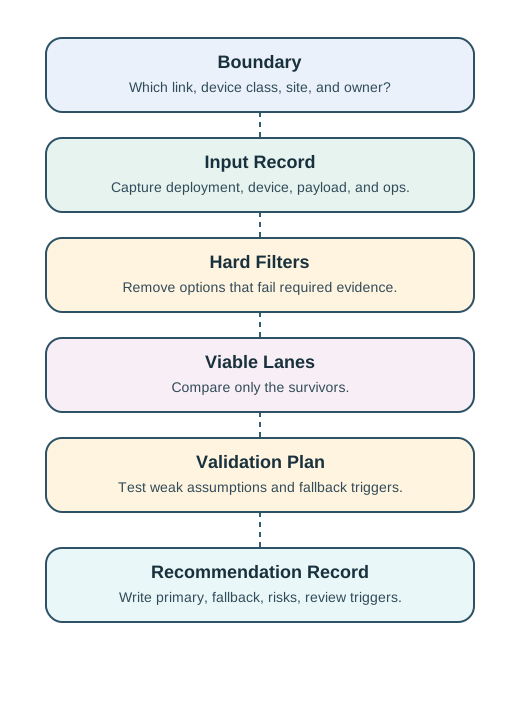
Read Figure 38.1 downward from the boundary and input record to the hard filters, which remove options lacking required evidence. Compare the surviving lanes, then plan validation before recording the recommendation and fallback.
Use the wizard flow as an evidence checklist, not just a scoring form. The boundary and input record define the decision; hard filters remove protocols that cannot meet required evidence; the validation plan turns close finalists into site tests; and the recommendation record preserves the primary choice, fallback, risks, and review triggers.
38.6.1 Interactive Selection Wizard
Use the step-by-step wizard to input your requirements and receive personalized protocol recommendations based on 14 protocols across short-range, LPWAN, cellular, and wired categories.
Use the protocol selection workbench
- 5-step requirements gathering
- Multi-factor scoring algorithm
- Side-by-side protocol comparison
- Detailed recommendations with explanations
38.6.2 Decision Framework Reference
Use a reference matrix to explain an elimination, rather than copying its suggested winner. Suppose the matrix points towards a short-range radio because the payload is tiny. The field monitor still needs a reachable receiver. If none can be installed within a tested path, the small-payload advantage does not rescue that option.
Read each branch as a question with evidence behind it: what range, whose infrastructure, which power source, and what delay? Write the answer beside the branch. The useful output is a traceable shortlist, so a later gateway installation or changed reporting interval can reopen the relevant branch without repeating the entire discussion.
Explore visual decision trees and reference matrices to quickly narrow down protocol options based on key constraints like range, power, and bandwidth. Use hard limits to eliminate unsuitable candidates before comparing preference scores; a strength elsewhere cannot compensate for a failed requirement.
- Interactive flowcharts help order the constraint checks before ranking survivors.
- Scenario-to-protocol mapping connects deployment requirements to candidate families rather than establishing a universal winner.
- Power/range matrix views make competing needs visible alongside the assumptions that require measurement.
- Quick reference tables support an initial shortlist; record coverage, energy, and operating evidence before making the final choice.
38.6.3 Protocol Matching Game
Test and reinforce your protocol knowledge through an interactive game matching real-world IoT scenarios to the best protocols.
- 24 real-world scenarios
- Three difficulty levels
- Detailed explanations
- Performance tracking
38.7 Quick Decision Guide
This section: Quick Decision Guide
| If you need… | And also need… | Consider… |
|---|---|---|
| Long range (km) | Battery (years) | LoRaWAN, Sigfox, NB-IoT |
| Long range (km) | Low latency | LTE-M, 5G |
| Short range (m) | High bandwidth | Wi-Fi |
| Short range (m) | Battery life | BLE, Zigbee, Thread |
| Mesh networking | Low power | Zigbee, Thread |
| Mesh networking | IP-native | Thread |
| Touch range | Instant | NFC |
| No battery | Tracking | UHF RFID |
Quick Check: Apply the Decision Guide
38.8 Put Numbers to the Decision
This section: Put Numbers to the Decision — The 0.26 score gap quantifies why LoRaWAN is favored for long-life telemetry even though Wi-Fi wins on raw bandwidth.
A practical protocol decision model uses weighted scoring:
where is a normalized rating (0 to 1) for each criterion (range, power, bandwidth, latency, cost).
Worked example: For a battery-first outdoor project, use weights:
- Range = 0.30
- Power = 0.30
- Bandwidth = 0.15
- Latency = 0.15
- Cost = 0.10
Using representative ratings (normalized 0-1):
- LoRaWAN ratings: Range 1.0, Power 0.95, Bandwidth 0.20, Latency 0.40, Cost 0.80
- Wi-Fi ratings: Range 0.30, Power 0.20, Bandwidth 1.0, Latency 0.90, Cost 0.60
The 0.26 score gap quantifies why LoRaWAN is favored for long-life telemetry even though Wi-Fi wins on raw bandwidth.
Interactive Protocol Scoring Calculator:
38.9 Worked Example: Use the Decision Guide for a Real Project
This section: Worked Example: Use the Decision Guide for a Real Project — Follow the beehive example as a chain of decisions.
Follow the beehive example as a chain of decisions. The hourly payload sets a modest data requirement; distance and enclosure shape the coverage question; the battery and panel create an energy budget. None of those facts alone selects a protocol.
Before reading the recommendation, write down which assumption would make each candidate fail. A link that reaches the barn in open air may still need testing from inside a hive. A radio-only energy estimate may omit other device loads. Carry these open questions alongside the worksheet numbers, then use the field trial to resolve them. The reusable method is to connect each requirement to a rejection, comparison, or measurement, so the final choice has reasons another team can inspect.
-

List the hive range, power, traffic, cost, and wooden-box limits.
-

Remove choices that fail a real project limit.
-

Pilot the survivors across the farm before choosing one.
Let’s apply the quick decision guide to a hypothetical smart beehive monitoring scenario. All component prices, currents, ranges, airtimes, and link counts below are worksheet assumptions, not vendor specifications or a validated site survey. Verify them against the selected hardware and site before making a purchase decision.
Project Requirements:
- Monitor temperature + humidity inside 50 beehives
- Hives spread across 2-hectare farm (200m max distance)
- Solar panel + battery (no mains power)
- 1 reading per hour (24 readings/day)
- Low cost (<$30 per hive sensor)
- Must work through wooden hive boxes
Step 1: Use Quick Decision Guide
- Range needed: 200m max from collection point. Implication: short-to-medium range (not km-scale).
- Power source: Solar + battery. Implication: need low power, but not ultra-low because solar recharges the battery.
- Data volume: 12 bytes/hour (temperature, humidity, battery). Implication: very low bandwidth requirement.
- Latency sensitivity: No, hourly data is fine. Implication: not real-time critical.
- Infrastructure: Farm has Wi-Fi in the barn (100m away). Implication: existing Wi-Fi could help, but only near the barn.
Step 2: Apply Quick Guide Rules
From table: “Short range (m) + Battery life” → Consider: BLE, Zigbee, Thread
But wait — 200m exceeds typical direct BLE range (10-50m) and Zigbee/Thread range (10-100m). These are site-dependent planning ranges, so verify actual links with a site test.
Alternative from table: “Long range (km) + Battery (years)” → Consider: LoRaWAN, Sigfox, NB-IoT
But 200m is overkill for LPWAN. We’re in the awkward middle ground.
Step 3: Consider Hybrid / Mesh Solutions
Option A: Wi-Fi with Sleep Modes
- Barn Wi-Fi reaches ~50m
- Need 4 Wi-Fi repeaters to cover 200m = $160 + installation
- Worksheet current assumptions: 5mA active × 10s per hour = 0.014 mAh/transmission × 24 = 0.33 mAh/day (active), plus 0.15mA × 24h sleep = 3.6 mAh/day (sleep) = 3.93 mAh/day total. A real Wi-Fi transmitter may draw much more; measure wake, association, and transmit current.
- A 2000 mAh battery and 1W solar panel need a site-specific winter energy budget before viability can be claimed
- Cost: $15 ESP32 + $10 solar/battery = $25/hive (within budget)
Option B: LoRaWAN
- One gateway at the barn is a candidate layout; test coverage at every hive before accepting it.
- LoRa module $12 + MCU $3 = $15 hardware
- Gateway $500 (one-time) ÷ 50 hives = $10/hive amortized
- Worksheet battery assumption: 6mA active current (about 20mW at 3.3V) × 2s per hour = 0.0033 mAh/transmission × 24 = 0.08 mAh/day (active), plus 0.0015mA × 24h sleep = 0.036 mAh/day (sleep) = ~0.12 mAh/day total before receive windows, joins, retries, self-discharge, and battery aging
- Cost: $15 hardware + $10 gateway share + $10 solar/battery = $35/hive (over budget)
Option C: Zigbee Mesh
- Mesh routing: each hive relays for others
- Avg 4 hops to reach barn (50m per hop × 4 = 200m)
- Zigbee module $8 + MCU $3 = $11 hardware
- Mesh coordinator at barn $25 (one-time) ÷ 50 hives = $0.50/hive amortized
- Worksheet battery assumption: Own active time at 9mA (about 30mW at 3.3V) × 100 ms × 24/day = 0.006 mAh/day, plus four similar relay transmissions per own reading (4 × 24 = 96/day) = 0.024 mAh/day, plus 0.003mA × 24h sleep = 0.072 mAh/day = ~0.10 mAh/day for those terms only. A Zigbee router must also remain available to receive and forward traffic; this sleep model cannot predict its real battery life.
- Cost: $11 hardware + $0.50 coordinator share + $8 solar/battery = $19.50/hive (within budget)
Provisional choice to test: Zigbee Mesh
Justification:
- Under $30 budget
- Four 50m hops could cover 200m if each link passes a site test
- Wooden hive boxes allow signal penetration better than concrete
- Solar and battery sizing require measured router receive current, winter yield, and battery losses; the worksheet’s ~0.10 mAh/day omits these loads
- Mesh can provide alternate paths if the topology and router availability support them
- No recurring costs (unlike NB-IoT)
Key Lesson: The quick decision guide gives starting points, but real projects require measured link and energy budgets. A 200m route may favor a mesh or an LPWAN link depending on obstruction, router power, gateway cost, and winter solar yield.
Interactive worksheet (illustrative currents only): This arithmetic omits Wi-Fi association, LoRaWAN receive windows, Zigbee router listening, retries, usable capacity, aging, and solar harvest. It cannot predict field battery life or choose a protocol by itself.
38.10 Common Pitfalls
This section: Common Pitfalls
Relying on theoretical models without profiling actual behavior can lead to designs that miss performance targets. Always measure the dominant bottleneck in your specific deployment environment — hardware variability, interference, and load patterns routinely differ from textbook assumptions.
Optimizing one parameter in isolation (latency, throughput, energy) without considering impact on others creates systems that excel on benchmarks but fail in production. Document the top three trade-offs before finalizing any design decision and verify with realistic workloads.
Most field failures come from edge cases that work in the lab: intermittent connectivity, partial node failure, clock drift, and buffer overflow under peak load. Explicitly design and test failure handling before deployment — retrofitting error recovery after deployment can be costly and disruptive.
38.11 Practice the Selection Workflow
This section: Practice the Selection Workflow
Label the Diagram
Code Challenge
Knowledge Check
38.12 Scenario Requirements Move the Protocol Answer
This section: Scenario Requirements Move the Protocol Answer — The best way to internalize protocol selection is to run the same method on concrete scenarios and watch the answer change with the requirements.
The best way to internalize protocol selection is to run the same method on concrete scenarios and watch the answer change with the requirements. A selector wizard asks about range, payload, power, latency, topology, mobility, and operations, then steers toward the technology whose compromises fit.
Four everyday IoT scenarios - a utility meter, a fitness wearable, a security camera, and a building sensor mesh - land on four different radios. The reasons are more useful than the names of the winners.
A responsible wizard uses two passes. First it applies hard filters: a 10 km meter route rules out BLE, while a video camera rules out very-low-rate LPWAN links. Then it scores the survivors on softer trade-offs such as gateway cost, operator skill, certification burden, roaming support, and security operations. This ordering matters because weighted scoring can hide a fatal constraint if a failed candidate keeps competing.
For example, a school asset tag, a cold-chain pallet tracker, and a pump-room vibration sensor may all send small payloads, but the deployment evidence differs. The school tag can assume phones or readers nearby, the pallet may cross carrier coverage zones, and the pump-room sensor may sit behind concrete and electrical noise. The wizard is useful when it makes those assumptions visible before anyone argues about a favorite protocol.
The exercise is to hold the method fixed and change the scenario. The requirements move the answer: meter, wearable, camera, and mesh each pick a different protocol for good reasons.
38.12.1 Four Scenarios, Four Answers
| Scenario | Dominant needs | Fitting protocol |
|---|---|---|
| City utility meter | Kilometre range, years of battery life, tiny hourly reads, no site build | NB-IoT or LoRaWAN |
| Fitness wearable | Short range to a phone, low power, modest data | BLE |
| Security camera | High data rate for video, mains power, in-building coverage | Wi-Fi |
| Building sensor mesh | Many nodes, low power, self-healing coverage | Zigbee or Thread over IEEE 802.15.4 |
The wearable and the meter show why one shared requirement is not enough. Both want low power, yet they diverge. The wearable talks a few metres to a nearby phone and syncs modest data, so BLE is ideal: low power, phone-native, and intentionally short range. The meter must reach a distant tower with no local phone or gateway, so it needs an LPWAN; BLE would be useless there. Same low-power pressure, opposite range requirement, opposite answer.
Practitioners should record the first rejecting constraint for each discarded protocol. For the city meter, Wi-Fi might fail on coverage and mains dependence before cost is even scored; BLE fails on range; LTE-M may remain a finalist if the utility accepts subscription cost and coverage checks. For the wearable, those same cellular subscription and kilometre-range strengths are liabilities because the device can use the phone as its gateway and must preserve a very small battery.
When the top two choices are close, the wizard output should become a test plan rather than a vote. A team comparing Thread and Zigbee for a building mesh can prototype join time, route repair after a powered-off router, packet delivery through stairwells, and commissioning support in the target mobile app. The protocol with the best field evidence should win even if the spreadsheet score was almost tied. Record the test result beside the score so reviewers can see whether the recommendation came from measured behavior or unchecked preference.
38.12.2 Record the Deciding Requirement
Across the four scenarios, a single requirement usually forces the answer. For the camera it is data rate: video needs Mbit/s throughput, which Wi-Fi or cellular can supply, so mains power is accepted. For the meter it is range without local infrastructure. For the mesh it is node count and self-healing coverage, which favors a mesh-native IEEE 802.15.4 stack over point-to-point links. The wizard’s real job is to surface that deciding requirement and not be distracted by the others.
The cautionary pattern is a requirement that quietly rules out the obvious pick. A building sensor mesh could use Wi-Fi until you count hundreds of battery nodes needing self-healing coverage through walls, at which point Wi-Fi’s power draw and star topology make Zigbee or Thread the better fit. Good selection means finding the constraint that breaks the tempting but wrong option.
A team might default to Wi-Fi for a 300-node building sensor deployment because it is familiar. The deciding requirements - multi-year batteries and reliable coverage through interior walls with hundreds of nodes - expose the mismatch: Wi-Fi’s high power and star topology fail both. A Thread or Zigbee mesh, where nodes relay for each other at low power, meets them. The scenario turned on one dominant constraint, and recognizing it is the whole skill.
Under the hood, the selector should keep hard constraints separate from preference weights. A protocol that cannot meet the range, payload, duty-cycle, roaming, or battery requirement should be removed before scoring; otherwise a high score in cost or developer familiarity can mask a non-deployable design. After filtering, the remaining candidates can be ranked with weights, sensitivity checks, and documented assumptions such as gateway density, firmware-update path, certificate handling, and operator monitoring.
The final decision should preserve rejected options, not only the winner. A record saying “Thread selected; Wi-Fi rejected for battery and topology; LoRaWAN rejected for local gateway ownership and latency” gives future maintainers a way to revisit the choice when the deployment changes. That record is also what turns the wizard from a classroom picker into an engineering tool.
38.13 Summary
This section: Summary
The Protocol Selector Wizard suite helps you systematically evaluate IoT connectivity options:
- 14 protocols analyzed across short-range, LPWAN, cellular, and wired categories
- Multi-factor scoring considers range, power, bandwidth, latency, cost, and security
- Personalized recommendations based on your specific requirements
- Interactive learning through decision frameworks and matching games
- Deep dive links to detailed protocol chapters
- No “best” protocol exists - only best fit for your requirements
- Trade-offs are inevitable - long range usually means lower bandwidth
- Start with constraints - power and range typically narrow options quickly
- Consider total cost - include infrastructure, recurring fees, and maintenance
- Plan for scale - choose protocols that grow with your deployment
Temperature Terry needed to send a message to the cloud, but couldn’t figure out which delivery service to use!
“I could use Bluetooth Buddy — he’s super fast but only delivers next door,” Sammy said.
the LED blinked excitedly. “What about LoRa Larry? He walks slowly but delivers across the whole city!”
the microcontroller scratched his head. “It depends on what you’re sending! A tiny temperature reading? LoRa Larry is perfect. A video? You need Wi-Fi Wanda — she carries big packages but needs lots of energy!”
the battery groaned. “Don’t pick Wi-Fi Wanda too often — she drains my energy fast! For small messages sent once an hour, LoRa Larry barely sips any power.”
The lesson: Picking the right protocol is like choosing the right delivery service — you match the distance, package size, and energy budget to find the perfect fit!
38.14 Knowledge Check
This section: Knowledge Check
Knowledge Check: Protocol Selection Reasoning
38.14.1 Match the Scenario to the Protocol
Drag each IoT deployment scenario to the protocol family that best fits its constraints.
38.14.2 Order the Protocol Selection Process
Arrange the steps of the weighted-scoring protocol selection method in the correct sequence.
38.15 Concept Relationships: Protocol Selection Wizard
This section: Concept Relationships: Protocol Selection Wizard — Cross-module connection: This connects to System Architecture Design via protocol capabilities determining architecture options.
| Concept | Relates To | Relationship |
|---|---|---|
| Protocol Selection Wizard | Requirements Matrix | The wizard automates the systematic requirements-to-protocol matching process |
| Decision Framework | Protocol Comparison | Frameworks reduce 14+ candidate protocols to 2-3 finalists via constraint elimination |
| Trade-offs | Range/Power/Bandwidth | Every protocol optimizes for specific dimensions at the expense of others |
Cross-module connection: This connects to System Architecture Design via protocol capabilities determining architecture options. See IoT Reference Models.
38.16 See Also
This section: See Also
- Protocol Selection Framework — Systematic three-step process for protocol selection
- LPWAN Fundamentals — Compare LPWAN protocol specifications
- Core Topology Shapes — How protocol choices constrain topology options
38.17 What’s Next
This section: What’s Next
- Selection Workbench: IoT Protocol Selection Workbench - Try the scenario flowchart and record a defensible shortlist.
- Decision Frameworks: Systematic Selection - Study constraint-elimination matrices used by professional IoT architects.
- Scenario Practice: Selection Scenarios - Reinforce protocol-to-scenario mapping through worked cases.
- Architecture Planner: Architecture Planner - Translate your protocol choice into a complete system architecture.
- LPWAN Deep Dive: LPWAN Fundamentals - Compare LoRaWAN, Sigfox, and NB-IoT specifications side-by-side.
- Network Topologies: Core Topology Shapes - Discover how your protocol choice constrains star, mesh, and tree topologies.
Find help
3 reviewed answers.
Where should I start in a module?
Open the module page from the sidebar to see its chapters in order. Use the module map to return to a topic you need.
Modules and pathsReviewed
What can I try when a project does not work?
Check the symptom, then work through the diagnostic steps. Keep the error message and the smallest example that reproduces it.
When you are stuckReviewed
How do interactive examples work?
Use the interactive guide to check how examples and simulations work before changing your project.
Interactive examples guideReviewed