Prefix
The slash number, such as /24 or /26, says how many address bits belong to the network part.
Progress saves as you read. Mark sections complete as you go; your progress appears in the sidebar.
This section: Start With the Boundary Line — Picture a school adding thirty air sensors beside cameras, printers, and staff laptops.
Draw the Boundary Around a Real Room
Picture a school adding thirty air sensors beside cameras, printers, and staff laptops. Giving every device an address is not enough. The installer must know which devices should speak directly, which must cross a checked boundary, and how many spare places the next term will need.
A subnet is a group of addresses treated as one local area. A gateway is the device that carries traffic from that area toward another one. Draw one room, floor, or device family. Count its devices, the gateway, service equipment, reserved places, and planned growth before choosing the boundary size.
Test an address at the first usable place, the last usable place, and just outside the boundary. Try a wrong prefix and an exhausted address pool. Check that local traffic stays local, remote traffic reaches the named gateway, and the fault record points to the boundary rather than a vague network failure.
This example does not replace address arithmetic or policy design. The deeper sections show how prefixes, host counts, route summaries, address assignment, and security rules make the boundary reviewable.
Subnetting is the moment an address becomes a design decision. The mask draws a boundary around who can talk directly, who needs a router, how broadcasts are contained, and how much room remains for devices.
For an IoT network, that boundary affects commissioning, service discovery, firewall rules, and future growth. The arithmetic matters because the deployment will inherit every boundary the design creates.
This section: Overview: A Subnet Is an Address Boundary
Subnetting divides one IP address space into smaller segments. In an IoT network, those segments are not just arithmetic. They become security, broadcast, troubleshooting, and ownership boundaries for device families, floors, buildings, gateways, labs, or operational zones.
The boundary decides the first routing question every host asks: is this destination local, or should traffic go to the gateway? If the prefix is wrong, a sensor can ARP for a server that is actually remote, send remote traffic to the wrong gateway, or appear healthy on link status while application traffic never leaves the local segment. That is why subnetting belongs in the deployment record, not only in a design diagram.
Before sizing device groups, inspect Figure 12.1 to see what the prefix actually divides. The diagram turns slash notation into the local-delivery boundary every host applies before choosing direct resolution or a gateway.
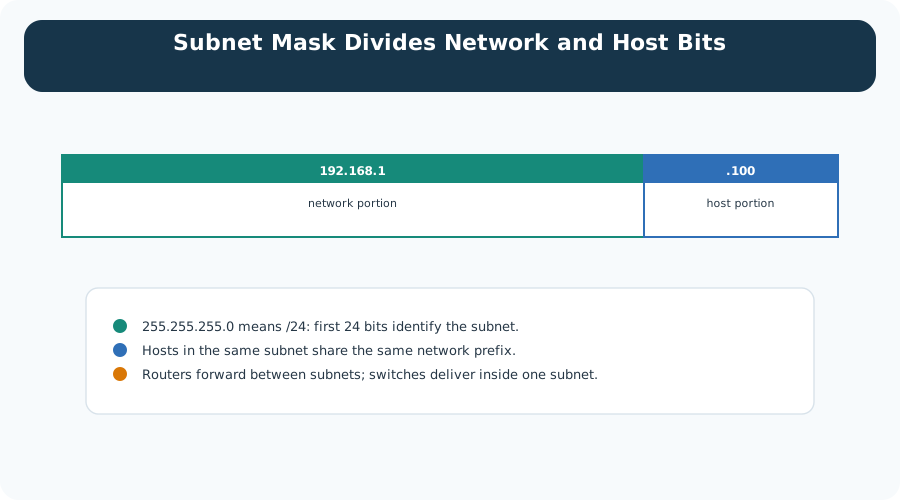
Read Figure 12.1 from the most significant network bits into the remaining host bits. Addresses with the same reviewed prefix are treated as local; other destinations use the configured gateway. Extending the prefix creates more, smaller subnets while reducing host space. That relationship connects the arithmetic to broadcast scope, routing policy, DHCP capacity, and the failure clues a deployment will expose.
The slash number, such as /24 or /26, says how many address bits belong to the network part.
The remaining bits create host addresses inside the subnet. For ordinary IPv4 host subnets, network and broadcast addresses are reserved.
The subnet boundary helps limit broadcast scope, separate device groups, and make routing and policy easier to review.
A subnet that fits the device count but ignores gateways, infrastructure, spare addresses, and future joins can fail during rollout.
Pick a subnet because it matches a responsibility boundary. Then verify that its usable host count, gateway placement, DHCP scope, route summary, and security policy match the devices that will live there.
Good IoT subnets make evidence easier to read. A camera subnet can be monitored for video-bandwidth behavior, a lighting subnet can be tied to building-control policy, and a maintenance subnet can have a different firewall path from unmanaged sensors. If all device classes share one flat subnet, every incident starts with mixed ownership, broad broadcast scope, and harder proof of which traffic should have been allowed.
This section: Practitioner: Build the Subnet Plan From Inventory
A defensible subnet plan starts with inventory, not with a favorite prefix. Count endpoint devices, gateways, controllers, management interfaces, DHCP reservations, static infrastructure, lab equipment, spare addresses, and expected growth. Then choose the smallest prefix that satisfies the boundary without forcing premature renumbering.
Capacity is only one part of the review. The selected prefix must also fit the DHCP pool, static reservations, gateway address, monitoring labels, firewall objects, and route summaries used by operations. A subnet that has enough usable addresses can still be a bad design if it splits one ownership domain across many unrelated routes or combines device groups that need different incident response rules.
Read Figure 12.2 down its rows, because the subnet size is the last decision, not the first.
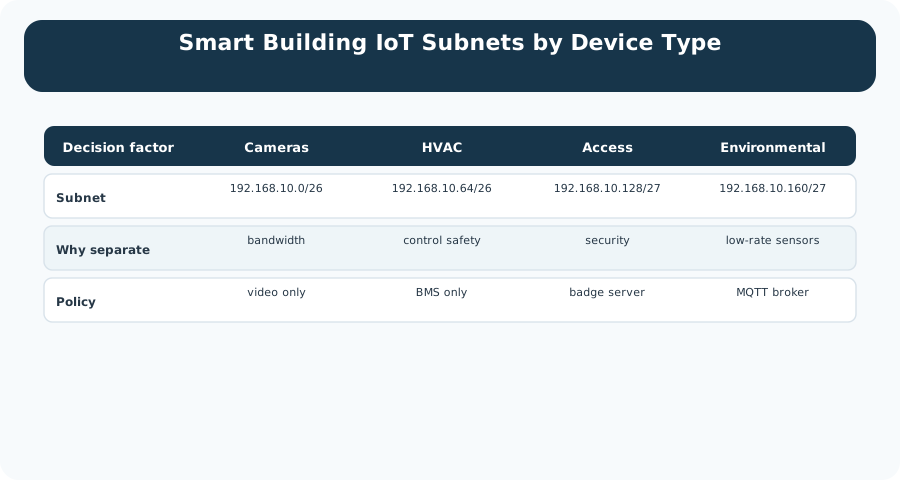
Four device families run across the table. The reason for splitting them is on the second row, and it is different every time: cameras for bandwidth, HVAC for control safety, access control for security, and environmental sensors because they are low-rate. Only then do the prefixes appear. Cameras and HVAC take a /26 each, while access and environmental take a /27, which is half the size. The bottom row shows why this holds up in operations. Each subnet also carries one policy, such as video only, BMS only, or the MQTT broker. Figure 12.2 sizes by ownership first and by host count second.
Begin by grouping devices according to operating responsibility and security policy. Count endpoints together with gateways, controllers, reservations, and static infrastructure, then add a documented growth allowance instead of silently filling the subnet. Choose a prefix whose usable host count fits that record. Finally, verify the resulting route summaries, DHCP scopes, firewall rules, monitoring labels, and support notes.
A plan that says "use /24 everywhere" may be easy to remember, but it can waste address space in small zones and underfit dense zones. Use a consistent rule only after checking the actual device and operations record.
Before rollout, test one representative device path per subnet: DHCP or static assignment, gateway reachability, DNS or broker resolution, allowed application service, blocked management service, and monitoring visibility. Keep the result with the subnet record so a later device failure can be compared against a known-good baseline instead of rediscovering the network design from scratch.
This section: Under the Hood: Prefix Bits Define the Address Budget
CIDR notation makes subnet sizing precise. In IPv4, a /24 prefix leaves 8 host bits, a /26 leaves 6 host bits, and a /28 leaves 4 host bits. For ordinary host subnets, usable host count is the total address count minus the network and broadcast addresses.
The arithmetic comes from binary boundaries. A /26 means the first 26 bits are fixed as the network prefix and the remaining 6 bits vary for hosts. Those 6 host bits create 64 possible bit patterns. The all-zero host pattern names the subnet itself, and the all-one host pattern is the directed broadcast address for that subnet, leaving 62 ordinary usable host addresses.
Keep directed broadcast and limited broadcast separate in troubleshooting notes. A directed broadcast names all hosts in one specific subnet, such as the all-one host pattern inside that prefix. The limited broadcast address 255.255.255.255 is local to the sender's current link and should not be routed beyond the gateway.
Read the host counts in Figure 12.3 to see how fast address space disappears as a prefix grows.
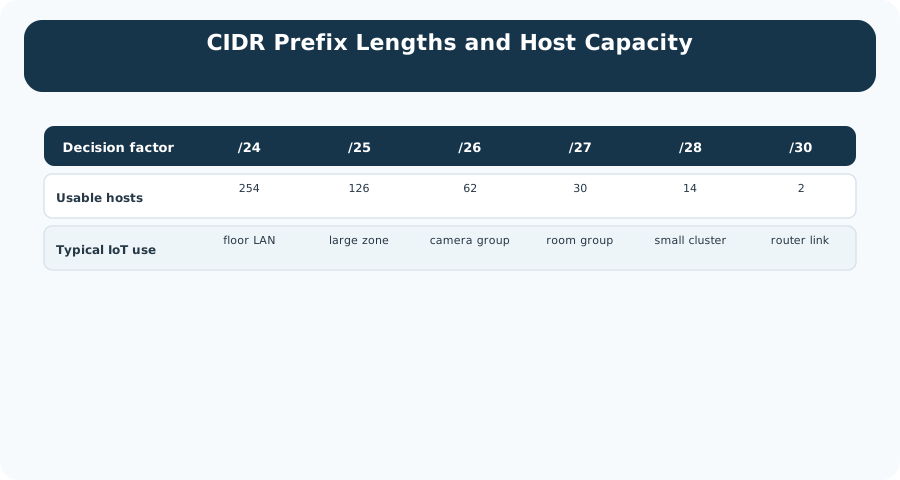
The prefixes run from /24 to /30 across the table. Under each one is the usable host count, and it halves at every step: 254, then 126, 62, 30, 14, and finally 2. The bottom row gives each size a job. A /24 suits a floor LAN, a /26 a camera group, a /28 a small cluster, and a /30 exists for a router-to-router link where only two addresses are ever needed. So Figure 12.3 is a budget, not a rule. Each extra prefix bit buys another subnet and charges you half the hosts in it.
Read Figure 12.4 for a budgeting question: what happens when one block is cut into pieces of different sizes instead of equal ones.
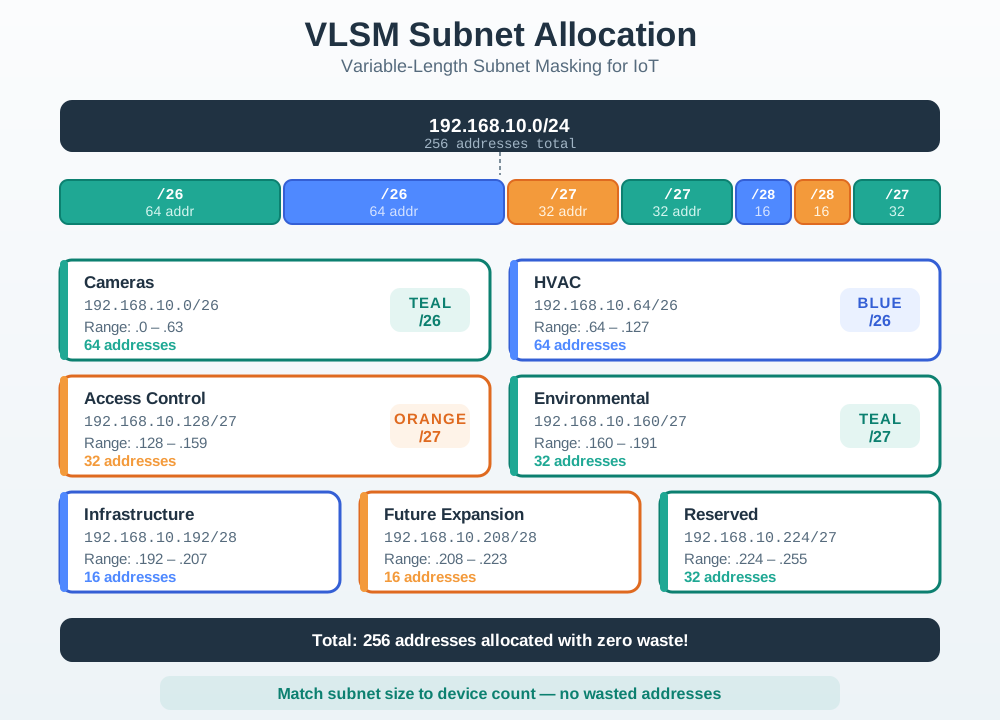
Begin at the single parent block across the top of Figure 12.4 and the count of addresses it holds. Everything below is spent from that one total. The next row shows the cut, and the pieces are deliberately unequal: the two largest device groups take a quarter of the block each, while the smallest take a sixteenth. Read those sizes against the group names beneath them and the rule becomes concrete. Prefix length is chosen from the device count, not from a habit of splitting evenly. The two slices at the end deserve a look, because one is held for growth and one is held back entirely. A block allocated with no spare is a block that will be renumbered later.
Total IPv4 addresses in a subnet equal 2^(32 - prefix length).
For ordinary host subnets, subtract network and broadcast addresses from the total.
Use different prefix lengths for different zones when their device counts and growth records differ.
Keep contiguous blocks when possible so routers and operators can summarize related zones cleanly.
For 192.168.10.45/26, the /26 prefix leaves 6 host bits. The block size in the last octet is 64, so addresses 192.168.10.0 through 192.168.10.63 are in the same subnet. The network address is 192.168.10.0, the broadcast address is 192.168.10.63, and ordinary usable host addresses run from 192.168.10.1 through 192.168.10.62.
Variable-length subnet masking works because each subnet still lands on a binary boundary. A /26 block uses increments of 64 in the last octet, a /27 uses increments of 32, and a /28 uses increments of 16. If two proposed subnets overlap those ranges, routing and DHCP records can point different devices at the same address space. If related subnets stay contiguous, a router can often advertise one shorter summary route while operators still keep smaller local policy zones.
The under-the-hood risk is confusing usable host count with deployment capacity. Gateways, static infrastructure, reservations, telemetry gateways, controller interfaces, maintenance laptops, and spare addresses all consume space or policy attention. The capacity calculation should therefore end with a reviewable statement: prefix length, total addresses, usable hosts, counted demand, spare margin, route summary, and the trigger for reopening the plan.
This section: Divide a Building by Device Population — A school has 50 cameras, 20 room sensors, and 10 door controllers.
A school has 50 cameras, 20 room sensors, and 10 door controllers. Placing every device in one flat network wastes neither addresses nor thought at first, but it also joins unlike traffic and failure domains. Figure 12.1 marks where prefix bits stop and host bits begin. Figure 12.2 turns that boundary into device groups, and Figure 12.4 shows why the groups need not receive equal blocks.
Start with the 50 cameras. A /26 leaves 6 host bits, so it contains (2^6=64) addresses and normally 62 usable IPv4 host addresses. The 20 room sensors need a /27: (2^5=32) total and 30 usable. The 10 controllers fit a /28: (2^4=16) total and 14 usable. Those three allocations consume 112 address slots while preserving a clear subnet boundary for each device family.
Document the subnet gateway and reserved addresses before assigning devices. A camera should not receive the broadcast address, and a controller should not collide with the router. Address management turns the CIDR plan into repeatable installation work.
Place the camera block first at 10.20.0.0/26. Its addresses run from 10.20.0.0 through 10.20.0.63. The room-sensor block can follow at 10.20.0.64/27, ending at 10.20.0.95. The controller block can begin at 10.20.0.96/28 and end at 10.20.0.111. Each start address falls on a boundary set by its block size.
VLSM saves the unassigned range from 10.20.0.112 onward for later subnets. It does not let blocks overlap. A mistaken 10.20.0.80/27 proposal is not a fresh /27 boundary because /27 blocks step by 32 in the last octet. The valid network start covering 80 is 64.
Broadcast reach is contained by those subnet boundaries unless routing or another service forwards it. That can limit noise from a camera discovery protocol, but the subnet plan alone is not an access-control rule. Routing and firewall policy still decide which device families may exchange unicast traffic.
This section: Summary
<ol>
  <li>Group devices by operating responsibility and security policy.</li>
  <li>Count endpoints plus gateways, controllers, reservations, and static infrastructure.</li>
  <li>Add a documented growth allowance instead of silently filling the subnet.</li>
  <li>Choose a prefix whose usable host count fits the record.</li>
  <li>Verify route summaries, DHCP scopes, firewall rules, monitoring labels, and support notes.</li>
</ol>This section: Key Takeaway
Choose subnet sizes from the deployment record, not from habit. A good IoT subnet plan makes address capacity, policy boundaries, routing, and support ownership visible before devices are installed.
This section: See Also
3 reviewed answers.
Open the module page from the sidebar to see its chapters in order. Use the module map to return to a topic you need.
Modules and pathsReviewed
Check the symptom, then work through the diagnostic steps. Keep the error message and the smallest example that reproduces it.
When you are stuckReviewed
Use the interactive guide to check how examples and simulations work before changing your project.
Interactive examples guideReviewed