21 Free-Space Path Loss
More
Depth: Practitioner
Progress saves as you read. Mark sections complete as you go; your progress appears in the sidebar.
-

Why does the wet wall break a link that crossed the empty yard?
21.1 Start With Distance Taking Energy Away
This section: Start With Distance Taking Energy Away — Picture a field sensor that works across an empty yard but fails after it is mounted behind a wet wall.
Prove the Open-Air Baseline Before Adding the Site
Picture a field sensor that works across an empty yard but fails after it is mounted behind a wet wall. The clean distance model is only the first line of the evidence.
A gateway means the boundary system that joins local devices to another network or service. Record its height, antenna, band, output, receiver limit, and target margin with the far device.
Measure at several open distances, then add the real mounting and obstruction. Keep distance, frequency, antennas, expected loss, received power, delivery, retries, and weather so another person can repeat the check.
This test covers one path and conditions, not every fade or interferer. The deeper sections develop the formula, units, frequency effects, link budgets, margin, and field validation.
A wireless signal spreads as it travels, so the receiver gets less energy than the transmitter sent. Free-space path loss is the clean baseline: what the path costs before walls, trees, antennas, fading, or interference make it harder.
Use the formula as a first promise, not a final guarantee. Once you know the open-air loss, every real deployment adds evidence about materials, height, frequency, antennas, and margin.

21.2 Overview: FSPL Is The Open-Air Baseline
Free-space path loss estimates how much radio power is lost as a signal spreads through unobstructed space. It is the clean starting point for IoT range work: distance consumes margin, frequency changes the received power for equal antenna gains, and the result becomes one line in a larger link-budget record.
FSPL is not an indoor or city-range promise. It assumes line of sight, clear Fresnel space, matched antennas, and no walls, bodies, shelves, vehicles, rain fade, or multipath. Use it to set the baseline, then add deployment losses before deciding gateway spacing.
The practical value of FSPL is that it separates a radio design into two questions. First, what would the path cost under the cleanest possible geometry? Second, which real losses must be added for this deployment? That separation keeps teams from arguing about range as a single number. A 100 m path at 915 MHz is about 71.7 dB in free space, while the same 100 m path at 2.4 GHz is about 80.0 dB. With equal transmit power and antenna gains, the higher-frequency link starts with roughly 8.4 dB less headroom before walls, antenna orientation, interference, and receiver mode are considered.
Use those numbers as a baseline record, not as a guarantee. For an IoT gateway plan, the baseline should state the distance, frequency, formula convention, and receiver sensitivity before it states the conclusion. If a designer cannot point to those assumptions, the range estimate cannot be reviewed or repaired when the site changes. If the assumptions are visible, the team can decide whether to raise an antenna, move a gateway, change a band, accept a lower data rate, or schedule a field measurement.
Follow Figure 21.1 to see where a launched signal spends its power before the receiver has to judge it.
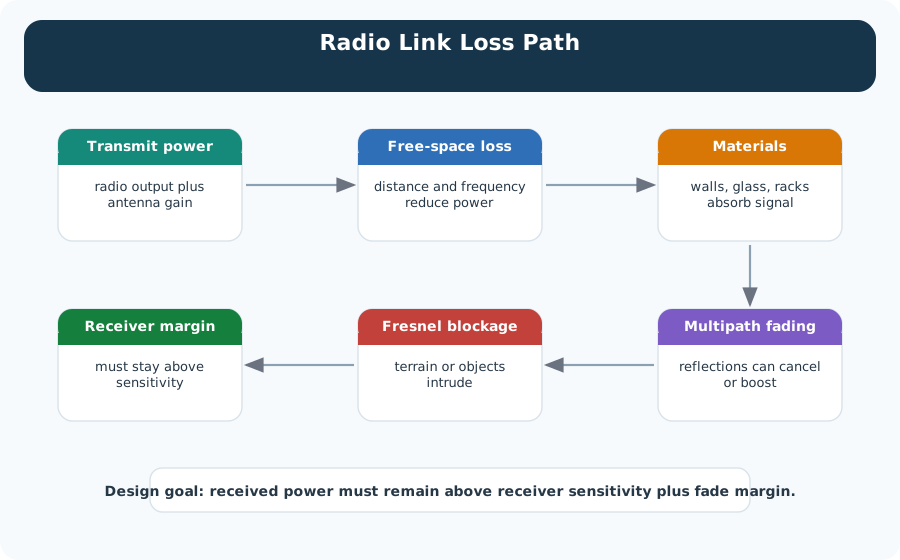
The chain starts with transmit power, which is the radio output plus antenna gain (minus any cable loss). Free-space loss takes the first and usually the largest share, because distance and frequency both reduce received power. Materials come next: walls, glass and racks can attenuate the signal. Multipath fading then moves the result up or down, and Fresnel blockage can add diffraction loss when terrain or objects sit near the path. Only the last box asks the real question. Received power must stay above receiver sensitivity, with a justified fade margin to spare. Read Figure 21.1 as the reason a free-space number alone cannot approve a site.
Distance
Every distance doubling adds about 6 dB of free-space loss because the same power spreads over a larger wavefront.
Frequency
At equal distance, 2.4 GHz has about 8.4 dB more FSPL than 915 MHz because the frequency term is higher.
Margin
The deployment decision uses received power minus receiver sensitivity, with reserve for fading, walls, antenna mismatch, and aging.
Baseline formula: with distance in km and frequency in MHz, FSPL(dB) = 20 log10(d) + 20 log10(f) + 32.45. With distance in meters and frequency in Hz, use 20 log10(d) + 20 log10(f) - 147.55.
21.3 Practitioner: Turn FSPL Into A Link-Budget Record
A field-ready link budget starts with transmit power, antenna gains, cable losses, FSPL, extra deployment losses, receiver sensitivity, and required margin. The decision is not whether a theoretical signal exists. The decision is whether enough margin remains after the site-specific losses are added.
Write the record so another engineer can reproduce the decision without re-running the whole survey. Keep the radio configuration beside the path estimate: band, channel width or spreading mode, transmit power limit, antenna gain, cable length, receiver sensitivity mode, and the packet success target. Then put the FSPL line in the middle of the ledger, not at the end. The path baseline should be followed by explicit allowances for walls, shelving, foliage, vehicle blockage, antenna mismatch, Fresnel clearance, weather exposure, and the fade margin required by the service.
This record also prevents overfitting to a single optimistic test. A field RSSI reading from a clear doorway might validate the arithmetic for that moment, but it does not prove the link during inventory movement, seasonal leaf growth, rain, or a changed enclosure. Treat the first calculation as a release candidate: approve it only when the remaining margin survives reasonable site losses and when the measurement plan checks the riskiest paths, not just the easiest path.
Follow Figure 21.2 to see how a set of radio numbers becomes a pass or fail you can defend.
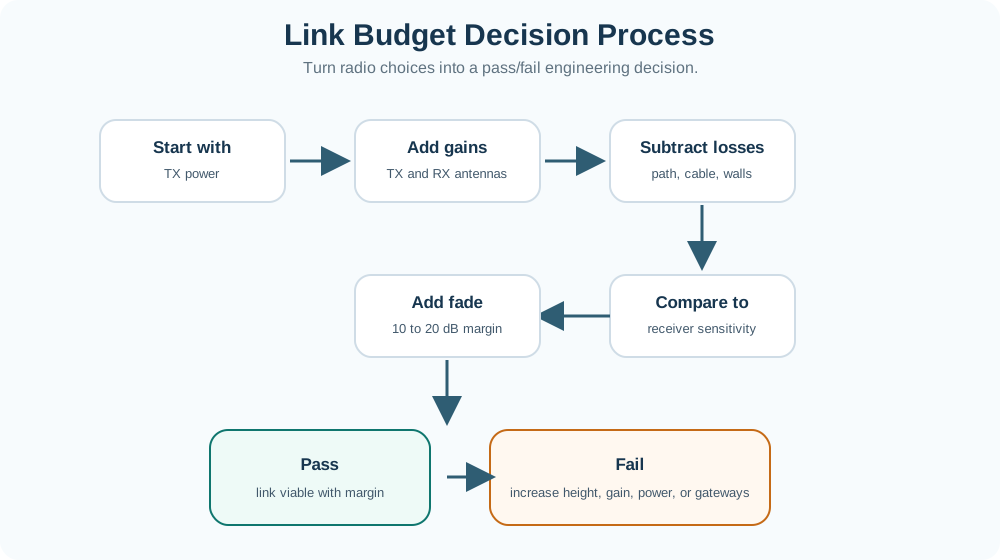
The steps run in one order, and the order matters. Start with transmit power, add the gains from both antennas, then subtract the losses from path, cable and walls. Compare that result with receiver sensitivity. The next step is the one teams skip: hold back a fade margin, typically 10 to 20 dB, sized to the site and the availability target. Only then does the flow split. A calculated pass still needs field validation. A fail sends you back to antenna height, gain, permitted power, or more gateways. That fork is why Figure 21.2 is a record, not a calculation.
A smart-building estimate that passes in free space can still fail after wall loss, metal shelving, antenna orientation, and people moving through the path. The useful output is a margin with assumptions, not a single range number.
21.4 Under The Hood: Model Boundaries Matter
FSPL follows from spreading loss and antenna aperture assumptions. The formula is powerful because it gives a repeatable open-air baseline, but it stops being sufficient when obstacles, reflections, antenna placement, terrain, or fading dominate the received signal.
The logarithmic shape is the key engineering idea. Doubling distance adds about 6 dB of free-space loss because the wavefront area grows with the square of distance. Increasing frequency also raises the loss term in the usual link-budget form, so a radio comparison at the same range still needs the band written down. These terms are deterministic; the uncertainty enters when the path stops looking like the model. That is why the formula should be paired with a model-boundary note rather than copied into a range claim.
A useful boundary note names which losses are inside the calculation and which are still external assumptions. Free-space spreading is inside. Wall attenuation, enclosure detuning, polarization mismatch, partial Fresnel blockage, body shadowing, rain fade, interference, and receiver implementation margin are outside unless the record adds them explicitly. Once those assumptions are named, the design review can ask a precise question: is the remaining margin large enough for this service, or must the team collect measurements before release?
Compare the bars in the chart at Figure 21.3 to see how much of a range estimate rests on one chosen number.
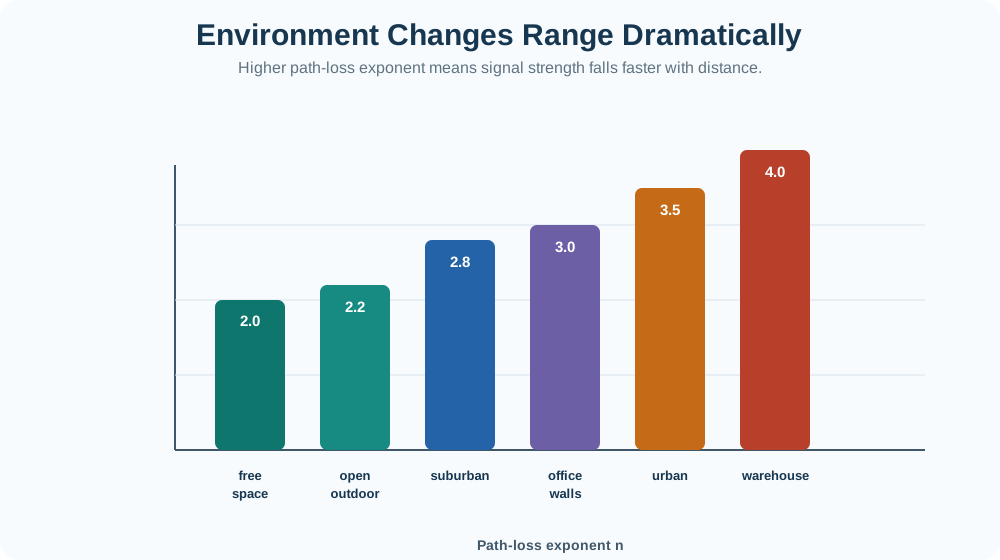
The bars show illustrative path-loss exponents, not measured constants for every site. Free space uses 2.0; the example open-outdoor, office, and warehouse values are 2.2, 3.0, and 4.0. The warehouse example doubles the free-space exponent, so a tenfold increase in distance adds 40 dB under that model instead of 20 dB in free space. Read Figure 21.3 as a warning about assumptions rather than a lookup table. A range figure quoted without its environment has hidden the exponent it used, and a reviewer cannot check it.
The log-distance model adds an environment exponent: L(d) = L0 + 10 n log10(d / d0) + X_sigma. Free space uses about n = 2. Indoor and obstructed environments often need a larger exponent plus explicit wall, body, foliage, or fade-margin allowances.
The exponent is not a decoration on the formula; it changes how quickly distance consumes margin. An exponent near 2 describes clear open space. Larger values describe environments where reflections, absorption, diffraction, and clutter make each distance increase more expensive. The shadowing term X_sigma is the reminder that two paths with the same distance can still behave differently. For IoT deployments, the under-the-hood review should therefore check model choice, unit consistency, and validation evidence together.
Use Figure 21.4 to see why a propagation model and its environment assumptions belong in the release record.
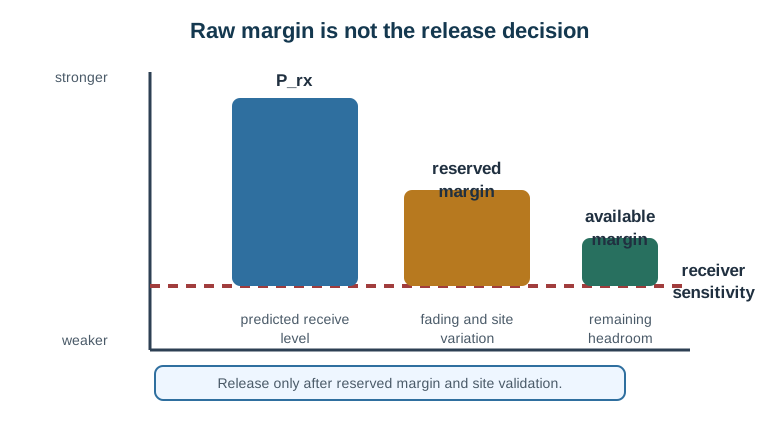
Start with the power that the model says will reach the receiver. Find the receiver limit and the raw spare margin on the strong-to-weak scale. The next path spends some of that margin on site loss and doubt. Free-space loss may fit a clear outdoor path. A room or a path with trees needs measured factors for walls, clutter, or leaves. A model that is too harsh wastes gear, while one that is too kind hides gaps. Record the site class, model values, band, antenna facts, sample plan, and field result that will keep or change the model.
Unit Discipline
The constant changes with units. Use km/MHz with 32.45, or meters/Hz with -147.55, and record the convention.
Environment Drift
Warehouses, hospitals, farms, and city streets do not share one path-loss exponent. Measure or choose conservative assumptions for the actual site.
Verification Trigger
Retest when frequency, antenna, gateway height, enclosure, wall layout, seasonal foliage, or packet reliability requirements change.
21.5 Summary
This section: Summary — Free-space path loss gives the clean baseline for wireless range estimates: distance and frequency consume signal margin before any real-world losses are added.
Free-space path loss gives the clean baseline for wireless range estimates: distance and frequency consume signal margin before any real-world losses are added. A deployment-ready link budget then adds antenna gains and losses, receiver sensitivity, wall or foliage loss, fading allowance, and a required margin. FSPL is a starting point, not a field guarantee.
21.6 Key Takeaway
This section: Key Takeaway
Use FSPL to create the baseline, then record units, site losses, receiver sensitivity, required margin, and field-verification evidence before approving IoT gateway spacing.
21.7 See Also
This section: See Also
Material Attenuation and RSSI
Extend the baseline with wall, body, glass, metal, and measured RSSI effects.
Link Budget and Coverage Planning
Turn transmit power, receiver sensitivity, losses, and margin into a coverage decision.
Fresnel Zones and Practical Deployment
Check antenna height and clearance before trusting a long wireless path.
Wireless Access: Wi-Fi
Apply path-loss thinking to indoor Wi-Fi planning, channel choices, and coverage margins.
Find help
3 reviewed answers.
Where should I start in a module?
Open the module page from the sidebar to see its chapters in order. Use the module map to return to a topic you need.
Modules and pathsReviewed
What can I try when a project does not work?
Check the symptom, then work through the diagnostic steps. Keep the error message and the smallest example that reproduces it.
When you are stuckReviewed
How do interactive examples work?
Use the interactive guide to check how examples and simulations work before changing your project.
Interactive examples guideReviewed