6 Data Representation in Networks
More
Depth: Practitioner
Progress saves as you read. Mark sections complete as you go; your progress appears in the sidebar.
6.1 Start With What the Bits Mean
This section: Start With What the Bits Mean — Picture a sensor sending the two bytes 00 FA through a site bridge to a dashboard.
Make One Number Mean the Same Thing at Every Stop
Picture a sensor sending the two bytes 00 FA through a site bridge to a dashboard. The bytes may arrive unchanged while one system reads 250 and another reads 25.0 degrees. The first contract names meaning before the value moves.
A broker means a service that accepts and routes messages. A gateway means a device or service that joins two system paths. A payload means the useful reading or command carried inside a message.
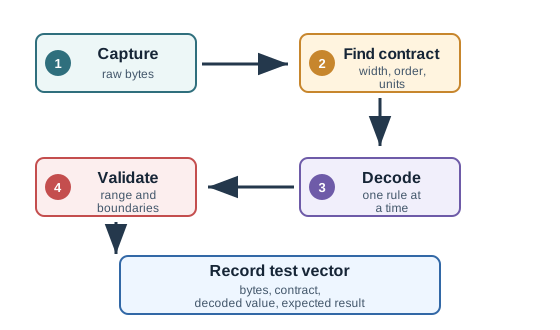
Record field name, byte order, signed rule, scale, unit, source time, quality, and format version. Swap byte order, omit the unit, send an older layout, repeat a missing value, and restart the gateway. Compare every decoded result with a known example.
This runway does not prove trustworthy identity or delivery from correct decoding alone. The deeper sections explain bits, numbers, text, schemas, time, translation, version change, and boundary tests.
A network can deliver bytes perfectly and still fail if the sender and receiver disagree about what those bytes mean. Representation turns readings, commands, text, numbers, and timestamps into a form another system can decode.
The practical question is: what must be preserved from sensor to decision? Units, byte order, encoding, precision, and schema choices are part of the networking story because they decide whether the received data can be trusted.
6.2 Overview: Bytes Need Shared Meaning
Every network payload eventually becomes bits on a medium and bytes in memory. The hard part is not only moving those bytes. The hard part is preserving what they mean when a device, gateway, broker, service, database, or dashboard reads them later.
A temperature reading, command state, image fragment, or configuration value is useful only when the receiver knows the field name, unit, scale, type, byte order, timestamp rule, and version that produced it.
That agreement is separate from the packet delivery path. A radio checksum can prove that the bytes were not corrupted in transit, but it cannot prove that 00 FA is an unsigned count, a signed offset, a scaled temperature, a status code, or the first half of a longer field. The representation contract supplies that missing layer: it says how many bytes belong to each field, whether the field is signed, which byte arrives first, what scale factor turns an integer into an engineering value, and which value means missing, stale, or invalid.
The contract also has to survive translation. A gateway might unpack a binary frame into JSON, normalize a timestamp, rename a field for a cloud topic, and store the result in a time-series database. Each step can preserve meaning or quietly damage it. For example, a humidity value sent as tenths of a percent should not become whole percent by accident, and a device-local timestamp should not be compared with server time unless the time base is known. Good representation work makes those assumptions visible before the system depends on them.
In IoT systems, representation mistakes often look like believable data instead of obvious failures. A byte-order mismatch can turn a normal measurement into a large but still numeric value. A version change can make an old gateway read a new field as if it were the old layout. A missing unit can make two dashboards compare Celsius and Fahrenheit as if they were the same measure. The practical defense is simple: keep example payloads, expected decoded values, unit and scale rules, version notes, and boundary tests beside the message definition.
Before decoding a payload field, inspect Figure 6.1 to ask which value each bit position contributes to the same byte at both ends.
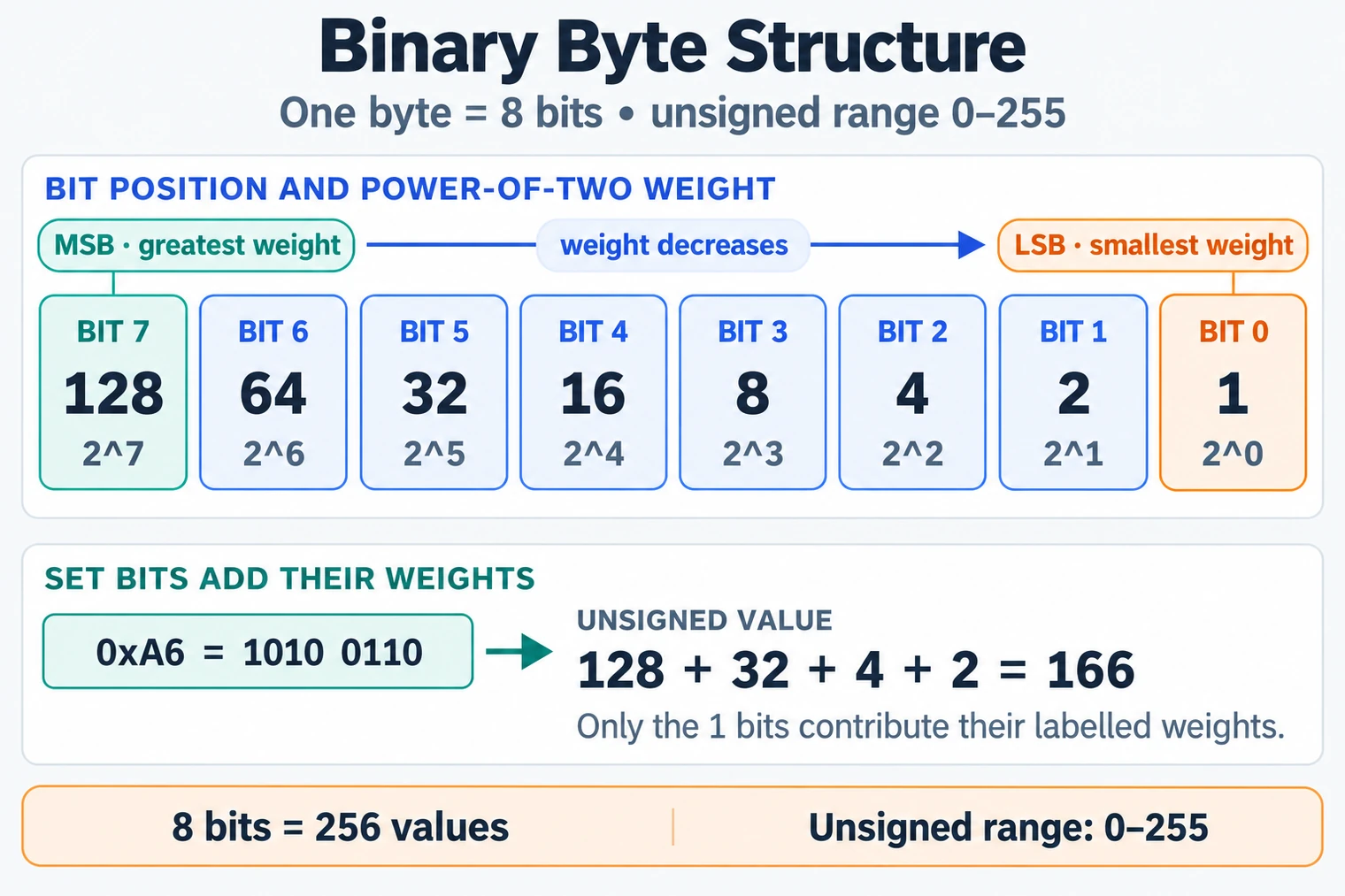
Read Figure 6.1 from bit 7, the most significant position, down to bit 0. Each set bit contributes its labelled power of two to the byte’s unsigned value, but signedness, scale, unit, byte order across larger fields, and invalid markers still come from the contract. This connects a stable container of bits to the chapter’s larger warning: delivered bytes are not useful meaning until their interpretation is shared.
Data representation is the contract between raw bytes and useful meaning. Bits and bytes carry symbols; schemas, units, encodings, and versions explain those symbols.
6.2.1 The One-Minute View
Bits and bytes
A bit has two states. A byte groups eight bits. Network links move bits, while software usually reads fields as bytes, integers, text, arrays, or structured objects.
Field meaning
A field needs a name, unit, scale, range, missing-value rule, and source timestamp before another system can interpret it safely.
Encoding choice
Text formats are easy to inspect. Binary formats can be compact and efficient. Schema-based formats make version changes more explicit.
Review evidence
Payload examples, decode tests, schema versions, and failure cases show whether meaning survives the path, not just whether bytes arrived.
6.2.2 Beginner Example
The bytes 00 FA might mean 250 counts, 25.0 degrees C after a scale factor, a device status code, or part of a text string. The network cannot infer that meaning. The sender and receiver need a representation agreement.
6.3 Practitioner: Build the Encoding Review Record
A practical representation decision starts with one message and writes down how another engineer would decode it. The goal is a small record that can be tested, versioned, and reviewed when devices or services change.
Read the figure from left to right. One observed temperature becomes a named, typed field; the contract turns that field into bytes; each gateway or service boundary must preserve the same unit, scale, version, source time, and quality; and the receiver must recover the same meaning before a dashboard or rule can trust it. The lower evidence rail closes the loop when a test fails or the contract changes.
Before approving an encoding, inspect Figure 6.2 to follow one known observation through every representation boundary. The fixed example makes sender and receiver agreement testable rather than leaving the schema as prose.
Read Figure 6.2 from the 25.0 degree Celsius observation into its named, typed, versioned field, then compare the encoded bytes before and after the gateway boundary. Receiver validation must recover the same unit, scale, source time, version, and quality state before storage or a rule uses it. The returning evidence rail sends failed vectors or contract changes back to the definition, connecting one golden payload to rollout and rollback decisions.
The record is not complete because one sample decoded once. It is complete when the team keeps the golden payload, proves sender and receiver agreement, checks missing, invalid, stale, minimum, maximum, and wrong-version cases, and records how old and new versions coexist or roll back. Any change to the field name, unit, scale, signedness, byte order, invalid marker, timestamp rule, or schema version reopens the review.
6.3.1 Encoding Review Flow
6.3.2 Format Tradeoffs
Do not choose the smallest-looking payload until the team can prove how it is decoded, how it changes version, and how invalid or missing values are represented.
6.4 Under the Hood: Representation Fails at Boundaries
Network delivery can succeed while representation fails. A broker can accept a payload whose fields are out of order. A database can store a value in the wrong unit. A gateway can translate a timestamp without preserving the source. A dashboard can show stale or default data as if it were current.
The under-the-hood discipline is boundary checking: each transition must say what bytes are preserved, what meaning is added or changed, and what evidence proves the receiver understood the same contract.
Figure 6.3 follows one short identifier from something a person can read to something a field has to hold.
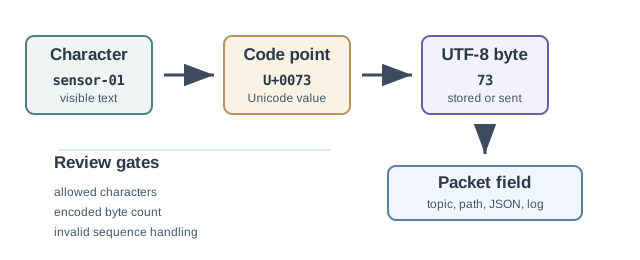
Move left to right through Figure 6.3 and watch what the thing being carried actually is at each step. It starts as visible text, which is what a person types and reviews. It becomes a numbered code point, which is what the standard agrees the symbol is. It becomes bytes, and this is where the count stops matching the character count, because one symbol may need more than one byte. Only then does it enter a packet or storage field. The two questions printed underneath are the practical test this section argues for: which characters are allowed here, and how many bytes may this field hold. The worked check at the foot shows why plain text can lull a reviewer into skipping both.
6.4.1 Before Fields: Bits Become Voltage First
The boundary ledger below starts at "bits to fields," but an earlier boundary decides whether those bits are recovered correctly at all: turning a stream of 1s and 0s into voltage transitions on a wire, and back again, before any byte-level contract can apply. This physical-layer step is invisible to most representation work, but its failure modes explain why some encoding and framing choices exist upstream of the payload.
A receiver needs a timing reference to decide when to sample each bit. A synchronous interface can carry a separate clock line, at the cost of an extra conductor and timing constraints. Many links instead use a self-clocking line code: the encoding guarantees enough transitions for the receiver to recover timing from the data signal alone.
Plain NRZ (Non-Return-to-Zero) signalling does not guarantee transitions: a long run of identical bits can let the receiver's clock drift. Manchester coding forces a transition in the middle of every bit period; 10BASE-T Ethernet uses this scheme for clock recovery. NRZI (Non-Return-to-Zero Inverted) represents one bit value with a transition and the other without one; the polarity convention varies, so long runs of the no-transition value need another coding or framing rule. Differential Manchester, Bipolar AMI, and Pseudoternary are other line codes that trade clock recovery, signal levels, and transition density for particular links.
The physical link also has to survive electrical impairments that shape these choices: unequal mixes of 0s and 1s can bias a receiver's level-detection threshold (DC balance), thermal and coupled noise can flip a sampled bit, and attenuation and dispersion both blur signal edges together over distance. A link that ignores these is not simply slower; it can silently misread bits before any byte-level contract ever sees them. An asynchronous alternative sidesteps continuous clock recovery altogether: UART-style framing wraps each character in a start bit and one or more stop bits, letting the receiver resynchronize at the start of every short message instead of staying phase-locked for an entire session—a fit for sensors and irregular traffic more than high-rate links.
Some links map data onto codewords chosen to support clock recovery and control symbols. 4B/5B, sent with NRZI, uses 16 of the 32 codes for data; each has at least two 1s, so a run never exceeds three zeros. Other examples include 8B/10B in some early gigabit links, 64B/66B in some 10 Gigabit Ethernet PHYs, 128B/130B in PCIe 3.0, and 128B/132B in USB 3.1 Gen 2. Their detailed scrambling, electrical signalling, and overhead differ; the codeword ratio alone does not describe the entire wire signal.
The rest of this section assumes physical recovery already succeeded, and turns to the next boundary: once bits are reliably recovered, do two implementations decode the same bytes into the same field values?
6.4.2 Boundary Failure Ledger
6.4.3 Byte Order and Schema Drift
Multi-byte numbers need an order. Network byte order is big-endian, but many systems also handle little-endian data at device or file boundaries. A representation record should name the byte order rather than assuming the receiver will infer it.
Schema drift is the same problem over time. A new firmware build may add a field, change a scale, or rename a status. If the message has no version rule, older receivers may accept bytes that no longer mean what they expect.
6.4.4 Under-the-Hood Checklist
- Record byte order, signedness, numeric scale, text encoding, and field alignment where they matter.
- Keep one or more golden payloads with expected decoded values.
- Validate missing, null, stale, default, overflow, and out-of-range cases explicitly.
- Version the schema and define how older devices and newer services coexist.
- Audit gateways and storage boundaries for changes to identity, timestamp, unit, precision, and quality markers.
6.5 Decode One Temperature Without Guessing
This section: Decode One Temperature Without Guessing — A cold-room sensor sends two bytes, 09 C4, and the cloud must turn them back into the same temperature the device measured.
A cold-room sensor sends two bytes, 09 C4, and the cloud must turn them back into the same temperature the device measured. In Figure 6.1, read the labelled bit positions from the most valuable bit to the least valuable one. Then follow Figure 6.3 from characters through encoded bytes and back to visible text. The figures show two separate contracts: byte order for a number and character encoding for text.
In this network representation, treat 09 C4 as an unsigned big-endian integer. The value is . If the payload contract says hundredths of a degree, the decoded result is . Reversing the bytes gives , or 501.85 °C, which is valid arithmetic but the wrong data representation.
6.5.1 Predict the Decoder Result
Version the data representation beside the packet schema.
Signedness creates another representation fork. If FF FE is a signed 16-bit two’s-complement value, it represents −2; as an unsigned value, it represents 65,534. The two bytes did not change. The schema decision changed how their top bit and remaining pattern were interpreted.
- Predict: The sender changes the scale from hundredths to tenths but keeps
09 C4. What does the same integer mean? Check: It becomes 250.0 °C, proving that bytes alone do not carry their unit or scale. - Predict: A receiver reads UTF-8 bytes as a different character set. Can the bit stream arrive intact while the label looks wrong? Check: Yes. Transport can preserve every bit while the text encoding contract still fails.
6.6 Summary
This section: Summary
- Network data is useful only when raw bytes can be decoded into the intended field meaning.
- Bits and bytes provide the container; units, scale, byte order, schema, and versioning provide the interpretation.
- Text, compact binary, schema-based binary, and custom binary formats are tradeoffs, not universal winners.
- Encoding reviews should include sample payloads, decoder tests, invalid examples, and boundary notes.
- Gateways and storage systems can silently change identity, timestamps, units, precision, quality, and schema version.
6.7 Key Takeaway
This section: Key Takeaway
Design the payload as a contract, not a blob. A network has done its job only when the receiver can prove that the delivered bytes still carry the sender’s intended meaning.
6.8 See Also
This section: See Also
Find help
3 reviewed answers.
Where should I start in a module?
Open the module page from the sidebar to see its chapters in order. Use the module map to return to a topic you need.
Modules and pathsReviewed
What can I try when a project does not work?
Check the symptom, then work through the diagnostic steps. Keep the error message and the smallest example that reproduces it.
When you are stuckReviewed
How do interactive examples work?
Use the interactive guide to check how examples and simulations work before changing your project.
Interactive examples guideReviewed