28 Wired Communication Fundamentals
More
Depth: Practitioner
Progress saves as you read. Mark sections complete as you go; your progress appears in the sidebar.
A controller reads a slow temperature probe while refreshing a display and printing debug records. All three peripherals are wired, but they do not need the same interface. Compare their traffic and electrical assumptions before choosing a bus for convenience.
28.1 Start With Why a Wire Is Still Useful
This section: Start With Why a Wire Is Still Useful
28.1.1 Choose the Wire by the Job
A microcontroller is a small computer that reads devices and controls local work. A protocol is an agreed set of exchange rules. Universal asynchronous receiver-transmitter (UART), inter-integrated circuit (I2C), and serial peripheral interface (SPI) are three common ways to connect nearby parts.
Picture a controller with a debug socket, two sensors, and a fast display. The debug link needs simple point-to-point access. The sensors can share a short addressed bus. The display needs fast transfers and a separate select line. One wire choice does not fit all three jobs.
For each link, record distance, voltage, clock owner, device count, required speed, connector, and likely noise. Disconnect one device, slow the clock, disturb the ground, and restart the controller. Check whether the fault stays local and whether a technician can see it with a meter or logic trace.
These checks do not prove that data is true after it leaves the board. They prove the local signal contract. The deeper sections explain framing, addressing, pull-ups, timing, discovery, and stronger links for long or noisy cable runs.
Wireless links are convenient, but wires still solve hard IoT problems: predictable timing, power delivery, noise control, security boundaries, and simple commissioning. The choice is not old versus new; it is which physical path gives the system enough trust.
Use this chapter to compare wired options by job. UART, I2C, SPI, Ethernet, and industrial wiring each make different promises about distance, speed, topology, timing, and evidence.
28.2 Overview: Wired Links Are Local Design Contracts
Wired communication connects a microcontroller to nearby sensors, displays, storage, modems, and other boards through electrical signals. The wire is only the medium. The protocol defines who may talk, how bits are framed, which clock is trusted, how devices are selected, and what electrical limits must be respected.
For IoT boards, the common beginner decision is between UART, I2C, and SPI. UART is simple point-to-point asynchronous serial. I2C shares a clocked two-wire bus across addressed peripherals. SPI uses a shared clock and data wires plus device-select lines for higher-throughput peripherals. The right choice is the one whose wiring, timing, device count, distance, and validation evidence fit the peripheral requirement.
The local link becomes a design contract because a peripheral failure often looks like a cloud or software fault later. A bad pull-up, long cable, weak ground reference, wrong voltage level, or overloaded shared bus can create missing readings, repeated resets, corrupted display frames, or values that are accepted by the application as if they were real measurements. The board review must prove the signal before blaming the network.
That proof starts with the physical context: whether the devices are on the same PCB, across a short harness, inside a noisy enclosure, or across a field cable. Same-board sensors can usually use short low-voltage buses. Cable runs near motors, relays, pumps, or separate power domains need stronger evidence: shielding, differential signaling, isolation, termination, service connectors, and a way to probe the bus during failures.
On switched wired networks, neighbor-discovery evidence belongs at this same link boundary. Link Layer Discovery Protocol (LLDP) frames, or vendor equivalents such as Cisco Discovery Protocol (CDP), let adjacent switches, gateways, and controllers advertise chassis identity, port identity, management address, and similar type-length-value records. Those records do not prove the application is healthy, but they are useful when an IoT gateway is plugged into the wrong switch port, a PoE run has been moved, or an operations team needs to reconcile the physical cable map with the logical network inventory.
The first design win is knowing which evidence belongs at the wire.
Look at Figure 28.1 for how many wires each link needs and who is on the other end of them.
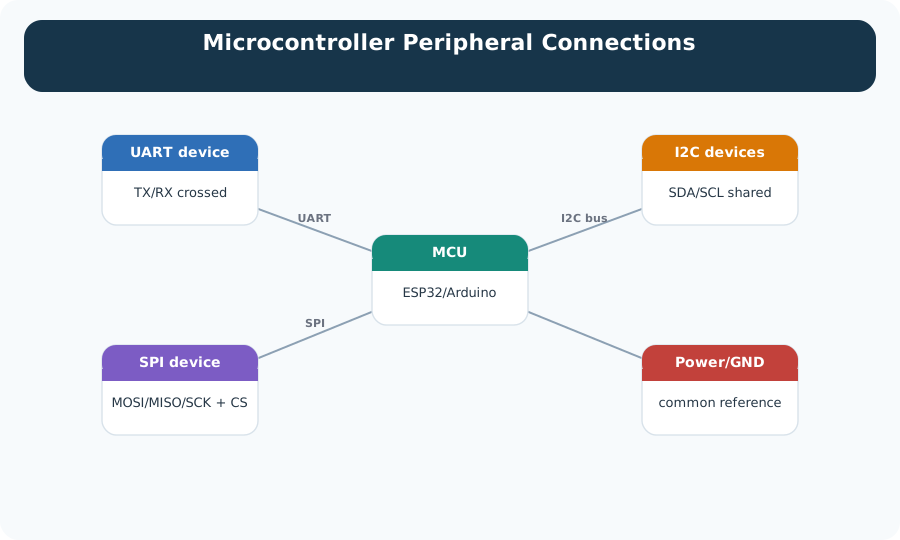
Trace the three links out from the controller in the middle of Figure 28.1. The first is a private pair between two devices, crossed so each one talks into the other’s ear, and nothing else shares it. The second is a shared pair that several peripherals sit on at once, which is what makes addressing and electrical loading a design problem rather than a wiring detail. The third spends more wires to buy speed and adds a select line for every device, so the wire count grows with the peripheral list. Now notice the connection drawn to every part: a common power and ground reference. Without it the other three prove nothing, because the signal levels have nothing agreed to be measured against.
Use Figure 28.2 to compare the performance gained from extra signals with their pin and routing cost.
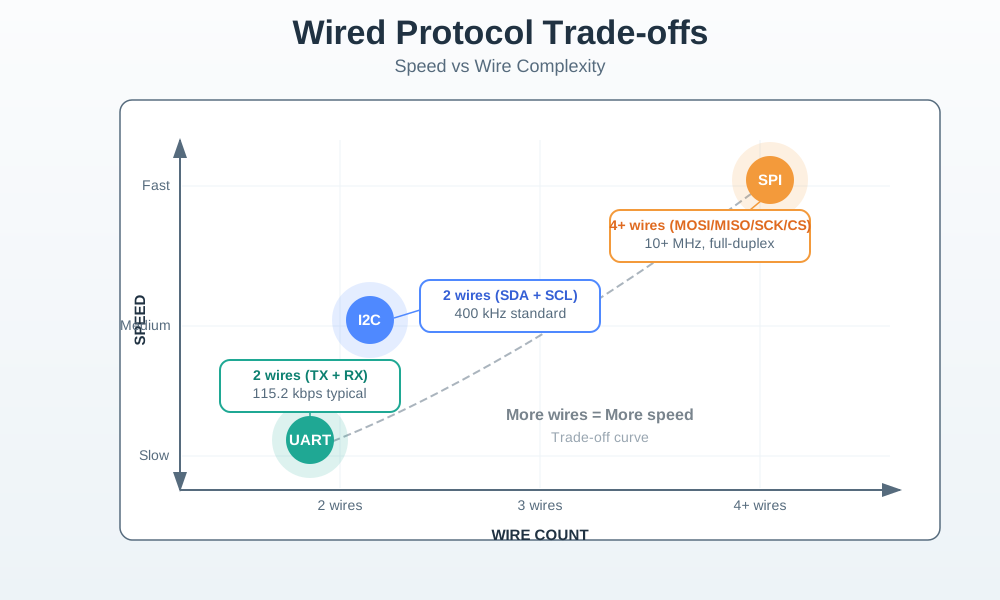
Read from UART’s small signal count toward I2C’s shared clock and addressable bus, then SPI’s separate clock, data directions, and select lines. More wires can support full-duplex transfer, simpler timing, or higher throughput, but each pin consumes package, connector, and board-routing space. Device count changes the cost again: I2C shares two signals, while basic SPI usually adds a select per peripheral. The useful comparison is therefore not speed alone. Distance, traffic direction, pin budget, electrical loading, debugging access, and fault isolation decide whether the extra signals buy anything the product needs.
UART
Best for simple two-device links such as debug consoles, GPS modules, and legacy serial peripherals.
I2C
Best for many low-speed peripherals on the same board when pin count matters and each device can be addressed.
SPI
Best for displays, storage, converters, and other peripherals that need higher throughput or deterministic clocked transfers.
Industrial Serial
Use differential or isolated wired links when cable length, noise, or different power domains make board-level buses unsafe.
GPIO
Best for simple on/off signals -- switches, buttons, motion sensors, relays, and single-actuator control -- where no serial bus protocol is needed. The usable toggle rate depends on the controller, circuit, load, and software, not a universal 1 kHz limit.
Design question: pick the wired protocol from peripheral constraints, not from a blanket rule that the fastest bus is always best.
Signal Encoding Still Matters
Before UART, I2C, or SPI can be trusted, the receiver has to decide where each bit begins and what voltage level counts as a 0 or 1. Lower logic swings can save power, but they leave less noise margin. Higher swings and familiar 3.3 V or 5 V domains can be easier to debug, but every connected device still needs compatible input thresholds, a shared reference, and protection from overvoltage.
A plain data wire can also hide timing problems. Long runs of the same bit value give the receiver few transitions to resynchronise against, while cable resistance, capacitance, loss, noise, and dispersion can round or shift edges until a clean square wave at the transmitter becomes ambiguous at the receiver. That is why board evidence should include the actual waveform or logic-analyser decode when timing is tight, not only the bytes printed by firmware.
Some links solve this by adding a clock line, as SPI and I2C do locally. Others make the data stream self-clocking or more balanced. Asynchronous serial adds start and stop bits around each character so the receiver can resynchronise on short messages. Manchester-style encodings force transitions but spend extra bandwidth. Block encodings such as 4B/5B choose five-bit codewords for four data bits so there are enough transitions and fewer long runs of zeros or ones; variants of that idea appear in faster wired links when clock recovery and DC balance matter more than raw coding efficiency.
28.2.1 Practitioner: Select the Bus from a Peripheral Evidence Record
A practical wired-protocol choice starts by listing the peripherals and their hard constraints. Some parts support only one bus. Others support several buses, but the application does not benefit from the faster one. The record should separate required throughput from advertised maximum speed, then check pin budget, cable length, pull-ups, grounding, noise, and test access.
Use Figure 28.3 to separate short board buses from cabled standards designed for longer, noisier links.
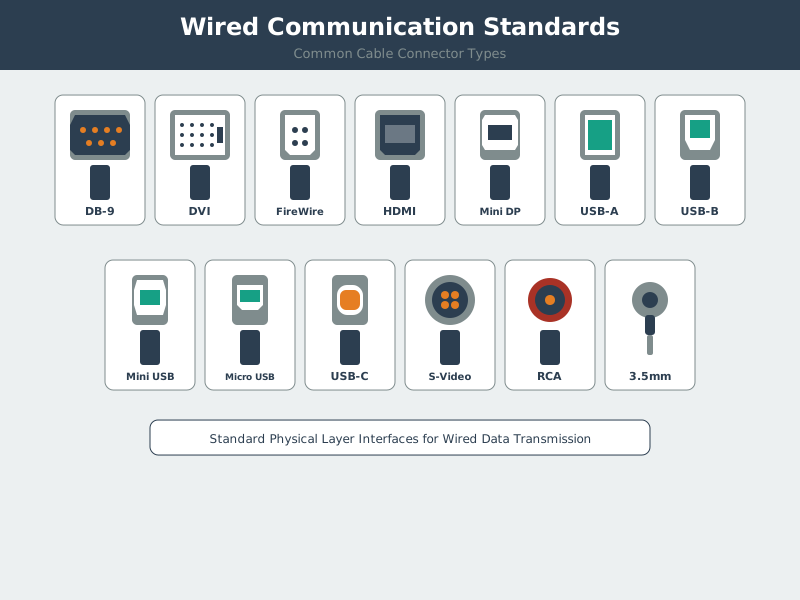
Start with UART, I2C, and SPI as logic-level links for one board or a short, known build. The cable side adds driver chips, set signal levels, line ends, or plugs. Those parts let RS-232, RS-485, USB, and Ethernet work over other lengths and sites. A DB-9 shape alone tells you neither the wire rules nor a safe voltage. Follow the path from logic to wire and plug. Then record length, ground, noise, isolation, line end, pinout, and driver needs. A familiar plug can still join two parts that will harm each other.
Follow Figure 28.4 to eliminate wired interfaces that cannot meet the physical and traffic constraints.
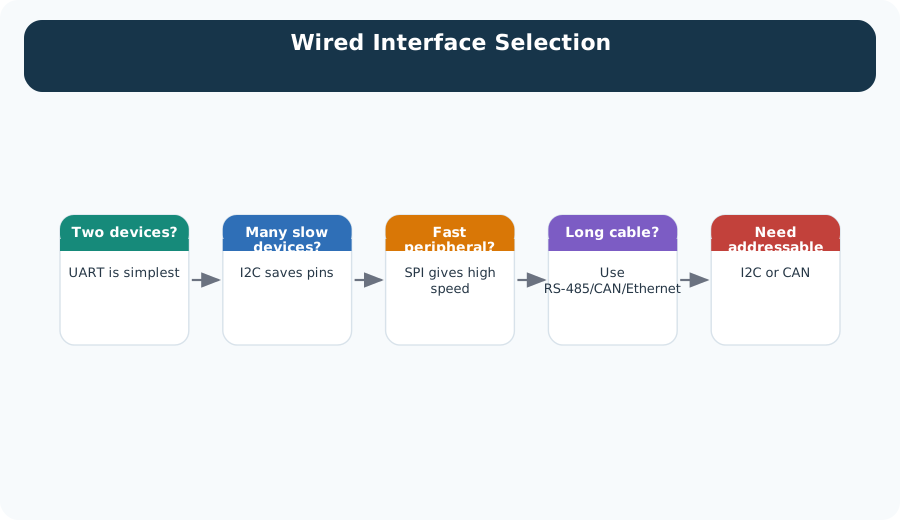
Start with distance and electrical environment, because board-level buses should be rejected before their headline rate is considered for a long cable. Next ask how many devices share the link and whether simultaneous traffic is required. A point-to-point, modest-rate pair may make UART the simplest choice; an addressed short bus points toward I2C, while high-rate full-duplex peripherals may justify SPI and extra selects. The last check is available pins and recovery behaviour. Record why the losing options failed so a later peripheral or enclosure change reopens the right decision.
Compare the three layouts in Figure 28.5 to see how topology changes both wiring and fault scope.
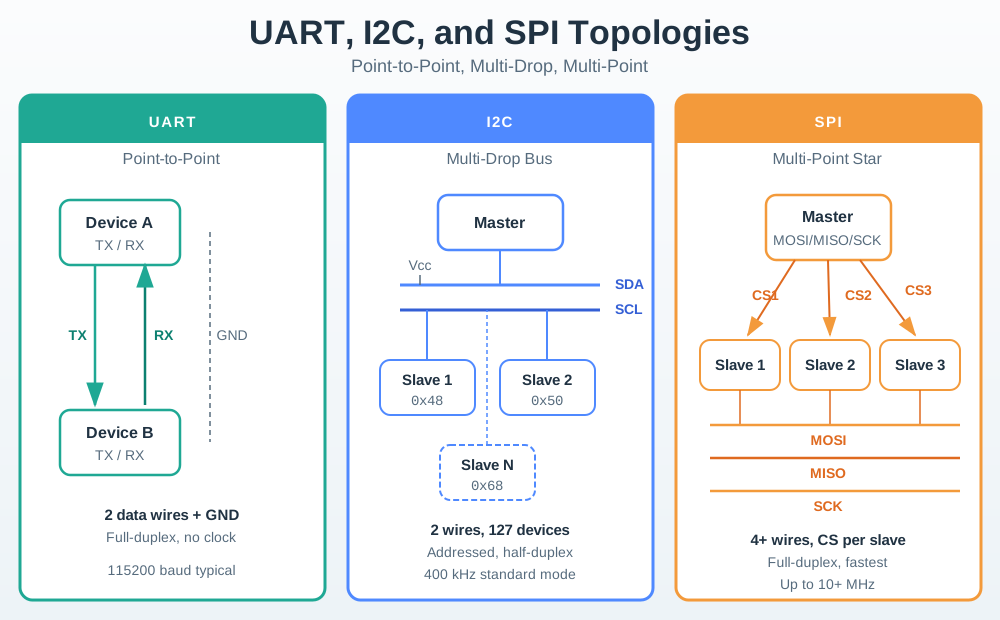
UART is shown point to point, so its wiring is direct and a fault usually affects that pair. I2C places addressed devices on shared SDA and SCL lines, reducing pins but allowing one stuck-low device or excess capacitance to disturb the whole bus. SPI shares clock and data while giving peripherals separate select lines; that raises routing cost but helps isolate selection. Read these as operational shapes, not only schematics. Device count, connector boundaries, pull-ups, inactive-driver behaviour, and the required recovery method should travel with the chosen topology.
Older wired-standards tables often mix RS-232, RS-422, RS-485, I2C, SPI, Microwire, 1-Wire, and USB rows. Read those rows as evidence prompts, not rankings: record whether the link is synchronous or asynchronous, point-to-point, multi-drop, or multi-point, full or half duplex, how many devices can share it, the credible distance, and how many pins or conductors the final connector must carry. RS-485 may win a noisy long bus; USB may win for a local high-speed peripheral; 1-Wire may fit a very slow pin-limited sensor chain. The selection still belongs to the installed boundary, not to the largest speed number in the table.
Greenhouse Controller Pattern
For a greenhouse controller with several slow environmental sensors, a display, and a storage device, the clean design is often mixed: I2C for slow sensors that share two wires, SPI for the display or storage device that needs higher throughput, and UART for a debug console or serial module. The review should prove that each bus has enough pins, timing margin, electrical margin, and test points.
28.2.1.1 Under the Hood: Timing, Edges, and Electrical Limits Decide Reliability
Under the hood, a wired protocol is a timed electrical agreement. Devices must agree on voltage thresholds, clocking, framing, bus ownership, pull-up behavior, and when a signal is valid. A wire can still fail because of ringing, weak pull-ups, excessive capacitance, ground offsets, connector damage, cable length, or crosstalk from faster nearby traces.
UART tolerates simple point-to-point wiring because both ends agree on baud rate, start bit, data bits, optional parity, and stop bits, but it has little built-in help if the clocks drift too far or the voltage levels are mismatched. I2C uses open-drain lines and pull-up resistors, so bus capacitance and pull-up strength shape the rise time. SPI pushes an explicit clock and chip-select lines, so routing, edge rate, and simultaneous switching near other traces can dominate reliability.
The timing budget is not only a datasheet number. It includes firmware interrupt latency, sensor clock stretching, display refresh bursts, DMA transfers, connector resistance, cable capacitance, level shifters, and ground noise during actuator switching. A bench test with short jumper wires can pass while the installed enclosure fails because the waveform is slower, noisier, or referenced to a different ground.
Line coding is another part of that agreement. The Signal Encoding section earlier explains why long runs of the same value threaten clock recovery and DC balance, and how schemes such as Manchester, NRZI, and 4B/5B spend transitions or extra bits to prevent it. At review time the question is narrower: does this specific link actually need that transition density, and is the coding overhead recorded in the timing budget alongside the other entries above?
A useful under-the-hood review keeps captures or scope notes at the real operating speed and real cable length. It records clock frequency, logic voltage, pull-up values, measured rise and fall shape, error counters, retry behavior, and the nearby events that coincide with corruption. That evidence turns "the bus is flaky" into a concrete fix such as lowering bus speed, changing pull-ups, separating traces, adding termination, improving grounding, or moving a noisy peripheral to another interface.
Use the synchronous and asynchronous bus figure to compare a shared clock with timing recovered from start and stop bits.
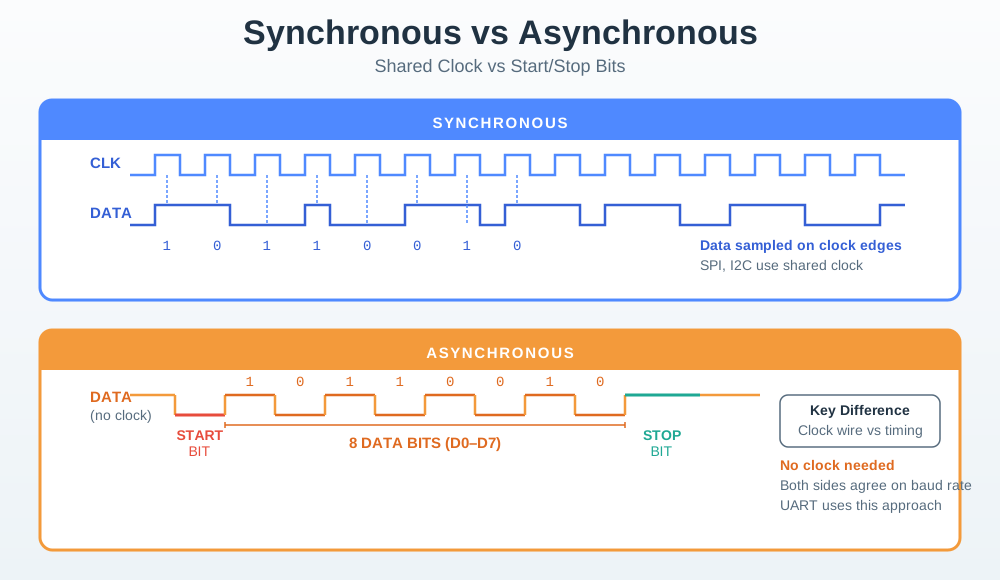
On the synchronous side, a clock line tells the receiver when to read each bit. The controller’s clock edge sets both the rate and sample time. The other side has no clock line. A start bit lines up the local clock for one frame, and stop bits check whether the two clocks stayed close. Both methods still face wire limits. Delay and poor edges hurt a clocked bus, while a baud mismatch grows across a frame. Record the set rate, wire length, load, clock limit, sample edge, and errors seen in the test.
Use Figure 28.7 to decide whether endpoints can transmit simultaneously or need an explicit turn-taking rule.
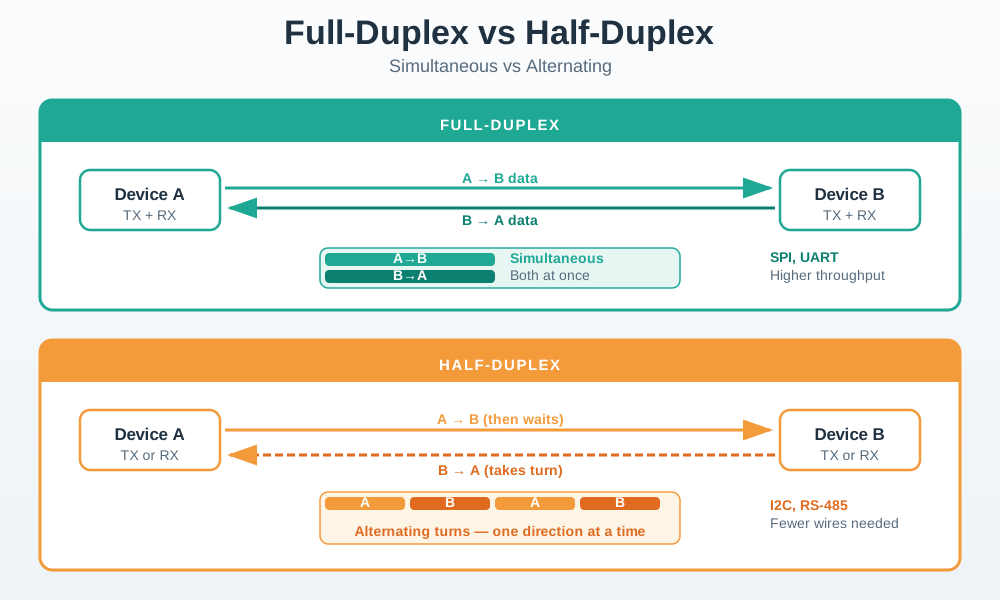
The full-duplex panel gives each direction an independent path, so both endpoints can send at the same time without sharing a transmit turn. Half-duplex reuses a path and requires alternation, which adds direction control, turnaround time, and a collision or arbitration rule. That difference changes more than peak rate. A request-and-response sensor may fit half-duplex well, while continuous bidirectional streaming may not. The record should state who controls the turn, how long the bus must settle, what happens on simultaneous transmission, and whether the measured workload includes those gaps.
Clocking
Synchronous buses depend on a shared clock edge. Asynchronous UART-style links depend on agreed baud rate and framing.
Bus Ownership
A controller, address, chip-select line, or higher-layer rule must prevent two devices from driving the same wire incorrectly.
Signal Integrity
Trace length, pull-ups, capacitance, termination, grounding, and nearby switching edges decide whether bits arrive as intended.
Field Evidence
Validate with real cable length, connectors, operating current, noise sources, temperature range, and service access, not only a desk prototype.
Failure mode: a continuity tester says the wire is connected, but the bus still fails because the waveform, timing, grounding, or noise margin is wrong.

28.3 Budget the Debug Port and the Display Separately
This section: Budget the Debug Port and the Display Separately — For an illustrative asynchronous debug connection at 9,600 bits per second, use one start bit, eight data bits and one stop bit per byte.
For an illustrative asynchronous debug connection at 9,600 bits per second, use one start bit, eight data bits and one stop bit per byte. Each useful byte therefore needs ten wire bits. A 40-byte line takes 400 divided by 9,600 = about 0.0417 s, or 41.7 ms, before gaps. Printing many such lines can block a simple program even though the sensor itself is slow.
Now assume the display accepts a synchronous serial transfer of 1,024 bytes at a 1 MHz clock, with one data bit per clock. The raw shift time is 8,192 divided by 1,000,000 = 0.008192 s, or 8.192 ms. Add command bytes, select timing and software pauses for the real transaction. The comparison explains why a clocked peripheral link can suit the display while the debug port remains simple and separate.
Read Figure 28.5 across point-to-point and shared-bus arrangements. A dedicated debug link confines many connection faults to one endpoint. A shared sensor bus saves pins but gives a stuck device a way to affect neighbours. The synchronous-versus-asynchronous figure then explains which timing comes from a shared clock and which comes from framing.
Predict whether moving the board-level bus down a long cable preserves these timing results. Extra capacitance, noise and ground differences can violate the interface’s electrical limits even when the bit-rate calculation still fits. Next, unplug one peripheral on the shared bus. Test whether the controller reports a timeout and continues useful work rather than waiting forever.
This module treats a wire as a local signal contract. Specify voltage levels, ground reference, connector, clock owner, device count and timeout behaviour alongside throughput. The calculations are useful upper-level budgets; a logic trace and the component timing requirements establish what the connected hardware actually tolerates. Choosing separate interfaces can make both debugging and failure containment easier without forcing every peripheral onto the fastest available option.
28.4 Summary
This section: Summary — Wired communication is the local contract between an IoT controller and nearby peripherals.
Wired communication is the local contract between an IoT controller and nearby peripherals. UART, I2C, SPI, and longer-distance serial standards differ in clocking, topology, pin count, throughput, bus ownership, and electrical limits. The right choice depends on the peripheral’s supported interfaces, required data movement, available pins, distance, grounding, noise, and validation evidence.
28.5 Key Takeaway
This section: Key Takeaway
Choose a wired protocol from evidence: supported interfaces, traffic need, topology, pin budget, timing margin, and electrical reliability. A wire is not automatically reliable until the signal, grounding, and field conditions have been tested.
28.6 See Also
This section: See Also
28.6.1 UART and RS-232
Study asynchronous point-to-point serial links, framing, voltage levels, and debugging.
28.6.2 I2C Protocol
Review two-wire addressing, pull-ups, bus loading, and shared sensor buses.
28.6.3 SPI Protocol
Explore clocked high-throughput peripheral links, chip select, and full-duplex transfers.
28.6.4 Wired Access: Ethernet
Connect board-level wired thinking to LAN-scale Ethernet, switching, and PoE.
Find help
3 reviewed answers.
Where should I start in a module?
Open the module page from the sidebar to see its chapters in order. Use the module map to return to a topic you need.
Modules and pathsReviewed
What can I try when a project does not work?
Check the symptom, then work through the diagnostic steps. Keep the error message and the smallest example that reproduces it.
When you are stuckReviewed
How do interactive examples work?
Use the interactive guide to check how examples and simulations work before changing your project.
Interactive examples guideReviewed