Layered Architecture: A design principle that divides network functionality into hierarchical layers, each with well-defined interfaces to the layers above and below
Abstraction: Hiding the implementation details of one layer from adjacent layers, allowing each layer to evolve independently
Service Interface: The boundary between layers through which the lower layer provides services to the upper layer
Peer Protocol: The protocol governing communication between the same layer on two different devices (e.g., TCP on sender communicates with TCP on receiver)
Protocol Independence: Each layer can be implemented with different protocols without affecting other layers, enabling modular design
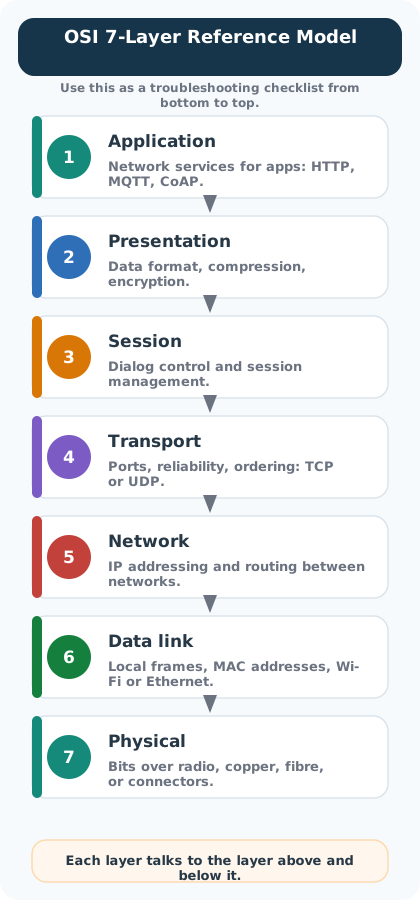
OSI Model: The Open Systems Interconnection reference model defining 7 layers from Physical to Application
TCP/IP Model: The practical 4-layer model (Network Access, Internet, Transport, Application) used in real internet and IoT deployments
28.1 In 60 Seconds
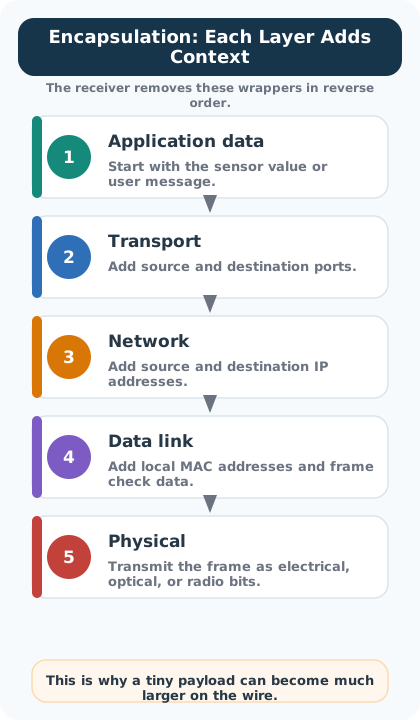
Layered network models (OSI with 7 layers, TCP/IP with 4) divide complex communication into independent layers, each handling one function – physical transmission, data framing, routing, or application logic. Each layer adds its own header through encapsulation, which is why a tiny IoT sensor reading can balloon in size on the wire. Understanding these layers is essential for debugging: always troubleshoot bottom-up, from physical connectivity to application code.
28.2 Overview
Layered network models are the foundation of all IoT communication. This section covers the theoretical frameworks (OSI, TCP/IP) and IoT-specific reference models that enable billions of devices to communicate seamlessly.
MVU: Minimum Viable Understanding
Core concept: Network communication is organized into layers (OSI: 7 layers, TCP/IP: 4 layers) where each layer handles one specific function and adds its own header to data passing through - a process called encapsulation.
Why it matters: When IoT connectivity fails, understanding layers helps you diagnose whether the problem is physical (antenna/cable), network (IP/routing), or application (code/protocol) - each requires different troubleshooting.
Key takeaway: Think “bottom-up” when debugging: check Physical layer first (is the device powered and connected?), then Data Link (MAC address visible?), then Network (IP assigned?), and finally Application (service running?).
28.3 Learning Objectives
By the end of this section, you will be able to:
Explain Network Standards: Describe why standards and protocols enable global IoT connectivity and identify the key bodies (IEEE, IETF, ITU, ISO) that define them
Compare OSI and TCP/IP Models: Differentiate between the seven-layer OSI and four-layer TCP/IP models and map their layers to each other
Analyze Encapsulation Overhead: Calculate the byte-level protocol overhead added at each layer and evaluate the goodput impact for constrained IoT devices
Apply IoT Reference Models: Select and justify appropriate IoT-specific architectural frameworks (ITU, Cisco 7-level) for a given system design scenario
Configure MAC and IP Addressing: Demonstrate how hardware and network layer addresses are structured and how 6LoWPAN compression reduces IPv6 header overhead
For Beginners: Layered Network Models
When devices communicate, the process is broken into layers, like floors of a building where each floor has a specific job. The bottom layer handles physical signals (like electrical pulses on a wire), and higher layers handle things like addressing and the actual data you want to send. This layered approach means you can change one part without rebuilding everything.
Sensor Squad: The Layer Cake of Communication!
“I want to send my temperature reading to the cloud, but how does it actually get there?” wondered Sammy the Sensor. Max the Microcontroller pulled out a stack of colored cards. “Think of it like a layer cake! Each layer has one specific job, and they all work together.”
“The bottom layer is the Physical layer – that is the actual radio waves or electrical signals,” Max explained. “Above that is the Data Link layer, which makes sure your message does not get scrambled. Then the Network layer figures out the route, and the Transport layer makes sure everything arrives safely.”
Lila the LED lit up. “Oh! It is like sending a letter. The Physical layer is the mail truck, the Data Link is the envelope, the Network layer is the address, and the Transport layer is the tracking number that confirms delivery!”
“Exactly!” said Bella the Battery. “And the best part about layers is that I can swap out the Physical layer from Wi-Fi to Bluetooth without changing anything else above it. Each layer only talks to the layer above and below, so you can upgrade one piece without rebuilding the whole system. That is why standards matter – they let all of us IoT devices speak the same language!”
IoT-specific architectural frameworks beyond traditional networking.
Topics covered:
Why IoT needs specialized reference models
ITU IoT Reference Model (4 layers + cross-cutting)
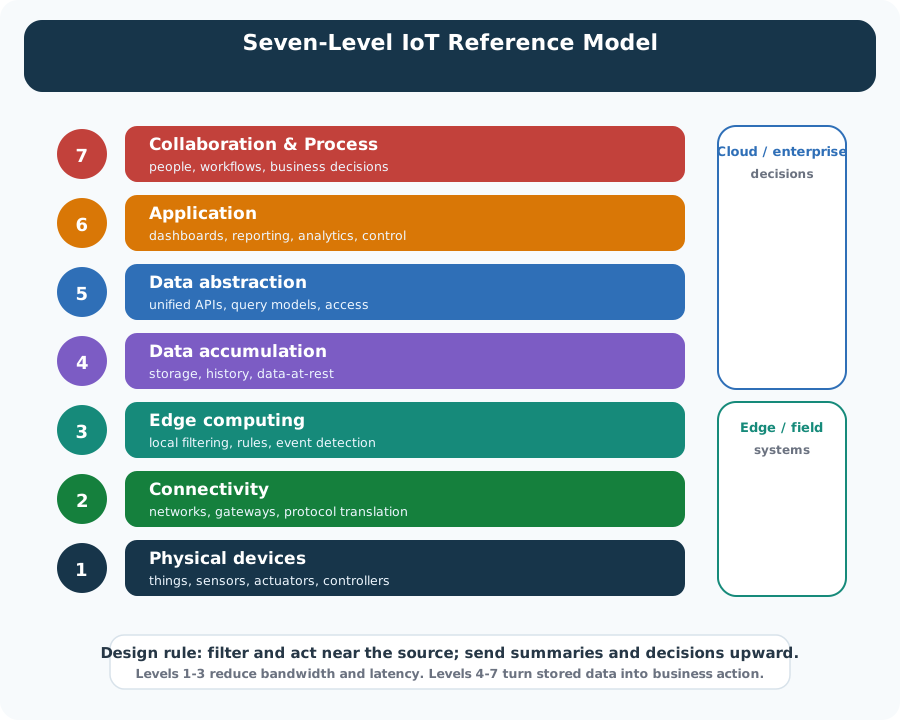
Cisco 7-Level IoT Reference Model (detailed)
Comparing Wi-Fi, Zigbee, and LoRaWAN stacks
Edge computing: where to process data
Key figures:
Figure 28.4: 7-level Internet of Things reference model showing complete IoT stack
28.5 Quick Reference
Model
Layers
Use Case
OSI
7 (Application to Physical)
Teaching, troubleshooting, detailed analysis
TCP/IP
4 (Application to Network Access)
Practical implementation, development
ITU IoT
4 + cross-cutting
Standards compliance, architecture planning
Cisco 7-Level
7 (Devices to Collaboration)
IoT system design, edge computing decisions
Check Your Understanding: Choosing the Right Model
28.6 Worked Example: Tracing a Soil Sensor Reading Through All Protocol Layers
Scenario: A precision agriculture sensor (ESP32 with soil moisture probe) sends a 6-byte reading ({moisture: 42, temp: 18}) to a cloud dashboard via a LoRaWAN gateway and LTE backhaul. Walk through every protocol layer to understand exactly what happens to those 6 bytes and why the final on-air transmission is 51 bytes.
Step 1: Application layer – CoAP formats the reading
The sensor application calls coap_put("/soil/m42", payload):
Field
Size
Content
CoAP header (Ver, Type, TKL, Code, MsgID)
4 bytes
Version 1, Non-Confirmable, PUT, MsgID=0x1A3F
CoAP token
2 bytes
0xBE01 (matches request to response)
CoAP option (Uri-Path)
0 bytes
Omitted (server knows device by DevEUI)
CoAP payload marker + data
1 + 6 = 7 bytes
0xFF + {42, 18, ...}
Subtotal
13 bytes
Application PDU
Step 2: Transport layer – UDP adds port addressing
UDP wraps the CoAP message with minimal header:
Field
Size
Content
Source port
2 bytes
5683 (CoAP default)
Destination port
2 bytes
5683
Length
2 bytes
21 (8 header + 13 payload)
Checksum
2 bytes
Integrity check
Subtotal
8 bytes
Added to 13 = 21 bytes
Why UDP and not TCP? The sensor sleeps for 10 minutes between readings. TCP’s 3-way handshake would add 3 extra packets (78+ bytes) every wake cycle, doubling energy consumption for a 6-byte payload.
Step 3: Network layer – IPv6 with 6LoWPAN compression
Standard IPv6 adds a 40-byte header, which is larger than the entire payload plus transport header. 6LoWPAN header compression reduces this:
Header version
Size
What it contains
Full IPv6
40 bytes
Source (16 B) + Dest (16 B) + Version/Class/Flow (4 B) + Payload length/Next/Hop (4 B)
6LoWPAN compressed
7 bytes
Context-based compression: addresses derived from link-layer IDs, next header = UDP (elided), hop limit = 64 (elided)
Compression ratio: 40 / 7 = 5.7x reduction. Without 6LoWPAN, network overhead alone would be 6.7x the payload.
LoRaWAN adds MAC header, device addressing, and integrity:
Field
Size
Content
MHDR (MAC header)
1 byte
Message type = Unconfirmed Data Up
DevAddr
4 bytes
Device network address
FCtrl
1 byte
ADR enabled, no pending, FOptsLen=0
FCnt
2 bytes
Frame counter (replay protection)
FPort
1 byte
Application port 1
FRMPayload
28 bytes
Encrypted application data (from above)
MIC
4 bytes
Message Integrity Code (AES-CMAC)
Subtotal
13 bytes
Added to 28 = 41 bytes
Step 5: Physical layer – LoRa modulation
LoRa adds a preamble and sync word for radio synchronization:
Component
Size
Purpose
Preamble
8 symbols
Receiver synchronization
Sync word
2 symbols
Network identification
LoRa PHY header + CRC
~2.25 + 2 bytes
Error detection
Payload
41 bytes
MAC frame from above
Total on-air payload
~51 bytes
Including PHY overhead
At spreading factor SF7 and bandwidth 125 kHz: airtime = 41.2 ms.
Step 6: Overhead summary
Layer
Bytes Added
Running Total
% of Total
Application data
6
6
11.8%
CoAP header
7
13
13.7%
UDP header
8
21
15.7%
6LoWPAN IPv6
7
28
13.7%
LoRaWAN MAC
13
41
25.5%
LoRa PHY
10
51
19.6%
Goodput: 6 / 51 = 11.8%. Only 1 in every 8.5 bytes transmitted is actual sensor data.
Key insight: Understanding encapsulation layer by layer reveals why IoT protocol design obsesses over header size. Each layer has a legitimate job – addressing, integrity, encryption, synchronization – but for tiny payloads, the overhead dominates. This is why 6LoWPAN compression (saving 33 bytes), CoAP over HTTP (saving ~200 bytes), and UDP over TCP (saving 12+ bytes per packet) are not optimizations but necessities for constrained IoT networks. When your payload is 6 bytes, every header byte matters.
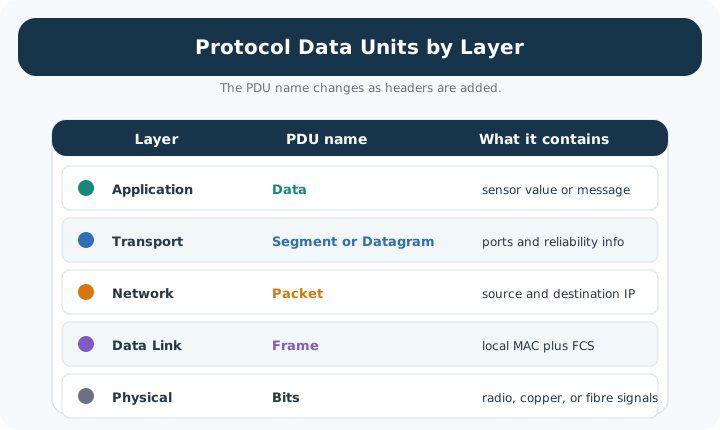
Match: Protocol Data Units to OSI Layers
Order: Encapsulation Steps for an IoT Sensor Transmission
Try It: Protocol Overhead Calculator
Explore how different protocol choices affect overhead and goodput for constrained IoT devices. Adjust the payload size and toggle protocol optimizations to see the impact.
1. Thinking Layered Models Are Implemented as Separate Hardware
All 7 OSI layers typically run as software on the same device. Physical layer hardware is an exception. Fix: understand that layering is a software abstraction implemented in a protocol stack, not separate hardware boxes.
2. Violating Layer Independence in IoT Designs
Cross-layer optimisation (sharing radio state from the physical layer directly with the application layer) is common in IoT for power savings but breaks the layered model guarantees. Fix: document any cross-layer optimisations explicitly, as they create tight coupling that complicates maintenance.
3. Not Recognising That Encapsulation Overhead Accumulates Across Layers
Each layer adds a header. In a constrained IoT frame of 127 bytes, headers from 5 layers can consume 40+ bytes, leaving little room for application data. Fix: calculate total header overhead for your chosen protocol stack before finalising the data model.
28.8 What’s Next
Start with the foundational models, then progress through practical implementation: