Address
The host identifier written in dotted decimal. Each octet has a value from 0 to 255 because it represents 8 bits.
Progress saves as you read. Mark sections complete as you go; your progress appears in the sidebar.
This section: Start With Where the Device Lives — Picture a replacement camera that receives an address but cannot reach its recorder.
Prove One Address Can Reach the Intended Place
Picture a replacement camera that receives an address but cannot reach its recorder. The four visible numbers are not enough; its local boundary and route may be wrong.
Internet Protocol means a system for addressing and routing packets. IPv4 means version 4 of that system. A gateway means the boundary device that forwards traffic beyond the local network.
Record one device address, prefix, assigned route, and owner. Test a local peer and a remote service, then change the prefix or route and show where delivery fails.
This runway does not prove identity, trust, or permission. The deeper sections explain binary address structure, prefixes, subnets, private ranges, assignment, discovery, routing, and troubleshooting records.
An IPv4 address is not just a label on a device. It tells the device which neighbors are local, which traffic needs a gateway, and which replies can find their way back.
Before memorizing dotted-decimal patterns, ask the field question: if this sensor sends a message now, does its address put it in the right network, behind the right gateway, with enough evidence to troubleshoot the path?
IPv4 uses a 32-bit address, usually written as four decimal octets such as 192.168.1.100. The address is only useful when the device also knows which bits identify the local network, which bits identify the host, and where to send traffic that is not local.
That context is why two devices can have similar-looking addresses but different reachability. A sensor at 192.168.10.25/24 treats 192.168.10.80 as local, but treats 192.168.20.80 as a remote destination that needs a gateway. A sensor at 192.168.10.25/16 would make a different local decision. The dotted address did not change; the prefix changed the boundary.
In IoT deployments, IPv4 addressing is also an inventory and policy signal. A camera VLAN, a building-automation controller subnet, and a maintenance laptop subnet may all use private addresses, but the prefix tells switches, routers, firewalls, DHCP servers, and monitoring tools which operational group the device belongs to. A useful address record therefore includes address, prefix, gateway, assignment method, device role, owner, and intended traffic path.
Use Figure 11.1 to keep the address you type apart from the bits the network uses.
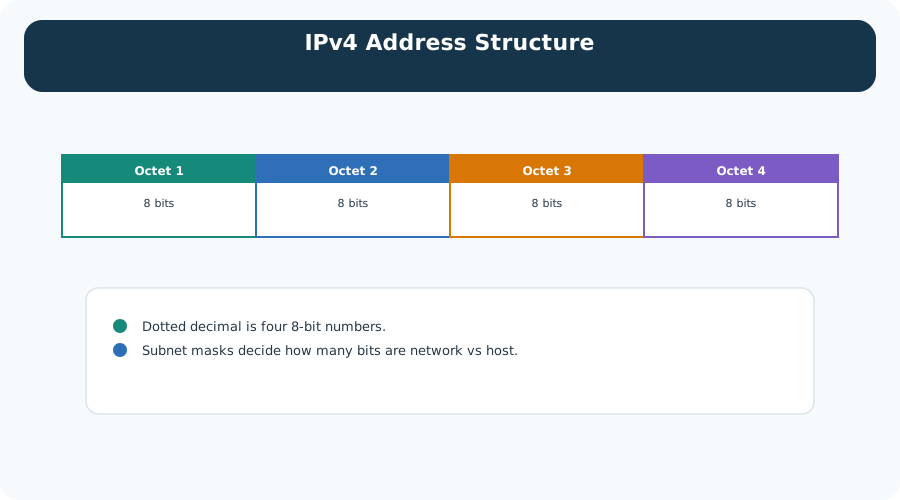
Four blocks run across the figure, and each one is marked as 8 bits. Together they are the 32 bits a router works with. The dots you type are only separators between those blocks, which is the first note under the diagram. The second note is the one this chapter builds on. The split between network and host is decided by how many of those bits the mask claims, and it does not have to fall on a dot. Read Figure 11.1 as a reminder that dotted decimal is a convenience for people, and the prefix is what names the network.
The host identifier written in dotted decimal. Each octet has a value from 0 to 255 because it represents 8 bits.
The boundary between network bits and host bits. CIDR notation writes this as a prefix such as /24.
The next-hop router used when the destination is outside the local subnet.
The network address, broadcast address, loopback range, link-local range, and multicast range all have special meanings.
Old class names still turn up in tools and documents, so it helps to know what they once fixed. Figure 11.2 sets the five classes out with their defaults.
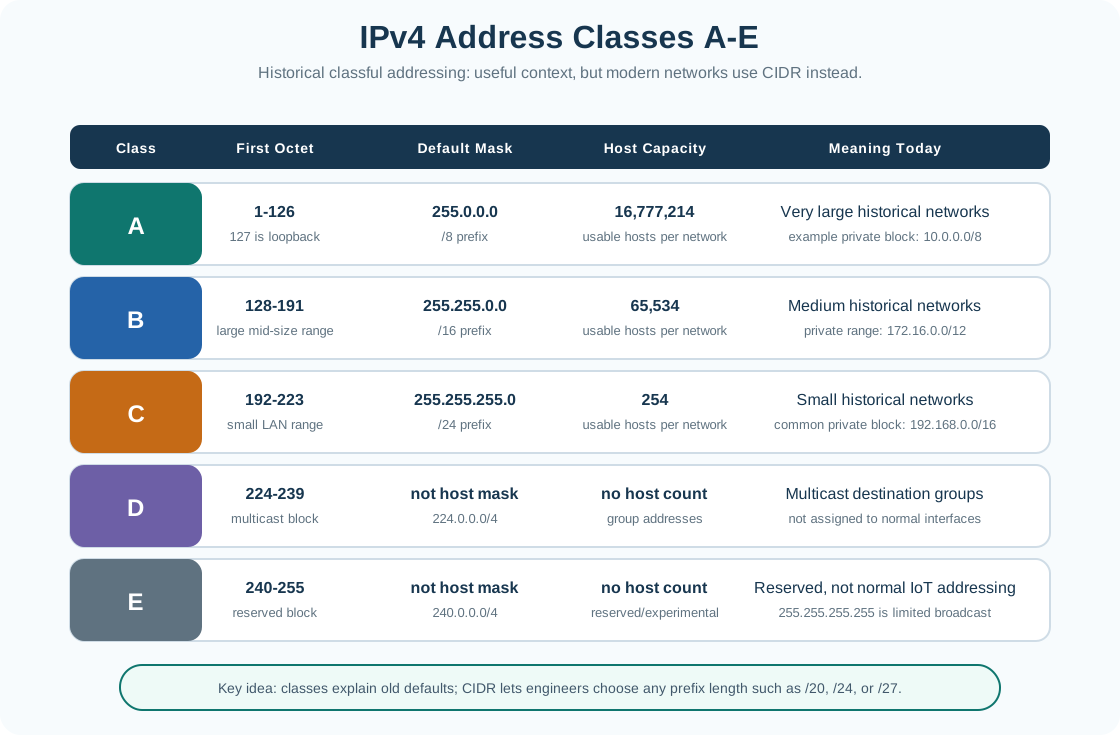
Read the first two columns of Figure 11.2 together. The opening byte of an address alone decided the class, and the class alone decided the mask, so the size of the network was fixed before anyone counted the devices. The host-capacity column shows how blunt that was: about sixteen million addresses, then sixty-five thousand, then two hundred and fifty-four, with nothing in between. The last two rows are not host ranges at all; they hold multicast groups and a reserved block. The closing note is the one to carry forward. CIDR lets you pick any prefix length, so the real question is whether the prefix fits the device count and the routing boundary.
Modern IPv4 design should not rely on historical class defaults such as "Class C means /24." CIDR lets an engineer choose the prefix that fits the device count and routing boundary: a small point-to-point link might use a very small subnet, a dense camera floor might need more host addresses, and an enterprise summary route might cover many smaller subnets. The review question is whether the selected prefix matches operations, not whether the first octet belongs to an old class.
Public IPv4 addresses are not self-assigned. ICANN, through IANA, holds the global IPv4 and IPv6 space and delegates large blocks to five Regional Internet Registries such as ARIN, RIPE NCC, APNIC, and LACNIC. Those registries allocate smaller blocks to ISPs, and ISPs in turn assign addresses to the enterprises and networks they serve. That chain is why a public address on an IoT gateway can usually be traced back to a specific ISP and registry, which matters for compliance and abuse response. Private RFC 1918 ranges skip this chain entirely: any organization can reuse them internally without registry involvement, which is exactly why they need a locally documented plan instead of a global one.
For IoT work, IPv4 planning usually starts with private RFC 1918 ranges. Use 10.0.0.0/8 for large estates, 172.16.0.0/12 for medium internal networks, and 192.168.0.0/16 for small sites. Then divide the range by building, floor, device type, trust zone, or operating responsibility.
A practitioner should turn that range choice into a deployable record before devices arrive. Count endpoints, gateways, controller interfaces, management ports, DHCP reservations, static addresses, test equipment, spares, and expected growth. Reserve obvious infrastructure addresses consistently, but document the convention instead of assuming everyone knows it. A subnet that technically has enough host addresses can still fail if the DHCP pool overlaps static assignments or if the gateway address is absent from the runbook.
Read Figure 11.3 from the bit rows, not from the dotted numbers beside them.
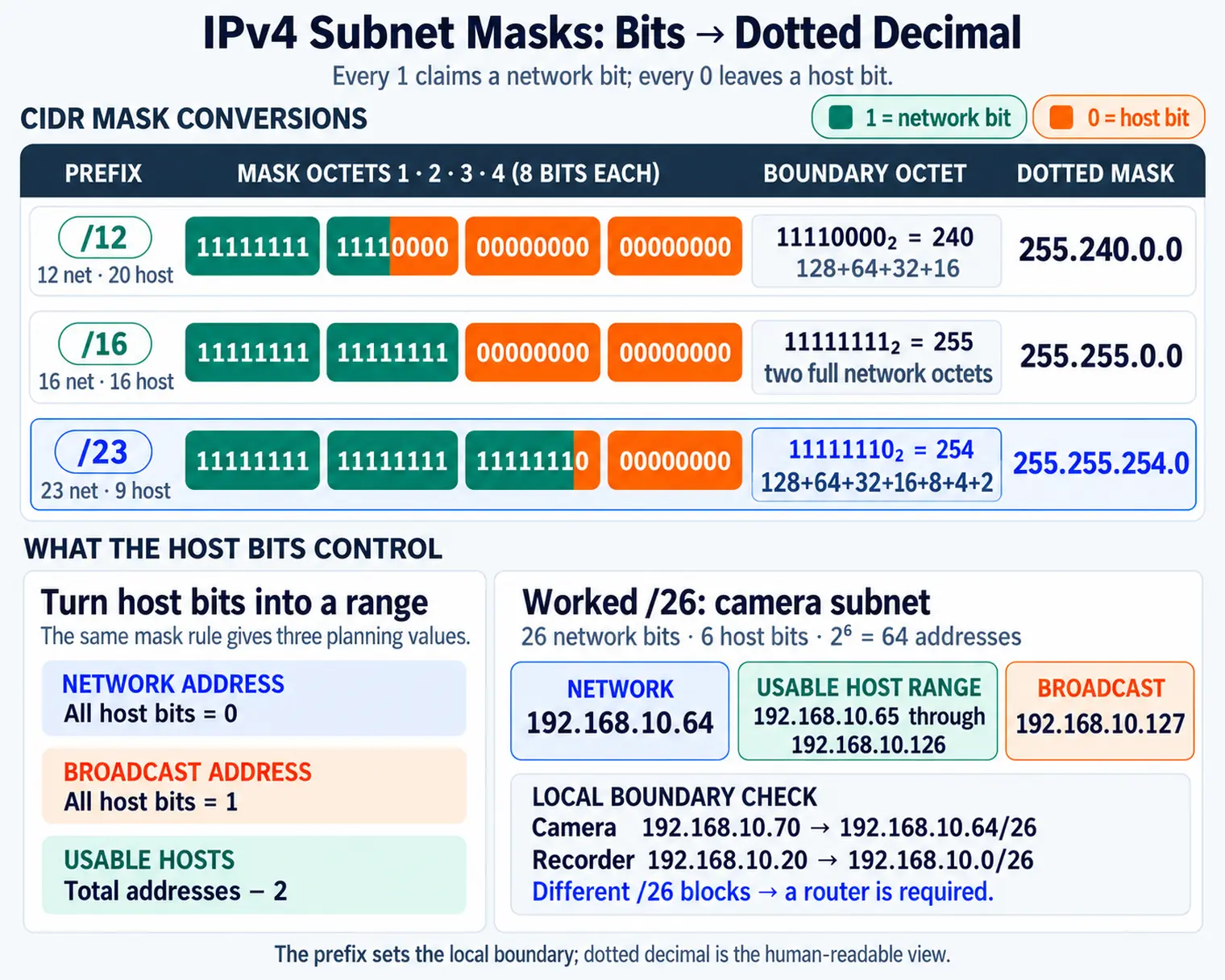
Each row shows one address with its mask written out in bits. Every 1 claims a bit for the network, and every 0 leaves it to the host. The /16 row makes this easy to see: the first sixteen bits are 1, so the mask reads 255.255.0.0. Shorter prefixes claim fewer bits and leave more hosts. The panel on the right turns that into the three values a plan needs. All host bits set to 0 is the network address, all set to 1 is the broadcast, and the usable count is two fewer than the total. That is how Figure 11.3 decides whether a peer is local.
During commissioning, verify the plan from both the device and the network side. On the device, record the assigned address, prefix, default gateway, DNS server, and whether the assignment came from DHCP or static configuration. On the network side, compare DHCP lease records, reservations, ARP tables, switch MAC-address tables, and firewall logs. This catches common rollout faults such as duplicate static addresses, masks copied from another VLAN, gateways pointing at the wrong SVI, and DHCP scopes that hand out addresses outside the intended policy boundary.
IPv4 packets carry source and destination addresses in the header. Routers do not read those addresses as building names or device types; they match destination prefixes in routing tables. That is why a clean addressing plan must align human grouping with prefixes that routers and firewall rules can use.
The forwarding path starts before a packet leaves the host. The host applies its prefix to decide whether the destination is local. If it is local, the host resolves the destination MAC address with ARP and sends the frame directly on the LAN. If it is remote, the host resolves the gateway MAC address and sends the IPv4 packet to that gateway. The destination IP address remains the final endpoint address; only the local Ethernet destination changes for the next hop.
Read Figure 11.4 as rows of 32 bits, and ask what each row lets a router decide.
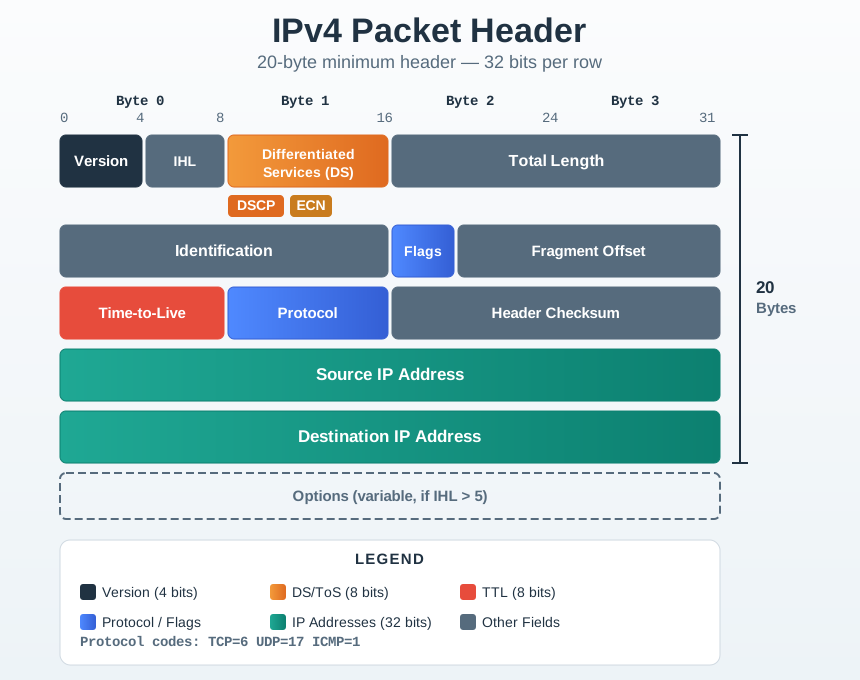
The grid is 20 bytes at minimum, drawn as rows four bytes wide. The first row sets version, header length, handling class and total length, so a router knows how much to read and how to treat it. The middle rows carry identification, flags and fragment offset for reassembly, then time-to-live and protocol. Time-to-live is what stops a looping packet. Protocol tells the receiver whether TCP, UDP or ICMP is inside. In Figure 11.4 the source and destination rows close that fixed header, and everything above them is what makes those two values usable.
The host applies its mask to decide whether the destination is on the same subnet.
If the destination is not local, the host sends the packet to a configured gateway.
Routers and firewalls can enforce policy when prefixes match operational zones.
TTL, route absence, wrong gateway, duplicate address, or wrong mask can all produce different failure symptoms.
Routers then apply longest-prefix match, decrement TTL, update the IPv4 header checksum, and forward toward the selected next hop if policy permits. If the packet is too large for the outgoing link and fragmentation is allowed, IPv4 can fragment the packet; if fragmentation is blocked or the Don't Fragment bit is set, the path needs a smaller packet size and an ICMP error path that reaches the sender. These mechanics matter for IoT gateways that bridge Ethernet, Wi-Fi, cellular, VPN, and low-power links with different MTUs and firewall rules.
22.22.22.3/24 with default gateway 22.22.22.163 requests a page from a server at 11.11.11.96 in a different subnet. The laptop applies its mask, sees the destination is not local, and resolves the gateway's MAC with ARP instead of the server's. The Ethernet frame goes to the gateway, but the IP packet keeps 11.11.11.96 as its destination address the whole way. The router matches that destination against its forwarding table, finds 11.11.11.0/24 reachable out a different interface, and ARPs on that side to resolve the server's MAC before forwarding the same IP packet with a new Ethernet header. Nothing about the source or destination IP address changes; only the Ethernet-layer next hop changes at each segment.
Different failures leave different evidence. A wrong local mask often produces ARP for a destination that should have gone to the gateway. A missing default route keeps remote traffic on the device. A wrong gateway MAC appears in ARP but fails after the first hop. A firewall or route-table denial may show successful local delivery but no permitted service path. Reading packet captures, route tables, ARP caches, and gateway logs together keeps IPv4 troubleshooting grounded in the actual forwarding sequence.
This section: Place a Camera on the Correct IPv4 Street — A camera arrives with IPv4 address 192.168.10.70, while its recorder sits at 192.168.10.20.
A camera arrives with IPv4 address 192.168.10.70, while its recorder sits at 192.168.10.20. Figure 11.1 first divides the address into four 8-bit octets. Figure 11.3 then applies the mask, and Figure 11.4 shows where source, destination, and time-to-live travel in the packet.
For a /26 prefix, 26 bits name the network and 6 bits remain for hosts. Each block therefore contains (2^6=64) addresses. The ranges in the last octet begin at 0, 64, 128, and 192. Camera 192.168.10.70 belongs to 192.168.10.64/26, while recorder 192.168.10.20 belongs to 192.168.10.0/26. They need a router even though their first three octets match.
The /26 camera subnet reserves 192.168.10.64 as its network address and 192.168.10.127 as its broadcast address. Its ordinary host range is therefore 192.168.10.65 through 192.168.10.126. The IPv4 gateway address must come from that host range and must match the deployed subnet plan.
This section: Summary — IPv4 addresses are 32-bit identifiers written as four decimal octets, but an address alone does not make a device reachable.
IPv4 addresses are 32-bit identifiers written as four decimal octets, but an address alone does not make a device reachable. The mask or prefix defines the local subnet, the gateway handles non-local destinations, and private RFC 1918 ranges provide reusable internal space for IoT deployments. A good IoT address plan groups devices by operational responsibility and keeps enough evidence to troubleshoot local reachability, routing, and policy failures.
This section: Key Takeaway
Treat IPv4 addressing as an operations contract: record the address range, prefix, gateway, owner, device group, growth allowance, and traffic policy before the deployment depends on it.
This section: See Also
Subnetting and CIDR - calculate subnet boundaries and usable host counts.
Ports and NAT - connect private addresses to services and gateway translation.
IPv6 for IoT - compare IPv4 limits with 128-bit addressing.
DHCP and Address Resolution - automate address assignment and local address discovery.
3 reviewed answers.
Open the module page from the sidebar to see its chapters in order. Use the module map to return to a topic you need.
Modules and pathsReviewed
Check the symptom, then work through the diagnostic steps. Keep the error message and the smallest example that reproduces it.
When you are stuckReviewed
Use the interactive guide to check how examples and simulations work before changing your project.
Interactive examples guideReviewed