This review chapter consolidates IoT networking fundamentals through curated video resources and cross-references to deep-dive chapters on topologies, routing, MQTT, CoAP, transport protocols, and wireless technologies. Use it as a navigation hub to revisit specific topics or fill knowledge gaps across the networking curriculum.
Wi-Fi provides 675,000x more bandwidth than needed while consuming 7.5x more power and requiring 10x more infrastructure. LoRaWAN’s “slower” 50 Kbps is still 225x faster than the 222 bps requirement, proving that for IoT, energy efficiency and range matter far more than raw speed.
What Actually Matters for IoT:
Energy efficiency (uW to mW, not watts)
Range (km, not meters)
Reliability (can you tolerate packet loss?)
Cost per device (deploy thousands, not tens)
Latency tolerance (seconds to minutes acceptable for most sensors)
The Right Question: Don’t ask “How fast?” Ask “How efficient, how far, how reliably, and at what cost?”
Counterexample - When High Bandwidth IS Needed:
Real-time video surveillance (5 Mbps per camera)
Industrial vision inspection (10-50 Mbps)
VR/AR headsets (100+ Mbps)
For these, Wi-Fi or 5G is appropriate. But they represent <5% of IoT deployments.
Try It: IoT Bandwidth Calculator
Explore how payload size and transmission frequency affect bandwidth requirements for different IoT protocols.
Explore these AI-generated visualizations that illustrate key networking concepts covered in this chapter.
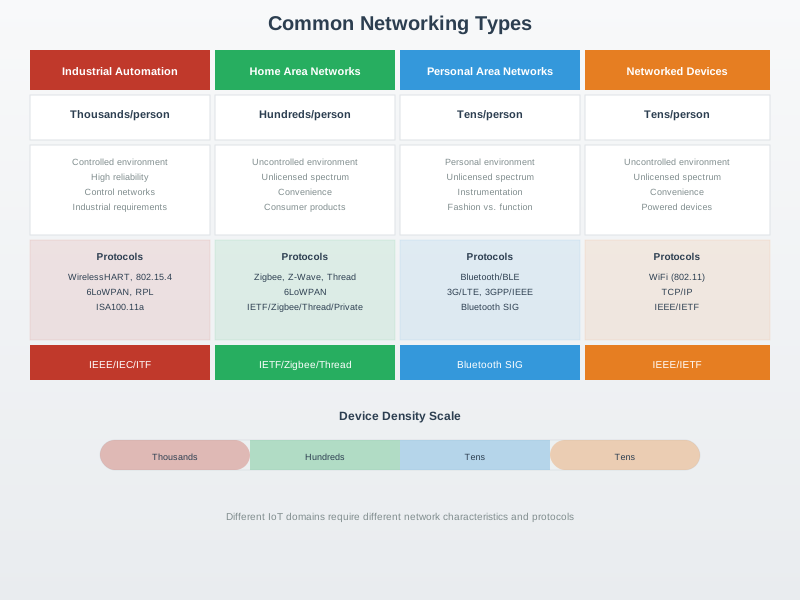
Visual: Common Networking Architecture
Common Networking Architecture
This diagram provides an overview of fundamental networking architecture patterns that underpin IoT systems, from local area networks to wide area connectivity.
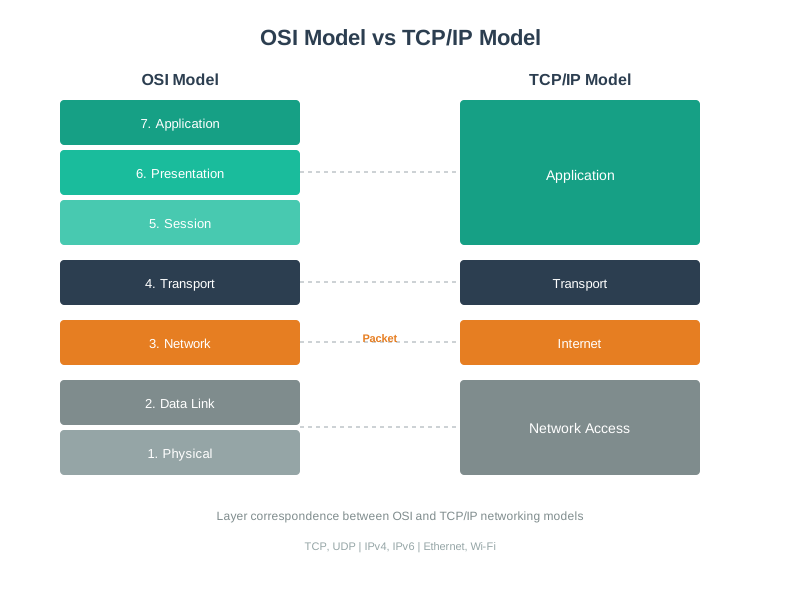
Visual: Networking Model Layers
Networking Model Layers
Understanding the layered networking model is essential for troubleshooting and designing IoT communication stacks.
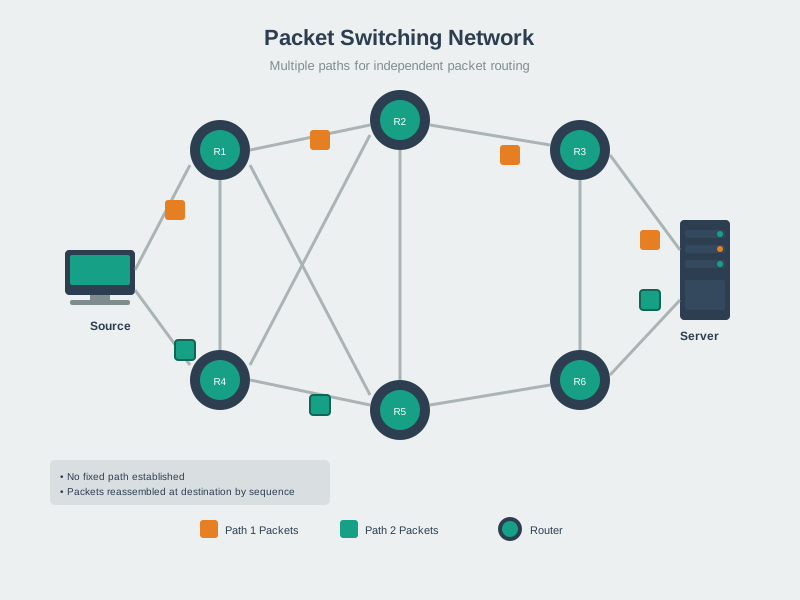
Visual: Packet Switching in Data Networks
Packet Switching in Data Networks
Packet switching is the foundation of modern network communication, enabling efficient data transmission across the Internet and IoT networks.
Decision Framework: Choosing the Right Protocol Layer for Reliability
When designing IoT systems, reliability requirements can be satisfied at multiple protocol layers. Choosing the wrong layer leads to wasted resources or fragile systems.
Approach
Implementation
Energy Cost
When to Use
Example
Application Layer
MQTT QoS 1/2, CoAP Confirmable
Medium (2-4x messages)
End-to-end critical data
Firmware updates, billing data
Transport Layer
TCP with retransmission
High (connection state + ACKs)
Reliable streams over unreliable networks
MQTT over cellular with spotty coverage
Network Layer
RPL routing with ACKs
Low-Medium (hop-by-hop)
Mesh networks with lossy links
Zigbee sensor mesh
Data Link Layer
802.15.4 auto-ACK
Very Low (hardware-level)
Wireless hop reliability
All 802.15.4-based protocols
None (UDP + Redundancy)
Send 3x copies, accept loss
Medium-High (bandwidth waste)
Time-series where next reading compensates
Temperature every 10 seconds
Key Principle: Implement reliability at the highest layer where it satisfies requirements. Lower layers handle hop-level issues; higher layers handle end-to-end issues.
Anti-Pattern Example: A temperature sensor sends readings every 30 seconds over a Zigbee mesh. The developer adds: - 802.15.4 auto-ACK (data link) - TCP retransmission (transport) - CoAP Confirmable messages (application)
Result: Triple redundancy wastes energy. A single missed reading is replaced 30 seconds later. Use UDP + CoAP Non-Confirmable instead, saving 60% battery life.
Good Example: A door lock command uses: - 802.15.4 auto-ACK (wireless hop reliability) - CoAP Confirmable with 3 retries (end-to-end critical command) - No TCP (avoids connection overhead for single command)
Decision Tree:
Can you tolerate occasional loss? –> UDP + redundant transmissions
Need end-to-end delivery guarantee? –> TCP or MQTT QoS 1
Need exactly-once delivery? –> MQTT QoS 2 (expensive!)
Wireless mesh with spotty links? –> RPL + link-layer ACKs
20.4 Visual Summaries
Estimated time: ~8 min | Foundational | P07.C17.U01
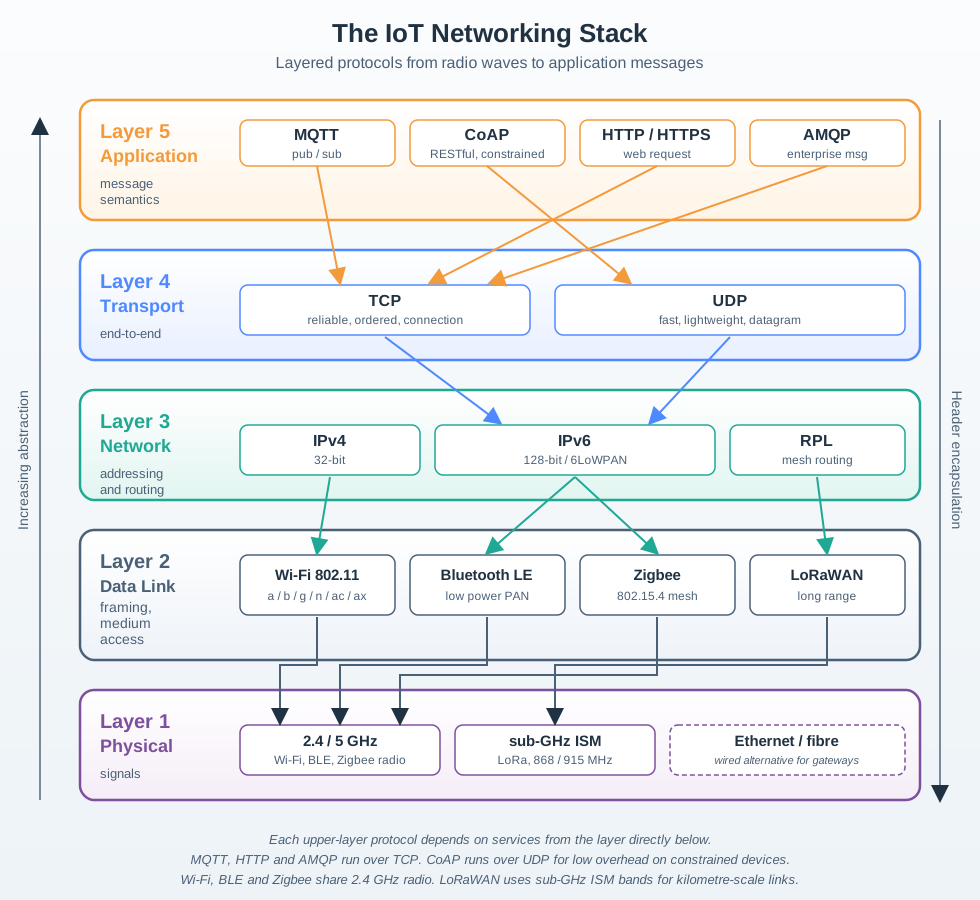
20.4.1 IoT Networking Stack Overview
The following diagram shows how IoT networking layers work together, from physical hardware to application protocols:
Figure 20.1: IoT networking stack showing the layered architecture from physical transmission (radio frequencies) through data link protocols (Wi-Fi, Bluetooth, Zigbee, LoRaWAN), network layer addressing and routing (IPv4/IPv6, RPL), transport protocols (TCP/UDP), to application-layer protocols (MQTT, CoAP, HTTP, AMQP). Each layer builds upon the services provided by layers below it.
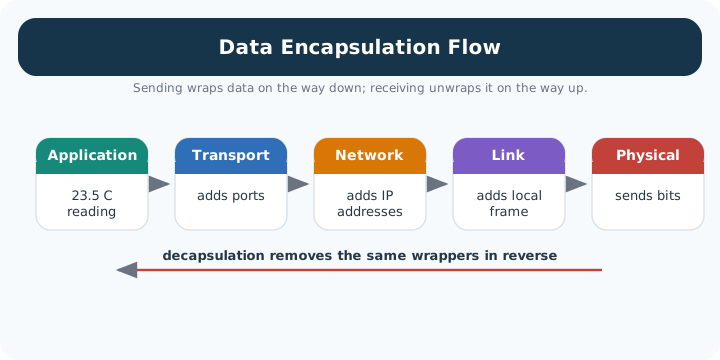
Figure 20.2: Alternative View: Data Encapsulation Flow - Rather than showing the static stack layers, this sequence diagram illustrates HOW data moves through the stack. A simple 15-byte sensor reading (temperature = 23.5C) gains headers at each layer: MQTT adds publish metadata, TCP adds reliability features, IPv6 adds addressing, and the MAC layer adds framing. By the time a 15-byte application payload becomes a 102-byte radio transmission, students can see the overhead cost of each layer and understand why IoT protocols like CoAP over UDP minimize this encapsulation for constrained devices.
20.4.2 Protocol Selection Quick Reference
Use this decision tree to choose the right protocol for your IoT application:
Figure 20.3: Protocol selection decision tree for IoT applications. Starting with range requirements, the tree guides you through key decision points including power constraints, data rate needs, and reliability requirements. Leaf nodes show recommended protocols with their key advantages and trade-offs. For example, short-range power-constrained applications should use Bluetooth Low Energy, while long-range applications benefit from LoRaWAN or cellular technologies.
How to use this guide:
Start with range: What physical distance must your devices communicate?
Consider power: Battery-powered or always connected?
Evaluate data needs: Streaming video vs. periodic sensor readings?
Assess reliability: Can you tolerate occasional packet loss?
Network Troubleshooting: Systematic layer-by-layer approach from Physical (signal strength, obstacles) to Application (DNS, ports)
IoT Security: Default credential changes, TLS encryption, network segmentation, firmware updates, and minimal port exposure
RSSI: Received Signal Strength Indicator in dBm; values above -70 dBm are considered good for reliable connections
Bandwidth & Latency: IoT data is typically small; sensor readings measured in bytes not megabytes; optimize for constrained networks
20.6 Chapter Summary
Networking is the foundation of IoT – without connectivity, you have isolated devices instead of the “Internet of Things.” This chapter reviewed fundamental networking concepts essential for every IoT developer.
We explored the OSI and TCP/IP models, understanding how they structure network communication from physical transmission (radio waves, copper cables) through application-level protocols (MQTT, CoAP, HTTP). While the OSI model provides a 7-layer theoretical framework, TCP/IP’s 4-layer practical model reflects what actually runs on the internet.
IP addressing was a central focus. IPv4’s 4.3 billion addresses are exhausted, making IPv6 critical for IoT’s future with its 340 undecillion possible addresses. We learned that private IPv4 ranges (10.0.0.0/8, 172.16.0.0/12, 192.168.0.0/16) enable local networks, while NAT translates between private and public addresses – introducing both security and architectural challenges for IoT systems.
Transport protocols determine reliability vs. speed trade-offs: TCP guarantees delivery with higher overhead (20-byte header), while UDP prioritizes speed with 8-byte headers and best-effort delivery. For IoT, UDP is often preferred for sensor readings where occasional loss is acceptable, but TCP is required for firmware updates and critical commands.
Network topologies significantly impact IoT system design. Star topology (central hub) is simple but creates single points of failure. Mesh topology is self-healing and extends range but adds routing complexity. Tree topology scales well but subtree nodes depend on intermediate nodes. The choice depends on coverage area, reliability requirements, power constraints, and scalability needs.
We covered MAC addresses (48-bit Layer 2 identifiers for hardware) vs. IP addresses (Layer 3 for routing), explaining how ARP bridges between them. Ports (0-65535) identify specific services on devices, with well-known ports like 80 (HTTP), 443 (HTTPS), 1883 (MQTT), and 5683 (CoAP).
Practical IoT protocols were introduced: MQTT for general IoT messaging (QoS levels for reliability), CoAP for constrained devices, HTTP/HTTPS for web services, and AMQP for enterprise messaging. Each has different overhead, latency, and reliability characteristics.
Troubleshooting was presented as a systematic layer-by-layer approach: start with Physical layer (signal strength, obstacles), move to Data Link (credentials, channel congestion), then Network (IP address, routing), Transport (TCP/UDP), and Application (DNS, ports).
Security fundamentals emphasized that IoT devices are prime attack targets. Key practices include changing default credentials, using TLS encryption (port 8883 for MQTT, 5684 for CoAP), network segmentation, regular firmware updates, and minimal port exposure. Security must be designed in from day one, not added later.
20.7 Knowledge Check
Auto-Gradable Quick Check
Understanding Check: Streaming Sensor Data
Scenario: You’re building a real-time air quality monitoring system with 50 sensors across a city. Each sensor sends CO2, PM2.5, and temperature readings every 5 seconds to a cloud dashboard. Your network engineer suggests using UDP instead of TCP for the sensor transmissions.
Think about:
What happens if one sensor packet gets lost in the network?
Should you use TCP (guaranteed delivery with retransmission) or UDP (best-effort, no retransmission)?
Key Insight: For real-time, loss-tolerant sensor streams, UDP can be a good fit. With readings every 5 seconds, one missed update is quickly replaced by the next reading. TCP adds reliability via retransmissions and flow control (useful when loss is unacceptable), but that reliability can increase latency and airtime for small, frequent messages. The Transport Layer (Layer 4) choice impacts both performance and power consumption.
Practical numbers (headers only): IPv4+UDP adds 28 bytes (20 IP + 8 UDP). IPv4+TCP adds 40 bytes (20 IP + 20 TCP), plus ACKs and connection state. For a 10-byte payload, UDP/IP makes payload 10/38 = 26% of the packet; TCP/IP makes payload 10/50 = 20% before accounting for ACKs, options, or TLS. With millions of tiny messages per year, these differences add up.
Verify Your Understanding:
When would you choose TCP for IoT? (Answer: Firmware updates, configuration changes, or any scenario where data loss is unacceptable and latency doesn’t matter.)
Try It: Subnet Calculator for IoT
Explore how subnetting divides a /24 network for different IoT device groups.
Show code
viewof bitsToSubnet = Inputs.range([1,8], {value:2,step:1,label:"Bits to borrow"})
Scenario: Your smart building has 250 IoT devices (thermostats, lights, sensors) that need IP addresses. The IT team gives you 192.168.10.0/24. Your colleague suggests creating 4 separate subnets by department (HVAC, lighting, security, access control) to improve security and troubleshooting.
Think about:
How do subnet masks help you divide one network into smaller logical networks?
Can you create 4 subnets with 60-70 devices each from a /24 network?
Key Insight: The subnet mask determines which bits represent the “network” vs “host” portion of an IP address. A /24 gives you 254 usable addresses (256 - 2 reserved). To create 4 subnets, borrow 2 bits from the host portion: /24 –> /26 gives you 4 subnets with 62 usable hosts each (64 - 2 reserved). Subnets: 192.168.10.0/26 (HVAC), 192.168.10.64/26 (lights), 192.168.10.128/26 (security), 192.168.10.192/26 (access).
Verify Your Understanding:
Why is subnetting valuable for IoT? (Answer: Security isolation – if HVAC devices are compromised, attackers can’t directly access the access control systems on another subnet. Troubleshooting – “all lighting subnet is offline” immediately narrows the problem scope. Broadcast domains – reduces network chatter by isolating broadcasts to each subnet.)
Common Pitfalls
1. Watching Videos Passively Without Taking Notes
Video content is easy to watch but hard to retain without active engagement. Fix: pause after each major concept in a video and write a one-sentence summary before continuing.
2. Reviewing Videos That Do Not Match the Module’s IoT Focus
General networking videos may cover concepts at the wrong level or with different emphasis than required. Fix: prioritise videos that specifically address IoT networking (6LoWPAN, LPWAN, constrained networks) rather than general enterprise networking.
3. Not Testing Understanding After Watching
Watching review videos creates an illusion of understanding. Fix: after each video, attempt two or three practice questions on the covered topic to confirm comprehension.
20.8 What’s Next
Now that you have reviewed networking fundamentals, the chapters below build directly on the concepts covered here. Follow the sequence to progress from protocol theory to implementation.
10 = huge corporate, 172.16 = medium business, 192.168 = home network
20.9.4 Practice Problems
Problem 1: Protocol Selection You need to deploy environmental sensors across a university campus (2 km square). Sensors transmit 50 bytes every 10 minutes. Battery life must be 5+ years. Choose the communication technology.
Click for solution approach
Analysis:
Range: 2 km square suggests need for wide-area coverage
Data rate: 50 bytes x 8 bits = 400 bits / 600 seconds = 0.67 bps (very low)
Power: 5-year battery = ultra-low power requirement
Answer: LoRaWAN - Range: 2-10 km covers campus - Power: Ultra-low (years on battery with proper duty cycling) - Data rate: 0.3-50 kbps sufficient for 0.67 bps need - Cost: 5-10 gateways cover campus vs 100+ Wi-Fi APs
Why not others:
Wi-Fi: 100m range, high power (weeks on battery)
Bluetooth: 30m range, insufficient coverage
Cellular: High power, expensive monthly fees
Problem 2: Troubleshooting A smart lock won’t connect to Wi-Fi. It can see the network but authentication fails. Which OSI layer should you check first?
Click for solution approach
Layer-by-layer analysis:
Physical (Layer 1): Signal present? YES (device sees network)
Data Link (Layer 2): Likely issue here – check Wi-Fi password, WPA2 vs WPA3 compatibility, MAC filtering
Network (Layer 3): Not reached yet (no IP assignment until authenticated)