7 Datagrams and Packet Structure
More
Depth: Practitioner
Progress saves as you read. Mark sections complete as you go; your progress appears in the sidebar.
7.1 Start With the Packet Budget
This section: Start With the Packet Budget — A payload is the useful data carried inside a message.
Count the Whole Message, Not Just the Reading
A payload is the useful data carried inside a message. Picture a soil sensor that sends ten bytes of readings over a small radio link. The program reports ten bytes, but the link must also carry addresses, order details, checks, and security data.
Write a byte budget before field tests. Start with the useful data, then add every header and protection field used on the real path. Compare that total with the smallest link limit. If the packet does not fit, it may split into parts, and losing one part can waste the whole message.
Test the largest normal record and the largest fault record. Add weak-signal retries, changed routes, and a restart. Check what the sender reports, what the receiver accepts, and whether a repeated packet changes the result twice.
A size calculation cannot prove delivery on its own. The deeper sections explain self-contained packets, routing, splitting, and receiver checks. Use them to decide whether to shrink, divide, or redesign the message before release.
Every datagram has a size, a set of headers, and a path that may or may not tolerate fragmentation. Constrained IoT links make this visible: a payload that looks small in code can become too large after security, addressing, and adaptation headers are added.
Use the packet as an accounting record. If you can explain where each byte goes, you can predict when a message fits, fragments, or should be redesigned before field devices start dropping it.
7.2 Overview: Datagrams Make Packets Self-Contained
A datagram is a self-contained network packet. It carries enough delivery metadata for the network to forward it independently, plus the payload that the application actually wants to move.
For IoT systems, this model is practical because devices usually send short bursts: a temperature reading, a command, a status report, or a small acknowledgement. The network does not reserve a dedicated circuit for each device. It forwards each packet when the packet appears.
What has to travel with a reading so the network can move it without help? Figure 7.1 lays one packet out field by field.
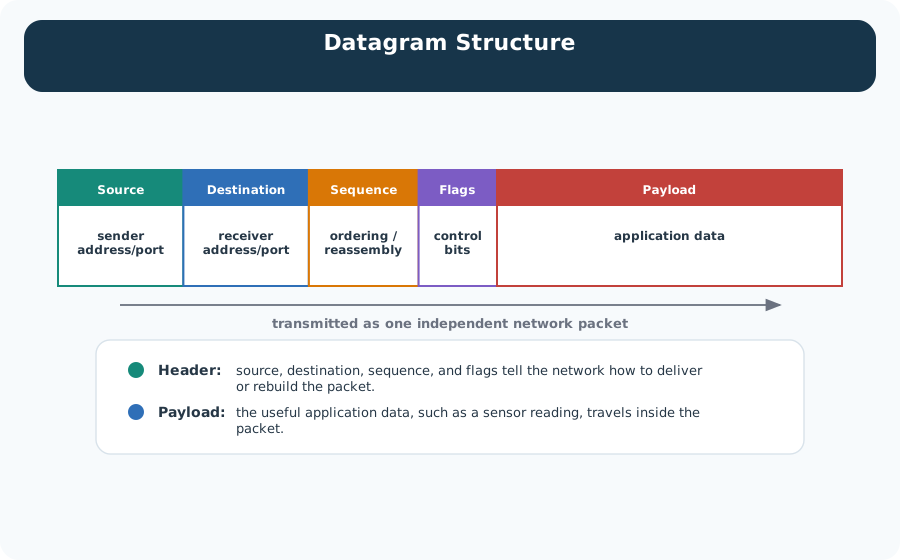
Read Figure 7.1 from left to right. The first four fields are the header, and none of them is the message. Source and destination say which endpoints are talking, the sequence field lets a receiver put pieces back in order, and the flag bits carry control information. Only the last block holds the sensor reading itself. That split makes independent forwarding possible: a router can use fields in the packet header to choose the next hop without needing to inspect the payload. It is also why the payload can be encrypted end to end while the network still works, and why a header field alone can reveal which devices are talking.
Header
The header identifies where the packet came from, where it should go, which protocol should process it next, how long it is, and what checks protect the packet from obvious corruption.
Payload
The payload is the data handed down from the layer above. For an IoT device, that might be a binary sensor reading, a CoAP message, a firmware block, or an application command.
Best effort
IP forwarding is best effort. A packet can be delayed, duplicated, dropped, or delivered out of order. Reliability, ordering, and retries belong in the transport or application design.
The important design habit is to treat packet structure as a contract. Every byte spent on headers, options, security tags, or fragmentation is a byte that cannot be used for application data on the same frame.
That contract is also what lets engineers reason from a packet capture. A source address explains who claimed to send the packet, a destination address explains the intended next delivery target, a protocol or next-header field explains which parser should receive the payload, and length fields set the boundary between real payload and stray bytes. Routers normally need only the forwarding fields, while endpoints need the full chain of fields to hand the right bytes to UDP, TCP, CoAP, MQTT-SN, or custom device logic. When a datagram is malformed, duplicated, or larger than the path can carry cleanly, those same fields become the first evidence for debugging.
Delivery Models: What the Destination Address Asks For
The destination address does more than name a single recipient. It also declares a delivery model -- how many receivers the network should try to reach with this one packet. Most IoT traffic is unicast: one source, one destination, the default assumption behind a sensor reading, a command, or an acknowledgement. Three other models exist for the cases where more than one receiver matters.
Broadcast
One source, every destination on the local network. Useful for service discovery and control announcements, but expensive: every device on the segment has to process the packet even if only one of them cares about it.
Multicast
One source, a group of destinations that opted in. A firmware push or a shared sensor feed can reach every subscribed gateway from one send, instead of one copy per receiver.
Anycast
One source, routed to whichever member of a destination group the network currently considers closest or healthiest. Useful for reaching "a" nearby resolver or time server rather than one specific device.
IPv4 reserves specific destination address ranges to carry this out: 255.255.255.255 is the limited local broadcast address (RFC 919), and 224.0.0.0 through 239.255.255.255 is the multicast range (RFC 1112). A parser can read which delivery model a packet is asking for straight from the destination address, before it looks at anything else in the header.
7.3 Practitioner: Budget the Packet Before Release
When you design or debug an IoT datagram, start with the packet budget. The useful payload must fit inside the smallest link on the path after every lower layer has added its own headers and trailers.
A useful budget is written as a byte ledger, not as a vague warning about overhead. Start with the link limit, then subtract the link header and trailer, security material, adaptation headers, the network header, the transport header, and any application envelope. For example, IEEE 802.15.4 gives constrained stacks a small frame budget, while IPv6 has a 40-byte base header and UDP adds 8 bytes before application data. 6LoWPAN header compression can recover space, but only when addresses, prefixes, and flow fields match the compression rules. The release question is therefore concrete: what is the largest normal message that still fits after the real deployed stack has wrapped it?
Keep the boundary named when doing the arithmetic. On a path with a 1,500-byte IP MTU and no options or extension headers, a TCP segment can carry at most 1,460 bytes of application data over IPv4 (1,500 - 20 IPv4 - 20 TCP) or 1,440 bytes over IPv6 (1,500 - 40 IPv6 - 20 TCP). These are example MSS values, not guaranteed end-to-end values: tunnels and smaller path MTUs reduce them. IPv6 requires each link to support a 1,280-byte IPv6 packet, or to provide adaptation below IPv6; that minimum is not a promise that a 1,500-byte packet will cross the path.
Follow Figure 7.2 to see how a two-byte sensor value grows as each layer adds delivery information.
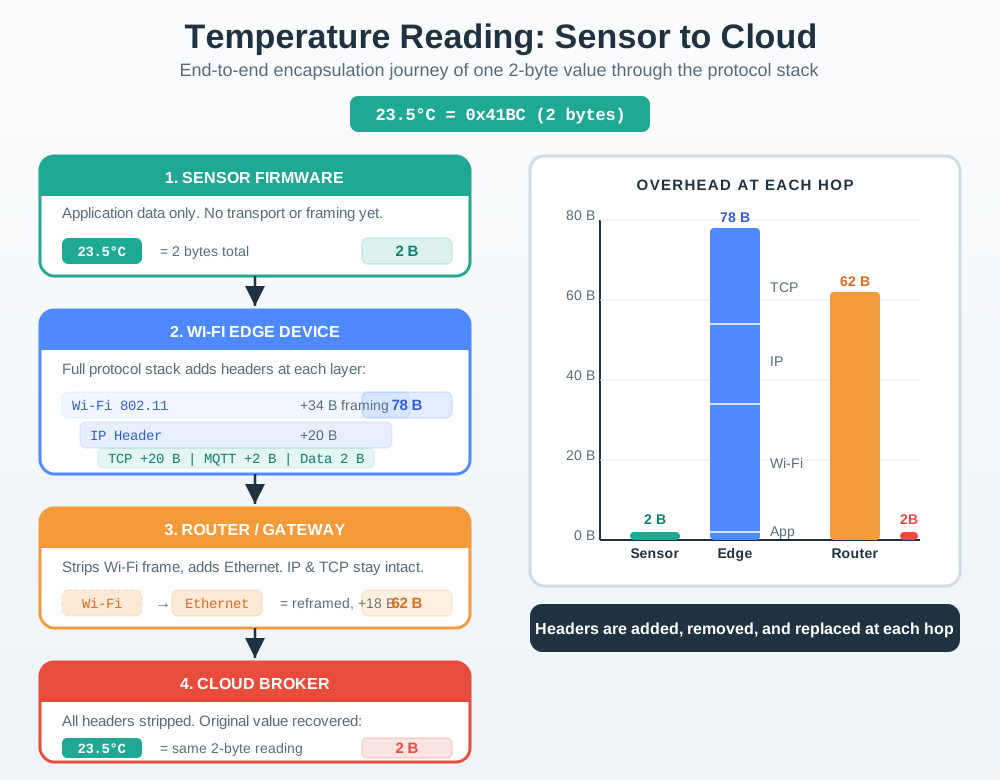
Start with the sensor firmware’s 23.5 °C value encoded as 0x41BC in 2 bytes. The application format gives those bytes meaning, then transport adds endpoint and integrity fields, the network layer adds addresses, and the link layer creates the frame used on the local medium. At the receiver, each layer removes and checks its own wrapper before delivering the original value. The figure explains why payload size alone cannot predict airtime, fragmentation, or energy. A packet budget must include every header, trailer, security field, acknowledgement, and retry used on the deployed path.
| Design check | What to decide | Why it matters |
|---|---|---|
| Payload size | How many application bytes are sent per message? | Small messages can spend more bytes on protocol overhead than on useful data. |
| Path MTU | What is the smallest frame size on the complete route? | A packet larger than the path allows must be fragmented or rejected. |
| Header stack | Which transport, network, security, adaptation, and link headers are present? | UDP, IPv6, 6LoWPAN compression, MAC security, and link trailers all consume frame space. |
| Recovery model | Who retransmits when one packet or fragment is lost? | IP fragmentation is all-or-nothing at reassembly; application chunks can often retry only the missing block. |
Read Figure 7.3 and notice that the payload block never changes; only the cost of carrying it does.
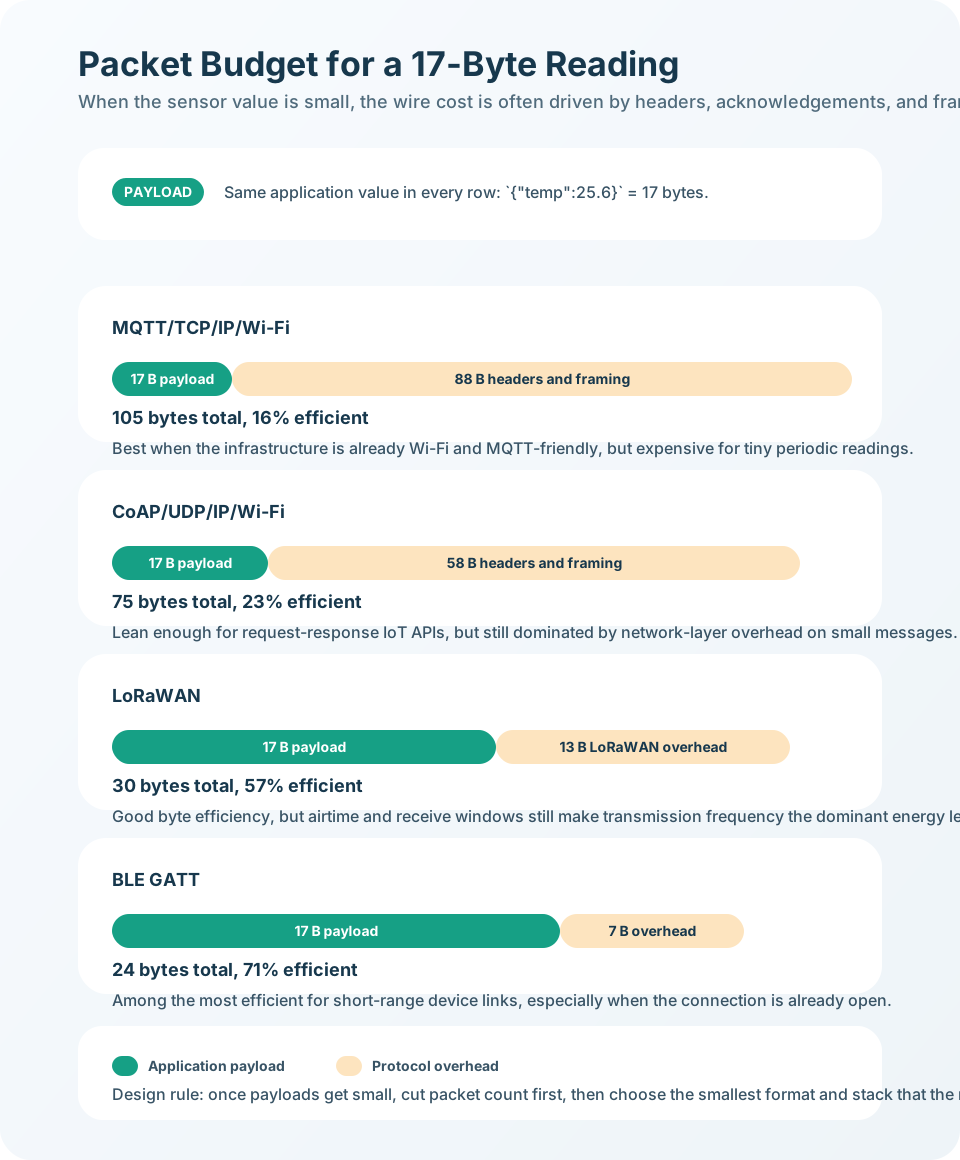
Every row in Figure 7.3 sends the same seventeen-byte reading, so the payload block is identical down the figure. What grows beside it is the framing. The top row carries the reading over a general-purpose stack and spends most of the packet on headers, leaving efficiency well under a quarter. Moving down, a leaner request-response stack recovers some of that, and the two rows built for low-power links recover much more, because their framing was designed for small messages. Read the closing rule with that in mind. The largest saving is not switching stacks at all. It is sending fewer packets, because each one pays its framing cost whether the reading changed or not.
Keep control payloads compact
Use binary fields, concise identifiers, and stable schemas for frequent telemetry. Verbose JSON can be reasonable at gateways, but it is often expensive on small radio frames.
Avoid accidental fragmentation
Check payload size after security and adaptation headers are added. If a message is near the path limit, split it deliberately at the application layer.
Log the fields that matter
Record length, protocol, source, destination, sequence or message ID, and checksum outcome. These fields explain most packet parsing and forwarding failures.
7.4 Under the Hood: Parsers Trust Fields Only After Checks
Under the hood, datagram handling is a parsing pipeline. Each layer reads the fields it owns, verifies enough structure to trust the next step, then passes the remaining payload upward or forwards the packet onward.
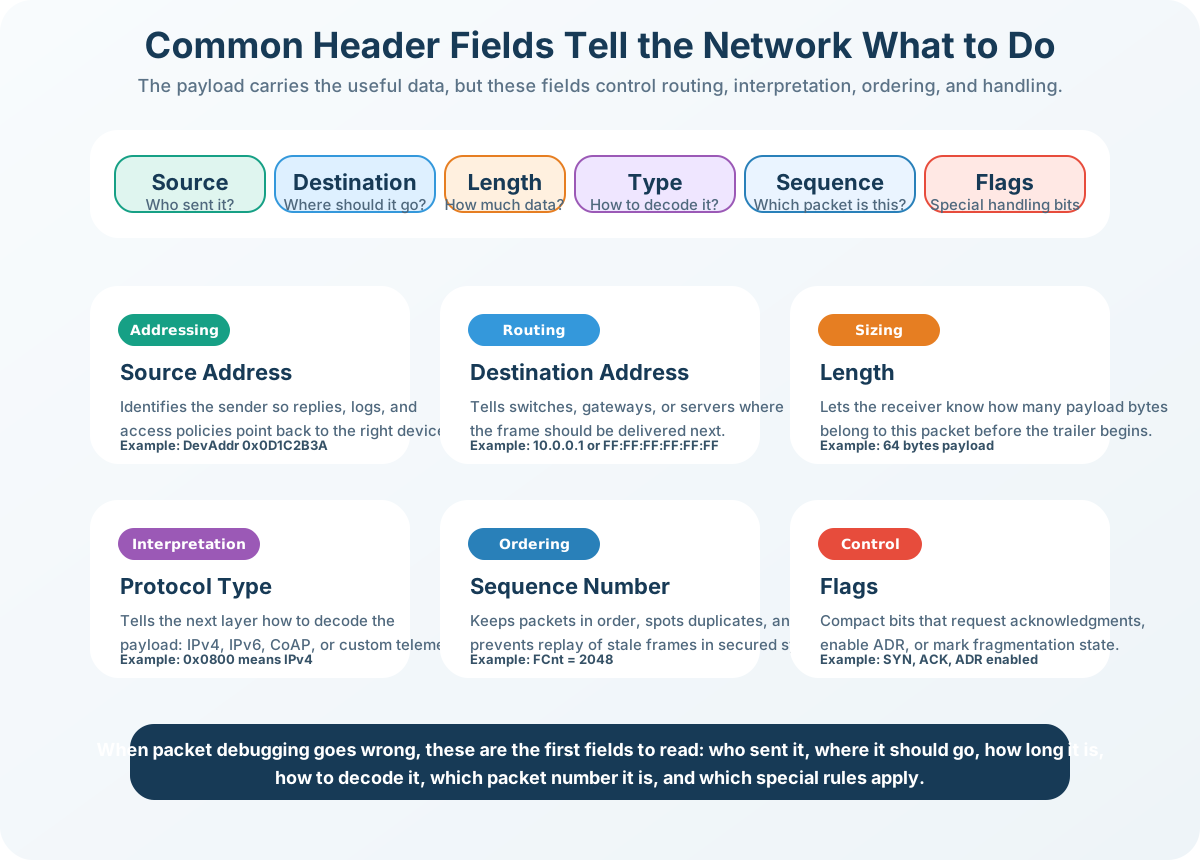
Fragmentation changes this pipeline. The receiver cannot deliver the original network-layer payload until all required fragments arrive and pass reassembly checks. That is why constrained IoT protocols often prefer smaller application chunks over one large datagram.
Robust parsers treat every length, flag, and next-header value as untrusted input until it has been checked against the bytes actually present. A declared length that exceeds the captured frame, a header chain that points past the payload, or a fragment offset that overlaps an earlier fragment should be rejected before the application sees the data. Diagnostics also depend on where the packet was captured. A checksum failure near the radio points toward corruption or framing trouble; a checksum warning on a host capture can be a hardware-offload artifact; a clean packet at the gateway but not at the service points toward forwarding, NAT, firewall, or application demultiplexing behavior.
| Failure signal | Likely cause | Engineering response |
|---|---|---|
| Length mismatch | Parser disagreement, truncation, or malformed packet | Reject the packet and log observed length versus declared length. |
| Hop limit expired | Routing loop or route churn | Inspect route advertisements, default gateways, and recent topology changes. |
| Repeated fragment timeout | Large payload on a lossy or congested constrained link | Reduce payload size, lower send rate, or move to application block transfer. |
| Checksum failure | Corruption, wrong offload assumptions, or malformed encapsulation | Verify capture point, hardware offload settings, and byte-order handling. |
7.5 Budget a Seventeen-Byte Reading
This section: Budget a Seventeen-Byte Reading — A battery sensor has only a 17-byte application reading, yet the radio must carry addresses, ports, checks, and link control around it.
A battery sensor has only a 17-byte application reading, yet the radio must carry addresses, ports, checks, and link control around it. Figure 7.1 shows the delivery fields beside the payload. Figure 7.2 then adds the wrappers in send order, while Figure 7.3 turns those wrappers into an airtime and energy decision.
With a 20-byte IPv4 header and an 8-byte UDP header, the network datagram is before link overhead. Only is application data, so 62.2% belongs to IP and UDP metadata. Sending ten readings together would make the payload 170 bytes and the same two headers only , but batching also delays the oldest reading and risks losing more readings at once.
7.5.1 Predict the Packet Trade-off
- Predict: The payload shrinks from 17 bytes to 8 bytes while headers stay at 28 bytes. Does header share rise? Check: Yes. Headers become of the datagram.
- Predict: A packet capture contains the destination address but no application schema. Can it prove what
0x41BCmeans? Check: No. Packet structure routes bytes; the payload contract gives those bytes meaning.
7.6 Summary
This section: Summary — Datagrams are the packet unit that makes packet-switched IoT networking practical.
Datagrams are the packet unit that makes packet-switched IoT networking practical. A datagram carries delivery metadata in its header and useful application data in its payload. Each layer wraps the payload it receives, so the final frame on the wire includes transport, network, adaptation, security, and link overhead.
For IoT systems, packet structure is a design constraint. Small payloads can be dominated by headers, and oversized payloads can trigger fragmentation on constrained links. Reliable designs size messages against the smallest path MTU, keep frequent telemetry compact, and add application-level sequence or message identifiers when loss, duplication, or ordering must be detected.
7.7 Key Takeaway
This section: Key Takeaway
Datagrams make each packet independently forwardable, but they do not make delivery reliable. Budget every header byte, avoid routine fragmentation, and make the application explicit about ordering, retries, and message identity.
7.8 See Also
This section: See Also
- Data Representation in Networks - How bits, bytes, encodings, and compact payloads become datagram content
- Encapsulation & PDUs - How protocol layers wrap payloads into progressively larger units
- Packet Switching & Performance - How routers forward datagrams and how queues affect delay and loss
- IPv4 Addressing Fundamentals - How address fields support forwarding decisions inside datagram headers
Find help
3 reviewed answers.
Where should I start in a module?
Open the module page from the sidebar to see its chapters in order. Use the module map to return to a topic you need.
Modules and pathsReviewed
What can I try when a project does not work?
Check the symptom, then work through the diagnostic steps. Keep the error message and the smallest example that reproduces it.
When you are stuckReviewed
How do interactive examples work?
Use the interactive guide to check how examples and simulations work before changing your project.
Interactive examples guideReviewed