8 Packet Switching and Performance
More
Depth: Practitioner
Progress saves as you read. Mark sections complete as you go; your progress appears in the sidebar.
8.1 Start With Many Small Decisions
This section: Start With Many Small Decisions — Picture an alarm waiting behind a large device update on the same link.
Prove the Urgent Packet Survives Shared Traffic
Picture an alarm waiting behind a large device update on the same link. Both flows may arrive eventually while the alarm still misses its useful deadline.
Firmware is stored device software. Label its update packets separately from alarms, status, and routine data before testing the shared path.
Send quiet, burst, full-queue, dropped-link, and recovery cases. Keep packet identity, address, hop, queue time, drop, retry, arrival, and deadline result so another person can repeat the trace.
This check covers chosen flows and loads, not every network failure. The deeper sections develop forwarding, queues, congestion, ordering, recovery, and service trade-offs.
Packet switching works because a long conversation is split into small pieces that can be forwarded independently. Each hop makes a local decision using addresses, tables, queues, and current load.
For IoT, those small decisions shape reliability and delay. A firmware update, alarm burst, or camera stream can all share a network, but only if the switching path has enough evidence to forward, queue, and recover without hiding failure.

Packet Pete
“A packet you can’t trace is a claim you can’t defend — name the address, the route, and the hop that dropped it.”
Through this chapter, Pete follows each packet hop by hop: the header picks the route; the queue, retry, or drop explains the delay.
8.2 Overview: Shared Links, Independent Packets
Packet switching breaks a message into packets and lets each packet move through the network as its own forwarding unit. A router does not need to know the full application conversation. It reads delivery fields in the packet header, chooses a next hop, and sends the packet onward.
This is why packet switching fits IoT systems. Sensors, cameras, gateways, phones, and cloud services rarely need a private circuit for every conversation. They need a shared network that can carry bursts from many devices, then free the link for the next burst.
The sharing works because most devices are not transmitting at full rate all the time. A sensor may send a few bytes each minute, a camera may burst when motion is detected, and a gateway may forward a short acknowledgement between larger uploads. Packet switching lets those bursts statistically multiplex on the same physical and logical links. It does not promise that every packet will take a different path, and it does not promise instant delivery. It promises that each packet carries enough forwarding information for the next router or gateway to make a local decision when capacity is available.
A useful mental shift is to compare a telephone exchange with a shared packet medium. In the circuit-switched model, a switchboard, crossbar, or central office selects a conversation path and holds that circuit while Alice and Bob talk. In a packet-switched or shared-link model, the medium is not reserved for one pair forever; Bob's packet can occupy the common link for a moment, carry enough addressing information to reach Alice, and then release the capacity for George, Cathy, Doug, a sensor, or a gateway to use next.
Follow the two drawn routes in Figure 8.1 to see what independent packets actually means.
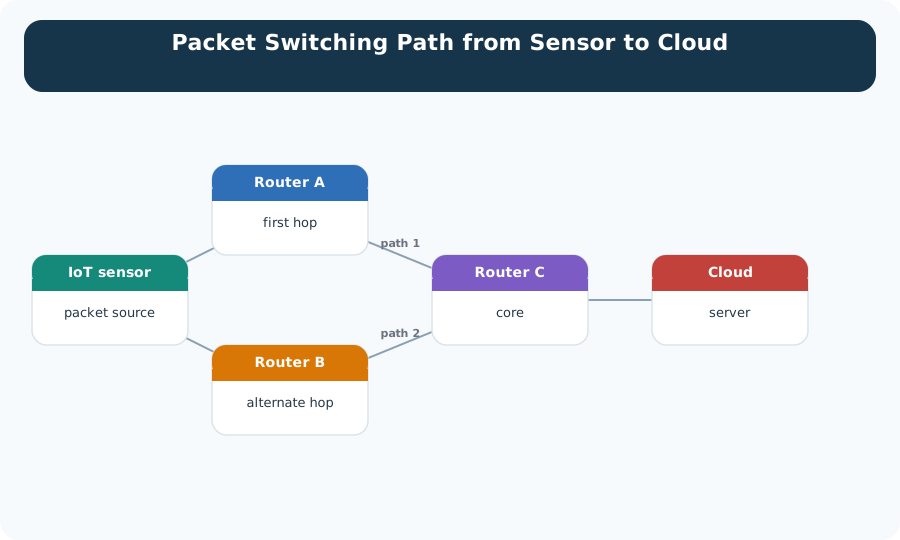
The sensor on the left is the packet source. From there, path 1 runs through router A and on to the core router and the cloud server. Path 2 leaves for router B, the alternate hop, and rejoins later. Neither route was reserved in advance. Each router chose the next hop from the packet header and from what it knew at that moment. That is the whole mechanism in Figure 8.1. Because the choice is local and repeated, two packets from the same sensor may take different hops, and no part of the network has to hold a circuit open for this sensor.
Forward by header
The packet header carries addressing and control information. Routers use that metadata to decide the next hop without opening the application payload.
Share by taking turns
Packets from different devices are interleaved on the same link. A camera frame, a thermostat reading, and an acknowledgement can all use the same path at different moments.
Recover by rerouting
Because packets are forwarded independently, later packets can use a different path when routing changes or a link becomes unavailable.
Read the slot order in Figure 8.2 to see how one link serves three flows without giving any of them a private channel.
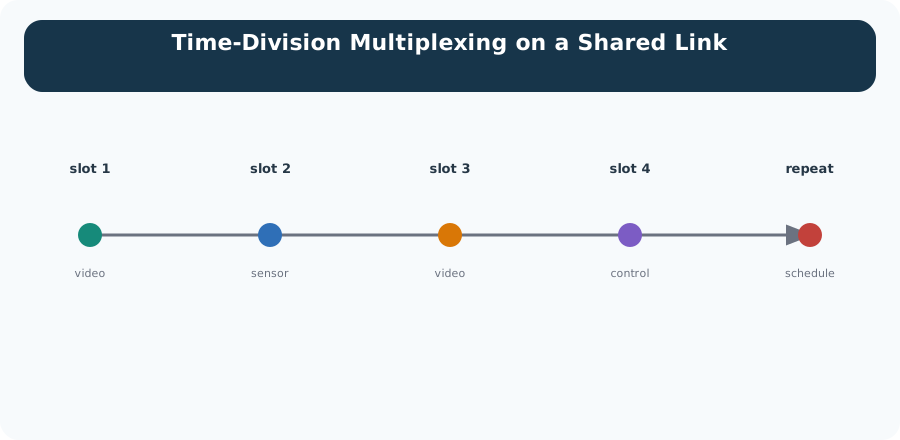
The slots run left to right. Slot one carries video, slot two a sensor reading, slot three video again, and slot four control traffic. Then the schedule repeats. Each flow gets a guaranteed turn, making the link predictable, and each flow waits for its turn, setting its delay. Video gets two slots per cycle, so its share is decided by the schedule. A flow that needs a faster answer needs a different schedule. Ordinary packet switching more often uses statistical multiplexing and queues, with no fixed slot per flow.
Compare the normal and failed-link routes in Figure 8.3 to see what independent forwarding can recover.
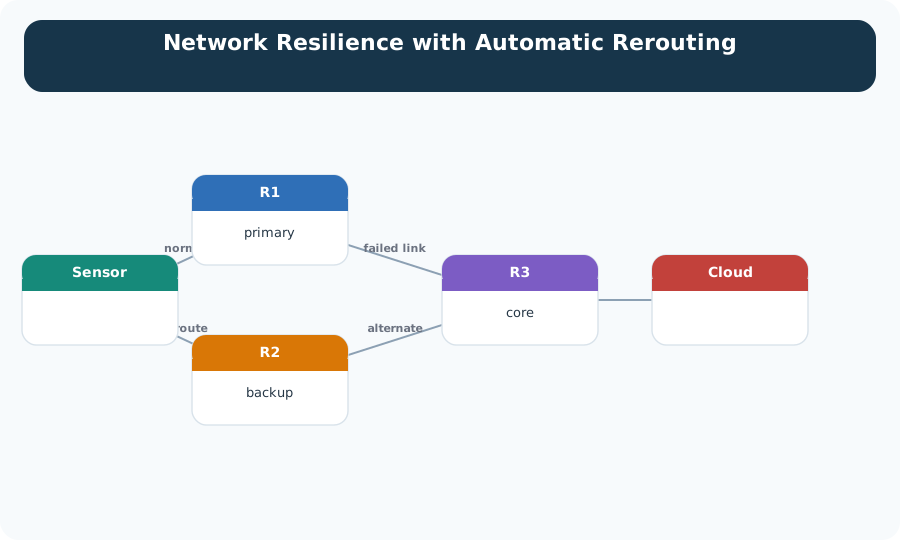
In the normal panel, forwarding state sends packets along the preferred path. When one link fails, routing updates can install an alternative and later packets take the surviving branch. The payload does not need a new end-to-end circuit for that path change. The gap between failure and convergence still matters: packets already queued or in flight may be delayed, reordered, or lost. The rerouting figure therefore supports resilience, not uninterrupted delivery. Measure detection and convergence time, then let the transport or application decide how to handle the missing and reordered packets.
IoT design habit: treat packet switching as shared infrastructure, not guaranteed private capacity. The packet may arrive, arrive late, arrive out of order, or be dropped. Application behavior should account for those outcomes.
Pete’s Delivery Slip
- Address: the header carries addressing and control; routers forward without opening the payload.
- Route: no reserved circuit — each hop decides locally, and later packets can reroute around a failed link.
- Receipt: none promised; late, out-of-order, or dropped arrivals are the application’s problem to handle.
8.3 Practitioner: Plan for Useful Capacity, Not Just Link Speed
A packet-switched link can look healthy on a spec sheet and still disappoint an IoT workload. The practical question is not only "how fast is the link?" It is "how much useful application data arrives on time while other flows, headers, retries, and queues are present?"
Use Figure 8.4 to separate nominal capacity from delivered traffic and useful application data.
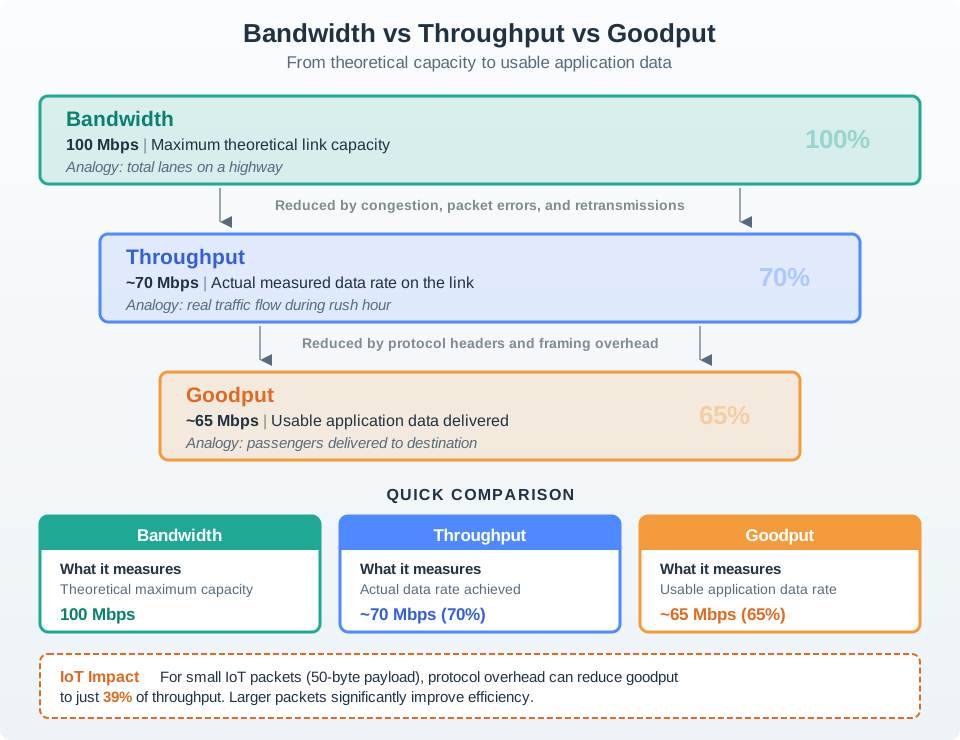
Start with bandwidth, the theoretical capacity of the link. Throughput is smaller when contention, scheduling, protocol overhead, and loss consume some of that capacity. Goodput removes headers, retransmissions, and duplicate or unusable payload, leaving the application data that advances the task. If a 10 Mbit/s link carries 8 Mbit/s of frames and only 6 Mbit/s of new payload, throughput is 80% of bandwidth and goodput is 75% of throughput. State which layer and time window produced each measurement before comparing links.
Separate small control traffic
Control commands and alarms often need predictable delay more than raw bandwidth. Give them a traffic class, topic, or path that is not buried behind bulk uploads.
Batch only when it helps
Bundling readings can improve goodput by amortizing headers, but it can also increase latency and loss impact. Match batching to the freshness requirement.
Treat queues as evidence
Rising queue depth, delayed acknowledgements, and bursty retries explain many "the link is fast but the app is slow" incidents.
Review question: when a deployment misses a timing target, ask which packets were useful, which were overhead, which were retries, and which waited in a queue. That evidence is more actionable than a bandwidth number alone.
Pete’s Delivery Slip
- Address: commands and alarms get their own traffic class, topic, or path — not buried behind bulk uploads.
- Route: the shared uplink, where camera bursts, headers, retries, and queues contend.
- Receipt: log goodput, retry counts, queue depth, and timestamped send and receive events.
8.4 Under the Hood: Forwarding Is a Series of Local Decisions
Packet switching feels end-to-end from the application view, but the network executes it as a chain of local choices. At each hop, a device receives a packet, checks enough metadata to decide what to do, waits for an output opportunity, and either forwards, marks, delays, or drops the packet.
Those local choices depend on tables and state that are smaller than the full application conversation. A router may use a forwarding table, a neighbor cache, a next-hop record, a hop-limit or TTL update, and optional quality-of-service markings. A constrained gateway may also decide whether a packet should cross from a low-power mesh into Ethernet, Wi-Fi, or a cellular backhaul. None of those devices needs to reconstruct the whole sensor workflow. They need enough header evidence to choose the next interface, enough buffer space to wait safely, and enough policy to reject traffic that should not pass.
Store-and-forward
Many devices receive the complete packet before forwarding it. That gives the device a chance to validate the frame and make a forwarding decision before the next hop sees it.
Queues create variable delay
When an output link is busy, packets wait. The wait changes with burst size, scheduling policy, retransmissions, and the traffic already ahead in the buffer.
Drops are part of the contract
If a buffer is full, a link fails, or a policy rejects a packet, the packet can be discarded. Recovery must come from transport or application behavior.
8.4.1 Edge and Core: Two Different Forwarding Styles
Not every hop makes its local decision the same way. Real networks are usually built in two layers: an edge of Ethernet switches connecting cameras, sensors, gateways, and access points at each site, and a core of IP routers carrying traffic between sites over a backbone. The two layers forward packets by different rules.
An ordinary learning Ethernet switch records source MAC addresses and their ingress ports. For an unknown unicast destination, it floods the frame out every other port in its VLAN until it learns the destination, subject to configured policy. Known unicast traffic uses the learned table. An unmanaged switch needs no configuration, so it is plug-and-play, but flooding and broadcast domains limit scaling. IP routers instead forward from a route table populated by connected, static, or learned routes; they do not flood an unknown destination across the network. Routers require routing state and configuration, but scale better between networks.
For an IoT deployment, local sensors may share a bridged Ethernet or Wi-Fi network, while traffic to another subnet or the cloud needs routing. Local networks can also be divided into routed VLANs. A device that works on one local segment may still need the correct address, gateway, policy, and route to reach another building or cloud service.
8.4.2 Router Internals: Queues, Backplane, and Planes
A network router is more than one input port and one output port. Physical interfaces receive frames, line cards hold queues and forwarding hardware, and an internal backplane or switch fabric moves packets between those interfaces. A small router may share memory or a bus for this transfer. A high-capacity chassis uses switched fabrics and line cards so several ports can move traffic at once.
Provision that fabric against offered port load rather than naming it merely “fast.” Using the source notation, backplane speedup is the aggregate backplane capacity divided by port capacity; input and output speedup compare their respective backplane-side capacities with the port capacity. Output-only queueing exposes the extreme case: if every input sends to the same output at once, the output side would need speedup equal to the number of ports to absorb the whole burst. Combined input-output queueing reduces that demand and can improve utilisation, but requires harder scheduling and backpressure logic.
A switched backplane can carry several disjoint input-output transfers at once. Some designs divide packets into fixed-size internal cells; 64 bytes is an illustrative cell size, not a universal router standard. Uniform cells simplify scheduling but may need padding or reassembly. Commercial designs place forwarding in ASICs while a route-processor CPU runs control-plane routing; a PC router uses NICs on a PCI bus and a commodity CPU for both. In a slotted chassis, line cards and the route-processor card can be replaced, including hot-swap where the platform supports it.
Read Figure 8.5 from left to right to find where a packet inside a router can be made to wait.

Packets arrive on the input interfaces, and each line has its own input queue. The backplane in the middle moves them across, and the panel beneath it names the three ways that middle can be built: shared memory, a shared bus, or a switched bus. Capacity rises along that list. Output queues then hold packets until their interface can send. The note at the foot of Figure 8.5 is the failure this section cares about. A line card holding one busy output can block packets queued behind it that were bound for free outputs, so the queue, not the link, becomes the limit.
Queue placement changes the failure mode. An input-queued router can be simple, but a packet waiting for one busy output can hold packets behind it that were destined for free outputs. That is head-of-line blocking. Output queues avoid that particular block by collecting packets at the egress side, but they require enough fabric and buffer capacity to absorb bursts. Virtual output queues split each input into per-output queues, reducing head-of-line blocking at the cost of more buffer and scheduling complexity.
Use Figure 8.6 to see why one blocked packet can delay packets headed for free outputs.

Begin with one FIFO at each input. When the packet at the head wants a busy output, it cannot move, even if the next packet wants an idle output. That second packet is trapped behind the first: head-of-line blocking couples unrelated flows and wastes available output capacity. Virtual output queues separate an input’s packets by destination, allowing the scheduler to choose an unblocked queue. The new structure does not eliminate congestion; it moves the design question toward arbitration, buffer size, fairness, and backpressure. Queue telemetry should distinguish blocked heads from a truly saturated backplane or output.
Keep the control plane and data plane separate in incident notes. The control plane computes routes, learns topology, and updates forwarding tables. The data plane applies those tables at line rate: classify, queue, forward, mark, or drop. A route processor or controller can be healthy while one output queue is congested, and an output queue can be empty while the routing table is wrong. Good evidence names which plane made the decision and where the packet waited.
Figure 8.7 separates the two jobs by how often each one runs.

Start at the top box of Figure 8.7. It runs routing protocols and updates the forwarding table as topology or policy changes. The dashed arrow shows those updates being installed in the data plane. The fabric and line cards then apply the current installed table to packets at line rate; exceptional packets can still be sent to the control processor. A healthy control plane can sit above a congested output card, and a card can forward consistently using stale or incorrect state.
Decision record for incidents: capture the path, the queue or radio state at each constrained hop, the retry behavior, and the application freshness requirement. That record connects forwarding mechanics to user-visible performance.
Pete’s Delivery Slip
- Address: the classify step reads destination, protocol, priority marking, and ingress interface.
- Route: the forwarding table maps destination to output interface and next hop, with hop metadata updated.
- Receipt: a full buffer, failed link, or policy drop discards the packet — recovery belongs to transport or application.
8.5 Summary
This section: Summary — Packet switching lets many IoT flows share the same network by forwarding independent packets instead of reserving a dedicated circuit for each conversation.
Packet switching lets many IoT flows share the same network by forwarding independent packets instead of reserving a dedicated circuit for each conversation. Routers make local forwarding decisions from packet headers, while queues, retries, overhead, and path changes determine the performance that applications actually experience.
For design reviews, separate bandwidth, throughput, goodput, delay, and jitter. A link can have enough nominal capacity and still fail a control-loop requirement if useful packets wait behind bulk traffic or spend too much of the budget on overhead and recovery.
8.6 Key Takeaway
This section: Key Takeaway
Packet switching scales IoT because shared links can carry many bursty flows, but shared links also create queueing, overhead, and loss tradeoffs. Measure useful delivered payload and timing evidence, not just nominal link speed.
8.7 See Also
This section: See Also
Find help
3 reviewed answers.
Where should I start in a module?
Open the module page from the sidebar to see its chapters in order. Use the module map to return to a topic you need.
Modules and pathsReviewed
What can I try when a project does not work?
Check the symptom, then work through the diagnostic steps. Keep the error message and the smallest example that reproduces it.
When you are stuckReviewed
How do interactive examples work?
Use the interactive guide to check how examples and simulations work before changing your project.
Interactive examples guideReviewed