5 Networking Basics: MAC
Previous: ← Introduction
Next: Hands-On Labs →
5.2 Learning Objectives
By the end of this chapter, you will be able to:
- Classify MAC protocols into contention-based, contention-free, and hybrid categories
- Compare CSMA/CA, TDMA, and ALOHA trade-offs in power consumption, latency, and scalability
- Select the appropriate MAC protocol for IoT scenarios based on traffic patterns and energy budgets
- Configure ESP32 Wi-Fi connections and interpret RSSI signal strength values
- Build Python network scanners to discover active IoT devices on a local network
5.3 MAC Protocol Classification
For Beginners: What is MAC?
MAC stands for Medium Access Control. Think of it as the “traffic rules” for how devices share a network channel:
- The Problem: Multiple devices want to send data at the same time on the same channel
- The Solution: MAC protocols provide rules so devices can take turns without interfering
- Real-World Analogy: Like people in a meeting raising hands to speak (polling), or taking turns in order (TDMA), or just talking when there’s silence (CSMA)
Different MAC protocols make different trade-offs between fairness, efficiency, and complexity.
Sensor Squad: Taking Turns to Talk!
“I keep trying to send my data, but another sensor transmits at the exact same time and our messages crash!” complained Sammy the Sensor. Max the Microcontroller explained, “That is a collision. You need MAC protocols – rules for sharing the channel.”
“There are three main approaches,” said Lila the LED. “First, CSMA/CA – Listen Before You Talk. Before transmitting, you check if the channel is quiet. If it is, go ahead. If not, wait. Wi-Fi uses this method. Second, TDMA – Time Slots. Everyone gets assigned a specific time to transmit, like a school schedule. No collisions possible, but you waste your time slot if you have nothing to send.”
“And third is the Hybrid approach,” added Max, “which combines both. Some devices get guaranteed time slots for critical data, while others share a pool of time for less urgent messages.”
Bella the Battery had strong opinions. “TDMA is my favorite because devices can sleep when it is not their time slot – huge energy savings! CSMA wastes energy because you have to keep listening to the channel. For a battery-powered sensor that sends data once an hour, TDMA lets me sleep 99.9% of the time!”
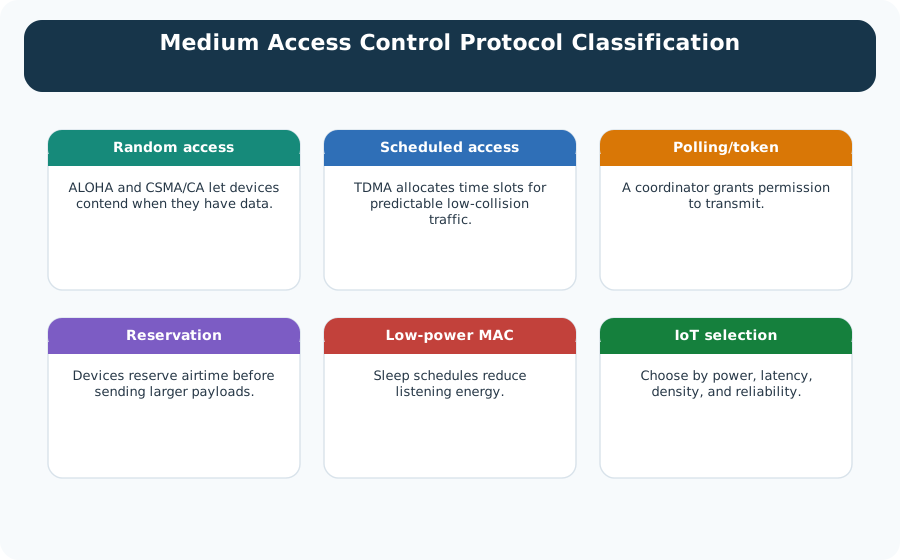
At the Data Link Layer, the Medium Access Control (MAC) sublayer determines how devices share access to the physical medium. For IoT, choosing the right MAC protocol directly impacts battery life, latency, and scalability.
5.3.1 MAC Protocol Taxonomy
Alternative View: MAC Protocol Trade-off Quadrant
This variant visualizes the same MAC protocols but arranges them by their key trade-offs: Latency Predictability vs Energy Efficiency. Different IoT use cases prioritize different quadrants.
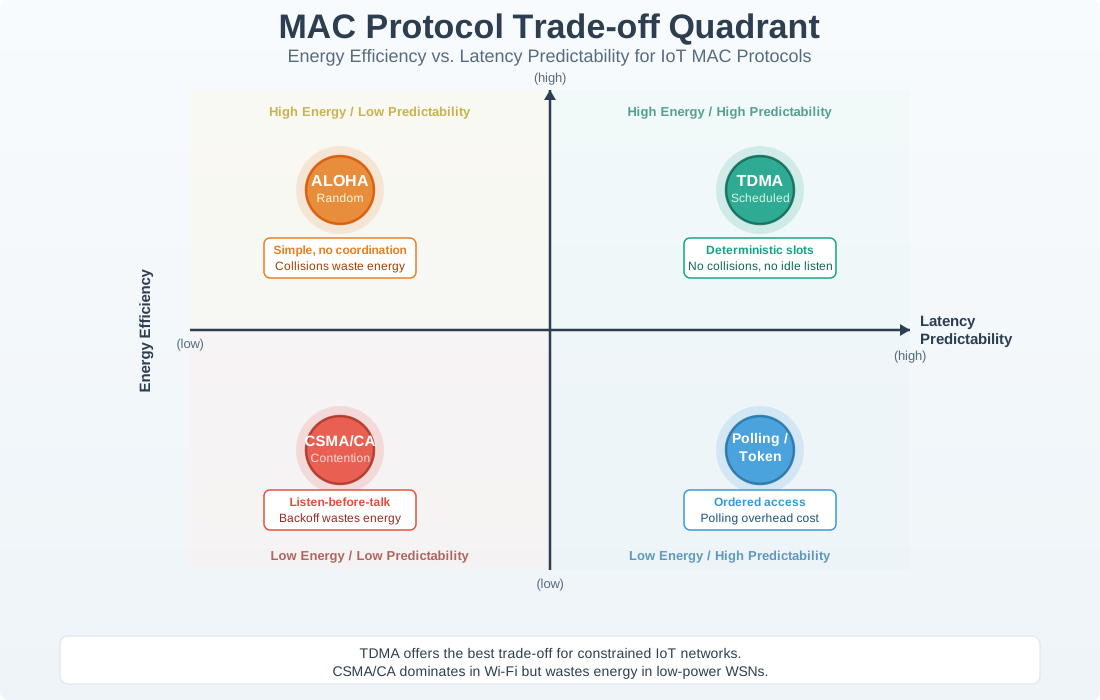
Reading the Quadrant:
- Top-Right (Best for Battery + Real-Time): TDMA excels - scheduled slots enable deep sleep AND predictable timing
- Bottom-Right (Battery Priority): ALOHA maximizes sleep time but has unpredictable collisions
- Top-Left (Latency Priority): Polling/Token ensure timing but require constant coordination
- Bottom-Left (General Purpose): CSMA/CA offers flexibility at cost of both metrics
5.3.2 MAC Protocol Performance Comparison
| Protocol | Throughput | Latency | Fairness | Energy Efficiency | Best For |
|---|---|---|---|---|---|
| ALOHA | Low (18% max) | Variable, high collisions | Poor | Low overhead | Very simple, low traffic (LoRaWAN Class A) |
| CSMA/CA | Medium (50-70%) | Variable, backoff delays | Fair | Medium | Wi-Fi, Zigbee, general wireless |
| TDMA | High (90%+) | Fixed, predictable | Excellent | Excellent (sleep in unused slots) | Scheduled IoT (Bluetooth, 802.15.4) |
| Polling | Medium | Bounded, depends on cycle | Excellent | Medium (wait for poll) | Deterministic industrial systems |
| CDMA | High | Low, simultaneous | Good | Medium (complex radio, no idle waste) | Cellular (NB-IoT, LTE-M) |
| Token Passing | High (90%+) | Bounded, token wait | Perfect | Medium | Industrial buses (CAN, Profibus) |
Key Trade-Offs
Contention-Based (Orange):
- ✅ Simple, scalable, no synchronization needed
- ❌ Variable latency, collisions waste energy
- IoT Impact: Good for bursty, unpredictable traffic (sensor alerts)
Contention-Free (Teal):
- ✅ Predictable latency, no collisions, excellent for sleep scheduling
- ❌ Requires synchronization, fixed overhead even when idle
- IoT Impact: Best for battery-powered, scheduled reporting (smart meters)
Hybrid (Gray):
- ✅ Combines benefits, adapts to traffic patterns
- ❌ More complex implementation
- IoT Impact: Industrial IoT with mixed traffic (time-critical + best-effort)
5.3.3 IoT MAC Protocol Selection Guide
Choosing MAC for Battery-Powered IoT
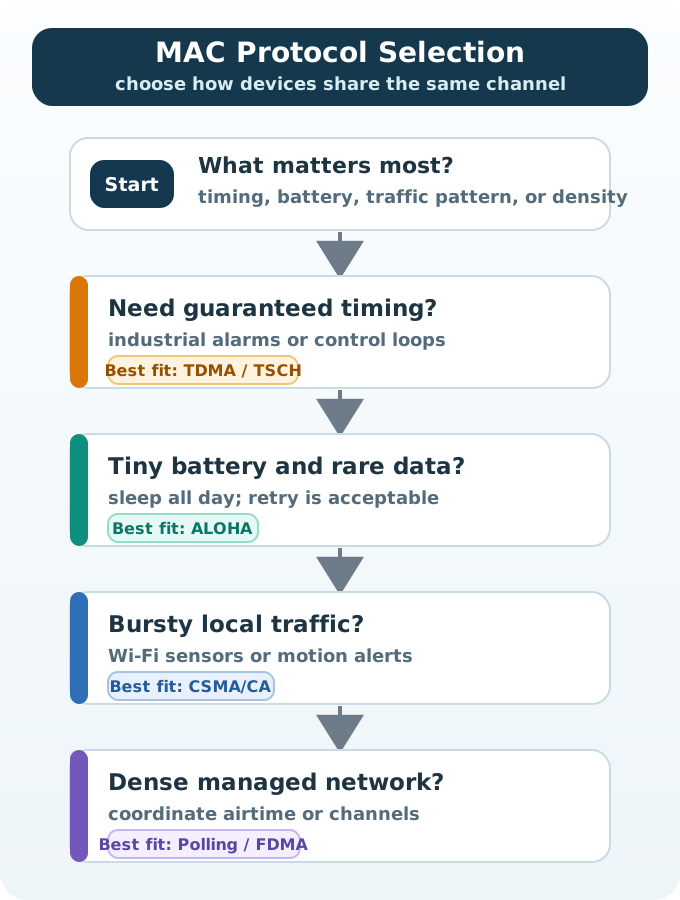
Low Traffic, Simple Devices (e.g., soil moisture sensor reporting 3x/day): - Use: ALOHA variants (LoRaWAN Class A) - Why: 99% of time sleeping, rare collisions, minimal overhead
Scheduled, Predictable Traffic (e.g., smart meter reading every 15 min): - Use: TDMA (Bluetooth, 802.15.4 beacon mode) - Why: Devices wake only for assigned slot, predictable latency
Bursty, Unpredictable Traffic (e.g., motion sensor sending alerts): - Use: CSMA/CA with aggressive sleep (Wi-Fi PSM) - Why: Flexible access, sleep when idle, listen before send reduces collisions
Real-Time, Deterministic (e.g., industrial robot control): - Use: TDMA or Polling (TSN, 802.15.4 GTS) - Why: Guaranteed latency bounds, no collisions
High Density, Interference (e.g., stadium with 10,000+ devices): - Use: CDMA or FDMA (NB-IoT, LoRa channels) - Why: Orthogonal access, simultaneous transmissions without collision
5.3.4 Protocol Selection Decision Tree
Use this decision tree to select the appropriate MAC protocol for your IoT application:
5.3.5 Real-World Examples
Wi-Fi (CSMA/CA):
- Listen for silence (carrier sense)
- Wait random backoff if busy
- Send when clear
- Acknowledgment required
- IoT Use: Smart home devices with AC power
Bluetooth LE (TDMA):
- Central device assigns 1.25ms time slots
- Peripheral transmits only in assigned slot
- Sleep between slots
- IoT Use: Wearables, sensors with predictable 1-second updates
LoRaWAN Class A (ALOHA):
- Device transmits whenever it wants
- No carrier sense (ultra-low power radio off between sends)
- Accepts ~1% packet loss due to collisions
- IoT Use: Agricultural sensors, asset tracking (battery life > 10 years)
CAN Bus (CSMA/CR - Collision Resolution):
- Listen before send (like CSMA)
- If collision, highest priority message wins
- Losers retry immediately
- IoT Use: Automotive, industrial control (deterministic, fault-tolerant)
Energy Impact Example
Scenario: 100 battery-powered sensors, 1 reading/hour
ALOHA:
- Device wakes, transmits immediately, sleeps
- Average energy: ~5 mJ/transmission
- Collision rate: ~1% (99 devices sleeping)
- Battery life: 5-10 years (dominant factor is sleep current)
CSMA/CA:
- Device wakes, listens for clear channel, sends, waits for ACK
- Average energy: ~15 mJ/transmission (3× ALOHA due to listening)
- Collision rate: <0.1%
- Battery life: 2-3 years (listening overhead significant)
TDMA:
- Device wakes only at assigned slot (e.g., slot 47 of 100)
- Average energy: ~3 mJ/transmission (no listening, no collisions)
- Collision rate: 0%
- Battery life: 10+ years (minimal overhead, perfect sleep scheduling)
Verdict: For ultra-low-power IoT with infrequent transmissions, TDMA or ALOHA variants dominate.
Putting Numbers to It
CSMA/CA backoff windows grow exponentially after collisions. The contention window starts at \(W_0\) and doubles after each failure:
\[W_i = 2^{BE_i} - 1\]
where \(BE\) (backoff exponent) increases: \(BE_i = \min(BE_{i-1} + 1, BE_{\max})\).
For IEEE 802.11 Wi-Fi with \(BE_0 = 4\) (initial window = 15 slots): - Attempt 1: \(W = 2^4 - 1 = 15\) slots - Attempt 2 (collision): \(W = 2^5 - 1 = 31\) slots - Attempt 3 (collision): \(W = 2^6 - 1 = 63\) slots - Attempt 4 (collision): \(W = 2^7 - 1 = 127\) slots - Caps at \(BE_{\max} = 10\): \(W = 2^{10} - 1 = 1023\) slots
With 9μs slot time (IEEE 802.11a/g/n/ac; 802.11b uses 20μs): \(1023 \times 9\mu s \approx 9.2 \text{ ms}\) maximum backoff.
Pure ALOHA channel utilization maxes at: \[U = G \times e^{-2G} \approx 0.184 \text{ (18.4% at optimal load)}\]
where \(G\) is offered traffic. Slotted ALOHA improves this: \[U = G \times e^{-G} \approx 0.368 \text{ (36.8% at optimal load)}\]
This is why CSMA/CA achieves 50-70% utilization – carrier sensing before transmission dramatically reduces collisions compared to blind ALOHA transmission.
Case Study: Smart Building Multi-Protocol Deployment
The decision tree above works well in theory. Here is how it plays out in a real 20-story office building with mixed IoT requirements:
| Sensor Type | Count | Traffic Pattern | Protocol Choice | Rationale |
|---|---|---|---|---|
| Temperature/humidity | 500 | 1 reading every 5 min | LoRaWAN (ALOHA) | Infrequent small packets; 10-year battery target; 1-2% loss acceptable |
| Occupancy (motion) | 200 | Event-driven alerts | Zigbee (TDMA) | Predictable wake schedule; mesh routing for floor coverage |
| Security cameras | 50 | Continuous HD video | Wi-Fi (CSMA/CA) | High bandwidth; AC-powered; bursty during motion events |
| Industrial HVAC | 20 | <10 ms control loop | Profibus (Polling) | Deterministic latency; guaranteed response time per PLC |
Each device class is matched to the protocol that fits its traffic pattern and power budget. Mixing protocols in one deployment is common and often the optimal solution – the MAC layer is invisible to the application above it.
5.4 Videos
Networking Fundamentals (Part 1)
Networking Fundamentals (Part 2)
5.5 Hands-On: Network Configuration
5.5.1 Example 1: ESP32 Wi-Fi Connection
Use the browser trace reader below first. If you later connect real hardware, collect the same evidence from the serial monitor:
| Evidence | Healthy Reading | What It Tells You |
|---|---|---|
| Association status | Connected to the intended SSID | The radio joined the access point before IP setup starts |
| IP address | Private address from the correct subnet | DHCP or static addressing is working |
| Gateway and subnet mask | Matches the local router and network plan | The device can route beyond the local Wi-Fi link |
| RSSI | Usually better than about -70 dBm for reliable IoT Wi-Fi | Weak signal causes retransmissions, latency, and battery drain |
| Reconnect behavior | Short reconnect after temporary loss | The application can survive normal wireless interruptions |
| MAC address | Stable hardware identifier | Useful for router reservations and fleet inventory |
Try It: ESP32 Wi-Fi Connection Trace
Use this browser-native trace reader to practise the same diagnosis workflow without depending on an external project link.
Learning Activities:
- Observe the MAC address – each ESP32 has a unique hardware identifier
- Check the RSSI value – how strong is the simulated signal?
- Decide whether each failure belongs to the MAC layer, IP configuration, or application layer
Understanding RSSI
RSSI (Received Signal Strength Indicator) measures Wi-Fi signal quality: - -30 dBm: Excellent (right next to router) - -67 dBm: Good (typical home use) - -70 dBm: Fair (edge of reliable range) - -80 dBm: Poor (frequent disconnections) - -90 dBm: Unusable
5.5.2 Example 2: Python Network Scanner
A scanner is useful only when it supports a troubleshooting question. Treat it as an evidence-gathering workflow, not as code to memorise:
| Step | Question to Answer | Evidence to Record |
|---|---|---|
| Identify your subnet | Which local address range should contain the IoT devices? | Your IP address, subnet mask, and gateway |
| Discover active hosts | Which addresses respond on the local network? | IP address, hostname if available, and response time |
| Classify devices | Which hosts are sensors, gateways, phones, laptops, or infrastructure? | Vendor hints, known MAC reservations, and open management pages |
| Check reachability | Can the application server or gateway reach the device reliably? | Packet loss, latency spikes, and intermittent responses |
| Respect boundaries | Are you scanning only a network you own or have permission to test? | Written scope and the exact address range scanned |
The browser tools in this chapter let you practise the same reasoning safely before using a scanner on a real network.
5.6 Knowledge Check
5.7 Review Activities
5.7.1 Review: Match MAC Protocols to Their Use Cases
5.7.2 Review: Order the CSMA/CA Transmission Steps
Common Pitfalls
1. Choosing Contention-Based MAC for Dense IoT Deployments
CSMA/CA degrades significantly above 30–40% channel utilisation. A 100-node deployment with frequent reporting can saturate the channel with retransmissions. Fix: use scheduled MAC (TDMA or TSCH) for high-density deployments with predictable traffic patterns.
2. Ignoring Clock Drift in TDMA Systems
A 10 ppm clock drift over 1 hour shifts timing by 36 ms. Without periodic resynchronisation, TDMA slots overlap and cause collisions. Fix: include beacon synchronisation with guard times wide enough to accommodate the expected clock drift over the maximum resynchronisation interval.
3. Not Considering MAC Layer Duty Cycling When Designing Sleeping Schedules
The MAC layer controls when the radio is active. A misconfigured MAC that wakes devices more often than necessary rapidly drains batteries. Fix: profile MAC-layer radio duty cycle separately from application transmit frequency to identify unexpected wakeups.
5.8 What’s Next
Having mastered MAC protocols and how devices share the wireless channel, the following chapters build on these fundamentals to explore complete networking stacks, routing strategies, and protocol-specific deployments in IoT systems.
| Topic | Chapter | Description |
|---|---|---|
| Network Layer & IP Addressing | Addressing and Subnetting | How IP addresses and subnets route packets across networks above the MAC layer |
| Physical Layer Fundamentals | Networking Basics: Introduction | Signals, modulation, and the physical foundations that MAC protocols operate on |
| Bluetooth LE MAC & Scheduling | Bluetooth Connection Establishment | TDMA slot scheduling in BLE connections, connection intervals, and latency tradeoffs |
| LoRaWAN ALOHA-Based Access | LoRaWAN Architecture | How LoRaWAN Class A/B/C devices use ALOHA variants and duty-cycle constraints |
| Zigbee TDMA & Superframes | Zigbee Protocol Stack | IEEE 802.15.4 superframe structure, guaranteed time slots, and beacon-enabled mode |
| Wi-Fi Power Save Mechanisms | Wi-Fi Power Consumption | How CSMA/CA interacts with PSM, TWT, and DTIM intervals to reduce IoT energy consumption |