12 Wi-Fi Power Consumption

More
Depth: Practitioner
Progress saves as you read. Mark sections complete as you go; your progress appears in the sidebar.
12.1 Start With the Wireless Story
This section: Start With the Wireless Story — An access point is the network unit that a Wi-Fi device joins.
An access point is the network unit that a Wi-Fi device joins. Its timing and traffic can change how long the device must stay awake.
Imagine a battery door sensor that sends one short update each hour. Most of its energy may still be spent finding the network, joining it, waiting for a reply, or staying awake for downlink traffic.
Start with a state trace. Measure sleep, wake, scan, join, send, wait, receive, retry, and return to sleep. Record current and time for each state. Repeat the trace with a weak signal, a busy access point, a lost reply, and a downlink that arrives late.
Build the budget from the full workload. A tiny sleep-current value does not prove long battery life. Longer sleep can delay commands. More retries can improve delivery while using more energy. The access point’s wake schedule can change both results.
Go deeper in two steps. The Practitioner section explains beacon timing and practical power settings. Under the Hood shows how newer wake schedules change the old beacon rhythm.
Begin with one day of device work. Count each sample, user action, alarm, check-in, update, and retry. State when the device must hear a message from the network. A daily budget needs both send and receive work.
Draw the state path for one report. Start in sleep. Wake the board. Start the radio. Find or join the network. Reach the service. Send. Wait. Read the reply. Close the work. Return to sleep. Mark any state that can repeat.
Measure current and time at the battery for every state. Keep the trace, not just one meter value. A short high peak can reset the board. A long low wait can use more energy than the brief send. Both matter.
Repeat the path with a warm join and a cold join. Use a good signal and a weak one. Lose the service reply. Let the access point change channel. Restart the network. Keep the number and length of each retry.
Check receive timing. A sleeping device cannot hear all the time. It may wake for a network notice or at a set time. Longer sleep can save energy but delay a command. Record the oldest acceptable downlink and prove it in the chosen mode.
Test a group, not only one unit. Many devices may wake after a power cut or at the same clock time. That burst can cause waits and retries. Spread work when the job allows it. Keep alarm traffic fast.
Turn the traces into a day. Add time in each state and energy used there. Add loss in the power circuit and the safe reserve. Compare the result with a real run over several days. Fix the model when the two do not agree.
Write a narrow power claim. Name the board, build, battery, network, access point, signal, workload, and test length. Recheck after any of them changes. Do not copy a sleep-current claim into a product-life claim.
Wi-Fi battery life is a sequence of states, not a single current number. Follow the device through scan, join, authenticate, transmit, listen, sleep, reconnect, and failure recovery so the power claim can be measured instead of guessed.
12.2 In 60 Seconds
This section: In 60 Seconds — Wi-Fi power consumption is not one number.
Wi-Fi power consumption is not one number. A device can spend energy while booting, scanning, joining, authenticating, getting an address, contacting a service, sending data, receiving commands, retrying after failure, waiting for buffered downlink, updating firmware, running support mode, and sleeping.
For IoT, the most important question is not “How much current does Wi-Fi use?” The useful question is: “Which states does this device enter, how long does each state last, and what evidence proves the total behavior meets the requirement?” This chapter builds the power-budget model that later chapters use for optimization and implementation decisions.

12.3 Learning Objectives
This section: Learning Objectives
By the end of this chapter, you will be able to:
- describe the Wi-Fi power states that matter in IoT reviews
- explain why connection, service, retry, and maintenance work can dominate a power budget
- separate data-sheet current values from measured device evidence
- review sleep, wake, downlink, and AP-coordination behavior without universal battery-life claims
- compare Wi-Fi with alternative network choices using requirements and evidence
- write a bounded Wi-Fi power-consumption record with limits and retest triggers
12.4 Power State Map
This section: Power State Map — Use Figure 12.1 to identify the states that belong in the review.
Use Figure 12.1 to identify the states that belong in the review.
Before averaging current, inspect Figure 12.1 to enumerate every state that contributes energy, including connection, retry, update, support, and sleep.
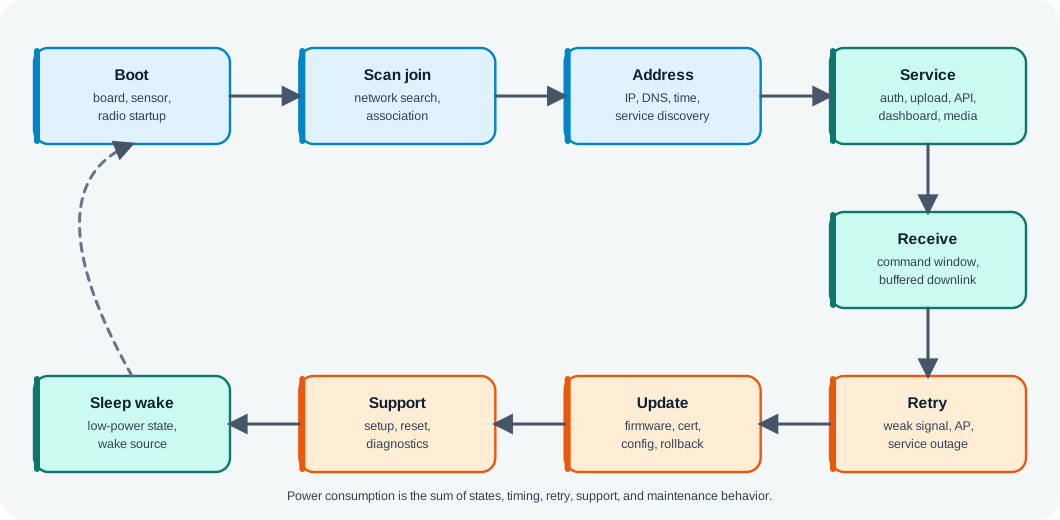
Read Figure 12.1 from boot and scan through useful service, receive windows, failures, maintenance, and sleep. This state inventory connects measured current and duration to a complete battery budget.
The map has three purposes:
- prevent the review from using only active transmit current
- make connection, service, retry, update, and support states visible
- show that power decisions must be tied to the device requirement
12.5 Power Budget Evidence Record
This section: Power Budget Evidence Record — Use Figure 12.2 to keep measurements and assumptions separate.
Use Figure 12.2 to keep measurements and assumptions separate.
Before approving a battery estimate, inspect Figure 12.2 to see which measurements and assumptions must be retained. An average current value is not meaningful without states, timing, traffic, and network conditions.
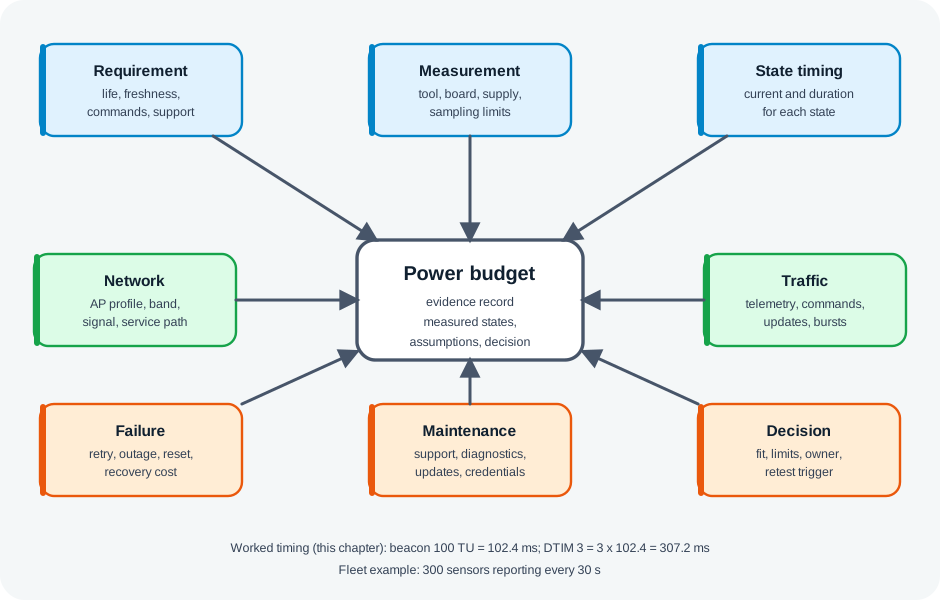
Read Figure 12.2, read from device and measurement setup through the full state inventory, then connect traffic and network context to retry, maintenance, and update behaviour. The bounded decision and retest trigger carry the calculation into operations, where firmware or coverage changes can invalidate it.
A useful record contains:
- device role, power source, battery or supply, firmware, board, sensors, and peripherals
- measurement tool, sampling limit, and test condition
- state inventory and timing for normal operation
- network context: band, channel, AP profile, signal condition, and service path
- traffic pattern, freshness requirement, command requirement, and retry behavior
- sleep, wake, buffered downlink, and support-mode behavior
- update, credential, and maintenance behavior
- assumptions, limits, decision, owner, and retest trigger
12.6 Why Wi-Fi Power Is Different
This section: Why Wi-Fi Power Is Different — Wi-Fi is built for high-throughput local networking.
Wi-Fi is built for high-throughput local networking. That can be very useful for IoT, but it means the radio and protocol stack often do more work than a tiny sensor message appears to require.
Wi-Fi power review should include:
- radio startup and calibration behavior
- scanning or known-network selection
- association and authentication
- address setup and name resolution
- service authentication or handshake
- telemetry, command, media, or diagnostic traffic
- receive windows and buffered downlink behavior
- retry after weak signal, missing AP, or service outage
- firmware, credential, or certificate update
- support access point or setup mode
- sleep and wake transitions
The active data transmission itself may be only one small part of the total energy. That is why power review must be state based.
12.7 State Inventory
This section: State Inventory — Start with the states the device actually enters.
Start with the states the device actually enters.
Include:
- cold boot
- sensor or peripheral startup
- Wi-Fi scan
- known-network join
- authentication and association
- address setup
- service discovery or name resolution
- application authentication
- telemetry upload
- command receive window
- local API or live session
- diagnostic upload
- retry and backoff
- service outage handling
- setup or support access point mode
- firmware or credential update
- sleep
- wake from sleep
- reset or reprovisioning
Do not average these states too early. A short high-current state and a long low-current state can both dominate under different workflows.
12.8 Connection And Service Cost
This section: Connection And Service Cost — Many Wi-Fi IoT devices wake, connect, perform service work, and sleep.
Many Wi-Fi IoT devices wake, connect, perform service work, and sleep. In that pattern, connection and service setup can matter more than the payload.
Review:
- whether the device scans every wake
- whether it can use a known network profile safely
- whether address setup is measured separately
- whether service authentication is included
- whether DNS, time, broker, local API, or cloud path adds meaningful time
- whether connection failure uses bounded retry and backoff
- whether the device can report or expose a failure without staying awake indefinitely
Avoid treating cached network information, static addressing, or reduced scanning as automatic wins. They can save time in one environment and create support problems in another.
12.9 Sleep And Wake Behavior
This section: Sleep And Wake Behavior — Sleep reduces energy only if it still fits the product requirement.
Sleep reduces energy only if it still fits the product requirement.
Review:
- what wakes the device
- whether the wake source is reliable
- what must happen before the radio turns on
- whether commands can wait for the next wake
- how stale data is shown
- whether missed wake windows are detected
- how the device behaves after reset
- how long maintenance or support mode can keep the device awake
A device that sleeps longer but misses alarms, commands, updates, or support events has not been optimized. It has changed the requirement.
12.10 Downlink And AP Coordination
This section: Downlink And AP Coordination — Wi-Fi power behavior can depend on the access point and network profile.
Wi-Fi power behavior can depend on the access point and network profile. Some power-save modes rely on AP buffering, beacon timing, or scheduled wake coordination. Newer features can help only when AP support, client support, firmware behavior, and application timing all align.
Review:
- whether the device needs downlink commands while idle or asleep
- whether AP buffering behavior is visible and supportable
- whether the AP profile changes sleep or wake behavior
- whether scheduled wake behavior is actually negotiated
- whether command latency remains acceptable
- what happens when the AP restarts, changes profile, or loses service
- whether support teams can observe the negotiated behavior
Use Wi-Fi 6 Features when a feature such as Target Wake Time is part of the claim.
12.11 Traffic Pattern
This section: Traffic Pattern — Power consumption follows the traffic pattern.
Power consumption follows the traffic pattern.
Review:
- periodic telemetry
- event-triggered telemetry
- alarm bursts
- local dashboard sessions
- media or snapshot upload
- command-response workflows
- diagnostics
- background logs
- firmware, certificate, or configuration updates
Traffic can often be batched, delayed, compressed, or moved to a different service pattern. Those changes are valid only when freshness, command, privacy, and support requirements still hold.
Use Wi-Fi HTTP & WebSocket when communication pattern drives power behavior.
12.12 Optimization Review Checkpoints
This section: Optimization Review Checkpoints — The merged power-optimization material adds a decision route for tuning after the first power record exists.
The merged power-optimization material adds a decision route for tuning after the first power record exists.
Check, in order:
- requirement: operating life, responsiveness, reporting freshness, command needs, and maintenance interval
- state inventory: boot, scan, join, service traffic, receive window, retry, setup, update, sleep, and wake
- measurement: current, timing, firmware, power settings, signal condition, and sampling limits
- duty cycle: wake interval, active work, batching, stale-data behavior, and failed-upload handling
- communication timing: acknowledgements, receive windows, broker or HTTP behavior, and command latency
- recovery and maintenance: wrong credentials, missing AP, weak signal, outage, reset, diagnostics, and updates
- decision: tune, retest, change the service pattern, change placement, add a gateway, or reject Wi-Fi for this device class
Do not remove security or support behavior to save energy. A lower-power state that hides command failure, update failure, or credential recovery has changed the requirement rather than optimized it.
12.13 Measurement Method
This section: Measurement Method — Power evidence should come from the real device and workflow whenever possible.
Power evidence should come from the real device and workflow whenever possible.
Record:
- board and firmware version
- sensors, displays, storage, regulators, and peripherals
- battery or supply model
- measurement tool and sampling limit
- network profile and signal condition
- service endpoint or local service used
- exact workflow under test
- state labels and timing boundaries
- any hidden assumptions
If the tool cannot see short bursts, state that limit. If a bench supply hides battery voltage behavior, state that limit. If the service was mocked, state that limit.
12.14 Comparing Wi-Fi With Other Networks
This section: Comparing Wi-Fi With Other Networks — A technology comparison is useful only when it starts from the requirement.
A technology comparison is useful only when it starts from the requirement.
Compare:
- payload size and frequency
- data freshness
- command latency
- range and installation environment
- gateway or infrastructure ownership
- security and provisioning model
- maintenance and update path
- monitoring and support needs
- power source and service interval
Wi-Fi may be a strong fit for powered, IP-heavy, local-dashboard, media, gateway, update, or diagnostic workflows. A lower-power technology may be a better fit for tiny, infrequent, long-life battery telemetry. A gateway-assisted design may be better when Wi-Fi is useful for the gateway but not for each leaf device.
Do not use a universal protocol ranking. Use a requirement and evidence record.
12.15 Worked Review: Periodic Room Sensor
This section: Worked Review: Periodic Room Sensor
Scenario:
- A room sensor wakes occasionally, reads local conditions, sends telemetry, and sleeps.
Evidence route:
- Requirement: freshness, alarm behavior, battery or maintenance expectation, and support owner.
- State inventory: boot, sensor read, scan or join, address setup, service work, upload, retry, sleep, and reset.
- Measurement: current and time for each state on the actual board.
- Traffic: batching and stale-data behavior.
- Network: signal and service reachability in the installed location.
- Decision: accept Wi-Fi only if measured power and recovery behavior meet the requirement.
12.16 Worked Review: Powered Camera
This section: Worked Review: Powered Camera
Scenario:
- A powered camera sends video or event snapshots through Wi-Fi.
Evidence route:
- Requirement: stream or snapshot behavior, privacy, support, update, and recovery.
- State inventory: boot, join, service, media traffic, diagnostics, update, retry, and restart.
- Measurement: power is still relevant for heat, supply, and backup behavior, even when battery life is not the goal.
- Traffic: sustained media and burst snapshots.
- Network: AP, backhaul, channel, and service path.
- Decision: power review focuses on supply and thermal constraints, not multi-year sleep.
12.17 Worked Review: Maintenance Tool
This section: Worked Review: Maintenance Tool
Scenario:
- A technician opens a local dashboard during a service visit.
Evidence route:
- Requirement: live session during service, clear stale state, and command feedback.
- State inventory: setup, local API or live session, commands, diagnostics, idle session, close, and reset.
- Measurement: active session duration and idle timeout.
- Traffic: local dashboard messages and diagnostic upload.
- Security: bounded support mode and authorization.
- Decision: accept only if the support workflow closes cleanly and does not leave the device awake indefinitely.
12.18 Knowledge Check: State-Based Power
This section: Knowledge Check: State-Based Power
12.19 Knowledge Check: Sleep Requirement
This section: Knowledge Check: Sleep Requirement
12.20 Match Evidence To Power Area
This section: Match Evidence To Power Area
12.21 Order The Power Review
This section: Order The Power Review
12.22 Common Mistakes
This section: Common Mistakes
Measuring only transmission:
- Problem: connection, service, retry, update, or support work may dominate the budget.
- Repair: record state-by-state current and timing.
Using a data sheet as the final budget:
- Problem: board, firmware, peripherals, AP behavior, service path, and enclosure change the result.
- Repair: measure the actual workflow and state the measurement limits.
Sleeping longer than the requirement allows:
- Problem: commands, alarms, updates, and support events are delayed or missed.
- Repair: tie sleep behavior to freshness and command requirements.
Treating scheduled wake features as magic:
- Problem: AP support, client firmware, service timing, and fallback behavior are not proven.
- Repair: verify negotiated behavior and failure handling in the intended network.
Ignoring maintenance:
- Problem: normal telemetry looks efficient, but support mode or update mode drains the battery.
- Repair: include diagnostics, updates, reset, and reprovisioning in the power record.
Ranking protocols without a requirement:
- Problem: the answer becomes a generic technology preference.
- Repair: compare network choices against the device requirement, installation, power source, and support model.
12.23 Final Checklist
This section: Final Checklist
Before accepting a Wi-Fi power-consumption claim, confirm that the record includes:
- device requirement and owner
- power source and maintenance expectation
- board, firmware, sensors, peripherals, and supply details
- measurement tool and sampling limits
- state inventory and timing
- network profile and signal context
- traffic and freshness behavior
- command and downlink behavior
- retry and recovery behavior
- update and support behavior
- assumptions and measurement limits
- technology-fit decision
- owner and retest trigger
12.24 Wi-Fi Sleeps Between Beacons
This section: Wi-Fi Sleeps Between Beacons — A Wi-Fi radio left fully on is a battery killer, so 802.11 lets a station sleep and wake only when needed.
A Wi-Fi radio left fully on is a battery killer, so 802.11 lets a station sleep and wake only when needed. The trick is the periodic beacon: the AP transmits one roughly every 100 TU (~102.4 ms) carrying a Traffic Indication Map (TIM) — a bitmap that tells each sleeping station whether the AP is holding buffered frames for it.
In power-save mode the station announces it is going to sleep; the AP then buffers that station’s downlink traffic instead of sending it. The station wakes on schedule, reads the TIM, and retrieves anything waiting. To turn that mechanism into a product claim, use Figure 12.3 to see which states, measurements, timing, and recovery evidence must follow.
Core loop: station sleeps → AP buffers its traffic → station wakes at a beacon, checks the TIM, retrieves what's waiting. Longer sleep saves power but delays downlink.
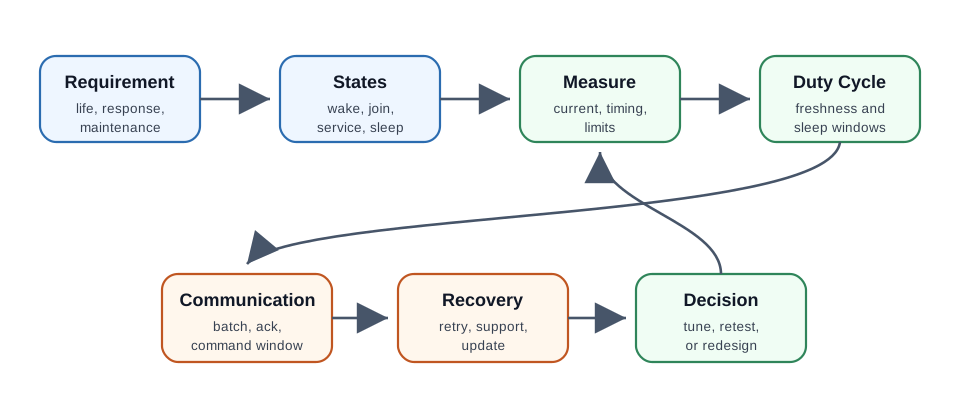
Read Figure 12.3 from the requirement through state inventory and measurement, then compare duty cycle with communication timing before testing recovery and choosing tune or redesign. The route prevents a low average-current number from hiding an unacceptable command delay or a long failure wake. It connects the beacon-and-TIM mechanism to the chapter’s acceptance record: beacon interval, DTIM period, station policy, AP profile, latency requirement, stale-state behavior, and retest trigger must describe the same tested cycle.
For an IoT review, the question is not whether power save exists. The question is whether the device can sleep, wake, receive or skip downlink, send its work, handle failure, and return to sleep without breaking the product requirement.
That is why the first acceptance record should include both the normal wake cycle and the failure wake cycle. A missing AP, buffered command, credential change, or update prompt can keep the radio awake far longer than the nominal telemetry path.
12.24.1 Overview Knowledge Check
12.25 DTIM, PS-Poll, and U-APSD
This section: DTIM, PS-Poll, and U-APSD — The DTIM period is a key knob: a station may sleep through ordinary beacons and only must wake at the DTIM beacon.
Several mechanisms build on the beacon/TIM loop, trading latency for power:
| Mechanism | How it works | Trade-off |
|---|---|---|
| Legacy PSM + PS-Poll | Wake at TIM, send a PS-Poll to pull each buffered frame | Very low power; higher polling latency |
| DTIM interval | Buffered broadcast/multicast delivered only after a DTIM beacon (every N beacons) | Larger N = more sleep, later delivery |
| U-APSD (WMM-PS) | An uplink frame triggers the AP to deliver buffered downlink | Lower latency, fewer wakeups than PS-Poll |
The DTIM period is a key knob: a station may sleep through ordinary beacons and only must wake at the DTIM beacon. With a 102.4 ms beacon interval and DTIM = 3, the station can sleep ~307 ms between mandatory wakeups — roughly tripling sleep versus DTIM = 1, at the cost of up to ~307 ms of extra downlink latency.
Worked example. A battery sensor rarely receives commands. Raising DTIM from 1 to 3 lets it sleep ~307 ms per cycle instead of ~102 ms, cutting average radio-on time and extending battery life — acceptable because a few hundred milliseconds of command latency does not matter for that device. A voice handset would keep DTIM = 1 for responsiveness. The knob is set per use case.
Practitioner evidence should separate the knob from the outcome. Record the AP beacon interval and DTIM value, whether the client actually enters power-save mode, how many buffered frames are delivered per wake, whether U-APSD trigger frames are used, and how the application behaves when a command arrives just after a sleep transition. That evidence keeps the review from treating an AP setting as a product result.
Also test the uncomfortable cases: weak signal, wrong credentials, AP restart, missing service, and a maintenance session that leaves the radio awake. Power optimization is acceptable only when retry, support, and recovery behavior are bounded.
12.25.1 Practitioner Knowledge Check
12.26 Target Wake Time Breaks the Beacon Cadence
This section: Target Wake Time Breaks the Beacon Cadence — Legacy power save uses beacon and DTIM timing to learn about buffered downlink traffic, although a client need not wake for every beacon.
Legacy power save uses beacon and DTIM timing to learn about buffered downlink traffic, although a client need not wake for every beacon. Target Wake Time (TWT) appeared in 802.11ah and is also available in 802.11ax (Wi-Fi 6). A capable station and AP can negotiate a schedule — a wake time and a service-period duration — so the station may sleep between agreed service periods when its traffic and latency requirements allow. This can reduce wakeups and contention, but it does not remove all other wake or access needs.
TWT can save power through predictable sleep periods and reduce contention if the AP staggers stations’ wake times. For a large fleet of Wi-Fi sensors, that scheduling can avoid a burst of simultaneous wakeups; actual airtime, retries, and battery life still need measurement.
Worked example. Suppose a building has 300 Wi-Fi sensors reporting every 30 seconds. If their legacy power-save wakeups cluster, they may contend in bursts. A compatible AP could negotiate staggered TWT service periods; a sensor may sleep for much of each 30-second interval, but its own reporting duration, downlink deadlines, and retries shorten that sleep. The schedule may smooth channel load; it does not guarantee an uncontended slot or maximum battery life.
The under-the-hood evidence is the negotiated schedule, not the marketing label. Capture the AP and client firmware, negotiated wake interval, service-period duration, expected traffic, actual airtime, retry count, missed wakeups, and fallback behavior when the AP does not support the requested schedule. TWT can improve a fleet only when the station, AP, firmware, and application timing all honor the same contract.
A release record should also say what invalidates the claim: AP replacement, firmware change, new command-latency requirement, different traffic cadence, roaming profile change, or a site with mixed AP support. Without those retest triggers, a good lab TWT result becomes a fragile deployment assumption.
12.26.1 Under-the-Hood Knowledge Check
12.27 Summary
This section: Summary — Wi-Fi power consumption is a state-by-state evidence problem.
Wi-Fi power consumption is a state-by-state evidence problem. Active transmit current is only one part of the record. Connection setup, service work, receive windows, retries, updates, support mode, and sleep behavior can all decide whether Wi-Fi fits the product requirement.
The strongest power review uses measured evidence from the real device workflow and ends with a bounded decision: accept Wi-Fi for the defined scope, tune the workflow, change the communication pattern, add a gateway, choose another network, or retest after a named change.
12.28 Key Takeaway
This section: Key Takeaway — Wi-Fi Power Consumption should evaluate Wi-Fi power choices against sleep states, association cost, traffic pattern, latency, battery budget, and deployment evidence.
Wi-Fi Power Consumption should evaluate Wi-Fi power choices against sleep states, association cost, traffic pattern, latency, battery budget, and deployment evidence.
12.29 What’s Next
This section: What’s Next — Use Wi-Fi for IoT Overview when the basic connectivity fit needs review.
Use Wi-Fi for IoT Overview when the basic connectivity fit needs review.
Use Wi-Fi HTTP & WebSocket when communication pattern drives power behavior.
Use Wi-Fi 6 Features when scheduled wake or other Wi-Fi 6 feature claims are part of the review.
Use Wi-Fi Deployment Planning when power behavior must be included in a broader site and release plan.
Find help
3 reviewed answers.
Where should I start in a module?
Open the module page from the sidebar to see its chapters in order. Use the module map to return to a topic you need.
Modules and pathsReviewed
What can I try when a project does not work?
Check the symptom, then work through the diagnostic steps. Keep the error message and the smallest example that reproduces it.
When you are stuckReviewed
How do interactive examples work?
Use the interactive guide to check how examples and simulations work before changing your project.
Interactive examples guideReviewed