2 Choosing a Wireless Technology

More
Depth: Practitioner
Progress saves as you read. Mark sections complete as you go; your progress appears in the sidebar.
2.1 Start With the Wireless Story
This section: Start With the Wireless Story — Bandwidth is how much data a link can carry in a set time.
Bandwidth is how much data a link can carry in a set time. A gateway is a device that passes data between networks. A protocol is a shared set of rules for messages. These terms help describe a link, but they do not pick the right radio by themselves.
IEEE 802.15.4 is a standard for low-rate radio links used by small devices. Radio-frequency identification (RFID) is a way to read a tag by radio. Near-field communication (NFC) is a very short-range link often used by a tap. Ultra-wideband (UWB) is a radio method that can measure short ranges very well. Zigbee is a set of rules for low-power devices on an IEEE 802.15.4 link.
Picture three jobs. A card needs a tap from a few centimetres away. A room sensor needs years of battery life. A vehicle tracker must report across a wide area. No one radio is best for all three.
Start with range, data size, wait time, power, movement, and who owns the network. Then check walls, metal, radio noise, antenna position, fees, and local rules. Test the device in the case and place where it will run.
A mixed product may need more than one link. A tag may use NFC for setup and another radio for daily data. A gateway may join a local link to the internet. Give each link a clear job and owner.
This Overview groups radios by common job and reach. Real links fade with place, time, traffic, and antenna design. The Practitioner section compares those effects. Under the Hood works through waves, spectrum, link proof, and limits.
Use five plain questions for each job. How far must it reach? How much data must it send? How long may it wait? Where does its power come from? Who owns the network? Test the short list before comparing names.
Then test the real path. Put the radio in its case. Place it near the body, wall, metal, or ground it will face. Send the real message at the real rate. Keep loss, delay, power, and recovery proof.
Begin with the device job, not the radio label. A tracker, meter, gateway, or handheld each needs a different mix of range, bandwidth, ownership, battery life, and approval evidence, so the wireless choice starts by naming what the device must prove in the field.
2.2 Begin With the Device Job
This section: Begin With the Device Job — Mobile wireless technology selection is not a popularity contest between Wi-Fi, Bluetooth LE, IEEE 802.15.4 networks, LPWAN, cellular, RFID, NFC, UWB, ANT/ANT+, Zigbee, or Thread.
Mobile wireless technology selection is not a popularity contest between Wi-Fi, Bluetooth LE, IEEE 802.15.4 networks, LPWAN, cellular, RFID, NFC, UWB, ANT/ANT+, Zigbee, or Thread. A defensible choice starts with the device job, then checks the radio environment, network ownership, power and reachability needs, validation evidence, and retest triggers.
The strongest early question is not “which radio is best?” It is “what must this device class prove before the wireless path can be approved?” Use Figure 2.1 to place the device job among interaction ranges and ownership models before attaching a protocol name to it.
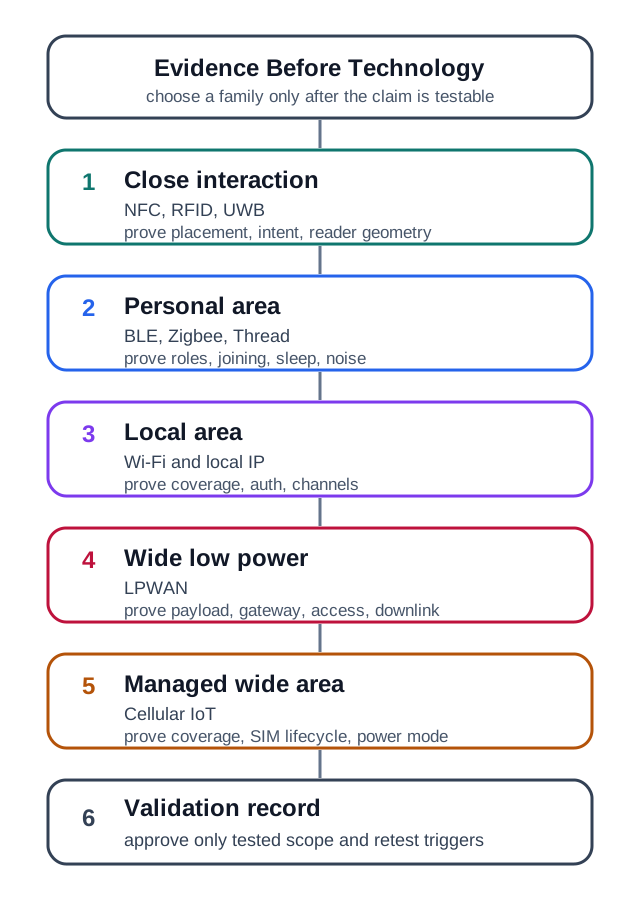
Read Figure 2.1 from close interaction through personal-area and local-area choices to wide low-power and managed wide-area service. As reach and infrastructure ownership change, so do the required proofs: reader placement for a tap, joining and sleep timing nearby, coverage and credentials on a LAN, or service lifecycle and downlink expectations across a managed wide area. The validation record at the end connects every family back to the opening rule: the device job and evidence boundary choose the shortlist, not popularity.
ANT and ANT+ belong in this comparison as narrow personal-area choices, not as generic low-power replacements. They can fit sport, fitness, and equipment telemetry when the device profile, hub or phone support, pairing policy, coexistence with BLE or Wi-Fi, and battery evidence are known. If the receiving ecosystem is uncertain, choose a more widely supported family or prove the bridge path before approving the radio label.
Write that evidence before naming the winner. “Use BLE” is not a decision until the reviewer knows range, body placement, phone or gateway availability, bonding or provisioning rules, and battery budget. “Use cellular” is not a decision until the reviewer knows operator support, profile lifecycle, antenna/enclosure state, traffic pattern, downlink timing, and support ownership. A good shortlist states which family is plausible, what must be measured next, and what would make the family unacceptable.
Write the deployment claim so it can be tested, collect device and site evidence, shortlist candidate families, and approve only the conditions that were actually validated.
2.2.1 The First Review Split
2.2.2 Device Class
Name the role, payload, update interval, command need, mobility pattern, power source, enclosure, and expected lifetime.
2.2.3 Installed Path
Check coverage, interference, antenna position, network policy, gateway or service ownership, and recovery behavior in representative locations.
2.2.4 Bounded Decision
Approve the family, approve it with limits, request more evidence, or redesign with explicit exclusions and retest triggers.
2.2.5 Useful Family Intuition
- Close interaction: NFC and many RFID designs fit intentional tap, badge, inventory, and reader-style workflows when placement and data scope are clear.
- Personal and local networks: Bluetooth LE, ANT/ANT+ device profiles, plus Zigbee, Thread, and other IEEE 802.15.4-based designs, can fit nearby sensors, wearables, controls, and building devices when commissioning, sleepy behavior, interference, and maintenance are proven.
- Local-area networks: Wi-Fi can fit devices that benefit from IP connectivity, local services, richer traffic, diagnostics, or updates when power, coverage, security, and support ownership are validated.
- Wide-area services: LPWAN and cellular families can fit wider reachability needs, but coverage maps, service plans, gateway placement, downlink behavior, SIM lifecycle, and support ownership still need evidence.
2.2.6 Telephony Goes Wireless
The older question “why would anyone walk around with a phone?” is a useful requirements test. A cordless phone proved the first mobility job at room or home scale: the handset could leave the wall jack, but the base station still anchored the service. Early consumer cordless designs used separated allocations such as 27 MHz, 49 MHz, and later 900 MHz, so the review problem was local interference, handset range, battery, and whether the base could reach the wired telephone line. That is a very different claim from mobile service across a city.
Cellular networks changed the proof. Mobility became a coverage and handoff problem built from many base stations, not one loud transmitter. Hexagon diagrams are planning shorthand for cells, frequency reuse, and neighboring coverage; the real site may be a tower, rooftop, or camouflaged pole, and the approved design still depends on measured signal, capacity, mobility, and service ownership. The AT&T lesson for IoT is to treat wireless as a new operating model, not merely a cordless version of an older wired product.
Once telephony went cellular, the standards themselves started evolving — and the vocabulary a wireless review meets today (TDMA, CDMA, OFDM, MIMO) is the residue of that evolution. Figure 2.2 arranges the family as a transit map so the acronyms stop floating free.

Two things in Figure 2.2 matter more than any single acronym. First, radio access methods changed across generations: GSM used TDMA, CDMA One already used code division in 2G, 3G included several CDMA-based paths, and LTE introduced OFDMA and MIMO. Second, follow the amber side line: CDMA One and CDMA2000 were a rival standards family; operators later moved to LTE, but the CDMA2000 radio standard did not merge into LTE. WiMAX remained outside 3GPP. For a device-class review, NB-IoT and LTE-M are LTE-based options that operators may run alongside 5G NR, so hardware life depends on the actual operator roadmap.
2.2.7 Overview Knowledge Check
2.3 Build the Wireless Fit Record
This section: Build the Wireless Fit Record — A practical review record turns “use this wireless technology” into evidence that another reviewer can inspect.
A practical review record turns “use this wireless technology” into evidence that another reviewer can inspect. It should show what the device must do, where it operates, who owns the network path, what validation was run, and what change would invalidate the approval.
Use the same record for early design, pilot review, and failure diagnosis. Early design may list assumptions and required tests. A pilot should replace assumptions with installed measurements, join or reconnect observations, coverage notes, power traces, support procedures, and fault records.
2.3.1 Worked Review: Building Sensor Retrofit
A building team wants every new sensor to use the same Wi-Fi network used by laptops. Some devices are powered, some are battery powered, and several are mounted inside metal equipment rooms and riser cabinets. The correct response is not automatic approval or automatic rejection. The reviewer should split the device classes, check installed coverage and policy, and validate commissioning, segmentation, power, replacement, and fault response in representative spaces.
2.3.2 Worked Review: Moving Service Asset
A city maintenance tool sends small messages and moves through depots, streets, and service vehicles. Reusing the low-power network that worked for stationary sensors is not proven until route coverage, reconnect behavior, charging workflow, command reachability, storage state, and service ownership are tested for the moving device class.
2.3.3 Practitioner Knowledge Check
2.4 Why Technology Labels Mislead
This section: Why Technology Labels Mislead — Wireless labels hide several different layers of evidence.
Wireless labels hide several different layers of evidence. A device can have a suitable radio family and still fail because the antenna is shadowed by the enclosure, the network owner cannot rotate credentials safely, downlink behavior is too constrained for updates, the gateway backhaul is unreliable, or the power budget ignores reconnect and support states.
The under-the-hood review separates physical path, link behavior, network service, application workflow, and operational ownership. That separation keeps a failure report from collapsing into a vague statement such as “the wireless network is bad.”
2.4.1 Diagnosis Pattern
- Preserve the symptom. Record device state, location, enclosure, owner, firmware, traffic, power state, and recent changes.
- Name the first unproven boundary. Do not jump from a failed message directly to a new wireless family.
- Change one variable at a time. Mixing antenna, firmware, gateway, credentials, and server changes makes evidence hard to trust.
- Update the decision record. Mark what is approved, what is excluded, and which future change requires retest.
2.4.2 Under-the-Hood Knowledge Check
2.5 Summary
This section: Summary
- Mobile wireless selection starts with the device class and deployment claim, not with a favorite technology family.
- A defensible recommendation records application needs, installed radio conditions, network ownership, validation evidence, and retest triggers.
- Family intuition is useful only when it is tied to proof: close interaction, local networking, LAN integration, LPWAN, and cellular each need different evidence.
- Telephony’s move from cordless handsets to cellular service shows why mobility changes the evidence from local range to coverage, handoff, frequency reuse, and service ownership.
- Mixed deployments often need multiple wireless paths under shared security, monitoring, ownership, and maintenance governance.
- Troubleshooting is faster when failures are routed to a boundary: physical path, link behavior, network service, application workflow, or operations ownership.
Approve a mobile wireless technology only for the device class, location, owner model, firmware, enclosure, traffic pattern, and recovery behavior that were actually validated.
2.6 See Also
This section: See Also
Mobile Wireless Design Considerations
Turn the technology fit record into a validation plan for coverage, traffic, ownership, and maintenance.
Electromagnetic Waves and Spectrum
Connect frequency, wavelength, antenna placement, obstacles, and propagation behavior to the installed path.
IoT Wireless Frequency Bands
Review band choice, coexistence, regional constraints, and placement evidence before approving a radio path.
Propagation and Licensing
Check how licensed, unlicensed, and managed service assumptions shape coverage, operations, and retest scope.
Find help
3 reviewed answers.
Where should I start in a module?
Open the module page from the sidebar to see its chapters in order. Use the module map to return to a topic you need.
Modules and pathsReviewed
What can I try when a project does not work?
Check the symptom, then work through the diagnostic steps. Keep the error message and the smallest example that reproduces it.
When you are stuckReviewed
How do interactive examples work?
Use the interactive guide to check how examples and simulations work before changing your project.
Interactive examples guideReviewed