Practice: Cellular Modem Bring-Up
More
Depth: Practitioner
Progress saves as you read. Mark sections complete as you go; your progress appears in the sidebar.
This lab belongs to Propagation and Link Budgets
Required Equipment And Service — Gather This First
This section: Required Equipment And Service — Gather This First — Picture a field device that must send a small status report where no local network is available.
Prove One Mobile Data Path
Picture a field device that must send a small status report where no local network is available. A cellular modem gives the device a path through a mobile network. The lab is successful only when you can prove the whole path, not when one light turns green.
Start with the service plan, antenna, power source, and a safe test message. Check that the modem can see the network. Check that it can join. Send one known message. Confirm that the far end received the same value and time.
Record the site, signal result, network state, data used, and any delay. Then remove one condition at a time. Try weak signal. Restart the modem. Break and restore the link. Watch how long it takes to return and whether any message is lost or sent twice.
The simple test does not prove that every site or network will behave the same way. Weather, walls, load, plan limits, and antenna placement can change the result.
Use Practitioner for test records and recovery choices. Use Under the Hood for radio, join, data, and timing details.
A universal asynchronous receiver transmitter (UART) is a simple serial link between the modem and the test computer.
This is a hardware lab with active cellular service. Before budgeting the 90 minutes, gather and verify every item below:
- a cellular modem development board with an exposed USB or UART command port (for example, an LTE-M/NB-IoT board supported by your local operator)
- the board’s data-capable USB cable or a 3.3 V USB-to-UART adapter, as required by its manual
- an antenna matched to both the modem connector and the operator bands used at the test location
- an activated SIM, eSIM, or operator test profile with a known APN and remaining service entitlement
- a stable supply sized to the modem vendor’s stated transmit-current peak; do not rely on an MCU board’s idle-current rating
- a laptop with a serial terminal, the modem command manual, and permission to use the chosen cellular service
- a test location with coverage for the selected operator and radio access technology
- a local notebook or log file for the transcript (never record SIM secrets, keys, or private identifiers)
If any required hardware or active service is unavailable, use the printed transcript examples only as a guided review. That review is not a completed hands-on bring-up.
Hands-on time after the checklist is satisfied: approximately 90 minutes.
Start With the Wireless Story
This section: Start With the Wireless Story — Picture a modem on a bench that answers one command but will not send data.
Picture a modem on a bench that answers one command but will not send data. The fault may sit in power, the SIM, the radio link, or the network.
First, prove one layer at a time. Save the command, reply, place, and power state before moving to the next check.
A quick success can hide weak signal or a supply dip. A long log can also hide the one step that failed, so keep each claim tied to clear proof.
The modem guide sets command expectations; the live service test shows whether attach, data transfer, and recovery work here.
Use the Practitioner sections to run and record the bring-up.
Plain check
- Check the board name. Check its power need. Check the cable. Check the antenna fit.
- Check the service plan. Check the test place. Check local coverage. Keep secrets out of logs.
- Power the board first. Watch the first boot. Note any reset. Save the supply state.
- Open the serial link. Send one safe command. Save the reply. Do not skip this proof.
- Check the card state. Check the profile state. Save the result. Stop if identity fails.
- Check for radio signal. Save the raw value. Note the test place. Note the antenna state.
- Check network join next. Wait for a clear state. Save each change. Mark the final state.
- Try the data path. Save each command. Save each reply. Mark where it stops.
- Watch power during join. Watch power during send. Note each reset. Retest with safe supply.
- Change one cause only. Run the same steps. Compare the two logs. Keep both test states.
- Use Practitioner to repeat. Use deeper radio checks. Recheck after each change. Do not overclaim.
Treat modem bring-up as a custody trail. The device must show SIM state, network registration, signal quality, attach behavior, data service, power draw, and failure notes before a successful AT command session can be trusted as deployment evidence.
In 60 Seconds
This section: In 60 Seconds — A cellular modem lab should prove one layer at a time.
A cellular modem lab should prove one layer at a time. Do not start with cloud publishing, sockets, or application code. First prove that the modem is powered, the serial link works, the SIM or profile is usable, signal is present, network registration completes, and a data context can be created when the selected module and network support it.
The useful lab output is an evidence packet:
- modem identity, firmware, SIM or profile state, and region/operator context
- exact command transcript for the bring-up sequence
- signal and registration observations from representative locations
- power-rail or reset observations during attach and transmit attempts
- failure notes with the layer that failed and the next action
- retest triggers after antenna, SIM, firmware, power, enclosure, or location changes
The lab is successful when it explains what was proven, what was not proven, and what evidence is needed before production use.

Learning Objectives
This section: Learning Objectives
By the end of this lab, you will be able to:
- run a cellular modem bring-up sequence without skipping dependency checks
- read AT-command responses as evidence for serial, SIM, signal, registration, and data readiness
- separate UART, SIM, antenna, coverage, power, registration, and data-session failures
- capture a compact lab record that another reviewer can repeat
- identify when a modem result is a hardware, configuration, network, or site problem
- define retest triggers for modem firmware, antenna, power, SIM/profile, and location changes
Lab Scope
This section: Lab Scope — This lab is about bring-up evidence.
This lab is about bring-up evidence. It is not a vendor-specific command reference and it is not a full production firmware tutorial.
Use the command names as patterns, not as a promise that every modem uses the same syntax. Most cellular modules support basic AT-style commands, but data-session, socket, power-saving, and diagnostic commands vary by module, firmware, network, and service type.
The lab should stay bounded to:
- modem responsiveness over the serial link
- SIM, eSIM, or profile readiness
- signal and antenna observations
- registration state and operator context
- packet-service or data-context readiness
- power stability and reset behavior during active modem work
- a record of failures and retest needs
If these checks are not clean, higher-level MQTT, HTTP, TLS, or cloud debugging will waste time.
Bring-Up Evidence Flow
This section: Bring-Up Evidence Flow — Before issuing application commands, inspect Figure 1 to stage the modem bring-up from physical communication to usable service.
Before issuing application commands, inspect Figure 1 to stage the modem bring-up from physical communication to usable service.
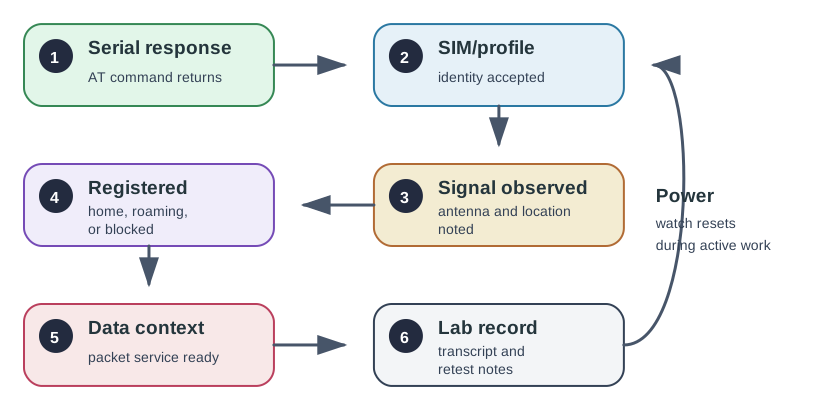
Read Figure 1 from power and UART response through SIM, registration, context activation, address assignment, and endpoint reachability. Each checkpoint supplies evidence for the next, making failures local and diagnosable.
Use Figure 1 as the lab route. Each step should either produce evidence or stop with a clear failure note.
Record The Equipment And Setup
This section: Record The Equipment And Setup — Before connecting the serial terminal, inspect Figure 2 to anchor the written inventory in the physical modem.
Using the equipment gathered in the up-front checklist, record the exact configuration that lets you observe the modem directly:
- cellular modem module or development board
- compatible antenna for the target band
- SIM, eSIM, or test profile with known service status
- stable power supply sized for modem activity, not only MCU idle current
- USB-to-UART adapter, MCU serial bridge, or terminal connection
- module documentation for command syntax and status meanings
- notebook or log file for command transcripts and observations
Before connecting the serial terminal, inspect Figure 2 to anchor the written inventory in the physical modem. The photo is useful because antenna, supply, and host connections are separate evidence boundaries even when they share one small board.

In Figure 2, start with the modem board, then locate its antenna connector and host interface. The board alone does not prove a usable radio path: it must be paired with a band-matched antenna, an active service profile, and a supply that survives transmit bursts. That ordered inspection leads directly to the setup record below, where each dependency is named without exposing credentials.
Photo credit: Ordercrazy, CC0.

Before sending commands, record:
- module model, firmware version if available, and configured radio access technology
- antenna type and connection state
- SIM/profile identifier state without exposing secrets
- region, operator, and expected service type
- power source, cable, regulator, and any bulk capacitance or battery support
- test location and whether it is indoor, outdoor, shielded, or near known interference
Do not publish private identifiers, SIM numbers, keys, APNs, or credentials in learner-facing records.
AT Command Evidence
This section: AT Command Evidence
The bring-up sequence should prove dependencies in order:
Step 1: Prove serial communication
- On your own hardware, open the connected modem’s serial terminal at the rate and line ending in its manual.
- Send
ATand save the raw command and response with a timestamp and module identity. - The chapter’s illustrative transcript below shows
TX ATfollowed byRX OK; it was not run here. - If the modem does not answer, check power, UART level, port, rate, and cable before any radio diagnosis.
- Record a failed serial check as blocked; later registration commands would have no trustworthy basis.
Step 2: Check the SIM or profile
- On your own hardware, issue the module’s documented SIM or eSIM readiness query in the same terminal.
- The chapter’s example uses
AT+CPIN?and shows+CPIN: READY; this is expected example text, not a captured response here. - Record ready, PIN-needed, absent, or error state without publishing identifiers or credentials.
- Stop if the profile is unavailable; a signal reading cannot establish service authorization.
- Keep the command syntax and firmware version so the review can interpret the result correctly.
Step 3: Observe signal and antenna state
- On your own hardware, query signal with the command documented for the selected radio technology.
- The example below uses
AT+CSQand a placeholder+CSQ: <rssi>,<ber>; no signal value was measured here. - Record antenna connection, band match, location, enclosure, and the raw returned value together.
- Treat signal as a relative indicator until the module manual maps its value to the active service.
- Repeat after antenna or enclosure changes, because a bench reading does not prove installed performance.
Step 4: Review registration state
- On your own hardware, query the registration domain that matches the service, such as the example
AT+CEREG?. - Log repeated replies with timestamps until they settle; the chapter’s
<mode>,<status>is a placeholder, not a result. - Interpret home, roaming, searching, denied, and unknown using the module documentation.
- Keep SIM readiness, antenna state, operator, and location beside every registration observation.
- A searching modem remains provisional even if the serial and signal checks succeeded.
Step 5: Check attach and data context
- On your own hardware, use the module manual’s packet-service or context query after registration is clean.
- Record context state and assigned address if exposed, redacting private values in shared evidence.
- If attach fails, save the exact response and diagnose service, band, coverage, and profile before proceeding.
- The expected result is an active context, but this chapter contains no captured attach response to quote.
- Do not treat a registration response alone as proof that packet data is ready.
Step 6: Configure the approved data profile
- On your own hardware, enter only the operator-approved APN or profile settings using the module manual.
- Record the command family and success or error response without exposing APN secrets or credentials.
- Re-query context state after configuration rather than assuming the command was applied.
- If settings changed, note the previous state and the retest trigger in the lab record.
- This step was not run here; the expected observation is a profile accepted by the module and service.
Step 7: Attempt a bounded data operation
- On your own hardware, send one small request to an approved endpoint only after context readiness is proven.
- Capture command, modem response, start and end time, and any reset or serial disappearance.
- The expected observation is a completed transfer without reset; no live transfer was run here.
- If active work resets the modem, compare supply and antenna evidence before changing application code.
- Record a pass, provisional, or blocked result and the exact layer that failed first.
Step 8: Review the example trace without hardware
- If you lack a modem, inspect the illustrative transcript below in a text editor or terminal.
- Mark
AT/OKas serial proof,CPINas profile proof,CSQas signal evidence, andCEREGas registration evidence. - Note that the placeholders contain no measured signal or registration state and no attach or data result.
- Write the next command you would need for attach, using your chosen module’s manual when hardware is available.
- Label this a trace-review exercise; it is not a modem bring-up run.
Example transcript shape:
TX  AT
RX  OK

TX  AT+CPIN?
RX  +CPIN: READY
RX  OK

TX  AT+CSQ
RX  +CSQ: <rssi>,<ber>
RX  OK

TX  AT+CEREG?
RX  +CEREG: <mode>,<status>
RX  OK
Use the module manual to interpret exact values. The lab record should explain what the response means for this module and network, not just paste the transcript.
Registration State Review
This section: Registration State Review — Registration is a state, not a single instant.
Registration is a state, not a single instant. A modem may respond to commands, have a valid SIM, and still be searching for a network.
Review questions:
- Is the command checking the right registration domain for the selected service?
- Does the response mean home registration, roaming registration, searching, denied, or unknown?
- Did the lab wait long enough for the module and network state to settle?
- Is denial linked to SIM/profile status, operator restriction, unsupported band, missing service, or weak coverage?
- Is the device allowed to roam for the intended use case?
- Does the record include the location and antenna state where registration was observed?
Do not treat a transient searching state as success. Do not treat one clean registration near a window as proof for the final enclosure or installation location.
Power And Antenna Evidence
This section: Power And Antenna Evidence — Cellular modems can fail during active network work even when the serial interface appears healthy.
Cellular modems can fail during active network work even when the serial interface appears healthy. Attach, registration, and transmit attempts can expose weak power supplies, poor cables, antenna mismatch, enclosure detuning, or coverage limits. Inspect Figure 3 to examine the parts of the installed antenna path that a clean AT response cannot validate.

Read Figure 3 from the mounted panel to its two coaxial connections, then outward to the pole position, cable run, and nearby obstructions. The two ports support the intended MIMO/diversity arrangement only when both modem ports, cables, and antenna elements are correctly connected. This view turns “antenna present” into the chapter’s stronger claim: band match, placement, feed loss, enclosure state, and active-network stability all belong in the same test record.
Photo credit: BAZ Spezialantennen, CC BY 3.0.

Record:
- whether the modem resets, disappears from serial, or returns unexpected errors during attach or data attempts
- whether failures correlate with weak signal, indoor location, antenna movement, or transmit attempts
- whether the power source is shared with the MCU and other loads
- whether the antenna is connected, correctly matched, and placed away from obvious blockers
- whether the final enclosure changes signal or reset behavior
The lab does not need a large power-design calculation. It does need evidence that the modem remains stable during the operations being claimed.
Troubleshooting Map
This section: Troubleshooting Map — Before resetting a failing modem, inspect Figure 4 to locate the earliest layer whose evidence is missing.
Before resetting a failing modem, inspect Figure 4 to locate the earliest layer whose evidence is missing.
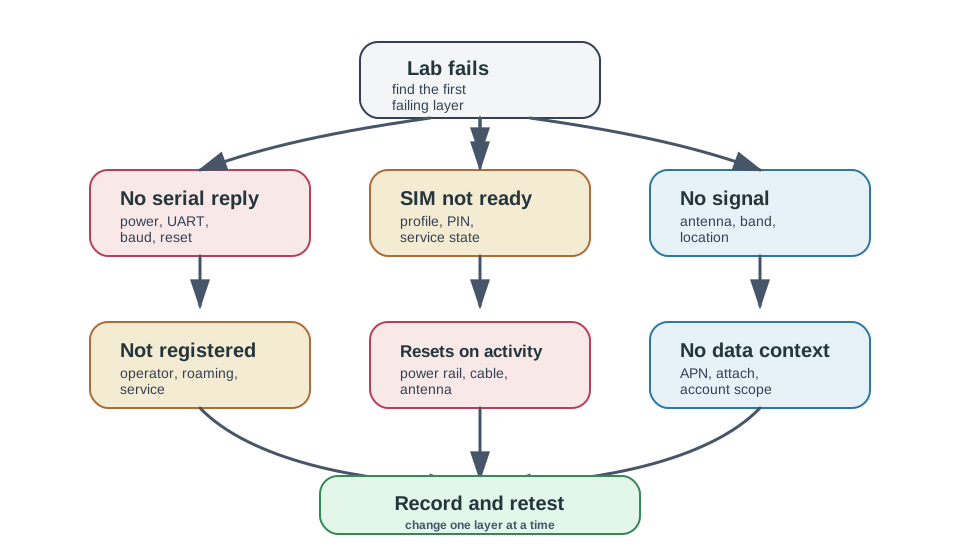
Read Figure 4 from power and serial communication through SIM readiness, registration, packet service, and application reachability. Fixing the first broken boundary avoids masking a lower-layer failure with repeated commands.
Use Figure 4 when the lab fails. The point is to isolate the failing layer before changing random settings.
Lab Record Template
This section: Lab Record Template — Screenshots are useful, but text transcripts are easier to review and diff over time.
Keep the lab record compact and repeatable:
- Question: What modem behavior is being proven?
- Hardware: module, firmware, antenna, power source, SIM/profile state, enclosure
- Location: region, operator context, indoor/outdoor position, gateway or cell environment notes
- Command transcript: exact commands and responses for each bring-up step
- Observed state: serial, SIM/profile, signal, registration, attach/context, data attempt
- Power and antenna notes: resets, rail observations, antenna placement, enclosure effects
- Decision: pass, provisional, blocked, or redesign
- Retest triggers: firmware, SIM/profile, antenna, power, enclosure, operator, or location change
Screenshots are useful, but text transcripts are easier to review and diff over time.
Worked Review: Searching But Signal Present
This section: Worked Review: Searching But Signal Present — Accepted answer: “Signal presence is not registration.
Prompt: “The modem has signal, so the lab is complete.”
Evidence:
- serial command returns are clean
- SIM/profile state is ready
- signal command returns a nonzero response
- registration response reports a searching state
- no data context was created
Review path:
- Confirm that the registration command matches the selected cellular service.
- Wait and re-query registration with timestamped observations.
- Check antenna placement, supported bands, operator/service profile, and location.
- Move to a known-coverage location or compare with a reference device if available.
- Record whether the issue is coverage, service authorization, band support, or configuration.
Accepted answer: “Signal presence is not registration. The lab remains provisional until registration and data-context evidence are captured.”
Worked Review: Data Attempt Resets The Modem
This section: Worked Review: Data Attempt Resets The Modem
Prompt: “The application code is broken because the modem resets when it sends data.”
Evidence:
- basic AT command response is clean
- SIM/profile and registration checks pass
- reset occurs when attach, context activation, or data send begins
- failure is worse in weak-signal locations
Review path:
- Separate application logic from modem stability by repeating a minimal command sequence.
- Observe whether the modem resets, drops serial, or reports a recoverable error.
- Check power source, cable, regulator headroom, connector quality, antenna, and enclosure.
- Compare behavior in stronger and weaker coverage locations.
- Record whether the fix belongs to power design, antenna placement, retry behavior, or firmware.
Accepted answer: “A reset during active modem work is often a power, antenna, or coverage evidence problem before it is an application-code problem.”
Common Mistakes
This section: Common Mistakes
- starting with MQTT, HTTP, or cloud tests before proving registration
- treating one
OKresponse as proof that the modem is ready for data - ignoring SIM/profile readiness or service activation state
- reading signal quality without checking registration state
- using a lab antenna or open bench result as final enclosure evidence
- assuming all vendors use the same data-session AT commands
- hiding command transcripts behind screenshots that cannot be searched
- leaving secrets, SIM identifiers, APNs, or credentials in shared lab records
- ignoring resets during attach or transmit attempts
- failing to record retest triggers after firmware, SIM/profile, antenna, power, or site changes
Knowledge Check: Cellular Modem Bring-Up
This section: Knowledge Check: Cellular Modem Bring-Up
Match The Check To The Evidence Layer
This section: Match The Check To The Evidence Layer
Order The Cellular Modem Lab
This section: Order The Cellular Modem Lab
Review Checklist
This section: Review Checklist
Before accepting the cellular modem lab, confirm that the record includes:
- module, firmware, antenna, power source, SIM/profile state, and location
- exact AT-command transcript for serial, SIM/profile, signal, registration, and data-context checks
- interpretation of registration state for the selected service
- antenna and enclosure observations from the tested configuration
- power stability observations during registration and data attempts
- failure layer, next action, and retest evidence if any step failed
- redaction of secrets, private identifiers, APNs, credentials, and account data
- retest triggers after firmware, antenna, power, SIM/profile, operator, enclosure, or site changes
A Cellular Modem Is an AT-Command Peripheral
This section: A Cellular Modem Is an AT-Command Peripheral — A cellular IoT module — a u-blox SARA, Quectel BG96, or similar — behaves like a serial peripheral driven by AT commands over a UART.
A cellular IoT module — a u-blox SARA, Quectel BG96, or similar — behaves like a serial peripheral driven by AT commands over a UART. Figure 5 traces the fixed bring-up sequence: power the radio on, unlock the SIM, tell it the network access point, wait for it to register, and read the signal before sending anything. Before debugging application traffic, inspect Figure 5 to divide modem bring-up into physical, serial, subscriber, registration, packet, and service layers.
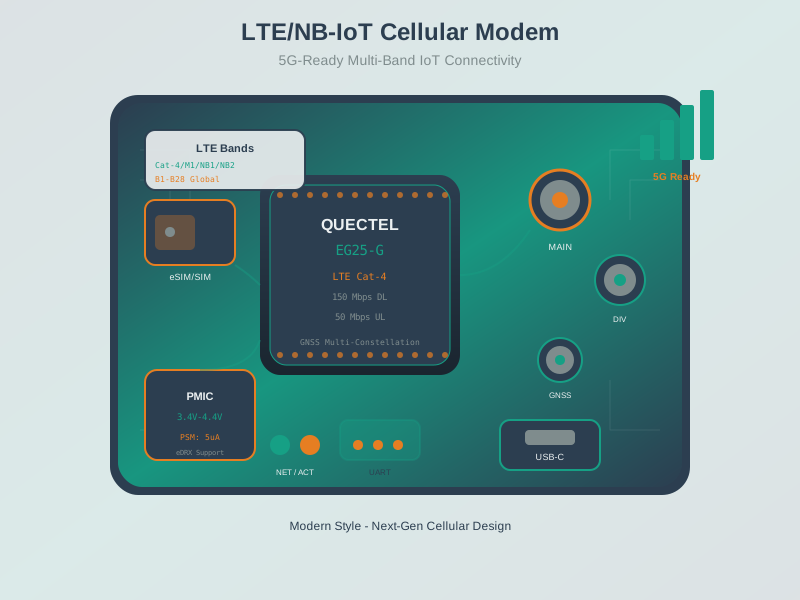
Read Figure 5 from the hardware boundary through parser response, SIM or profile readiness, network registration, data context, and endpoint proof. This layered sequence connects AT-command success to actual application reachability.
The registration step in Figure 5 checks the service domain: AT+CEREG? reports EPS/LTE registration for NB-IoT and LTE-M, whereas AT+CREG? reports circuit-mode network registration. Once registered, the module can open a data context and transmit; before that, application traffic simply fails.
Worked bring-up check. A reviewer should be able to read the transcript and identify the exact layer that passed. AT followed by OK proves the host serial path and command parser. AT+CPIN? returning READY proves the SIM or profile is usable enough for registration. AT+CESQ or the module’s equivalent gives a signal observation tied to antenna and location. AT+CEREG? returning a registered state proves network registration for the selected LTE/EPS service. Only after those checks should the lab configure or activate a data context.
If the sequence stops, record the stop as the result instead of skipping ahead. A clean serial response plus +CPIN: READY and +CEREG: 0,2 is not a failed application; it is a registration-layer problem. The next evidence should be antenna placement, supported bands, service authorization, roaming permission, location, and elapsed wait time. A lab that preserves that boundary is useful because another engineer can repeat the same layer check without inheriting a vague “cloud publish failed” report.
Bring-up in order: radio on → SIM ready → APN set → registered → read signal → send. Skip a step and the modem looks “broken” when it is only unregistered.
Overview Knowledge Check
The Bring-Up Sequence and Reading Signal
This section: The Bring-Up Sequence and Reading Signal — When the module supports it, AT+CESQ reports LTE RSRQ and RSRP after its first four indices; newer 3GPP versions can append three NR signal indices, so LTE RSRQ and RSRP are not always the last two fields.
A minimal, ordered bring-up:
| Step | Command | Checks |
|---|---|---|
| Radio on | AT+CFUN=1 | Full functionality enabled |
| SIM | AT+CPIN? | Returns READY |
| APN | AT+CGDCONT=1,"IP","<apn>" | Data context defined |
| Registration | AT+CEREG? | Status 1 (home) or 5 (roaming) |
| Signal | AT+CESQ | Reads RSRQ and RSRP |
When the module supports it, AT+CESQ reports LTE RSRQ and RSRP after its first four indices; newer 3GPP versions can append three NR signal indices, so LTE RSRQ and RSRP are not always the last two fields. RSRP index 0 means below −140 dBm, indices 1–96 cover −140 to −45 dBm in 1 dB steps, 97 means at least −44 dBm, and 255 means “unknown.” The older AT+CSQ returns a coarser RSSI index (0–31, or 99 when unknown).
Worked example. A device reports +CEREG: 0,2 — status 2 means “searching, not yet registered,” so a cellular data socket cannot be used yet. The fix is not in the application: check operator service, band configuration, and antenna, then poll AT+CEREG? until it reads 1 or 5. Check AT+CESQ for a usable signal and verify the APN/data context before transmitting.
A compact lab table can prevent false conclusions. Record the command, response, interpretation, and next action. For example, AT+CPIN? returning READY means “SIM/profile not blocking this step”; it does not mean “network available.” AT+CESQ returning unknown signal fields means the antenna, band, modem state, or registration stage still needs investigation. AT+CEREG? returning a denied state points toward service authorization, region, operator selection, or supported-band mismatch rather than UART wiring.
Also record the physical state during the command sequence. A modem that answers AT on bench power but disappears from serial during registration may be exposing a power rail, cable, or antenna problem. Repeat the minimal sequence in a stronger-coverage location and with the final enclosure connected. If the reset disappears outdoors or with a known-good antenna, the lab has found a propagation or antenna path; if it disappears with a stronger supply, the lab has found a power-design path. Keep those conclusions separate from application code.
Practitioner Knowledge Check
PSM and eDRX Power-Saving Timers
This section: PSM and eDRX Power-Saving Timers — Battery life on cellular IoT comes from two negotiated sleep modes.
Battery life on cellular IoT comes from two negotiated sleep modes. PSM (Power Saving Mode) lets the modem power down almost completely while staying registered. The device requests two timers at attach or tracking-area update: T3324, the Active Timer, sets how long it stays reachable after going idle; T3412, the extended periodic-TAU timer, sets how long it may sleep before it must check in (encodable up to hundreds of days). During PSM the device is unreachable for downlink until it wakes to send or to run its periodic TAU.
eDRX (extended Discontinuous Reception) is the middle option: the device sleeps but wakes on a long, agreed cycle to listen for paging — up to about 43.7 minutes for LTE-M and 2.9 hours for NB-IoT. eDRX keeps the device occasionally reachable at the cost of some standby current; PSM saves more but makes downlink latency as long as the sleep interval.
Worked example. A meter that only ever reports uses PSM: enable it with AT+CPSMS, request a short T3324 (stay awake ~10 s after sending in case of a reply) and a long T3412 (sleep an hour between periodic check-ins), and average current drops toward the microamp range. A device that must occasionally receive a command instead uses eDRX so the network can page it within one cycle. The choice is a reachability-versus-battery decision, set by these timers.
The lab should not claim battery behavior just because a command was accepted. A modem can accept a PSM request and receive a different timer from the network, or the network can reject the requested mode. The transcript should capture the request, the modem’s reported negotiated settings if the module exposes them, and the observed current or wake behavior at a coarse level. If the device stays reachable for a short active window and then becomes unavailable until the next uplink or tracking-area update, the observed behavior matches the PSM claim.
Power-saving evidence also belongs with registration evidence. A device that drops registration every cycle may spend more energy reattaching than it saves in sleep. A device that needs downlink control within minutes may fail the product requirement if PSM sleeps for an hour. The bring-up lab should therefore record the chosen mode, requested timers, observed reachability, wake cause, and the retest triggers: operator profile change, firmware update, SIM/profile change, antenna/enclosure change, or deployment region change.
Under-the-Hood Knowledge Check
Summary
This section: Summary — A cellular modem bring-up lab should prove the modem stack one layer at a time: serial response, SIM or profile readiness, signal, registration, packet-service context, and bounded data readiness.
A cellular modem bring-up lab should prove the modem stack one layer at a time: serial response, SIM or profile readiness, signal, registration, packet-service context, and bounded data readiness. The important artifact is not a large code sample. It is a clear evidence record that shows what worked, what failed, what layer failed, and what must be retested when hardware, firmware, service, antenna, power, or location changes.
Key Takeaway
This section: Key Takeaway — Lab: Cellular Modem Bring-Up should produce deployment evidence for spectrum assumptions, coverage, antenna placement, link budget, modem behavior, fallback paths, and validation limits.
Lab: Cellular Modem Bring-Up should produce deployment evidence for spectrum assumptions, coverage, antenna placement, link budget, modem behavior, fallback paths, and validation limits.
Concept Relationships
This section: Concept Relationships
- Cellular spectrum explains why supported bands, operator service, and region matter before the lab starts.
- Propagation design explains why antenna placement, enclosure, location, and coverage affect modem results.
- Coverage planning labs extend modem observations into deployment mapping and acceptance records.
- Wi-Fi spectrum labs use similar evidence discipline for a different radio environment.
- Mobile wireless review compares cellular modem evidence against other wireless technology options.
What’s Next
This section: What’s Next
- Cellular Spectrum for IoT reviews cellular band and operator context.
- Wireless Propagation and Design explains the coverage and antenna evidence behind modem lab results.
- Mobile Labs: Coverage Planning extends signal and registration evidence into deployment planning.
- Mobile Labs: Wi-Fi Spectrum Analysis practices similar RF evidence gathering in shared Wi-Fi spectrum.
- Mobile Wireless Comprehensive Review compares cellular modem trade-offs with other wireless options.