7 Propagation and Link Budgets

More
Depth: Practitioner
Progress saves as you read. Mark sections complete as you go; your progress appears in the sidebar.
7.1 Start With the Wireless Story
This section: Start With the Wireless Story — A sound site review starts on paper.
A sound site review starts on paper. Mark each device. Mark each receiver. Draw the needed paths. Add walls and large objects. Note height and direction. Flag anything that moves.
Then walk the site. Test the final case. Use the final antenna. Use normal power. Begin at the hard places. Save both good and bad results. Repeat during normal work.
Change one fact at a time. Move the device. Turn its case. Open a door. Add people. Start nearby equipment. Watch whether the result stays stable. Keep the worst useful case.
Set a pass line. Leave room for change. Do not approve a link that only just works. State where it fails. Add a new receiver or move the mount when needed. Test again after the change. Recheck after layout, season, or equipment changes.
Picture a warehouse door sensor. It works on a desk. It fails after workers mount it behind a metal beam. The device did not change. The path around it did. Wireless design must account for the real place.
A signal loses strength as it travels. Distance is only one cause. Walls, people, shelves, rain, leaves, and vehicles can also matter. The case and mounting angle can change the result. Nearby equipment may add noise. Conditions can change during the day.
Start with the hardest useful path. Mark both ends. Note their height and direction. List what may stand between them. Then test the final device in that place. Record successful and missed messages. Repeat the test when the site is busy.
Leave a margin. A link that barely works today has little room for change. Move an antenna or add another route when the evidence is weak. Do not hide a weak place inside one average score. Name the places that did not pass.
This first view treats the path as a simple loss story. Real signals can reflect, fade, and combine in less tidy ways. The Practitioner layer turns site facts and measurements into a design record. Under the Hood explains path calculations, fading, interference, and why a clean early estimate must still be checked in the field.
Start with one link that must close under the worst expected conditions. The propagation story follows distance, walls, antenna placement, fading, interference, margin, and retest triggers until the team can explain why packets should still arrive.
7.2 In 60 Seconds
This section: In 60 Seconds — Wireless propagation design is the discipline of proving that a radio link will work after the product leaves the lab.
Wireless propagation design is the discipline of proving that a radio link will work after the product leaves the lab. Free-space calculations are useful early checks, but they are not enough for IoT deployments with walls, people, cabinets, poles, foliage, vehicles, machinery, antenna detuning, interference, and changing gateway placement.
An approved propagation design needs evidence for:
- radio band and antenna behavior in the final enclosure
- path distance, height, orientation, and obstruction conditions
- expected losses from materials, terrain, bodies, vehicles, and mounting
- interference and coexistence from nearby systems
- measured signal quality and packet behavior from representative locations
- link margin, failure boundaries, and retest triggers
The goal is not to memorize a path-loss formula. The goal is to build a review record that explains why the installed link has enough margin for the actual site.

7.3 Learning Objectives
This section: Learning Objectives
By the end of this chapter, you will be able to:
- distinguish free-space estimates from deployment-ready propagation evidence
- explain why antenna placement, orientation, enclosure, and mounting affect link performance
- identify how obstacles, Fresnel clearance, multipath, and interference change the link record
- review a link budget as a set of evidence assumptions rather than a single computed result
- design a site survey that measures representative locations and busy periods
- define retest triggers after product, firmware, antenna, gateway, or site changes
7.4 Propagation Review Scope
This section: Propagation Review Scope — A propagation review starts after the project has named the radio technology and frequency band.
A propagation review starts after the project has named the radio technology and frequency band. It asks whether the selected link will still work when installed.
Review inputs:
- payload size, reporting interval, latency tolerance, and retry behavior
- battery or power budget constraints
- frequency band, channel plan, and regulatory region
- transmit power setting, receiver behavior, and modulation or data-rate mode
- antenna type, gain pattern, ground plane, enclosure, feed path, and orientation
- gateway, access point, base station, or peer placement
- expected obstacles, movement, weather, and maintenance changes
- site measurements and acceptance limits
The design is weak if it only says “range should be enough.” The design is stronger when it names where the margin comes from and how the margin was measured.
7.5 Propagation Evidence Map
This section: Propagation Evidence Map — Before estimating range, inspect Figure 7.1 to gather geometry, frequency, antenna, obstacle, receiver, and service evidence.
Before estimating range, inspect Figure 7.1 to gather geometry, frequency, antenna, obstacle, receiver, and service evidence.
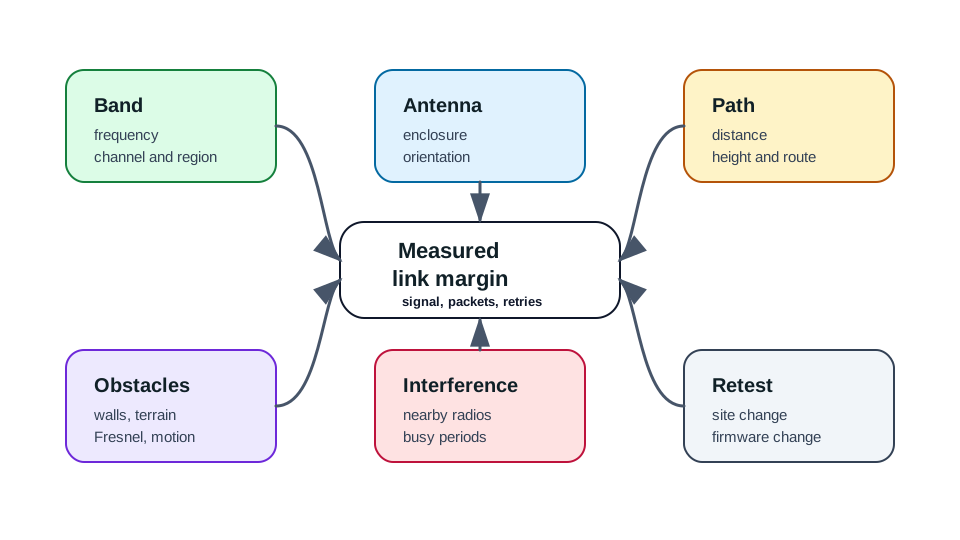
Read Figure 7.1 from transmitter assumptions through path gains and losses to measured receiver margin and application result. The map connects the link budget to field observations and exposes which assumption needs retesting.
Use Figure 7.1 to separate theoretical checks from field evidence. A design can pass the formula step and still fail because the antenna is detuned, the gateway is too low, a cabinet blocks the path, or a nearby system occupies the channel.
7.6 From Free-Space Estimate To Field Evidence
This section: From Free-Space Estimate To Field Evidence — Free-space path loss estimates how much signal weakens over an unobstructed path.
Free-space path loss estimates how much signal weakens over an unobstructed path. It is useful because it shows the direction of the trade-off: longer paths and higher frequencies need more signal budget. It is not a complete model for real buildings, farms, streets, factories, basements, or vehicles.
Treat free-space estimates as a first filter:
- If the free-space estimate already has weak margin, the real deployment is very unlikely to work.
- If the free-space estimate has comfortable margin, the review still needs obstacle, antenna, interference, and measurement evidence.
- If the estimate depends on ideal antenna gain or perfect line of sight, the approval should be provisional until the final installation is measured.
Do not use a clean mathematical estimate as a substitute for a site survey.
7.7 Antenna And Enclosure Effects
This section: Antenna And Enclosure Effects — The antenna is part of the propagation design.
The antenna is part of the propagation design. A radio module data sheet does not prove that the final product enclosure, cable, ground plane, battery, mounting bracket, hand, wall, or metal cabinet preserves the intended pattern.
Review questions:
- Was antenna performance checked in the final enclosure?
- Does the antenna orientation match how the device is installed or worn?
- Is the ground plane or counterpoise adequate for the selected antenna?
- Are cable, connector, matching, and placement losses included in the record?
- Is the gateway or access point antenna placed high enough and clear enough?
- Does a directional antenna create blind spots or alignment requirements?
A link budget that uses antenna gain without placement evidence is not review-ready.
7.8 Obstacles, Fresnel Clearance, And Multipath
This section: Obstacles, Fresnel Clearance, And Multipath — Propagation is shaped by the space around the path, not only by the straight line between transmitter and receiver.
Propagation is shaped by the space around the path, not only by the straight line between transmitter and receiver. Walls, floors, shelving, vehicles, bodies, trees, terrain, tanks, machinery, and low-emissivity glass can all change received signal quality.
Important effects:
- Obstruction loss occurs when materials absorb or reflect signal energy.
- Fresnel-zone blockage reduces margin even when visual line of sight appears clear.
- Multipath creates constructive and destructive interference as reflected copies arrive together.
- Shadowing creates slower signal changes as large objects block or reveal a path.
- Orientation changes can reduce coupling when antennas are polarized differently.
The review should identify which of these effects matters for the deployment and how it was measured.
7.9 Interference And Coexistence
This section: Interference And Coexistence — A radio link can have enough path margin and still fail because the receiver is competing with other signals.
A radio link can have enough path margin and still fail because the receiver is competing with other signals. Coexistence review belongs in the propagation design because nearby transmitters affect packet success, retry behavior, latency, and battery use.
Review questions:
- What other systems use the same band or adjacent channels?
- Are busy periods different from quiet test periods?
- Are gateways, access points, routers, phones, drives, welders, vehicles, or other emitters near the device?
- Does the protocol use channel selection, hopping, listen-before-talk, scheduling, spreading, or retries?
- Do measurements include packet success and latency, not only received signal level?
- Does interference change after building, access-point, gateway, or production-line changes?
The approval record should include coexistence evidence from representative operating conditions.
7.10 Link Design Review Flow
This section: Link Design Review Flow — Before approving a link design, inspect Figure 7.2 to order requirement, geometry, link budget, measurement, margin, and retest decisions.
Before approving a link design, inspect Figure 7.2 to order requirement, geometry, link budget, measurement, margin, and retest decisions.
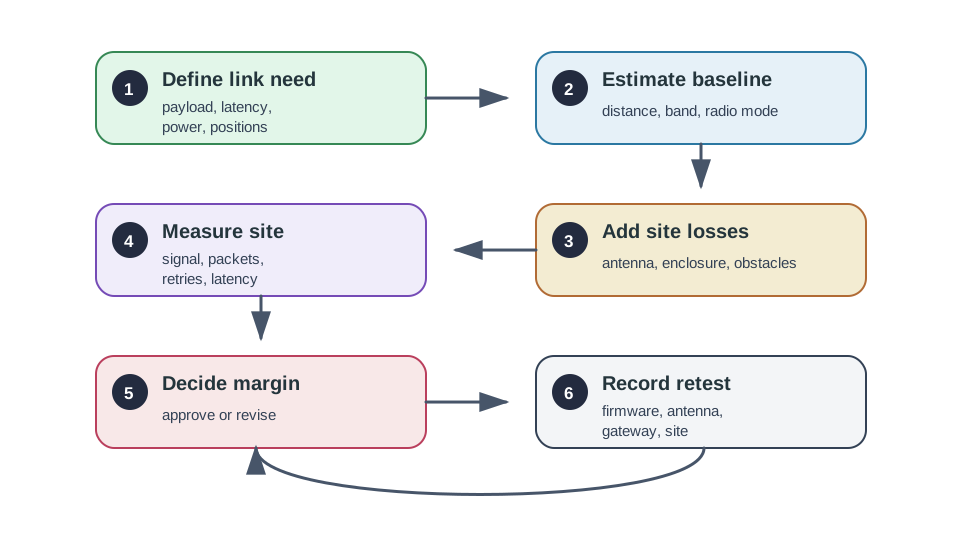
Read Figure 7.2 from the service need through transmitter, path, receiver, and measured margin, then finish at acceptance or redesign. This connects propagation theory to a bounded installed result.
Use Figure 7.2 when a proposed deployment relies on a simple range claim. The sequence forces the review to connect requirements, assumptions, measurements, and future change control.
7.11 Site Survey Evidence
This section: Site Survey Evidence — A useful site survey measures the locations and conditions that are most likely to fail, not only the easiest locations.
A useful site survey measures the locations and conditions that are most likely to fail, not only the easiest locations.
Include:
- representative device positions, heights, orientations, and enclosures
- proposed gateway, access point, or peer positions
- expected doors, cabinets, vehicles, people, crops, inventory, or machinery states
- busy and quiet periods for the band
- received signal, packet success, retry behavior, latency, and power-state impact
- edge locations, shadowed locations, and locations with known obstruction
- screenshots, logs, photos, maps, or notes that let the review be repeated
For battery devices, record how weak links change wake time, retries, association, scanning, and reporting success.
7.12 Worked Review: Basement Meter Link
This section: Worked Review: Basement Meter Link
Prompt: “The gateway can hear the meter in the lab, so the basement installation is approved.”
Review path:
- Compare the lab setup with the final installation: enclosure, antenna, cable, mounting height, wall material, and gateway position.
- Identify the likely losses: below-grade placement, cabinet doors, concrete, pipework, parked vehicles, or access-room changes.
- Measure received signal and packet success from several real meter positions.
- Test busy periods and maintenance states, such as closed doors or nearby equipment operating.
- Record the minimum acceptable margin and what action is required when margin falls below it.
- Define retest triggers after gateway relocation, meter enclosure change, firmware update, or building work.
Accepted answer: “A lab link is useful evidence, but the basement installation needs measured margin from representative installed locations.”
7.13 Worked Review: Outdoor Pole Sensor
This section: Worked Review: Outdoor Pole Sensor
Prompt: “The devices have line of sight across the yard, so the link budget is complete.”
Review path:
- Check actual antenna height, pole material, enclosure, cable path, and orientation.
- Identify terrain, vegetation, vehicles, seasonal foliage, and future obstruction risks.
- Confirm Fresnel clearance rather than relying only on visual line of sight.
- Measure signal quality and packet behavior at multiple times and weather states if relevant.
- Record whether the link depends on one precise antenna alignment or has practical installation tolerance.
- Define retest triggers after pole movement, antenna replacement, gateway relocation, vegetation growth, or new structures.
Accepted answer: “Line of sight helps, but propagation approval also needs Fresnel, antenna, obstruction, measurement, and retest evidence.”
7.14 Common Mistakes
This section: Common Mistakes
- treating advertised range as deployment evidence
- approving a link budget without final-enclosure antenna evidence
- using a free-space estimate for indoor or obstructed locations without measurement
- measuring received signal but not packet success, retries, or latency
- testing during quiet periods while the production site fails during busy periods
- forgetting that body, cabinet, door, or vehicle position can change the link
- assuming a directional antenna improves every topology
- ignoring gateway height, cable loss, and antenna orientation
- failing to define retest triggers after site or firmware changes
7.15 Knowledge Check: Propagation Evidence
This section: Knowledge Check: Propagation Evidence
7.16 Match The Propagation Term To The Evidence
This section: Match The Propagation Term To The Evidence
7.17 Order The Propagation Review
This section: Order The Propagation Review
7.18 Review Checklist
This section: Review Checklist
Before approving a propagation design, confirm that the record includes:
- link purpose, payload, latency, reporting interval, and retry behavior
- selected band, channel plan, regional constraints, and radio mode
- transmit-power setting, receiver behavior, and gateway or peer placement
- final antenna, enclosure, cable, mounting, and orientation evidence
- path assumptions, obstruction conditions, Fresnel clearance, and multipath risks
- interference and coexistence measurements from realistic busy periods
- measured signal quality, packet success, latency, and retry behavior
- battery or power-state impact for weak-link conditions
- acceptance margin, failure boundaries, and retest triggers
7.19 The Link Budget Decides Whether a Link Closes
This section: The Link Budget Decides Whether a Link Closes — Propagation is the study of how a signal weakens between transmitter and receiver.
Propagation is the study of how a signal weakens between transmitter and receiver. The accounting tool is the link budget: start with transmit power, add antenna gains, subtract cable and path loss, and compare the result with the receiver's sensitivity. If received power sits comfortably above sensitivity, the link closes; if not, it drops.
Path loss is dominated by distance and obstacles. In free space it follows FSPL = 20 log₁₀d + 20 log₁₀f + 32.44, but real environments lose faster — the log-distance model captures this with a path-loss exponent n (about 2 in free space, 3–4 outdoors urban, 4–6 deep indoors).
Cellular gives the device concrete numbers to judge its link: RSRP (reference-signal received power, in dBm) and RSRQ (reference-signal received quality, in dB). These are the readouts an IoT engineer lives by.
Worked link-budget check. Put a 2.4 GHz gateway 100 m from a sensor in a clear yard. Free-space loss is about 20 log10(0.1 km) + 20 log10(2400 MHz) + 32.44 ≈ 80 dB. If the transmitter is 14 dBm, both antennas add 2 dBi, and enclosure/feed losses subtract 3 dB, the rough received power is 14 + 2 + 2 - 3 - 80 = -65 dBm. Before accepting the resulting 27 dB clean-path margin, inspect Figure 7.3 to see the order of the gains, losses, sensitivity threshold, and reserved margin.
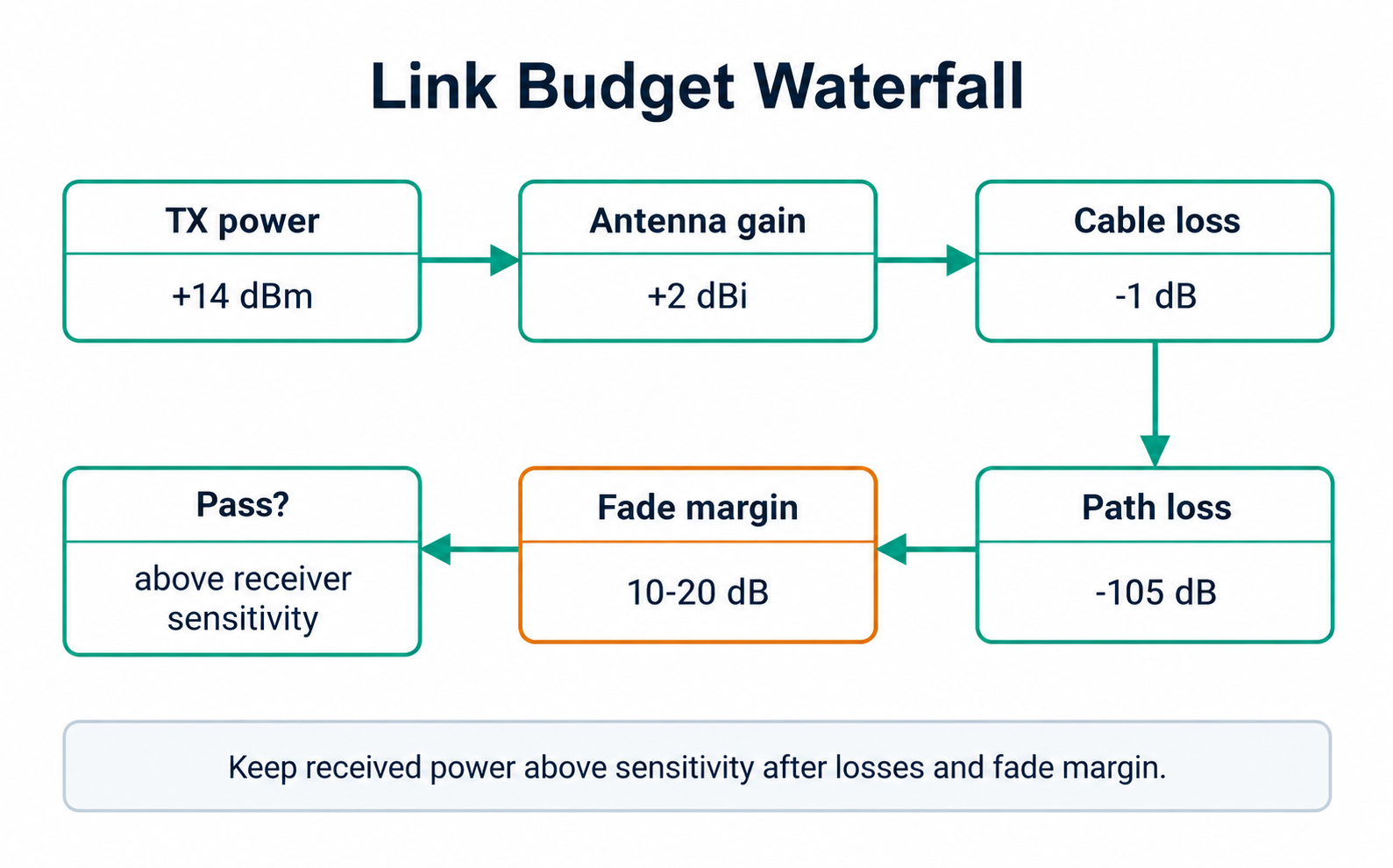
Follow Figure 7.3 from transmit power, adding antenna gain and subtracting feed and path losses until the received-power line reaches the sensitivity comparison. The remaining vertical separation is the margin available for fading and installation changes. Two masonry walls, a metal cabinet, a wet product, or a human body can spend much of it. This waterfall connects the arithmetic to field validation: every term needs a source, and the final enclosure and location must prove that enough margin remains.
Every wireless link is an inequality: received power must exceed sensitivity, with margin to spare. RSRP tells a cellular device how that inequality is going.
Overview Knowledge Check
7.20 Read RSRP, RSRQ, and SINR
This section: Read RSRP, RSRQ, and SINR — RSRP is about strength; RSRQ and SINR are about cleanliness.
Three cellular metrics describe a link, and each answers a different question:
| Metric | Meaning | Rough guide |
|---|---|---|
| RSRP (dBm) | Average power of the reference signals | ≥ -90 excellent, -100 good, -110 fair, ≤ -120 poor/edge |
| RSRQ (dB) | Quality: reference power vs total received power | ≥ -10 good, -15 fair, ≤ -20 poor |
| SINR (dB) | Signal vs interference + noise | Higher enables higher-order modulation |
RSRP is about strength; RSRQ and SINR are about cleanliness. A device can show strong RSRP but poor RSRQ when the cell is congested or interfered — the signal is loud but the channel is noisy.
Worked example. A meter reports RSRP = −115 dBm and RSRQ = −18 dB. Strength is weak and quality is poor — connection may need repetition and deliver low throughput. A better antenna, a different supported band, or relocation may raise RSRP, while poor RSRQ also calls for checking cell load and interference. Reading both numbers turns “it's flaky” into a diagnosable radio problem.
Do not read one metric alone. A device with RSRP around -85 dBm but RSRQ near -17 dB probably has enough reference-signal strength but poor quality from load, interference, or neighboring-cell energy. Moving the antenna may not solve that if the local cell is busy. A different device with RSRP around -110 dBm and RSRQ near -9 dB has a cleaner channel but little strength margin, so placement, antenna efficiency, band choice, or gateway/base-station geometry matter more.
For site acceptance, record the metric set at the worst representative locations, not only at the doorway where the installer has good signal. Pair the radio metrics with packet success, attach time, retry count, and wake duration. If a weak meter needs five attach attempts and long repetition to deliver a 40-byte report, the propagation issue has become an energy issue. The survey should show the threshold where the product still meets latency and battery assumptions.
Practitioner Knowledge Check
7.21 Maximum Coupling Loss and NB-IoT’s +20 dB
This section: Maximum Coupling Loss and NB-IoT’s +20 dB — Engineers summarise a technology's reach with maximum coupling loss (MCL) — the largest total path loss a link can survive while still delivering data under stated assumptions.
Engineers summarise a technology's reach with maximum coupling loss (MCL) — the largest total path loss a link can survive while still delivering data under stated assumptions. A commonly cited legacy GPRS/LTE comparison is near 144 dB; 3GPP published a 164 dB NB-IoT target for standalone deployment — a 20 dB or 100× power-ratio difference. That target motivates deep-indoor use, but it is not an installed basement coverage promise or an identical target for every deployment mode.
That extra 20 dB is bought two ways. First, concentrating transmit power into the narrow 180 kHz carrier raises power spectral density. Second, and mainly, NB-IoT repeats transmissions so the receiver can combine copies: under ideal independent combining, N repeats yield up to 10 log₁₀(N) dB of gain, so 16 repeats give ~12 dB and 128 repeats give ~21 dB before implementation losses. The price is time and energy — deep-coverage messages are slow and costly, which is why NB-IoT targets tiny, infrequent payloads.
Worked example. A sensor at the cell edge fails to decode at 150 dB coupling loss with a single transmission. In the ideal combining model, 32 repetitions add 10 log₁₀(32) ≈ 15.05 dB, enough to move a 150 dB single-send limit past 160 dB; real reception must still be measured. The repeated message takes longer on air and drains more battery per report. Coverage, throughput, and power are the three-way trade every deep-coverage design balances.
The repeated-copy gain is logarithmic, so it has diminishing returns. Moving from 1 to 4 repetitions gives about 6 dB, 4 to 16 gives another 6 dB, and 16 to 128 gives about 9 dB more. Each step also multiplies airtime. If a report consumes 200 ms at a shallow-coverage setting, 32 repetitions can push the radio-on time into seconds before protocol overhead and scheduling delays. That is acceptable for rare meter reads; it is a poor fit for chatty telemetry or tight latency.
MCL also hides implementation assumptions. Antenna efficiency, body or cabinet loss, gateway/base-station selection, receiver mode, and required data rate all decide whether the theoretical MCL is available to the product. A deployment record should state the selected coverage enhancement level, measured RSRP/RSRQ or equivalent metrics, observed packet success, and the battery cost of the chosen repetition mode. The correct review question is not "can the technology reach 164 dB?" but "does this installed product meet its reporting and energy targets at the measured coupling loss?"
Under-the-Hood Knowledge Check
7.22 Summary
This section: Summary — Wireless propagation design turns a radio choice into an installable link.
Wireless propagation design turns a radio choice into an installable link. Free-space calculations are useful early checks, but the real approval record depends on antenna placement, enclosure behavior, obstacles, Fresnel clearance, multipath, interference, site measurements, packet behavior, margin decisions, and retest planning. A strong review makes the assumptions visible and proves them at representative locations.
7.23 Key Takeaway
This section: Key Takeaway — Wireless Propagation and Design should tie mobile wireless fundamentals to spectrum, propagation, link budget, coverage planning, licensing, power, and deployment evidence.
Wireless Propagation and Design should tie mobile wireless fundamentals to spectrum, propagation, link budget, coverage planning, licensing, power, and deployment evidence.
7.24 Concept Relationships
This section: Concept Relationships
- EM waves and spectrum basics explain why frequency, wavelength, antennas, and path loss are connected.
- Frequency bands and licensing define which bands and regional rules the propagation design must obey.
- Cellular spectrum adds operator coverage, supported bands, and service behavior to the propagation record.
- Wi-Fi fundamentals add channel, access-point, and coexistence details for local networks.
- Mobile wireless labs turn propagation concepts into measured site-survey evidence.
7.25 What’s Next
This section: What’s Next
- EM Waves and Spectrum Basics reviews the RF physics behind propagation.
- IoT Frequency Bands and Licensing explains the band and regional context for propagation design.
- Cellular Spectrum for IoT connects propagation evidence to operator-managed cellular bands.
- Mobile Wireless Labs and Implementation provides practice with measurements and deployment evidence.
- Mobile Wireless Comprehensive Review brings the wireless-design evidence together.
Find help
3 reviewed answers.
Where should I start in a module?
Open the module page from the sidebar to see its chapters in order. Use the module map to return to a topic you need.
Modules and pathsReviewed
What can I try when a project does not work?
Check the symptom, then work through the diagnostic steps. Keep the error message and the smallest example that reproduces it.
When you are stuckReviewed
How do interactive examples work?
Use the interactive guide to check how examples and simulations work before changing your project.
Interactive examples guideReviewed