27 802.15.4 MAC Operation
27.1 Start With the Wireless Story
27.1.1 Spend Radio Time on the Right Event
Institute of Electrical and Electronics Engineers (IEEE) 802.15.4 is a set of radio and link rules for small, low-power devices. Latency is the time between an event and the result that depends on it.
Picture a battery door sensor that wakes, reports a change, and sleeps again. Keeping its radio awake may give a fast reply but shorten battery life. Sleeping saves energy but can delay a command. A design must choose which events deserve awake time.
Write the timing promise before choosing a mode. Record how a device learns when to listen, how long it waits, what happens after a missed exchange, and which clock or coordinator it trusts. Test a late message, a lost reply, a busy channel, a reset, and a long sleep. Measure both energy and response time.
Use one short event log. Mark wake, listen, send, wait, reply, and sleep. Add the time and energy at each step. Repeat it with one missed reply. The difference shows where the budget goes and whether the user promise still holds.
One good exchange does not prove a network will scale or survive interference. This review proves only the named operating case. The deeper sections explain frames, channel access, beacons, polling, retries, and the evidence needed when traffic or timing changes.
802.15.4 operation is a schedule for when a sleepy radio may speak. Follow association, CSMA/CA, acknowledgments, retries, beacons, GTS, polling, and frame handling so power savings do not quietly break reliability.
27.2 In 60 Seconds
IEEE 802.15.4 operation is the behavior that happens after a radio exists: a device discovers a PAN, associates or joins through the selected stack, shares the channel with CSMA/CA, optionally requests acknowledgments, sleeps or listens according to its role, and recovers when the parent, coordinator, channel, or timing changes.
Use this chapter to review:
- network discovery, association, short addressing, and rejoin behavior
- non-beacon CSMA/CA access and acknowledgment handling
- beacon-enabled operation, active/inactive periods, and GTS assumptions
- sleepy end-device polling and parent buffering
- frame handling, retries, duplicate filtering, and loss reporting
- operational evidence that proves the chosen mode matches the deployment
27.3 Learning Objectives
By the end of this chapter, you will be able to:
- explain the operational path from scan to association, data exchange, and recovery
- distinguish non-beacon contention access from beacon-enabled scheduling
- review CSMA/CA, CCA, acknowledgments, retries, and dropped-frame evidence
- connect sleepy-device behavior to latency, downlink reliability, and battery use
- identify when GTS helps and when it is being used as a vague reliability label
- build an operation record that captures mode, traffic, metrics, and failure recovery
27.4 Operation State Flow
Before calculating latency or energy, inspect Figure 27.1 to see the radio states and transitions that produce both.
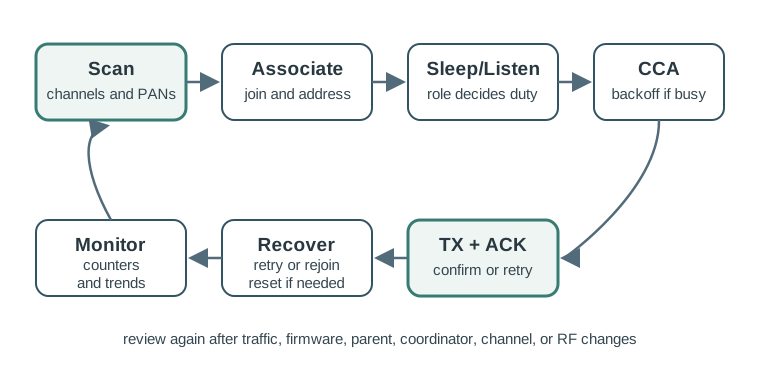
Read Figure 27.1 from scan and association through sleep or listen, clear-channel assessment, backoff, transmission, acknowledgement, retry, and return. The state path connects MAC rules to timing and battery cost.
Use Figure 27.1 to keep operation review concrete. A device is not simply “connected.” It cycles through discovery, association, channel access, data exchange, sleep or listen states, and recovery paths.
27.5 What Operation Means
802.15.4 defines PHY and MAC behavior. It does not by itself define every mesh route, application profile, cloud workflow, or product commissioning policy. Those functions belong to upper-layer stacks or product firmware.
Operation review should ask:
- Which PHY and channel are active?
- Which MAC mode is used: non-beacon or beacon-enabled?
- Which devices can route or keep receivers available?
- Which devices sleep, poll, or listen continuously?
- Are acknowledgments and retries used for the traffic being reviewed?
- What does the device do after CCA failure, missing ACK, missed beacon, lost parent, or reset?
- Which evidence proves the answer: packet logs, counters, current traces, or field events?
27.6 Discovery And Association
A typical device first scans supported channels, discovers a suitable PAN or coordinator, and follows the product stack’s join or association process. The coordinator or stack may assign a short address, while the extended identifier remains useful for inventory and diagnosis.
Review prompts:
- Which channels does the device scan and in what order?
- How does it choose a PAN or parent when several are visible?
- What identifier is used for inventory, commissioning, and field support?
- Does address assignment avoid collisions after replacement or reset?
- How does a device recover when a parent, coordinator, or border device disappears?
- Does rejoin behavior create traffic bursts or long radio-on periods?
Joining successfully once is not enough evidence. The review should include reset, replacement, and rejoin behavior.
27.7 Non-Beacon CSMA/CA Operation
In non-beacon operation, devices use contention access. Before transmission, the MAC performs clear channel assessment. If the channel is busy, the device waits for a random backoff and tries again according to MAC and stack limits. If an acknowledgment was requested and no ACK arrives, the frame can be retried or reported as failed.
Review prompts:
- How often do CCA failures occur during quiet, normal, and busy periods?
- Are retries caused by weak links, interference, parent overload, or synchronized traffic?
- Which traffic classes request ACKs, and which do not?
- What happens after the retry or backoff limit is reached?
- Are duplicate frames filtered when retries arrive after a delayed ACK?
- Does the application surface delivery failure, or does loss disappear silently?
CSMA/CA is not a delivery guarantee. It is a shared-channel access method whose behavior depends on offered load, link quality, interference, and timing.
27.8 Beacon-Enabled Operation And GTS
Beacon-enabled operation organizes communication around coordinator beacons and a superframe. Devices can synchronize to active periods, use contention access during the CAP, and in some designs use guaranteed time slots for bounded transmission opportunities.
Review prompts:
- Why does this design need beacon-enabled operation?
- Which devices must listen for beacons, and how often?
- What traffic still competes in the contention access period?
- Which devices receive scheduled opportunities and why?
- What happens when a beacon is missed?
- Does the power budget include beacon tracking and resynchronization?
Do not accept “use GTS” as a generic reliability fix. Scheduled slots help only when the traffic timing, device count, synchronization, and coordinator behavior match the application.
27.9 Sleepy Devices And Downlink
Sleepy end devices save power by keeping the receiver off most of the time. That improves battery behavior, but it changes downlink latency and parent buffering.
Review prompts:
- Does the device wake on event, on a poll interval, on a beacon schedule, or on a mixed pattern?
- How does the parent indicate buffered data?
- What latency is acceptable for commands sent to a sleeping device?
- What happens if the child sleeps through a parent change or missed message?
- Does a shorter poll interval improve responsiveness at an acceptable power cost?
- Are current measurements taken during sleep, poll, receive, transmit, join, and recovery states?
A sleepy sensor may be excellent for reporting local events but a poor choice for urgent commands unless the downlink behavior is designed and tested.
27.10 Frame Handling And Reliability
Operational reliability is more than raw data rate. It depends on frame budget, addressing, ACK policy, duplicate handling, security overhead, fragmentation or adaptation overhead, and how the application responds to loss.
Review prompts:
- Does the normal frame fit after addressing, security, and upper-layer headers?
- Are large application messages fragmented by an upper layer?
- Are sequence numbers or transaction identifiers used to detect duplicates?
- Are ACK failures, CCA failures, and queue drops counted separately?
- Does the receiver distinguish stale retries from new events?
- Are operational counters exposed for support?
If the field log only says “message failed,” the team may not know whether the cause was channel busy, no ACK, parent queue overflow, frame too large, or application timeout.
27.11 Operation Evidence Record
Before accepting an 802.15.4 operating mode, inspect Figure 27.2 to retain traffic, polling, delivery, retry, latency, and power evidence together.
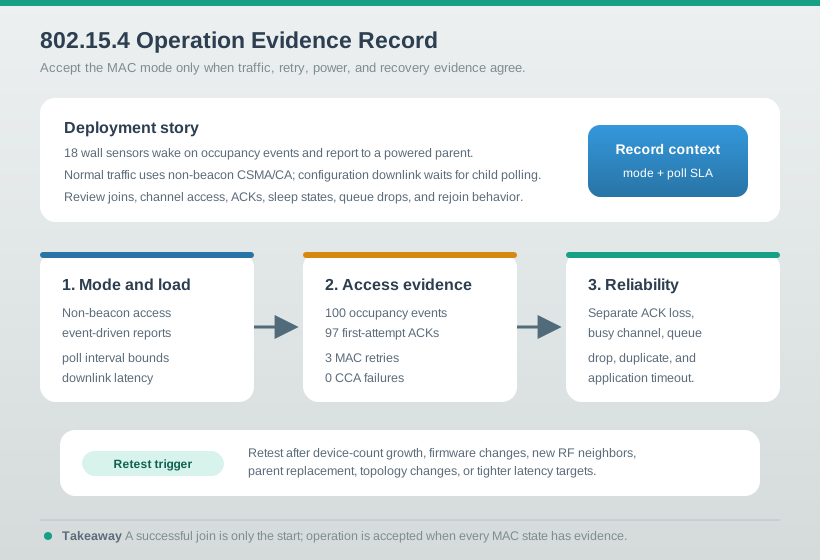
Read Figure 27.2 from the wall-sensor workload through the measured packet outcomes and power behaviour to the bounded decision. The record connects MAC settings to what the application actually received.
Use Figure 27.2 when accepting a design. The record should show the mode, traffic pattern, metrics, failure handling, and retest trigger.
27.12 Worked Review Examples
27.12.1 Building Occupancy Sensors
Occupancy sensors wake on events and report to a parent. Some command traffic is needed for configuration, but ordinary control does not require immediate downlink.
Review steps:
- Confirm whether event reporting uses non-beacon contention access.
- Measure CCA failures, retries, packet success, and latency during occupied periods.
- Verify the parent buffers configuration updates until the child polls or wakes.
- Check current traces for sleep, event transmit, poll, and failed rejoin states.
- Record how the device behaves after parent loss and restoration.
The key review question is whether the sleep behavior matches both reporting and configuration needs.
27.12.2 Meter Reading Window
A set of meters reports during a collection window. The traffic is predictable and many devices may transmit near the same time.
Review steps:
- Identify whether contention access is enough for the collection window.
- Look for synchronized reporting that creates retry bursts.
- Test staggered reports before adding scheduling complexity.
- Consider beacon-enabled operation only if timing evidence justifies it.
- Record completion time, dropped-frame counters, and recovery after missed reports.
The correct operating mode depends on timing evidence, not on the word “metering.”
27.12.3 Low-Power Actuator
A battery actuator must receive commands within a bounded response time.
Review steps:
- Define the maximum acceptable command latency.
- Compare always-listening, polling, and beacon-synchronized behavior.
- Measure current in the receive or poll state, not only transmit state.
- Verify parent buffering and duplicate command handling.
- Decide whether the latency requirement is compatible with the battery target.
The review may show that the requirement belongs on a powered router or mains-powered actuator instead of a sleepy end device.
27.13 Review Checklist
Before accepting an 802.15.4 operation design, verify that:
- scan, association, address assignment, reset, and rejoin behavior are documented
- the selected non-beacon or beacon-enabled mode is tied to traffic evidence
- CCA failures, ACK failures, retries, drops, and queue overflow are measured separately
- sleepy-device polling or beacon tracking is included in latency and power review
- GTS or scheduling claims are tied to real traffic timing and coordinator behavior
- frame budget includes addressing, security, and upper-layer adaptation overhead
- duplicate handling and application-level delivery response are defined
- failure recovery is tested for parent loss, channel change, firmware reset, and device replacement
- the operation record includes retest triggers for traffic, firmware, device-count, topology, and RF changes
27.14 Common Mistakes
Avoid these patterns:
- treating a successful join as proof that operation is reliable
- using raw PHY rate as an operation guarantee
- ignoring CCA failures because RSSI looks acceptable
- using GTS as a vague reliability label without timing evidence
- measuring transmit current while ignoring receive, poll, scan, join, and retry states
- assuming a sleepy device can receive urgent commands without latency or power tradeoffs
- hiding all failures behind one generic “message failed” counter
- forgetting duplicate filtering after retries and delayed acknowledgments
27.15 Knowledge Check
27.16 Matching Quiz
27.17 Ordering Quiz
27.18 The MAC Decides When a Radio May Talk
The 802.15.4 PHY says how to send bits; the MAC decides when. In the common non-beacon (unslotted) mode, every node uses CSMA/CA — carrier-sense multiple access with collision avoidance. Before transmitting, a node waits a random backoff, listens to the channel (a clear channel assessment, or CCA), and only sends if the channel is idle.
“Collision avoidance” rather than “collision detection” is the key idea: a half-duplex radio cannot hear its own transmission collide, so 802.15.4 tries to avoid collisions by listening first and by randomising when nodes talk. When two nodes both have data, the random backoff makes it unlikely they transmit at the same instant. Before comparing MAC options, inspect Figure 27.3 to see how access overhead, acknowledgements, retries, headers, and payload share airtime.
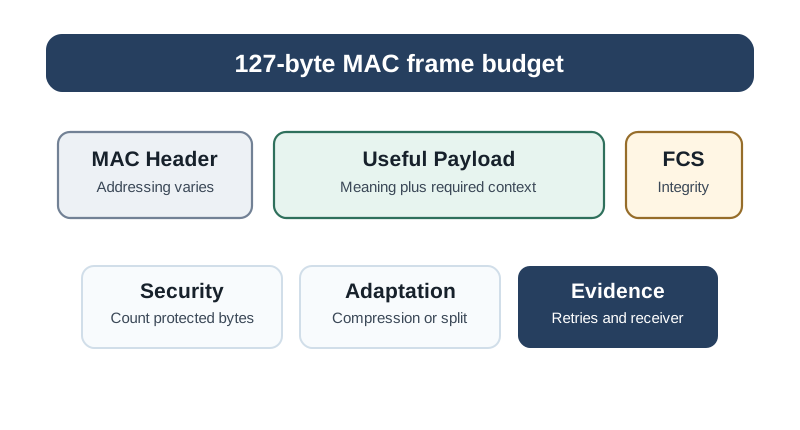
Read Figure 27.3 from channel access through the transmitted frame and response, then compare useful payload with total airtime. The ledger connects reliability settings to capacity, latency, and energy rather than treating them as free.
Worked operation trace. Imagine 18 wall sensors on one PAN, each sending a short occupancy event to a powered parent. During quiet periods, a sensor wakes, waits its random backoff, performs CCA, transmits, receives an ACK, and returns to sleep. The evidence record for that case might show 100 events, 97 first-attempt successes, three MAC retries, no channel-access failures, and command latency bounded by the child poll interval.
The same design behaves differently when every room reports at the start of a meeting. If 18 devices wake in the same few seconds, more CCAs find the channel busy, some nodes increase their backoff exponent, and a few events may be delayed until a retry or application queue releases them. That is still normal CSMA/CA behavior, but it must be measured as latency and retry count, not dismissed as a vague range problem.
Operation review therefore follows the state machine. Scan and join evidence proves the node can find the PAN; CCA and ACK counters prove the channel-access path; sleep and poll records prove downlink timing; rejoin tests prove recovery after parent loss. A design is not accepted because it says “802.15.4”; it is accepted because each state has a measured success and failure path.
Intuition: random wait → listen (CCA) → send if clear, else back off longer and retry. Reliability then rests on an acknowledgment and a bounded number of retries.
27.18.1 Overview Knowledge Check
27.19 The Backoff Parameters and Retry Budget
Unslotted CSMA/CA is driven by three MAC attributes with standard defaults. The backoff time unit is aUnitBackoffPeriod = 20 symbols = 320 µs at 2.4 GHz (20 × 16 µs per symbol).
| Attribute | Default | Role |
|---|---|---|
macMinBE | 3 | Starting backoff exponent (BE) |
macMaxBE | 5 | Ceiling for BE as it grows |
macMaxCSMABackoffs | 4 | How many times CCA may find the channel busy before giving up |
macMaxFrameRetries | 3 | Retransmissions after a missing acknowledgment |
The algorithm: set BE = macMinBE, wait a random [0, 2^BE − 1] backoff periods, do one CCA. If idle, transmit. If busy, increment the backoff count and set BE = min(BE+1, macMaxBE); after macMaxCSMABackoffs busy results, report a channel-access failure.
Worked example. First attempt uses BE = 3, so the node waits a random 0–7 backoff periods = 0–2240 µs (mean ~1.1 ms) before its first CCA. If the channel is busy, BE becomes 4, widening the window to 0–15 periods (0–4800 µs); a third busy result widens it to BE = 5, 0–31 periods. This exponential widening spreads out contending nodes. If the frame does transmit but no acknowledgment arrives, the MAC retransmits up to 3 times — a distinct failure path from channel-access failure.
Keep those two failure paths separate in field logs. A channel-access failure says the transmitter repeatedly sensed a busy channel before it could send. A missing ACK says it did transmit, but the receiver did not confirm the frame. The first points toward load, hidden traffic, or synchronized reports; the second points toward link margin, interference during the frame, receiver overload, parent state, or ACK policy.
Review example. In a 50-event busy-period test, 44 frames may succeed on the first CCA, four may need one backoff expansion, one may exhaust CCA attempts, and one may transmit twice before receiving an ACK. That is a much more useful record than “two messages failed,” because the corrective actions differ: add jitter for access failures, improve placement or parent capacity for ACK failures, and check queue handling when both rise together.
27.19.1 Practitioner Knowledge Check
27.20 Why 802.15.4 Backoff Differs From Wi-Fi’s DCF
Wi-Fi’s DCF is also CSMA/CA, but it counts down a backoff timer slot by slot only while the medium is idle, freezing the counter whenever another station transmits, then resuming. Unslotted 802.15.4 is simpler: it waits a fresh random backoff, performs a single CCA, and if busy it draws an entirely new random backoff with a larger exponent. It does not freeze-and-resume a countdown.
That simplicity keeps the radio and MAC small, but it means 802.15.4 is less fair and less efficient under heavy load than Wi-Fi’s DCF — contending nodes can repeatedly collide or hit channel-access failures. It is a deliberate trade: 802.15.4 targets sparse, bursty, low-duty-cycle traffic, so the light-weight scheme is usually enough.
Worked example. Twenty sensors on one channel each report every few seconds — a low aggregate load, so CSMA/CA rarely finds the channel busy and frames get through on the first CCA. Now the same twenty enter an alarm storm and all transmit at once: CCAs collide, backoff exponents climb to macMaxBE, some frames exhaust macMaxCSMABackoffs and report channel-access failure, and others transmit but lose their acknowledgment and burn all 3 retries. The fix is not a bigger radio but application design — stagger reports, add jitter, or use a beacon-enabled superframe for scheduled access.
Under load, the important counter is not just packet delivery. A packet that succeeds after three MAC attempts may still miss an application deadline and consume extra energy. If a sleepy node spends 4 ms awake on a clean report but 18 ms awake during a retry burst, the access mechanism has become part of the power budget. That is why operational tests should capture current traces or radio-on time beside retry counters.
Also watch where queuing happens. An application queue can release many events into the MAC at once, a parent can buffer downlink commands until a child polls, and a gateway can acknowledge local receipt before the rest of the system has processed the event. Separating MAC access, ACK success, parent buffering, and application acknowledgment prevents a reviewer from blaming the wrong layer.
27.20.1 Under-the-Hood Knowledge Check
27.21 Summary
802.15.4 operation review turns MAC behavior into evidence. A reliable design records how devices discover and join a PAN, which channel-access mode they use, when acknowledgments and retries apply, how sleepy children receive downstream data, how beacon or GTS assumptions are justified, how frame and duplicate handling works, and how the system recovers after common failures.
27.22 Key Takeaway
802.15.4 Operation and Features should connect 802.15.4 frame structure, addressing, topology, MAC behavior, power use, security, coexistence, and deployment evidence before selecting the stack.
27.23 Concept Relationships
This chapter connects to:
- 802.15.4 Features and Specifications for PHY/MAC feature boundaries, frame budget, beacon mode, and GTS.
- 802.15.4 Coexistence for separating CCA or retry problems caused by RF coexistence from those caused by traffic load.
- 802.15.4 Deployment Practices for validating operation behavior at installed locations.
- 802.15.4 Comprehensive Review for combining operation evidence with topology, power, security, coexistence, and commissioning review.
27.24 What’s Next
Continue with 802.15.4 Overview and Protocol Stack to review the layer boundaries that explain which behavior belongs to 802.15.4 and which behavior belongs to upper-layer stacks.