13 Wi-Fi MAC Layer and Protocols

More
Depth: Practitioner
Progress saves as you read. Mark sections complete as you go; your progress appears in the sidebar.
13.1 Start With the Wireless Story
This section: Start With the Wireless Story — Picture a door sensor trying to report while several cameras use the same air.
Watch One Frame Wait for Its Turn
Picture a door sensor trying to report while several cameras use the same air. The sensor is close to the network base, yet its warning arrives late because every device must wait for a turn. Strong signal bars did not prove prompt delivery.
The medium access control rule decides when each Wi-Fi device may speak. A protocol is an agreed set of message and timing rules. Latency means the time from sending to a useful result. Quality of service means rules that give some traffic different handling. Define the warning’s deadline before assigning any priority.
Create a quiet trial, then add competing traffic. Record wait time, retries, lost replies, and the age of the warning at the receiver. Hide one sender from another, let a device sleep, and repeat the test after a busy period. Check whether the chosen rules protect the warning without silently starving other work.
One room test cannot prove every building or load. Walls, neighbours, and device mixes change. The deeper sections show how contention, backoff, acknowledgements, hidden devices, aggregation, and sleep rules explain the evidence.
The Wi-Fi MAC decides who gets to talk next. Start with one frame waiting for airtime, then follow contention, backoff, retries, acknowledgments, hidden terminals, QoS, aggregation, and power-save effects until latency and reliability make sense.
13.2 The Wi-Fi MAC Layer Shares Airtime
This section: The Wi-Fi MAC Layer Shares Airtime — The Wi-Fi MAC layer is the rule set that decides when a station may use the wireless channel.
The Wi-Fi MAC layer is the rule set that decides when a station may use the wireless channel. In an IoT deployment, it connects radio behavior to product behavior: a sensor waits, transmits, receives an acknowledgment, retries if needed, sleeps, wakes, and eventually has to prove that the application received fresh enough data. The MAC evidence therefore sits between raw RF observations and service evidence.
The beginner mistake is to treat Wi-Fi like a private wire. It is a shared medium. Devices listen before transmitting, defer when the channel appears busy, use random backoff, and compete with other devices that may have different traffic classes, power states, and locations. A review should ask what workload is sharing the airtime, not just whether the device joined the AP.
Before examining individual MAC mechanisms, inspect Figure 13.1 to keep radio behaviour tied to the IoT workload it serves. The map separates protocol evidence from the application-level acceptance claim.
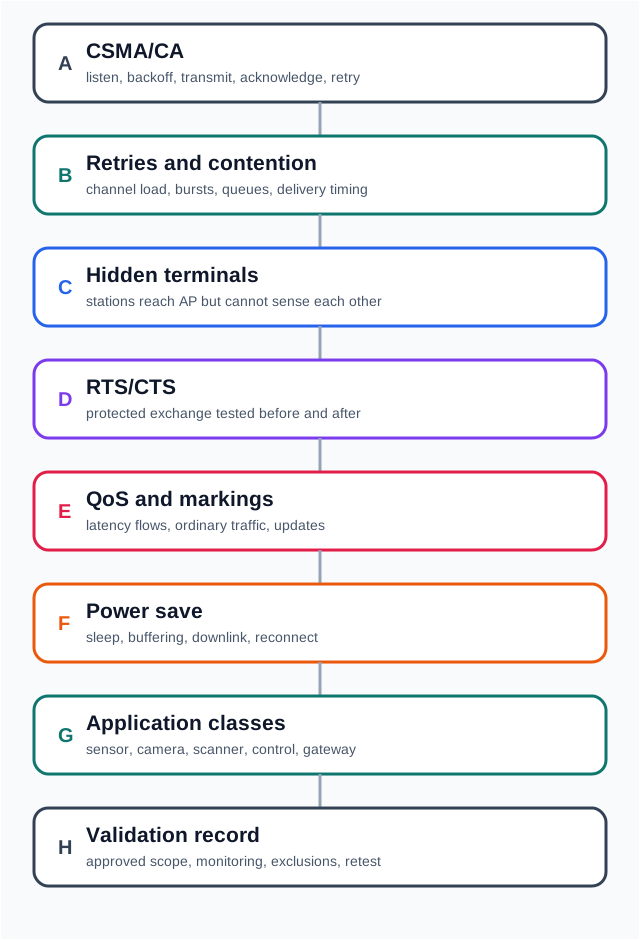
Read Figure 13.1, begin with CSMA/CA, acknowledgements, and retries, then move through traffic class and power timing to the validation record. This layered reading connects shared-airtime mechanics to freshness, reliability, and energy requirements instead of judging the MAC by link rate alone.
For a small IoT device, the MAC decision often hides in timing. Ten bytes sent at a quiet minute is easy; ten bytes sent by hundreds of devices at the same scheduled wake time can become a queue, a retry burst, or a stale dashboard. The acceptance record should name the traffic class, expected freshness, AP profile, channel plan, retry observations, service outcome, and retest trigger. That record keeps the airtime claim tied to the workload, not the payload size.
If you only need the core idea, use this rule: a small payload does not make MAC behavior irrelevant. Many small frames can still queue, collide, retry, or arrive too late when devices wake together.
13.2.1 Beginner MAC Pieces
13.2.2 Channel access
The station checks whether the medium appears free, waits when needed, and uses backoff so multiple stations do not all transmit at once.
13.2.3 Frame exchange
Data, management, and control frames provide different evidence. ACKs and retries describe link-layer behavior, not full application success.
13.2.4 Contention
Retry rate, busy time, latency, and burst behavior show whether stations are sharing airtime cleanly under the actual workload.
13.2.5 Power save
Sleeping devices may delay downlink commands or buffered frames, so freshness and command response need their own evidence.
13.2.6 Beginner Example
A room sensor that uploads ten bytes every minute can still fail a MAC review if every sensor wakes at the same time. The payload is small, but the evidence must cover wake timing, channel busy behavior, retries, service acceptance, stale-data state, and what the user sees when reports arrive late.
13.2.7 Overview Knowledge Check
13.3 Build a MAC Evidence Record
This section: Build a MAC Evidence Record — A practical MAC review starts with the traffic class, not the protocol feature.
A practical MAC review starts with the traffic class, not the protocol feature. Periodic telemetry, alarms, live video, setup traffic, firmware updates, scanner sessions, and maintenance commands each stress airtime differently. The review should state which behavior is required, which evidence was observed, and which change would trigger retest.
13.3.1 How It Works: MAC Review Route
First, Name the traffic. Record whether it is periodic, bursty, event-driven, live, bulk, diagnostic, or setup traffic. Next, Inspect channel access. Look for busy-channel behavior, retry trends, latency, synchronized wake periods, and AP load. Then, Separate link evidence from service evidence. ACKs and retries are not the same as application acceptance, command execution, or dashboard freshness. After that, Test targeted controls. Use placement, channel choices, traffic staggering, scoped RTS/CTS, QoS, aggregation, or power-state changes only where the evidence justifies them. Finally, Record the decision. Include limits, owner, support observations, and the retest trigger for firmware, AP profile, site, or workload changes.
13.3.2 Intermediate Example
A warehouse adds Wi-Fi sensors near metal racks. RSSI to the AP looks acceptable, but retry rate rises when devices on opposite sides of the racks report together. A reviewable response tests AP placement, device grouping, channel changes, traffic staggering, or scoped RTS/CTS and compares retries, latency, delivery, and user-visible freshness before accepting a repair.
To diagnose the warehouse retries, inspect Figure 13.2 before changing transmit power or channels. The drawing distinguishes what each station can sense from what the access point or receiver must decode.

Read Figure 13.2, trace A’s transmission toward B, then note that C lies outside A’s sensing range but can still reach B. C may therefore transmit while B is receiving A, connecting the rack-separated geometry to collisions that good RSSI at each client does not reveal.
After finding hidden-node collisions, inspect Figure 13.3 to ask when a station wastes airtime by waiting even though its send would not harm the first receiver.

Read Figure 13.3 from B’s transmission toward A, then inspect what C can hear. C senses B and defers even though its own transmission to D would not interfere at A, so the medium loses a safe reuse opportunity. Compare that silence with the hidden-terminal case, where a sender cannot hear the competing transmitter and causes a collision at a shared receiver. The two diagrams show opposite errors caused by local carrier-sense geometry: one permits too much simultaneous traffic, while the other suppresses traffic that could have succeeded.
13.3.3 MAC Evidence Ledger
13.3.4 Practitioner Knowledge Check
13.4 Under The Hood: Protocol Controls Change Tradeoffs
This section: Under The Hood: Protocol Controls Change Tradeoffs — MAC controls can improve a bounded problem, but they also create tradeoffs.
MAC controls can improve a bounded problem, but they also create tradeoffs. RTS/CTS may reduce hidden-terminal collisions while adding control overhead. QoS can help selected latency-sensitive flows while failing if everything receives the same priority. Aggregation can reduce overhead for compatible batches while increasing delay for traffic that needs immediate delivery. Power save can save energy while delaying buffered downlink frames and making command latency look random.
13.4.1 DCF Timing And Frame Evidence
For deeper reviews, treat the 802.11 distributed coordination function as a timing ledger. A station waits for the required interframe space, chooses a random backoff from the current contention window, freezes that counter while the medium is busy, and retries with a larger window after a collision. The default contention window is only a starting point; the useful question is whether the selected access category, contention window, retry limit, and transmit opportunity match the number of contenders and the traffic promise.
Before interpreting retries, inspect Figure 13.4 to follow one station’s access delay in time. The timeline separates mandatory interframe waiting, another station’s busy period, and the random backoff that follows.

The stepping stones turn the timeline’s backoff counter into a visible path. Watch what happens to the remaining stones when a second radio uses the lane.
-

Remi waits for the required quiet gap.
-

The station draws a random slot count.
-

Another station speaks, so the count freezes.
-

The lane clears. Remi counts down the idle slots.
-

A clash means a wider retry range next time.
The timer finishes before Remi draws a random set of stones. Another radio takes the lane, so Remi stops on the same stone instead of using up the count. When the lane clears he resumes; the final clash widens the next set of choices. The timeline above shows those same pauses as airtime.
Read Figure 13.4 left to right: after an interframe wait, a busy medium makes the station wait for another clear interframe interval before starting randomized backoff. The separate backoff ledger below shows what happens when a busy medium interrupts an in-progress countdown.
RTS/CTS adds a short reservation exchange before the data frame. The sender asks for the medium with Request to Send, the receiver answers with Clear to Send, and nearby stations that overhear either control frame treat the announced duration as busy in their Network Allocation Vector. That virtual carrier-sense state is why RTS/CTS can reduce some hidden-terminal collisions, while still adding control overhead that has to be justified by before-and-after retry and latency evidence.
To understand why carrier sensing alone cannot solve hidden terminals, inspect Figure 13.5 across all four stations. The control exchange reserves time for nodes that hear different parts of the conversation.

Read Figure 13.5, follow B’s RTS to C, C’s CTS back to B, then DATA and ACK; meanwhile compare A, which hears RTS, with D, which hears CTS. Both set their virtual carrier-sense timer, connecting reservation signalling to fewer collisions around the receiver.
A compact throughput estimate separates three probabilities. Let tau be the probability that one station transmits in a randomly chosen slot, and let n be the number of contending stations. The frame-level collision probability is approximately p = 1 - (1 - tau)^(n - 1). The expected number of attempts before success is 1 + p + p^2 + … + p^K for a retry limit K. The expected backoff slots depend on the backoff stage, for example b_k = 2^k CWmin / 2 before any maximum-window cap is applied.
The station’s useful rate is not the PHY rate. It is useful payload over expected slot time. A slot can be idle, successful, or collided; a busy slot includes preamble, payload airtime, SIFS, ACK time, and AIFS. For equal-length packets at one PHY rate, a useful review can write the shape as S = useful payload / E[slot] and then test whether observed retry, busy-time, and latency evidence agree with that model. If the model says the window is too small for the contender count, the repair may be traffic staggering, AP/channel changes, QoS tuning, or a different radio plan rather than simply increasing transmit power.
The two contention plots below use one explicit illustrative model, so their optima are reproducible. Assume saturated stations, one fixed contention window, a uniform backoff counter, 3,000 useful payload bits, an idle slot of , a successful busy time of , and a collision time of . Then
and
Evaluating gives the five-station maximum at : 7.79 Mbit/s, compared with 7.61 Mbit/s at 64. For 30 stations the same calculation peaks at with 7.67 Mbit/s. These are model-specific teaching optima, not universal 802.11 settings; frame length, PHY timing, retry-stage growth, QoS category, and offered load can move them.
Light and heavy contention peak at different contention-window settings in Figure 13.6.

Read Figure 13.6, follow the five-station curve to its earlier peak, then compare the thirty-station curve whose optimum shifts toward a larger window. Small windows waste airtime in collisions under load, while oversized windows waste idle slots, linking contention tuning to useful payload throughput.
The frame fields are part of the same evidence. An 802.11 data frame carries frame control, duration, receiver/transmitter addressing, sequence control, optional fourth address, payload, and frame check sequence. Frame-control bits such as type, subtype, To DS, From DS, retry, power management, and protected-frame state explain whether a capture is showing association traffic, data transfer, retry behavior, roaming, or security handling. Aggregation changes the evidence again: A-MPDU aggregation batches MPDUs with block acknowledgments, while A-MSDU aggregation packs several payloads under one MAC header. Both reduce overhead for compatible batches, but neither makes tiny urgent messages free.
Not every frame competes through the same queue, either. Wi-Fi Multimedia (WMM) defines four Access Categories — Voice, Video, Best Effort, and Background — with different contention parameters, so a capable station can prioritize its latency-sensitive traffic. Multicast and broadcast frames follow a separate rule: if any client is asleep, the AP holds them and sends them right after each DTIM beacon, and many chipsets keep a dedicated after-beacon queue (and a beacon slot) for this, although the standard does not require that queue layout. Reviewing a QoS claim means checking which access category the client driver actually assigns to the traffic in question, not just confirming that the AP advertises support for all four — a sensor stack that tags everything Best Effort gets no benefit from an AP that implements the rest.
13.4.2 Why ACKs, Retries, And Applications Must Stay Separate
A MAC acknowledgment means that a frame exchange reached the expected receiver at the link layer. It does not prove that the application parsed the payload, stored the reading, executed a command, updated a dashboard, or recovered from a duplicate. A useful review keeps link evidence, network evidence, service evidence, and product evidence in separate columns.
The same separation applies to retry counters. A rising retry count may point to weak signal, channel contention, hidden terminals, rate adaptation, roaming, or synchronized wake bursts. The MAC layer can report symptoms, but the release decision needs a joined trace: AP or sniffer observation, device log, service timestamp, user-visible state, and final application outcome. That trace is what stops a radio repair from masking a service problem.
13.4.3 Advanced Example
A maintenance tablet controls equipment while moving through a site. The review cannot approve the workflow from a single speed test. It needs route evidence, busy-channel behavior, reassociation or reconnect events, command response, stale-state display, and support logs that can explain whether a failure came from channel contention, roaming, security, service delivery, or the application. If RTS/CTS, QoS, aggregation, or power-save tuning is changed, the record should show the before/after symptom, the user-visible outcome, and when to roll the change back.
13.4.4 Failure-Boundary Checks
13.4.5 RTS/CTS boundary
Use it as a measured hidden-terminal repair, not as a universal performance improvement. Record rollback conditions.
13.4.6 QoS boundary
Reserve priority for flows with real latency or jitter needs, then verify that clients, APs, and upstream paths preserve the intended behavior.
13.4.7 Aggregation boundary
Batch only when freshness and duplicate handling allow it. Measure whether latency, retries, and service acceptance improve.
13.4.8 Observability boundary
Decide which AP metrics, device logs, service records, and user-visible states will remain available after deployment.
13.4.9 Try It: MAC Readiness Sentence
Write one sentence for a device class: “This MAC behavior is accepted for this traffic class, on this AP profile and channel plan, with this retry and latency evidence, these service outcomes, these support observations, and this retest trigger.” If the sentence cannot be completed, the readiness claim is still too broad.
13.4.10 Under-The-Hood Knowledge Check
Wi-Fi CSMA/CA contention narrated tour
Play silently with captions on provisional storyboard timing; narration audio is pending. Production pacing is not radio timing. Choose Reduced motion for a complete still at each beat.
Play the tour to open the workbench. Pause, replay a beat, or read the full transcript below. Situations the model cannot show keep the existing frame and provide captions only.
Full transcript — Wi-Fi CSMA/CA contention (8 beats)
B1 — Queued sensor report
You are the engineer responsible for a sensor dashboard staying fresh. Your Wi-Fi sensors wake together to send small reports. Their shared airtime can become crowded, leaving reports queued or needing another attempt. What makes a short report wait before it can even transmit?
Model caption: You manage a sensor dashboard. Reports sent together can wait or need retries, delaying fresh readings.
B2 — Carrier sense
Wi-Fi devices compete for permission to use a shared wireless channel. That competition is called contention. A device listens before transmitting and waits when the channel appears busy. Listening is part of collision avoidance; random waiting also helps devices avoid all starting their transmissions together.
Model caption: Contention means competition for shared airtime. Devices listen and defer when busy; random waiting helps spread transmission starts.
B3 — Clear wait and backoff
After the required clear interval between transmissions, a device counts down a randomly chosen number of backoff slots. The contention window is the range from which it chooses that count. Only idle slots reduce the count. Another transmission makes the counter freeze.
Model caption: The device waits through the required clear interval, then counts idle backoff slots. The contention window supplies the draw range. Busy periods freeze the counter.
B4 — Chapter countdown example
Take the chapter's example. A sensor starts with five backoff slots remaining. Two idle slots pass, leaving three. Another station transmits, and the sensor keeps three slots remaining throughout the busy period. After the required clear interval, three more idle slots bring the counter to zero before the data transmission and acknowledgment.
Model caption: Chapter example: start with five. Two idle slots leave three. Busy time leaves three. After the required clear interval, three more idle slots reach zero; data and acknowledgment follow.
B5 — Missing ACK and retry
In the workbench, a missing acknowledgment signals collision or loss. After a collision, the device retries with a larger contention window. A wider range allows a longer random wait on the next attempt, adding waiting to the cost of trying again.
Model caption: In the workbench, a missing acknowledgment signals collision or loss. A collision leads to a retry with a wider draw range, allowing more backoff waiting.
B6 — Hidden stations and reservations
Hidden stations cannot hear a competing sender, yet their transmissions can collide at a shared receiver. Request to Send and Clear to Send add a short reservation exchange before the data. Stations hearing either control message treat the announced duration as busy. That can reduce some hidden station collisions, at the cost of extra control traffic.
Model caption: Hidden senders can collide at a shared receiver. Request to Send and Clear to Send reserve announced airtime for stations hearing either message. Some hidden-station collisions can be reduced, with extra control traffic.
B7 — Idle-slot misconception
The misconception is that backoff is an ordinary timer that keeps running while another device talks. It fails because the counter measures idle slots. In the five-slot example, the busy interval leaves three slots still owed; elapsed time alone does not pay them off.
Model caption: Backoff counts idle slots, not all elapsed time. In the separate chapter example, the busy interval leaves three slots still owed.
B8 — Shared airtime takeaway
For your sensor dashboard, remember that Wi-Fi backoff counts quiet opportunities to transmit, so shared airtime can delay even a small report.
Model caption: Wi-Fi backoff counts quiet opportunities to transmit, so shared airtime can delay even a small report.
13.5 Figure Review: Backoff as a Pausing Ledger
This section: Figure Review: Backoff as a Pausing Ledger — DCF contention is a stateful countdown over idle slots, so a busy medium pauses the ledger rather than consuming the remaining counter in wall-clock time.
DCF contention is a stateful countdown over idle slots, so a busy medium pauses the ledger rather than consuming the remaining counter in wall-clock time.

Figure 13.7 follows AIFS · 3 slots into BACKOFF 5 → 3, freezes at three during MEDIUM BUSY, and resumes 3 → 0 before DATA and ACK; a missing ACK moves the retry into the CWmin → 2·CWmin collision path.
13.6 Summary
This section: Summary — Wi-Fi MAC behavior determines how IoT stations share airtime.
Wi-Fi MAC behavior determines how IoT stations share airtime. CSMA/CA, backoff, frame exchange, ACKs, retries, RTS/CTS, QoS, aggregation, and power-save behavior matter because they shape delivery, latency, freshness, command response, recovery, and supportability.
A strong review does not approve MAC readiness from a technology label, payload size, single association, or RSSI value. It ties the protocol behavior to a traffic class, installed evidence, service outcomes, user-visible state, and retest trigger.
Approve Wi-Fi MAC behavior only when channel access, frame exchange, contention, power-save, service delivery, and support evidence match the actual IoT workload.
13.7 Quantitative Contention Window
This section: Quantitative Contention Window — Inspect Figure 13.8 to see why one contention-window setting cannot maximise throughput for every active-station count.
Inspect Figure 13.8 to see why one contention-window setting cannot maximise throughput for every active-station count.

Read Figure 13.8 by comparing n = 5, which peaks at 32, with n = 30, which peaks at 256 under the same stated assumptions. The COLLISION MODEL links contender count and per-slot transmit probability to retry limit K, so the chosen window must still be validated with throughput, retries, latency, and fairness together.
13.8 See Also
This section: See Also
13.8.1 Wi-Fi Bands & Channels
Use this when band choice, channel width, and shared-spectrum behavior drive MAC risk.
13.8.2 Wi-Fi Power Consumption
Use this when wake windows, buffered downlink, retry energy, or sleep behavior shape acceptance.
13.8.3 Wi-Fi Security and Provisioning
Use this when onboarding, credentials, segmentation, or revocation affect frame and service evidence.
13.8.4 Wi-Fi Deployment Planning
Use this when MAC evidence must become a site validation and operations plan.
Find help
3 reviewed answers.
Where should I start in a module?
Open the module page from the sidebar to see its chapters in order. Use the module map to return to a topic you need.
Modules and pathsReviewed
What can I try when a project does not work?
Check the symptom, then work through the diagnostic steps. Keep the error message and the smallest example that reproduces it.
When you are stuckReviewed
How do interactive examples work?
Use the interactive guide to check how examples and simulations work before changing your project.
Interactive examples guideReviewed