28 802.15.4 Specifications and Roles

More
Depth: Practitioner
Progress saves as you read. Mark sections complete as you go; your progress appears in the sidebar.
28.1 Start With the Wireless Story
This section: Start With the Wireless Story — Picture a warehouse tag that sends one short shelf update through a busy band.
Turn a Radio Feature Into a Field Test
Picture a warehouse tag that sends one short shelf update through a busy band. A product sheet lists range, rate, and low power, but the planner still has to fit an address, security data, and the reading into one small frame. Nearby office traffic may also delay the send.
Write the real exchange before choosing settings. Name the sender and receiver roles, band, channel, frame size, useful data, added bytes, reply need, wake plan, and time limit. Mark which feature belongs to the radio rule and which belongs to the system built above it.
Test the final frame at the final place. Add nearby traffic, a weak link, a busy receiver, a missed reply, and a battery near its low point. Count retries and useful bytes rather than quoting the best rate. A supported feature is not proof of a working site.
Keep any urgent safe action close to the machine that can see the event. A low-power link can report and coordinate, but loss and delay still need a known local response.
This opening does not pick a stack or promise a fixed range. Practitioner turns the feature list into a frame and site plan. Under the Hood examines timing, channel access, device roles, security cost, and the exact limits behind each choice.
Use a short release check. Does the full frame fit? Do sender and receiver wake at the same time? Is the real site clear of hidden loss? Can the link heal after a miss? Does the safe case work without it? If any answer is no, test again.
Specification choices become deployment limits. Start by naming the device role, PHY option, addressing model, frame budget, beacon behavior, security setting, and coexistence evidence before a stack claims 802.15.4 support.
28.2 In 60 Seconds
This section: In 60 Seconds — IEEE 802.15.4 is a low-rate wireless PHY/MAC standard.
IEEE 802.15.4 is a low-rate wireless PHY/MAC standard. The most important review skill is knowing which feature belongs to the standard, which feature belongs to an upper-layer stack, and which deployment claim still needs measurement.
This chapter reviews the features and specifications that learners should keep separate:
- PHY choices such as band, channel, modulation, symbol timing, and nominal data rate
- MAC behavior such as CSMA/CA, acknowledgments, beacon mode, and GTS
- frame budget constraints, including addressing, footer, security, and adaptation overhead
- device roles such as FFD and RFD
- coexistence with nearby 2.4 GHz systems, especially Wi-Fi
- evidence needed before accepting throughput, range, power, or channel-planning claims

28.3 Learning Objectives
This section: Learning Objectives
By the end of this chapter, you will be able to:
- identify the 802.15.4 PHY and MAC features that affect design review
- explain why nominal data rate is not the same as usable application throughput
- review how frame fields and security overhead reduce payload space
- distinguish non-beacon CSMA/CA from beacon-enabled scheduling and GTS
- connect FFD/RFD roles to topology and power expectations
- evaluate coexistence claims without relying on universal channel rules
- build a specification evidence record for an 802.15.4 design
28.4 Specification Review Map
This section: Specification Review Map — Before using a specification value as a design promise, inspect Figure 28.1 to connect PHY, MAC, device role, timing, and payload constraints.
Before using a specification value as a design promise, inspect Figure 28.1 to connect PHY, MAC, device role, timing, and payload constraints.
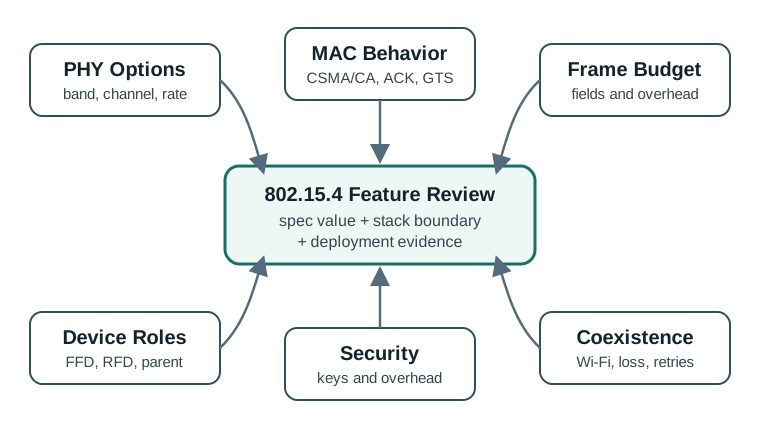
Read Figure 28.1 from the application requirement through the relevant standard feature and device capability to the measurement needed. This separates what the standard permits from what the chosen hardware and deployment prove.
Use Figure 28.1 to keep specification review balanced. A design can be wrong even when a single data-rate, frequency, or channel number is correct.
28.5 What 802.15.4 Specifies
This section: What 802.15.4 Specifies — When reviewing a design, do not say “802.15.4 provides mesh” unless the actual stack layer that provides routing is named.
IEEE 802.15.4 focuses on the lower layers:
- PHY behavior: radio band, channelization, modulation, spreading, symbol behavior, transmit/receive operation, and packet delivery to the MAC.
- MAC behavior: frame format, addressing, CSMA/CA, acknowledgments, association support, beacon-enabled operation, GTS, and optional security services.
Higher-layer protocols add functions that 802.15.4 does not fully define:
- mesh routing and route repair
- IPv6 adaptation and compression
- application profiles and device semantics
- commissioning workflows
- cloud integration and product behavior
When reviewing a design, do not say “802.15.4 provides mesh” unless the actual stack layer that provides routing is named.
28.6 PHY Features To Review
This section: PHY Features To Review — The common 2.4 GHz PHY uses channels 11 through 26, spaced 5 MHz apart from 2405 MHz to 2480 MHz, with a nominal 250 kbps rate.
The common 2.4 GHz PHY uses channels 11 through 26, spaced 5 MHz apart from 2405 MHz to 2480 MHz, with a nominal 250 kbps rate. Regional sub-GHz PHY options also exist, and their allowed channels and rates depend on region, amendment, and local regulation.
Keep the rate and band claims specific. A classic 802.15.4 design may use 2.4 GHz worldwide at 250 kbps, 868 MHz in Europe at lower legacy rates such as 20 kbps, or 915 MHz options in regions such as North America and Australia. Those choices are not interchangeable: path loss, antenna size, interference, channel availability, and local duty-cycle rules all change with frequency. A Zigbee or 6LoWPAN review that cites “250 kbps” should therefore also name the actual PHY, band, and channel evidence.
Review prompts:
- Which band and channel set is allowed in the deployment region?
- Which PHY option does the device actually implement?
- Is the nominal data rate being used as a raw PHY number or as an application-throughput estimate?
- Is link quality measured at the installed antenna location?
- Are receiver sensitivity, transmit power, antenna placement, duty-cycle rules, and regulatory limits part of the review?
28.6.1 PHY Modulation and Amendment Lineage
The legacy IEEE 802.15.4 PHYs discussed here use direct-sequence spread spectrum (DSSS): each data symbol selects a longer chip sequence, so the radio correlates many chips to recover one symbol. Other PHY options use different modulation. If a symbol carries information bits and maps to chips, the processing structure is visible as
where is bit rate and is chip rate. The extra chips do not create free capacity; they trade bandwidth and correlation work for robustness against noise and interference.
Legacy lower-rate sub-GHz PHYs use BPSK, where the carrier phase represents two symbol states. The widely used 2.4 GHz 250 kbit/s PHY maps four data bits to one of sixteen 32-chip sequences and sends the chips with offset QPSK. O-QPSK delays the quadrature branch by one chip so the in-phase and quadrature components do not reverse simultaneously. With half-sine pulse shaping, this limits envelope discontinuities and permits efficient low-power transmitter implementations. A design record should therefore name the exact PHY; “802.15.4 modulation” is not one universal waveform.
The often-quoted minimum transmit-power capability of dBm converts to watts through
That is a conducted-power capability example, not a required deployment setting and not proof of range. Antenna gain, receiver sensitivity, obstacles, interference, regional limits, link margin, and the endpoint’s return path still determine whether the link works.
The amendment family changed different layers and regions:
| Amendment | Main addition | What to verify in a product claim |
|---|---|---|
| 802.15.4a | alternative UWB and chirp-spread-spectrum PHYs, including ranging-oriented capability | supported PHY, channel, ranging method, and regional approval |
| 802.15.4c | PHY/channel provisions for Chinese regional bands, including the 779–787 MHz allocation | actual regional radio variant and certification |
| 802.15.4d | PHY/channel provisions for Japan’s 950 MHz allocation | current permitted band and product radio variant |
| 802.15.4e | MAC enhancements such as time-slotted channel hopping, deterministic/synchronous multichannel operation, and low-latency industrial modes | schedule, time synchronization, channel hopping, recovery, and upper stack |
| 802.15.4f | active-RFID-oriented PHY additions, including 433 MHz and UWB-related operation | tag/reader PHY profile rather than a generic mesh claim |
| 802.15.4g | Smart Utility Network PHYs for regional sub-GHz neighborhood-area operation | SUN PHY choice, data rate, channel plan, and regulation |
| : Amendment letters identify a capability family, not automatic interoperability. |
Finally, keep beacon terminology straight. In a beacon-enabled PAN, the coordinator sends periodic beacons, a superframe can structure time, and slotted CSMA/CA plus an optional contention-free period/GTS can be used. In a non-beacon-enabled PAN, devices normally use unslotted CSMA/CA and do not depend on a periodic coordinator superframe; polling may be used for sleepy-device traffic. Reversing those labels produces the wrong clock, wake, and access assumptions even if packets happen to pass during a demonstration.
28.7 MAC Features To Review
This section: MAC Features To Review — The MAC layer controls how devices share the channel and how frames are addressed and acknowledged.
The MAC layer controls how devices share the channel and how frames are addressed and acknowledged.
Important features include:
- CSMA/CA contention access with random backoff
- optional acknowledgments and retries
- beacon-enabled superframes for synchronized operation
- guaranteed time slots in the contention-free portion of a superframe
- association and addressing support
- security fields when security is enabled
Review prompts:
- Is the traffic event-driven, periodic, bursty, or mixed?
- Does the design need bounded timing or only best-effort reporting?
- Are acknowledgments and retries enabled for the traffic class being reviewed?
- Does beacon tracking increase wake time for battery devices?
- Are GTS requests limited to traffic that truly needs scheduled access?
28.8 Frame Budget
This section: Frame Budget — The 802.15.4 frame is small enough that every field matters.
The 802.15.4 frame is small enough that every field matters. A payload estimate should count the MAC header, addressing fields, footer, security fields, and any upper-layer adaptation headers before claiming application capacity.
Review prompts:
- Which addressing fields appear in normal data frames?
- Is PAN ID compression used where appropriate?
- Is the 2-byte frame check sequence counted?
- Does security add auxiliary fields or a message integrity code?
- Does the upper-layer stack add compression, fragmentation, or routing headers?
- Are retransmissions counted when estimating airtime and battery use?
28.9 Beacon Mode And GTS
This section: Beacon Mode And GTS — Beacon-enabled operation can organize time into a superframe.
Beacon-enabled operation can organize time into a superframe. The contention access period supports CSMA/CA traffic. The contention-free period can include GTS allocations for devices that need bounded transmission opportunities.
GTS review should ask:
- Which device gets a slot and why?
- Is the traffic periodic enough to justify the slot?
- Is the slot request accepted and maintained by the coordinator?
- What happens when a beacon is missed?
- What traffic still competes in the contention access period?
Do not use GTS as a generic reliability label. It helps only when the timing and synchronization assumptions are true.
28.10 Coexistence Review
This section: Coexistence Review — 2.4 GHz 802.15.4 networks often share space with Wi-Fi and other radios.
2.4 GHz 802.15.4 networks often share space with Wi-Fi and other radios. A good channel plan starts with observation, not a universal “always use channel X” rule.
Before changing channels or transmit settings, inspect Figure 28.2 to organise the coexistence diagnosis. The route keeps spectrum observations, device capabilities, and service outcomes connected.
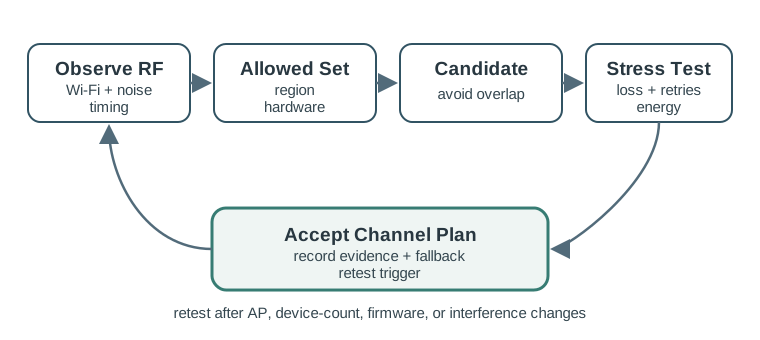
Read Figure 28.2, begin with the failure window and overlapping activity, then trace candidate changes through a controlled retest and service-level comparison. This order connects PHY and MAC specifications to deployment evidence, so a cleaner spectrum plot alone is not mistaken for a successful application.
Use Figure 28.2 before accepting a coexistence claim. Nearby Wi-Fi channel use, Wi-Fi bandwidth, transmit power, traffic pattern, adjacent-channel leakage, physical separation, and local noise floor all affect the result.
Review prompts:
- Which Wi-Fi channels and channel widths are active nearby?
- Which 802.15.4 channels are allowed and supported by the devices?
- Does the candidate channel avoid both direct overlap and strong adjacent-channel interference?
- Was packet loss, retry count, latency, and energy measured before and after the change?
- Does the plan include a retest trigger when the Wi-Fi environment changes?
28.11 Worked Review Examples
This section: Worked Review Examples
28.11.1 Classroom Sensor Demonstration
A classroom prototype has a few sensors sending short messages every minute. The review should not need complex capacity math. It should check that the payload fits, acknowledgments work, the coordinator is placed well, and the selected channel is not obviously crowded during the demonstration.
Acceptance evidence should include:
- actual frame payload and addressing mode
- measured packet success during the class period
- observed retry count or link-quality indicator
- channel observation from the room
- note that results are prototype evidence, not a production capacity guarantee
28.11.2 Building Lighting Network
A building lighting system has many nodes and local Wi-Fi. A weak review chooses a channel from a diagram. A stronger review measures the installed spectrum, checks candidate channels during busy Wi-Fi periods, records loss and retries, and keeps a retest trigger for access-point changes.
Acceptance evidence should include:
- Wi-Fi channel and width observations
- tested 802.15.4 candidate channels
- packet loss and retry count under normal and busy conditions
- response latency for user actions
- fallback channel or maintenance plan
28.11.3 Meter Reading Window
A metering network sends periodic readings in a limited time window. The review should check whether contention access can handle the window or whether scheduled access is justified.
Acceptance evidence should include:
- number of devices per parent or coordinator
- payload budget after security and upper-layer headers
- reporting window and acceptable completion time
- retry behavior during the collection window
- power cost of any beacon tracking
- recovery behavior after missed readings
28.12 Review Checklist
This section: Review Checklist
Before accepting a feature/specification answer, verify that:
- PHY band, channel, and data-rate statements match the actual device and region
- nominal PHY rate is not treated as application throughput
- frame budget includes addressing, footer, security, and upper-layer overhead
- CSMA/CA, acknowledgments, retries, and burst timing are part of airtime reasoning
- beacon and GTS choices are tied to measured timing needs
- FFD/RFD roles are consistent with routing and sleep behavior
- coexistence claims are based on local spectrum and packet evidence
- sub-GHz choices include regional, antenna, data-rate, and hardware constraints
- the design record says which condition should trigger retesting
28.13 Common Mistakes
This section: Common Mistakes
Avoid these patterns:
- describing Zigbee, Thread, or 6LoWPAN behavior as if it were provided only by 802.15.4
- using raw 250 kbps PHY rate as a capacity guarantee
- claiming a fixed usable throughput without traffic, frame, and retry evidence
- assuming a channel is safe because a generic diagram says so
- using GTS for traffic that is mostly absent or unpredictable
- ignoring beacon-listening energy in battery designs
- forgetting security overhead in small-payload frames
- treating sub-GHz as automatically better without checking data rate, antenna, region, and product support
28.14 Knowledge Check
This section: Knowledge Check
28.15 Matching Quiz
This section: Matching Quiz
28.16 Ordering Quiz
This section: Ordering Quiz
28.17 Two Device Types and One Coordinator
This section: Two Device Types and One Coordinator — 802.15.4 defines two device classes.
802.15.4 defines two device classes. A full-function device (FFD) implements the full MAC capability set: it can communicate with FFDs and RFDs, participate in peer-to-peer arrangements, and act as a coordinator when the topology requires it. A reduced-function device (RFD) is deliberately simpler. It talks only to an FFD, does not become a coordinator, and is normally used as a low-power leaf node whose radio can sleep for long periods.
Before assigning device roles, inspect Figure 28.3 to separate the local radio topology from the upper-layer gateway and service boundary. The separation matters because FFD and RFD describe IEEE 802.15.4 MAC capability, not every routing or application responsibility imposed by the stack above it.
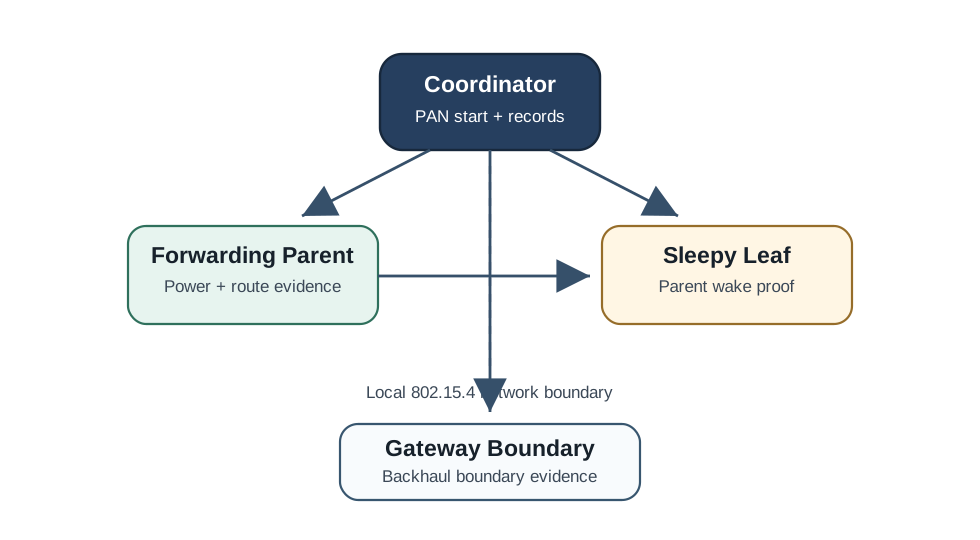
Read Figure 28.3 from the coordinator at the local network boundary to the forwarding parent and sleepy leaf, then follow the local links toward the gateway boundary. Notice which devices must remain available to coordinate or forward and which leaf can sleep without carrying another node’s traffic. The map therefore connects RFD and FFD capability to actual deployment duties while keeping upper-layer routing and gateway services outside the PHY/MAC claim. Use that boundary in the running review to assign roles, power budgets, and failure expectations without importing Zigbee or Thread role names into the base standard.
Every 802.15.4 personal area network (PAN) has exactly one PAN coordinator. That device is an FFD, starts the PAN, chooses or owns the 16-bit PAN identifier, and manages association for devices that join. Other FFDs may support richer topology behavior when an upper-layer stack uses them, but the important review boundary is this: 802.15.4 gives you device capabilities and MAC association; mesh routing, application profiles, commissioning semantics, and product behavior come from layers above the PHY/MAC.
Worked topology example. A room has 30 battery door sensors and 3 powered relay nodes. If every node were treated as an FFD with receiver-on behavior, the design would waste energy on devices that never need to coordinate traffic. A cleaner mapping makes the door sensors RFD leaves and the powered relays FFD-capable infrastructure. The PAN coordinator can assign short addresses and manage the network, while the upper-layer stack decides whether powered relays also route application traffic. The specification review should write down which role is 802.15.4 and which role belongs to the upper layer.
The role choice also affects failure analysis. If a door sensor is an RFD, it cannot be blamed for failing to relay a neighbour's packet; that was never its job. If a powered relay is expected to support many children, the review must check its receiver duty cycle, parent/child limits from the chosen stack, and local link evidence. Confusing FFD/RFD with Zigbee coordinator/router/end-device names makes this easy to miss.
Rule of thumb: FFD = full MAC participant and possible coordinator; RFD = leaf that speaks only to an FFD. A battery sensor is usually an RFD; a powered relay or PAN coordinator must use FFD capability.
Overview Knowledge Check
28.18 Addressing, Frame Types, and the Header Budget
This section: Addressing, Frame Types, and the Header Budget — 802.15.4 nodes carry two addresses.
802.15.4 nodes carry two addresses. The 64-bit extended address is a globally unique IEEE EUI-64 associated with the radio. The 16-bit short address is assigned by the coordinator when a node associates and is unique only within that PAN. Using short addresses shrinks the MAC header, which matters because The whole IEEE 802.15.4 frame is capped at 127 bytes, including MAC fields, security overhead when enabled, upper-layer headers, and application data.
There are four classic MAC frame types, selected by the 2-byte Frame Control Field: Beacon, Data, Acknowledgment, and MAC Command. MAC command frames handle association, disassociation, data requests, coordinator realignment, and similar control behavior. A reviewer should therefore separate two budgets: data frames carry application payload, while command and acknowledgment frames consume airtime that still affects latency and energy.
Worked example: the byte impact of long addresses. For an intra-PAN data frame with PAN-ID compression, a compact overhead count is FCF (2) + sequence number (1) + destination PAN ID (2) + destination short address (2) + source short address (2) + FCS (2). That is 2 + 1 + 2 + 2 + 2 + 2 = 11 bytes, leaving 127 - 11 = 116 bytes before any security or upper-layer header. If both addresses are 64-bit instead, the two address fields grow from 2 bytes each to 8 bytes each. Overhead becomes 11 + 12 = 23 bytes, leaving 127 - 23 = 104 bytes. Switching to short addressing after association recovers 12 bytes per frame.
Security budget example. If a design also enables MAC security with a 5-byte auxiliary security header and a 4-byte message integrity code, that compact short-address frame loses another 5 + 4 = 9 bytes. The remaining space drops from 116 bytes to 107 bytes before an IPv6 adaptation layer, routing header, or application schema is counted. A payload that looked safe at “about 110 bytes” can become a fragmentation problem once the real stack is named.
The practical review habit is to ask for a frame budget table, not a sentence. The table should name address modes, PAN-ID compression, acknowledgment use, security fields, upper-layer adaptation, expected payload, and retry assumptions. It should also say whether the estimate is for ordinary data, a join/control exchange, or an alarm path, because those may use different frame types and different header combinations.
28.18.1 Practitioner Knowledge Check
28.19 The Frame Control Field and Indirect Transmission
This section: The Frame Control Field and Indirect Transmission — Two FCF ideas reveal how sleepy RFDs are supported.
The 2-byte Frame Control Field (FCF) is where a lot of 802.15.4 behavior is encoded as flags: frame type, security enabled, frame pending, acknowledgment request, PAN-ID compression, frame version, and the source/destination addressing modes. A single frame can therefore say “I am a data frame, using short addresses in this PAN, with security enabled, and I expect an acknowledgment.” That compact flag set is why frame-budget review and behavior review belong together.
Two FCF ideas reveal how sleepy RFDs are supported. Because an RFD powers its radio down, its coordinator cannot push data to it whenever the application wants. Instead the coordinator buffers pending data. In beacon-enabled operation, pending-address information can be advertised in beacons. In polling behavior, the RFD wakes and sends a data-request MAC command; the coordinator acknowledges and indicates whether data is pending, then sends the buffered frame. This indirect transmission lets a leaf sleep most of the time yet still receive commands.
Worked timing example. A door sensor sleeps for 30 seconds at a time and wakes for a short poll. A controller wants to send a disable command just after the sensor has gone back to sleep. Direct transmission cannot work because the receiver is off. With indirect transmission, the coordinator queues the command. On the next wake, the sensor sends a data-request, receives the pending indication, receives the buffered command, and acknowledges it. The command latency is therefore tied to the polling interval: if the sensor polls every 30 seconds, a command may wait almost 30 seconds before delivery. That is acceptable for configuration, but not for a sub-second safety stop.
The FCF flags also affect airtime. If the data frame requests an acknowledgment, the exchange is not just one packet; the sender waits for an ACK and retries if it does not arrive. If security is enabled, the security flag means auxiliary fields and integrity data must be counted. If PAN-ID compression is not available for a frame, an extra PAN identifier may be present. A good review does not memorize one universal header size; it identifies the actual FCF choices and computes the frame for that exchange.
The design implication is simple: sleepy RFD behavior saves energy by moving from continuous listening to scheduled polling, but it trades away immediate downlink delivery. Use it for sensors that mostly report upward and can tolerate delayed commands. Do not use it as a hidden control path for an actuator that must respond within a tight deadline unless the poll interval, beacon schedule, and retry behavior have been engineered for that deadline.
28.19.1 Under-the-Hood Knowledge Check
28.20 Summary
This section: Summary — IEEE 802.15.4 feature review should be precise.
IEEE 802.15.4 feature review should be precise. The standard provides low-rate PHY and MAC behavior, not a complete application stack. Nominal data rate, channel spacing, CSMA/CA, beacon mode, GTS, security fields, and frame size all matter, but none of them proves a deployment claim by itself. Accept a feature choice only after the frame budget, traffic timing, device roles, coexistence evidence, and retest trigger are clear.
28.21 Key Takeaway
This section: Key Takeaway — 802.15.4 Features and Specifications should connect 802.15.4 frame structure, addressing, topology, MAC behavior, power use, security, coexistence, and deployment evidence before selecting the stack.
802.15.4 Features and Specifications should connect 802.15.4 frame structure, addressing, topology, MAC behavior, power use, security, coexistence, and deployment evidence before selecting the stack.
28.22 Concept Relationships
This section: Concept Relationships
This chapter connects to:
- 802.15.4 Fundamental Operation for CSMA/CA, acknowledgments, association, and beacon behavior.
- 802.15.4 Coexistence for deeper Wi-Fi and 802.15.4 channel planning review.
- 802.15.4 Deployment Considerations for site evidence, antenna placement, topology, and installation checks.
- 802.15.4 Comprehensive Review for a broader cross-topic review gate.
- 802.15.4 Advanced Topics for CSMA/CA tuning, scheduling, and sparse collision-identification review.
28.23 What’s Next
This section: What’s Next — Continue with 802.15.4 Coexistence to review interference, channel planning, and local RF evidence in more detail.
Continue with 802.15.4 Coexistence to review interference, channel planning, and local RF evidence in more detail.
28.24 PHY and Timing Decision Map
This section: PHY and Timing Decision Map — Inspect Figure 28.4 to name the selected PHY, amendment lineage, and MAC timing mode rather than quoting a family-wide rate.
Inspect Figure 28.4 to name the selected PHY, amendment lineage, and MAC timing mode rather than quoting a family-wide rate.

Read Figure 28.4 by comparing 868 MHz with 2.4 GHz, including DSSS, modulation, and nominal rate. The BEACON-ENABLED and NON-BEACON cards correct the timing boundary: periodic beacons and a 16-slot superframe belong to the former, while the latter uses unslotted contention.
Find help
3 reviewed answers.
Where should I start in a module?
Open the module page from the sidebar to see its chapters in order. Use the module map to return to a topic you need.
Modules and pathsReviewed
What can I try when a project does not work?
Check the symptom, then work through the diagnostic steps. Keep the error message and the smallest example that reproduces it.
When you are stuckReviewed
How do interactive examples work?
Use the interactive guide to check how examples and simulations work before changing your project.
Interactive examples guideReviewed