30 802.15.4 Deployment Practices

More
Depth: Practitioner
Progress saves as you read. Mark sections complete as you go; your progress appears in the sidebar.
30.1 Begin With One Installed Link
This section: Begin With One Installed Link — IEEE 802.15.4 is a low-power radio and link standard.
IEEE 802.15.4 is a low-power radio and link standard. Firmware is the code that runs on a device. Picture a cold-room sensor that must send a small alert through two walls. A range claim from a data sheet is not the field result. Start with the real device place, receiver place, message need, and safe failure.
Draw the path and note walls, metal, other radios, power, and node roles. Choose a channel and a first route. Then send a known set of messages at quiet and busy times. Record signal facts, retries, loss, delay, and current use. Move a door, add stock, remove a relay, and restart a node. Check the app result as well as the radio log.
More link margin can aid repair, but a louder or busier design may use more power and disturb peers. More relays can add paths, but they add upkeep and air use. One site pass does not prove all seasons or loads. For an 802.15.4 deployment, work the link budget, site record, and acceptance test; check fade, shared channels, routing measures, and current limits before accepting the result.
Use a short walk test before the full fit. Mark each planned point on a map. Take the real box, aerial, cell, and mount. Hold them in the planned pose. Send a fixed set of small messages. Repeat with doors open and shut. Repeat while nearby systems are busy. Note time and weather. A map of real misses is worth more than one best range.
Set a clear pass rule before the run. Count total sends. Count first-pass wins. Count retries and gaps. Check the worst key path, not just the mean. Check the cell cost of the same test. If a relay is part of the claim, remove it once. If the path heals, count the lost or late work during the change.
Keep the map with the final record. Mark the sites not tested. Mark the next visit and the event that forces a new test. Stock moves. Walls change. New radios arrive. Cells age. A field link is a claim with a date, not a fact for all time.
30.2 Start With the Wireless Story
This section: Start With the Wireless Story — Deployment is where 802.15.4 link assumptions meet walls, batteries, neighbors, and installers.
Deployment is where 802.15.4 link assumptions meet walls, batteries, neighbors, and installers. Start with the site evidence, then prove topology roles, channel choice, link margin, commissioning, monitoring, and recovery plans.
30.3 In 60 Seconds
This section: In 60 Seconds — An IEEE 802.15.4 deployment is not accepted by quoting a range number, a generic channel rule, or a battery-life promise.
An IEEE 802.15.4 deployment is not accepted by quoting a range number, a generic channel rule, or a battery-life promise. It is accepted by evidence from the actual site: where devices are installed, which roles they use, which channel candidates were tested, how links behave under normal load, how much current the firmware draws, and what will trigger a retest.
Use this chapter to review:
- site survey evidence before installation
- topology choices and device roles
- link-quality and coverage validation at installed locations
- channel planning and coexistence with nearby radios
- power measurements for sleepy and routing devices
- commissioning records for addresses, identifiers, keys, and firmware
- monitoring signals that reveal drift after the installation changes

30.4 Learning Objectives
This section: Learning Objectives
By the end of this chapter, you will be able to:
- turn an 802.15.4 deployment plan into a testable evidence loop
- distinguish role, topology, channel, power, and commissioning decisions
- review link validation without relying on fixed indoor range assumptions
- evaluate power claims from measured current and radio-on behavior
- define commissioning records that make field support repeatable
- identify retest triggers for RF, firmware, topology, and device-count changes
30.5 Deployment Evidence Loop
This section: Deployment Evidence Loop — Before freezing a deployment plan, inspect Figure 30.1 to see how survey, topology, channel, link, power, and commissioning evidence feed one another.
Before freezing a deployment plan, inspect Figure 30.1 to see how survey, topology, channel, link, power, and commissioning evidence feed one another.
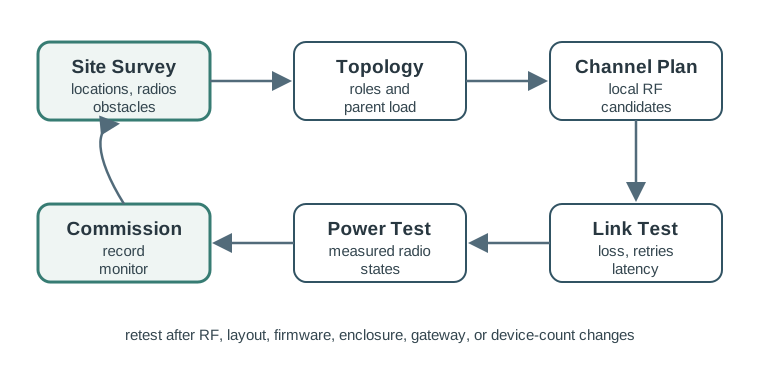
Read Figure 30.1 from site baseline through installed validation, then follow weak results back to the design decision that must change. The loop connects planning assumptions to repeatable acceptance evidence.
Use Figure 30.1 to keep the review grounded in site evidence. A deployment decision should move from observation to a bounded test, then to commissioning and monitoring. If the site changes, the loop reopens.
30.6 Site Survey
This section: Site Survey — The survey should describe the installed environment rather than an ideal floor plan.
The survey should describe the installed environment rather than an ideal floor plan.
Collect evidence for:
- device locations, mounting height, enclosure material, and antenna orientation
- walls, doors, racks, vehicles, water, machinery, and human traffic that can change the RF path
- existing Wi-Fi, Bluetooth, neighboring 802.15.4 PANs, and other local transmitters
- quiet and busy periods for both application traffic and nearby radios
- power sources for coordinators, routers, gateways, and sensor nodes
- maintenance constraints such as access limits, downtime windows, and replacement procedures
The survey does not need to produce a perfect propagation model. It must identify the conditions that should be tested before the installation is accepted.
30.7 Topology And Device Roles
This section: Topology And Device Roles — 802.15.4 device roles must match the power and forwarding responsibilities of the installation.
802.15.4 device roles must match the power and forwarding responsibilities of the installation.
Review these role decisions:
- The PAN coordinator or border device is placed where it can be powered, protected, backed up, and connected to the rest of the system.
- Router or full-function devices are used only where forwarding, association support, or always-on reception is justified.
- Sleepy end devices avoid routing obligations and wake only for their own traffic pattern.
- Parent or router load is reviewed by zone, not just by total device count.
- A failed coordinator, router, or gateway has a documented recovery path.
- The chosen upper-layer stack is named when mesh routing, IPv6 adaptation, application profiles, or cloud behavior are discussed.
Do not accept “make every node a router” as a deployment plan. Routing capability can improve coverage, but it also changes power, firmware, support, and failure behavior.
30.8 Link And Coverage Validation
This section: Link And Coverage Validation — Coverage validation should happen at the installed antenna position with the final enclosure, not only on a bench.
Coverage validation should happen at the installed antenna position with the final enclosure, not only on a bench.
Review the following evidence:
- packet success, retries, latency, RSSI, and LQI measured together
- join and rejoin behavior from representative locations
- results with doors, racks, equipment, people, or vehicles in realistic states
- results during normal traffic and expected bursts
- path diversity when a router, coordinator, or gateway is unavailable
- evidence that weak zones were fixed by placement, topology, channel, antenna, or product choice
RSSI alone is not enough. A strong RSSI value can still coexist with interference, hidden nodes, poor LQI, or a high retry rate.
30.9 Channel And Coexistence Planning
This section: Channel And Coexistence Planning — Channel planning starts with the local RF environment and device support.
Channel planning starts with the local RF environment and device support.
Review prompts:
- Which channels are supported by the hardware, firmware, stack, and deployment region?
- Which nearby Wi-Fi channels and channel widths are active during the failure-prone period?
- Are neighboring 802.15.4 PANs present?
- Were candidate channels tested for packet success, retries, latency, and join behavior?
- Does changing channels require rejoin, recommissioning, downtime, or user action?
- Is there a fallback channel and a rollback plan?
A generic “safe channel” recommendation is not a deployment record. The record should explain why a candidate channel worked at this site and when it must be retested.
30.10 Power And Duty-Cycle Evidence
This section: Power And Duty-Cycle Evidence — Low-power wireless still needs power evidence.
Low-power wireless still needs power evidence. Battery life depends on firmware behavior, sleep current, wake frequency, radio-on time, retries, temperature, battery chemistry, and maintenance expectations.
Review prompts:
- What current was measured in sleep, transmit, receive, scan, join, and error-recovery states?
- How often does the device wake under normal, busy, and failure conditions?
- Do retries, failed joins, parent changes, or beacon tracking increase radio-on time?
- Are routing devices powered appropriately for their listening and forwarding obligations?
- Does the battery model include self-discharge, temperature, aging, and replacement practice?
- Was the final firmware measured, not only a reference example?
Do not accept a battery claim that only says “802.15.4 is low power.” The claim should tie measured current to the actual traffic and recovery behavior.
30.11 Commissioning And Addressing
This section: Commissioning And Addressing — Commissioning evidence makes the deployment repeatable.
Commissioning evidence makes the deployment repeatable.
Record:
- device identity and physical location
- PAN, channel, coordinator, parent, or router association when relevant
- extended identifier and assigned short address if the stack exposes both
- firmware, hardware revision, antenna, enclosure, and power source
- security material handling and rekey or replacement procedure
- join, rejoin, reset, and factory-recovery steps
- acceptance test result and date
Addressing should not be reviewed in isolation. The important question is whether a technician can replace, rejoin, or diagnose a device without guessing how it was installed.
30.12 Acceptance Record
This section: Acceptance Record — To decide whether a planned network is actually deployable, inspect Figure 30.2 before sign-off.
To decide whether a planned network is actually deployable, inspect Figure 30.2 before sign-off. The record joins radio planning to installed measurements, commissioning, and future change control.
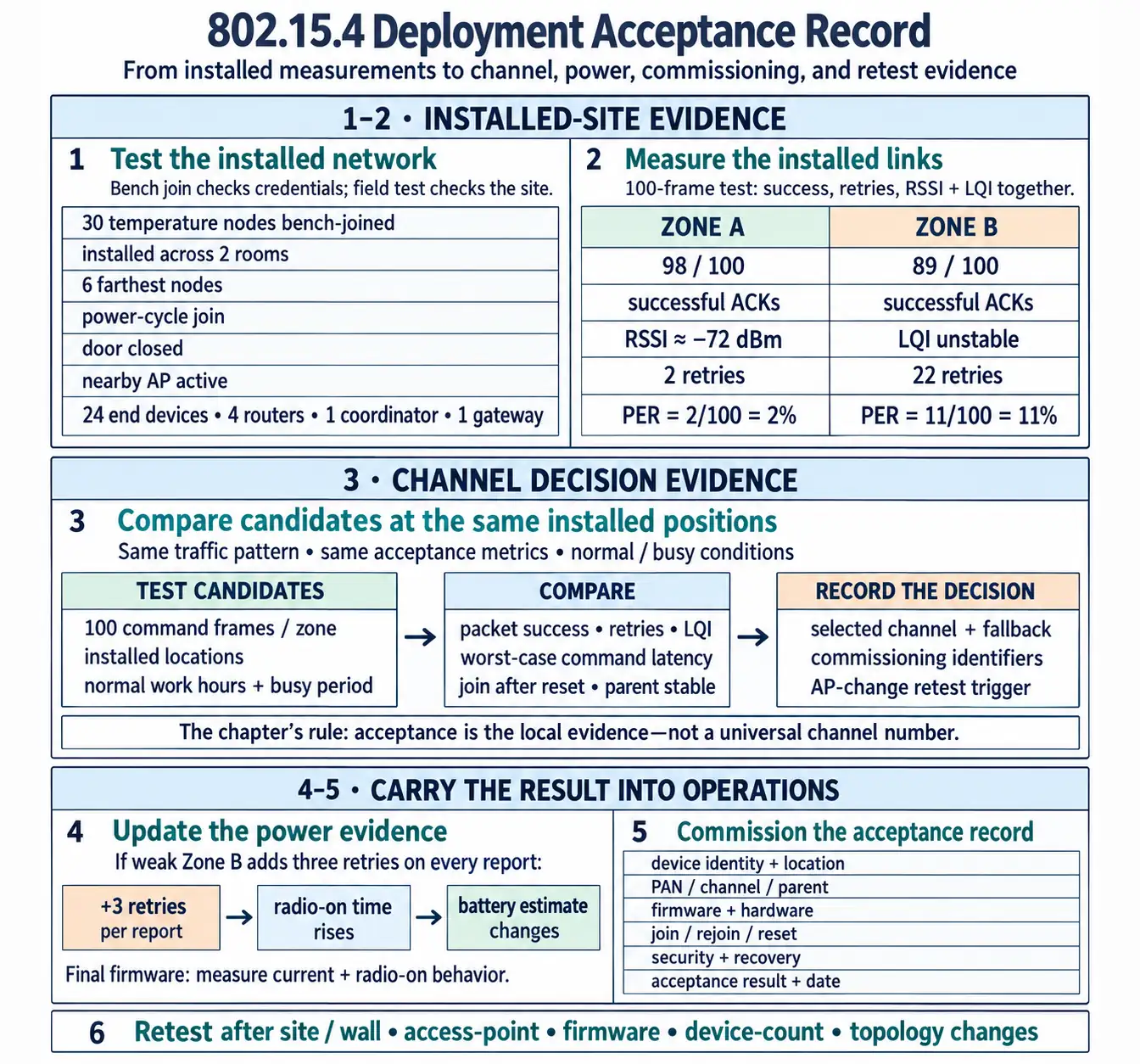
Read Figure 30.2, start with the site baseline and node roles, then follow channel and link evidence into power results and commissioning records. Finish at the retest trigger: it connects today’s acceptance to the conditions under which the deployment must be measured again.
Use Figure 30.2 before sign-off. The record should make the decision reviewable months later when a wall moves, an access point changes, firmware is updated, or more devices are added.
30.13 Monitoring And Maintenance
This section: Monitoring And Maintenance — The deployment is not finished after the first successful join.
The deployment is not finished after the first successful join.
Monitor:
- packet success and retry trends by zone
- join and rejoin failures
- parent or route changes
- latency for user-visible actions
- battery voltage and radio-on indicators when available
- coordinator, router, gateway, or backhaul health
- firmware and configuration changes
- RF or site changes that match the retest triggers
Maintenance should distinguish local device failure from site-wide RF or topology drift. A few failed batteries are different from a building-wide retry increase after an access-point change.
30.14 Worked Review Examples
This section: Worked Review Examples
30.14.1 Office Retrofit
A lighting retrofit adds 802.15.4 wall sensors to an office with existing Wi-Fi.
Review steps:
- Survey access-point placement, channel widths, sensor mounting positions, and busy-hour traffic.
- Test candidate 802.15.4 channels from the installed locations.
- Compare packet success, retries, LQI, and command latency during normal work hours.
- Place routing devices only where power and forwarding responsibility are acceptable.
- Record the selected channel, fallback channel, commissioning identifiers, and retest trigger for access-point changes.
The acceptable answer is not a single channel number. It is the evidence that the channel, topology, and commissioning process work in that office.
30.14.2 Warehouse Sensors
A warehouse monitors doors, pallets, or equipment with battery devices. Failures cluster near metal racks and during shift changes.
Review steps:
- Separate coverage problems near racks from synchronized traffic bursts.
- Test installed devices with normal rack loading and vehicle movement.
- Stagger non-critical reports if burst traffic drives retries.
- Add powered routing points only where they improve measured coverage and can be maintained.
- Track failures by zone so a local obstruction is not mistaken for a whole-network issue.
The fix may combine placement, topology, and traffic shaping. A channel change alone may not address the real cause.
30.14.3 Cold-Room Monitoring
Temperature sensors are installed in cold rooms, freezers, or refrigerated cases.
Review steps:
- Test the final enclosure and antenna at operating temperature.
- Measure current in sleep, transmit, receive, and recovery states at the expected temperature range.
- Validate packet delivery with doors open and closed, stock present, and equipment cycling.
- Record battery replacement practice and alarms for missed reports.
- Define retest triggers for enclosure, antenna, shelving, or firmware changes.
The review should avoid assuming that bench current and bench range are still valid after temperature, enclosure, and installation changes.
30.15 Review Checklist
This section: Review Checklist
Before accepting an 802.15.4 deployment, verify that:
- the site survey covers real locations, obstacles, traffic periods, and local radios
- topology and device roles match power, forwarding, and failure-recovery needs
- link validation uses packet success, retries, latency, RSSI, and LQI together
- channel choice is based on local RF evidence and supported device channels
- power claims use measured current and radio-on behavior from final firmware
- commissioning records support replacement, rejoin, security handling, and diagnosis
- monitoring separates device faults from RF, topology, or firmware drift
- retest triggers are documented for site, access-point, firmware, device-count, or topology changes
30.16 Folded Pitfall Repair Notes
This section: Folded Pitfall Repair Notes — When a deployed system behaves differently from the promise, start with the symptom and assign it to the right evidence boundary.
When a deployed system behaves differently from the promise, start with the symptom and assign it to the right evidence boundary. Common repairs should check stack mismatch, same-radio interoperability assumptions, sleepy devices assigned forwarding work, frame-budget overflow, raw-rate capacity claims, paper-only channel plans, range or battery claims without conditions, and missing recovery evidence.
Use a repair record after each fix:
- symptom and affected location or device class;
- suspected pitfall and evidence checked;
- repair action such as staggering reports, reducing payload, changing role, moving a parent, changing channel, or testing scoped recovery;
- retest result using packet success, retries, latency, LQI/RSSI where available, join behavior, power behavior, and user-visible outcome;
- remaining assumption and next retest trigger.
30.17 Common Mistakes
This section: Common Mistakes
Avoid these patterns:
- accepting a specification range as installed coverage evidence
- using a universal channel rule without local RF testing
- treating every node as a router without reviewing power and support burden
- measuring power only in ideal sleep and transmit states while ignoring retries and joins
- relying on RSSI alone and ignoring LQI, retry count, latency, and packet success
- commissioning devices without a location and recovery record
- testing only during quiet hours
- forgetting to retest after access-point, firmware, enclosure, layout, or device-count changes
30.18 Knowledge Check
This section: Knowledge Check
30.19 Matching Quiz
This section: Matching Quiz
30.20 Ordering Quiz
This section: Ordering Quiz
30.21 Deployment Is a Link-Budget Question
This section: Deployment Is a Link-Budget Question — An 802.15.4 device may pass every bench test and still fail once it is bolted to a wall.
An 802.15.4 device may pass every bench test and still fail once it is bolted to a wall. Deployment turns the radio’s numbers into a real link: how much signal actually reaches the receiver, and how much margin is left before the link drops. The core relationship is the link budget: received power = transmit power + antenna gains − path loss, and the link margin is how far that received power sits above the receiver’s sensitivity. Before accepting a link margin, inspect Figure 30.3 to account for transmitter power, antenna gains, path losses, and receiver sensitivity in order.
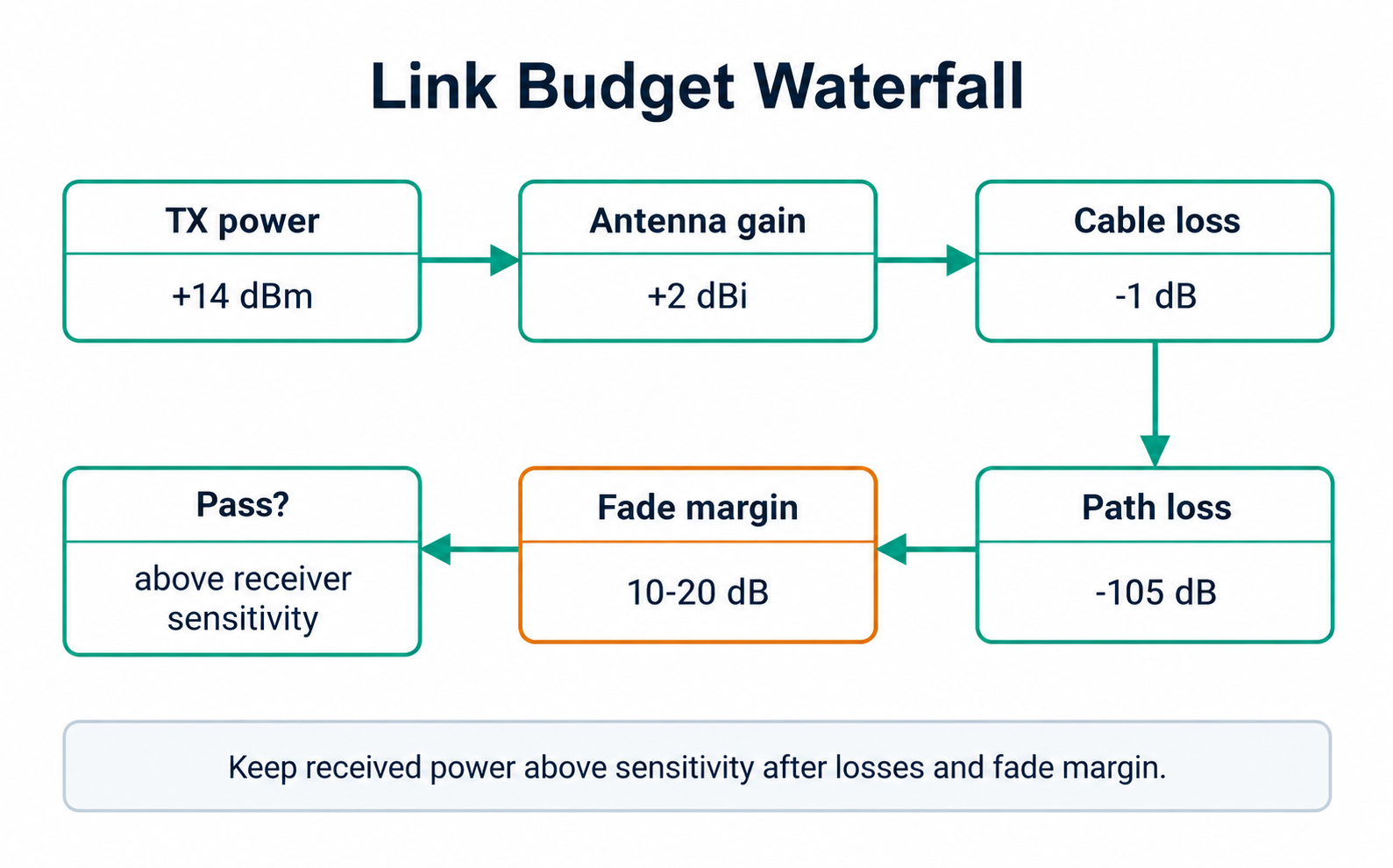
Read Figure 30.3 as a gain-and-loss waterfall to the predicted receive level, then compare the remaining margin with field measurements. This connects calculation to placement, fading, and the deployment acceptance record.
802.15.4 hands the installer two per-packet measurements to check this in situ: RSSI (received signal strength, often reported in dBm) and LQI (a link-quality indicator, 0–255, whose calculation depends on the radio). A frame can arrive with strong RSSI but poor LQI when interference harms reception — so both matter.
Example acceptance loop. A team bench-joins 30 temperature nodes, then installs 24 sleepy end devices, four powered routers, one coordinator, and one gateway across two rooms. The bench result only proves credentials and basic radio operation. The deployment result asks different questions: do the six farthest nodes still join after a power cycle, do they keep their selected parent during normal traffic, and do retries stay bounded when a door is closed or a nearby access point is active?
Write the answer as a small evidence table, not as a verbal promise. For example, Zone A might show 98 successful acknowledgments from 100 test frames with two retries and RSSI near −72 dBm; Zone B might show 89 of 100 with 22 retries and unstable LQI from the same test. That difference tells the reviewer where to move a router, change channel, rotate an antenna, or reject the location before sign-off.
The same loop should connect RF, power, and maintenance. If the weak Zone B nodes retry three extra frames on every report, their radio-on time rises and the battery estimate changes. If a technician later moves the router to another outlet, the recorded baseline shows exactly which packet-success, LQI, join, and power checks must be repeated.
Deployment mantra: measure, don't assume. Read RSSI and LQI where the device will actually live, and keep a fade margin so doors, people, and weather don't push the link below sensitivity.
30.21.1 Overview Knowledge Check
30.22 Work a Real Link Budget
This section: Work a Real Link Budget — Take a typical 2.4 GHz node: transmit power 0 dBm, near-0 dBi PCB antennas at both ends, receiver sensitivity −95 dBm.
Take a typical 2.4 GHz node: transmit power 0 dBm, near-0 dBi PCB antennas at both ends, receiver sensitivity −95 dBm. Free-space path loss at 10 m and 2.44 GHz is about 60 dB (FSPL = 20 log₁₀d + 20 log₁₀f − 27.55).
Worked example. Line-of-sight at 10 m: received power = 0 + 0 + 0 − 60 = −60 dBm, giving a margin of 35 dB over −95 dBm — comfortable. Now route the same link through three drywall partitions (~4 dB each) and one brick wall (~12 dB): add 24 dB of loss, so received power falls to −84 dBm and the margin shrinks to 11 dB. That is marginal — a closing fire door or a passing forklift can erase it.
Turn that calculation into an installation decision. If the same sensor can associate with Parent A at −84 dBm and Parent B at −77 dBm, Parent B has about 18 dB of margin over the −95 dBm sensitivity while Parent A has about 11 dB. If Parent B also reports steadier LQI and fewer retries, it is the better commissioning parent even if Parent A is physically closer.
Now add load and duty cycle. Suppose the node reports once every five minutes and normally sends one data frame plus one acknowledgment exchange. If a marginal link causes three retries per report, the radio is awake for more attempts, channel access, acknowledgments, and backoff time. That retry pattern can make a plausible bench battery estimate wrong after installation, so the deployment record should include the measured retry count used by the power calculation.
| Metric | What it measures | Field use |
|---|---|---|
| RSSI (dBm) | Received signal power | Estimate margin over sensitivity |
| LQI (0–255) | Radio-specific indication of received-frame quality | Spot poor reception even when RSSI looks fine |
| ED (energy detect) | Channel energy, no decoding | Survey noise/interference on a channel |
| PER (%) | Fraction of frames lost | The bottom-line delivery health |
A practical sign-off packet is therefore a bundle: installed photo or location code, parent/coordinator identity, channel, transmit-power setting if configurable, RSSI, LQI, packet success, retry count, join/rejoin result, and the power state measured on final firmware. Missing any one of those fields leaves a support gap when a technician later asks whether the device failed, the parent moved, the channel became noisy, or the battery model was optimistic.
30.22.1 Practitioner Knowledge Check
30.23 Fade Margin, Multipath, and LQI-Driven Routing
This section: Fade Margin, Multipath, and LQI-Driven Routing — 2.4 GHz waves are ~12 cm long, so they reflect off metal shelving and reinforced walls and arrive via multiple paths that can add or cancel.
2.4 GHz waves are ~12 cm long, so they reflect off metal shelving and reinforced walls and arrive via multiple paths that can add or cancel. A device that reads a healthy −70 dBm today may drop 15 dB when a metal cart parks in the Fresnel zone. That variability is why deployers budget a fade margin — commonly 10–20 dB of headroom — rather than installing at the edge of sensitivity.
LQI can inform routing, but the chosen stack may use link cost, estimated transmission count, or other metrics rather than raw LQI. Mesh stacks built on 802.15.4 can prefer neighbours with consistently good links over merely nearby ones. A poor-quality neighbour that happens to be one hop away can be a worse parent than a slightly farther neighbour with a clean link.
Worked example. A warehouse sensor installs against a steel column and shows −88 dBm / low LQI with occasional retries. Moving it 40 cm off the column onto a plastic bracket recovers ~8 dB and steadies LQI, because it clears the near-field metal and reduces multipath cancellation. No firmware or power change was needed — only respecting the link budget and the physics of the band.
The hidden failure is that every layer can look acceptable in isolation. RSSI can be above sensitivity, but interference can still lower LQI. LQI can look acceptable during a quiet test, but a burst of application traffic can expose collisions and backoff delay. Packet success can look fine near the coordinator, but the same device may churn between parents when a powered router is unplugged for maintenance.
Review parent churn as an engineering signal, not just a log detail. If a node switches between two parents ten times during a one-hour busy-period test, the network may still deliver most frames, but it is spending energy on rejoin and route maintenance and it has no stable baseline for troubleshooting. A better fix may be a small placement change that gives one parent clear dominance, not a blanket transmit-power increase.
Channel choice also interacts with the route metric. A candidate channel that improves the average RSSI is not automatically better if its LQI is unstable near a neighboring transmitter. The deployment test should compare candidate channels with the same device positions, traffic pattern, and acceptance metric: for example, 100 command frames per zone, retry count, worst-case latency, join time after reset, and whether the selected parent remains stable.
30.23.1 Under-the-Hood Knowledge Check
30.24 Summary
This section: Summary — 802.15.4 deployment quality depends on installed evidence.
802.15.4 deployment quality depends on installed evidence. The review should prove that the site was surveyed, topology and roles match power and forwarding needs, channel candidates were validated locally, links were tested under realistic conditions, power behavior was measured from final firmware, commissioning records support field recovery, and monitoring can detect when the decision must be reopened.
30.25 Key Takeaway
This section: Key Takeaway — 802.15.4 Deployment Practices should turn 802.15.4 planning into deployment evidence for placement, channel choice, power profile, security setup, troubleshooting, and retest triggers.
802.15.4 Deployment Practices should turn 802.15.4 planning into deployment evidence for placement, channel choice, power profile, security setup, troubleshooting, and retest triggers.
30.26 Concept Relationships
This section: Concept Relationships
This chapter connects to:
- 802.15.4 Coexistence for the RF evidence behind channel selection and retest triggers.
- 802.15.4 Features and Specifications for PHY, MAC, frame budget, beacon, GTS, and role boundaries.
- 802.15.4 Fundamental Operation for CSMA/CA, acknowledgments, retries, and beacon behavior.
- 802.15.4 Comprehensive Review for combining deployment evidence with protocol, power, security, and coexistence review.
- Thread, Zigbee, and 6LoWPAN protocol chapters for upper-layer choices built on top of 802.15.4.
30.27 What’s Next
This section: What’s Next — Continue with 802.15.4 Fundamental Operation to review how CSMA/CA, acknowledgments, retries, beacon behavior, and traffic timing affect the deployment evidence collected here.
Continue with 802.15.4 Fundamental Operation to review how CSMA/CA, acknowledgments, retries, beacon behavior, and traffic timing affect the deployment evidence collected here.
Find help
3 reviewed answers.
Where should I start in a module?
Open the module page from the sidebar to see its chapters in order. Use the module map to return to a topic you need.
Modules and pathsReviewed
What can I try when a project does not work?
Check the symptom, then work through the diagnostic steps. Keep the error message and the smallest example that reproduces it.
When you are stuckReviewed
How do interactive examples work?
Use the interactive guide to check how examples and simulations work before changing your project.
Interactive examples guideReviewed