24 HTTP and WebSocket over Wi-Fi

More
Depth: Practitioner
Progress saves as you read. Mark sections complete as you go; your progress appears in the sidebar.
24.1 In 60 Seconds
This section: In 60 Seconds — Begin with one room sensor and one screen.
Begin with one room sensor and one screen. The screen asks for the current value. The device sends one reply. Later, the screen needs live notice when a door opens. That second job needs a lasting conversation.
Describe the first job. Name who asks. Define the request. Define the reply. Set the wait time. Say what an error looks like. Decide whether a repeat is safe.
Now describe the live job. Name who opens the path. Decide which side may send. Mark how both sides notice a break. Set a reconnect rule. Show the age of the last event.
Both jobs need a shared data contract. Give each field a clear name and type. Check who may read or change it. Limit message size. Reject bad input. Keep an action record when the effect matters.
Test failure on purpose. Close the screen. Restart the device. End an idle path. Lose the network for a minute. Watch for stale state, missed change, and repeated action. Record the result at both ends.
This quick view compares a short exchange with a lasting one. Real paths cross middle systems and policy limits. Practitioner work builds the service record. Under the Hood explains message framing, connection state, and the pressure that a slow receiver can place on the sender. This chapter reviews HTTP and WebSocket communication for Wi-Fi IoT devices. HTTP is a request-response pattern: a client asks for a resource or sends a command, and the device or service replies. WebSocket is a persistent bidirectional channel: either side can send messages after the connection is established.
The review question is not “Which protocol is faster?” in the abstract. The review question is: “Which communication pattern matches the device requirement, and what evidence proves that it works under normal, failed, and recovered conditions?” Use HTTP for bounded request-response workflows. Use WebSocket when the application genuinely needs a live bidirectional channel and can support connection state, keepalive, reconnect, and backpressure.
24.2 Learning Objectives
This section: Learning Objectives
By the end of this chapter, you will be able to:
- define an HTTP or WebSocket service contract for a Wi-Fi IoT device
- separate network connection success from application communication success
- choose HTTP, WebSocket, or another application pattern based on evidence rather than slogans
- review request-response, streaming, command, and diagnostic paths
- identify failure behavior for timeouts, retries, disconnects, stale data, and service overload
- record security, observability, and support evidence for the selected communication pattern
24.3 Communication Review Route
This section: Communication Review Route — Use Figure 24.1 to keep HTTP and WebSocket review decisions in order.
Use Figure 24.1 to keep HTTP and WebSocket review decisions in order.
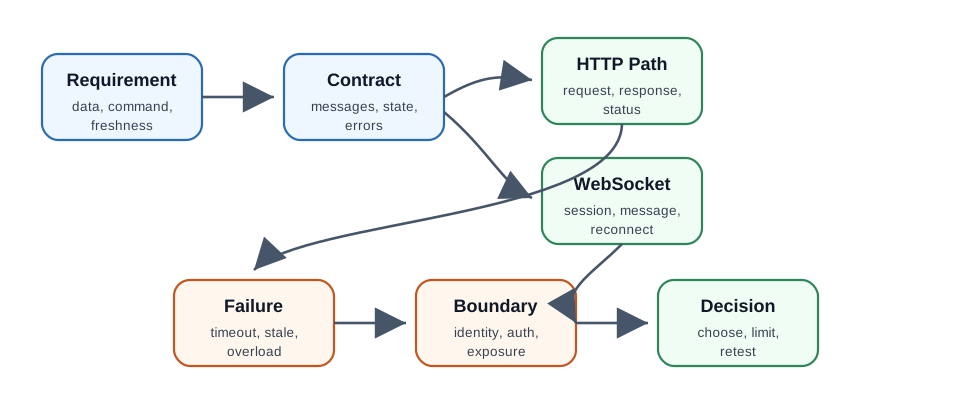
Read Figure 24.1 from the requirement into the service contract, then split the proof into the bounded HTTP exchange and the persistent WebSocket session. The two paths rejoin at failure behavior and the security boundary before the final decision records which pattern is accepted and what would reopen it.
The route has seven checkpoints:
- requirement: define the data, command, timing, and ownership need
- contract: write the endpoint, message, state, and error behavior expected by clients
- HTTP path: prove request, response, status, payload, timeout, and retry behavior
- WebSocket path: prove connect, message, keepalive, disconnect, reconnect, and flow-control behavior
- failure: record stale data, service outage, network loss, malformed message, and overload handling
- boundary: check identity, authorization, transport protection, and exposure of device controls
- decision: choose the pattern, state limits, and identify the next implementation review
24.4 Communication Evidence Record
This section: Communication Evidence Record — Inspect the evidence-record diagram in Figure 24.2 to keep the evidence complete.
Inspect the evidence-record diagram in Figure 24.2 to keep the evidence complete.
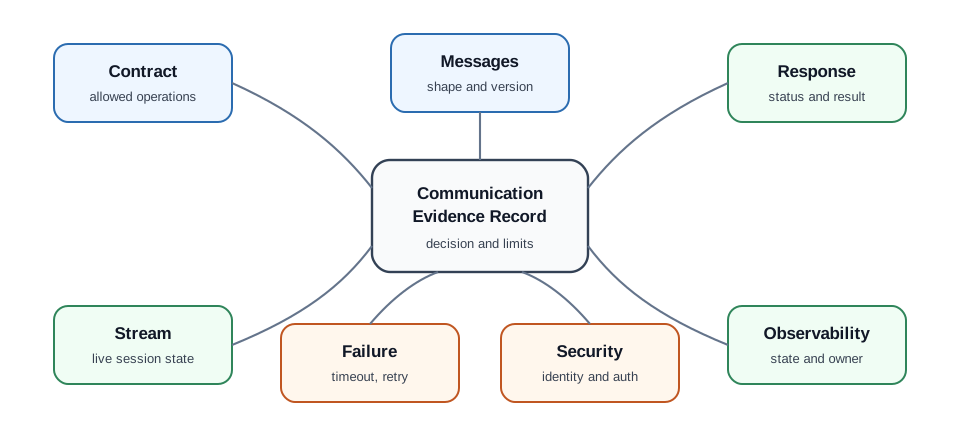
In Figure 24.2, both paths start with the service rules and message shape. On the HTTP side, keep the status, headers, data, timeout, and retry result for a full request. On the WebSocket side, keep the link, message, keepalive, order, and close result for the session. Fault and trust facts then feed the logs and the review choice. Compare what the receiver accepted with what the message was meant to do. A TCP link or upgrade reply alone does not prove that either app path worked.
A useful record contains:
- service contract under review
- device role and service owner
- message shape and allowed operations
- HTTP status or response behavior
- WebSocket connection and message behavior
- timeout, retry, reconnect, and backpressure behavior
- security and authorization boundary
- logs, metrics, user-visible state, and support action
- decision, limits, owner, and retest trigger
24.5 Start With The Service Contract
This section: Start With The Service Contract — Picture a room sensor and a control screen.
Picture a room sensor and a control screen. The screen asks for the current temperature. Later, it needs live notice when a door opens. These are two different conversations. One is a direct question. The other stays open for changes in either direction.
Start with the service contract. This is the shared promise between the device and its client. Name who begins each exchange. Define the request and reply. Set how long each side waits. State what an old or repeated message means. List who may perform each action.
A short request and reply fits work that happens on demand. A lasting two-way channel fits frequent live changes. Neither choice fixes poor message design. Both need clear data shapes, error replies, identity checks, and limits on input.
Plan for a break. The screen may close. The device may restart. A middle system may end an idle path. Decide who reconnects. Decide how missed changes are found. Keep the last known time visible so stale data does not look current.
This first view compares one direct exchange with one open conversation. Real paths cross browsers, middle systems, and policy rules. The Practitioner layer builds the contract and failure test. Under the Hood examines framing, connection state, flow control, and the cases where a simple live channel can hide lost or repeated work. The protocol choice should follow the service contract. A service contract describes what the device and client are allowed to exchange.
Record:
- who initiates communication
- what data or command is exchanged
- how fresh the data must be
- whether the exchange is occasional, bursty, continuous, or command driven
- how the client knows the result was accepted
- what the device does when the service is unreachable
- what is logged for support
- which operations require authorization
Without this contract, HTTP and WebSocket comparisons become guesswork.
24.6 HTTP Request-Response Path
This section: HTTP Request-Response Path — HTTP fits workflows where each exchange has a clear request and a clear response.
HTTP fits workflows where each exchange has a clear request and a clear response.
Good HTTP candidates include:
- reading the latest device state on demand
- sending a configuration change and receiving an acceptance or rejection result
- submitting telemetry at a bounded interval
- requesting a diagnostic snapshot
- checking whether an update is available
- serving a local setup or support page during an intentional support window
Review evidence should include:
- endpoint purpose and allowed method
- request payload shape when a payload is required
- response payload shape
- status behavior for success, invalid request, unauthorized request, missing resource, busy service, and service failure
- timeout behavior
- retry policy and duplicate-command protection
- size limits for request and response bodies
- logs that identify the request without exposing secrets
Avoid treating HTTP as only a code sample. The review needs the contract, failure behavior, and support signal.
24.7 WebSocket Bidirectional Path
This section: WebSocket Bidirectional Path — WebSocket fits workflows where a persistent channel is justified.
WebSocket fits workflows where a persistent channel is justified.
Good WebSocket candidates include:
- live dashboards that need push updates while the page is open
- operator tools that need near-live device state and command feedback
- setup or commissioning tools that exchange a sequence of short messages
- local control panels where the device and client both send events
- diagnostic sessions that should not create a new HTTP request for every update
Review evidence should include:
- when the connection is opened and closed
- which side may send each message type
- message schema and versioning
- keepalive or health-check behavior
- disconnect detection
- reconnect behavior
- stale data behavior
- backpressure behavior when messages arrive faster than they can be processed
- limit on concurrent clients or sessions
- authorization and session expiry behavior
Do not choose WebSocket only because it sounds newer. A persistent channel adds state that must be observed and supported.
24.8 Protocol Selection
This section: Protocol Selection — The best answer often combines patterns.
Choose HTTP when:
- the client asks for data or sends a command occasionally
- each request can stand alone
- cache, proxy, logs, and ordinary web tooling help the workflow
- failure can be reported through a clear response
- the device should avoid maintaining a long-lived client session
Choose WebSocket when:
- the client needs a live channel while it is actively monitoring or controlling the device
- either side must send events without waiting for the next poll
- a connected or disconnected state is meaningful to the user
- the implementation can handle keepalive, reconnect, stale data, and backpressure
- the service owner can support long-lived sessions
Choose another application pattern when:
- the system is primarily publish-subscribe
- devices must send telemetry to a broker that decouples producers from consumers
- the device is deeply sleep oriented and cannot hold a live channel
- the service boundary requires a gateway or message broker
The best answer often combines patterns. A device might use HTTP for setup and diagnostics, WebSocket for an active local control session, and a brokered messaging pattern for fleet telemetry.
24.9 Failure And Recovery
This section: Failure And Recovery — Every communication path needs failure evidence.
Every communication path needs failure evidence.
For HTTP, test:
- timeout before connection
- timeout while waiting for response
- invalid payload
- unauthorized request
- service busy or unavailable
- repeated retry after failure
- duplicate command after retry
For WebSocket, test:
- failed open
- authentication failure
- idle timeout
- network loss
- server restart
- malformed message
- slow client
- reconnect after device restart
Record what the user, operator, or support workflow sees. A communication path that fails silently is not ready.
24.10 Security And Exposure
This section: Security And Exposure — HTTP and WebSocket often expose device controls more directly than lower-level Wi-Fi join behavior.
HTTP and WebSocket often expose device controls more directly than lower-level Wi-Fi join behavior. The review must include the boundary.
Check:
- which endpoint or message can change device state
- whether commands require identity and authorization
- whether transport protection is used when secrets, credentials, or commands cross the network
- whether setup endpoints are disabled outside setup or support mode
- whether logs avoid exposing credentials, tokens, and personal data
- whether cross-origin browser access is intentionally allowed or denied
- whether local control remains bounded to the intended network or support workflow
This chapter does not replace a full security review, but it should catch obvious exposure mistakes before a device reaches a larger lab.
24.11 Observability And Support
This section: Observability And Support — The communication review should leave evidence that support teams can use.
The communication review should leave evidence that support teams can use.
Useful records include:
- last successful request or message time
- last failed request or message type
- last disconnect or timeout reason
- current service state
- stale data indication
- retry or reconnect state
- user-visible status
- log correlation value that does not expose secrets
- owner for service-side and device-side issues
Without observability, a working demo can become an unfixable field issue.
24.12 Worked Review: Local Sensor API
This section: Worked Review: Local Sensor API
Scenario:
- A room sensor exposes local HTTP endpoints for latest readings and status.
Evidence route:
- Requirement: read current state on demand and show whether data is fresh.
- Contract: define read-only endpoints and response shape.
- HTTP: record success, missing endpoint, invalid method, stale reading, timeout, and service unavailable behavior.
- Boundary: allow read access only where the network design permits it.
- Observability: log the last successful request and stale-data state.
Review decision:
- HTTP is a good fit if each request stands alone and stale-data behavior is explicit.
24.13 Worked Review: Active Control Dashboard
This section: Worked Review: Active Control Dashboard
Scenario:
- A browser dashboard opens during a maintenance session and needs live state plus command feedback.
Evidence route:
- Requirement: show live state while the dashboard is open and report command acceptance.
- Contract: define state messages, command messages, errors, and close behavior.
- WebSocket: record open, authorized session, messages, disconnect, reconnect, stale state, and slow-client behavior.
- HTTP: keep setup or static page delivery separate from the live channel.
- Boundary: close the channel when the session ends or authorization expires.
Review decision:
- WebSocket is a candidate only if connection state, reconnect, stale data, and command authorization are all observable.
24.14 Worked Review: Device Telemetry Upload
This section: Worked Review: Device Telemetry Upload
Scenario:
- A powered device sends periodic telemetry to a service and receives rare configuration changes.
Evidence route:
- Requirement: telemetry accepted, configuration changes acknowledged, and failures visible.
- Contract: define telemetry payload, acceptance response, retry behavior, and duplicate handling.
- HTTP: test post success, service unavailable, retry, duplicate payload, and response processing.
- Alternative: consider a brokered messaging pattern if many consumers need the same data or devices must be decoupled from dashboards.
- Observability: record last accepted telemetry and last failed upload.
Review decision:
- HTTP may be enough if upload timing is bounded and command needs are rare. WebSocket is unnecessary unless a live bidirectional session is part of the requirement.
24.15 Knowledge Check: Protocol Fit
This section: Knowledge Check: Protocol Fit
24.16 Knowledge Check: HTTP Evidence
This section: Knowledge Check: HTTP Evidence
24.17 Match Evidence To Communication Area
This section: Match Evidence To Communication Area
24.18 Order The Communication Review
This section: Order The Communication Review
24.19 Common Mistakes
This section: Common Mistakes
Choosing from slogans:
- Problem: the decision is made from “HTTP is simple” or “WebSocket is real time” without a service contract.
- Repair: write the contract first, then choose the communication pattern.
Treating Wi-Fi connection as application success:
- Problem: the device joins Wi-Fi, but the endpoint or live channel was not tested.
- Repair: record service-path evidence separately from Wi-Fi join evidence.
Ignoring duplicate commands:
- Problem: an HTTP command is retried after a timeout and may apply twice.
- Repair: define duplicate handling and verify the final device state.
Leaving WebSocket state invisible:
- Problem: the channel disconnects or stalls, but the dashboard still appears current.
- Repair: show stale state, disconnect state, reconnect state, and command acceptance clearly.
Exposing setup or control endpoints too broadly:
- Problem: local endpoints remain available outside the intended setup, support, or control workflow.
- Repair: bound setup mode, require authorization for state changes, and log access without secrets.
Overclaiming power or bandwidth:
- Problem: a generic overhead comparison is used as proof for this device.
- Repair: measure the actual traffic pattern, radio state, sleep behavior, and service lifecycle in the power review.
24.20 Final Checklist
This section: Final Checklist
Before accepting the communication implementation, confirm that the record includes:
- service requirement and owner
- protocol choice and reason
- endpoint or message contract
- normal success evidence
- failure and retry evidence
- stale-data behavior
- disconnect and reconnect behavior where relevant
- duplicate-command handling
- security and authorization boundary
- observable user or support state
- limits of the review
- decision, owner, and retest trigger
24.21 Request/Response Versus a Persistent Channel
This section: Request/Response Versus a Persistent Channel — Over Wi-Fi, an IoT device can use two common application patterns.
Over Wi-Fi, an IoT device can use two common application patterns. HTTP is request/response: the device opens or reuses a connection, sends a request, gets a reply, and can let the exchange finish. It is simple to inspect and works well when each operation has a bounded result. WebSocket provides a persistent, full-duplex channel so either side can send while the connection is open. With HTTP/1.1, it begins with an Upgrade exchange. Inspect Figure 24.3 to see where that exchange changes the operating contract.

In the HTTP/1.1 lifecycle diagram in Figure 24.3, phase 1 carries GET /chat, the Upgrade: websocket request, and the server’s 101 Switching Protocols response. Phase 2 removes repeated HTTP requests for messages and can carry PING/PONG keepalive in both directions. Phase 3 shows a normal close with code 1000; abnormal loss may have no close frame. This HTTP/1.1 WebSocket path uses TCP; HTTP/2 and HTTP/3 WebSockets use Extended CONNECT, and HTTP/3 runs over QUIC. Wi-Fi retries, contention, roaming, and power-save delay can still affect application latency. Association and IP reachability do not prove that a command endpoint or persistent session is authorized or handles stale data safely.
For review, start with the message pattern rather than the library name. Request/response needs endpoint, method, status, payload, timeout, retry, duplicate handling, and support logs. A stream/session needs open, authentication, message types, keepalive, disconnect detection, reconnect, stale-state display, backpressure, and close behavior. If the requirement is telemetry fan-out, queueing, or gateway translation, HTTP and WebSocket may only be part of the path. The release record should say which pattern is being accepted and what evidence would force the decision to change.
Pick by pattern: HTTP for bounded request/response; WebSocket for a justified live session. Then prove the Wi-Fi, TCP, application, security, and support states separately.
24.21.1 Overview Knowledge Check
24.22 Keep-Alive and the WebSocket Upgrade
This section: Keep-Alive and the WebSocket Upgrade — Setting up a connection is expensive over Wi-Fi: a TCP three-way handshake plus, for HTTPS, a TLS handshake, with several round trips that can each be delayed by contention or link-layer retries.
Setting up a connection is expensive over Wi-Fi: a TCP three-way handshake plus, for HTTPS, a TLS handshake, with several round trips that can each be delayed by contention or link-layer retries. HTTP keep-alive (default in HTTP/1.1) reuses one TCP connection for many requests, so a device polling every few seconds pays the handshake once instead of every time. A reviewer should still check the idle timeout on both ends, because a gateway, browser, reverse proxy, or firmware stack may close the connection earlier than the application expects.
With HTTP/1.1, a WebSocket starts as a request with Upgrade: websocket; the server answers 101 Switching Protocols, and the same TCP connection then carries WebSocket frames in both directions without HTTP headers per message. HTTP/2 and HTTP/3 use Extended CONNECT instead. WebSocket can cut overhead for frequent small updates, but adds state: session ownership, authorization lifetime, ping or heartbeat policy, close codes, reconnect limits, stale-data marking, and backpressure.
For HTTP commands, the practical hazard is not only the timeout; it is what happens when a client retries after the timeout. Use request IDs, idempotent operations where possible, or an explicit duplicate-command rule so the same actuator command does not apply twice. For WebSocket commands, use message IDs and acknowledgments so the dashboard can tell the difference between “sent”, “accepted”, “rejected”, and “connection lost before the server saw it”. In both patterns, logs should correlate the exchange without printing tokens, passwords, or personal data.
Worked example. A thermostat reports every 5 seconds and must receive setpoint changes promptly. With HTTP polling it opens or reuses a connection, sends headers, and can only learn of a setpoint change on its next poll, adding up to 5 seconds of latency plus repeated header bytes. Switching to WebSocket, it holds one upgraded connection: reports flow up as small frames and setpoint changes are pushed down quickly. The release evidence is not just lower latency; it is the observed keepalive, authorization expiry, reconnect path, stale-state display, command acknowledgment, and support log after an access point restart.
24.22.1 Practitioner Knowledge Check
24.23 How 802.11 Retries and Aggregation Shape TCP
This section: How 802.11 Retries and Aggregation Shape TCP — TCP treats visible packet loss as a possible congestion signal and may slow down.
TCP treats visible packet loss as a possible congestion signal and may slow down. Over the air, the 802.11 MAC acknowledges and retries unicast data frames at the link layer, so some RF losses are recovered before TCP notices. Broadcast and multicast frames do not receive the same per-recipient acknowledgment. Link retries can spare TCP a loss response but add variable delay: retries, backoff, and rate adaptation create jitter that may surface as uneven HTTP response time or WebSocket message latency.
Throughput over Wi-Fi also depends on frame aggregation. Since 802.11n, the MAC can bundle many subframes into one A-MPDU covered by a single block acknowledgment, amortizing fixed per-frame overhead such as preamble, backoff, interframe spacing, and ACK time across a large batch. This is what lets TCP reach high throughput on Wi-Fi, but it favors steady bulk flows. A device sending one tiny JSON frame at a time gains little from aggregation and still pays contention and wakeup costs.
The application protocol changes how those radio mechanics are felt. HTTP polling produces bursts: request headers, optional body, response headers, body, then quiet. WebSocket produces a long session with smaller frames, so it can reduce repeated headers but may keep the radio or access point state active for longer. TLS record sizing, Nagle behavior, delayed ACKs, proxy buffering, and firmware socket buffers can all turn a “small message” design into delayed delivery. A good test measures not only throughput but message age, jitter, reconnect time, and the number of bytes sent while the device is idle.
Worked example. In this example, a camera streaming over TCP gets excellent throughput because its steady byte stream fills large A-MPDUs recovered by block-ack. A sensor sending a 20-byte reading every second gets no aggregation benefit. If it also holds a WebSocket open under Wi-Fi power save, each server push may wait for the device’s next scheduled wake. The remedy is application-aware: batch small messages where the freshness budget allows it, tune keepalive and power-save timing to the required push latency, and record the resulting stale-data and reconnect behavior as release evidence.
24.23.1 Under-the-Hood Knowledge Check
24.24 Summary
This section: Summary — HTTP and WebSocket are application communication patterns, not just library choices.
HTTP and WebSocket are application communication patterns, not just library choices. HTTP works well for bounded request-response workflows. WebSocket works well for justified live bidirectional sessions, but only when state, disconnects, reconnects, stale data, backpressure, and authorization are reviewed.
The right choice comes from the service contract and evidence. Keep Wi-Fi join, application reachability, normal behavior, failure behavior, security boundary, and support visibility separate in the record.
24.25 Key Takeaway
This section: Key Takeaway — Wi-Fi HTTP & WebSocket should leave deployment evidence for association, throughput, latency, security setup, power behavior, failure recovery, and tested device constraints.
Wi-Fi HTTP & WebSocket should leave deployment evidence for association, throughput, latency, security setup, power behavior, failure recovery, and tested device constraints.
24.26 What’s Next
This section: What’s Next — Use Wi-Fi Implementation: ESP32 Basics if the station join and usable-service path still need review.
Use Wi-Fi Implementation: ESP32 Basics if the station join and usable-service path still need review.
Use Wi-Fi Power Optimization when communication behavior must be tied to the device power cycle.
Use Wi-Fi Security and Provisioning when authorization, setup mode, credentials, or local control exposure are the main risk.
Use Wi-Fi Comprehensive Lab when HTTP or WebSocket behavior is ready for a broader implementation lab.
Use Wi-Fi for IoT: Implementations to compare this chapter with other implementation patterns.
Find help
3 reviewed answers.
Where should I start in a module?
Open the module page from the sidebar to see its chapters in order. Use the module map to return to a topic you need.
Modules and pathsReviewed
What can I try when a project does not work?
Check the symptom, then work through the diagnostic steps. Keep the error message and the smallest example that reproduces it.
When you are stuckReviewed
How do interactive examples work?
Use the interactive guide to check how examples and simulations work before changing your project.
Interactive examples guideReviewed