19 Wi-Fi Security and Provisioning
Wi-Fi security provisioning, IoT Wi-Fi credential review, secure device onboarding, WPA2 WPA3 IoT review, Wi-Fi provisioning evidence
19.1 Start With the Wireless Story
Wi-Fi security starts before the first normal packet. The story runs from onboarding and credentials through WPA mode, identity proof, key rotation, fleet recovery, and deprovisioning, because a device that is easy to join must also be safe to operate.
19.2 In 60 Seconds
A Wi-Fi security and provisioning review checks whether an IoT device can be joined, authenticated, isolated, recovered, updated, and removed without exposing credentials or creating a flat network risk.
The review should not approve a design because it uses a familiar Wi-Fi password, a newer security label, or a convenient onboarding flow. It should record the device role, authentication mode, credential owner, provisioning path, storage behavior, recovery path, segmentation boundary, update path, monitoring signal, and retest triggers.
Only perform Wi-Fi security testing on networks and devices you own or are explicitly authorized to review. This chapter focuses on defensive design review, not attack instructions.
19.3 Learning Objectives
By the end of this chapter, you will be able to:
- review Wi-Fi authentication and provisioning decisions for IoT devices
- distinguish shared-password, per-device, certificate, and managed onboarding models
- identify credential exposure, reset, revocation, update, and recovery risks
- check whether network segmentation and service rules limit device compromise impact
- write a bounded security and provisioning decision with owner and retest triggers
19.4 Security Provisioning Review Flow
Use Figure 19.1 to keep security and onboarding decisions connected.
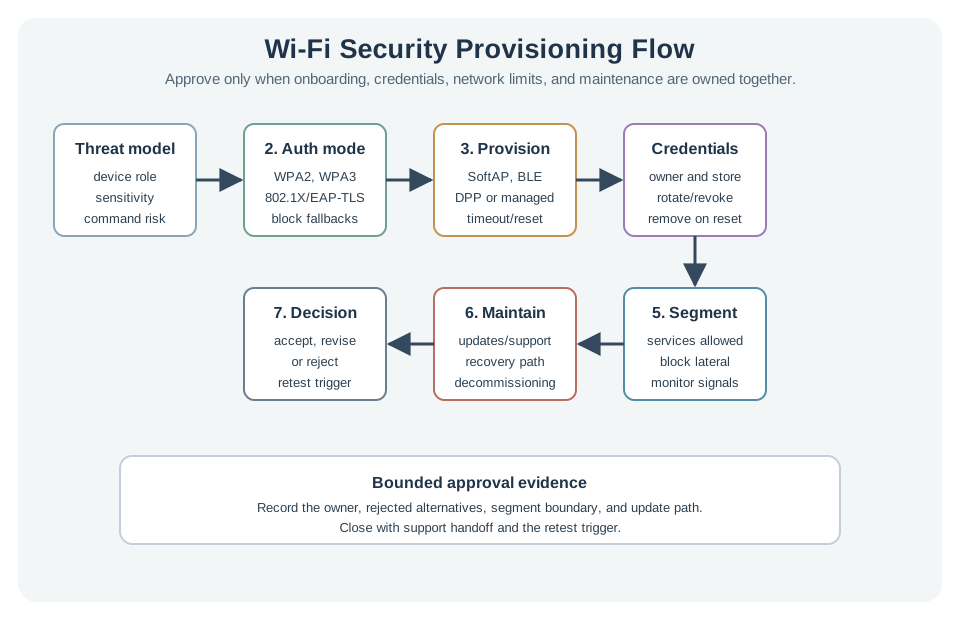
The flow asks:
- What device role and threat model are being reviewed?
- Which authentication mode is used, and who owns credentials?
- How does a headless device receive network credentials?
- Where are secrets stored, rotated, revoked, and recovered?
- What network boundary limits device compromise impact?
- What update, reset, monitoring, and support path keeps the design maintainable?
19.5 Security Provisioning Record
Use Figure 19.2 to make the approval traceable.
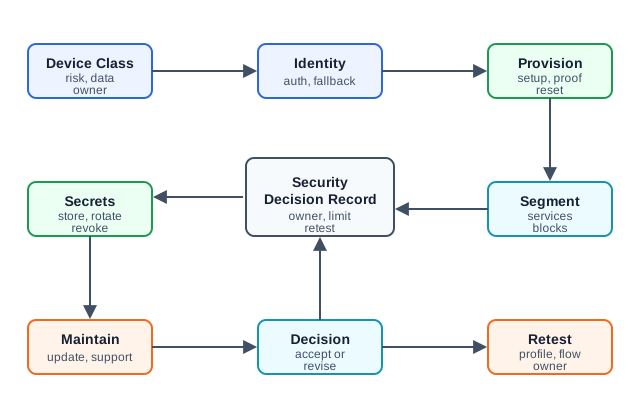
A useful record contains:
- device class, location, power source, data sensitivity, command risk, and owner
- selected Wi-Fi authentication mode and fallback modes that are allowed or blocked
- provisioning path, pairing proof, timeout behavior, reset behavior, and user/support workflow
- credential storage, rotation, revocation, factory reset, and lost-device handling
- network segment, allowed services, blocked lateral paths, and monitoring signals
- update path, certificate or password renewal path, firmware recovery, and support handoff
- accepted decision, rejected alternatives, limits, owner, and retest trigger
19.6 Authentication Mode Review
Wi-Fi authentication is not one thing. Review the actual protocol, because each one fails differently.
19.6.1 WEP — never accept it
WEP encrypts traffic with the RC4 stream cipher using short, reused initialization vectors. The key can be recovered from ordinary captured traffic in minutes. WEP is broken for every use — if a device supports only WEP, treat that as a hardware end-of-life signal, not a setting to tune.
19.6.4 WPA2/WPA3-Enterprise (802.1X + EAP) — per-device identity
Enterprise mode removes the shared secret entirely. Each device authenticates through 802.1X, carrying an EAP exchange to a RADIUS server. With EAP-TLS, the device presents its own client certificate and validates the server’s — mutual authentication with no passphrase to leak. For IoT fleets this means:
- a single device can be revoked individually (revoke its certificate) without touching the rest of the fleet
- there is no shared credential to extract and reuse
The cost is operational: a certificate authority, per-device enrollment, renewal, revocation, and time sync. Choose Enterprise/EAP-TLS when the fleet is large or high-value and operations can run the identity lifecycle; it is usually too heavy for a handful of unmanaged consumer devices.
19.7 Provisioning Path Review
Provisioning is often the weakest part of a Wi-Fi IoT design.
For headless devices, review:
- how the device enters setup mode
- how the user or installer proves physical possession
- whether setup mode times out and closes cleanly
- how credentials are transferred and protected
- how failed setup is retried without exposing secrets
- how the device is reset, transferred, decommissioned, or reissued
- how support can diagnose setup without asking users to reveal passwords
Common provisioning paths, by name:
- SoftAP setup: the device hosts a temporary access point; a phone joins it and pushes the Wi-Fi credentials. Widely used, but the credentials cross that setup link, so it must close cleanly after onboarding.
- BLE-assisted provisioning: a companion app sends the credentials over a short-range Bluetooth Low Energy link, keeping them off any open Wi-Fi.
- WPS (Wi-Fi Protected Setup): PIN- or push-button onboarding. The PIN method is brute-forceable and should not be used — treat WPS support as something to disable.
- Wi-Fi Easy Connect (DPP, Device Provisioning Protocol): the modern standard — scanning a QR code bootstraps a public-key exchange, so no plaintext passphrase is ever transferred. Prefer it when supported.
- Zero-touch / managed enrollment: per-device certificates are pre-loaded at manufacture, so the device joins an Enterprise (EAP-TLS) network with no field secret entry at all.
None is automatically safe. Match the path to the device role, installer skill, support model, and recovery requirement.
19.8 Credential Handling
Do not accept a provisioning design until credential handling is clear.
Review questions:
- Are credentials ever stored in source code, logs, screenshots, build artifacts, or support tickets?
- Does the device store secrets in a protected device store where available?
- Can a credential be rotated without replacing the device?
- Can one lost or compromised device be revoked without disrupting the full fleet?
- Is the reset path bounded, observable, and resistant to accidental exposure?
- Is there a documented owner for credential renewal and retirement?
The decision should identify which secrets exist, where they live, who can change them, how they are removed, and what event forces a retest.
19.9 Segmentation And Service Rules
Wi-Fi authentication controls who joins. Segmentation controls what a joined device can reach.
Review segmentation evidence:
- device segment name and purpose
- allowed service destinations and protocols
- blocked lateral movement to user, admin, and unrelated device areas
- management path for updates and support
- monitoring signal for unexpected destinations, retries, or join attempts
- exception owner and expiry date for temporary access
Segmentation should be tested with the real service path. A device that can join securely but can reach every internal system is still a weak design.
19.10 Recovery, Updates, And Removal
Security design must survive normal operations.
Review:
- firmware update path and rollback behavior
- credential or certificate renewal path
- device reset and reprovisioning flow
- lost-device and stolen-device response
- decommissioning path before resale, disposal, or transfer
- support access limits and audit trail
- monitoring and alert ownership
Security fails when a design is secure only on the first day. The review should include maintenance and end-of-life behavior before approval.
19.11 Worked Review: Small Building Sensors
Scenario:
- A building sensor fleet uses Wi-Fi for periodic telemetry and occasional maintenance commands.
Review route:
- Authentication: decide whether shared-password mode is acceptable or whether per-device identity is needed.
- Provisioning: check installer flow, setup timeout, reset, and support workflow.
- Segmentation: allow telemetry and update paths, block unrelated internal paths.
- Recovery: define lost-device removal, credential rotation, and firmware update owner.
- Decision: accept only if the operational team can maintain the chosen security model.
19.12 Worked Review: Local Setup Device
Scenario:
- A device creates a temporary setup path during installation.
Review route:
- Authentication: require physical-possession proof or a bounded pairing step.
- Provisioning: close setup mode after success, timeout, reset, or failed attempts.
- Credential handling: keep secrets out of logs, UI screenshots, source code, and support messages.
- Recovery: document how a user restarts setup without exposing the previous credential.
- Decision: accept only if setup convenience does not leave a permanent open management path.
19.13 Worked Review: Managed Facility Fleet
Scenario:
- A facility operates multiple device classes with different owners and service paths.
Review route:
- Authentication: prefer per-device identity when fleet operations can renew and revoke credentials.
- Provisioning: use managed enrollment and record ownership for identity lifecycle.
- Segmentation: separate device classes by service need, not just by convenience.
- Monitoring: alert on unexpected destinations, repeated join failures, and unsupported security modes.
- Decision: accept only if identity lifecycle, network policy, and support ownership are documented.
19.15 Knowledge Check: Provisioning Path
19.16 Match Evidence To Security Review Area
19.17 Order The Security Provisioning Review
19.18 Common Mistakes
Treating onboarding as separate from security:
- Problem: setup mode works, but it leaves credentials or management access exposed.
- Repair: review setup entry, exit, timeout, reset, and credential handling as part of the security boundary.
Using one shared credential without a recovery plan:
- Problem: one leaked or lost device can force a disruptive fleet-wide credential change.
- Repair: document rotation, revocation, segmentation, owner, and whether per-device identity is needed.
Assuming the newest mode is enough:
- Problem: the label on the AP does not prove client support, provisioning safety, update behavior, or segmentation.
- Repair: review the full device lifecycle and measured join behavior.
Leaving support paths unbounded:
- Problem: a support feature becomes a permanent management opening.
- Repair: define who can enable it, when it closes, what it logs, and what forces a retest.
Forgetting decommissioning:
- Problem: devices leave service with credentials or owner binding still present.
- Repair: include transfer, wipe, removal, and identity retirement in the acceptance checklist.
19.19 Final Checklist
Before accepting a Wi-Fi security and provisioning design, confirm that the review includes:
- device class, data sensitivity, command risk, and owner
- selected authentication mode and blocked fallback modes
- provisioning path and physical-possession or pairing proof
- setup timeout, reset, failure, and support behavior
- credential storage, rotation, revocation, and removal plan
- network segment and allowed service rules
- update, recovery, and decommissioning path
- monitoring signal and response owner
- accepted decision and rejected alternatives
- retest triggers for firmware, AP profile, credential policy, installer flow, service path, or ownership changes
19.20 Authenticate, Then Derive Keys
Wi-Fi security answers two questions: is this device allowed on the network, and how do the two ends agree on encryption keys? For home and IoT networks the dominant schemes are WPA2-Personal and its successor WPA3-Personal. Both start from a shared password, but they turn it into keys very differently — and that difference decides how resistant the network is to attack.
A separate but linked problem is provisioning: how a screenless IoT device gets the Wi-Fi credentials in the first place. Typing a passphrase into a sensor with no keyboard is impossible, so the industry built dedicated onboarding methods.
The review should keep those jobs separate. A strong key-agreement protocol does not prove that setup mode closes, credentials are stored safely, one lost device can be removed, or the device is isolated after it joins. Likewise, a convenient provisioning app does not prove that the final network session uses the intended authentication mode.
For an IoT fleet, the first evidence record should name the authentication mode, fallback modes that are blocked, provisioning entry and exit rules, credential owner, storage location, rotation or revocation path, segmentation boundary, update path, monitoring signal, and retest trigger. That record turns “uses WPA3” or “uses a QR code” into an auditable lifecycle decision.
A simple acceptance test can stay lightweight: join a representative device, confirm the negotiated security mode on the access point, confirm the provisioning path cannot be restarted without authorization, then remove the device and verify that it cannot silently rejoin from stale credentials. Keep screenshots or controller exports with the record. Those checks expose the failure modes that matter most in long-lived field deployments.
Two jobs: a key-agreement scheme (WPA2 or WPA3) secures the link, and a provisioning method gets credentials onto a device with no screen or keyboard.
19.20.1 Overview Knowledge Check
19.21 The WPA2 Four-Way Handshake and Its Weakness
WPA2-Personal turns the passphrase into a Pairwise Master Key (PMK), then runs the four-way handshake to derive the per-session Pairwise Transient Key (PTK) that actually encrypts traffic:
- AP → station: a random ANonce.
- Station → AP: its own SNonce plus a MIC. Both sides now derive the PTK from PMK + both nonces + both MAC addresses.
- AP → station: the group key (GTK) and a MIC, confirming keys.
- Station → AP: acknowledgment; encryption begins.
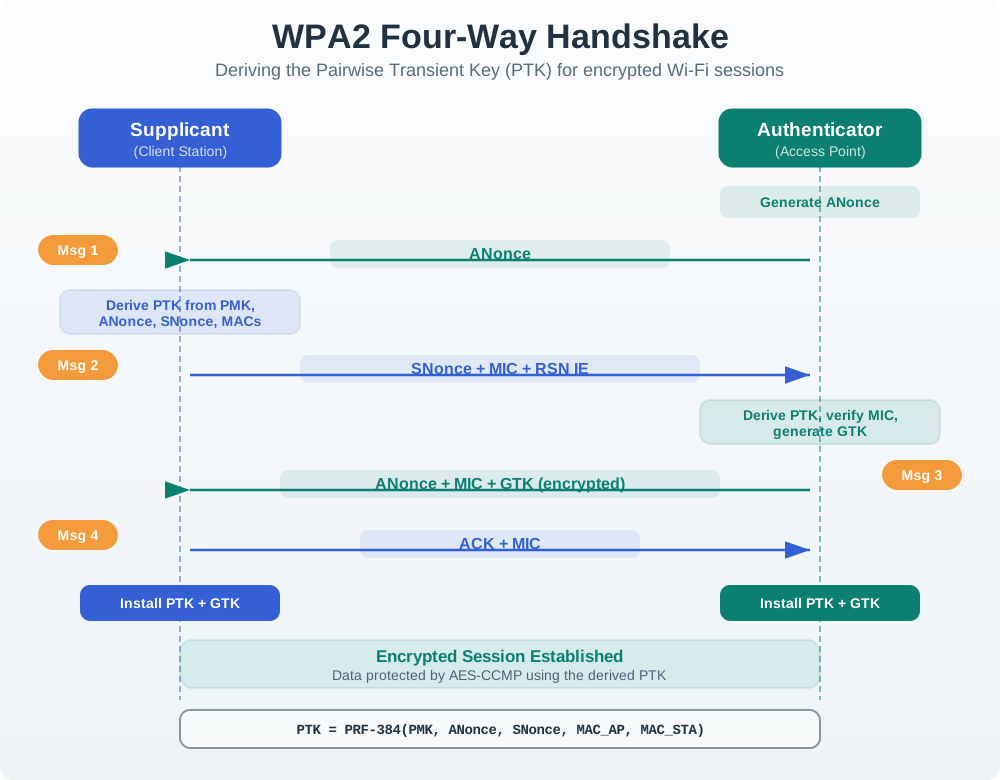
The weakness: an attacker who captures this handshake can guess passwords offline — for each guess, compute the PMK and PTK and check the MIC, with no further contact needed. A weak passphrase falls quickly. (The KRACK attack separately abused handshake nonce reuse.)
Worked example. An attacker sniffs a WPA2 network’s four-way handshake, then runs a wordlist offline against it. If the passphrase is a common phrase, it is recovered in minutes; a long random passphrase resists it. This offline-guessing exposure is exactly what WPA3 was designed to close.
In a defensive review, the point is not to reproduce an attack. It is to decide whether a shared passphrase is acceptable for this device class. Ask who knows the passphrase, how it is provisioned, whether it ever appears in logs or support messages, how one lost device is handled, and whether the network segment limits the damage if one credential leaks.
For WPA2-Personal fleets that cannot move immediately, the compensating controls should be explicit: unique SSIDs or VLANs for device classes, a high-entropy passphrase controlled by operations rather than end users, documented rotation triggers, disabled WPS, and monitoring for repeated authentication failures or unexpected reassociation after removal.
19.21.1 Practitioner Knowledge Check
19.22 WPA3-SAE, PMF, and DPP Onboarding
WPA3-Personal replaces the PMK-from-passphrase step with SAE (Simultaneous Authentication of Equals), a password-authenticated key exchange (the “Dragonfly” handshake). Its crucial property: an attacker cannot test password guesses offline — each guess requires a fresh online exchange with the AP, so brute force is throttled to network speed, and SAE also gives forward secrecy (a later password compromise cannot decrypt past traffic). WPA3 additionally mandates Protected Management Frames (802.11w), which authenticate deauthentication and disassociation frames to block the deauth-flood attacks that plague WPA2.
For onboarding screenless devices, Wi-Fi Easy Connect (DPP) uses public-key cryptography: a configurator (say a phone app) reads the device’s bootstrapping key — often from a printed QR code — and then securely hands the device its network credentials. No passphrase is ever typed into the device, and the network PSK is never exposed to it in the clear. (Simpler schemes exist too: a device may host a temporary SoftAP or use BLE to receive credentials from an app.)
Worked example. A new smart sensor ships with a QR code on its label. During setup the installer scans it with the vendor app (the configurator); DPP uses the encoded public key to establish a secure channel and provision the sensor onto the WPA3 network — no keyboard, no exposed PSK, and management frames protected by PMF against a deauth attacker trying to disrupt the onboarding.
The under-the-hood acceptance evidence is the negotiated behavior, not the label on the box. Record whether the AP and client actually use WPA3-SAE, whether transition mode or WPA2 fallback is allowed, whether PMF is required, how DPP bootstrapping keys are protected, and how the device leaves setup mode after success, timeout, or failure. Also record what invalidates the approval: AP profile change, firmware change, installer app change, QR label process change, credential rotation, ownership transfer, or service-path change.
19.22.1 Under-the-Hood Knowledge Check
19.23 Summary
Wi-Fi security and provisioning review is a lifecycle decision. The design must be secure when the device joins, fails setup, receives updates, changes owner, loses credentials, is removed from service, or needs support.
The final output should be a bounded decision record: authentication mode, provisioning path, credential owner, storage and revocation behavior, segmentation boundary, maintenance path, monitoring signal, and retest triggers.
19.24 Key Takeaway
Wi-Fi Security and Provisioning should align Wi-Fi onboarding, credentials, encryption, rotation, recovery, and support visibility with deployment evidence.
19.25 What’s Next
Use Wi-Fi Deployment Planning when the security decision must be validated across a site rollout.
Use Wi-Fi 6 Density Review when the AP profile or client support decision affects dense-device behavior.
Use Wi-Fi Implementation: Comprehensive Lab when the reviewed security and provisioning plan is ready for release validation.
Use Wi-Fi Standards Index when the team needs to choose the right standards route before making a security decision.