Design micro-segmentation strategies for IoT networks
Implement Software-Defined Perimeters (SDP) for zero trust network access
Build behavioral baselines for IoT device monitoring
Apply risk-based access decisions using continuous verification
In 60 Seconds
Network segmentation is zero trust’s primary control for limiting lateral movement — isolating IoT devices into zones by function, trust level, and data sensitivity so that a compromised thermostat cannot reach industrial control systems. Implementation uses VLANs for logical separation, firewall rules for inter-zone traffic control, and software-defined networking for dynamic policy enforcement.
Key Concepts
Network Segmentation: Division of a network into isolated zones with controlled traffic between zones; primary control preventing lateral movement after device compromise.
VLAN (Virtual LAN): Layer-2 network segmentation technique creating logical isolation between device groups on shared physical infrastructure; first step in IoT network segmentation.
Software-Defined Networking (SDN): Network architecture separating control plane from data plane, enabling dynamic policy-based traffic routing and segmentation for IoT environments.
Micro-Segmentation: Fine-grained network segmentation down to individual workload or device level; enables zero trust policy enforcement at the device-to-device traffic level.
East-West Traffic Control: Security control on traffic between devices within the same network segment; often neglected in favor of north-south (perimeter) controls, but critical for containing lateral movement.
Network Access Control (NAC): System enforcing policies about which devices can connect to which network segments based on device identity, health, and compliance status.
Inter-Zone Trust Model: Policy framework defining what traffic is permitted between network segments, implementing least privilege at the network level.
For Beginners: Zero Trust Segmentation
Zero trust segmentation is about dividing a network into many tiny zones so that no device automatically trusts any other device. Think of it like a building where every room has its own locked door, and you need a separate key for each room. Even if someone breaks into one room, they cannot get into any other room. In IoT networks, this means each device or group of devices gets its own secure zone, and every connection must be verified before it is allowed.
Sensor Squad: Tiny Zones, Maximum Protection!
“Micro-segmentation takes network segmentation to the extreme,” Max the Microcontroller explained. “Instead of putting all IoT devices in one big zone, each device – or even each function of a device – gets its own tiny secure zone. It is like giving every person in an office building their own individual room with a locked door.”
Sammy the Sensor demonstrated. “In a smart hospital, the MRI machine is in its own micro-segment. The heart monitors are in another. The nurse call buttons are in a third. Even if an attacker compromises the nurse call button, they CANNOT reach the MRI machine because the micro-segments are completely isolated from each other.”
“Software-Defined Perimeters – SDP – make this possible at scale,” Lila the LED added. “Instead of physical network switches and cables, software dynamically creates encrypted tunnels between authorized pairs of devices. The network itself becomes invisible to unauthorized devices – they cannot even DISCOVER that other devices exist, let alone attack them.”
“Continuous verification is the other half of the equation,” Bella the Battery said. “We build behavioral baselines for each device – how much data it normally sends, when it communicates, what protocols it uses. If a temperature sensor suddenly starts sending gigabytes of data at 3 AM using an unusual protocol, the system flags it immediately. The device might be compromised, and continuous monitoring catches it in real time!”
29.2 Introduction
Micro-segmentation and continuous verification are the second and third pillars of zero trust security after device identity. Even with strong authentication, a compromised device can cause extensive damage if it has broad network access. This chapter explores how to divide networks into small, isolated zones and continuously monitor device behavior to detect and contain threats.
29.3 Micro-Segmentation
⏱️ ~12 min | ⭐⭐⭐ Advanced | 📋 P11.C02.U06
Micro-segmentation divides the network into small, isolated zones with granular access controls. Instead of a single “trusted” internal network, you create hundreds or thousands of segments, each with specific security policies.
29.3.1 Network Segmentation for IoT
Traditional Segmentation: VLANs
Virtual LANs separate devices at the network layer. Firewalls control traffic between VLANs.
Example: Smart Building Segmentation
VLAN 10: Building Management (10.1.10.0/24)
- HVAC controllers
- Lighting controllers
- Elevator systems
POLICY: No internet access, limited inter-VLAN communication

VLAN 20: Security Systems (10.1.20.0/24)
- Access control panels
- Security cameras
- Intrusion detection sensors
POLICY: No internet access, only to video storage server

VLAN 30: Occupancy Sensors (10.1.30.0/24)
- Presence sensors
- People counters
- Space utilization trackers
POLICY: Upload to analytics server only, no lateral movement

VLAN 40: Guest Wi-Fi (10.1.40.0/24)
- Visitor devices
POLICY: Internet access only, no access to other VLANs

VLAN 50: IT Management (10.1.50.0/24)
- Admin workstations
- Network management tools
POLICY: Can access all VLANs for maintenance
Firewall Rules Between VLANs:
RULE 1: ALLOW VLAN 10 → Building Mgmt Server (10.1.100.10) port 443
RULE 2: ALLOW VLAN 20 → Video Storage (10.1.100.20) port 8443
RULE 3: ALLOW VLAN 30 → Analytics Server (10.1.100.30) port 443
RULE 4: ALLOW VLAN 50 → ALL (for IT maintenance)
RULE 5: DENY ALL other inter-VLAN traffic
Advanced Segmentation: Application-Layer
Modern zero trust implementations segment at Layer 7 (application layer), not just Layer 3 (network layer).
Service mesh (Istio, Linkerd) for containerized IoT applications
More granular control (endpoint-level, not network-level)
Works across cloud, on-premises, and hybrid environments
Decouples security from network topology
29.3.2 Software-Defined Perimeters (SDP)
Also called “Zero Trust Network Access” (ZTNA), SDP makes resources invisible until after authentication.
Traditional Network:
All devices can see all IP addresses on the network
Attackers can scan for vulnerabilities (port scanning, service enumeration)
“Reconnaissance” is the first stage of most attacks
SDP Model:
Resources are “dark” - they don’t respond to unauthenticated requests
Single Packet Authorization (SPA) - device sends cryptographically signed packet
Only after verification does the firewall open a connection
Device can only see resources it’s authorized to access
SDP Flow:
Device authenticates to SDP controller
Controller verifies identity and policy
Controller instructs SDP gateway to open firewall rule for this device
Device can now access specific resources
All other resources remain invisible
Example: Industrial SCADA System
1,000 sensors distributed across factory floor
Each sensor should only communicate with its designated data collector
With SDP, sensor cannot even discover other collectors or PLCs
If sensor is compromised, attacker sees a “dark” network with no targets
Let’s visualize micro-segmentation:
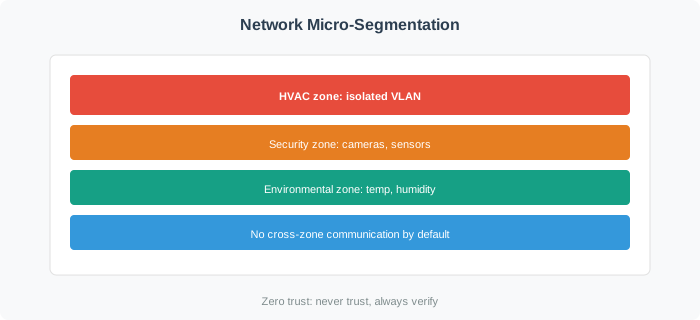
Figure 29.1: Network Micro-Segmentation: HVAC, Security, and Sensor Device Isolation
The diagram shows that each device can only access its designated resource server. Lateral movement between segments is blocked, and devices in one segment cannot access resources meant for other segments.
29.4 Continuous Verification
⏱️ ~15 min | ⭐⭐⭐ Advanced | 📋 P11.C02.U07
Zero trust doesn’t stop after initial authentication. Continuous verification monitors device behavior in real-time, detecting anomalies that might indicate compromise.
29.4.1 Behavioral Baselines
Every IoT device has normal behavior patterns. Deviations from these baselines can signal security issues.
Network Traffic Patterns:
Temperature Sensor Baseline: 48-byte packet every 60 seconds to 10.1.100.30:443
Anomaly: Suddenly sending 1MB data to external IP address
Action: Block connection, quarantine device, alert security team
Access Patterns:
Security Camera Baseline: Uploads video to 10.1.100.20:8443 continuously
Anomaly: Attempts to access building access control system
Action: Deny access, investigate device firmware
Temporal Patterns:
Smart Lock Baseline: 20-50 access events per day, 7 AM - 7 PM
NORMAL OPERATION:
Device: robot-arm-07
Certificate: Valid (+20)
Firmware: v3.2.1 - Latest (+20)
Location: Factory floor Zone 3 (+10)
Time: 2:30 PM weekday (+5)
Behavior: Normal operation pattern (+10)
Resource: Motion control system (safety-critical, -50)

Total Risk Score: 15
Decision: REQUIRE additional verification
Action: Request TPM attestation before allowing safety-critical commands
SUSPICIOUS ACTIVITY:
Device: robot-arm-07
Certificate: Valid (+20)
Firmware: v3.1.8 - 2 versions outdated (-20)
Location: Factory floor Zone 3 (+10)
Time: 3:47 AM Sunday (-20)
Behavior: Attempting to access network file server (-40)
Resource: File server (not normally accessed, 0)

Total Risk Score: -50
Decision: DENY access and QUARANTINE
Action: Isolate device, prevent all network communication, alert incident response
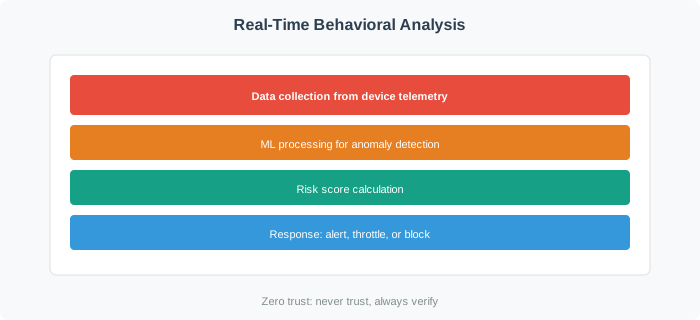
29.4.4 Real-Time Monitoring Architecture
Figure 29.2: Real-Time Behavioral Analysis: Data Collection, ML Processing, and Risk-Based Response
This architecture shows how device activity flows through collection, analysis, and automated response systems in real-time.
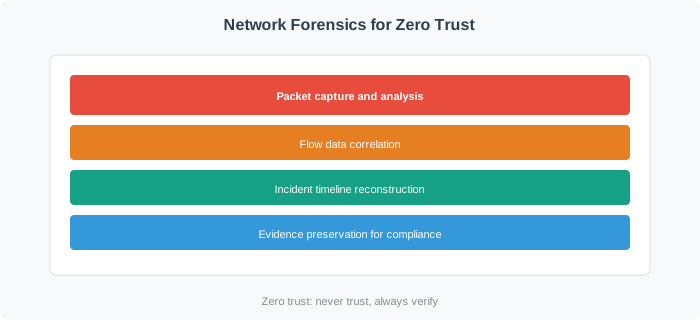
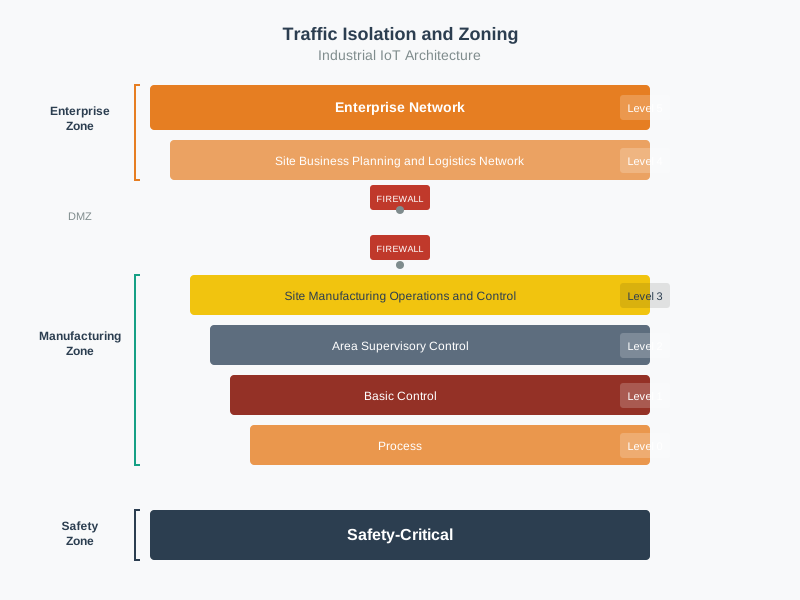
Additional Visuals: Network Forensics and Traffic Isolation
Figure 29.3: Network Forensics - Continuous monitoring and incident investigation for zero trust
Figure 29.4: Traffic Isolation and Zoning - Geometric representation of secure IoT network architecture
Worked Example: Zero Trust Access Control for Smart Factory
Scenario: A manufacturing company implements zero trust security for a smart factory with 150 industrial robots, 500 sensors, and 50 operator workstations. Unlike traditional perimeter security where devices inside the factory network are trusted, zero trust requires every device to authenticate for every access request. Design an access control system that enforces least-privilege access while maintaining the sub-100ms response times required for real-time industrial control.
Given:
150 industrial robots (PLCs with ARM Cortex-R, 64MB RAM, Linux-based)
500 sensors (temperature, vibration, vision) on industrial Ethernet
50 operator workstations (Windows, Linux)
Central manufacturing execution system (MES) coordinating production
Latency requirement: <100ms for control commands, <10ms for safety signals
Compliance: IEC 62443 (industrial cybersecurity), ISO 27001
Steps:
Design identity and policy architecture:
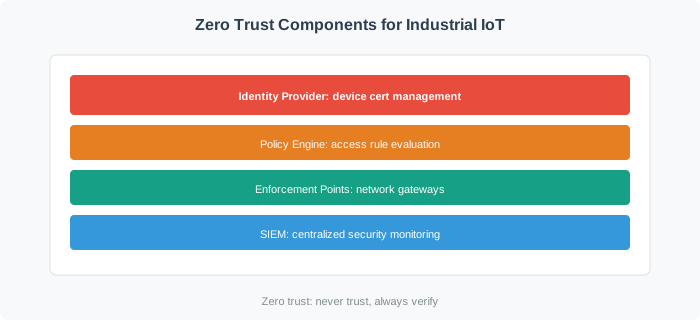
Figure 29.5: Zero trust architecture components for industrial IoT showing Identity Provider managing device certificates, user credentials, and service accounts; Policy Decision Point defining roles and resource permissions; and Policy Enforcement Points at network, application, and device layers.
Calculate authentication latency budget:
Target: 100ms total for authenticated control command
Problem: PDP query for every request is bottleneck
150 robots times 10 commands/sec = 1,500 policy decisions/sec
Single PDP server at 20ms/decision = 50 decisions/sec max
EMERGENCY ACCESS PROTOCOL:

Scenario: Network partition isolates robot from PDP server

SAFETY REQUIREMENT: Emergency stop MUST work even without auth
SECURITY REQUIREMENT: Cannot allow arbitrary commands without auth

Solution: Pre-authorized emergency credentials

1. Each robot stores emergency policy locally:
   emergency_policy = {
       "allowed_subjects": [
           "cert:supervisor-badge-*",  # Any supervisor badge
           "cert:emergency-override"   # Physical key
       ],
       "allowed_actions": ["emergency_stop", "safe_state"],
       "max_duration": 3600,  # 1 hour
       "audit_required": true
   }

2. Emergency activation sequence:
   a. Operator attempts normal command → fails (no PDP)
   b. Robot detects PDP unreachable for >5 seconds
   c. Robot enters "degraded security mode"
   d. Robot accepts ONLY emergency commands from pre-authorized certs
   e. All actions logged locally with timestamps

3. Recovery sequence:
   a. PDP connectivity restored
   b. Robot uploads emergency audit log
   c. Security team reviews all emergency actions
   d. Robot returns to full zero trust mode

TRADEOFF: Emergency bypass creates attack surface
MITIGATION: Hardware physical key required (not just certificate)
           Supervisor must be physically present at robot
Define continuous verification and attestation: | Verification | Frequency | Failure Action | |————–|———–|—————-| | Device certificate validity | Per connection | Reject connection, alert | | Workstation health (EDR status) | Every 5 minutes | Reduce permissions to read-only | | PLC firmware attestation | Hourly | Quarantine device, alert engineering | | User session validity | Per request | Force re-authentication | | Network segment isolation | Continuous (SDN) | Block cross-zone traffic | | Anomaly detection (behavior) | Real-time | Flag for human review |
Result:
Every access request authenticated and authorized (zero trust)
Throughput: 10,000+ policy decisions/second with distributed caching
Availability: 99.99% with local policy caching and emergency bypass
Granularity: Per-robot, per-operator, per-action access control
Audit: Complete record of every access decision for compliance
Key Insight: Zero trust in industrial environments requires careful balancing of security, performance, and safety. The key enabler is distributed policy caching: rather than querying a central PDP for every decision, each PEP maintains a local cache of recently-used policies with short TTLs. This reduces latency from 75ms to 23ms while maintaining security (policies refresh every 60 seconds). The emergency bypass mechanism is essential: safety-critical systems cannot fail-closed if the authentication system is unreachable. By pre-authorizing specific emergency actions with hardware-backed credentials, the system maintains safety guarantees even during security infrastructure outages. This pattern applies to any real-time system where zero trust must coexist with deterministic response requirements.
Worked Example: University Campus Network Micro-Segmentation
Scenario: State University has 15,000 IoT devices across 120 buildings: 8,500 building automation (HVAC, lighting), 3,200 access control (door locks, card readers), 2,100 research lab equipment, 800 security cameras, 400 smart classroom devices. The CIO must implement micro-segmentation to comply with NSF grant requirements for research data protection.
Step 1: Network Baseline Analysis
Before segmentation, the campus network is flat: all devices on single subnet 10.50.0.0/16 (65,534 addresses). Security audit reveals:
Lateral movement risk: Door lock can communicate with research lab equipment
Data exfiltration risk: Research microscope could upload to external cloud (no egress filtering)
Blast radius: Single compromised device can scan entire 10.50.0.0/16 subnet
Compliance gap: NSF requires research data isolation (FISMA Moderate baseline)
The network team creates 32 micro-segments by function and building zone:
Segment ID
Purpose
Device Count
Access Policy
Internet
Cross-Segment
VLAN 100-103
Building Automation (4 zones)
8,500
BACnet → BMS only
DENY
DENY
VLAN 110-113
Access Control (4 zones)
3,200
OSDP → Access Server only
DENY
DENY
VLAN 120-125
Research Labs (6 zones by building)
2,100
Lab-specific servers only
DENY
DENY
VLAN 130-131
Security Cameras (2 zones)
800
RTSP → Video NVR only
DENY
DENY
VLAN 140-141
Smart Classrooms (2 zones)
400
Education apps + display
Limited
DENY
Step 3: Implement Software-Defined Perimeters for Research Labs
Six research lab VLANs (120-125) have strictest requirements due to grant compliance:
# Research Lab SDP Policy (simplified)# Lab 1 (Biology): VLAN 120allowed_devices = {"microscope-bio-001": {"destinations": ["10.70.20.5:443"]}, # Lab data server only"centrifuge-bio-002": {"destinations": ["10.70.20.5:443"]},"incubator-bio-003": {"destinations": ["10.70.20.5:443"]},# 350 total devices in VLAN 120}# Default deny: All other destinations blocked# Result: Microscope cannot even DISCOVER other devices exist# Anomaly detected (Week 3):# Device: microscope-bio-001# Attempted destination: 203.0.113.45:22 (external SSH server, China)# Action: Gateway blocked (not in allowed_destinations list)# Alert: SOC notified, device quarantined for forensics# Root cause: Vendor remote support malware (supplied USB drive compromised)# Resolution: Vendor access revoked, USB policy updated (disable autorun)
Step 4: Behavioral Baseline for Each Segment
30-day training period establishes normal behavior per segment:
VLAN 100 (Building Automation, North Campus, 2,125 devices):
Baseline Profile:
- Active hours: 24/7 (continuous environmental control)
- Traffic pattern: 200-byte BACnet messages every 30 seconds
- Destinations: BMS server (10.70.10.10:47808) 99.8% of traffic
- Protocols: BACnet/IP only (UDP port 47808)
- Anomaly threshold: 3 standard deviations from mean

Week 5 Anomaly:
- Device: HVAC-North-112 (rooftop unit)
- Behavior: HTTP traffic to 198.51.100.88:80 (never seen before)
- Volume: 5 MB outbound (25,000x baseline)
- Action: Behavioral monitoring flags anomaly, firewall blocks HTTP (not whitelisted)
- Investigation: Technician laptop connected to HVAC network for diagnostics
- Resolution: Technician laptop VLAN policy (can only access designated maintenance VLAN)
VLAN 120 (Research Lab, Biology):
Baseline Profile:
- Active hours: 8 AM - 10 PM weekdays (lab open hours)
- Traffic pattern: Microscope captures 50 MB images every 2 hours (12 images/day)
- Destinations: Lab server (10.70.20.5:443) 100% of traffic
- Protocols: HTTPS only
- Expected volume: 600 MB/day per microscope

Week 8 Anomaly:
- Device: microscope-bio-001
- Behavior: 50 GB upload in 6 hours (83x daily baseline)
- Destination: Correct lab server 10.70.20.5:443 (authorized)
- Action: Volume anomaly detected, but destination authorized → ALERT (not block)
- Investigation: Graduate student running weekend experiment, legitimate
- Resolution: Baseline updated to include weekend usage patterns
Step 5: Cross-Segment Access Rules (Principle of Least Privilege)
Some devices legitimately need cross-segment access (e.g., IT management):
# IT Management Workstations (VLAN 200) can access all segments for diagnosticscross_segment_policies:-source_vlan:200 # IT Managementallowed_destinations:-vlan:"*" # All VLANsports:[22,443,3389] # SSH, HTTPS, RDP for device managementtime_restriction:"8AM-6PM Mon-Fri" # Business hours onlymfa_required:true # Multi-factor authentication mandatorysession_duration:3600 # 1-hour max, re-auth required-source_vlan:130 # Security Camerasallowed_destinations:-vlan:200 # IT Management (for camera firmware updates)ports:[443]time_restriction:"2AM-4AM" # Maintenance window onlyrate_limit:"10 MB/hour" # Firmware updates only, not bulk data-source_vlan:140 # Smart Classroomsallowed_destinations:-vlan:120 # Research Labs (for classroom research demos)ports:[443]request_approval:true # Requires faculty approval per sessionaudit_log:true # All access logged for compliance
Step 6: SDP Implementation for “Dark Network” Effect
Research lab equipment (VLAN 120-125) implements SDP to hide network topology:
Traditional Network (Pre-SDP):
- Attacker compromises 1 device in VLAN 120
- Attacker scans VLAN 120: discovers 350 devices (all respond to ping, port scan)
- Attacker identifies 12 high-value targets (microscopes, sequencers)
- Attacker attempts lateral movement to each target

SDP "Dark Network" (Post-SDP):
- Attacker compromises 1 device in VLAN 120
- Attacker scans VLAN 120: NO RESPONSES (all devices behind SDP gateway, invisible)
- Attacker attempts connection to 10.70.20.100 (another microscope): TIMEOUT (SDP gateway drops unauthenticated packets)
- Attacker has NO VISIBILITY into network topology (cannot even discover other devices exist)
- SDP gateway logs 347 unauthorized connection attempts, alerts SOC
Results After 6 Months:
Metric
Before Segmentation
After Segmentation
Improvement
Lateral movement attempts
Unknown (not detected)
1,247 blocked
100% blocked
Blast radius (compromised device reach)
15,000 devices (flat network)
Avg 267 devices (same VLAN)
98.2% reduction
Unauthorized cross-segment access
Not detected
89 attempts, 89 blocked
100% blocked
NSF compliance status
FAILED (4 critical findings)
PASSED (0 findings)
Full compliance
Mean time to detect anomaly
Not capable
12 seconds
N/A (new capability)
Security incidents contained
0% (spread across network)
100% (within segment)
100% containment
Real Incident: Research Lab Ransomware (Month 4)
Attack Vector: Phishing email → graduate student laptop → lateral movement to microscope
Pre-Segmentation Scenario (simulated): Ransomware spreads from laptop to microscope to entire VLAN 120 (350 research devices), then to access control systems (VLAN 110), total 3,550 devices encrypted. Estimated recovery: 3 weeks, $2.8M.
Post-Segmentation Reality: Ransomware infects laptop, attempts lateral movement to microscope. Micro-segmentation blocks: laptop in VLAN 200 (user devices) CANNOT access VLAN 120 (research labs) without MFA + approval. Attack contained to 1 laptop. Recovery: 2 hours (reimage laptop), $0 additional cost.
Key Success Factors:
Per-Function Segmentation: 32 VLANs by function (not geography) ensures similar devices with similar security needs are grouped
Default Deny: All inter-segment traffic blocked by default, explicit allowlists for legitimate flows
Behavioral Baselines: 30-day training per segment captures normal patterns (including weekends, holidays)
SDP for Research Labs: Highest-value targets get “dark network” treatment (invisible unless authenticated)
Cross-Segment Audit: IT management access logged for compliance (who accessed what, when, why)
Small deployments, homogeneous devices, low security requirements
LOW
LOW (large blast radius)
LOW ($5K-20K)
Medium (10-30 VLANs)
10-30
100-1,000
Medium deployments, mixed device types, moderate security
MEDIUM
MEDIUM
MEDIUM ($50K-150K)
Fine (50-100 VLANs)
50-100
50-500
Large enterprise, regulatory requirements, high-value assets
HIGH
HIGH
HIGH ($200K-500K)
Micro (500+ VLANs)
500+
1-50
Critical infrastructure, zero trust mandate, per-device isolation
VERY HIGH
VERY HIGH
VERY HIGH ($1M+)
Decision Criteria:
Choose Coarse when: Small office (<100 devices), low security requirements, budget constraints Choose Medium when: Campus/enterprise (1,000-10,000 devices), mixed use cases, standard security Choose Fine when: Large organization, regulatory compliance (HIPAA, PCI-DSS), high-value data Choose Micro when: Critical infrastructure, nation-state threats, zero trust mandate
Trade-Off: Security vs Complexity
More segments = better security = higher complexity. Find the minimum segmentation that meets security requirements without operational burden.
Common Mistake: Segmentation Without Monitoring
The Problem: Network team creates 20 VLANs, firewall rules between them, declares “we have micro-segmentation!” But NO behavioral monitoring, NO anomaly detection, NO alerting.
What Happens: Attacker compromises device in VLAN 10, discovers firewall rule allows VLAN 10 → VLAN 20 on port 443. Attacker uses legitimate allowed path to access VLAN 20. Segmentation ALLOWS the connection (it’s a valid rule), but there’s no monitoring to detect the connection is ANOMALOUS (device never accessed VLAN 20 before).
Result: Segmentation becomes a false sense of security. Firewall rules allow legitimate flows, but also allow FIRST-TIME anomalous flows if they match the rule.
Segmentation: Firewall rules limit WHAT CAN connect (allowlist)
Behavioral Monitoring: Alerts when device connects to ALLOWED but UNUSUAL destination
Example: Device in VLAN 10 CAN access VLAN 20 (firewall allows), but device has NEVER done this before (behavioral baseline flags as anomaly)
Security team investigates: Is this legitimate new behavior or compromise?
Lesson: Segmentation without monitoring is like locking doors but never checking if someone is walking through them. Deploy behavioral baselines alongside segmentation to detect anomalies even when firewall rules allow the traffic.
Concept Relationships
How network segmentation and verification concepts connect:
Segmentation Concept
Relates To
Connection
Micro-Segmentation
Zero Trust Principle
Implements least-privilege network access
VLANs
Layer 2 Isolation
Separates broadcast domains by device type
Software-Defined Perimeters
ZTNA
Makes resources invisible until authenticated
Behavioral Baselines
Anomaly Detection
Defines normal patterns for deviation alerts
Risk-Based Access
Dynamic Authorization
Trust scores adjust requirements in real-time
Service Mesh
Application-Layer Control
Policy enforcement for containerized workloads
Single Packet Authorization
SDP Authentication
Cryptographically signed packets prove identity
Match the Key Concepts
Order the Steps
Label the Diagram
💻 Code Challenge
29.5 Summary
Micro-segmentation and continuous verification complete the zero trust security model:
Micro-segmentation divides networks into isolated zones, limiting lateral movement when devices are compromised.
Software-Defined Perimeters make resources invisible to unauthorized devices, eliminating reconnaissance attacks.
Behavioral baselines establish normal device patterns, enabling anomaly detection when devices are compromised.
Risk-based access adjusts security requirements dynamically based on device health, location, time, and behavior.
Real-time monitoring with automated response enables sub-second threat containment.
Putting Numbers to It: Micro-Segmentation Policy Count and Management Complexity
Number of firewall rules grows quadratically with segments in full-mesh topology, linearly with hub-and-spoke.
Given: Smart campus network - Segments: \(k = 32\) VLANs (by building and function) - Full-mesh approach: all segments can talk to all segments - Hub-spoke approach: all segments talk through central gateway - Policy creation time: 2 hours per rule - Annual review time: 0.5 hours per rule - Annual update frequency: 20% rules need changes (1 hour each)
1. Flat Network Design With All IoT Devices on One Segment
Deploying all IoT devices on a single flat network means a compromised smart thermostat has direct network access to industrial controllers, medical devices, and security cameras. Segment IoT devices by function and sensitivity from day one; retrofitting segmentation is expensive.
2. Segmenting Only at the Perimeter
Many organizations segment IoT devices from the corporate network (north-south segmentation) while allowing unrestricted device-to-device traffic within the IoT segment (east-west). Effective zero trust requires controlling both directions; east-west controls prevent lateral movement between compromised IoT devices.
3. Not Testing Segmentation Effectiveness
Network segmentation configured in firewall rules may not work as intended due to routing misconfigurations, VLAN trunk issues, or SDN policy gaps. Test segmentation by attempting traffic between segments that should be blocked; periodic penetration testing validates ongoing segmentation integrity.
4. Ignoring Wireless Isolation for Wi-Fi IoT Devices
Wi-Fi IoT devices on the corporate SSID have network-layer access to all corporate systems even if firewalls exist. Use separate SSIDs with VLAN assignment for IoT devices, and configure wireless client isolation preventing device-to-device communication within the IoT SSID.
29.8 What’s Next
Now that you understand micro-segmentation and continuous verification, continue to Zero Trust Architecture to learn about complete implementation architectures, real-world case studies from Google BeyondCorp and Microsoft Azure, and comprehensive worked examples.