16 Mobile Wi-Fi and Sensing Privacy
More
Depth: Practitioner
Progress saves as you read. Mark sections complete as you go; your progress appears in the sidebar.
16.1 Signals Can Identify Without Messages
This section: Signals Can Identify Without Messages — Start with a familiar mobile-IoT moment: a phone pairs with earbuds, unlocks a speaker, or lets a room controller notice whether people are nearby.
Start with a familiar mobile-IoT moment: a phone pairs with earbuds, unlocks a speaker, or lets a room controller notice whether people are nearby. Nothing private seems to be typed or spoken. Still, the phone is broadcasting identifiers, listening for nearby radios, and reading motion or signal changes that can reveal where it is and what is happening around it.
Wireless radios and motion sensors are always interacting with their surroundings, and the privacy risk often lives in that interaction rather than in any message a device sends. The identifiers a device broadcasts, the list of access points it can see, the strength of a signal, and the readings from an accelerometer can all reveal who is present and what they are doing, without anyone reading a single line of content.
This is what makes Wi-Fi and sensing privacy different from ordinary data collection. Two distinct risks combine here. First, wireless identifiers can let separate locations recognize the same device over time and follow it. Second, signal patterns and sensor readings can be turned into inferences about presence, motion, and activity. Both happen below the level most people think of as "data."
If you only need the intuition, this layer is enough: treat wireless identifiers and signal metadata as personal data. Rely on randomized identifiers, process signal and sensor data on the device, request the narrowest scanning permission a platform offers, and be honest when a feature senses presence.
Wireless privacy has two paths to review at once. Use Figure 16.2 to follow the persistent identifier risk separately from the raw-signal inference risk.
Wireless Sensing Review
Identifier -> scan permission -> raw signal -> local inference -> minimal result.
In Figure 16.2, begin with the identifier and ask whether randomization prevents recognition across places. Then inspect the scan permission and raw signal, derive only the needed inference locally, and release a minimal result. The route removes both the fixed “name badge” and the unnecessary radio trace. It connects the chapter's two risks—tracking and sensing—to one testable minimization workflow.
Think of a crowded room. Even if you cannot hear any conversation, you could still learn a lot if every person wore a fixed name badge and if you could feel the air move as people walked around. The badges let you recognize the same person on different days, and the moving air tells you the room is occupied and active. Wireless identifiers are the badges, and signal changes are the moving air. Good design removes the fixed badge and keeps the air-reading on the device.
The One-Minute Sensing Decision
Identifiers can track
A stable wireless address can be matched across places. Prefer randomized identifiers so a device is not recognizable from one location to the next.
Signals can sense
Signal strength and channel changes can reveal presence and motion. Treat these measurements as sensitive even though they carry no content.
Minimize and decide locally
Request the narrowest scan permission, derive only the result the feature needs on the device, and disclose presence sensing plainly.
Beginner Examples
Work from the simplest case toward the broader design consequence. First, A phone that uses a randomized address when scanning is harder to follow from shop to shop than one that always shows the same address. Next, the list of Wi-Fi networks a device can see is effectively a location fingerprint, even when no coordinate is collected. Then, comparing the lists of Wi-Fi networks two different devices have seen can reveal a social relationship between their owners, such as coworkers, family, or a shared interest group, even though neither list contains a name. Finally, A presence sensor that decides "room occupied" on the device leaks far less than one that streams raw signal measurements to a server.
Overview Knowledge Check
Start simple: remove the fixed wireless name badge, ask for the smallest scan grant, and keep raw sensing close to the device. If you can explain the two risks, recognizable identifiers and inferable signals, you have the core idea. Continue to the review layer to scope a wireless or sensing feature.
16.2 Scope Scans and Keep Sensing Local
This section: Scope Scans and Keep Sensing Local — The practical work is to inventory the wireless and sensor signals a feature touches, request the narrowest access that delivers it, and keep raw signal data on the device wherever possible.
The practical work is to inventory the wireless and sensor signals a feature touches, request the narrowest access that delivers it, and keep raw signal data on the device wherever possible. As with location, the goal is a deliberate, recorded decision rather than broad access taken just in case.
What Each Signal Can Reveal
Scope the Scanning Permission
Because the set of nearby access points reveals location, scanning permissions were historically tied to location access. Recent mobile platforms let an app declare a dedicated nearby-devices intent and state that scanning is not used to derive location, so a Bluetooth or Wi-Fi feature can run without requesting full location. Prefer that narrower permission whenever the feature genuinely does not need a position.
Use the narrowest scan grant
Where a nearby-devices permission exists, use it and declare the scan is not for location.
Tie scans to a visible action
Scan during pairing or an active feature, not continuously in the background.
Keep raw signals on device
Compute the result the feature needs locally and upload the conclusion, not the measurements.
Worked Example: Room Occupancy for Automation
A building automation feature wants to turn off lighting and heating in empty rooms. A weak design streams raw signal-strength and channel measurements from every room to the cloud, and logs the stable identifiers of every device it sees so it can count people. That design exports fine-grained sensing data and builds a tracking dataset as a side effect.
The lesson mirrors location: the strongest fix is to remove the sensitive raw signal from the architecture and keep only the conclusion the feature actually uses.
Practitioner Knowledge Check
If you can scope scanning to the narrowest grant and keep raw signals local, you can stop here. Continue to Under the Hood for how identifiers leak, how signal sensing works, and where mitigations fall short.
16.3 How Identifiers, Channels, and Side Channels Leak
This section: How Identifiers, Channels, and Side Channels Leak — The deeper layer explains the mechanisms behind the two risks.
The deeper layer explains the mechanisms behind the two risks. Identifiers leak when a device announces something stable about itself, and sensing works because radio signals and motion sensors are sensitive to the physical world around them.
How Identifiers Leak and How Randomization Helps
To find networks and devices, a radio broadcasts small management frames, such as probe requests, that include an address. If that address is the device's fixed hardware identifier, any receiver can recognize the same device wherever it appears, which is the basis of cross-location tracking. The standard mitigation is address randomization: the operating system uses a randomized address for scanning, and often a different stable-but-private address per saved network. Randomization is necessary, but it is not a complete shield on its own. The specific contents and timing of probe frames can sometimes form a weaker fingerprint, so good design also avoids broadcasting unnecessary detail and does not rely on identifiers being unlinkable forever.
How Signal Sensing Works
A wireless signal weakens and reflects as it travels, so the strength a receiver reports, often called RSSI, changes with distance and obstacles. Finer measurements of how the channel responds, sometimes exposed as channel state information, capture the multipath structure of a space. Because a moving body changes those reflections, the same radio used for communication can act as a motion and presence sensor without any camera. This is the heart of device-free sensing: an entity with access to these measurements across a space can infer occupancy and movement. The privacy implication is that signal-strength and channel data deserve the same care as a sensor feed, even though they contain no message content.
Bluetooth Addressing and Motion Side Channels
Bluetooth Low Energy addresses the tracking problem with resolvable private addresses that rotate over time, so only a paired peer holding the right key can recognize the device, while a passive observer sees a changing address. Motion sensors raise a different issue: accelerometer and gyroscope streams have historically been available to apps and web pages with little or no permission prompt, yet high-rate motion data can reveal activity and gait, and research has shown it can leak even more in some conditions. The defensive posture is to treat zero-prompt sensors as sensitive anyway, limit sampling rates, and request only the resolution a feature truly needs.
Failure Modes and Fixes
Common Pitfalls
Review these failure modes in order. First, Assuming "no content" means "no risk." Identifiers and signal patterns reveal who is present and that they are moving without any message being read. Next, Treating randomization as a complete fix. It is necessary but not sufficient; avoid broadcasting and logging unnecessary detail too. Then, Hiding a location feature inside a scan. A nearby access point list is a location fingerprint and should be scoped like location. Then, Streaming raw signals to the cloud. Channel and signal data can reveal motion, so derive the result locally and keep the raw data on the device. Finally, Ignoring zero-prompt sensors. Motion sensors can be sensitive even when no permission is required, so limit rate and resolution.
Under-the-Hood Knowledge Check
At this depth, wireless privacy has two moving parts: keep identifiers unrecognizable so devices cannot be followed, and keep signal and sensor data on the device so presence and motion cannot be reconstructed elsewhere. Randomization, narrow scan permissions, on-device decisions, and rate limits are the controls that make both real.
16.4 Sensor Inference Through Activity-Stream Re-identification
This section: Sensor Inference Through Activity-Stream Re-identification — Pseudonyms offer little protection when a short auxiliary sequence is rare enough to correlate.
Pseudonyms offer little protection when a short auxiliary sequence is rare enough to correlate. Figure 16.1 matches train, gym, and clinic windows against four representative sparse streams and shows the anonymity set collapsing.
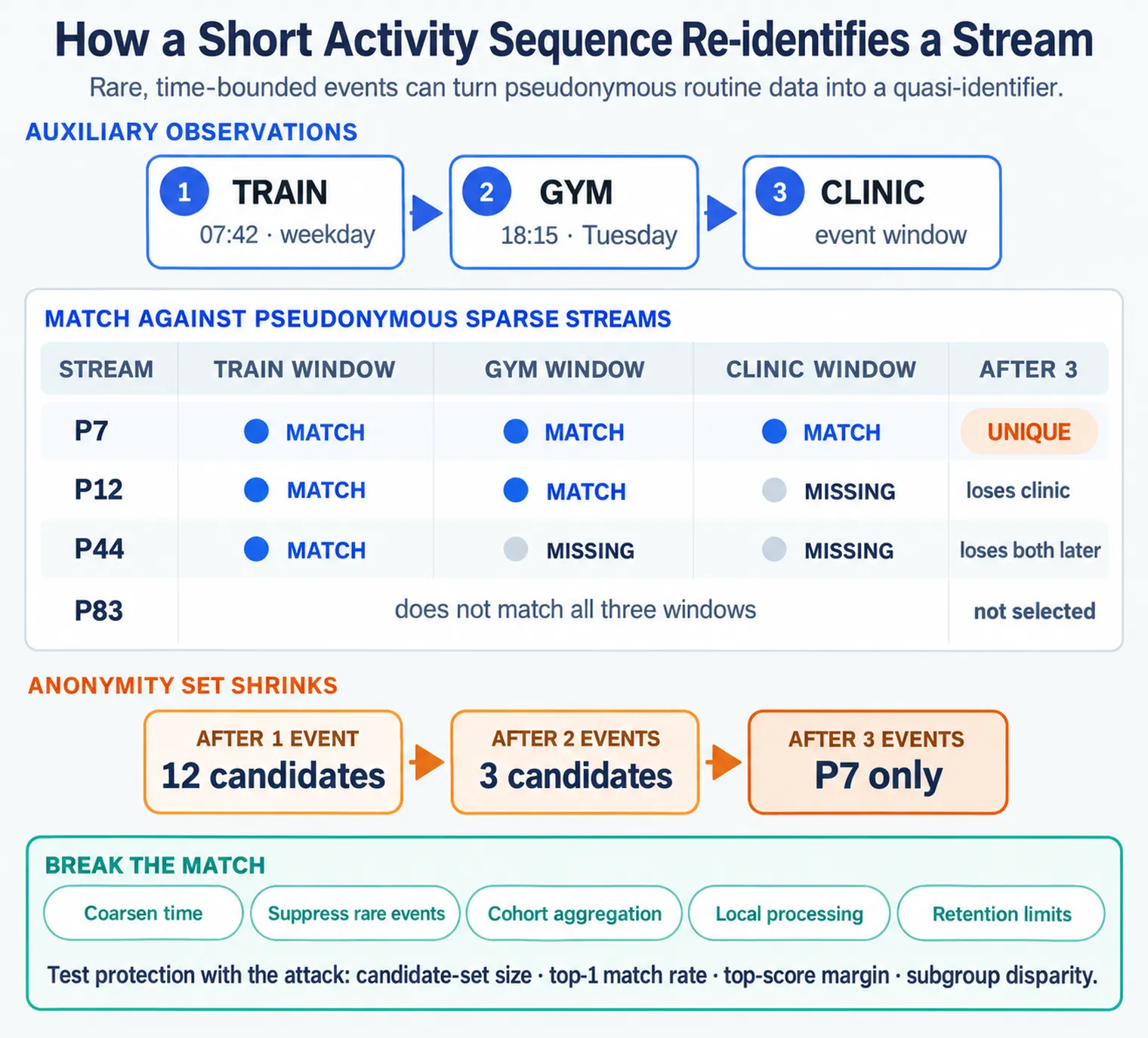
Match the side stream carefully. Then test the privacy harm. Read Figure 16.1 from the train window through gym and clinic events across the four pseudonymous streams. P7 matches all three, while P12 loses the clinic event and P44 loses both later events. The anonymity set consequently contracts from 12 candidates to three and then one, making a short auxiliary sequence identifying even without names. The response panel works against that join by coarsening time, suppressing rare events, aggregating cohorts, processing locally, and limiting retention. Each mitigation still needs a measured re-identification test because utility-preserving detail can recreate the match.
Removing names from a sensing dataset does not remove routines. Mobile activity streams are often high-dimensional and sparse: one person produces events across transport, location, motion, app, touch, and time dimensions, yet only a few events occur in each narrow combination. That rarity makes a short correlated sequence behave like a quasi-identifier.
Suppose an adversary observes a target board the 07:42 train on weekdays and sees a public gym check-in around 18:15 on Tuesdays. The adversary now has auxiliary sequence
The anonymous release contains streams keyed only by pseudonyms. For each auxiliary event , define a match to stream when event type/location agrees and time is within tolerance . A simple weighted score is
Weights should be larger for rarer events; an information-based choice is . The attacker ranks streams by score or by a probabilistic likelihood that also models missing and false events. The target is singled out when one stream remains plausible and the gap to the next candidate is large enough. A single train event may match hundreds of people; train then a particular gym schedule can reduce the anonymity set to one.
Walk the attack in order:
- Collect auxiliary evidence. Direct observation, public posts, calendars, check-ins, or known commuting habits supply a few time-bounded activities.
- Normalize representations. Map public descriptions and sensor labels to common event categories and time/location windows.
- Generate candidates. Keep pseudonymous streams matching the least common event; discard impossible time/space paths.
- Correlate the sequence. Add events in temporal order, allowing the measurement error and missingness expected from the sensor.
- Rank and test uniqueness. Compare top scores and estimate how often an equally good match appears under a background population.
- Confirm with a different channel. Gait, touch rhythm, key-flight times, Wi-Fi history, or device-specific accelerometer bias can strengthen the linkage.
That last step links two distinct signatures. Behavioral biometrics such as touch pressure, swipe timing, key hold/flight times, and gait can identify a user even after the phone changes. Device fingerprints arise from small accelerometer scale-factor, offset, and cross-axis differences that persist for one handset across users. Combining them can answer both “which person’s routine?” and “which physical device produced this stream?” Do not treat a noisy sensor as anonymous simply because its calibration is imperfect.
| Defence | What it breaks | Residual trade-off |
|---|---|---|
| Coarsen time and location | exact event alignment and impossible-path pruning | may reduce transport or safety-analysis utility |
| Suppress rare combinations | high-information quasi-identifiers | can erase minority patterns and bias results |
| Aggregate before release | person-level sequence construction | overlapping aggregates can still leak; small cells need thresholds |
| Rotate scoped pseudonyms | long-term linkage under one token | routines can relink rotated tokens unless epochs and releases are designed together |
| Limit retention and joins | long correlated histories and cross-channel confirmation | reduces longitudinal analysis |
| Add formal privacy protection | bounds contribution to released statistics when correctly parameterized | does not automatically protect raw per-person streams or arbitrary downstream joins |
| Process locally | prevents raw touch, motion, and routine streams leaving the device | model outputs can still reveal sensitive states and need minimization |
Test protection with the attack, not with identifier removal alone. Build held-out auxiliary sequences of one, two, three, and more events; measure candidate-set size, top-1 match rate, top-score margin, and subgroup disparity. Repeat with realistic timing error and missing observations. If a few common public facts still isolate a stream, coarsen, suppress, aggregate, shorten, or avoid releasing that sequence. The safe question is not “did we delete the name?” but “how much outside knowledge is needed to single someone out?”
This section:

This section:
16.5 Summary
This section: Summary — Review both wireless identifiers and signal patterns for the inferences they allow.
Review both wireless identifiers and signal patterns for the inferences they allow. First, wi-Fi and sensing privacy involves two risks: wireless identifiers can let separate locations recognize and track a device, and signal patterns can be turned into inferences about presence and motion. Next, both risks operate below the level of message content, so identifiers and signal metadata must be treated as personal data. Then, address randomization is the standard mitigation for tracking, but it is necessary rather than sufficient, because probe contents and timing can still form a weaker fingerprint. Then, the set of nearby access points is effectively a location fingerprint, which is why scanning should use the narrowest permission a platform offers and declare when it is not used for location. Then, signal-strength and channel data can reveal motion through device-free sensing, so derive the needed result on the device and discard the raw measurements. Finally, bluetooth uses rotating private addresses, and motion sensors can be sensitive even without a permission prompt, so limit sampling rate and resolution.
Wireless data is sensitive even when it carries no content. Make identifiers unrecognizable so a device cannot be followed across places, and keep signal and sensor data on the device so presence and motion cannot be reconstructed off-site. Randomization, narrow scan permissions, local decisions, and rate limits are the controls that turn those goals into real protection.
16.6 See Also
This section: See Also
Mobile Location Privacy
See why a nearby access point list is a location fingerprint and how to minimize location use.
Mobile Data Collection and Permissions
Scope permissions and reduce what apps and SDKs collect, including scanning permissions.
Mobile Privacy
See how wireless and sensing risks fit the wider mobile privacy picture for IoT.
Find help
3 reviewed answers.
Where should I start in a module?
Open the module page from the sidebar to see its chapters in order. Use the module map to return to a topic you need.
Modules and pathsReviewed
What can I try when a project does not work?
Check the symptom, then work through the diagnostic steps. Keep the error message and the smallest example that reproduces it.
When you are stuckReviewed
How do interactive examples work?
Use the interactive guide to check how examples and simulations work before changing your project.
Interactive examples guideReviewed