17  Mobile Privacy Leak Detection

17.1 Learning Objectives

By the end of this chapter, you will be able to:

  • Implement Data Flow Analysis: Track information flow from sources to sinks to detect unauthorized data exfiltration
  • Diagnose Capability Leaks: Analyze how malicious apps exploit permission sharing vulnerabilities
  • Apply TaintDroid Concepts: Explain real-time taint tracking for dynamic privacy leak detection
  • Compare Analysis Approaches: Distinguish between static and dynamic analysis trade-offs
In 60 Seconds

Privacy leak detection identifies when mobile IoT apps transmit personal data to unexpected third parties, log sensitive information, or expose data through insecure channels. Detecting leaks requires network traffic analysis, static code analysis, and dynamic runtime monitoring to catch inadvertent data exposures before or after deployment.

Key Concepts

  • Privacy Leak: Inadvertent transmission of personal data to unauthorized parties through insecure channels, over-broad data sharing, or implementation errors.
  • Network Traffic Analysis: Technique for detecting privacy leaks by capturing and analyzing outbound network traffic from mobile IoT applications to identify unexpected data recipients.
  • Static Code Analysis: Examination of application source code or compiled binaries to identify privacy-risky patterns like hardcoded device IDs, insecure logging, or broad permission requests.
  • Dynamic Analysis: Runtime monitoring of application behavior to detect privacy leaks that only manifest during execution rather than static code inspection.
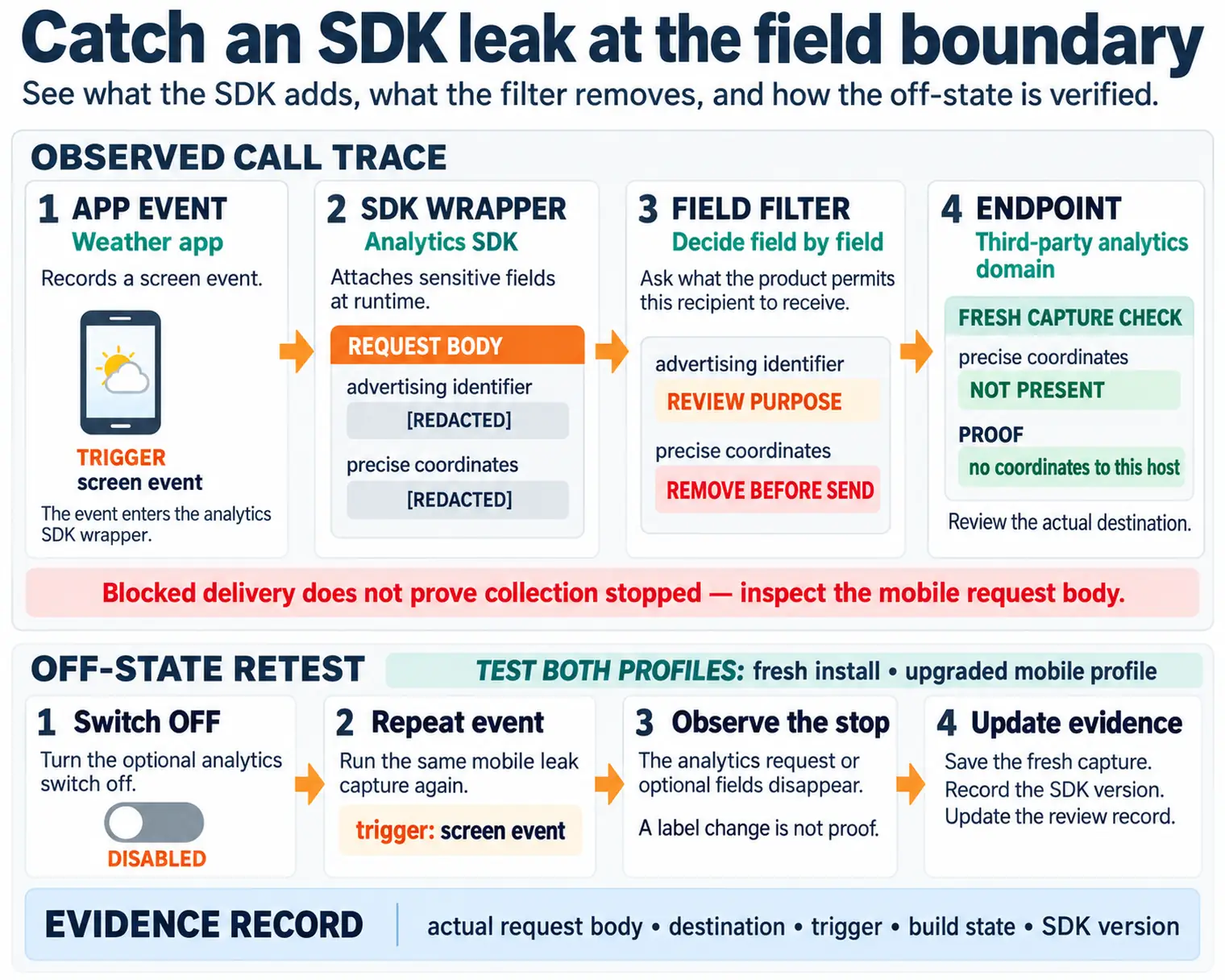
  • Third-Party SDK Leakage: Privacy risk from advertising, analytics, and social media SDKs embedded in IoT apps that collect and transmit user data independently of the primary app.
  • Log Privacy: Risk of sensitive data written to application logs being accessible to other apps, crash reporting systems, or cloud log aggregation services.
  • TLS Traffic Inspection: Technique using SSL/TLS interception proxies (mitmproxy, Charles Proxy) to decrypt and analyze HTTPS traffic for privacy leak detection.

Privacy and compliance for IoT are about protecting people’s personal information and following the laws that govern data collection. Think of it like the rules a doctor follows to keep medical records confidential. IoT devices in homes, workplaces, and public spaces collect sensitive data about people’s lives, and there are strict requirements about how this data must be handled.

“Privacy leaks are like leaky water pipes,” Sammy the Sensor explained. “Data flows out of your device through tiny cracks you cannot see. Leak detection tools help you find and fix those cracks!”

Max the Microcontroller described the methods. “Static analysis looks at an app’s code WITHOUT running it – like reading a blueprint to find design flaws. Dynamic analysis runs the app and watches what data it actually sends – like turning on the faucet and checking for drips. Both are needed because some leaks only happen when the app is running.”

“Taint analysis is particularly clever,” Lila the LED said. “It ‘colors’ sensitive data – like your phone number or location – with an invisible marker. Then it tracks where that colored data flows. If your phone number ends up in a network packet heading to an advertising server, the taint tracker catches it red-handed!”

“Network traffic analysis watches everything going in and out of your phone,” Bella the Battery added. “Tools like packet sniffers capture all the data your apps send. You would be surprised how much personal information flows to servers you have never heard of. Regular leak checks should be part of every IoT app’s testing process!”

17.2 Prerequisites

Before diving into this chapter, you should be familiar with:

  • Simulations Hub: Try the TaintDroid simulation to see real-time taint tracking in action. Experiment with different data flows from sources (GPS, contacts) to sinks (network, SMS) and observe how taint labels propagate through variables and method calls.

  • Videos Hub: Watch curated videos on Android permission models, data flow analysis techniques, and real-world privacy breach case studies. See demonstrations of static analysis tools (FlowDroid, LeakMiner) and dynamic analysis with TaintDroid.

17.3 Introduction

Even when users grant app permissions, they expect their data to be used for the app’s stated purpose. Privacy leak detection identifies when apps violate this trust by sending sensitive data to unauthorized destinations. This chapter covers the techniques used to detect these violations.

17.4 Data Flow Analysis (DFA)

Objective: Monitor app behavior to detect when privacy-sensitive information leaves the device without user consent.

Methodology:

  • Identify sources (sensors, contacts, location services)
  • Identify sinks (network, SMS, external storage)
  • Trace data flow paths from sources to sinks
  • Flag paths without explicit user consent as privacy leaks
How It Works: Data Flow Analysis Step-by-Step

Data Flow Analysis identifies privacy leaks by tracing how sensitive information moves through an app from collection to transmission. Here’s the complete process:

Step 1: Source Identification The analyzer scans the app’s code for privacy-sensitive APIs: getLastLocation() (GPS), getContacts() (contacts list), getDeviceId() (IMEI), getExternalStorage() (files). Each source is tagged with a sensitivity label (LOCATION, CONTACTS, DEVICE_ID).

Step 2: Sink Identification Next, the analyzer finds data exit points: HttpURLConnection.connect() (network transmission), sendTextMessage() (SMS), FileOutputStream to external storage, ContentProvider.insert() to shared databases.

Step 3: Path Tracing The analyzer builds a control flow graph showing all possible execution paths from each source to each sink. For example: getLastLocation() → Variable locJSONObject.put("location", loc)httpPost.setEntity(json)httpClient.execute(httpPost).

Step 4: Consent Verification For each source-to-sink path, check if user consent was obtained. If the path getContacts() → httpClient.execute() exists but no consent dialog appears in the code flow, the analyzer flags it as a privacy leak.

Step 5: Reporting Generate a report listing all detected leaks with: source API, sink destination, data type, consent status, and code line numbers for manual verification.

Why This Matters: Apps can request permissions legitimately (for weather, show my location) but then secretly exfiltrate that data to advertising networks. DFA catches these violations by analyzing actual data flows, not just permission requests.

Static analysis workflow showing APK decompilation to bytecode, control flow graph construction, identification of privacy sources and sinks, path analysis between them, and detection of potential privacy leaks without code execution
Figure 17.1: Static analysis for privacy
Layered diagram showing data flow analysis for privacy: sources (contacts, location, photos) flow through processing (analytics SDKs), reach sinks (network transmission, storage), with taint tracking revealing privacy leaks
Figure 17.2: Data Flow Analysis: Privacy Sources, Processing, and Sensitive Sinks

Privacy Leak: Any path from source to sink without user consent.

Privacy leak case study showing location data collected from getLastLocation API being transmitted to advertising network without user consent, demonstrating unauthorized data flow from sensitive source to third-party sink
Figure 17.3: Privacy leak example 1
Privacy leak case study demonstrating contacts list access via getContacts API being exfiltrated through HTTP POST to analytics server, revealing social graph information without explicit user permission
Figure 17.4: Privacy leak example 2

This view maps the complete attack surface for mobile IoT companion apps, showing how attackers can extract user data:

Mobile privacy attack surface diagram showing four threat layers: network traffic interception, unencrypted storage databases, inter-process communication vulnerabilities, and unauthorized sensor access
Figure 17.5: Mobile Privacy Attack Surface

Defense Priority: Focus on app-level defenses first (permission minimization, secure SDK selection), then network security (certificate pinning, encrypted protocols), then on-device protections (secure storage, anti-tampering).

17.5 Capability Leaks

Explicit Capability Leak: Malicious app hijacks permissions granted to other trusted apps.

Mechanism:

  • Android allows apps from the same developer to share sharedUserId
  • Apps with the same User ID share permissions and process space
  • Malicious app can exploit trusted app’s permissions

Note: sharedUserId was deprecated in Android 10 (API level 29) but remains relevant for legacy apps and educational understanding of capability leak attacks.

Example:

  1. Trusted app has location permission
  2. Malicious app from same developer shares User ID
  3. Malicious app gains location access without requesting permission

17.6 Dynamic Analysis: TaintDroid

TaintDroid is a modified Android OS that tracks sensitive data flows in real-time.

17.6.1 How TaintDroid Works

TaintDroid privacy leak detection flow: sensitive data is tagged at sources, tracked through app processing, generates alerts when data reaches network sinks, enabling real-time taint analysis
Figure 17.6: TaintDroid Real-Time Taint Tracking and Privacy Leak Detection Flow

Key Features:

  1. Automatic Labeling: Data from privacy sources automatically tagged
  2. Transitive Tainting: Labels propagate through variables, files, IPC
  3. Multi-level Granularity:
    • Variable-level taint tracking
    • Message-level taint tracking
    • Method-level taint tracking
    • File-level taint tracking
  4. Logging: When tainted data exits (network, SMS), log:
    • Data labels (what privacy-sensitive data)
    • Application responsible
    • Destination (IP address, phone number)

17.6.2 Challenges Addressed by TaintDroid

  • Resource Constraints: Lightweight implementation for smartphones
  • Third-Party Trust: Monitors all apps, including untrusted ones
  • Dynamic Context: Tracks context-based privacy information
  • Information Sharing: Monitors data sharing between apps
Performance comparison chart showing overhead of privacy protection mechanisms: taint tracking adds 10-30% CPU overhead, encryption consumes additional battery, and real-time monitoring impacts app responsiveness
Figure 17.7: Privacy protection performance impact

17.7 Static Analysis

Advantages over Dynamic Analysis:

  • Covers all possible code paths (not just executed ones)
  • No runtime overhead
  • Can be performed offline
  • Finds leaks that rarely execute

Disadvantages:

  • Takes longer to analyze
  • May have false positives
  • Cannot handle dynamic code loading

17.7.1 LeakMiner Approach

LeakMiner static analysis pipeline showing four stages: APK decompilation, control flow graph construction, taint propagation analysis, and privacy leak report generation
Figure 17.8: LeakMiner Static Analysis Pipeline: APK Decompilation to Privacy Leak Detection

17.7.2 Static vs Dynamic Analysis Comparison

Aspect Static Analysis Dynamic Analysis (TaintDroid)
Coverage All code paths Only executed paths
Runtime overhead None 10-30% CPU
False positives Higher Lower
Dynamic code Cannot analyze Fully tracked
When to use Pre-deployment review Runtime monitoring

17.8 Code Example: Simple Taint Tracker for IoT Data Flows

This Python implementation demonstrates the core taint-tracking concept from TaintDroid. It labels sensitive data at sources, propagates labels through operations, and detects unauthorized flows to network sinks:

class TaintTracker:
    """Simplified taint tracking for IoT app privacy analysis."""

    def __init__(self):
        self.variables = {}      # {name: {"value": ..., "taint": set()}}
        self.allowed_sinks = {}  # {sink: set of allowed labels}
        self.leaks = []

    def source(self, var_name, value, label):
        self.variables[var_name] = {"value": value, "taint": {label}}

    def combine(self, dest, var_a, var_b):
        """Taint union -- key TaintDroid insight."""
        a = self.variables.get(var_a, {"value": None, "taint": set()})
        b = self.variables.get(var_b, {"value": None, "taint": set()})
        self.variables[dest] = {
            "value": f"{a['value']}|{b['value']}",
            "taint": a["taint"] | b["taint"],
        }

    def send_to_sink(self, sink_name, var_name):
        var = self.variables.get(var_name)
        unauthorized = var["taint"] - self.allowed_sinks.get(sink_name, set())
        if unauthorized:
            self.leaks.append({"sink": sink_name, "unauthorized": unauthorized})
        return ("LEAK" if unauthorized else "OK"), unauthorized

# Weather app with hidden ad tracking
tracker = TaintTracker()
tracker.allowed_sinks = {"weather-api.com": {"LOCATION"}, "ad-network.com": set()}
tracker.source("gps_loc", "37.7749,-122.4194", "LOCATION")
tracker.source("device_id", "353456789012345", "IMEI")

print(tracker.send_to_sink("weather-api.com", "gps_loc"))  # ('OK', set())
tracker.combine("ad_payload", "gps_loc", "device_id")       # Union: LOCATION + IMEI
print(tracker.send_to_sink("ad-network.com", "ad_payload")) # ('LEAK', {'LOCATION','IMEI'})

The taint union in combine() is the key insight: when the app concatenates IMEI and location into one payload, the result inherits both labels. Even if the IMEI alone seems harmless, combining it with location creates a persistent tracking profile – exactly the pattern TaintDroid was designed to catch.

Scenario: A smart home company launches “HomeGuard,” an Android companion app for their security camera and door lock products. Before the v2.0 release, the security team must audit the app for privacy leaks. The app requests 8 permissions: camera, microphone, location, contacts, storage, phone state, Bluetooth, and Wi-Fi state.

Step 1: Permission Necessity Audit

Evaluate whether each permission is actually needed for the app’s stated functionality:

Permission Stated Purpose Audit Finding Verdict
Camera QR code scanning for device setup Used once during setup, then continuously by analytics SDK Over-retained
Microphone Two-way audio with camera Legitimate, used only during live view Necessary
Location “Improve service” (vague) Sent to 3 ad SDKs every 15 minutes even when app is backgrounded Privacy leak
Contacts Not disclosed Read by analytics SDK, hashed and uploaded for “social graph” Undisclosed leak
Storage Save video clips Legitimate Necessary
Phone state (IMEI) “Device identification” IMEI sent to 4 different analytics endpoints Over-collection
Bluetooth Device discovery Legitimate, scoped to setup flow Necessary
Wi-Fi state Network detection Legitimate for local device communication Necessary

Step 2: Static Analysis with FlowDroid

Run FlowDroid on the decompiled APK (42,000 methods across app code + 6 third-party SDKs):

Source Sink SDK Responsible Consent Given? Classification
getLastLocation() HttpURLConnection to ads.tracker.com AdMob SDK No explicit consent Privacy leak
getLastLocation() HttpURLConnection to analytics.mix.com Mixpanel SDK No explicit consent Privacy leak
getDeviceId() (IMEI) HttpURLConnection to graph.facebook.com Facebook SDK Buried in ToS page 23 Privacy leak
getContacts() HttpURLConnection to analytics.mix.com Mixpanel SDK Not disclosed anywhere Privacy leak
getContacts() Local SQLite App code N/A (local storage) Not a leak
Camera frames HttpURLConnection to api.homeguard.com App code User-initiated (live view) Legitimate

FlowDroid found 12 source-to-sink paths, of which 4 are confirmed privacy leaks, 2 are legitimate app functionality, and 6 are false positives (paths that exist in code but are unreachable at runtime).

Step 3: Dynamic Analysis with Network Traffic Capture

Run the app for 24 hours with a MITM proxy (mitmproxy with SSL unpinning via Frida) while simulating normal usage:

Destination Data Sent Frequency Encrypted? User Aware?
api.homeguard.com Camera stream, device status On user action TLS 1.3 Yes
ads.tracker.com GPS lat/lng, device model, Android ID Every 15 min TLS 1.2 No
analytics.mix.com IMEI hash, contact count, app events Every 5 min TLS 1.2 No
graph.facebook.com IMEI, installed apps list, Wi-Fi SSID Every 30 min TLS 1.3 No
crashes.google.com Stack traces (may contain user data) On crash TLS 1.3 Partial

Key finding: Over 24 hours, the app made 287 requests to third-party analytics servers versus 34 requests to the company’s own API. The device transmitted the user’s GPS location 96 times to advertising networks without any in-app disclosure.

Step 4: Taint Analysis Summary

Combining static and dynamic results:

Data Type Sources Unauthorized Sinks Risk Level GDPR Impact
GPS location getLastLocation() 2 ad networks Critical Article 6 violation (no legal basis)
Contacts getContacts() 1 analytics SDK Critical Article 9 violation (social graph)
IMEI getDeviceId() 4 analytics endpoints High Article 5(1)(c) violation (minimization)
Camera access Camera API 1 analytics SDK (background) High Article 5(1)(b) violation (purpose limitation)

Step 5: Remediation

Issue Fix Time Risk Reduction
Remove contacts permission Delete Mixpanel social graph feature 2 hours Eliminates contacts leak entirely
Replace IMEI with instance ID Use UUID.randomUUID() per install 4 hours Eliminates cross-app tracking
Add consent dialog for analytics GDPR-compliant opt-in before SDK init 3 days Enables legal basis for analytics
Remove location from ad SDK Set AdMob.setLocationEnabled(false) 1 hour Stops 96 daily location transmissions
Audit all 6 SDKs quarterly Integrate Exodus Privacy into CI/CD 2 days Catches new leaks from SDK updates

Outcome: The v2.0 release shipped with 3 permissions removed (location, contacts, phone state), a GDPR-compliant consent dialog, and instance-based IDs replacing IMEI. Third-party network requests dropped from 287/day to 41/day. The app passed an independent privacy audit, enabling EU market distribution.

Choose the right analysis approach based on development stage, resource constraints, and threat model:

Analysis Type When to Use Strengths Limitations Best For
Static Analysis Pre-deployment, code review Examines ALL code paths (100% coverage), no runtime overhead, finds leaks in error handlers and rarely-executed code False positives (~20-40%), cannot analyze dynamic code loading, obfuscation defeats analysis Security audit before release, regulatory compliance review, developer training
Dynamic Analysis Runtime monitoring, post-deployment No false positives (only real leaks), handles dynamic code, analyzes third-party libraries, detects actual network exfiltration Only tests executed paths (~40-60% coverage), runtime overhead (10-30% CPU), requires representative test scenarios Production monitoring, incident response, user-reported privacy concerns, third-party SDK verification
Hybrid Comprehensive security review Combines static path discovery with dynamic validation, reduces false positives, achieves higher coverage Requires both toolchains, longer analysis time, more complex setup Pre-release security certification, government/military deployments, medical device validation

Decision Tree:

START: Which analysis approach should I use?

1. Do I have access to source code?
   NO  → Must use dynamic analysis (TaintDroid, network capture)
   YES → Continue

2. What is my development stage?
   PRE-ALPHA (design) → Static analysis (find architectural flaws)
   BETA (testing) → Hybrid (static + targeted dynamic tests)
   PRODUCTION (live) → Dynamic analysis (real-world monitoring)

3. What is my threat model?
   MALICIOUS THIRD-PARTY SDK → Dynamic analysis (network traffic)
   DEVELOPER ERROR → Static analysis (code review)
   SOPHISTICATED ATTACKER → Hybrid (comprehensive)

4. What are my resource constraints?
   LOW (startup) → Static analysis (one-time setup, free tools)
   MEDIUM (growing company) → Hybrid (automated CI/CD integration)
   HIGH (enterprise) → Continuous dynamic monitoring

5. What is my risk tolerance?
   VERY LOW (medical, finance) → Hybrid + manual review
   MODERATE (consumer apps) → Static OR dynamic (pick one)
   HIGH (internal tools) → Lightweight static scan only

Tool Selection Guide:

Tool Type Cost Platform Coverage Best Use Case
FlowDroid Static Free (academic) Android 95% precision Pre-deployment audit, finds all potential leaks
TaintDroid Dynamic Free (research OS) Android 100% accuracy, 40-60% coverage Research, proof-of-concept leak demonstration
Frida Dynamic Free Android/iOS Depends on hooks Runtime monitoring, SDK behavior analysis
mitmproxy Network Free Any Network-only Third-party data exfiltration detection
Exodus Privacy Static Free (web) Android Known trackers only Quick SDK tracker scan (37+ known SDKs)
AppSweep Static Free Android Medium precision Continuous Integration (CI) integration
Guardsquare Static Commercial Android/iOS High precision Enterprise-grade pre-deployment scanning

Combining Static and Dynamic Analysis:

Optimal workflow for comprehensive privacy assurance:

PHASE 1: Pre-Development (Architecture)
  ├─ Static analysis on architecture docs
  ├─ Threat modeling (STRIDE/LINDDUN)
  └─ Privacy-by-design review

PHASE 2: Development (Code Review)
  ├─ Static analysis in CI/CD pipeline (every commit)
  ├─ Developer training on identified patterns
  └─ Automated blocking of high-severity findings

PHASE 3: Testing (Validation)
  ├─ Dynamic analysis on beta builds (1 week monitoring)
  ├─ Network traffic baseline establishment
  ├─ Third-party SDK behavior verification
  └─ Cross-reference static findings with dynamic results

PHASE 4: Pre-Release (Certification)
  ├─ Hybrid analysis (static paths + dynamic validation)
  ├─ External security audit (independent review)
  ├─ Penetration testing (adversarial scenarios)
  └─ Privacy Impact Assessment (PIA) documentation

PHASE 5: Production (Monitoring)
  ├─ Dynamic analysis on production builds (sampling 1% users)
  ├─ Anomaly detection (unexpected network destinations)
  ├─ User-reported privacy complaint investigation
  └─ Quarterly re-audit (static analysis on major updates)

Cost-Benefit Analysis:

Scenario Static Only Dynamic Only Hybrid Cost Risk Reduction
Startup (limited budget) $0-500 60% of leaks found
Consumer app (moderate risk) $0-2,000 50% of leaks found (only tested paths)
Enterprise IoT (high stakes) $5,000-20,000 85-95% of leaks found
Medical device (critical) ✓ + Manual $50,000+ 95%+ (regulatory requirement)

Key Insight: No single analysis technique provides complete coverage. Static analysis finds all potential paths but has false positives. Dynamic analysis finds only real leaks but misses untested paths. For production IoT apps, use static analysis pre-deployment and dynamic monitoring in production for comprehensive leak detection across the entire app lifecycle.

Common Mistake: Relying Only on Permissions for Privacy Protection

The Mistake: Developers assume that Android/iOS permission models provide sufficient privacy protection, and that users granting permission implies consent for all uses of that data.

Why It Fails:

  • Permissions are too coarse-grained (granting “Location” doesn’t distinguish “for maps” vs “for advertising”)
  • Users cannot see WHO receives data after permission grant (third-party SDKs are invisible)
  • Zero-permission sensors (accelerometer, gyroscope) require no consent but enable serious attacks
  • Implicit consent (pre-checked boxes) doesn’t meet GDPR Article 7 “freely given” standard
  • Permission fatigue causes users to blindly accept all requests

Real-World Example:

  • App: Flashlight app requests ONLY “Camera” permission (to control LED flash)
  • User thinks: “Of course a flashlight needs camera access to turn on the LED”
  • Actual behavior: App continuously captures photos every 30 seconds and uploads to ad network
  • Privacy violation: User granted camera permission for flashlight function, NOT for photo surveillance
  • Legal outcome: FTC fined flashlight app developer for deceptive practices (2013)

Why Permissions Are Insufficient:

Permission What User Thinks What Apps Can Do Actual Privacy Risk
Location (Always) “App knows where I am when using it” Continuous background tracking, 17,280 samples/day, exact home/work addresses, 95% de-anonymization with 4 points CRITICAL
Contacts “App can see my friends to add them” Hash entire contact list, upload to server, infer social graph, cross-reference with other datasets HIGH
Microphone “App can use voice commands” Record 24/7, send audio to third parties, infer sensitive conversations, enable eavesdropping CRITICAL
Motion Sensors NO PERMISSION REQUIRED 70-80% keystroke inference (PINs, passwords), activity tracking, gait-based identity fingerprinting MEDIUM
Storage “App can save my photos” Read ALL files, including other apps’ data, sensitive documents, personal photos HIGH

What Users Don’t Know After Granting Permission:

  • Third-party data sharing: Camera permission for QR code scanning → Analytics SDK gets camera access too
  • Background operation: Location “while using” permission → Many apps interpret “while using” as “while running in background”
  • Data retention: Microphone permission for voice command → Recording stored indefinitely, used for ML training
  • Derivative insights: Motion sensor data → Insurance company infers “user walks with limp” → Higher health premiums

Correct Approach:

  1. Purpose Limitation:

    // WRONG: Generic permission request
    requestPermissions(new String[]{Manifest.permission.CAMERA}, REQUEST_CAMERA);
    
    // RIGHT: Explain specific purpose in dialog
    new AlertDialog.Builder(context)
        .setTitle("Camera Permission")
        .setMessage("This app needs camera access to scan QR codes for device setup. Your camera will NOT be used for any other purpose.")
        .setPositiveButton("Allow", (dialog, which) -> requestCameraPermission())
        .setNegativeButton("Deny", null)
        .show();
  2. Granular Consent:

    // Separate toggles for each purpose
    data class PrivacyConsent(
        val allowLocationForMaps: Boolean = false,
        val allowLocationForWeather: Boolean = false,
        val allowLocationForAdvertising: Boolean = false,  // Likely stays false
        val allowContactsForFriends: Boolean = false,
        val allowContactsForMarketing: Boolean = false      // Likely stays false
    )
  3. Runtime Purpose Verification:

    fun useCamera(purpose: CameraPurpose) {
        when (purpose) {
            CameraPurpose.QR_SCAN -> {
                if (!consentManager.hasConsent(Purpose.CAMERA_QR)) {
                    throw SecurityException("No consent for QR scanning")
                }
                // Proceed with QR scan
            }
            CameraPurpose.ANALYTICS -> {
                // Analytics SDK tries to use camera
                throw SecurityException("Analytics cannot access camera")
            }
        }
    }
  4. Audit Third-Party SDK Access:

    # Use Frida to hook permission use and log which library called it
    frida -U -f com.example.app -l hook-permissions.js --no-pause
    # Output: "Analytics SDK (com.thirdparty.analytics) accessed Location at 14:23:05"

Key Insight: Permissions are a necessary but insufficient privacy control. They establish that an app CAN access data, but not WHEN, WHY, or WHO receives it. Robust privacy requires: granular purpose-specific consent, runtime access control, third-party SDK restrictions, and continuous monitoring. Treat permissions as the first layer of defense, not the only layer.

Concept Relationships
Concept Builds On Enables Contrasts With
Data Flow Analysis Control flow graphs, taint propagation Privacy leak detection, GDPR compliance verification Permission-based access control (DFA tracks actual usage)
TaintDroid Variable-level taint tracking, Dalvik VM modification Runtime privacy monitoring, third-party SDK auditing Static analysis (TaintDroid sees actual execution paths)
Static Analysis Abstract syntax trees, symbolic execution Pre-deployment security review, finding all potential paths Dynamic analysis (static covers unexecuted code)
Capability Leaks Android permission model, sharedUserID Privilege escalation attacks, permission bypasses Normal permission grants (capability leaks are implicit grants)

Key Insight: DFA, TaintDroid, and static analysis are complementary techniques that address different phases of the app lifecycle—design, runtime, and deployment—working together to provide comprehensive privacy leak detection.

Information leakage quantifies how much sensitive information flows from sources to sinks, measured in bits of entropy reduction.

\[L = H(S) - H(S|O)\]

where \(L\) is the information leakage, \(H(S)\) is the entropy of the sensitive data source, and \(H(S|O)\) is the conditional entropy after observing the output.

Working through an example: Given: A mobile app accesses GPS location (latitude, longitude with 6 decimal places = ~0.1 meter precision). The location is transmitted to an advertising network.

Step 1: Calculate source entropy - GPS coordinate space: Earth surface area ≈ \(5.1 \times 10^{14}\) m² - Precision: 0.1m × 0.1m = 0.01 m² per coordinate - Possible locations: \(5.1 \times 10^{14} / 0.01 = 5.1 \times 10^{16}\) - Source entropy: \(H(S) = \log_2(5.1 \times 10^{16}) \approx 55.5\) bits

Step 2: Calculate leakage with perfect transmission - If GPS coordinates transmitted exactly: \(H(S|O) = 0\) bits - Information leakage: \(L = 55.5 - 0 = 55.5\) bits

Step 3: Calculate leakage with coarse location (city-level) - If only city name is transmitted (e.g., “San Francisco”): - Number of cities worldwide: ~10,000 major cities - Remaining entropy after observing city: \(H(S|O) = \log_2(5.1 \times 10^{16} / 10000) \approx 55.5 - 13.3 = 42.2\) bits (uncertainty within the city) - Information leakage: \(L = 55.5 - 42.2 = 13.3\) bits (knowing the city)

Result: Transmitting precise GPS coordinates leaks 55.5 bits of location information – enough to pinpoint a user to within 0.1 meters. Even city-level coarsening still leaks 13.3 bits (which city you are in). To limit leakage to <5 bits, you would need continental-level granularity.

In practice: TaintDroid tracks data from sources (GPS, microphone) to sinks (network). The information leakage rate helps quantify privacy risk: higher leakage = greater ability to de-anonymize users. Data flow analysis combined with entropy calculations reveals which app behaviors pose the highest re-identification risk, enabling prioritized remediation.

17.8.1 Interactive: Information Leakage Calculator

Experiment with different precision levels and coarsening strategies to see how information leakage changes.

17.9 See Also

17.10 Summary

Privacy leak detection mechanisms identify unauthorized data exfiltration:

Data Flow Analysis:

  • Tracks information from privacy-sensitive sources to network sinks
  • Operates at method-level (coarse) or variable-level (fine) granularity
  • Flags any path from source to sink without user consent

TaintDroid (Dynamic Analysis):

  • Real-time taint tracking within Android’s Dalvik VM
  • Automatic propagation through variables, methods, files, IPC
  • Detects third-party libraries transmitting data without awareness

Static Analysis:

  • Offline path analysis identifying potential leaks from code structure
  • Covers all code paths, not just executed ones
  • Higher false positive rate but comprehensive coverage

Key Takeaway: Use static analysis for comprehensive pre-deployment review, dynamic analysis (TaintDroid) for runtime monitoring. Neither alone is sufficient—combine both for robust privacy protection.

Common Pitfalls

Embedded SDKs (analytics, crash reporting, advertising) collect and transmit data independently of the primary application code. Teams often don’t audit what third-party SDKs collect. Review privacy policies and network behavior of every embedded SDK before including it in IoT applications.

Debug logs capturing device IDs, location coordinates, or user behavior are commonly left in production builds. These logs may be readable by other apps (on Android), uploaded to crash reporting services, or stored in cloud log aggregation. Implement log redaction for production builds.

Teams who check for “using HTTPS” believe their traffic is private. But HTTPS encryption doesn’t prevent the destination from receiving and misusing data. Traffic analysis must check both that transport is encrypted AND that the destination is appropriate for the data being sent.

Privacy leak testing performed once at development doesn’t catch leaks introduced by SDK updates, backend changes, or new feature additions. Implement automated privacy traffic analysis as part of CI/CD pipelines to continuously detect privacy regression.

17.11 What’s Next

Now that you can detect privacy leaks, the next chapter explores Location Privacy Leaks where you’ll understand why location data is especially dangerous and how de-anonymization attacks work even on “anonymized” datasets.

Continue to Location Privacy Leaks

← Mobile Data Collection Location Privacy →