11 Privacy Claims Audit
More
Depth: Practitioner
Progress saves as you read. Mark sections complete as you go; your progress appears in the sidebar.
Check the Privacy Claim in the Running System
Walk One Promise Through Every Copy
Picture a family turning off location sharing for a home-care tag. The app changes at once, yet an old job still sends place data to a support store. The assessor must decide whether the promise holds across the device, phone, service, logs, exports, and backups.
Write the user promise in plain words. Name the data, purpose, default state, allowed people, retention time, copies, and owner of deletion. Map every path before testing the switch. Keep the screen claim tied to the rule and release version that should enforce it.
Test first use, the off state, an old account, a lost phone, an export, a restored backup, and the end of the retention time. Look for data at each boundary and record both positive and negative results. A hidden value or quiet screen is not proof that collection stopped.
Keep protective defaults active when a service is unsure or offline. Loss of a remote check should not reopen collection or wider sharing.
This opening does not replace legal review or prove every unseen system. Practitioner turns the promise into a test and release record. Under the Hood examines data paths, threat prompts, removal limits, and the changes that force a new assessment.
Use a short release check. Did the off switch stop the send? Did the old user lose access? Did the export obey the same rule? Did the restored copy stay off? Did the due copy leave on time? Keep a clear yes or no for each test.
Read the screen and the data path as two views of one promise. Start with a new account. Change one setting. Watch each copy. End the account. Restore a backup. Ask the owner to show what remains and why. If one view and the other do not match, the claim fails.
A good test is small enough to run again. Save the steps, date, build, sample id, result, and named owner. Mark the next change that will make the old result stale. This turns a broad claim into work that another reviewer can check.
Start with a promise a user can understand: "location sharing is off," "deletion removes my data," or "we only keep summaries." A privacy assessment asks whether the device, gateway, app, cloud service, logs, and backups all behave like that promise is true.
The story in this chapter is the assessor's path: spot the common failure shapes, turn each claim into a test, exercise the default or disabled state, and leave a record strong enough for a release decision.
Privacy assessment is the act of examining a design or a finished system to find weak or missing privacy controls. It is a different job from naming the principles and a different job from building the controls. Foundations tell you what privacy should look like, implementation builds the controls, and assessment is the independent check that the controls actually exist, work, and match what the product claims.
The reason assessment is a separate discipline is that confident-sounding claims are easy and enforced behavior is hard. A team can sincerely believe a feature is private because the settings screen says so, while the data path tells a different story. Assessment exists to close that gap with evidence.
If you only need the intuition, this layer is enough: assessment trusts evidence, not promises. Look for the recurring shapes of privacy failure, check that protective defaults actually constrain the system, and ask to be shown the behavior rather than told about it.
An assessment must connect a design promise to behavior a reviewer can observe. Inspect Figure 11.1 to follow a claim from its feature boundary to a release or retest decision.
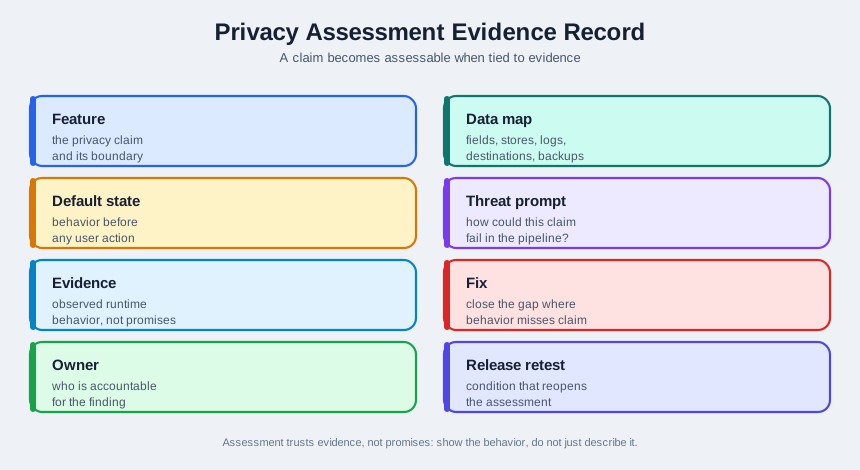
Read Figure 11.1 from feature and boundary into the data map, then test the protective default and a concrete threat prompt against runtime evidence. If observation differs from the claim, record the fix and owner; if it matches, still retain the release condition and change that forces retesting. This evidence chain is the privacy equivalent of the building inspection analogy used next.
Think of a building inspection. You do not approve a building because the blueprint has fire exits drawn on it; an inspector walks the building, opens the exit doors, and confirms they actually open onto a safe path. Privacy assessment is the same move applied to data: walk the system, exercise the protective claims, and confirm each one holds in reality.
The Shapes Privacy Failure Takes
An anti-pattern is a recurring design choice that looks reasonable but reliably causes a privacy problem. Learning the common ones lets an assessor spot trouble quickly, because most privacy failures rhyme with a handful of familiar shapes.
Collect just in case
Gathering data with no current use, hoping it is handy later. The data becomes a liability with no owner and no deletion plan.
Off on screen, on in the pipeline
A toggle that changes the display but not the behavior, so the protective setting is a label rather than a control.
Notice instead of design
Answering a privacy concern by lengthening the policy text rather than reducing what the system collects or keeps.
Beginner Examples
Work from the simplest case toward the broader design consequence. First, A reviewer who asks to see the disabled-state behavior, not just the settings screen, is doing assessment. Next, finding that deletion clears one table while copies remain in logs and backups is a classic assessment finding. Finally, approving a design because the document recites the seven principles is not assessment; nothing was checked.
Check the Evidence Habit
If you can tell assessment apart from reciting or building, you have the core idea. Continue to Practitioner to run an evidence-based review.
Run an Evidence Trail Review
A practical assessment turns each privacy claim into a question that can only be answered with evidence, then records the answer. The aim is not to score the team; it is to find the gaps between what a system claims and what it does, while there is still time to fix them.
Privacy Threat Prompts
Assessors use threat prompts to make sure they look at a system from a privacy attacker's angle, not just a feature angle. A widely used privacy threat-modeling approach, LINDDUN, organizes these prompts into categories. Each one is a question to ask of every data flow.
Walkthrough: From Claim to Evidence
Trace the sequence from its starting condition to its decision. First, List the privacy claims. Write down what the product says it does: what it collects, what is off by default, what users can delete. Next, Turn each claim into a test. For every claim, decide what observation would prove or disprove it. Then, Exercise the defaults. Set the system to its out-of-the-box state and confirm the protective defaults actually constrain behavior, not just the screen. Then, Ask to be shown, not told. Request logs, payloads, and disabled-state behavior rather than accepting a verbal assurance. Finally, Record findings against a gate. Note each gap, its severity, and whether it must block release, so the decision is deliberate.
Default Settings Are Where Assessment Earns Its Keep
The single most valuable assessment check is the disabled-state test. Set every optional collection, sharing, and retention feature to off, then watch what the system actually does. If a feature still transmits when its switch is off, you have found a protective screen over an unprotected pipeline, which is one of the most common and most serious privacy findings.
Worked Reasoning: Three Claims, One Method
Claim: analytics is off by default
Test: capture outbound traffic from a fresh device with analytics off. Evidence: no analytics events leave. A finding if any do.
Claim: deletion removes my data
Test: delete an account, then search every store, log, and backup. Evidence: a deletion path that reaches all copies, not one table.
Claim: we only keep summaries
Test: inspect the synced payload. Evidence: summaries, not raw streams. A finding if raw data is retained just in case.
Check the Disabled-State Test
If you can turn claims into tests and check the defaults, you can stop here. Continue to Under the Hood for the impact assessment, the durable record, and where assessment quietly fails.
Keep an Audit Record That Survives Release
A failure mode is a way a privacy claim can stop being true. The deeper layer connects these failures to impact assessment and a durable record, so a later reviewer can see what was tested and decided. A finding that is not written down, with severity and a decision attached, tends to be forgotten by the next release.
The Data Protection Impact Assessment
When processing is likely to create a high risk to people, data protection practice calls for a structured study before the processing begins. This is a data protection impact assessment, often shortened to DPIA. It describes the processing and its purpose, judges whether the data collected is necessary and proportionate to that purpose, identifies the risks to individuals, and sets out the measures that reduce those risks. For IoT, the trigger is usually large-scale or sensitive sensing, such as continuous monitoring of people in a space, where the impact of getting it wrong is high. The point of a DPIA is to surface and shrink risk while the design can still change, not to produce a document after launch.
Evidence Over Claims, Written Down
The discipline that separates real assessment from theater is insisting on evidence and recording it. For each claim, the record should hold the test that was run, the observation, the resulting finding, its severity, and the decision: fixed, accepted with a reason, or blocked. This turns assessment into something a later reviewer or auditor can re-check, rather than a memory that fades.
Anti-Patterns, Why They Persist, and How to Catch Them
Common Pitfalls
Review these failure modes in order. First, Assessing the document, not the system. Reviewing the design description while the running system has drifted away from it. Next, Accepting claims as evidence. Recording what the team says instead of what the system does. Then, One-time assessment. Treating a review as a launch gate that never runs again, even as data flows change. Then, Findings with no decision. Listing gaps without severity or an owner, so nothing is fixed or consciously accepted. Finally, Skipping the impact assessment for high-risk sensing. Launching large-scale or sensitive monitoring without studying its risk first.
Check the Deletion Record
At this depth, assessment is a habit of proof: turn each claim into a test, exercise the defaults, study the risk of high-impact sensing, and write findings down with a decision attached. A trustworthy assessment does not ask whether the team means well; it asks what evidence shows the controls hold, and what would catch them breaking later.
11.1 Summary
This section: Summary — Close the audit with one user promise and one clear result.
Close the audit with one user promise and one clear result. Write what the user was told. Name the data and each place it can go. Set the safe choice. Run the app, device, service, export, log, and restore path. Mark pass or fail for each place. Save the date, build, sample, and owner.
Use a plain five-step review. First, map the path. Next, set the safe choice. Then watch what is sent and kept. After that, end the account or due use. Last, bring back a saved copy and check the same rule. Do not infer a pass from a screen alone.
Try the weak cases too. Lose the link. Use an old account. Ask for an export. Wait for the due end date. Restore an old copy. Make sure the safe state stays safe. If a check cannot run, mark the gap and name who will close it.
Keep the record small enough to repeat. A new build, store, partner, field, or use can make the old result stale. Name the change that calls for a new test. This lets the next team see what was proved, what was not, and when the claim must be checked again.
Test each privacy claim against what the product actually does. First, assessment is the independent job of checking that privacy controls exist, work, and match the product’s claims; it is distinct from naming principles (foundations) and building controls (implementation). Next, assessment trusts evidence over promises: walk the system, exercise the protective claims, and confirm each one holds, like a building inspector opening the fire exits. Then, anti-patterns are recurring shapes of failure: collect just in case, off on screen but on in the pipeline, partial deletion, and notice instead of design. Then, privacy threat prompts, organized by approaches such as LINDDUN, push the assessor to look at each data flow for linkability, identifiability, detectability, disclosure, unawareness, and non-compliance. Then, the disabled-state test is the highest-value check: set optional features off and confirm the system actually withholds the data, not just the display. Finally, for high-risk processing, a data protection impact assessment (DPIA) studies and shrinks risk before launch; findings should be recorded with severity and a decision so they can be re-checked later.
Privacy assessment is evidence, not assurance. Turn each claim into a test, exercise the defaults, study the risk of high-impact sensing with a DPIA, and write every finding down with a severity and a decision. The test of an assessment is not whether the team means well, but what observation shows the controls hold, and what would catch them breaking.
11.2 See Also
This section: See Also
Privacy by Design Foundations
Review the seven principles and protective defaults that an assessment checks against.
Privacy by Design Implementation
See how protective defaults and runtime gates are built, so you know what evidence to ask for.
Privacy Patterns and Data Tiers
Recognize the minimization and separation patterns whose absence an assessment flags.
Find help
3 reviewed answers.
Where should I start in a module?
Open the module page from the sidebar to see its chapters in order. Use the module map to return to a topic you need.
Modules and pathsReviewed
What can I try when a project does not work?
Check the symptom, then work through the diagnostic steps. Keep the error message and the smallest example that reproduces it.
When you are stuckReviewed
How do interactive examples work?
Use the interactive guide to check how examples and simulations work before changing your project.
Interactive examples guideReviewed