23 Implementing IoT Security Controls
More
Depth: Practitioner
Progress saves as you read. Mark sections complete as you go; your progress appears in the sidebar.
23.1 Start Simple
This section: Start Simple — Picture a care-home door sensor that should report only through its approved path.
Turn One Control Into Visible Behavior
Picture a care-home door sensor that should report only through its approved path. Firmware is the software stored on a device. A gateway is the local device or service that joins the sensor path to wider systems. A control is useful only when those parts enforce a clear rule and leave proof.
Write the promised outcome first. Name the device identity, allowed route, update rule, operator role, denied case, log, owner, and review date. Show where the rule is enforced instead of saying only that the system has security.
Test a copied identity, an old operator role, a changed device setting, a bad update, a lost gateway link, a missing log, and recovery after replacement. Confirm both refusal and normal service. A green dashboard does not prove that a blocked route or recovery step works.
Keep any urgent safe action at the door or site when the wider control path fails. A network control may reduce risk, but it cannot replace safe device behavior.
This opening does not claim that one control covers every risk. Practitioner selects a set of preventive, detective, response, and recovery controls. Under the Hood examines overlap, gaps, drift, exceptions, evidence age, and the changes that reopen review.
A control is a promise made specific. “Only approved devices can send commands” is still abstract until a gateway checks device identity, the cloud limits operator roles, logs show denied attempts, and someone owns the review. In IoT, controls must survive real devices, constrained firmware, gateways, cloud services, field updates, and long maintenance cycles.
This chapter follows the path from framework outcome to working control: choose where the safeguard lives, tailor it to the device and data flow, operate it, monitor it, and keep proof.
23.2 Overview: From a Framework Outcome to a Running Control
This section: Overview: From a Framework Outcome to a Running Control — The key shift is that a control is not finished when it is named.
A security framework tells you what outcome a system needs, such as "only authorized actors can send commands." A security control is the concrete safeguard that makes that outcome real: a specific device setting, access rule, network boundary, log source, update process, response playbook, or evidence record. Implementation is the bridge between the two. The catalogs most teams draw on are established references, including the NIST Cybersecurity Framework for organizing outcomes, NIST SP 800-53 as a broad catalog of security and privacy controls, and NIST SP 800-213 for fitting IoT devices into system requirements.
The key shift is that a control is not finished when it is named. "We have access control" is a slogan. A control is finished only when the team can answer four questions: what risk does it reduce, where is it enforced, who owns it, and how is it proven? Controls also come in four kinds that work together: preventive controls reduce opportunity, detective controls reveal change, and responsive and recovery controls restore the system with evidence.
In practice, a smart-building baseline turns those words into checkable behavior. A room sensor has a unique credential and a known firmware version. A gateway admits only approved device identities, forwards telemetry to the MQTT broker, blocks peer-to-peer device traffic, and records denied attempts. The cloud service accepts commands only from named operator roles, while the maintenance process proves that update packages are signed, rollback has been tested, and drift from the approved configuration raises an alert. None of those items is impressive by itself; together they make the control review concrete because every promise has an enforcement point, a test, and a current evidence artifact.
If you only need the intuition, this layer is enough: pick the outcome, choose a control, name the exact enforcement point and owner, and keep evidence that it works. For IoT this must span the whole device lifecycle, because a control means little if it cannot survive constrained devices, long field life, and remote updates. And controls protect privacy only when they are matched to the actual data risk and data flow.
Inspect Figure 23.1 to see how a framework outcome becomes a control that can be owned, tested, monitored, and reopened when the system changes.
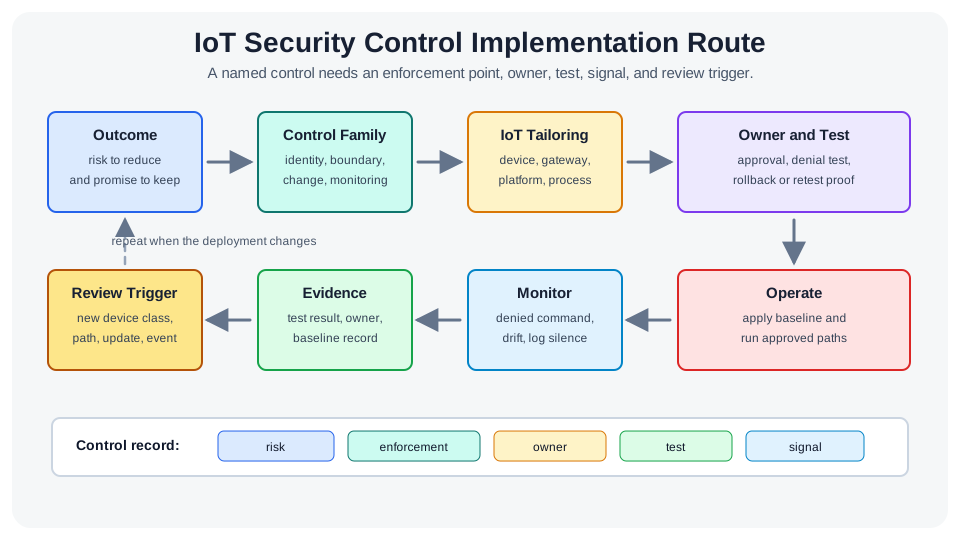
Read Figure 23.1 from the desired outcome into a control family and IoT-specific tailoring decision. Continue through owner and test into live operation, monitoring signal, evidence, and review trigger. A control is therefore more than a requirement statement: it is an enforcement point with observable behavior and lifecycle ownership. The sections below expand each link, beginning with the families that organize related controls.
23.2.1 The One-Minute View
Framework says what, control says how
The outcome is the goal; the control is the enforced safeguard at a named point in the device, gateway, network, service, or process.
Four kinds, working together
Preventive, detective, responsive, and recovery controls form a set; no single one carries the whole system.
Named is not done
A control is real only with an enforcement point, an owner, a test that proves it, and evidence that stays current.
23.2.2 Beginner Examples
Work from the simplest case toward the broader design consequence. First, "Devices use unique identities" is a control only if enrollment rejects a duplicate identity and a test proves it. Next, "Updates are trusted" is a control only if the device or gateway verifies the update's signature before installing it. Finally, "We block bad traffic" describes a filter; a reviewable control also states the allowed paths, the owner, and the denied-path test.
23.2.3 Overview Knowledge Check
If you can explain why a named control still needs an enforcement point, an owner, and proof, you have the core idea. Continue to Practitioner to select control families and tailor them to the device.
23.3 Practitioner: Select, Tailor, and Operate
This section: Practitioner: Select, Tailor, and Operate — The full catalog is broad, so IoT teams start by mapping controls to the parts of the system that can actually enforce them.
The full catalog is broad, so IoT teams start by mapping controls to the parts of the system that can actually enforce them. Five families do most of the work: identity and access, configuration and change, communication and boundary, monitoring, and response and recovery.
23.3.1 Tailoring: The Same Requirement, a Different Enforcement Point
IoT devices are often constrained, long-lived, and hard to reach physically. That does not remove a control requirement; it moves where the control is enforced. Inspect the decision path in Figure 23.2 to decide whether the device, gateway, platform, or an operations process carries it. A constrained sensor that cannot verify updates itself, for example, can sit behind a gateway that validates update packages on its behalf.
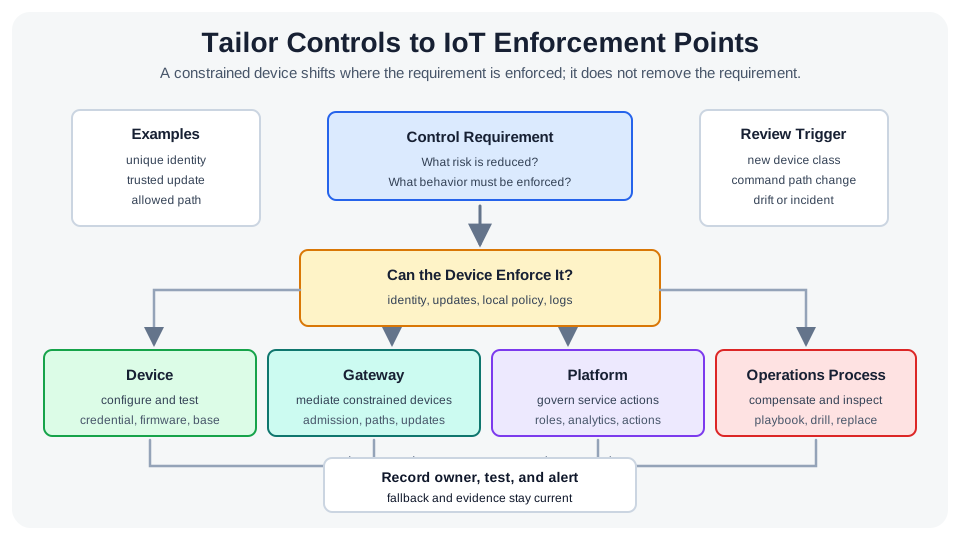
Read Figure 23.2 from the unchanged requirement into the four possible enforcement points. After choosing one, follow the path through owner, test, alert, fallback, and retained evidence. Moving enforcement to a gateway or process is therefore not a waiver: it creates a different implementation and proof obligation. The control-family ledger below applies that same tailoring logic to identity, configuration, communication, monitoring, response, and recovery.
23.3.2 Build Controls That Describe Allowed Behavior
Strong controls describe what is permitted, not only what is blocked. For identity, identify each actor, state its allowed actions, bind access to context (device state, version, purpose), and keep a clean revocation path. For configuration, record the approved baseline (firmware, enabled services, endpoints, logging, update channel), require change review, check drift continuously, and keep a tested rollback. For communication, write each rule as source, destination, purpose, allowed protocol, and evidence, so devices send telemetry to a gateway rather than to arbitrary peers, and management interfaces are reachable only from approved operator paths.
23.3.3 Worked Review: Facility Monitoring Before Rollout
A facility system has environmental sensors, local gateways, a management service, and an operator dashboard. The team works the method end to end:
- Scope: identity records, telemetry, gateway configuration, threshold-change command paths, dashboard access, update packages, and recovery records.
- Baseline controls: unique identity per sensor and gateway (no shared identities at enrollment), an approved configuration baseline, gateway-mediated allowed paths, and a short list of actionable monitoring signals.
- Tests: try a duplicate-identity enrollment, a command from an unapproved service, a telemetry path that bypasses the gateway, a gateway setting change to trigger drift detection, a disabled identity reconnect, and a baseline restore.
- Evidence packet: objective, the controls chosen, enforcement points, the test results, the response owner, and the review trigger (a new device class, a new command path, an update-mechanism change, an incident, or a failed drift check).
Before calling any control implemented, run the quality checklist: it is traceable to a risk, enforced at a named point with a test, operated by an owner over time, and recoverable to a known-good state.
23.3.4 Practitioner Knowledge Check
If you can select a family, tailor its enforcement point, and prove it with a test, you can stop here. Continue to Under the Hood for defense in depth, compensating controls, and drift.
23.4 Under the Hood: Layers, Compensation, and Drift
This section: Under the Hood: Layers, Compensation, and Drift — The deeper layer explains why controls must be a coordinated set rather than a checklist, and why the hardest IoT problem is keeping them true over a long field life.
The deeper layer explains why controls must be a coordinated set rather than a checklist, and why the hardest IoT problem is keeping them true over a long field life.
23.4.1 Defense in Depth, Not a Single Wall
No single layer should carry the system. Network filtering, device hardening, encryption, and monitoring each reduce a different slice of risk and each can fail in a different way. The point of layering is that a gap in one control is caught or contained by another: if a boundary rule is misconfigured, identity and monitoring still limit and reveal the damage. A design that leans entirely on one strong layer, such as a firewall, fails completely the moment that layer is bypassed.
23.4.2 Compensating Controls Preserve the Requirement
When a constrained device cannot enforce a control itself, the requirement does not disappear; it shifts to a compensating control elsewhere. A device that cannot verify firmware signatures can be updated through a gateway that validates packages on its behalf; a device that cannot report configuration can be watched by network-side drift detection; a device with no secure local interface can be protected by operational inspection, acceptance testing, and replacement rules. The critical discipline is to make the assumption explicit. "The gateway handles it" is not a control until the record names the gateway rule, the owner, the test, the alert, and the fallback action.
23.4.3 Monitoring, Response, and Recovery as One Chain
Detective controls are only useful if they feed action. Inspect Figure 23.3 from event sources such as registration, commands, changes, and gateway decisions through normalization and triage. Concrete signals—unknown identity, denied command, new destination, failed update, log silence, or drift—must map to containment, recovery, and verification rather than stop at an alert.
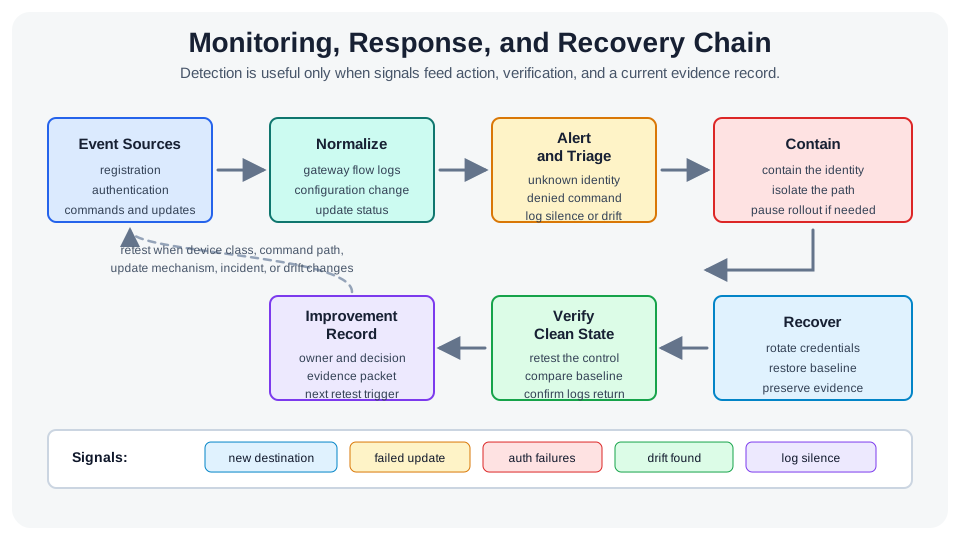
Read Figure 23.3 from event sources into normalization and triage, then follow the chosen response through containment, recovery, verification, and an improvement record. The final retest trigger closes the loop when code, configuration, or topology changes. This ordered chain connects monitoring to the chapter's running control record: a named signal, owner, action, recovery proof, and condition for checking the control again.
For the facility-monitoring example, trigger the existing denied-command test and follow its record through triage to the named response owner. Then check the restore result and retain the retest trigger. An alert alone proves detection, not recovery.
23.4.4 Drift Is the Default Failure Mode
A control that passed at release can quietly fail after a new endpoint, an update package, a changed gateway rule, an added data path, or an expanded support process. This is drift, and over a long IoT field life it is the most common way controls decay. The defense is to compare observed state against the approved baseline continuously and to treat unexpected service exposure, log silence, and unknown software as review triggers. Evidence has the same problem: a record gathered once for a deadline is stale almost immediately. The useful record is the one maintained through release, monitoring, incidents, and change, with a named owner and a retest trigger.
23.4.5 Mechanisms and Failure Modes
23.4.6 Common Pitfalls
Review these failure modes in order. First, Naming a control without an enforcement point. State where it is checked, which identities it covers, which actions are allowed, and how denial is tested. Next, Depending on one layer. Filtering, hardening, encryption, and monitoring are a set with fallback behavior, not a single wall. Then, Ignoring drift. A control that passed at release fails after change; make drift checks part of normal operation. Then, Collecting evidence only before a review. Evidence gathered for a deadline goes stale; maintain it through operation and change. Finally, Leaving compensation implicit. "The gateway handles it" must name the rule, owner, test, alert, and fallback.
23.4.7 Under-the-Hood Knowledge Check
At this depth, security control implementation is a coordinated, owned, and evidenced set: layered so no single failure is fatal, tailored so constrained devices are compensated explicitly, monitored so detection drives response, and rechecked so drift is caught. A trustworthy review asks where each control is enforced, what compensates when the device cannot, and what test proves it still works.
23.5 Summary
This section: Summary — For each control, identify the risk, enforcement point, owner, and proof.
For each control, identify the risk, enforcement point, owner, and proof. First, a framework states the outcome; a control is the enforced safeguard, and a control is finished only when its risk, enforcement point, owner, and proof are all clear. Next, established catalogs help: the NIST Cybersecurity Framework organizes outcomes, NIST SP 800-53 catalogs security and privacy controls, and NIST SP 800-213 fits IoT devices into system requirements. Then, controls come in four kinds that work together: preventive, detective, responsive, and recovery. Then, five families do most of the IoT work: identity and access, configuration and change, communication and boundary, monitoring, and response and recovery. Then, tailoring moves the enforcement point rather than removing the requirement: device, gateway, platform, or operations process. Then, strong controls describe allowed behavior, not just blocked behavior, and each rule names source, destination, purpose, protocol, and evidence. Then, defense in depth means no single layer carries the system; a gap in one control is contained by another. Finally, drift is the default failure mode over a long field life; compare observed state to the baseline continuously and keep evidence current with named owners and retest triggers.
Security controls protect privacy only when they match the data risk and are actually enforced. Translate the outcome into a control with a named enforcement point and owner, tailor it to what the device, gateway, platform, or process can do, layer controls so no single failure is fatal, and prove each one with a test that you keep re-running as the system drifts. A control you cannot point to and cannot retest is not a control.
23.6 See Also
This section: See Also
NIST Cybersecurity Framework for IoT
Review the framework outcomes that drive control selection and tailoring.
Revisit the broader safeguard set spanning both privacy and security.
Zero Trust Network Segmentation
Apply boundary and flow controls as fine-grained, resource-centered access decisions.
Strengthen the identity control that most other safeguards depend on.
Find help
3 reviewed answers.
Where should I start in a module?
Open the module page from the sidebar to see its chapters in order. Use the module map to return to a topic you need.
Modules and pathsReviewed
What can I try when a project does not work?
Check the symptom, then work through the diagnostic steps. Keep the error message and the smallest example that reproduces it.
When you are stuckReviewed
How do interactive examples work?
Use the interactive guide to check how examples and simulations work before changing your project.
Interactive examples guideReviewed