15 The Threat Modelling Process

More
Depth: Practitioner
Progress saves as you read. Mark sections complete as you go; your progress appears in the sidebar.
15.1 Start Simple: Draw One Flow Before Choosing Controls
This section: Start Simple: Draw One Flow Before Choosing Controls — Picture a warehouse door that accepts an open command from a staff tablet.
-

Name the harm in one door command before naming a security control.
-

Trace the command from person to tablet, service, site unit, and door.
-

Test false, changed, old, lost, bypassed, and unrecorded commands.
Name the Harm Before Naming the Control
Picture a warehouse door that accepts an open command from a staff tablet. The team proposes stronger encryption, but it has not yet asked whether a stolen account, an old command, or a bypass path could still open the door. The safety owner needs a threat tied to the real flow.
Draw the command from person to tablet, service, site unit, and door. Mark the asset, actor, trust change, expected state, and proof at each step. Then name what could be copied, changed, blocked, repeated, denied, or hidden. Choose a control only after the harmed promise is clear.
Test a false identity, a changed command, a late replay, a lost link, a bypass route, and a missing record. For each control, collect settings, logs, and a negative test. A control name is not evidence, and one protected link does not secure the whole action.
Keep the door’s safe local rule active when remote checks fail. Record the risk that remains, its owner, and the change that forces the review to run again.
This opening does not list every attacker or guarantee no harm. Practitioner turns flows into ranked controls and residual risk. Under the Hood examines formal categories, likelihood, impact, control fit, and the evidence loop that keeps the model current.
Before selecting a control, draw one IoT flow in plain words: device sends telemetry to gateway, gateway forwards an alert to service, service sends a command back, or device installs an update. The threat model begins when the flow names its asset, trust boundary, actor, assumption, and expected evidence.
This keeps mitigation grounded. Encryption, authentication, authorization, logging, monitoring, rollback, and recovery all matter, but each one answers a different threat. A useful model chooses the control after it has named the threat and can show the evidence behind the decision.
15.2 A Threat Model Is an Evidence Record
This section: A Threat Model Is an Evidence Record
Threat modelling is a structured review of what the system protects, how data and control actions move, where trust changes, what could go wrong, and which mitigations reduce the most relevant risks. A useful threat model is not a long list of fears. It is an evidence record that links assets, flows, assumptions, threats, controls, owners, and retest triggers.
Mitigation is the step after threat identification. The review should explain why a control fits a specific threat, what evidence shows the control is present, what risk remains, and what change would reopen the model.
This discipline is a lightweight, IoT-scoped way to run the same process NIST Special Publication 800-30 defines formally for risk assessment: identifying, estimating, and prioritizing information security risk by analyzing threat and vulnerability information together to judge the likelihood and impact of an adverse event. Naming the standard matters for review conversations with auditors or partners who expect the process to carry a citation, even though it is the evidence-record loop below that actually makes the assessment repeatable.
For an IoT gateway, the protected assets might be device identity, telemetry history, configuration commands, update packages, audit records, and operator roles. The flows might include device-to-gateway telemetry, service-to-gateway commands, operator dashboard changes, and firmware updates. Each place where authority changes is a trust boundary: device enrollment, local network access, cloud API authorization, update signing, or operator role assignment. A threat model makes those boundaries explicit before choosing controls.
That sequence matters because the same control can mean different things in different places. Encryption on a network path may protect confidentiality and integrity in transit, but it does not prove the device identity is enrolled, the operator is authorized for the action, the update is accepted by the bootloader, or the audit record names the actor. A useful model keeps the control claim attached to the asset, flow, and threat it actually reduces.
If you only need the intuition, this layer is enough: a threat model is a repeatable record. It starts with scope and flows, names threats by category, selects mitigations that fit, attaches evidence, and records residual risk and retest triggers.
The model is intentionally iterative. A new data flow, device identity scheme, update path, management role, or monitoring change can make a previous model incomplete, which is why the loop is meant to be re-run rather than written once.
Treat A Threat Model Is an Evidence Record as a testable claim, not a heading. Figure 15.1 earns attention because it renders this claim visibly: “The review loop: scope, flows, boundaries, threats, mitigations, evidence, residual risk, and retest triggers” is explicit in the diagram.
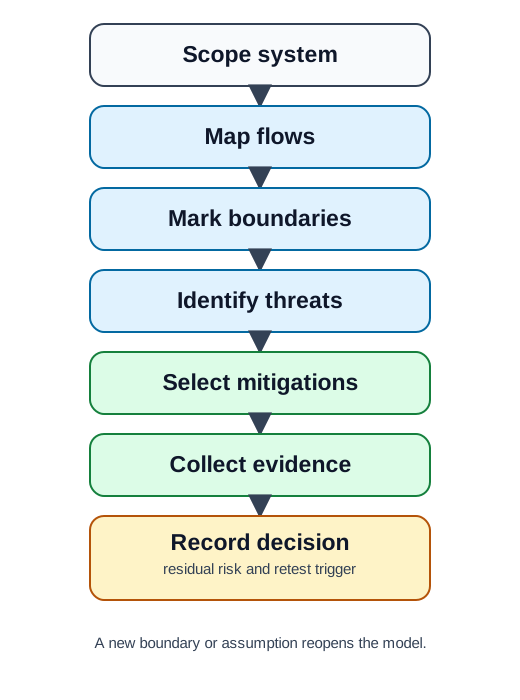
Rather than scanning Figure 15.1 as decoration, interrogate Mark boundaries, Collect evidence, and residual risk and retest trigger in turn. Their distinct roles are why “The review loop: scope, flows, boundaries, threats, mitigations, evidence, residual risk, and retest triggers” is explicit in the diagram. The result ties A Threat Model Is an Evidence Record to a named test or record later in the narrative.
The One-Minute View
Scope first
Name the system, assets, data paths, control actions, and assumptions before naming any control.
Threats before controls
Identify threats by category, then select mitigations that fit the named threats, not the other way around.
Evidence and retest
A control claim needs configuration, logs, tests, or records, plus residual risk and a trigger to reopen the model.
Beginner Examples
Taken together, these checks make the section reviewable. That order prevents a control name from being treated as proof and connects the visual to the chapter's evidence-led review sequence.
Overview Knowledge Check
If you can describe a threat model as an evidence record, you can stop here. Continue to Practitioner to build one for a real system.
15.3 Build the Model and Match Mitigations
This section: Build the Model and Match Mitigations
Start by deciding what is inside the review. Scope should be narrow enough to reason about and broad enough to include the paths that matter.
Walkthrough: Scope, Threats, Mitigations
- Define scope. Which device, gateway, service, broker, or store is included, and what is the review question?
- Map flows and boundaries. Data flows, control actions, and the points where identity, network, or service context changes.
- List assumptions. What must stay true for the model to remain valid.
- Identify threats by category. Use STRIDE prompts as questions for each path.
- Select mitigations. Choose controls that fit each named threat.
- Attach evidence and retest triggers. Configuration, logs, tests, owners, and the change that reopens the model.
The risk in Walkthrough: Scope, Threats, Mitigations is skipping a necessary intermediate decision. Figure 15.2 prevents that shortcut by showing how the scope map keeps the model grounded: every threat ties to an asset, flow, boundary, or assumption.
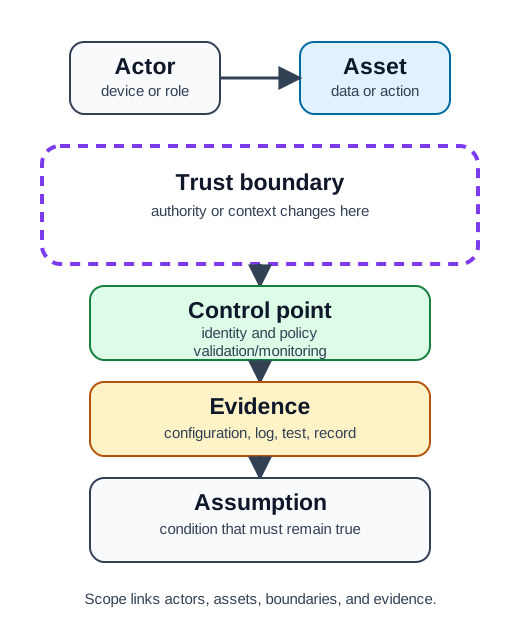
Figure 15.2 makes three checkpoints explicit: Asset, identity and policy, and condition that must remain true. The movement between them reveals the scope map keeps the model grounded: every threat ties to an asset, flow, boundary, or assumption. Keep that relationship in view as Walkthrough: Scope, Threats, Mitigations becomes an implementation or review decision.
STRIDE Prompts and Matching Mitigations
STRIDE maps common threat questions to security properties. Use each as a question, then match a mitigation to the named threat.
Avoid procedure detail. Describe the threat condition and affected property, not step-by-step misuse instructions. Mitigation records should also name assumptions: if segmentation is selected, state which boundary it protects and which flows remain allowed.
To keep STRIDE Prompts and Matching Mitigations auditable, the chapter now needs a visual contract. Figure 15.3 provides it by showing how the mitigation workflow keeps control selection separate from threat identification.
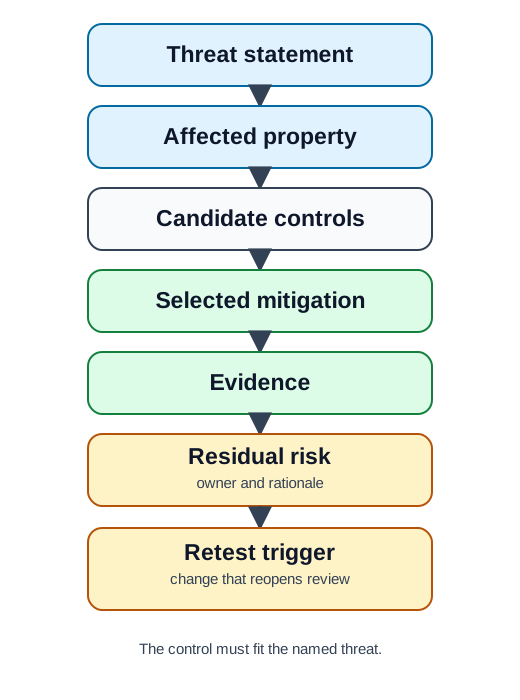
Figure 15.3 separates Candidate controls, owner and rationale, and The control must fit the named threat so the reader can see where the claim might fail. Taken together, they show the mitigation workflow keeps control selection separate from threat identification. That failure-aware reading connects the figure directly to STRIDE Prompts and Matching Mitigations and its later proof obligations.
Worked Review
A building gateway receives sensor telemetry, forwards commands to devices, and lets operators change device settings. Scope assets: telemetry, management commands, device identity, configuration, and audit records. Boundaries: sensor-to-gateway, gateway-to-service, operator-to-dashboard, and service-to-gateway.
Threat notes
Spoofing: unauthorized device submits telemetry. Tampering: commands changed in transit. Repudiation: disputed management changes. Disclosure: telemetry visible beyond the assigned site. EoP: a viewer role changes settings if authorization is only checked at login.
Mitigation record
Device identity required before telemetry is accepted; command integrity plus action-level authorization; audit records with actor, action, target, outcome; dashboard access limited to assigned sites; segmented, monitored gateway paths; viewer roles denied config changes, with denied attempts logged.
Residual risk and retest
Reopen after changes to enrollment, routing, dashboard roles, command format, monitoring rules, or update behavior. Record accepted residual risk with an owner and review date.
Practitioner Knowledge Check
If you can scope a model and match mitigations to threats, you can stop here. Continue to Under the Hood for evidence quality, residual risk, and assessment findings.
15.4 Evidence Quality, Residual Risk, and Findings
This section: Evidence Quality, Residual Risk, and Findings
The deeper layer is where a threat model becomes an assessment. Threat models fail when they stop at "control should exist." A mitigation needs evidence, and a finding needs an owner, a decision, and a retest path.
Evidence and Residual Risk
Useful evidence includes an architecture diagram with named trust boundaries, an identity enrollment or certificate-status record, an access-control rule or denied-action log, a signed update or startup verification record, a packet trace or broker policy for an allowed path, a monitoring rule with a sample alert, and a recovery or rollback test. Residual risk should be recorded plainly: what remains possible, why it is accepted for now, who owns it, and what change reopens the decision.
Evidence quality should be graded, not just collected. Direct evidence shows the control in the reviewed system: a denied-role log for the dashboard action, a certificate rejection record for an unenrolled device, or an update verification result from the target boot path. Indirect evidence supports the claim but needs caution, such as a design diagram, a policy statement, or a test from a different environment. Missing evidence is also a finding when the model depends on the claim. A threat model is stronger when it says which evidence is direct, which is assumed, and which remains open.
Residual risk is not a failure by itself. Some risk may be accepted because the affected path is isolated, monitored, rate-limited, or operationally recoverable. The record still needs the acceptance owner, the reason, the compensating control, the monitoring signal, and the retest trigger. For example, accepting delayed telemetry during a network outage is different from accepting unauthenticated management commands. One affects freshness and recovery; the other affects authorization and accountability for physical changes.
From Threat Notes to Assessment Findings
When threat-model notes become findings in a formal assessment, specificity is required. A vague finding cannot be assigned an owner or closed with evidence.
Weak finding
"The gateway is insecure." No path, evidence, or affected property, so nobody can own it or close it.
Reviewable finding
"The gateway accepts management commands from the service path without evidence of action-level authorization; this affects authorization and accountability for configuration changes." Names path, missing evidence, and properties.
When prioritizing findings, use context rather than a generic score alone:
- Which asset or control action is affected?
- Is the finding about identity, authorization, integrity, confidentiality, availability, accountability, recovery, or monitoring?
- Is the evidence direct, indirect, missing, or contradicted by another source?
- Is a compensating control already present and tested?
- What decision is needed now: mitigate, monitor, accept with owner, or gather more evidence?
- What retest would change the status from open to closed?
A finding is not complete when it is written. It is complete when the decision, owner, and retest path are clear.
A reviewable closure path should say what proof changes the finding status. If the finding is missing action-level authorization on a command path, closure may require the authorization rule, a denied-action test for a viewer role, an allowed-action test for the maintainer role, and an audit record showing actor, action, target, and outcome. If the decision is to monitor instead of change design immediately, the record should name the alert, threshold, owner, and review date. Without that closure path, the assessment becomes a backlog of labels rather than a risk decision record.
Finding Completeness
Common Mistakes
Under-the-Hood Knowledge Check
At this depth, threat modelling and assessment are one continuous record: scope and flows lead to category-based threats, mitigations that fit, evidence of varying quality, residual risk with an owner, and findings that close only when a named retest supports the decision.
15.5 Summary
This section: Summary — Link each threat to its asset, path, guard, owner, and next test.
Link each threat to its asset, path, guard, owner, and next test.
Threat modelling is most useful when assets, actors, entry points, trust boundaries, mitigations, and residual risks stay linked, and when each finding is specific enough to assign an owner, a decision, and a retest.
15.6 See Also
This section: See Also
Threats STRIDE Framework
Expand category-based threat identification with STRIDE review prompts.
Cyber Security Defense in Depth
See how layered mitigations reduce dependence on a single control.
Security-by-Design Principles
Connect principles such as least privilege and fail-secure behavior to mitigation choices.
Find help
3 reviewed answers.
Where should I start in a module?
Open the module page from the sidebar to see its chapters in order. Use the module map to return to a topic you need.
Modules and pathsReviewed
What can I try when a project does not work?
Check the symptom, then work through the diagnostic steps. Keep the error message and the smallest example that reproduces it.
When you are stuckReviewed
How do interactive examples work?
Use the interactive guide to check how examples and simulations work before changing your project.
Interactive examples guideReviewed