13 OWASP IoT Top 10
More
Depth: Practitioner
Progress saves as you read. Mark sections complete as you go; your progress appears in the sidebar.
13.1 Start Simple: Turn One Risk Family Into Evidence
This section: Start Simple: Turn One Risk Family Into Evidence — Choose one familiar OWASP family, such as weak passwords or exposed services, and ask what would prove the local system handles it well.
Choose one familiar OWASP family, such as weak passwords or exposed services, and ask what would prove the local system handles it well. “Reviewed OWASP” is not evidence. A useful note says which interface, credential, update path, data store, or management function was checked and what record supports the decision.
Use the Top 10 as a memory aid while keeping the review narrow. Each item becomes valuable only when it is tied to scope, ownership, a specific control claim, evidence, residual risk, and the change that would require the check again.
13.2 A Review Lens, Not a Checklist
This section: A Review Lens, Not a Checklist
The OWASP IoT Top 10 is a widely referenced list of recurring risk families in IoT systems: weak credentials, exposed network services, insecure ecosystem interfaces, missing update mechanisms, outdated components, weak privacy protection, unprotected data, missing device management, insecure defaults, and weak physical hardening. Its value is as a structured prompt for review questions, not as a pass or fail checklist.
The important idea is how to use the list. It reminds a reviewer which areas tend to fail, but ticking "item reviewed" proves nothing. Each family becomes useful only when it is mapped to a specific boundary and supported by evidence: what is in scope, what control should reduce the risk, what shows the control works, who owns it, and what change requires retest.
If you only need the intuition, this layer is enough: the OWASP IoT Top 10 is a memory aid for common IoT weaknesses. It does not replace threat modelling, architecture review, secure development, or operations evidence, and its numbering is not a priority order for your system.
Think of the list as the section headings of an inspection manual. The headings remind an inspector which areas to examine, but the headings are not the inspection. The inspection is the recorded observation that a specific part was checked and behaved as required. The Top 10 names the areas; your evidence is the inspection.
For example, a connected camera might already use unique administrator credentials, so the password family is not the first finding. The same camera could still expose a debug service on the local network, send event clips through a weakly authorized cloud API, and report no installed firmware version after an update. The Top 10 helps name those separate review areas, but the useful record is narrower: service exposure, ecosystem authorization, update-state evidence, owner, and retest trigger.
The chapter pauses for Figure 13.1 so that A Review Lens, Not a Checklist has inspectable evidence. The visual’s specific claim is that the Top 10 reaches beyond the device: credentials, services, ecosystem interfaces, updates, data handling, management, and physical access.
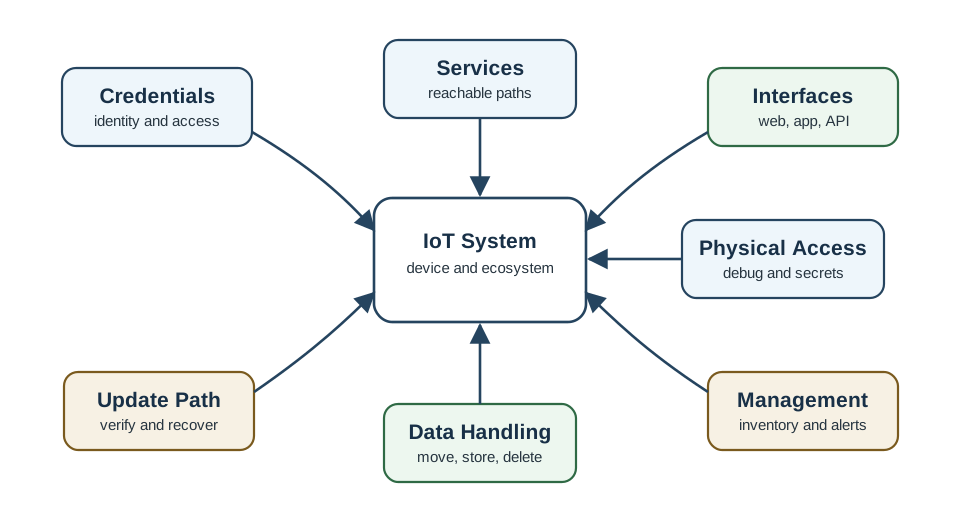
The sequence Credentials to verify and recover to debug and secrets is the substantive content of Figure 13.1. It makes clear how the Top 10 reaches beyond the device: credentials, services, ecosystem interfaces, updates, data handling, management, and physical access. With that mechanism visible, A Review Lens, Not a Checklist can serve as a reasoned input to the chapter’s continuing decision.
The One-Minute View
It is a risk-family lens
Ten recurring IoT weakness areas that reach from the device to cloud, mobile, update, and management surfaces.
It is not a full program
It does not replace threat modelling, architecture review, secure development, or operations evidence.
It is not a priority order
Work in risk order for the local system. Numeric order is not severity order, and one device may invert the list.
Beginner Examples
Taken together, these checks make the section reviewable. That order prevents a control name from being treated as proof and connects the visual to the chapter's evidence-led review sequence.
Overview Knowledge Check
If you can describe the list as a review lens rather than a checklist, you can stop here. Continue to Practitioner to map each family to evidence.
13.3 Map Each Risk Family to Evidence
This section: Map Each Risk Family to Evidence
A defensive review turns each risk family into a scoped, evidence-backed claim. Run the same loop for every family: scope the boundary, map the family, ask one evidence question that can be answered without overclaiming, collect allowed and denied behavior, decide, and assign an owner and retest trigger.
Walkthrough: The Review Loop
- Scope the device class, interface, data flow, update path, or process under review.
- Map the relevant OWASP IoT risk family to that boundary.
- Ask one evidence question that can be answered without overclaiming.
- Collect records for the allowed case, the denied case, and the operating state.
- Decide whether to accept, remediate, compensate, or record an exception.
- Assign an owner and define the retest trigger.
The next choice is defensible only if the reader can see that the review loop keeps the list active: scope, map a family, ask for evidence, collect records, decide, and assign owner and retest. Inspect Figure 13.2 before moving from Walkthrough: The Review Loop to the operational decision.
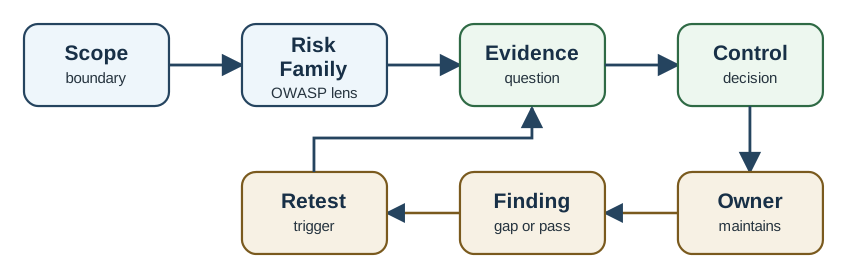
Three labels organize Figure 13.2: Risk, Owner, and trigger. Follow their roles rather than the page geometry. They jointly show the review loop keeps the list active: scope, map a family, ask for evidence, collect records, decide, and assign owner and retest, which turns Walkthrough: The Review Loop into a checkable requirement for the rest of the chapter.
The Ten Risk Families and Their Evidence
Each cell is a prompt, not a verdict. Write the evidence-backed claim instead of the family label: name the boundary, ask for concrete evidence, and record what is accepted or missing.
Worked Review: Gateway Update Path
A gateway receives firmware updates through an operator-managed service. The claim under review is: the reviewed gateway version accepts only authorized update packages and records the install state.
Evidence observed
The gateway rejected an unauthorized package, installed an authorized one, recorded the resulting version, and retained a recovery decision for failure handling (maps to I4 and I5).
Evidence gaps
The review does not cover cloud operator access, mobile app authorization, or physical debug access. The component inventory has no named owner for triage.
Conclusion
Accept only the narrow claim: one update-path expectation was reviewed with evidence. Retest on bootloader, update-service, package-format, signing-key, or recovery-path change.
Practitioner Knowledge Check
If you can map findings to families and scope each claim to evidence, you can stop here. Continue to Under the Hood for how families combine and what strong evidence looks like.
13.4 Using the List Without Misusing It
This section: Using the List Without Misusing It
At this depth the list stops being a slide and becomes a way to reason about how weaknesses combine, why order is local, and what counts as strong evidence for the highest-value families.
Families Combine Into Findings
Real findings rarely sit inside one family. Weak credentials (I1), an exposed service (I2), and missing update evidence (I4) often combine: a guessable secret reaches a service that should not be exposed, and there is no trustworthy way to ship a fix. A review that records each family separately, then notes how they chain, produces a more honest risk picture than ten isolated checkboxes.
Why Order Is Local
The numbering is a stable label, not a severity ranking for your system. A sensor with no personal data may treat privacy (I6) as low priority, while a camera handling video may treat it as the top risk. Rank by exposure, the sensitivity of the affected data or action, the privilege required to reach the path, and whether an independent control already limits the impact. Working strictly from I1 to I10 can spend effort on a low-risk family before a high-risk one.
What Strong Update Evidence Looks Like
The update family (I4) is a frequent overclaim because "update supported" sounds sufficient. A reviewable update claim needs four separable guarantees: authenticity (the package came from the release process, usually via a signature the device verifies with public material), integrity (the package was not altered, via a digest or the same signature), install state (the device can report which version is actually running), and recovery (a defined behavior when an install fails, such as rollback to a known-good image). Missing any one weakens the claim even if the others are present. In the gateway example, inspect the version record separately from the package rejection: one supports install state, while the other supports verification.
Data, Privacy, and Management Evidence
Data and privacy families (I6, I7) need evidence across the whole life of the data: collection rationale, movement, storage, access, retention, and deletion. Protecting transport while leaking data in logs or storage is a common partial control. Device management (I8) is the family that operations forgets: without inventory, health state, ownership, alert routing, and a retirement or wipe path, a fleet cannot be patched, monitored, or safely decommissioned, which quietly undermines every other family over time.
Physical Access Without Misuse Detail
The physical hardening family (I10) should be reviewed defensively, not as a teardown recipe. The reviewable questions are whether debug interfaces are disabled or protected for the shipped build, whether secrets are held in protected storage rather than readable memory, whether manufacturing-test access is removed, and whether the design documents its assumptions about who can touch the device. State the assumption and the control; do not publish step-by-step extraction procedures.
Common Mistakes
Under-the-Hood Knowledge Check
At this depth the OWASP IoT Top 10 is a disciplined prompt: ten recurring families, mapped to a boundary, ranked by local risk, supported by allowed and denied evidence, owned, and retested. The list reminds you what to inspect; your records prove what was inspected.
13.5 Summary
This section: Summary — Tie each OWASP IoT risk to a real flaw, owner, proof, and next test.
Tie each OWASP IoT risk to a real flaw, owner, proof, and next test.
The OWASP IoT Top 10 is most useful when each family is tied to a concrete device, network, application, identity, data, or update weakness, with evidence, ownership, and a retest trigger, rather than treated as a checklist worked in numeric order.
13.6 See Also
This section: See Also
Threat Modelling and Mitigation
Explain why a risk family matters for a particular boundary and how to choose a mitigation that fits.
Threats STRIDE Framework
Compare OWASP risk families with the threat categories used during modelling.
Security-by-Design Principles
Connect controls such as least privilege, secure defaults, and update integrity to design rationale.
Find help
3 reviewed answers.
Where should I start in a module?
Open the module page from the sidebar to see its chapters in order. Use the module map to return to a topic you need.
Modules and pathsReviewed
What can I try when a project does not work?
Check the symptom, then work through the diagnostic steps. Keep the error message and the smallest example that reproduces it.
When you are stuckReviewed
How do interactive examples work?
Use the interactive guide to check how examples and simulations work before changing your project.
Interactive examples guideReviewed