22 Secure Boot

More
Depth: Practitioner
Progress saves as you read. Mark sections complete as you go; your progress appears in the sidebar.
22.1 Start With the First Instruction After Reset
This section: Start With the First Instruction After Reset — Picture a sensor waking after a power cut.
Picture a sensor waking after a power cut. Before it joins the network, reads a key, or starts an application, one tiny trusted part of the device decides what code is allowed to run next. If an old image, a changed bootloader, or an unsigned recovery build is present, the device needs a clear answer before it hands over control.
Start simple: name the anchor, name the next image it checks, name the signature or digest it expects, and name the failure behavior. Then follow the baton from stage to stage. Secure boot becomes understandable when each handoff has a verifier, an approved image, a rollback rule, and evidence that an unverified stage did not run.
22.2 Overview: What Secure Boot Actually Proves
Secure boot is a startup integrity control. When the device powers on, a small trusted anchor checks the next piece of code before letting it run, and each verified stage checks the stage after it. The result is a narrow but valuable claim: the device started from a code state that the release process approved.
The important idea is the size of that claim. Secure boot decides what is allowed to start. It does not prove the approved firmware is free of bugs, that runtime credentials are safe, or that the network is trustworthy. Overclaiming secure boot is a common review mistake.
A reviewer should therefore ask for a bounded claim and the evidence behind it. Useful records name the immutable anchor, the images checked before execution, the signing authority, the rollback rule, and what the device does when verification fails.
If you only need the intuition, this layer is enough: secure boot is a chain of checks that begins at an unchangeable anchor and refuses to hand control to code it cannot verify. A failed check should stop or recover, never silently continue.
Think of a relay race where each runner must show a valid wristband before taking the baton. The first official is trusted and cannot be replaced. If any runner cannot prove a valid band, the baton is not passed. Secure boot is that rule applied to boot stages: the root of trust verifies the bootloader, the bootloader verifies the firmware, and an unverifiable stage stops the race.
Overview: What Secure Boot Actually Proves needs more than a verbal rule; it needs a visible account of how “The boot chain: each stage verifies the next, and a failed check routes to a controlled stop or recovery path” is explicit in the diagram. Figure 22.1 supplies that account before the chapter asks for a design choice.
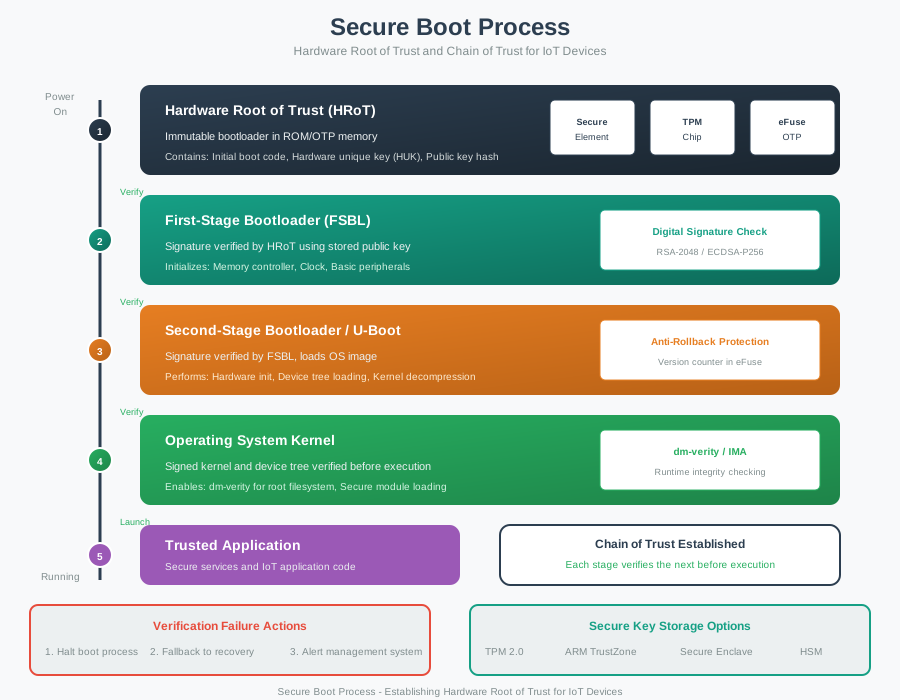
Use Power as the entry point to Figure 22.1; then compare it with Version counter in eFuse and the outcome at HSM. The labels expose the mechanism behind “The boot chain: each stage verifies the next, and a failed check routes to a controlled stop or recovery path” is explicit in the diagram. Read this result back into Overview: What Secure Boot Actually Proves as the condition the design must preserve.
Secure boot narrated tour
Narrated audio tour. The full transcript is below.
Play the tour to open the simulator. Pause, replay a beat, or read the full transcript below.
Some beats explain situations this teaching model cannot show; those beats keep the existing frame and provide captions only.
Full transcript — Secure boot (8 beats)
B1 — Gateway restart
You are the engineer responsible for an industrial gateway restarting after a power cut. An older firmware image could bring back a weakness that was already fixed. Before the gateway starts its application, what decides whether that code is allowed to run?
Model caption: You are responsible for the gateway's restart. An older image could restore a fixed weakness.
B2 — Root of trust
Secure boot checks code before handing control to it. The chain begins with a root of trust: the earliest part the device trusts without checking it. That starting point must be effectively unchangeable, because it checks the first changeable bootloader before allowing it to run.
Model caption: The effectively unchangeable root checks the first changeable bootloader before execution.
B3 — Verified handoffs
A bootloader is a startup stage that checks the next piece of code. Each verified stage checks its successor before handing over control. The release process signs an image with a private key, and the device checks that signature with the corresponding public key.
Model caption: Each verified stage checks its successor. The release process signs with a private key; the device verifies with the corresponding public key.
B4 — Clean boot
Follow the gateway model through a clean boot. Its image security version is five, and its stored minimum accepted version is also five. Five meets the minimum. With the other checks passing, boot is allowed and the application runs. Each handoff follows a successful check.
Model caption: Image version five meets minimum five. With every gate passing, boot is allowed and the application runs.
B5 — Old signed image
Now give your gateway the model's old signed image. The model adds negative two to the starting version of five, giving three. The stored minimum remains five. The signature is still valid, but version three is less than five, so the rollback check fails.
Model caption: Five plus negative two gives image version three. Three is less than minimum five: signature trusted, rollback rejected.
B6 — Halt before OS
The boot manager checks the operating system image before allowing it to run. With the halt response selected, the old image is rejected at that gate. Boot halts before the operating system starts, so control never reaches the application through the rejected image.
Model caption: The boot manager rejects the old operating system image. The halt policy prevents its execution and the following application handoff.
B7 — Signature versus version
The misconception is that a valid signature means the newest image. A signature establishes approval by the signing process; an older image can still carry one. The version rule rejects the signed version three because the gateway's minimum is five. Approval alone cannot settle that comparison.
Model caption: A valid signature does not mean newest. Signed version three is rejected by minimum five.
B8 — Trust decision
Secure boot passes control only after the next stage meets the device's trust rules, including its minimum accepted version.
Model caption: Secure boot passes control only after the next stage meets the device's trust rules, including its minimum accepted version.
22.2.1 The One-Minute View
It verifies a chain
An immutable anchor checks the first mutable code; each verified stage checks the next before passing control.
It is not runtime security
Approved code can still contain defects. Memory safety, access control, and monitoring are separate controls.
Failure must be defined
On a failed check the device should halt, enter a verified recovery image, or enter a verified restricted safe mode; it may also log and alert, but must not run the unverified stage.
22.2.2 Beginner Examples
- A device that refuses to run a tampered bootloader supports a startup-integrity claim, but it still needs patching for application bugs.
- A device that verifies the firmware signature but silently boots old firmware on failure has not implemented a controlled failure path.
- "Secure hardware is enabled" is not a claim. The reviewer still needs to know which anchor, which images, and what happens on failure.
22.2.3 Overview Knowledge Check
If you can state what secure boot does and does not prove, you can stop here. Continue to Practitioner to review a real boot chain and its evidence.
22.3 Practitioner: Review the Boot Chain and Its Evidence
A secure boot review should produce concrete evidence rather than a single “enabled” label. The strongest record names the trust anchor, the verified images, the signing policy, the rollback state, and the failure behavior, and it includes a deliberate failed-verification test.
22.3.1 Walkthrough: From Anchor to Accepted Code
- Name the root of trust. Identify the exact item trusted before any mutable code runs: boot ROM, a one-time-programmable key digest, or a secure element.
- List the verified images. State which bootloader, firmware, configuration block, and recovery image are checked before execution.
- Check signing and custody. Confirm the device verifies with public material and that the private signing key is held off-device.
- Check rollback state. Confirm how an older but still-signed image is rejected, and where the minimum accepted version is stored.
- Check failure behavior. Confirm that a failed check halts boot or enters verified recovery or a verified restricted safe mode; logging and alerting may accompany that containment.
- Record limits and retest triggers. Note what the evidence does not cover and which changes reopen the review.
A reliable account of Walkthrough: From Anchor to Accepted Code must show both responsibility and outcome. Figure 22.2 links those ideas through the claim that the evidence record connects the trust anchor, signing custody, image verification, rollback state, failure behavior, and retest triggers.
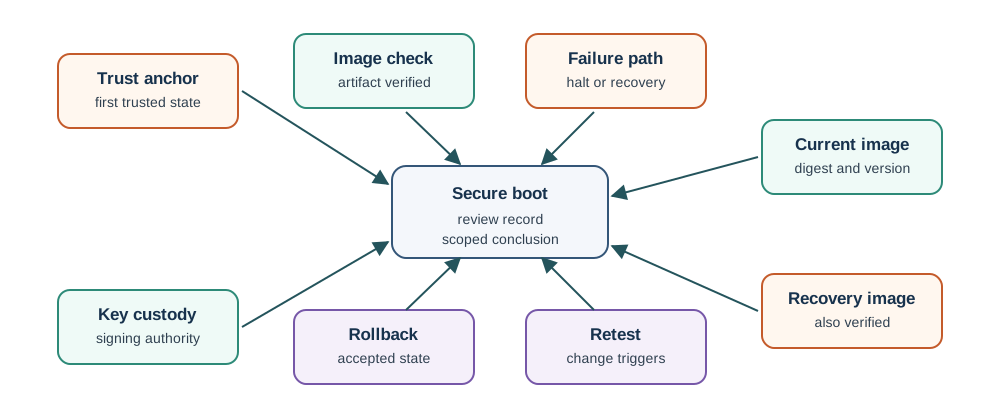
Read Figure 22.2 as a technical claim anchored by scoped conclusion, accepted state, and also verified. The labels expose distinct stages or roles that together show the evidence record connects the trust anchor, signing custody, image verification, rollback state, failure behavior, and retest triggers. This interpretation keeps Walkthrough: From Anchor to Accepted Code connected to the system behavior being designed.
22.3.2 The Secure Boot Evidence Record
22.3.3 Worked Review Record
A gateway receives signed firmware and has a documented secure boot feature. The claim under review is: the gateway only starts firmware approved by the release process.
Evidence observed
A root of trust and first bootloader check are recorded; the application image is signed; the device stores public verification material; failed application verification enters a verified recovery image.
Evidence gaps
No record shows how older signed images are rejected; signing logs do not identify the release request; retest triggers for signing-key and bootloader changes are undefined.
Conclusion
Accept only the partial claim: verified bootloader and firmware handoff with controlled failure. The rollback and custody claims stay open until the missing records are supplied.
22.3.4 Practitioner Knowledge Check
If you can review a boot chain and scope the claim to the evidence, you can stop here. Continue to Under the Hood for the verification mechanisms and failure modes.
22.4 Under the Hood: Mechanisms, Keys, and Failure Modes
The deeper layer explains how each boot-chain check works and why each is a separate guarantee. The chain is only as trustworthy as its anchor, its keys, and its failure path.
22.4.1 Root of Trust and Chain of Trust
The root of trust is the earliest element the device treats as trusted without checking it, so it must be effectively immutable. In practice this is boot ROM, a public-key hash burned into one-time-programmable (OTP) fuses, or a secure element. The root verifies the first mutable bootloader before executing it, and verification then propagates stage by stage: bootloader verifies firmware, firmware verifies the next image, and so on. This propagation is the chain of trust. A single unverified link breaks the chain even if every later stage is signed.
22.4.2 Signature Verification
Most designs use asymmetric signing. The release process signs an artifact with a private key; the device verifies the signature using the corresponding public key. Because public material cannot create valid signatures, it is safe to store on the device, often as a key or a hash of the public key in OTP. Two facts follow:
- The private signing key must stay off-device, in a hardware security module or controlled signing service. A private key on the device would let an attacker who extracts it sign images that pass the check.
- A valid signature proves only that the signing process approved the artifact. It does not prove the artifact is defect-free or that the signing key was used appropriately, which is why signing logs and key custody are part of the evidence.
Public material also needs an origin story: how does a reviewer know a given public key genuinely belongs to the claimed signing authority? Two patterns cover most designs. Direct trust-anchor provisioning anchors trust directly: the public key or its hash is provisioned into the device, often in OTP, at manufacture time, with no further chain to check, which is the same anchor already described as the root of trust. Hierarchical certification instead has a certificate authority vouch for the signing key: the CA verifies the key holder’s identity, then signs a certificate binding that identity to the public key, and the device verifies the certificate chain back to a trusted root before trusting the artifact’s own signature. A review should name which pattern is in use, because a hierarchical chain only adds value if every link, including the CA’s own key, is itself verified back to an anchor the device already trusts; an unverified intermediate certificate is an unverified signature wearing a badge.
22.4.3 Verified Boot Versus Measured Boot
Two related mechanisms are easy to confuse:
- Verified boot enforces a policy: if a stage fails verification, the device halts or enters recovery rather than running the stage.
- Measured boot records a measurement (for example, a hash of each stage into a protected register such as a TPM PCR) so a later attestation step can judge the state. Measurement alone does not stop unverified code; it produces evidence for a separate decision.
A design may use one or both. The review should state which guarantee is actually present, because measurement without enforcement does not block startup by itself.
22.4.4 Anti-Rollback
Rollback protection stops a device from accepting an older image that is still correctly signed but no longer acceptable, for example because it reintroduces a fixed weakness. The usual mechanism is a monotonic security version: the device stores a minimum accepted version (often in OTP or protected non-volatile memory) and rejects any image whose version is below it. Keep two cases distinct:
- Recovery revert returns to the last known-good image because a candidate failed its checks. This is allowed when that image still meets the device's minimum accepted security version.
- Downgrade attack installs an older signed image to reopen a known weakness. This is what anti-rollback must block.
22.4.5 Recovery, Keys, and Failure
A recovery image is a frequent blind spot: if it is not verified by the same trust rule, it becomes an unreviewed bypass. Signing keys also need a lifecycle, since the signing key is often the most valuable operational asset in the design.
22.4.6 Common Pitfalls
- Treating secure boot as runtime security. It controls startup state, not memory safety, authentication, or monitoring.
- Signing without custody. A signature is only as strong as the control over the signing key and its audit trail.
- Forgetting the recovery path. An unverified recovery or maintenance image can bypass the whole chain.
- Ignoring rollback. Older firmware can still carry a valid signature, so anti-rollback needs its own state and test.
22.4.7 Under-the-Hood Knowledge Check
At this depth, secure boot is a chain of independent guarantees: an immutable anchor, staged verification, off-device signing custody, anti-rollback state, a verified recovery path, and a defined failure behavior. A trustworthy review records each link instead of accepting a single “secure boot enabled” label.
22.5 Summary
This section: Summary
- Secure boot is a startup-integrity control: an immutable anchor verifies each boot stage before it runs.
- It proves which code state is allowed to start, not that the approved firmware is defect-free.
- Asymmetric signing lets the device verify with public material while the private key stays off-device.
- Verified boot enforces on failure; measured boot only records measurements for later attestation.
- Anti-rollback rejects signed images below the minimum accepted security version; recovery may use a known-good image only if it still meets that minimum.
- A complete review records the anchor, verified images, signing custody, rollback state, recovery handling, failure behavior, and retest triggers.
Secure boot protects device trust only when the root of trust, signing-key custody, verification stages, rollback rules, recovery handling, and failure behavior are all managed and evidenced, not when a single “enabled” flag is set.
22.6 See Also
This section: See Also
See how signed updates deliver the firmware that secure boot later verifies at startup.
Review the physical-access assumptions behind the root of trust and key storage.
Cyber Security Defense in Depth
Place boot integrity alongside the other independent controls in a layered design.
Find help
3 reviewed answers.
Where should I start in a module?
Open the module page from the sidebar to see its chapters in order. Use the module map to return to a topic you need.
Modules and pathsReviewed
What can I try when a project does not work?
Check the symptom, then work through the diagnostic steps. Keep the error message and the smallest example that reproduces it.
When you are stuckReviewed
How do interactive examples work?
Use the interactive guide to check how examples and simulations work before changing your project.
Interactive examples guideReviewed