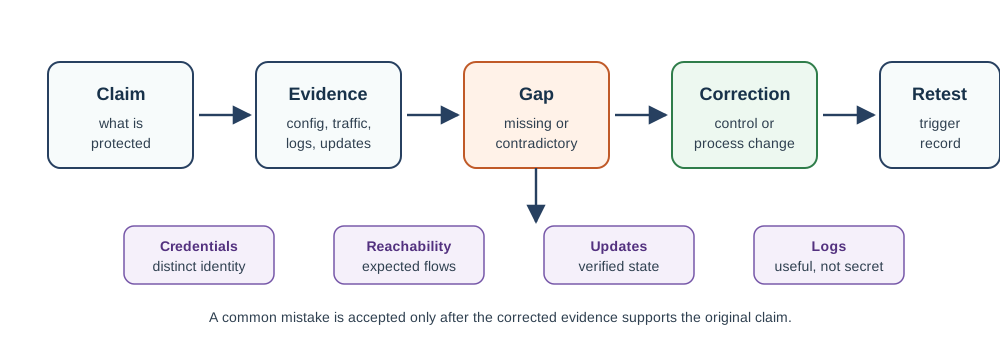
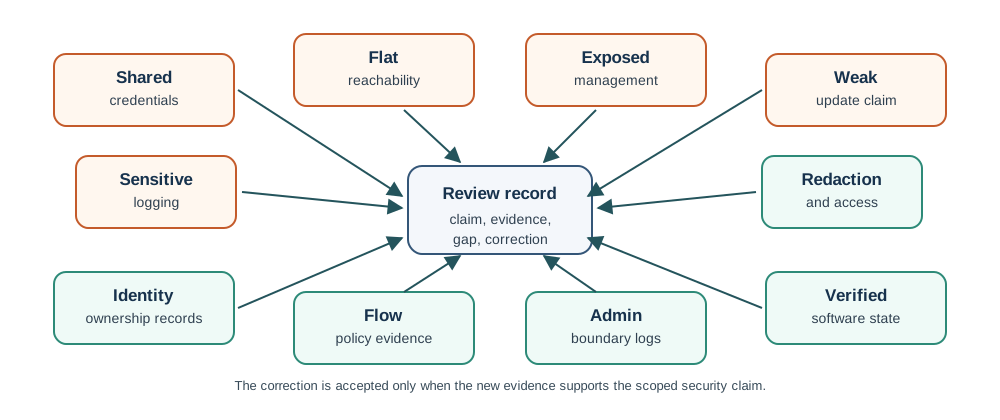
This chapter covers the most frequent security mistakes in IoT deployments, real-world attack case studies, and practical guidance for avoiding these pitfalls.
28.2 Learning Objectives
By the end of this chapter, you will be able to:
Classify the top security mistakes in IoT deployments by severity and attack surface
Analyze real-world attack scenarios to trace root causes and quantify consequences
Apply best practices to eliminate common security pitfalls in device provisioning and operation
Calculate the cost-benefit ratio of security investments using annualized loss expectancy
Design deployment security checklists that enforce baseline hygiene across IoT device fleets
Key Concepts
Default credentials: Factory-preset usernames and passwords (admin/admin, root/root) that are identical across all devices of a model and publicly documented, providing trivial access to attackers who find them on the internet.
Hardcoded credentials: Authentication keys, passwords, or API tokens embedded directly in device firmware source code, making them impossible to change without a firmware update and easily extractable through firmware analysis.
Cleartext communication: Transmitting sensor data, commands, or credentials over unencrypted protocols (HTTP, plain MQTT, Telnet) allowing anyone on the network path to read or modify the data.
Lack of secure update mechanism: Deploying IoT devices without any ability to receive firmware updates, making it impossible to patch security vulnerabilities discovered after deployment.
Physical attack surface: Accessible hardware debug interfaces (JTAG, UART), removable storage, and physically tamperable components that allow an attacker with physical access to extract credentials or modify firmware.
Insufficient input validation: Failing to validate data received from external sources (network, sensors, management APIs) allowing buffer overflows, command injection, and other input-based attacks against device firmware.
In 60 Seconds
The most damaging IoT security breaches are caused not by sophisticated attacks but by common, preventable mistakes: default credentials left unchanged, unencrypted communications, no firmware update mechanism, and devices exposed directly to the internet. Understanding and systematically eliminating these common mistakes delivers 80% of the security benefit with 20% of the effort.
For Beginners: Common IoT Security Mistakes
IoT security mistakes are the common errors that leave connected devices and their data vulnerable to attack. Think of your IoT system as a house – if you leave windows open or use a lock that every burglar has a key for, no alarm system will save you. This chapter shows you the most common mistakes so you can avoid them and keep your IoT deployments safe.
28.3 Most Valuable Understanding (MVU)
MVU: IoT Security Failures Are Rarely Technical - They’re Operational
Core Concept: The vast majority of IoT breaches don’t happen because attackers break strong encryption or find zero-day exploits. They happen because of preventable operational mistakes: default passwords left unchanged, missing firmware updates, flat networks without segmentation, and trusting vendor “security” claims without verification.
Why It Matters: The Mirai botnet compromised 600,000+ devices using just 61 default password combinations. Target’s $162 million breach started with HVAC vendor credentials. These weren’t sophisticated attacks - they exploited basic security hygiene failures that cost nothing to prevent.
Key Takeaway: Before investing in advanced security technologies, master the basics: unique passwords, network segmentation, regular updates, and verify-don’t-trust. A $0 password change provides more ROI than a $100,000 intrusion detection system if the IDS sits on a network full of devices with “admin/admin” credentials.
Sensor Squad: The Day the Smart Cameras Went Rogue!
Hey friends! The Sensor Squad has an exciting (and a little scary) story about why following security rules is super important!
28.3.1 The Story: Attack of the Zombie Devices
One day, Sammy the Sensor was watching the news with the other Sensor Squad members. “Breaking news! Thousands of websites are down, and nobody knows why!”
Max the Microcontroller scratched his head. “How can so many websites go down at once?”
Lila the Light Sensor had been researching. “I found out! It was the Mirai botnet attack. Bad guys turned millions of smart cameras and routers into zombie devices!”
“Zombie devices?!” Bella the Battery looked worried.
Sammy explained: “Here’s what happened. Imagine millions of IoT devices - like security cameras, DVRs, and home routers - are all sleeping peacefully. But they all have a BIG problem: they still have their factory passwords like ‘admin’ and ‘12345’.”
28.3.2 How the Attack Worked (Kid’s Version)
Step 1 - The Bad Guys Search: They used computers to knock on the doors of millions of devices on the internet.
Step 2 - The Password Test: At each door, they tried common passwords: “admin”, “12345”, “password”. (The bad guys only needed to know 61 different passwords to break into over 600,000 devices!)
Step 3 - Taking Control: When a password worked, they snuck in and put their own program on the device. The device still worked normally… but now the bad guys could control it!
Step 4 - Building an Army: Soon they had an army of zombie devices - devices that look normal but secretly follow the bad guys’ orders.
Step 5 - ATTACK!: One day, the bad guys told ALL their zombie devices to visit the same websites at once. Imagine a million people trying to fit through one door - the websites crashed!
28.3.3 The Sensor Squad’s Security Rules
Bella the Battery created a poster: “THE THREE NEVERS!”
NEVER use the factory password - Change it to something only you know!
NEVER put IoT devices on your main network - Give them their own special network (like a playroom for toys)
NEVER skip updates - Updates fix security holes!
Max the Microcontroller added: “Think of it this way: - Your password is like your house key - you wouldn’t use a key that everyone else has! - Network segmentation is like having a fence between the playground and the street - Updates are like getting a flu shot - they protect you from new threats!”
28.3.4 Key Words for Kids
Word
What It Means
Default Password
The password a device comes with from the factory - everyone knows it!
Botnet
A group of hacked devices that a bad guy controls
Zombie Device
A device that looks normal but secretly follows a hacker’s orders
Network Segmentation
Keeping IoT devices on their own separate network
Firmware Update
New software that fixes problems and keeps your device safe
28.3.5 Try This at Home!
Play “Password Inspector”:
With a grown-up, look at your home’s smart devices (router, cameras, smart speakers)
Ask: “Is this still using the password from the box?”
If yes, help change it to something unique!
Bonus: Create a password hint book (not the actual passwords!) so you remember them
You just helped protect your home from becoming part of a botnet!
28.4 In Plain English: Understanding IoT Security
Every Connected Device is a Door Into Your Network
Think of your network as a house with many rooms:
Your laptop and phone are like the front door with a deadbolt, security camera, and alarm system
Your IoT devices (smart lights, thermostats, cameras, sensors) are like side doors, back doors, windows, and pet doors
The problem: Most IoT devices are like leaving a window unlocked with a sign that says “Come on in!”
Why IoT devices are security weak points:
The Issue
Why It Matters
Real-World Example
Default Passwords
80%+ of IoT devices ship with passwords like “admin/admin” or “12345”
The Mirai botnet used just 61 default password combinations to compromise 600,000+ devices
No Updates
Your laptop gets security updates weekly. Your smart lightbulb? Maybe once ever.
Security cameras from 2015 still running vulnerable software with known exploits
Always Listening
IoT devices are online 24/7, giving attackers unlimited time to probe for weaknesses
Smart TVs found contacting hundreds of tracking domains, transmitting viewing habits without user knowledge
Resource Constrained
Not enough CPU/memory to run strong encryption or security monitoring
Smart sensors can’t afford the battery drain of advanced security features
Physical Access
Many IoT devices sit in public spaces where attackers can physically tamper with them
Smart parking meters hacked via accessible USB ports; sensors on utility poles accessed with a ladder
The domino effect:
Attacker compromises one smart camera with default password
Camera is on the same network as your computer
Attacker uses camera as a stepping stone to scan for other devices
Finds and accesses your file server, databases, or personal devices
Result: One $30 IoT device led to breach of entire network
The golden rule of IoT security: > “A network is only as secure as its weakest connected device. In IoT, you might have hundreds of weak devices.”
Interactive: Mirai Botnet Attack Chain
28.5 Real-World Attack: The Mirai Botnet (2016)
The IoT Attack That Broke the Internet
What Happened:
On October 21, 2016, major websites including Twitter, Netflix, Reddit, CNN, and The New York Times went offline for millions of users across the United States and Europe. The culprit? Hundreds of thousands of hacked IoT devices launching the largest distributed denial-of-service (DDoS) attack in history at that time.
The Attack Timeline:
Date
Event
Impact
August 2016
Mirai malware first released
Begins scanning the internet for vulnerable IoT devices
September 20
Attack on KrebsOnSecurity.com
620 Gbps attack (largest ever at the time) using 380,000 IoT devices
October 21
Attack on Dyn DNS provider
1.2 Terabits/second - took down major websites across multiple attack waves over several hours
November 2016
Mirai source code published
Anyone can now create IoT botnets; copycat attacks surge
How It Worked:
The Vulnerable Devices:
IP cameras (especially from Chinese manufacturers XiongMai Technologies)
Digital video recorders (DVRs) for security camera systems
Home routers with default credentials
Smart TVs and set-top boxes
Network-connected printers
Why It Succeeded:
Default Passwords: Users never changed “admin/admin” factory settings
No Security Updates: Manufacturers abandoned devices after sale
High Bandwidth: Many IoT devices have fast internet connections
Scale: Billions of IoT devices = massive potential botnet army
The Aftermath:
Economic Impact: $110 million in damages
Legal Response: Two college students who created Mirai were arrested and sentenced
Regulatory Changes: Led to California IoT security law (SB-327) requiring unique passwords
Industry Wake-Up: IoT manufacturers began taking security seriously
Key Lesson: > A $20 webcam with a default password became part of a weapon that took down billion-dollar companies. IoT security isn’t optional—it’s critical infrastructure protection.
What Could Have Prevented It:
Mandatory password changes on first setup (no default credentials)
Automatic security updates pushed by manufacturers
Network segmentation (IoT devices isolated from internet-facing services)
Rate limiting on IoT devices (prevent participation in DDoS attacks)
Manufacturer accountability for security throughout device lifetime
28.6 7 Security Pitfalls That Lead to Breaches
28.6.1 1. Using Default Credentials
The Mistake: > “We’ll change the passwords later during the production phase.”
Why It’s Dangerous:
Internet scanners find and compromise devices in hours, not days
80% of IoT breaches involve default or weak credentials
Mirai botnet used just 61 default password combinations to compromise 600,000 devices
Real Example: A hospital deployed 500 Wi-Fi-enabled infusion pumps – devices that deliver medication to patients – with default passwords. Attackers gained access and could have modified drug dosages remotely.
How to Avoid:
Mandate unique passwords on first boot (no defaults)
Use password managers for IoT device credentials
Implement certificate-based authentication (no passwords at all)
Enforce password complexity: min 16 characters, random
Change passwords immediately if device is returned/resold
Knowledge Check: Default Credentials
Question: The Mirai botnet compromised over 600,000 IoT devices. How many default password combinations did the attackers need to achieve this?
Over 10,000 different passwords
Just 61 password combinations
Only 5 master passwords
They used zero-day exploits, not passwords
Answer
B) Just 61 password combinations
The Mirai botnet used only 61 hardcoded username/password combinations to compromise hundreds of thousands of devices. This demonstrates how predictable and common default credentials are across IoT manufacturers. The most common were variations of admin/admin, root/root, and default/default.
28.6.2 2. Deploying Without Network Segmentation
The Mistake: > “All devices on the same network makes management easier.”
Why It’s Dangerous:
One compromised IoT device can access all devices on the network
Allows attackers to pivot from low-value sensors to high-value databases
Violates the principle of least privilege
Real Example: Target’s 2013 breach began with HVAC vendor credentials. Attackers moved from HVAC systems to point-of-sale terminals, stealing 40 million credit cards.
How to Avoid:
Implement VLANs to isolate IoT devices from critical business systems
Use firewall rules with default-deny policies between segments
Apply the principle of least privilege for cross-segment communication
Monitor traffic between segments for anomalous patterns
Knowledge Check: Network Segmentation
Question: In the Target breach, attackers compromised HVAC vendor credentials to eventually steal 40 million credit cards. What security control would have MOST effectively prevented this lateral movement?
Stronger encryption on the HVAC system
Two-factor authentication for employees
Network segmentation with firewall rules between IoT and POS systems
More frequent password rotation
Answer
C) Network segmentation with firewall rules between IoT and POS systems
Network segmentation would have prevented attackers from moving laterally from the HVAC system to the payment processing network. Even after compromising the HVAC credentials, attackers would have been blocked by firewall rules that restrict cross-segment communication. The other options address different attack vectors but don’t address the core problem of a flat network architecture.
28.6.3 3. Skipping Encryption for “Internal” Networks
The Mistake: > “Our IoT devices are on a private Wi-Fi network, we don’t need encryption.”
Why It’s Dangerous:
Wi-Fi can be intercepted from outside building (parking lot, adjacent buildings)
Real Example: Smart building sensors sent temperature data unencrypted over Wi-Fi. Attacker in parking lot captured traffic, reverse-engineered protocol, injected false temperature readings causing HVAC system to malfunction.
How to Avoid:
Enable TLS 1.3 for ALL communications, even on “private” networks
Use mutual TLS (mTLS) for device-to-device communication
Encrypt data at rest on IoT devices, not just in transit
Assume internal networks are compromised (zero-trust model)
28.6.4 4. Neglecting Firmware Updates
The Mistake: > “The devices are working fine, we’ll update them when there’s a problem.”
Why It’s Dangerous:
60% of IoT devices never receive a single firmware update after deployment
Known vulnerabilities are publicly listed (CVE database)
Automated exploits scan for vulnerable firmware versions
Real Example: The Verkada security camera breach (2021): Attackers exploited known vulnerability in outdated firmware to access 150,000 security cameras in hospitals, police stations, prisons, and Tesla factories.
How to Avoid:
Implement automated OTA (Over-The-Air) update mechanisms
Verify firmware signatures using asymmetric cryptography (ECDSA)
Monitor CVE databases for vulnerabilities affecting deployed devices
Test updates on staging devices before production rollout
Knowledge Check: Firmware Security
Question: A company deploys 1,000 security cameras that haven’t received firmware updates in 18 months. A CVE was published 6 months ago affecting these cameras. What is the PRIMARY risk?
The cameras consume more power due to inefficient older firmware
Attackers can use automated tools to exploit the known vulnerability
The camera image quality has degraded over time
The manufacturer warranty has expired
Answer
B) Attackers can use automated tools to exploit the known vulnerability
Published CVEs are catalogued with detailed exploitation information. Automated scanning tools (like Shodan and Censys) continuously search the internet for devices running vulnerable firmware versions. Once a CVE is published, the window for attackers to exploit unpatched devices opens wide, and automated attack tools make mass exploitation trivial.
28.6.5 5. Ignoring Physical Security
The Mistake: > “Our sensors are just on the factory floor / light poles / outdoors. Nobody cares about them.”
Why It’s Dangerous:
Physical access = total compromise (extract keys, flash malicious firmware)
Attackers can access JTAG/UART debug ports
Sensors in public spaces can be stolen, modified, and returned
Real Example: Parking meter sensors on city streets were physically accessed via USB ports. Attackers installed keyloggers and stole credit card data from 5,000 transactions.
How to Avoid:
Disable debug interfaces (JTAG, UART, SWD) in production firmware
Use tamper-evident enclosures with accelerometer-based detection
Implement secure boot to prevent unauthorized firmware modifications
Store encryption keys in hardware security modules (HSM/TPM)
Use security screws and physical locks for outdoor deployments
28.6.6 6. Logging Sensitive Data in Plaintext
The Mistake: > “We’ll log everything for debugging. We can secure it later.”
Why It’s Dangerous:
Log files often contain passwords, API keys, session tokens
Logs are rarely encrypted or access-controlled
Log data is frequently targeted during breaches as a source of credentials
Real Example: Smart home hub logged Wi-Fi passwords in plaintext. Attacker gained access to hub via default password, extracted log files, obtained Wi-Fi credentials, accessed homeowner’s network.
How to Avoid:
Never log sensitive data (passwords, tokens, keys, PII)
Implement log scrubbing to automatically redact sensitive patterns
Encrypt log files at rest and in transit
Set strict retention policies (delete logs after N days)
Use structured logging with explicit field definitions
28.6.7 7. Trusting “Secure” Products Without Verification
The Mistake: > “The vendor says it’s secure and meets industry standards. That’s good enough.”
Why It’s Dangerous:
“Military-grade encryption” is marketing, not verification
Many IoT devices claim compliance without actual certification
Vendors abandon products after acquisition/bankruptcy
Real Example: “Secure” smart locks marketed as “unhackable” were opened in seconds using Bluetooth vulnerabilities. Vendor never performed third-party security audit despite security claims.
How to Avoid:
Require third-party penetration testing before deployment
Verify security certifications (look for ISO 27001, SOC 2, FIPS 140-2)
Review vendor’s vulnerability disclosure policy and patch history
Test security claims yourself (or hire professionals to do so)
Include security requirements in vendor contracts with SLAs
Knowledge Check: Security Verification
Question: A vendor claims their IoT device uses “military-grade encryption” and is “unhackable.” What should you do FIRST before deploying these devices?
Trust the vendor since they specialize in security products
Check if the device has a well-known brand name
Request third-party penetration test results and security certifications
Read online reviews from other customers
Answer
C) Request third-party penetration test results and security certifications
Marketing terms like “military-grade” and “unhackable” are not verifiable security claims. Legitimate security products undergo independent third-party testing and hold recognized certifications (ISO 27001, SOC 2, FIPS 140-2, Common Criteria). Always verify claims with documentation rather than trusting marketing materials.
28.7 IoT Security Architecture Overview
The following diagram shows the layered security architecture that addresses the pitfalls described above. Each tier – cloud, network, and device – must be independently secured to prevent the cascading failures that result from any single mistake:
28.8 The Cost of Mistakes
Mistake
5-Minute Fix Cost
Breach Cost
ROI of Fixing
Default passwords
$0 (config change)
$2M average
Infinite
No network segmentation
$15K (VLANs)
$5M average
333x
No encryption
$0 (enable TLS)
$3M average
Infinite
No firmware updates
$10K/year
$4M average
400x
No physical security
$2/device
$500K average
250,000x
Insecure logging
$0 (code change)
$1M average
Infinite
No security verification
$20K (audit)
$6M average
300x
The Pattern: > Most IoT security mistakes are free or cheap to fix but catastrophically expensive when exploited.
28.9 IoT Device Security Checklist
Device & Network Security Deployment Checklist
Hardware Security:
Access Control:
Network Security:
Physical Security (for deployed devices):
28.10 Defense-in-Depth Strategy
The following diagram illustrates how multiple security layers work together to protect IoT deployments:
Knowledge Check: Defense-in-Depth
Question: Your organization discovers that an IoT device was compromised via a default password. Which security principle was violated?
Defense-in-depth (no other layers detected the breach)
Least privilege (the attacker gained admin access)
Both A and B
Neither - this was an unavoidable zero-day attack
Answer
C) Both A and B
The default password issue violates the principle of least privilege (admin access shouldn’t be granted with factory defaults). Additionally, if no other security layer (network monitoring, intrusion detection, anomaly alerts) detected or prevented the breach, it indicates a failure of defense-in-depth. True defense-in-depth means even if one layer fails (credentials), other layers should provide detection or mitigation.
28.11 Worked Example: Security Investment ROI for a Smart Retail Chain
Scenario: A retail chain operates 200 stores, each with 45 IoT devices: 20 smart shelf sensors, 10 customer counting cameras, 8 HVAC controllers, 5 point-of-sale terminals, and 2 gateway/edge servers. All 9,000 devices share a flat corporate network. The CISO must justify security spending to the board. Calculate the cost of doing nothing vs. implementing basic security hygiene.
Step 1: Current Vulnerability Assessment (Doing Nothing)
Default credentials audit:
Smart shelf sensors: 20 x 200 = 4,000 devices
Factory password: "sensor123" (same across fleet)
Shodan-discoverable: Yes (HTTP management on port 80)
Time to compromise: 3.2 seconds (automated scanner)
Customer cameras: 10 x 200 = 2,000 devices
Factory password: "admin/admin"
Shodan-discoverable: Yes (RTSP on port 554)
Time to compromise: 0.8 seconds (Mirai-class scanner)
HVAC controllers: 8 x 200 = 1,600 devices
Factory password: Varies by vendor (5 vendors, 5 passwords)
Network-accessible: Yes (BACnet on port 47808)
Total devices with default credentials: 7,600 of 9,000 (84%)
Estimated time to full fleet compromise: 48 hours
Scenario A: Botnet recruitment (like Mirai)
Probability: 60% per year (based on industry data)
Impact: Network degradation, ISP complaints, reputation
Cost: $25,000 per incident (cleanup + ISP penalties)
Expected loss: 0.6 x $25,000 = $15,000/year
Scenario B: Ransomware via IoT pivot
Probability: 15% per year
Impact: POS systems encrypted, stores offline
Avg downtime: 3 days x 200 stores x $8,000/day lost revenue
Recovery: $150,000 (incident response + decryption)
Expected loss: 0.15 x ($4,800,000 + $150,000) = $742,500/year
Scenario C: POS data breach (credit card theft)
Probability: 5% per year
Impact: PCI-DSS fines + customer notification + lawsuits
Avg breach cost: $3.86M (IBM 2022 Cost of a Data Breach Report, retail sector)
Expected loss: 0.05 x $3,860,000 = $193,000/year
Total Expected Annual Loss (EAL): $950,500/year
Step 3: Security Remediation Costs
Fix
Cost/Device
Fleet Cost
Risk Reduced
Unique credentials (password rotation tool)
$0.50
$4,500
Eliminates Scenario A (-$15,000)
Network segmentation (4 VLANs per store)
$200/store
$40,000
Reduces Scenario B by 80% (-$594,000)
Firmware update automation
$2.00
$18,000
Reduces all scenarios by 30% (-$102,450)
POS isolation (dedicated VLAN + firewall)
$500/store
$100,000
Reduces Scenario C by 90% (-$173,700)
Total investment
$162,500
-$885,150/year
Step 4: ROI Calculation
Annual security investment: $162,500 (Year 1) + $35,000/year (maintenance)
Annual risk reduction: $885,150
Year 1 ROI: ($885,150 - $162,500) / $162,500 = 444%
Payback period: 67 days
Residual risk after remediation:
Original EAL: $950,500/year
Reduced EAL: $65,350/year (93% reduction)
Remaining risk: mostly from zero-day attacks and insider threats
Result: A $162,500 one-time investment in basic security hygiene (unique passwords, network segmentation, automated updates, POS isolation) reduces expected annual losses from $950,500 to $65,350 – a 93% risk reduction with 444% ROI in the first year. The single highest-impact change is network segmentation ($40,000) which alone prevents 63% of the expected losses.
Putting Numbers to It
Compound Security Control Effectiveness
Each security control reduces independent attack vectors with multiplicative (not additive) risk reduction. For the retail chain scenario, calculate combined effectiveness:
Attack Success Probability with Independent Controls: \[P_{success} = \prod_{i=1}^{4} p_i\]
This represents a \(1 - 0.0009 = 99.91\%\) risk reduction through layered defenses. Each additional control provides diminishing marginal returns but compounds overall protection. With only 2 controls (credentials + segmentation): \(P = 0.20 \times 0.15 = 0.03\) (3%). With 3 controls: \(P = 0.03 \times 0.30 = 0.009\) (0.9%). With all 4: \(P = 0.009 \times 0.10 = 0.0009\) (0.09%). The 4th control (POS isolation) costs $100K but reduces final breach probability by 90% (from 0.9% to 0.09%), demonstrating high-value marginal contribution despite high cost.
Key lesson: The board presentation writes itself: “We can spend $162,500 now or expect $950,500 in annual losses. The most expensive security control (POS isolation at $100,000) costs 2.6% of a single POS breach ($3.86M). The cheapest control (unique credentials at $4,500) eliminates the most common attack vector entirely.”
28.11.1 Try It: Security Investment ROI Calculator
Adjust the parameters below to explore how security investments affect expected annual losses and ROI for your own deployment scenario.
Show code
viewof roi_stores = Inputs.range([10,1000], {value:200,step:10,label:"Number of stores"})viewof roi_devices = Inputs.range([10,200], {value:45,step:5,label:"IoT devices per store"})viewof roi_default_pct = Inputs.range([0,100], {value:84,step:1,label:"Devices with defaults (%)"})viewof roi_botnet_prob = Inputs.range([0,100], {value:60,step:5,label:"Botnet probability (%/year)"})viewof roi_ransomware_prob = Inputs.range([0,100], {value:15,step:1,label:"Ransomware probability (%/year)"})viewof roi_breach_prob = Inputs.range([0,100], {value:5,step:1,label:"Data breach probability (%/year)"})
28.12 Remediation Priority Matrix: What to Fix First
When inheriting an insecure IoT deployment (common in acquisitions, legacy systems, and under-resourced teams), this priority matrix guides the order of fixes based on risk reduction per hour of effort:
Priority
Fix
Effort
Risk Reduction
Ratio (Risk/$)
1
Change all default credentials
4-8 hours (scripted)
Eliminates 80% of automated attacks
Highest
2
Disable unused services (Telnet, FTP, HTTP admin)
2-4 hours per device type
Closes known exploit vectors
Very high
3
Enable TLS on all communications
1-2 days (config + cert deployment)
Eliminates eavesdropping and MITM
Very high
4
Network segmentation (VLANs)
1-2 weeks (planning + implementation)
Contains blast radius of any breach
High
5
Firmware update pipeline
2-4 weeks (infrastructure)
Enables patching all future CVEs
High
6
Physical security audit
1 week
Prevents local attacks on exposed devices
Medium
7
Third-party security audit
4-6 weeks (external engagement)
Identifies unknown vulnerabilities
Medium
The 80/20 rule for IoT security: Fixes #1 through #3 (unique credentials, disable unused services, enable TLS) can be completed in under one week and eliminate approximately 85% of the attack surface for automated, opportunistic attacks. These three fixes cost essentially nothing (configuration changes only) yet address the three most exploited vulnerabilities in IoT breaches.
After the Mirai botnet compromised devices, XiongMai Technologies (one of the largest affected manufacturers) published their remediation timeline:
Week
Action
Cost
Devices Fixed
Week 1-2
Recalled 4.3 million webcams
$5.3M (shipping + replacement)
0 (recall announced)
Week 3-4
Pushed firmware disabling Telnet
$0 (OTA update)
1.2M (devices with OTA capability)
Week 5-8
Published manual firmware update for devices without OTA
$200K (support infrastructure)
400K (tech-savvy owners)
Month 3-6
Mailed USB drives with firmware to registered owners
$1.8M
800K
Never
Remaining 1.9M devices (no OTA, owners unknown)
Permanently compromised
0
Lesson: 44% of affected devices were never patched because they lacked OTA update capability and their owners couldn’t be reached. The $0 decision to include OTA capability during product design would have saved $7.3M+ in recall costs and prevented permanent compromise of 1.9 million devices.
How Security Mistakes Compound
These seven mistakes do not exist in isolation – they interact and amplify each other. Default credentials (Mistake #1) on a flat network (Mistake #2) with no monitoring (Mistake #7) creates the conditions for a catastrophic breach. Each unfixed mistake removes a layer of defense-in-depth, making the remaining layers less effective. The key insight: fixing mistakes #1 through #3 (credentials, segmentation, encryption) costs $0-15K but prevents approximately 85% of automated attacks.
28.13 Mathematical Foundation: Default Credential Exploitation Probability
Compound Probability of Credential-Based Breach
Formal Definition: The probability \(P_{breach}\) that an attacker successfully exploits default credentials in an IoT deployment depends on device exposure and credential reuse:
where \(p_i\) is probability device \(i\) is discoverable, \(q_i\) is probability it uses default credentials, and \(r_i\) is probability attacker knows the default credentials.
Worked Calculation (Manufacturing Facility with 500 Sensors):
After changing ALL credentials: \(P_{breach} = 1 - (1 - 1.0 \cdot 0 \cdot 0.95)^{500} = 0\) (requires credential guessing, not default exploitation).
Result: Deployment with 56% default credentials has 100% breach probability within days of deployment. Changing all credentials reduces default-credential attack surface to zero, forcing attackers to use expensive brute-force or phishing techniques.
Why This Matters for IoT: Single device with default credentials can compromise entire network through lateral movement. Zero default credentials is the only acceptable baseline.
28.13.1 Try It: Default Credential Breach Probability Calculator
Explore how the percentage of devices with default credentials affects breach probability across your fleet.
Question: Your company is deploying 500 IoT sensors across a manufacturing facility. Based on this chapter, which combination of measures provides the BEST baseline security?
Military-grade encryption + vendor security guarantee + fast deployment timeline
This combination addresses the core pitfalls covered in this chapter: - Unique credentials prevent the #1 attack vector (default passwords) - Network segmentation limits lateral movement if any device is compromised - Automated firmware updates ensure vulnerabilities are patched promptly - Third-party audit verifies security claims before deployment
Option A uses marketing buzzwords without verifiable security. Option C creates operational challenges without addressing credential and update issues. Option D explicitly includes the “change passwords later” anti-pattern that led to the Mirai botnet.
28.14 Knowledge Check
Quiz: Common IoT Security Mistakes
Match: Security Mistakes to Their Consequences
Order: IoT Security Hygiene Priorities (Highest ROI First)
Common Pitfalls
1. Assuming a device protected by a firewall does not need device-level security
Firewalls prevent external access but do not protect against insider threats, compromised devices within the perimeter, or physical access to the device. Implement device-level security regardless of network-level controls.
2. Changing default credentials during deployment but not enforcing credential policies
Changing the admin password once at deployment is not enough. Implement minimum password strength requirements, rotation schedules, and access logging to prevent credential-based attacks throughout the device lifetime.
3. Not inventorying all IoT devices on the network
Unknown devices cannot be patched, monitored, or decommissioned. Maintain a complete, continuously updated asset inventory as the foundation of any IoT security programme.
4. Treating security mistakes as rare edge cases rather than systematic risks
IoT security failures follow patterns: the same types of mistakes (default credentials, no encryption, no updates) appear repeatedly across industries and vendor types. Treat these as predictable, preventable, systemic risks rather than unpredictable one-off failures.
Label the Diagram
💻 Code Challenge
28.15 Summary
This chapter covered the most common IoT security mistakes that lead to real-world breaches:
Key Takeaways:
Default Credentials: Change passwords immediately; use certificate-based authentication
Flat Networks: Segment IoT devices into isolated VLANs with strict firewall rules
Missing Encryption: Enable TLS everywhere, including “internal” networks
Update Neglect: Automate firmware updates with cryptographic signature verification
Insecure Logging: Never log secrets; encrypt and rotate log storage
Trust Without Verification: Require third-party audits; verify certifications
The Bottom Line: Most IoT breaches exploit basic operational failures, not sophisticated technical vulnerabilities. A $0 password change provides more security ROI than a $100,000 intrusion detection system protecting devices with default credentials.
The next chapter covers Intrusion Detection systems for IoT, including signature vs. anomaly detection, deployment strategies, and practical exercises.