5 Access Control for IoT
Access-Control Models, OAuth 2.0, Least Privilege, and the Device Certificate Lifecycle
IoT access control, RBAC, ABAC, OAuth 2.0 for IoT, least privilege, device provisioning, X.509 certificate lifecycle, AWS IoT policy, Azure IoT Hub
5.1 Overview: From Proven Identity to Scoped Permission
Imagine a gateway has just proved it is the real gateway for floor 3. That still does not mean it should read every tenant’s data, change another floor’s locks, or publish commands for a valve it does not own. Access control is the second gate: after identity is trusted, it limits the action to the smallest useful scope.
Once a device or user has been authenticated, access control answers the next question: given who you are, what are you allowed to do? This is authorization, and at scale it is governed by an access-control model – a consistent rule for how permissions are decided. Choosing the right model is what keeps a fleet of thousands of devices both secure and manageable.
Shield Shelly
“Proving who you are only opens the first gate – I still want to see the scope on the second one.”
Through this chapter she follows one thing: how a proven identity gets narrowed down to the smallest permission it actually needs.
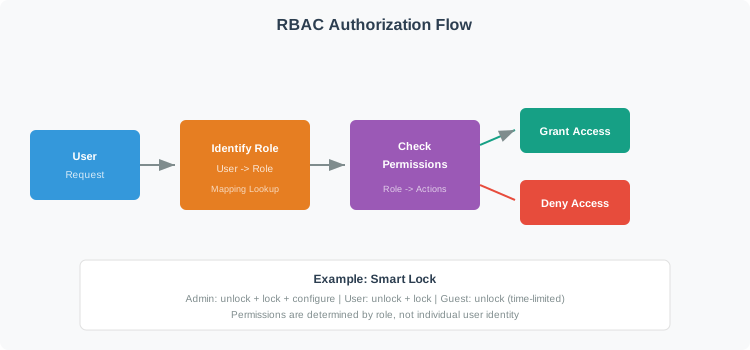
The common models differ in who decides and on what basis. With discretionary access control (DAC) the resource owner decides. With mandatory access control (MAC) a central policy decides and users have no discretion. With role-based access control (RBAC) permissions are grouped into roles and identities are assigned roles. With attribute-based access control (ABAC) rules evaluate attributes of the subject, resource, action, and environment. A fifth style, capability-based access, grants rights by holding an unforgeable token and has its own chapter.
If you only need the intuition, this layer is enough: every model is a way to enforce least privilege – each identity gets only the access it needs and nothing more. Start with the simplest rulebook that can express the real boundary, then add context only when the decision truly depends on it.
Picture a hospital. Doctors may prescribe, nurses may administer, and visitors may only visit. RBAC captures those job categories cleanly. But if access also depends on the time of day, the ward, or whether a device is in maintenance, you need rules over attributes – that is ABAC. Most real IoT systems combine a coarse role grant with finer contextual rules.
5.1.1 The Rulebook in One Minute
- DAC and MAC: DAC lets owners grant access; flexible but hard to govern. MAC enforces a central policy; rigid but strong for classified systems.
- RBAC: Group permissions into roles and assign roles to identities. The practical sweet spot when job categories are stable.
- ABAC: Decide from attributes and context (time, location, device state). Best when decisions are dynamic or multi-tenant.
5.1.2 Everyday IoT Examples
- A new device should join with no permissions and be granted only what it needs, rather than full access pending review.
- “Operators can use the dashboard” is a role grant; “operators can use it only during their shift, from the control room” adds attribute rules on top.
- Giving every device the same broad permissions is convenient but means one compromised device can reach everything.
5.1.3 Overview Knowledge Check
If you can name the models and the least-privilege principle behind them, you have the overview. Continue to Practitioner to choose a model and provision device identity without turning a good login into a broad standing grant.
5.2 Practitioner: Choose a Model and Provision Identity
The first decision is RBAC versus ABAC, driven by scale and how dynamic the access decisions are. Use RBAC when job categories are well defined and the number of role combinations stays manageable; it is simple to set up and audit. Switch to ABAC when decisions must depend on runtime context – time, location, device health, tenant – or when a multi-tenant system would otherwise suffer “role explosion,” a proliferation of narrow roles like one per shift per level.
5.2.1 RBAC Versus ABAC
| Dimension | RBAC | ABAC | Implication |
|---|---|---|---|
| Setup | Low; define roles and assign them. | Higher; author attribute policies. | RBAC starts faster for stable categories. |
| Scaling | Roles multiply as cases grow (role explosion). | Add an attribute, not a new role. | ABAC scales better for many varied cases. |
| Context | Role only; no time or location. | Full context: time, location, state. | Dynamic decisions need ABAC. |
| Audit | Simple: who has which role. | Detailed: which policy and attributes decided. | RBAC is easier to explain; ABAC is more precise. |
5.2.3 Worked Example: Layering RBAC and ABAC in a Smart Building
Consider a commercial building with networked door locks, HVAC across many floors, lighting zones, and multiple tenants. A workable design layers the models. First, define coarse roles: building admin, tenant admin, maintenance, security, tenant employee, and visitor, each with a baseline permission set (a tenant admin manages only their own tenant). Then add ABAC contextual gates: an employee’s door access also requires a tenant match, business hours, and a normal threat level; after-hours maintenance requires an active work order covering that specific resource; a visitor requires a present escort and a non-expired badge. Apply least-privilege patterns – just-in-time grants, time-bounded privileges, approval workflows, and default deny – and record, in the audit log, which policy decided each access. The lesson is that roles give a clean baseline while attributes enforce the situational rules roles cannot express.
5.2.4 Provisioning Device Identity
Authorization is only as trustworthy as the identity behind it, so device identity must be provisioned deliberately. A practical checklist: give every device a unique identity (never a shared fleet credential); generate and keep the private key inside a secure element so it never leaves the hardware; separate the one-time bootstrap credential from the long-lived operational credential; scope each device’s policy to its own resources and tenant rather than using wildcards; and plan renewal and revocation before the first device ships. At the platform level, distinguish human identity and access management (IAM) from the management of machine and device identities, which have their own enrolment and lifecycle.
Shelly’s Access Ledger
- Who: every device gets its own identity – never a credential shared across the fleet.
- What: the one-time bootstrap credential is separate from the long-lived operational one, and the private key never leaves the secure element.
- Proof: a renewal and revocation plan exists before the first device ships, not after.
5.2.6 Practitioner Knowledge Check
If you can choose a model, pick an OAuth grant, and provision per-device identity, you can stop here. Continue to Under the Hood for how policies evaluate and how the certificate lifecycle fails.
5.3 Under the Hood: Policy Evaluation, Certificate Lifecycle, and Failure Modes
The deeper layer explains how an authorization decision is actually computed and how device identity is maintained over years of operation. The recurring theme is that authorization fails when a policy is broader than intended or when a credential outlives its trust.
5.3.1 How ABAC Evaluates a Request
An ABAC engine decides in steps. It first collects attributes from four sources: the subject (role, department, clearance, whether MFA was used), the resource (owner, sensitivity, criticality, location), the action (read, write, control, configure), and the environment (time, day, network zone, threat level). It then selects policies that match the requested action and evaluates each policy’s conditions, all of which must be true. The decisive rules are precedence and default: an explicit deny overrides any allow, and if no policy grants access the request is denied by default. Every decision is logged. This is why ABAC scales: expressing a new rule means adding an attribute or condition, not minting a new role.
5.3.2 How Cloud Policies Evaluate
Cloud IoT policy engines work the same way at heart. Each statement is checked for an action match and a resource match; an explicit Deny always wins over any Allow, and if nothing allows the action it is implicitly denied. The powerful part is the runtime substitution of the device’s own identity into the policy – for instance, binding a topic to the connecting device’s Thing name – so the same policy text gives each device access only to its own resources, and one device cannot publish as another.
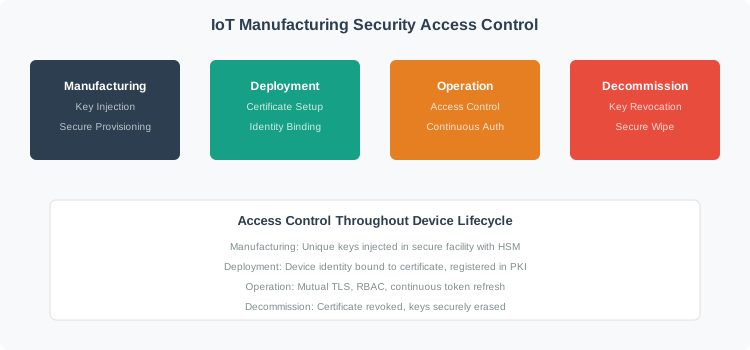
5.3.3 The Certificate Lifecycle, Stage by Stage
Certificate-based device identity has a lifecycle, and each stage has a failure to avoid:
- Manufacturing: generate the key pair inside a secure element. Failure to avoid: shipping the same key in every device.
- Enrolment: the device sends a certificate signing request and proves it is genuine with a one-time bootstrap secret. Failure to avoid: issuing a certificate to anyone who merely reaches the enrolment endpoint.
- Activation: the device receives an operational certificate and a scoped policy. Failure to avoid: attaching broad wildcard permissions.
- Operation: the device authenticates with mutual TLS and each action is authorized. Failure to avoid: assuming that being authenticated also means being authorized.
- Renewal: renew well before expiry, and only for healthy, non-revoked devices. Failure to avoid: letting a quarantined device silently regain access, or letting certificates lapse and brick the fleet.
- Revocation: publish the revocation and remove the device from its policy groups. Failure to avoid: leaving a decommissioned device’s credentials active.
Enrolment and renewal are commonly automated with EST (RFC 7030), preferred over the older SCEP. On constrained devices, ECDSA on a curve such as P-256 is often chosen over RSA because it yields much smaller keys and signatures and faster signing, which saves flash, bandwidth, and energy – note that RSA verification can actually be faster, so the win is size and signing, not verification speed.
5.3.4 Blast Radius and Token Identifiers
The damage a compromised device can do scales with the breadth of its permissions: a device scoped to its own telemetry is a small blast radius, while a device holding wildcard rights is a large one. The same logic applies to identifiers – use long random token or session identifiers (at least 128 bits) so they cannot be guessed or collide across a large fleet.
Shelly’s Access Ledger
- Who: a device scoped to its own telemetry versus one holding wildcard rights.
- What: blast radius scales directly with how broad the permissions are.
- Proof: token and session identifiers stay at least 128 bits so they can’t be guessed across a large fleet.
5.3.5 Mechanisms and Failure Modes
| Mechanism | What It Guarantees | Evidence to Request | Failure Mode If Weak |
|---|---|---|---|
| Deny-overrides precedence | An explicit deny cannot be bypassed by an allow. | Documented precedence and default-deny behavior. | Allow-wins logic lets a broad grant defeat a narrow block. |
| Identity-bound policy | Each device reaches only its own resources. | Policy variables bound to the device identity at runtime. | Static shared policies let one device act as another. |
| Secure-element keygen | The private key never leaves the device. | On-chip key generation and a signed CSR. | Keys in firmware or files can be copied fleet-wide. |
| Revocation | Compromised or retired devices lose access. | CRL or OCSP plus removal from policy groups. | Without revocation, stolen or old credentials stay valid. |
| Least-privilege scoping | Compromise stays contained. | Per-device, per-tenant scopes; no wildcards in production. | Uniform broad permissions maximize the blast radius. |
5.3.6 Common Pitfalls
- Keys in firmware instead of a secure element. Extractable keys turn one device into a fleet-wide impersonation path.
- No revocation checking. Without CRL or OCSP, a revoked or stolen certificate keeps working.
- Renewing only at expiry. Renew well before expiry, or devices that miss the window go offline.
- Uniform permissions across device types. A weather sensor and a valve actuator should not share a policy; scope to each role.
- Wildcard development policies in production. A convenient “allow all” left in place is a standing breach.
- Treating OAuth as authentication. OAuth authorizes; use OIDC if you need to authenticate the user.
5.3.7 Under-the-Hood Knowledge Check
At this depth, access control is policy evaluated consistently – deny overrides allow, default deny, identity bound at runtime – resting on device identity that is provisioned in hardware, scoped to the minimum, renewed before expiry, and revoked on retirement. A trustworthy review traces a request through the policy and traces a device through its certificate lifecycle, rather than trusting a single broad grant.
5.5 Summary
- Access control is authorization: deciding what a proven identity may do, governed by a model that enforces least privilege.
- DAC lets owners grant access, MAC enforces a central policy, RBAC groups permissions into roles, ABAC decides from attributes and context, and capability-based access grants rights by holding an unforgeable token.
- Use RBAC for stable job categories and ABAC for dynamic, context-dependent, or multi-tenant decisions that would otherwise cause role explosion; real systems often layer both.
- OAuth 2.0 is an authorization framework (device code, client credentials, authorization code with PKCE, refresh); OpenID Connect is the identity layer if you must authenticate the user. Avoid the Implicit and ROPC grants.
- Provision per-device identity: unique key generated in a secure element, separate bootstrap and operational credentials, scoped policies, and a revocation plan from day one.
- ABAC and cloud policy engines both evaluate with deny-overrides-allow and default-deny, and bind the device’s identity into the policy so each device reaches only its own resources.
- The certificate lifecycle runs from manufacturing through enrolment, activation, operation, renewal (well before expiry), and revocation; automate it with EST, and prefer ECDSA on constrained devices for smaller keys and faster signing.
- A device’s blast radius equals its permission scope, so scope to the minimum and use long random identifiers.
5.6 Key Takeaway
Choose the access-control model by scale and how dynamic the decision is, then enforce least privilege everywhere: deny by default, scope each device to its own resources, and bind policy to the device’s identity. Back it with per-device certificates provisioned in hardware and a working renewal and revocation path. OAuth authorizes; OIDC authenticates; an explicit deny always wins.
5.7 See Also
- Auth & Authorization Basics: Revisit identity, authentication, and how authorization fits the AAA framework.
- Capability-Based Access Control: Explore the fine-grained alternative to roles: unforgeable tokens of authority.
- Authentication Methods for IoT: See how the certificates behind device identity actually authenticate via mutual TLS.
- Advanced Access Control: Put models into operation with sessions, tokens, elevation, and defense in depth.