3 Authentication Methods for IoT
More
Depth: Practitioner
Progress saves as you read. Mark sections complete as you go; your progress appears in the sidebar.
3.1 Start With Who Is Signing In
This section: Start With Who Is Signing In — Picture a technician opening a plant dashboard while an unattended field unit connects to the same service.
Match the Proof to One Actor
Picture a technician opening a plant dashboard while an unattended field unit connects to the same service. Reusing one login pattern for both can turn one stolen secret into a fleet-wide failure.
Multi-factor authentication means requiring independent kinds of proof from a person. An API means a named software entry point used by another program. A gateway is the device or service that joins two system paths. TLS means protected transport that checks the service identity and can also check the client.
Try the right identity, a wrong identity, an expired proof, a copied proof, and a restart. Record which actor asked, which service decided, why it refused or accepted, and what access followed. A connected device is not yet a trusted device.
This runway does not make one method best for every actor. The deeper sections compare passwords, device certificates, short-lived tokens, independent factors, recovery, revocation, and risk.
Before choosing an authentication method, picture the moment of sign-in. Is it a person at a dashboard, a gateway talking to the cloud, or a sensor with no screen and no keyboard? The proof always connects an identity to one or more factor categories: something you know (a password or PIN), something you have (a phone, hardware token, or key in a secure element), and something you are (a biometric). The engineering question is which proof fits that actor and threat.
Four methods cover most IoT designs. Passwords are the simplest and the most attacked. Certificates with mutual TLS are the gold standard for unattended devices, giving each unit a unique cryptographic identity. Tokens such as JWT carry the result of a prior authentication so an API does not re-check a password on every call. Multi-factor authentication layers independent factors to defend accounts against credential theft.
If you only need the intuition, this layer is enough: roughly ordered weakest to strongest, the ladder runs static password, then password plus SMS code (defeated by SIM swapping), then password plus an authenticator app code (still phishable), then certificate-based mutual TLS, then a FIDO2 hardware key that is phishing-resistant. Match the rung to the risk.
A useful image: a password is a memorized secret, a certificate is like a tamper-evident birth certificate issued to the device at manufacture, a token is a boarding pass you show after check-in until it expires, and MFA is asking for two unrelated proofs at once. Each has a place; none is universally best.
The Core Idea
Certificates for devices
Unattended devices cannot type passwords or codes. A per-device certificate with mutual TLS authenticates without a human in the loop.
Tokens after a login
A token like a JWT proves a previous successful authentication. It is short-lived and signed, not a long-term secret.
MFA for humans
Where a person signs in — admin panels, cloud dashboards — add a second, independent factor against stolen passwords.
Everyday IoT Checks
Work from the simplest case toward the broader design consequence. First, A fleet of thousands of headless sensors is a poor fit for passwords; it is a natural fit for per-device certificates and mutual TLS. Next, an internet-facing admin console protected by a password alone is a credential-stuffing target; it should require a second factor. Finally, "We hash the passwords" is not enough detail. A reviewer needs to know it is a salted, deliberately slow hash, not a single fast digest.
Overview Knowledge Check
Start simple: decide who is signing in, pick the lowest-friction proof that still matches the risk, and make sure the proof can be revoked. If you can name the four methods and roughly rank their strength, you have the overview. Continue to Practitioner to choose among them by risk and device constraints.
3.2 Build the Method Around Risk
This section: Build the Method Around Risk — Selecting an authentication method is a risk decision, not just a technical one.
Selecting an authentication method is a risk decision, not just a technical one. The key inputs are who or what is authenticating (a device or a human), whether the endpoint is exposed to the internet, and how large the fleet is. Large device fleets favor mutual TLS; machine-to-machine APIs favor signed tokens; anything a human reaches over the internet should require MFA; and a simple internal device can use a password with strict rate limiting as a stopgap while you plan something stronger.
Choose by Exposure and Damage
Frame the choice as risk — the combination of how likely an attack is and how much damage it would do — rather than reacting to the scariest-sounding vulnerability. Lightweight threat modeling helps: walk the STRIDE categories (spoofing, tampering, repudiation, information disclosure, denial of service, and elevation of privilege) to find where authentication actually matters, and use a scoring system such as CVSS to compare specific weaknesses. A low-severity flaw on an internet-facing controller can outrank a high-severity flaw on an isolated bench device. The output is a method matched to the asset's real exposure.
Password or Certificate?
Add Friction Where It Buys Down Risk
A single factor is low friction and low cost but weak; multi-factor adds a step of friction and blocks the large majority of automated credential attacks. Reserve single-factor for low-risk devices that are not exposed to the internet, and require MFA for administrative interfaces, cloud dashboards, and anything an attacker can reach remotely. For headless or industrial equipment with no screen, choose factors that fit the environment: reuse an existing physical badge (a "have" factor) plus a short PIN, or use a hardware certificate in a TPM as the second factor. SMS codes and CAPTCHAs assume a human interface and rarely suit field devices. After that proof succeeds, trace Figure 3.1 to see how a signed token carries the result to later API calls.
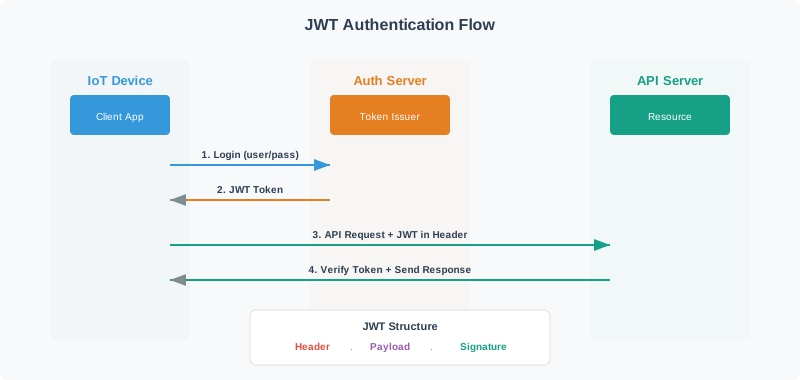
Read Figure 3.1 from the initial login to the repeated request path. The authentication server first validates the credential and issues a signed JWT; the client then presents it to the API, which verifies the signature and claims before responding. The header names the signing method, the payload carries readable claims, and the signature detects alteration. That division explains the next practice: a token can convey identity and scope temporarily, but it must not carry reusable secrets or be mistaken for encrypted storage.
Treat Tokens as Temporary Passes
When you adopt JWTs, a short list of practices prevents most mistakes: keep lifetimes short (minutes to an hour for devices, with a refresh path), sign with a strong key, carry the token only over TLS, and validate every claim on each use — expiry, issued-at, issuer, audience, and scope. Critically, a JWT payload is not encrypted: it is base64url-encoded and fully readable, with the signature providing tamper-evidence, not confidentiality. Never place a secret or sensitive personal data in a token payload.
Practitioner Knowledge Check
If you can pick a method by risk and apply token hygiene, you can stop here. Continue to Under the Hood for how each method works and where it fails.
3.3 Under the Hood: What Each Method Proves
This section: Under the Hood: What Each Method Proves — The deeper layer explains how each method actually authenticates and why each fails in a specific way.
The deeper layer explains how each method actually authenticates and why each fails in a specific way. The same word, "authentication," hides very different machinery for passwords, certificates, tokens, and one-time codes.
Passwords: Salted, Deliberately Slow Hashing
Never store passwords in plaintext, and never store a single fast digest. Store each password as a slow, salted hash. A salt is a unique random value per user that is mixed into the hash, so identical passwords produce different stored hashes and precomputed rainbow tables become ineffective. Fast hashes can permit billions of guesses per second on some GPU setups; a deliberately costly password-hashing function reduces that rate, depending on its parameters and the attacker's hardware. OWASP's Password Storage Cheat Sheet and RFC 9106 favor Argon2id, a memory-hard function; bcrypt, scrypt, and PBKDF2 with appropriate cost settings are alternatives. RFC 9106 §4 recommends, where memory is limited, Argon2id with three passes, 64 MiB, four lanes, a 128-bit salt, and a 256-bit tag; tune the choice to the verifier's capacity and current policy. Compare derived hashes in constant time to avoid leaking comparison results through timing. An optional pepper — a secret kept separately from the database — adds defense if the hash store alone is stolen.
Certificates and Mutual TLS
In mutual TLS, both sides authenticate. The server presents its certificate, and it also requests one from the client. The client then presents its device certificate and proves it holds the matching private key by signing a value in the handshake (the CertificateVerify step). This signature is the heart of the proof: merely presenting a certificate proves nothing, because certificates are public. Each side validates the other's certificate chain to a trusted certificate authority, checking name, validity, purpose, and revocation. The device must hold three things: the CA certificate it trusts, its own device certificate, and its private key — which belongs in a secure element so it cannot be extracted. The result is a mutually authenticated, encrypted channel.
JWT Structure and Algorithm Pitfalls
A compact signed JWT (JWS) has three base64url parts joined by dots: a protected header, a payload of claims, and a signature or MAC over the first two parts. An encrypted JWT (JWE) instead has five parts. A server can verify a signed token without storing session state — the convenience of statelessness. That same property is the trade-off: a stateless token stays valid until it expires, so instant revocation requires extra server-side state such as a denylist or a token-introspection call. Two signature pitfalls deserve naming. First, reject alg: none in an authentication-token profile; an unsecured token must never be accepted as verified. Second, pin the expected algorithm to prevent algorithm-confusion attacks, where an attacker takes an RS256 (public-key) configuration and submits an HS256 token signed with the public key treated as an HMAC secret. The verifier must decide the algorithm, not the token.
MFA and TOTP
Time-based one-time passwords (TOTP, RFC 6238) extend the HOTP construction (RFC 4226). Both sides share a secret; a common profile derives a counter from Unix time in 30-second steps and truncates HMAC-SHA1 to six digits. RFC 6238 also permits other step sizes and HMAC-SHA256 or HMAC-SHA512. A verifier may allow a narrow adjacent-step window for clock skew, but it must reject reuse of a code already accepted within that window; expiry alone does not prevent replay. The factor categories differ sharply in resistance: SMS codes can fall to SIM-swap attacks, app-generated TOTP codes can still be phished in real time, and FIDO2 or WebAuthn hardware keys are phishing-resistant because the challenge-response is cryptographically bound to the real site's origin.
Why Credential Stuffing Works
Credential stuffing is not guessing; it replays username and password pairs leaked from other breaches, betting that some users reuse them. Only a small fraction of pairs work on any one site, but stolen credentials are cheap and the attack automates across millions of accounts, so even a low hit rate pays. Defenses stack in increasing strength: rate limiting slows it, CAPTCHA raises cost, MFA breaks most automated attempts, and certificate or passkey authentication removes the reusable shared secret entirely. A password alone offers no defense against an attacker who already holds a valid pair.
Review Evidence and Failure Modes
Common Pitfalls
Review these failure modes in order. First, Plaintext or fast-hash password storage. Use a salted, deliberately slow KDF such as Argon2id, and compare in constant time. Next, Trusting a presented certificate. Require the handshake signature that proves private-key possession, and validate the full chain. Then, Accepting alg:none or unpinned algorithms. The verifier must fix the expected signing algorithm and reject "none". Then, TOTP without clock synchronization. Headless devices without a reliable clock will generate codes that never validate. Finally, Shared PSK or secrets in config files. Use per-device credentials in secure hardware and a secret store, not plaintext files.
Under-the-Hood Knowledge Check
At this depth, each method is a distinct guarantee with a distinct failure: passwords need salted slow hashing, certificates need a possession-proving signature, tokens need a pinned algorithm and claim checks, and one-time codes need synchronized clocks and phishing-resistant factors where the stakes are high. A trustworthy review names the method, its evidence, and the specific way it would break.
3.4 Summary
This section: Summary — Choose an IoT authentication method by the risk, device, and strength of the factor it can support.
Choose an IoT authentication method by the risk, device, and strength of the factor it can support. First, ioT authentication draws on three factor categories (know, have, are) combined into four practical methods: passwords, certificates with mutual TLS, tokens such as JWT, and multi-factor authentication. Next, roughly weakest to strongest: static password, password plus SMS code (SIM-swappable), password plus app TOTP (phishable), certificate-based mTLS, and phishing-resistant FIDO2 hardware keys. Then, choose by risk and device: certificates and mTLS for device fleets, signed tokens for machine-to-machine APIs, MFA for anything human-facing and internet-exposed, and passwords with rate limiting only as a low-risk stopgap. Then, store passwords as salted, deliberately slow hashes (Argon2id preferred) and compare in constant time; salt defeats rainbow tables, slowness defeats GPU cracking. Then, mutual TLS authenticates the client through a CertificateVerify signature that proves private-key possession, not by merely presenting a certificate. Then, a JWT payload is base64url-encoded and readable; the signature provides integrity, not confidentiality, so never put secrets in it, and reject alg:none and unpinned algorithms. Then, TOTP (RFC 6238, building on HOTP RFC 4226) derives a six-digit code from HMAC over a 30-second time step and needs clock synchronization; FIDO2 is phishing-resistant. Finally, credential stuffing exploits password reuse at scale; defenses stack from rate limiting through CAPTCHA and MFA to certificates and passkeys.
Pick the authentication method by the asset’s real risk and the device’s constraints, not by habit. Give devices per-device certificates, give APIs short signed tokens validated on every call, give humans MFA, and store any passwords as salted, slow hashes. Then verify the specifics: the possession proof, the pinned algorithm, the synchronized clock, and the per-device revocation path.
3.5 See Also
This section: See Also
Auth & Authorization Basics
Revisit identity, the AAA framework, and how authentication relates to authorization.
Access Control for IoT
See what happens after authentication: RBAC, ABAC, OAuth 2.0 scopes, and least privilege.
Advanced Access Control
Follow tokens into sessions, refresh, revocation, and defense in depth.
Find help
3 reviewed answers.
Where should I start in a module?
Open the module page from the sidebar to see its chapters in order. Use the module map to return to a topic you need.
Modules and pathsReviewed
What can I try when a project does not work?
Check the symptom, then work through the diagnostic steps. Keep the error message and the smallest example that reproduces it.
When you are stuckReviewed
How do interactive examples work?
Use the interactive guide to check how examples and simulations work before changing your project.
Interactive examples guideReviewed