14  Advanced Access Control

Complete Enterprise-Grade Security System

14.1 Learning Objectives

After completing this chapter, you will be able to:

  • Implement a complete capability-based access control system
  • Build session management with idle timeouts and maximum durations
  • Create token lifecycle management (issue, validate, refresh, revoke)
  • Implement privilege escalation prevention and detection
  • Build comprehensive audit logging for security events

Imagine your house has a smart lock. You want your family to get in easily, but you don’t want strangers walking through your door. The lock needs to know who you are and what you’re allowed to do. This is exactly the problem IoT devices face every second of every day.

In the physical world, you show your ID card to prove who you are, and security guards check if you’re on the approved list. In the IoT world, devices use digital tokens like temporary ID cards. When you want to read data from a sensor or control a device, you first prove your identity and receive a token. This token is like a visitor badge that says “This person is Alice, and she’s allowed to read sensor data but not change system settings.” Every time you try to do something, the device checks your token to make sure you’re allowed.

The tricky part is managing these tokens over time. Just like a visitor badge should expire at the end of the day, digital tokens need expiration times. Some users might need to temporarily elevate their permissions like calling a supervisor for approval to access a restricted area. The system needs to track who accessed what and when, creating an audit trail like security camera footage. All of this happens automatically in milliseconds, keeping your IoT devices secure while still being convenient to use.

“This chapter has a complete working security system!” Max the Microcontroller said excitedly. “We are building enterprise-grade access control right here on an ESP32. That means session management, token lifecycles, privilege escalation prevention, and audit logging – the whole package!”

Sammy the Sensor walked through it. “When someone scans their RFID card, the system checks: Is this card valid? Is the account active? Has it been locked out for too many failed attempts? What capabilities does this user have? All of these checks happen in milliseconds.”

“Session management is like a library card checkout,” Lila the LED explained. “When you log in, you get a session that lasts for a set time – maybe 30 minutes. If you are idle too long, the session expires automatically. And there is a maximum session duration so nobody stays logged in forever. Each session gets a unique token that proves you have already authenticated.”

“Privilege escalation prevention is the most important part,” Bella the Battery emphasized. “That is when someone tries to sneak from a basic user level to an admin level without proper authorization. Our system detects these attempts and immediately locks the account. It is like a security guard who notices someone trying to slip through a restricted door behind an authorized person – instant lockdown!”

14.2 Interactive Wokwi Simulator

Use this embedded simulator to explore advanced access control concepts with a complete working implementation.


14.3 Complete Implementation

This comprehensive implementation demonstrates enterprise-grade access control patterns. Copy this code into the Wokwi editor above.

14.3.1 Hardware Configuration

/*
 * Advanced IoT Access Control System
 * ==================================
 * Demonstrates enterprise-grade security patterns:
 *
 * 1. CAPABILITY-BASED ACCESS CONTROL
 *    - Fine-grained permissions (READ, WRITE, EXECUTE, ADMIN)
 *    - Capability tokens with specific resource access
 *    - Permission inheritance and composition
 *
 * 2. SESSION MANAGEMENT
 *    - Time-limited access sessions
 *    - Session tokens with expiration
 *    - Idle timeout detection
 *    - Maximum session duration enforcement
 *
 * 3. PRIVILEGE ESCALATION PREVENTION
 *    - Monitors for unauthorized privilege changes
 *    - Detects capability manipulation attempts
 *    - Alerts on suspicious access patterns
 *    - Rate limiting on sensitive operations
 *
 * 4. TOKEN LIFECYCLE MANAGEMENT
 *    - Token creation with cryptographic binding
 *    - Token validation and verification
 *    - Token refresh and renewal
 *    - Token revocation and blacklisting
 *
 * 5. ATTRIBUTE-BASED ACCESS CONTROL (ABAC)
 *    - Time-based restrictions
 *    - Location/zone-based access
 *    - Device state conditions
 *    - Environmental context
 *
 * Hardware Requirements:
 * - ESP32 DevKit V1
 * - 4x LEDs (Green, Red, Yellow, Blue)
 * - 4x 220 ohm resistors
 * - 1x Piezo buzzer
 * - 2x Push buttons
 */

#include <Arduino.h>

// ============== PIN DEFINITIONS ==============
const int LED_ACCESS_GRANTED = 2;   // Green LED - Access approved
const int LED_ACCESS_DENIED = 4;    // Red LED - Access denied
const int LED_SYSTEM_STATUS = 5;    // Yellow LED - System alerts
const int LED_ELEVATED_MODE = 18;   // Blue LED - Elevated privileges active
const int BUZZER_PIN = 19;          // Audio feedback
const int BUTTON_ACTION = 15;       // Primary action button
const int BUTTON_MODE = 16;         // Mode selection button

14.3.2 Capability Flags and Data Structures

See Capability-Based Access Control for detailed explanation of these structures.

// ============== CAPABILITY FLAGS ==============
const uint16_t CAP_NONE         = 0x0000;
const uint16_t CAP_READ         = 0x0001;
const uint16_t CAP_WRITE        = 0x0002;
const uint16_t CAP_EXECUTE      = 0x0004;
const uint16_t CAP_DELETE       = 0x0008;
const uint16_t CAP_CREATE       = 0x0010;
const uint16_t CAP_ADMIN_READ   = 0x0020;
const uint16_t CAP_ADMIN_WRITE  = 0x0040;
const uint16_t CAP_GRANT        = 0x0080;
const uint16_t CAP_REVOKE       = 0x0100;
const uint16_t CAP_AUDIT        = 0x0200;
const uint16_t CAP_EMERGENCY    = 0x0400;
const uint16_t CAP_DEBUG        = 0x0800;

// Composite capability sets
const uint16_t CAP_BASIC_USER = CAP_READ | CAP_EXECUTE;
const uint16_t CAP_POWER_USER = CAP_BASIC_USER | CAP_WRITE | CAP_CREATE;
const uint16_t CAP_OPERATOR = CAP_POWER_USER | CAP_DELETE | CAP_ADMIN_READ;
const uint16_t CAP_ADMIN = CAP_OPERATOR | CAP_ADMIN_WRITE | CAP_GRANT | CAP_REVOKE | CAP_AUDIT;
const uint16_t CAP_SUPERUSER = 0xFFFF;

// Data structures (see auth-adv-capabilities.qmd for full documentation)
struct AccessToken {
    uint32_t tokenId;
    char userId[16];
    uint16_t capabilities;
    unsigned long issuedAt;
    unsigned long expiresAt;
    unsigned long lastActivity;
    uint8_t refreshCount;
    bool isRevoked;
    uint32_t sessionId;
    char issuedBy[16];
};

struct UserProfile {
    const char* userId;
    const char* userName;
    uint16_t baseCapabilities;
    uint16_t maxCapabilities;
    bool canElevate;
    uint8_t maxConcurrentSessions;
    uint32_t maxSessionDuration;
    bool requiresMFA;
};

struct ProtectedResource {
    const char* resourceId;
    const char* resourceName;
    uint16_t requiredCapabilities;
    bool requiresAudit;
    bool timeRestricted;
    uint8_t allowedStartHour;
    uint8_t allowedEndHour;
};

struct Session {
    uint32_t sessionId;
    char userId[16];
    unsigned long startTime;
    unsigned long lastActivity;
    unsigned long maxDuration;
    uint8_t tokenCount;
    bool isElevated;
    unsigned long elevatedUntil;
    uint16_t currentCapabilities;
    uint8_t failedElevationAttempts;
};

enum AuditEventType {
    AUDIT_SESSION_START, AUDIT_SESSION_END, AUDIT_TOKEN_ISSUED,
    AUDIT_TOKEN_REFRESHED, AUDIT_TOKEN_REVOKED, AUDIT_ACCESS_GRANTED,
    AUDIT_ACCESS_DENIED, AUDIT_PRIVILEGE_ELEVATED, AUDIT_PRIVILEGE_DROPPED,
    AUDIT_ESCALATION_ATTEMPT, AUDIT_SUSPICIOUS_ACTIVITY, AUDIT_EMERGENCY_ACCESS,
    AUDIT_CAPABILITY_MODIFIED
};

struct AuditEntry {
    unsigned long timestamp;
    AuditEventType eventType;
    char userId[16];
    char resourceId[16];
    uint16_t attemptedCapabilities;
    uint16_t grantedCapabilities;
    bool success;
    char details[32];
};
Try It: Capability Bitmask Explorer

Toggle individual capability flags to see how composite permission sets are built using bitwise OR operations — matching the CAP_* constants defined in the code above.

14.3.3 System State and Configuration

// ============== USER DATABASE ==============
const int NUM_USERS = 6;
UserProfile userDatabase[NUM_USERS] = {
    {"SU001", "SuperAdmin", CAP_ADMIN, CAP_SUPERUSER, true, 2, 14400000, true},
    {"AD001", "Alice Admin", CAP_OPERATOR, CAP_ADMIN, true, 3, 28800000, true},
    {"OP001", "Bob Operator", CAP_POWER_USER, CAP_OPERATOR, true, 3, 28800000, false},
    {"US001", "Charlie User", CAP_BASIC_USER, CAP_POWER_USER, false, 5, 28800000, false},
    {"GU001", "Diana Guest", CAP_READ, CAP_BASIC_USER, false, 1, 3600000, false},
    {"SV001", "ServiceAccount", CAP_READ | CAP_EXECUTE, CAP_READ | CAP_EXECUTE, false, 10, 86400000, false}
};

// ============== PROTECTED RESOURCES ==============
const int NUM_RESOURCES = 8;
ProtectedResource resources[NUM_RESOURCES] = {
    {"RES_SENSOR", "Sensor Data", CAP_READ, false, false, 0, 23},
    {"RES_CONFIG", "Configuration", CAP_WRITE, true, false, 0, 23},
    {"RES_CONTROL", "Device Control", CAP_EXECUTE, true, false, 0, 23},
    {"RES_LOGS", "System Logs", CAP_AUDIT, true, true, 8, 18},
    {"RES_USERS", "User Management", CAP_ADMIN_WRITE, true, true, 9, 17},
    {"RES_FIRMWARE", "Firmware Update", CAP_ADMIN_WRITE | CAP_EXECUTE, true, true, 2, 6},
    {"RES_EMERGENCY", "Emergency Override", CAP_EMERGENCY, true, false, 0, 23},
    {"RES_DEBUG", "Debug Console", CAP_DEBUG, true, true, 9, 17}
};

// ============== SYSTEM STATE ==============
const int MAX_TOKENS = 10;
AccessToken tokenStore[MAX_TOKENS];
int activeTokenCount = 0;

const int MAX_SESSIONS = 5;
Session sessionStore[MAX_SESSIONS];
int activeSessionCount = 0;

const int MAX_AUDIT_ENTRIES = 100;
AuditEntry auditLog[MAX_AUDIT_ENTRIES];
int auditIndex = 0;

const int MAX_BLACKLIST = 20;
uint32_t tokenBlacklist[MAX_BLACKLIST];
int blacklistCount = 0;

uint32_t nextTokenId = 1000;
uint32_t nextSessionId = 1;
int escalationAttempts = 0;
unsigned long lastEscalationTime = 0;

int currentUserIndex = 0;
int currentResourceIndex = 0;
int currentMode = 0;
Session* currentSession = NULL;
AccessToken* currentToken = NULL;

// ============== TIMING CONSTANTS ==============
const unsigned long TOKEN_LIFETIME = 300000;
const unsigned long SESSION_IDLE_TIMEOUT = 600000;
const unsigned long ELEVATION_DURATION = 120000;
const unsigned long ESCALATION_WINDOW = 60000;
const int MAX_ESCALATION_ATTEMPTS = 3;
const unsigned long MIN_TOKEN_REFRESH_INTERVAL = 60000;

unsigned long lastButtonActionTime = 0;
unsigned long lastButtonModeTime = 0;
const unsigned long DEBOUNCE_DELAY = 300;

14.3.4 Core Functions

// Forward declarations
void initializeSystem();
void handleButtons();
void processCommands();
void displayStatus();
Session* createSession(const char* userId);
void endSession(Session* session);
bool validateSession(Session* session);
void updateSessionActivity(Session* session);
AccessToken* issueToken(Session* session, uint16_t requestedCaps);
bool validateToken(AccessToken* token);
bool refreshToken(AccessToken* token);
void revokeToken(AccessToken* token);
bool isTokenBlacklisted(uint32_t tokenId);
void addToBlacklist(uint32_t tokenId);
bool checkAccess(AccessToken* token, const char* resourceId);
bool hasCapability(uint16_t granted, uint16_t required);
bool checkTimeRestriction(ProtectedResource* resource);
uint16_t calculateEffectiveCapabilities(Session* session, UserProfile* user);
bool requestElevation(Session* session, const char* reason);
void dropElevation(Session* session);
bool detectEscalationAttempt(Session* session, uint16_t attemptedCaps);
void logAudit(AuditEventType type, const char* userId, const char* resourceId,
              uint16_t attempted, uint16_t granted, bool success, const char* details);
void printAuditLog();
UserProfile* findUser(const char* userId);
ProtectedResource* findResource(const char* resourceId);
void printCapabilities(uint16_t caps);
const char* eventTypeToString(AuditEventType type);
void playTone(int freq, int duration);
void indicateSuccess();
void indicateDenied();
void indicateElevated();
void indicateAlert();
void printMenu();
uint8_t getSimulatedHour();
void checkExpiredSessions();
void checkExpiredTokens();
void attemptResourceAccess();

// ============== SETUP ==============
void setup() {
    Serial.begin(115200);
    delay(1000);
    initializeSystem();

    Serial.println("\n");
    Serial.println("╔══════════════════════════════════════════════════════╗");
    Serial.println("║   ADVANCED IoT ACCESS CONTROL SYSTEM v2.0            ║");
    Serial.println("╠══════════════════════════════════════════════════════╣");
    Serial.println("║  Features:                                           ║");
    Serial.println("║  • Capability-Based Access Control (CBAC)            ║");
    Serial.println("║  • Time-Limited Session Tokens                       ║");
    Serial.println("║  • Privilege Escalation Prevention                   ║");
    Serial.println("║  • Token Lifecycle Management                        ║");
    Serial.println("║  • Attribute-Based Access Decisions                  ║");
    Serial.println("║  • Comprehensive Security Audit Logging              ║");
    Serial.println("╚══════════════════════════════════════════════════════╝\n");

    printMenu();
}

// ============== MAIN LOOP ==============
void loop() {
    handleButtons();
    processCommands();

    static unsigned long lastCheck = 0;
    if (millis() - lastCheck > 10000) {
        checkExpiredSessions();
        checkExpiredTokens();
        lastCheck = millis();
    }
    delay(10);
}

// ============== INITIALIZATION ==============
void initializeSystem() {
    pinMode(LED_ACCESS_GRANTED, OUTPUT);
    pinMode(LED_ACCESS_DENIED, OUTPUT);
    pinMode(LED_SYSTEM_STATUS, OUTPUT);
    pinMode(LED_ELEVATED_MODE, OUTPUT);
    pinMode(BUZZER_PIN, OUTPUT);
    pinMode(BUTTON_ACTION, INPUT_PULLUP);
    pinMode(BUTTON_MODE, INPUT_PULLUP);

    digitalWrite(LED_ACCESS_GRANTED, LOW);
    digitalWrite(LED_ACCESS_DENIED, LOW);
    digitalWrite(LED_SYSTEM_STATUS, LOW);
    digitalWrite(LED_ELEVATED_MODE, LOW);

    for (int i = 0; i < MAX_TOKENS; i++) tokenStore[i].tokenId = 0;
    for (int i = 0; i < MAX_SESSIONS; i++) sessionStore[i].sessionId = 0;
    for (int i = 0; i < MAX_AUDIT_ENTRIES; i++) auditLog[i].timestamp = 0;

    playTone(800, 100); delay(100);
    playTone(1000, 100); delay(100);
    playTone(1200, 150);

    logAudit(AUDIT_SESSION_START, "SYSTEM", "BOOT", 0, 0, true, "System initialized");
}

14.3.5 Session Management Implementation

// ============== SESSION MANAGEMENT ==============
Session* createSession(const char* userId) {
    UserProfile* user = findUser(userId);
    if (user == NULL) {
        Serial.println("ERROR: User not found");
        return NULL;
    }

    int userSessionCount = 0;
    for (int i = 0; i < MAX_SESSIONS; i++) {
        if (sessionStore[i].sessionId != 0 && strcmp(sessionStore[i].userId, userId) == 0) {
            userSessionCount++;
        }
    }

    if (userSessionCount >= user->maxConcurrentSessions) {
        Serial.println("ERROR: Maximum concurrent sessions reached for user");
        return NULL;
    }

    Session* session = NULL;
    for (int i = 0; i < MAX_SESSIONS; i++) {
        if (sessionStore[i].sessionId == 0) {
            session = &sessionStore[i];
            break;
        }
    }

    if (session == NULL) {
        Serial.println("ERROR: Session store full");
        return NULL;
    }

    session->sessionId = nextSessionId++;
    strncpy(session->userId, userId, 15);
    session->userId[15] = '\0';
    session->startTime = millis();
    session->lastActivity = millis();
    session->maxDuration = user->maxSessionDuration;
    session->tokenCount = 0;
    session->isElevated = false;
    session->elevatedUntil = 0;
    session->currentCapabilities = user->baseCapabilities;
    session->failedElevationAttempts = 0;

    activeSessionCount++;

    Serial.print("Session created: ID=");
    Serial.print(session->sessionId);
    Serial.print(", MaxDuration=");
    Serial.print(session->maxDuration / 60000);
    Serial.println(" minutes");

    logAudit(AUDIT_SESSION_START, userId, "SESSION", 0, user->baseCapabilities, true, "New session");
    return session;
}

void endSession(Session* session) {
    if (session == NULL || session->sessionId == 0) return;

    Serial.print("Ending session: ID=");
    Serial.println(session->sessionId);

    for (int i = 0; i < MAX_TOKENS; i++) {
        if (tokenStore[i].sessionId == session->sessionId && !tokenStore[i].isRevoked) {
            revokeToken(&tokenStore[i]);
        }
    }

    logAudit(AUDIT_SESSION_END, session->userId, "SESSION", 0, 0, true, "Session ended");
    session->sessionId = 0;
    activeSessionCount--;
}

bool validateSession(Session* session) {
    if (session == NULL || session->sessionId == 0) return false;

    unsigned long now = millis();

    if (now - session->startTime > session->maxDuration) {
        Serial.println("Session expired: Maximum duration exceeded");
        return false;
    }

    if (now - session->lastActivity > SESSION_IDLE_TIMEOUT) {
        Serial.println("Session expired: Idle timeout");
        return false;
    }

    if (session->isElevated && now > session->elevatedUntil) {
        Serial.println("Elevation expired - reverting to base capabilities");
        dropElevation(session);
    }

    return true;
}

void updateSessionActivity(Session* session) {
    if (session != NULL) session->lastActivity = millis();
}

void checkExpiredSessions() {
    for (int i = 0; i < MAX_SESSIONS; i++) {
        if (sessionStore[i].sessionId != 0) {
            if (!validateSession(&sessionStore[i])) {
                endSession(&sessionStore[i]);
            }
        }
    }
}
Try It: Session Timeout Simulator

Explore how idle timeouts and maximum session durations interact. Set the timing parameters and simulate a series of user activity events to see when the session expires.

14.3.6 Token Management Implementation

// ============== TOKEN MANAGEMENT ==============
AccessToken* issueToken(Session* session, uint16_t requestedCaps) {
    if (session == NULL) return NULL;

    UserProfile* user = findUser(session->userId);
    if (user == NULL) return NULL;

    uint16_t grantedCaps = requestedCaps & user->maxCapabilities;

    AccessToken* token = NULL;
    for (int i = 0; i < MAX_TOKENS; i++) {
        if (tokenStore[i].tokenId == 0) {
            token = &tokenStore[i];
            break;
        }
    }

    if (token == NULL) {
        Serial.println("ERROR: Token store full");
        return NULL;
    }

    token->tokenId = nextTokenId++;
    strncpy(token->userId, session->userId, 15);
    token->userId[15] = '\0';
    token->capabilities = grantedCaps;
    token->issuedAt = millis();
    token->expiresAt = millis() + TOKEN_LIFETIME;
    token->lastActivity = millis();
    token->refreshCount = 0;
    token->isRevoked = false;
    token->sessionId = session->sessionId;
    strncpy(token->issuedBy, "SYSTEM", 15);

    session->tokenCount++;
    activeTokenCount++;

    Serial.print("Token issued: ID=");
    Serial.print(token->tokenId);
    Serial.print(", Expires in ");
    Serial.print(TOKEN_LIFETIME / 1000);
    Serial.println(" seconds");
    Serial.print("Capabilities: ");
    printCapabilities(token->capabilities);

    logAudit(AUDIT_TOKEN_ISSUED, session->userId, "TOKEN", requestedCaps, grantedCaps, true, "New token");
    return token;
}

bool validateToken(AccessToken* token) {
    if (token == NULL || token->tokenId == 0) return false;

    if (isTokenBlacklisted(token->tokenId)) {
        Serial.println("Token REJECTED: Blacklisted");
        return false;
    }

    if (token->isRevoked) {
        Serial.println("Token REJECTED: Revoked");
        return false;
    }

    if (millis() > token->expiresAt) {
        Serial.println("Token REJECTED: Expired");
        return false;
    }

    token->lastActivity = millis();
    return true;
}

bool refreshToken(AccessToken* token) {
    if (token == NULL || !validateToken(token)) return false;

    if (millis() - token->issuedAt < MIN_TOKEN_REFRESH_INTERVAL) {
        Serial.println("Token refresh denied: Too soon");
        return false;
    }

    if (token->refreshCount >= 5) {
        Serial.println("Token refresh denied: Max refreshes reached");
        return false;
    }

    token->expiresAt = millis() + TOKEN_LIFETIME;
    token->refreshCount++;

    Serial.print("Token refreshed: ID=");
    Serial.print(token->tokenId);
    Serial.print(", Count=");
    Serial.println(token->refreshCount);

    logAudit(AUDIT_TOKEN_REFRESHED, token->userId, "TOKEN", 0, token->capabilities, true, "Refreshed");
    return true;
}

void revokeToken(AccessToken* token) {
    if (token == NULL || token->tokenId == 0) return;

    token->isRevoked = true;
    addToBlacklist(token->tokenId);

    Serial.print("Token revoked: ID=");
    Serial.println(token->tokenId);

    logAudit(AUDIT_TOKEN_REVOKED, token->userId, "TOKEN", 0, 0, true, "Revoked");
    token->tokenId = 0;
    activeTokenCount--;
}

bool isTokenBlacklisted(uint32_t tokenId) {
    for (int i = 0; i < blacklistCount; i++) {
        if (tokenBlacklist[i] == tokenId) return true;
    }
    return false;
}

void addToBlacklist(uint32_t tokenId) {
    if (blacklistCount < MAX_BLACKLIST) {
        tokenBlacklist[blacklistCount++] = tokenId;
    } else {
        for (int i = 0; i < MAX_BLACKLIST - 1; i++) {
            tokenBlacklist[i] = tokenBlacklist[i + 1];
        }
        tokenBlacklist[MAX_BLACKLIST - 1] = tokenId;
    }
}

void checkExpiredTokens() {
    for (int i = 0; i < MAX_TOKENS; i++) {
        if (tokenStore[i].tokenId != 0 && !tokenStore[i].isRevoked) {
            if (millis() > tokenStore[i].expiresAt) {
                Serial.print("Token auto-expired: ID=");
                Serial.println(tokenStore[i].tokenId);
                revokeToken(&tokenStore[i]);
            }
        }
    }
}

14.3.7 Access Control Implementation

// ============== ACCESS CONTROL ==============
bool checkAccess(AccessToken* token, const char* resourceId) {
    if (token == NULL || !validateToken(token)) return false;

    ProtectedResource* resource = findResource(resourceId);
    if (resource == NULL) {
        Serial.println("ERROR: Resource not found");
        return false;
    }

    return hasCapability(token->capabilities, resource->requiredCapabilities);
}

bool hasCapability(uint16_t granted, uint16_t required) {
    return (granted & required) == required;
}

bool checkTimeRestriction(ProtectedResource* resource) {
    uint8_t hour = getSimulatedHour();
    return (hour >= resource->allowedStartHour && hour < resource->allowedEndHour);
}

uint16_t calculateEffectiveCapabilities(Session* session, UserProfile* user) {
    if (session->isElevated) return user->maxCapabilities;
    return session->currentCapabilities;
}
Try It: Access Control Matrix

Select a user and a resource to see whether access would be granted based on the capability-based access control system defined in the code above. The matrix shows which flags the user has vs. what the resource requires.

14.3.8 Privilege Escalation Prevention

// ============== PRIVILEGE MANAGEMENT ==============
bool requestElevation(Session* session, const char* reason) {
    if (session == NULL) return false;

    UserProfile* user = findUser(session->userId);
    if (user == NULL) return false;

    Serial.println("\n[ELEVATION REQUEST]");
    Serial.print("User: "); Serial.println(user->userName);
    Serial.print("Reason: "); Serial.println(reason);

    if (!user->canElevate) {
        Serial.println("DENIED: User not authorized for elevation");
        session->failedElevationAttempts++;
        logAudit(AUDIT_ESCALATION_ATTEMPT, session->userId, "ELEVATION",
                user->maxCapabilities, user->baseCapabilities, false, "Not authorized");
        return false;
    }

    if (session->failedElevationAttempts >= 3) {
        Serial.println("DENIED: Too many failed elevation attempts");
        indicateAlert();
        logAudit(AUDIT_ESCALATION_ATTEMPT, session->userId, "ELEVATION",
                user->maxCapabilities, user->baseCapabilities, false, "Rate limited");
        return false;
    }

    if (user->requiresMFA) {
        Serial.println("NOTE: MFA verification would be required in production");
    }

    session->isElevated = true;
    session->elevatedUntil = millis() + ELEVATION_DURATION;
    session->currentCapabilities = user->maxCapabilities;

    Serial.println("ELEVATION GRANTED");
    Serial.print("Duration: "); Serial.print(ELEVATION_DURATION / 1000); Serial.println(" seconds");
    Serial.print("New capabilities: ");
    printCapabilities(session->currentCapabilities);

    if (currentToken != NULL) revokeToken(currentToken);
    currentToken = issueToken(session, session->currentCapabilities);

    logAudit(AUDIT_PRIVILEGE_ELEVATED, session->userId, "ELEVATION",
            user->maxCapabilities, user->maxCapabilities, true, reason);

    indicateElevated();
    return true;
}

void dropElevation(Session* session) {
    if (session == NULL || !session->isElevated) return;

    UserProfile* user = findUser(session->userId);
    if (user == NULL) return;

    session->isElevated = false;
    session->elevatedUntil = 0;
    session->currentCapabilities = user->baseCapabilities;

    Serial.println("Elevation dropped - returned to base capabilities");

    logAudit(AUDIT_PRIVILEGE_DROPPED, session->userId, "ELEVATION",
            0, user->baseCapabilities, true, "Dropped");

    digitalWrite(LED_ELEVATED_MODE, LOW);
}

bool detectEscalationAttempt(Session* session, uint16_t attemptedCaps) {
    if (session == NULL) return false;

    UserProfile* user = findUser(session->userId);
    if (user == NULL) return false;

    unsigned long now = millis();

    uint16_t forbidden = attemptedCaps & ~user->maxCapabilities;
    if (forbidden != 0) {
        escalationAttempts++;
        lastEscalationTime = now;

        Serial.println("\n!!! ESCALATION ATTEMPT DETECTED !!!");
        Serial.print("Attempted forbidden capabilities: ");
        printCapabilities(forbidden);
        Serial.print("Escalation attempts in window: ");
        Serial.println(escalationAttempts);

        logAudit(AUDIT_ESCALATION_ATTEMPT, session->userId, "SECURITY",
                attemptedCaps, session->currentCapabilities, false, "Forbidden caps");

        if (escalationAttempts >= MAX_ESCALATION_ATTEMPTS &&
            (now - lastEscalationTime) < ESCALATION_WINDOW) {
            Serial.println("!!! SECURITY LOCKDOWN INITIATED !!!");
            endSession(session);
            currentSession = NULL;
            currentToken = NULL;
            return true;
        }

        return true;
    }

    if ((now - lastEscalationTime) > ESCALATION_WINDOW) {
        escalationAttempts = 0;
    }

    return false;
}
Try It: Escalation Attempt Detector

Simulate a sequence of access attempts and see how the escalation detection system responds. The system tracks attempts within a time window and triggers lockdown after exceeding the threshold.

14.3.9 Resource Access and Button Handling

// ============== BUTTON HANDLING ==============
void handleButtons() {
    unsigned long now = millis();

    if (digitalRead(BUTTON_ACTION) == LOW && (now - lastButtonActionTime) > DEBOUNCE_DELAY) {
        lastButtonActionTime = now;

        if (currentMode == 0) {
            attemptResourceAccess();
        } else if (currentMode == 1) {
            if (currentSession != NULL) {
                requestElevation(currentSession, "Button request");
            } else {
                Serial.println("No active session - start a session first");
            }
        } else if (currentMode == 2) {
            currentUserIndex = (currentUserIndex + 1) % NUM_USERS;
            Serial.print("\n[USER SELECTED] ");
            Serial.print(userDatabase[currentUserIndex].userName);
            Serial.print(" ("); Serial.print(userDatabase[currentUserIndex].userId); Serial.println(")");
            printCapabilities(userDatabase[currentUserIndex].baseCapabilities);
        }
    }

    if (digitalRead(BUTTON_MODE) == LOW && (now - lastButtonModeTime) > DEBOUNCE_DELAY) {
        lastButtonModeTime = now;
        currentMode = (currentMode + 1) % 3;

        Serial.print("\n[MODE] ");
        switch (currentMode) {
            case 0: Serial.println("NORMAL - Press Button 1 to access resource"); break;
            case 1: Serial.println("ELEVATION - Press Button 1 to request elevated privileges"); break;
            case 2: Serial.println("ADMIN - Press Button 1 to cycle users"); break;
        }
    }
}

// ============== RESOURCE ACCESS ==============
void attemptResourceAccess() {
    UserProfile* user = &userDatabase[currentUserIndex];
    ProtectedResource* resource = &resources[currentResourceIndex];

    Serial.println("\n╔════════════════════════════════════════╗");
    Serial.println("║       ACCESS REQUEST PROCESSING        ║");
    Serial.println("╚════════════════════════════════════════╝");

    Serial.print("User: "); Serial.print(user->userName);
    Serial.print(" ("); Serial.print(user->userId); Serial.println(")");
    Serial.print("Resource: "); Serial.print(resource->resourceName);
    Serial.print(" ("); Serial.print(resource->resourceId); Serial.println(")");
    Serial.print("Required: ");
    printCapabilities(resource->requiredCapabilities);

    // Step 1: Check/create session
    if (currentSession == NULL || strcmp(currentSession->userId, user->userId) != 0) {
        Serial.println("\n[STEP 1] Creating new session...");
        currentSession = createSession(user->userId);
        if (currentSession == NULL) {
            Serial.println("ERROR: Cannot create session - limit reached");
            indicateDenied();
            return;
        }
        currentToken = NULL;
    } else {
        Serial.println("\n[STEP 1] Using existing session");
        if (!validateSession(currentSession)) {
            Serial.println("WARNING: Session expired - creating new session");
            endSession(currentSession);
            currentSession = createSession(user->userId);
            currentToken = NULL;
        }
    }

    // Step 2: Check/issue token
    if (currentToken == NULL || !validateToken(currentToken)) {
        Serial.println("\n[STEP 2] Issuing new access token...");
        uint16_t effectiveCaps = calculateEffectiveCapabilities(currentSession, user);
        currentToken = issueToken(currentSession, effectiveCaps);
        if (currentToken == NULL) {
            Serial.println("ERROR: Cannot issue token - limit reached");
            indicateDenied();
            return;
        }
    } else {
        Serial.println("\n[STEP 2] Using existing token");
        updateSessionActivity(currentSession);
    }

    // Step 3: Check access
    Serial.println("\n[STEP 3] Checking access authorization...");

    if (resource->timeRestricted) {
        if (!checkTimeRestriction(resource)) {
            Serial.println("ACCESS DENIED: Outside allowed time window");
            Serial.print("  Allowed hours: "); Serial.print(resource->allowedStartHour);
            Serial.print(":00 - "); Serial.print(resource->allowedEndHour); Serial.println(":00");
            Serial.print("  Current hour: "); Serial.println(getSimulatedHour());

            logAudit(AUDIT_ACCESS_DENIED, user->userId, resource->resourceId,
                    resource->requiredCapabilities, currentToken->capabilities, false, "Time restricted");
            indicateDenied();
            return;
        }
    }

    if (checkAccess(currentToken, resource->resourceId)) {
        Serial.println("\n════════════════════════════════════════");
        Serial.println("         ACCESS GRANTED");
        Serial.println("════════════════════════════════════════");

        logAudit(AUDIT_ACCESS_GRANTED, user->userId, resource->resourceId,
                resource->requiredCapabilities, currentToken->capabilities, true, "OK");

        if (currentSession->isElevated) {
            indicateElevated();
        } else {
            indicateSuccess();
        }
    } else {
        Serial.println("\n════════════════════════════════════════");
        Serial.println("         ACCESS DENIED");
        Serial.println("════════════════════════════════════════");
        Serial.println("Reason: Insufficient capabilities");
        Serial.print("Have: "); printCapabilities(currentToken->capabilities);
        Serial.print("Need: "); printCapabilities(resource->requiredCapabilities);

        if (detectEscalationAttempt(currentSession, resource->requiredCapabilities)) {
            Serial.println("\n!!! SECURITY ALERT !!!");
            Serial.println("Potential privilege escalation attempt detected!");
            indicateAlert();
        } else {
            indicateDenied();
        }

        logAudit(AUDIT_ACCESS_DENIED, user->userId, resource->resourceId,
                resource->requiredCapabilities, currentToken->capabilities, false, "Insufficient caps");
    }
}

14.3.10 Utility and Helper Functions

// ============== AUDIT LOGGING ==============
void logAudit(AuditEventType type, const char* userId, const char* resourceId,
              uint16_t attempted, uint16_t granted, bool success, const char* details) {
    AuditEntry* entry = &auditLog[auditIndex];

    entry->timestamp = millis();
    entry->eventType = type;
    strncpy(entry->userId, userId, 15); entry->userId[15] = '\0';
    strncpy(entry->resourceId, resourceId, 15); entry->resourceId[15] = '\0';
    entry->attemptedCapabilities = attempted;
    entry->grantedCapabilities = granted;
    entry->success = success;
    strncpy(entry->details, details, 31); entry->details[31] = '\0';

    auditIndex = (auditIndex + 1) % MAX_AUDIT_ENTRIES;
}

void printAuditLog() {
    Serial.println("\n╔════════════════════════════════════════════════════════════════════╗");
    Serial.println("║                      SECURITY AUDIT LOG                            ║");
    Serial.println("╠════════════════════════════════════════════════════════════════════╣");
    Serial.println("║ Time(ms)  | Event              | User      | Resource  | Status    ║");
    Serial.println("╠════════════════════════════════════════════════════════════════════╣");

    int printed = 0;
    for (int i = 0; i < MAX_AUDIT_ENTRIES && printed < 20; i++) {
        int idx = (auditIndex - 1 - i + MAX_AUDIT_ENTRIES) % MAX_AUDIT_ENTRIES;
        AuditEntry* entry = &auditLog[idx];

        if (entry->timestamp > 0) {
            Serial.print("║ ");
            char buf[12];
            sprintf(buf, "%-9lu", entry->timestamp);
            Serial.print(buf); Serial.print(" | ");

            const char* eventStr = eventTypeToString(entry->eventType);
            Serial.print(eventStr);
            for (int j = strlen(eventStr); j < 18; j++) Serial.print(" ");
            Serial.print(" | ");

            Serial.print(entry->userId);
            for (int j = strlen(entry->userId); j < 9; j++) Serial.print(" ");
            Serial.print(" | ");

            Serial.print(entry->resourceId);
            for (int j = strlen(entry->resourceId); j < 9; j++) Serial.print(" ");
            Serial.print(" | ");

            Serial.print(entry->success ? "SUCCESS  " : "FAILED   ");
            Serial.println("║");

            printed++;
        }
    }
    Serial.println("╚════════════════════════════════════════════════════════════════════╝");
}

// ============== UTILITY FUNCTIONS ==============
UserProfile* findUser(const char* userId) {
    for (int i = 0; i < NUM_USERS; i++) {
        if (strcmp(userDatabase[i].userId, userId) == 0) return &userDatabase[i];
    }
    return NULL;
}

ProtectedResource* findResource(const char* resourceId) {
    for (int i = 0; i < NUM_RESOURCES; i++) {
        if (strcmp(resources[i].resourceId, resourceId) == 0) return &resources[i];
    }
    return NULL;
}

void printCapabilities(uint16_t caps) {
    Serial.print("[");
    if (caps & CAP_READ) Serial.print("READ ");
    if (caps & CAP_WRITE) Serial.print("WRITE ");
    if (caps & CAP_EXECUTE) Serial.print("EXEC ");
    if (caps & CAP_DELETE) Serial.print("DEL ");
    if (caps & CAP_CREATE) Serial.print("CREATE ");
    if (caps & CAP_ADMIN_READ) Serial.print("ADMIN_R ");
    if (caps & CAP_ADMIN_WRITE) Serial.print("ADMIN_W ");
    if (caps & CAP_GRANT) Serial.print("GRANT ");
    if (caps & CAP_REVOKE) Serial.print("REVOKE ");
    if (caps & CAP_AUDIT) Serial.print("AUDIT ");
    if (caps & CAP_EMERGENCY) Serial.print("EMERG ");
    if (caps & CAP_DEBUG) Serial.print("DEBUG ");
    if (caps == CAP_NONE) Serial.print("NONE");
    Serial.println("]");
}

const char* eventTypeToString(AuditEventType type) {
    switch (type) {
        case AUDIT_SESSION_START: return "SESSION_START";
        case AUDIT_SESSION_END: return "SESSION_END";
        case AUDIT_TOKEN_ISSUED: return "TOKEN_ISSUED";
        case AUDIT_TOKEN_REFRESHED: return "TOKEN_REFRESHED";
        case AUDIT_TOKEN_REVOKED: return "TOKEN_REVOKED";
        case AUDIT_ACCESS_GRANTED: return "ACCESS_GRANTED";
        case AUDIT_ACCESS_DENIED: return "ACCESS_DENIED";
        case AUDIT_PRIVILEGE_ELEVATED: return "PRIV_ELEVATED";
        case AUDIT_PRIVILEGE_DROPPED: return "PRIV_DROPPED";
        case AUDIT_ESCALATION_ATTEMPT: return "ESCALATION_ATTEMPT";
        case AUDIT_SUSPICIOUS_ACTIVITY: return "SUSPICIOUS";
        case AUDIT_EMERGENCY_ACCESS: return "EMERGENCY";
        case AUDIT_CAPABILITY_MODIFIED: return "CAP_MODIFIED";
        default: return "UNKNOWN";
    }
}

uint8_t getSimulatedHour() {
    return (millis() / 10000) % 24;
}

// ============== LED/AUDIO FEEDBACK ==============
void playTone(int freq, int duration) {
    tone(BUZZER_PIN, freq, duration);
}

void indicateSuccess() {
    digitalWrite(LED_ACCESS_GRANTED, HIGH);
    digitalWrite(LED_ACCESS_DENIED, LOW);
    playTone(1500, 100); delay(50);
    playTone(2000, 150);
    delay(1500);
    digitalWrite(LED_ACCESS_GRANTED, LOW);
}

void indicateDenied() {
    for (int i = 0; i < 3; i++) {
        digitalWrite(LED_ACCESS_DENIED, HIGH);
        playTone(400, 100); delay(100);
        digitalWrite(LED_ACCESS_DENIED, LOW);
        delay(100);
    }
}

void indicateElevated() {
    digitalWrite(LED_ACCESS_GRANTED, HIGH);
    digitalWrite(LED_ELEVATED_MODE, HIGH);
    playTone(1500, 100); delay(50);
    playTone(2000, 100); delay(50);
    playTone(2500, 200);
    delay(1500);
    digitalWrite(LED_ACCESS_GRANTED, LOW);
}

void indicateAlert() {
    for (int i = 0; i < 5; i++) {
        digitalWrite(LED_ACCESS_DENIED, HIGH);
        digitalWrite(LED_SYSTEM_STATUS, HIGH);
        playTone(300, 100); delay(100);
        digitalWrite(LED_ACCESS_DENIED, LOW);
        digitalWrite(LED_SYSTEM_STATUS, LOW);
        delay(100);
    }
}

14.3.11 Serial Command Processing

// ============== SERIAL COMMAND PROCESSING ==============
void processCommands() {
    if (Serial.available()) {
        String cmd = Serial.readStringUntil('\n');
        cmd.trim();
        cmd.toUpperCase();

        if (cmd == "HELP" || cmd == "?") printMenu();
        else if (cmd == "STATUS") displayStatus();
        else if (cmd == "LOG" || cmd == "AUDIT") printAuditLog();
        else if (cmd == "USERS") {
            Serial.println("\n--- USER DATABASE ---");
            for (int i = 0; i < NUM_USERS; i++) {
                Serial.print(i); Serial.print(". "); Serial.print(userDatabase[i].userName);
                Serial.print(" ("); Serial.print(userDatabase[i].userId); Serial.print(") - Base: ");
                printCapabilities(userDatabase[i].baseCapabilities);
            }
        }
        else if (cmd == "RESOURCES") {
            Serial.println("\n--- PROTECTED RESOURCES ---");
            for (int i = 0; i < NUM_RESOURCES; i++) {
                Serial.print(i); Serial.print(". "); Serial.print(resources[i].resourceName);
                Serial.print(" - Requires: ");
                printCapabilities(resources[i].requiredCapabilities);
                if (resources[i].timeRestricted) {
                    Serial.print("   Time restricted: "); Serial.print(resources[i].allowedStartHour);
                    Serial.print(":00 - "); Serial.print(resources[i].allowedEndHour); Serial.println(":00");
                }
            }
        }
        else if (cmd.startsWith("USER ")) {
            int idx = cmd.substring(5).toInt();
            if (idx >= 0 && idx < NUM_USERS) {
                currentUserIndex = idx;
                Serial.print("Selected: "); Serial.println(userDatabase[idx].userName);
            }
        }
        else if (cmd.startsWith("RES ")) {
            int idx = cmd.substring(4).toInt();
            if (idx >= 0 && idx < NUM_RESOURCES) {
                currentResourceIndex = idx;
                Serial.print("Selected resource: "); Serial.println(resources[idx].resourceName);
            }
        }
        else if (cmd == "ACCESS") attemptResourceAccess();
        else if (cmd == "ELEVATE") {
            if (currentSession != NULL) requestElevation(currentSession, "Serial command");
            else Serial.println("No active session");
        }
        else if (cmd == "DROP") { if (currentSession != NULL) dropElevation(currentSession); }
        else if (cmd == "REFRESH") {
            if (currentToken != NULL) refreshToken(currentToken);
            else Serial.println("No active token");
        }
        else if (cmd == "REVOKE") {
            if (currentToken != NULL) { revokeToken(currentToken); currentToken = NULL; }
        }
        else if (cmd == "LOGOUT") {
            if (currentSession != NULL) {
                endSession(currentSession);
                currentSession = NULL; currentToken = NULL;
                Serial.println("Session ended");
            }
        }
        else if (cmd == "TIME") {
            Serial.print("Simulated hour: "); Serial.println(getSimulatedHour());
        }
    }
}

void displayStatus() {
    Serial.println("\n╔════════════════════════════════════════╗");
    Serial.println("║           SYSTEM STATUS                ║");
    Serial.println("╚════════════════════════════════════════╝");

    Serial.print("Active Sessions: "); Serial.println(activeSessionCount);
    Serial.print("Active Tokens: "); Serial.println(activeTokenCount);
    Serial.print("Blacklisted Tokens: "); Serial.println(blacklistCount);
    Serial.print("Escalation Attempts: "); Serial.println(escalationAttempts);
    Serial.print("Simulated Hour: "); Serial.println(getSimulatedHour());

    Serial.println("\n--- Current User ---");
    Serial.print("User: "); Serial.println(userDatabase[currentUserIndex].userName);

    Serial.println("\n--- Current Resource ---");
    Serial.print("Resource: "); Serial.println(resources[currentResourceIndex].resourceName);

    if (currentSession != NULL) {
        Serial.println("\n--- Active Session ---");
        Serial.print("Session ID: "); Serial.println(currentSession->sessionId);
        Serial.print("Elevated: "); Serial.println(currentSession->isElevated ? "YES" : "NO");
        Serial.print("Age (sec): "); Serial.println((millis() - currentSession->startTime) / 1000);
    }

    if (currentToken != NULL) {
        Serial.println("\n--- Active Token ---");
        Serial.print("Token ID: "); Serial.println(currentToken->tokenId);
        Serial.print("Valid: "); Serial.println(validateToken(currentToken) ? "YES" : "NO");
        Serial.print("Expires in (sec): ");
        long remaining = (currentToken->expiresAt - millis()) / 1000;
        Serial.println(remaining > 0 ? remaining : 0);
    }
}

void printMenu() {
    Serial.println("\n╔════════════════════════════════════════╗");
    Serial.println("║              COMMANDS                  ║");
    Serial.println("╚════════════════════════════════════════╝");
    Serial.println("Button 1: Execute action (depends on mode)");
    Serial.println("Button 2: Change mode (Normal/Elevation/Admin)");
    Serial.println("");
    Serial.println("Serial Commands:");
    Serial.println("  HELP      - Show this menu");
    Serial.println("  STATUS    - Display system status");
    Serial.println("  USERS     - List all users");
    Serial.println("  RESOURCES - List protected resources");
    Serial.println("  USER n    - Select user by index");
    Serial.println("  RES n     - Select resource by index");
    Serial.println("  ACCESS    - Attempt access to selected resource");
    Serial.println("  ELEVATE   - Request privilege elevation");
    Serial.println("  DROP      - Drop elevated privileges");
    Serial.println("  REFRESH   - Refresh current token");
    Serial.println("  REVOKE    - Revoke current token");
    Serial.println("  LOGOUT    - End current session");
    Serial.println("  LOG       - View security audit log");
    Serial.println("  TIME      - Show simulated hour");
    Serial.println("");
}

A smart building management system has 3 authentication tiers: edge gateways (ESP32), cloud API, and web dashboard. All must coordinate session timeouts to prevent stale access.

Tier 1: ESP32 Gateway

  • Max session duration: 8 hours (work shift)
  • Idle timeout: 10 minutes (inactivity)
  • Token lifetime: 5 minutes (auto-refresh)
  • Implementation:
bool validateSession(Session* session) {
    unsigned long now = millis();
    if (now - session->startTime > 28800000)  // 8 hours
        return false;
    if (now - session->lastActivity > 600000) // 10 min
        return false;
    return true;
}

Tier 2: Cloud API

  • Receives gateway tokens, validates against session database
  • Token refresh: Only if session still valid AND <4 hours old
  • Revocation propagation: 30-second polling interval

Tier 3: Web Dashboard

  • OAuth tokens: 1-hour lifetime
  • Refresh token: 30-day lifetime
  • Backend checks: Gateway session must still be active

Cascade Scenario: Operator logs in at 9:00 AM, goes to lunch at 12:00 PM (idle for 35 minutes). Returns at 12:35 PM and attempts dashboard action: 1. Dashboard token (issued 9:00 AM) is still valid (< 1 hour old? No, 3.5 hours → expired) 2. Dashboard attempts refresh using refresh token (valid for 30 days → OK) 3. Backend checks gateway session: 3.5 hours total, 35 min idle → IDLE TIMEOUT EXCEEDED 4. Refresh denied, user must re-authenticate at gateway (scan badge)

Production Benefit: Prevents “zombie sessions” where a web dashboard stays open but the operator left the building 2 hours ago.

Token Lifetime Security Benefit Usability Cost Best For
1-5 minutes Stolen tokens expire quickly Frequent refresh overhead Admin operations, payment processing
15-60 minutes Balanced Moderate refresh General IoT device-to-cloud
24 hours Minimal overhead 24-hour exposure window Low-risk read-only sensors
30-90 days (refresh tokens) Enables long sessions with short access tokens If leaked, attacker has persistent access User login sessions (paired with short access tokens)

Refresh Token Best Practices:

  • Rotation: Issue new refresh token on every access token refresh
  • Single-use: Invalidate old refresh token after use
  • Family tracking: Detect replay if old refresh token reused

Session Duration Guidelines: | Device Type | Max Session | Idle Timeout | Reasoning | |————|————-|————–|———–| | Wearables | 24 hours | None | Battery drain from re-auth | | Industrial HMI | 8 hours (shift) | 10 minutes | Walk-away protection | | Mobile apps | 30 days (refresh) | None | User convenience | | Admin consoles | 4 hours | 15 minutes | High-risk operations |

Common Mistake: Not Implementing Token Revocation

What practitioners do wrong: They issue JWT tokens with long expiration times (e.g., 24 hours) but have no mechanism to revoke a specific token before expiration.

Why it fails: When a device is compromised or an employee is terminated, the system cannot immediately invalidate their active tokens. The attacker/former employee can continue using the system until the token naturally expires.

Correct approach (multiple layers of defense):

  1. Short token lifetimes (5-15 minutes) reduce exposure window

  2. Token revocation list (blacklist): Maintain a server-side list of revoked token IDs

    bool isTokenBlacklisted(uint32_t tokenId) {
        for (int i = 0; i < blacklistCount; i++) {
            if (tokenBlacklist[i] == tokenId) return true;
        }
        return false;
    }
  3. Session-based invalidation: Revoke the entire session, not just one token

  4. Token introspection: Resource servers query auth server on every request (adds latency but ensures real-time revocation)

Real-world consequence: In 2021, a logistics company discovered a stolen employee laptop with valid API tokens. Because tokens had 7-day expiration and no revocation mechanism, the attacker accessed shipment data for 4 days before tokens expired. Post-incident fix: 15-minute access tokens + refresh tokens + server-side revocation list, reducing max exposure to 15 minutes.

14.4 Concept Relationships

How Advanced Access Control Concepts Connect
Core Concept Builds On Enables Common Confusion
Session management Authentication + tokens Time-bounded access with state tracking “Why sessions AND tokens?” - Sessions track user state; tokens prove session validity
Token lifecycle Cryptographic signatures Short-lived credentials with renewal “Why not just long-lived tokens?” - Short lifetimes limit breach impact
Privilege escalation Capability flags Temporary elevated access “Isn’t this the same as changing roles?” - No, elevation is temporary and logged
Token blacklist Revocation events Immediate access termination “Why not just expire the token?” - Blacklists enable instant revocation before natural expiry
Idle timeout Session tracking Walk-away attack prevention “Why both idle AND max duration?” - Max prevents indefinite sessions; idle prevents abandoned terminals

Key Insight: Enterprise access control requires defense in depth - multiple overlapping security mechanisms (sessions, tokens, timeouts, audit logging) that together prevent attacks that bypass any single control.

A session token’s security window is determined by its lifetime \(T\), and the probability that a stolen token is still valid when discovered is proportional to remaining lifetime.

\[P(\text{token valid at discovery}) = \frac{T - t_{\text{discovery}}}{T}\]

Working through an example:

Given: IoT access control system with: - Token lifetime \(T = 300\) seconds (5 minutes) - Average breach discovery time \(t_{\text{discovery}} = 180\) seconds (3 minutes) - Session idle timeout \(T_{\text{idle}} = 600\) seconds (10 minutes) - Maximum session duration \(T_{\text{max}} = 28,800\) seconds (8 hours)

Step 1: Calculate probability stolen token is still valid when breach is discovered

\[P(\text{valid}) = \frac{300 - 180}{300} = \frac{120}{300} = 0.40 \text{ or } 40\%\]

Step 2: Calculate expected number of token refreshes in an 8-hour session with active use every 5 minutes

Number of 5-minute intervals in 8 hours:

\[\text{Intervals} = \frac{28,800}{300} = 96\]

Each interval may require 1 refresh if token expires:

\[\text{Expected Refreshes} = 96 \text{ refreshes over 8 hours}\]

Step 3: Calculate security improvement from reducing token lifetime

For \(T = 60\) seconds (1 minute) with the same discovery time \(t_{\text{discovery}} = 180\) seconds:

\[P(\text{valid at 60s lifetime}) = \max\!\left(0,\;\frac{60 - 180}{60}\right) = \max(0,\;{-2.0}) = 0 \text{ (token expired well before discovery)}\]

Because the token lifetime (60 s) is shorter than the breach discovery time (180 s), the token is guaranteed to have expired before anyone could exploit it.

Result: Reducing token lifetime from 5 minutes to 1 minute decreases the probability of a stolen token being usable from 40% to 0%, but increases refresh overhead by 5x.

In practice: Short token lifetimes (\(T\)) reduce the window of vulnerability when credentials are stolen. However, each refresh consumes battery power (radio transmission) and network bandwidth. The optimal \(T\) balances security (smaller \(T\)) with resource constraints (larger \(T\) reduces overhead). Constrained devices often use \(T = 900\)-\(1800\) seconds (15-30 minutes) while high-security systems use \(T = 60\)-\(300\) seconds (1-5 minutes).

14.4.1 Token Security Calculator

Use the interactive calculator below to explore how token lifetime and breach discovery time affect the probability of a stolen token still being valid.

14.5 Summary

This implementation demonstrates:

Concept Demonstration Real-World Application
Capability Flags Fine-grained permission checking with bit operations Linux file permissions, AWS IAM policies
Token Lifecycle Issue, validate, refresh, revoke tokens OAuth 2.0, JWT tokens
Session Management Time-limited sessions with idle detection Web applications, enterprise systems
Privilege Escalation Prevention Detect and block unauthorized capability expansion Unix sudo, Windows UAC
Time-Based Access Restrict access to specific hours Business hours policies, maintenance windows
Audit Logging Complete security event trail SIEM systems, compliance requirements

14.6 See Also

Within This Module:

Related Security Topics:

Production Systems:

  • OAuth 2.0 RFC 6749 - Token-based authorization framework
  • JSON Web Tokens (JWT) - Compact token format for web applications
  • AWS IAM Session Policies - Temporary credentials with capability restrictions

Key Concepts

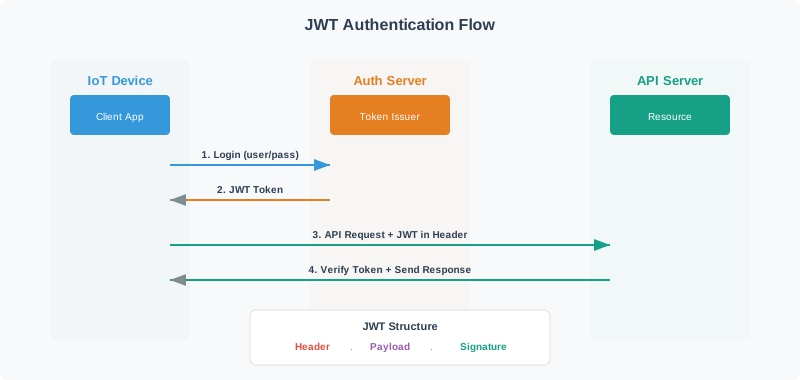
  • JWT (JSON Web Token): A compact, URL-safe token format with three parts (header, payload, signature) that encodes claims about identity and permissions, signed with HMAC or RSA
  • Middleware Authorization: A software layer that intercepts every request and checks permissions before passing the request to the application handler; implements DRY access control
  • Session Token: A short-lived credential issued after authentication that authorizes subsequent API calls without re-authentication; should have 15-minute to 4-hour expiry
  • AWS IAM Session Policy: An additional policy that further restricts the effective permissions of an assumed role; enables temporary, scoped-down credentials for specific tasks
  • Refresh Token: A long-lived token used to obtain new access tokens when they expire; must be stored securely and rotated on use to prevent credential theft
  • Token Introspection: A protocol (RFC 7662) where a resource server queries the authorization server to validate a token and retrieve its claims in real time
  • Scope: An OAuth 2.0 concept that limits what actions a token can authorize; IoT scopes might include “device:read”, “device:actuate”, “device:configure”
In 60 Seconds

Advanced access control implementation combines JWT tokens for stateless authentication, RBAC policy enforcement middleware, and short-lived session credentials — creating a system where every API call carries proof of identity and the server can verify permissions without database lookups.


14.7 Knowledge Check

Common Pitfalls

A JWT signed with HMAC is valid until it expires, even if the user is compromised or deleted. With 24-hour or 7-day expiry, a stolen token allows access for the full token lifetime. Use short expiry (15–60 minutes) combined with refresh tokens, and implement a token blocklist for revoked sessions.

Hardcoding the JWT signing secret in environment variables means all tokens are compromised if the secret leaks. Use a secrets manager (AWS Secrets Manager, HashiCorp Vault) with automatic rotation, and rotate secrets regularly even without a suspected breach.

JWTs include an “alg” header field; an attacker can set it to “none” to bypass signature verification in some libraries. Always explicitly specify and validate the expected algorithm on the server side, never accept “none” or allow client-supplied algorithm selection.

Frontend authorization that hides UI elements but doesn’t enforce the same checks on the backend API is security theater. Every API endpoint must independently verify that the calling token has permission for the requested operation, regardless of what the frontend allows.

14.8 What’s Next

If you want to… Read this
Test your understanding with challenges Authentication and Access Control Challenges
Return to the advanced lab overview Advanced Access Control Lab Overview
Study capability-based access control Capability-Based Access Control
Learn authentication fundamentals Auth & Authorization Basics
Explore zero trust architecture Zero Trust Security