2 Authentication and Authorization
More
Depth: Practitioner
Progress saves as you read. Mark sections complete as you go; your progress appears in the sidebar.
-

Why can a known controller still be denied?
2.1 Start With the Door Question
This section: Start With the Door Question — Picture a pump controller that proves its identity but is still denied an administrator command.
Prove the Right Device Gets Only the Right Action
Picture a pump controller that proves its identity but is still denied an administrator command. A gateway means the device or service that joins one system to another; passing through it does not automatically grant authority.
Name the identity claim, credential, verifier, allowed action, denied action, and audit record. Test a valid device, a wrong credential, an expired credential, and a valid identity asking for too much.
Keep the request, proof result, policy decision, time, and recorded action. This proves one identity and policy path, not the security of every service; the deeper sections separate identity, authentication, authorization, and accounting.
Picture a sensor, gateway, or user arriving at a locked service. The service has to ask two questions in order: who or what is this? and given that answer, what may it do? The first question is authentication; the second is authorization. They sound similar, but mixing them up is how IoT systems end up with "logged in" devices that can do far too much.
The story starts one step earlier with identity: the claim a device or user makes about who it is, such as a device serial, a username, or a certificate subject. Authentication proves that claim with a credential. Authorization then uses the proven identity to decide which actions and resources are permitted. Add accounting — recording what was actually done — and the result is the classic AAA framework: Authentication, Authorization, Accounting.
Shield Shelly
“Security is not a wall, it’s a list of who can do what — and the proof that the list is enforced.”
Through this chapter, Shelly asks each control the same three questions: who can act, what can they do, and how is it proven.
If you only need the intuition, this layer is enough: authenticate first, authorize by least privilege, and log everything. Authentication answers "who are you?", authorization answers "what may you do?", and accounting answers "what did you do?" Keeping the three distinct is the whole foundation.
Think of a controlled building. A badge reader at the door checks that your badge is genuine: that is authentication. The list of which rooms your badge opens is authorization. The entry log that records every door you used is accounting. A genuine badge does not mean every door should open, and a door that never checks badges is not secured by having a room list. Follow Figure 2.1 to see those first two decisions in their required order.
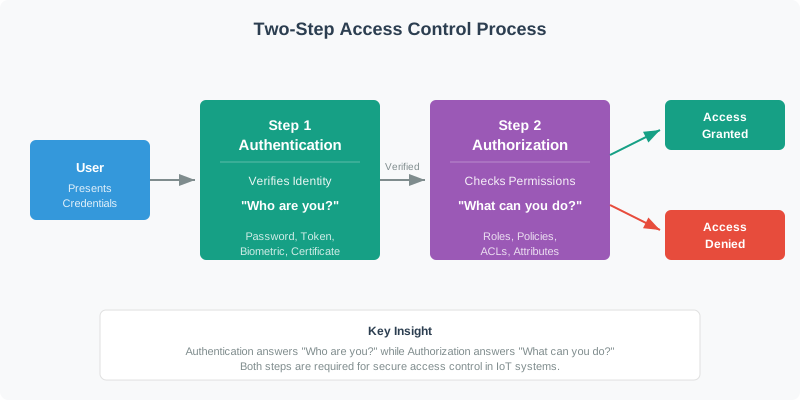
In Figure 2.1, start with the credential presented on the left. The authentication step checks whether it proves the claimed identity; only a successful proof reaches the authorization step, where permissions determine whether this particular action is allowed. The final grant or denial belongs to the request, not permanently to the identity. That sequence is the foundation for adding accounting and least privilege without treating a successful login as blanket access.
The Core Idea
Identity, then permission
You cannot decide what something may do until you know what it is. Authentication always comes before authorization.
Three different jobs
Authentication, authorization, and accounting are separate controls. A gap in any one leaves a different kind of hole.
Least privilege by default
A proven identity should receive only the access it needs. New or unknown identities start with nothing.
Everyday IoT Checks
Work from the simplest case toward the broader design consequence. First, A door lock that verifies a valid badge but then unlocks every door in the building has authentication without meaningful authorization. Next, A system that carefully checks permissions for each room but never verifies the badge has authorization without authentication: anyone can claim to be anyone. Finally, "The device logs in successfully" is not a complete claim. A reviewer still needs to know what that login is then allowed to do, and whether the action is recorded.
Start simple: name the identity, prove it, give it only the permissions it needs, and record what happened. This keeps identity, authentication, authorization, and accounting visible as separate AAA framework jobs. If you can keep those four jobs separate, you have the core idea. Continue to Practitioner to choose credentials, methods, and roles for a real device.
Overview Knowledge Check
2.2 Build the Access Plan
This section: Build the Access Plan — The practical work is turning the door question into a plan: select an authentication method that fits the device, then define authorization that follows least privilege.
The practical work is turning the door question into a plan: select an authentication method that fits the device, then define authorization that follows least privilege. Write the identity, authentication method, authorization rule, credential owner, and credential rotation date into the same design record. A credential is the secret or proof used to authenticate — a password or pre-shared key, a private key paired with a certificate, an API key, or a token. The right credential depends on the device's compute budget, whether a human is involved, and how you will revoke it later.
Choose the Credential for the Device
There is no single best method; there is a best fit. Constrained microcontrollers on a private network can use a factory-provisioned pre-shared key. Devices that must mutually authenticate at scale are better served by an X.509 certificate held in a hardware secure element. Human users signing in through an app or browser are handled by OAuth 2.0 with OpenID Connect. The decision turns on a few questions: can the device do asymmetric cryptography, does it have a secure element, is a human involved, and is there an existing PKI to build on?
One distinction matters here and is easy to get wrong: OAuth 2.0 is an authorization framework — it grants scoped, delegated access through tokens. The authentication of the user is provided by OpenID Connect (OIDC), an identity layer built on top of OAuth 2.0. Saying "we use OAuth to log users in" without OIDC is imprecise: OAuth issues access, OIDC proves identity.
Give Every Device Its Own Exit Door
Give every device its own credential. A unique per-device key or certificate means that if one device is compromised, you revoke just that one identity and the rest of the fleet keeps running. A shared credential baked into a product line collapses this: extracting it from a single unit compromises every unit, with no surgical way to recover. Treat revocation as a design requirement: each credential needs a revocation trigger, a revocation channel, and an audit trail. Plan revocation and renewal before the first device ships.
Shelly’s Access Ledger
- Who: one credential per device — never one per product line.
- What: a stolen identity exposes only that single device’s permissions.
- Proof: a revocation trigger, channel, and audit trail, designed before the first unit ships.
Multi-Factor: Different Categories, Not More of the Same
Multi-factor authentication (MFA) combines factors from different categories: something you know (password or PIN), something you have (a phone, token, or key in a secure element), and something you are (a biometric). The protection comes from forcing an attacker to defeat independent factors at once. Two secrets from the same category — a password plus a security-question answer — is not MFA, because both are "something you know" and a single phishing page captures both. MFA strength is about this independence, not about adding up the "bits" of each factor. Once identity is proven, Figure 2.2 shows how RBAC translates it into manageable permissions.
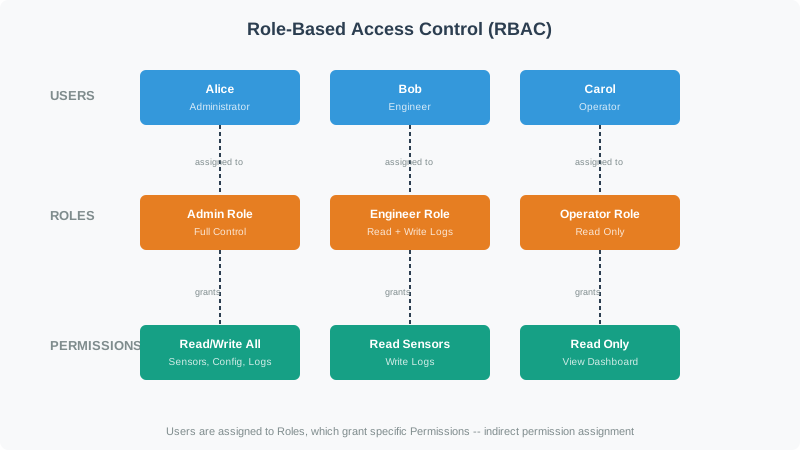
Follow a user to a role. Then inspect its permission. Read Figure 2.2 from identities to roles and then to permissions. The middle layer is the administrative leverage: many users or devices inherit a reviewed permission bundle without sharing credentials or receiving one-off grants. The order also keeps authentication and authorization separate. Proving Alice's identity does not choose her role, and assigning the administrator role does not prove that the requester is Alice.
Use Roles Until Roles Stop Fitting
The most common authorization model is therefore role-based access control (RBAC), but a frequent mistake is assuming roles are always a hierarchy (admin ≥ user ≥ guest). Many real roles are parallel, not ranked — a nurse and a pharmacist need different, overlapping permissions, not "more" or "less." When permissions are non-hierarchical, reach for fine-grained capability permissions or attribute-based rules instead of forcing a ranking.
Shelly’s Access Ledger
- Who: a thousand identities, managed through a handful of roles.
- What: only what the role grants; parallel roles (nurse, pharmacist) differ rather than rank.
- Proof: the accounting log shows each proven identity doing only role-permitted actions.
Make the Lifecycle the System
When you design AAA for a large deployment — say thousands of mixed devices across several sites under a compliance regime — the architecture is the easy part. Assign each device class a fitting authentication method (mTLS with secure elements for capable devices, PSK for the most constrained), define an RBAC matrix for the human roles, and size your audit logging for the required retention period. The dominant ongoing cost is not the technology; it is the credential lifecycle: provisioning, rotation, renewal, and revocation as devices and staff come and go. The single highest-leverage decision is to automate enrolment and renewal (for example with EST or SCEP) so that most credential operations happen without manual steps and human error.
Practitioner Knowledge Check
If you can pick a method that fits the device and assign least-privilege roles, you can stop here. Continue to Under the Hood for how credentials actually prove identity and how they fail.
2.3 Under the Hood: How Proofs Fail
This section: Under the Hood: How Proofs Fail — The deeper layer keeps the same story but opens the mechanism: how a credential proves identity without handing the secret over, why revocation and storage are first-class concerns, and where each mechanism fails.
The deeper layer keeps the same story but opens the mechanism: how a credential proves identity without handing the secret over, why revocation and storage are first-class concerns, and where each mechanism fails. A credential is only as strong as the way it is proven, stored, and retired.
Prove Challenge-Response Without Sending the Secret
A device should rarely transmit its secret. Instead, many protocols use challenge-response: the verifier sends a fresh random nonce, and the device returns a value computed from the nonce and its secret — commonly a keyed MAC such as HMAC. The verifier recomputes the same value and compares. Possession of the secret is proven, but the secret never crosses the wire. The security rests on the nonce being unique and unpredictable: if a nonce repeats, the matching response repeats, and a captured response can simply be replayed. Note that a longer secret resists brute force but does not fix nonce reuse — even a 256-bit key replays if the challenge is repeated.
Bind the Key, Then Check the Chain
A public key alone does not say whose key it is. An X.509 certificate binds an identity to a public key and is signed by a certificate authority. Verifying a certificate means walking the certificate chain to a trusted root and checking the signature, the name, the validity period, and the intended purpose — then failing closed on anything wrong. Parsing is not validating. Because credentials must also be retired, deployments rely on revocation: a Certificate Revocation List (CRL) or the Online Certificate Status Protocol (OCSP), with enrolment and renewal automated through protocols such as EST or SCEP.
Keep Secrets Where Extraction Is Hard
Most IoT firmware is not encrypted, and even when it is, keys can often be extracted by side channels or by reading them after secure boot. A secret stored in plain flash should be assumed recoverable by anyone with the hardware. The strong pattern is a hardware secure element or TPM, where the private key is generated on-chip and never leaves it. The opposite pattern — a hardcoded or fleet-wide shared credential — is the classic catastrophic failure: extract it once, impersonate the whole product line. Default and shared device credentials are exactly what large IoT botnets such as Mirai exploited.
Shelly’s Access Ledger
- Who: only the device itself — the key is generated on-chip and never leaves the secure element.
- What: a shared key in plain flash turns one extraction into product-line-wide impersonation, the Mirai pattern.
- Proof: challenge-response with fresh nonces demonstrates possession without the secret ever crossing the wire.
Biometrics: False Accepts, False Rejects, and Risk
Biometrics are not measured in "bits of a password." They are characterized by two error rates: the false acceptance rate (FAR), the chance an impostor is accepted, and the false rejection rate (FRR), the chance a legitimate user is rejected. Tightening the threshold to lower FAR reduces impostor risk but raises false rejections, which frustrates real users; loosening it does the reverse. Because a biometric cannot be changed if it leaks and lives on a spectrum of error rather than a secret, it is best used as one factor combined with another, not as a sole credential.
What to Ask For in Review
Common Pitfalls
Review these failure modes in order. First, Confusing authentication with authorization. Proving identity is not the same as granting access; design both, and default to least privilege. Next, Reusing nonces in challenge-response. Replay protection depends on fresh, unpredictable challenges, not on key length. Then, Hardcoded or shared credentials. One extraction compromises every device; use per-device keys in secure hardware. Then, Two factors from one category. A password plus a security question is not MFA; combine different factor categories. Finally, No renewal or revocation plan. Long-lived devices with short-lived certs must renew before expiry and revoke on compromise.
Under-the-Hood Knowledge Check
At this depth, authentication is a set of independent guarantees: a credential proven without being exposed, an identity bound by a validated certificate, a secret kept in hardware, factors that are genuinely independent, and a lifecycle that can rotate and revoke. Authorization then layers least privilege on top. A trustworthy review checks each guarantee rather than accepting "the device logs in."
2.4 Summary
This section: Summary — Keep four roles apart: identity, proof, permission, and a record.
Keep four roles apart: identity, proof, permission, and a record. First, identity is the claim of who something is; authentication proves that claim with a credential; authorization decides what the proven identity may do; accounting records what it did. Together they form the AAA framework. Next, authentication always precedes authorization, and the two fail in different ways: full access after login (no authorization) versus permissions checked without verifying identity (no authentication). Then, choose the authentication method by device capability and revocation needs: PSK for constrained private-network devices, X.509 with mTLS for fleets, tokens after a login, and OAuth 2.0 with OIDC for human users. Then, OAuth 2.0 grants delegated authorization; OpenID Connect (OIDC) is the identity layer that authenticates the user on top of it. Then, per-device credentials enable surgical revocation; shared or hardcoded credentials make one extraction a fleet-wide compromise. Then, multi-factor authentication means factors from different categories (know, have, are); its strength is independence, not summed entropy. Then, RBAC manages access through roles, but parallel (non-hierarchical) roles call for fine-grained capabilities or attribute-based rules. Finally, challenge-response proves a secret without sending it but depends on fresh nonces; certificates must be validated and revoked; secrets belong in a secure element; biometrics are judged by FAR and FRR, not bits.
Authenticate first, then authorize by least privilege, and log what happens. Pick a credential that fits the device and can be revoked per device, keep secrets in hardware, make MFA span different factor categories, and plan rotation and revocation before deployment. “The device logs in” is never, by itself, a security claim.
2.5 See Also
This section: See Also
Authentication Methods for IoT
Go deeper on passwords and salted hashing, X.509 and mTLS, JWT tokens, and TOTP-based MFA.
Access Control for IoT
See how RBAC, ABAC, OAuth 2.0, and least privilege turn a proven identity into scoped permissions.
Capability-Based Access Control
Learn the fine-grained alternative to roles: unforgeable tokens of authority and permission flags.
Advanced Access Control
Put it together with sessions, token lifecycle, privilege elevation, and defense in depth.
Find help
3 reviewed answers.
Where should I start in a module?
Open the module page from the sidebar to see its chapters in order. Use the module map to return to a topic you need.
Modules and pathsReviewed
What can I try when a project does not work?
Check the symptom, then work through the diagnostic steps. Keep the error message and the smallest example that reproduces it.
When you are stuckReviewed
How do interactive examples work?
Use the interactive guide to check how examples and simulations work before changing your project.
Interactive examples guideReviewed