16 Secure Communication and Firmware
More
Depth: Practitioner
Progress saves as you read. Mark sections complete as you go; your progress appears in the sidebar.
16.1 Start With the Protection Boundary
This section: Start With the Protection Boundary — Picture a door sensor sending an alarm through a building bridge to a phone.
Name Who Can Read Each Handoff
Picture a door sensor sending an alarm through a building bridge to a phone. Hiding the radio signal is not enough if a middle service can read, change, or repeat the alarm without the owner knowing.
-
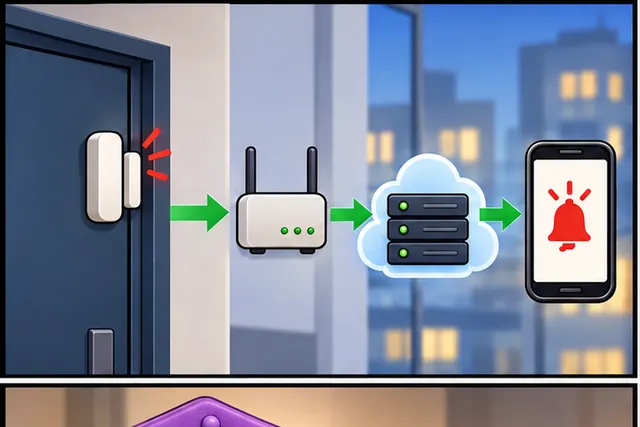
A door alarm travels through a building bridge to a phone.
-
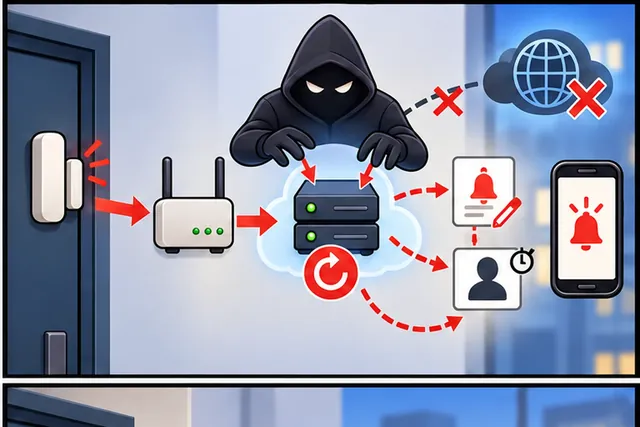
Radio secrecy alone cannot stop a middle service from changing it.
-
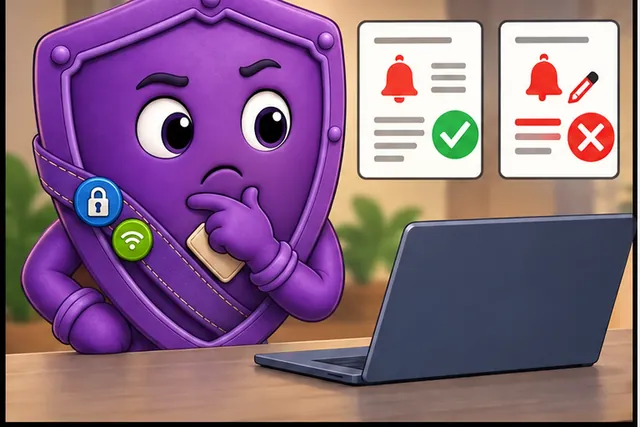
Map who reads each handoff, then copy, change, and replay the alarm.
-
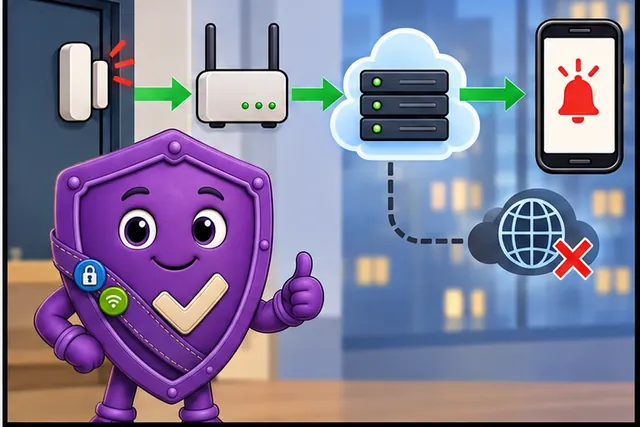
Keep the door safe and deliver one honest result or a clear refusal.
Firmware means software stored on a device. A gateway means the bridge between local devices and a wider network. A message broker means a service that passes messages between senders and receivers. A payload means the useful data inside one message.
Draw the alarm path and name who can read the payload at every stop. Then copy the message, change it, use an old identity, restart the broker, and remove the outside link. The local door state must stay safe, while the receiver gets one honest result or a clear refusal.
This runway does not prove that a cipher, key store, or service is secure. The deeper sections compare protection goals, key ownership, trust boundaries, attacks, and the evidence needed to defend a design.
Imagine a sensor reading that leaves a device, crosses a gateway, lands in a broker, and triggers a cloud rule. Saying “the link is encrypted” is not enough. A reviewer still needs to know where plaintext appears, which intermediary is trusted, and whether the same evidence would protect a signed firmware image before the device installs it.
This chapter follows that one question through the whole route: name the boundary, choose session or object protection, then prove the firmware and message paths fail closed when the wrong party, stale version, or modified payload appears.
Overview: Secure Communication Is a Boundary Decision
Secure communication protects messages as they travel between the parts of an IoT system: a sensor, a gateway, a message broker, and a cloud service. The first question is not which protocol to enable. It is how far the protection must reach, and who is allowed to read the data along the way.
Two protection styles answer that question. Session security protects a connection between two endpoints, so the data is safe only along that hop. Object security protects the message itself, so it stays protected end-to-end even when it passes through intermediaries. Firmware updates are a special case of the same idea: the message is code, and the device must verify it is authorized before running it.
If you only need the intuition, this layer is enough: name the boundary first. Decide how far protection must travel and who may read the data on the way. Session security protects one hop; object security protects the message end-to-end; and the network path is never enough on its own to trust a firmware update.
Think of mailing a letter through a sorting centre. An armoured van between two post offices protects the mailbag only while it rides that van; at the sorting centre the bag is opened and re-bagged, and the staff there can read every letter. That is session security: safe for one hop, exposed at the intermediary. A sealed, signed envelope inside the bag stays sealed through every van and every sorting centre until the addressee opens it. That is object security: protected end-to-end. If a letter must stay private past the sorting centre, it needs the sealed envelope, not just an armoured van to the centre.
Before selecting a mechanism, inspect Figure 16.1 to decide how far protection must travel and which intermediary is allowed to see plaintext.
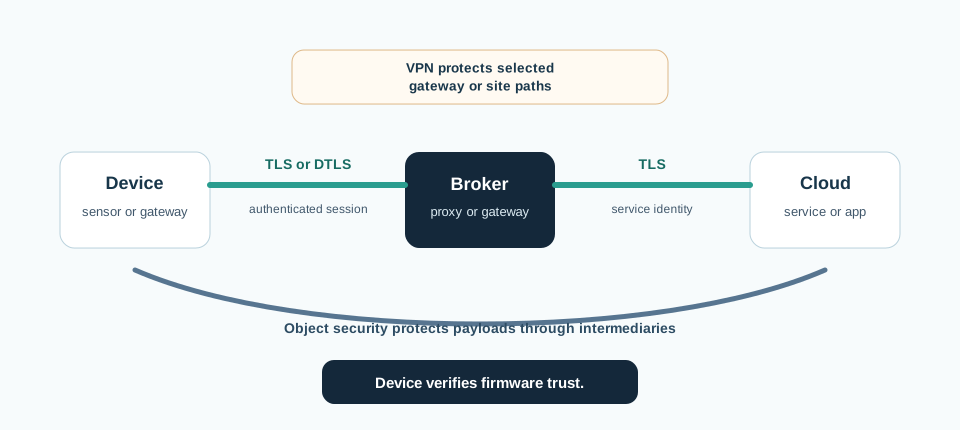
Read Figure 16.1 from one-hop session protection to the object-security path that remains protected through intermediaries. Then compare the gateway tunnel, which protects a network path but not endpoint identity by itself, with signed firmware, whose trust must survive any delivery path. These branches establish the chapter’s running rule: name the termination and authorized plaintext readers before naming the protocol.
The One-Minute View
Name the boundary first
Decide how far protection must travel, one hop or end-to-end, and who may read the data along the way, before naming any protocol.
Session security protects a hop
TLS over TCP and DTLS over UDP protect a connection between two endpoints. A broker or proxy that terminates the session still sees plaintext.
Object and signed code travel further
To keep a payload protected past an intermediary, protect the message itself. For firmware, the device must verify a signed image, not trust the delivery path.
Beginner Examples
These examples show why the protection boundary matters. A device using TLS to a message broker has a private link, but the broker still reads every message in plaintext. That is hop-by-hop protection, not end-to-end. A firmware download over HTTPS proves the link to the server, not that the firmware is authorized. The device still has to verify a signature before it installs the image. "The connection is encrypted" is not a claim a reviewer can accept. Encryption to the wrong endpoint, or only to the broker, may not give the data the protection it needs.
Overview Knowledge Check
If you can explain the difference between protecting a single hop and protecting a message end-to-end, you can stop here. Continue to Practitioner to match each path to a mechanism and review a real fleet.
Practitioner: Match Each Path to a Mechanism
The practical workflow turns a set of communication paths into a boundary, a mechanism, and an identity and freshness plan, then proves the choice with negative tests. The common failure is naming a protocol before naming the boundary, which leads to session security where the data really needs to survive an intermediary.
Walkthrough: From Paths to Controls
Follow the sequence from decision to evidence. First, List the communication paths. Enumerate every path: device-to-gateway telemetry, command and control, gateway-to-cloud, technician or remote access, and firmware update. Next, Name the boundary for each path. Decide how far protection must travel and which intermediaries, brokers, proxies, or gateways, sit in the middle and might terminate the session. Next, Decide session or object. If protection only needs to reach the next endpoint, session security fits. If the payload must stay protected past an intermediary, choose object security for the message. Next, Pick the transport mechanism. TCP sessions take TLS; UDP sessions take DTLS; messages through brokers take object security (COSE, and OSCORE for CoAP); gateway or site paths take a VPN or IPsec tunnel, with endpoint identity still checked inside it. Next, Pin identity and freshness, not just encryption. Validate the peer identity (certificate, raw public key, or PSK) and add replay protection. A secure channel to the wrong party, or one that accepts an old message, still fails. Finally, Treat firmware as a signed object. Distribute a signed manifest and image; the device verifies the signature before install, and before boot where supported, with anti-rollback and a verified recovery path. Then define key rotation, revocation owners, and the negative tests that prove bad inputs are rejected.
Before selecting a named protocol, inspect Figure 16.2 to connect each communication path and intermediary to the protection boundary it actually needs.
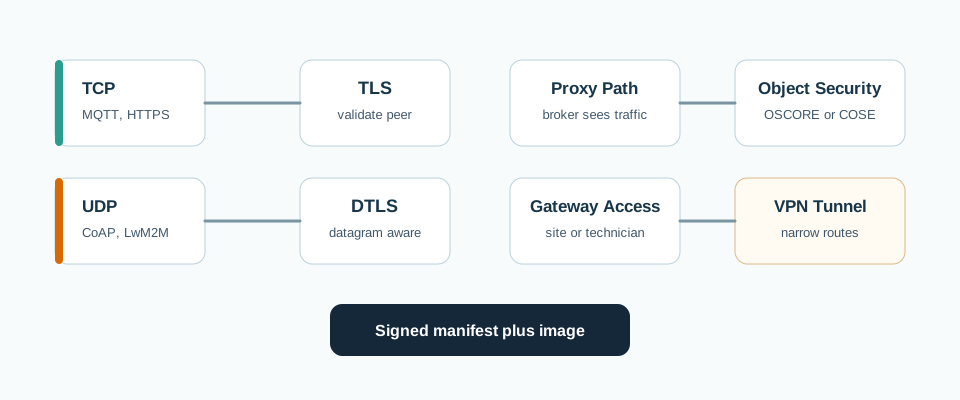
Read Figure 16.2 from TCP and UDP sessions to TLS and DTLS, then follow broker or proxy paths to object security, gateway or site paths to a tunnel, and firmware packages to signed manifests verified by the device. Each branch answers a different termination question; none makes endpoint identity or freshness optional. This path connects the walkthrough’s inventory to a defensible mechanism choice and its negative tests.
The Protocol-Fit Ledger
Worked Review: A Facilities Sensor Fleet
Wireless sensors reach a local gateway over a constrained UDP protocol; the gateway publishes MQTT to a cloud broker, which forwards readings to analytics services; firmware can be delivered from the cloud or from local recovery media. The claim under review is: the readings are end-to-end secure and the updates are safe.
What the evidence covers
DTLS protects the sensor-to-gateway hop; TLS protects the gateway-to-broker hop; the gateway validates the broker identity. Both links are encrypted and authenticated to their next endpoint.
What the evidence misses
The broker terminates TLS and forwards readings in plaintext to analytics, so the end-to-end claim is unproven. Replay handling on the UDP path and anti-rollback on the local recovery update path are not tested.
Conclusion
Accept only the hop-by-hop claim: each link is protected to its next endpoint. For confidentiality past the broker, require object security on the payload, and hold the firmware claim until recovery-path signing and anti-rollback are tested.
Practitioner Knowledge Check
If you can assign each path a boundary and a mechanism and scope the claim to the evidence, you can stop here. Continue to Under the Hood for the mechanisms that make session, object, and update security different guarantees.
Under the Hood: Mechanisms, Boundaries, and Failure Modes
The deeper layer explains why session security, object security, network tunnels, and signed firmware are different guarantees. The difference comes down to where decryption happens and which intermediaries are trusted, and each control still depends on identity, freshness, and key custody to mean anything.
Session Security: TLS and DTLS
Session security authenticates two endpoints and protects the connection between exactly those two. TLS runs over a reliable stream transport such as TCP. DTLS adapts the same handshake and record idea to datagram transports such as UDP, where it must tolerate loss, reordering, and retransmission that TCP would otherwise handle. In both, protection ends at each endpoint: when a broker, proxy, or gateway terminates the session, it holds the plaintext and can read or change it before forwarding. This is what makes session security hop-by-hop.
Object Security: Protecting the Message
Object security protects the message itself, independent of the transport, so it stays protected across stores, queues, brokers, and proxies until it reaches the true recipient. In constrained IoT the standard building block is COSE (CBOR Object Signing and Encryption), and OSCORE applies object security to CoAP. Because protection is bound to the object, an intermediary can route or store the message without being able to read or silently alter the protected parts. Fields an intermediary genuinely needs, such as routing headers, can be left readable but integrity-protected, much like the associated data of an authenticated-encryption scheme. These are named here as the standard approaches; the point is the boundary they move, not implementation detail.
Hop-by-Hop Versus End-to-End
The central design decision restates cleanly at the mechanism level:
Session security is hop-by-hop. It is strong for a direct endpoint-to-endpoint connection, but protection resets at every intermediary that terminates the session. Object security is end-to-end. The message stays protected past intermediaries, but the true endpoints must manage keys between them. Intermediaries can act only on what remains readable. A VPN or IPsec tunnel is a network-layer hop. It protects traffic between gateways or sites, but terminates at the tunnel endpoints. Endpoint identity and authorization are still required inside the tunnel.
Identity, Freshness, and Forward Secrecy
Encryption is not the same as identity, and a secure channel still needs three guarantees kept distinct from confidentiality:
Authentication. The device must validate the peer identity (certificate, raw public key, or PSK) and the expected name. A securely encrypted channel to the wrong party is still a channel to an attacker. Freshness. A correctly authenticated old message can still be replayed unless the protocol adds a sequence number, counter, or replay window. Forward secrecy. Ephemeral key agreement (ECDHE) gives a fresh per-session key. A later compromise of a long-term key does not expose traffic from past sessions.
Confidentiality, integrity, authenticity, and freshness are separate jobs; a channel can provide some and not others, and a review should say which.
Firmware Update Trust
A firmware update is a command to run new code, and the channel that delivers it does not authorize it. The release process distributes a signed manifest that binds the image digest, or another authenticated package profile; the device verifies the signature and image digest before install, and before boot where the platform supports it. The signing private key stays off-device, in a controlled signing service, so a compromised device cannot forge an accepted update. Anti-rollback rejects older but still validly signed versions, typically through a monotonic security version, so a downgrade cannot reopen a fixed weakness, while a verified recovery path lets a failed update fall back without an unsafe bypass. A standard manifest approach for constrained devices is SUIT, named here only as the recognised model.
To follow update authorization beyond its delivery channel, inspect Figure 16.3 from the immutable root through each verified boot stage.
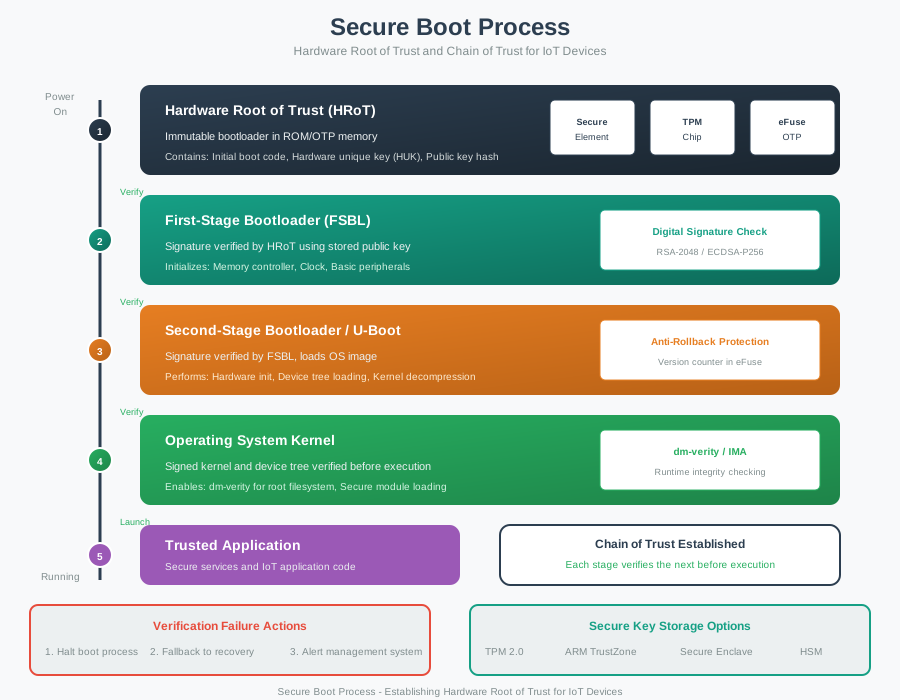
Read Figure 16.3 from the hardware root to the first bootloader, onward to later boot code, and finally to the signed kernel. Each stage accepts the next only after signature and version policy succeed, so a valid transport download cannot bypass authorization or anti-rollback. This chain connects firmware distribution to the chapter’s end-to-end rule: trust belongs to the signed object and verifier, not merely to the channel that carried it.
Mechanisms and Where Protection Ends
Common Pitfalls
Follow the sequence from decision to evidence. First, Treating session security as end-to-end. TLS and DTLS protect a hop; a broker that terminates the session reads plaintext, so the payload is not protected past it. Next, Encrypting without authenticating identity. A secure channel to an unverified peer can be a secure channel to an attacker. Next, Forgetting freshness. An authenticated message can still be replayed without a counter, sequence number, or replay window. Next, Trusting the network path for firmware. HTTPS or VPN delivery does not replace device-side signature, version, and recovery checks. Finally, Signing one update path only. Local recovery, factory, and alternate-slot images must follow the same signing and anti-rollback rules.
Under-the-Hood Knowledge Check
At this depth, secure communication is a set of independent guarantees chosen by how far protection must travel: session security for a single hop, object security for messages that cross intermediaries, a network tunnel for path access, and signed firmware for code that must be authorized before it runs. Each is only as strong as the endpoint identity, freshness, forward secrecy, and key custody behind it. A trustworthy review records where protection ends, not just that the traffic is encrypted.
16.2 Protect a Pump Command and Its Update
This section: Protect a Pump Command and Its Update — A remote pump receives a START command today and new firmware next month.
A remote pump receives a START command today and new firmware next month. Figure 16.1 distinguishes data moving across the network from code resting before installation. Figure 16.2 maps communication protection to the link and session, while Figure 16.3 follows the firmware from release signing through device verification and controlled activation.
16.2.1 Predict the Secure Handoff
- Predict: Transport encryption ends at a gateway that forwards plain pump commands. Is the device-side handoff still confidential? Check: No. Secure communication must cover every boundary where the command needs protection.
- Predict: The firmware download uses an encrypted channel but the pump never verifies a release signature. Can the pump prove who authorised the image? Check: No. Channel protection and firmware authenticity answer different questions.
16.3 Summary
This section: Summary — Secure communication is a boundary decision: name how far protection must travel, and who may read the data on the way, before naming a protocol.
Secure communication is a boundary decision: name how far protection must travel, and who may read the data on the way, before naming a protocol. Session security (TLS over TCP, DTLS over UDP) protects a connection between two endpoints; an intermediary that terminates it sees plaintext, so it is hop-by-hop.
Object security (COSE, and OSCORE for CoAP) protects the message itself, so it stays protected end-to-end past brokers and proxies. The central decision: a payload that must stay confidential past a broker needs object security, not just TLS to the broker.
A VPN or IPsec tunnel protects a network path between gateways or sites but still terminates at the tunnel endpoints, where identity and authorization are still required. A secure channel still needs authenticated identity and replay protection; forward secrecy from ephemeral key agreement protects past sessions if a long-term key later leaks.
Firmware updates need a signed manifest and image the device verifies before install, and before boot where supported, with anti-rollback and a verified recovery path; the signing private key stays off-device.
Choose a secure-communication control by how far protection must travel: session security for one hop, object security for messages that cross intermediaries, a tunnel for a network path, and signed firmware for code. Encryption to the wrong endpoint, or only as far as the broker, is not the protection the data needs.
16.4 See Also
This section: See Also
Encryption Principles & Crypto Basics
Review the primitives, AEAD, signatures, and key lifecycle, behind every channel and update path in this chapter.
TLS / DTLS Transport Security
Go deeper on the handshake and record mechanics of the session security used over TCP and UDP.
Encryption Security Properties
Separate confidentiality, integrity, authenticity, and freshness, the goals each mechanism here must satisfy.
Key Management for IoT Devices
Expand the provisioning, rotation, and revocation that keep these credentials and signing keys trustworthy.
Find help
3 reviewed answers.
Where should I start in a module?
Open the module page from the sidebar to see its chapters in order. Use the module map to return to a topic you need.
Modules and pathsReviewed
What can I try when a project does not work?
Check the symptom, then work through the diagnostic steps. Keep the error message and the smallest example that reproduces it.
When you are stuckReviewed
How do interactive examples work?
Use the interactive guide to check how examples and simulations work before changing your project.
Interactive examples guideReviewed