18 Secure Data in IoT Protocols
More
Depth: Practitioner
Progress saves as you read. Mark sections complete as you go; your progress appears in the sidebar.
A smart lock can send encrypted messages while still accepting a replayed old command or exposing a key to the wrong service. Transport protection covers a path; protecting the data also requires identity, authorization, freshness, storage rules, and visible failure. The protocol claim must name which layer supplies each property.
A protocol is a set of communication rules, including message formats and exchange order. A payload is the application data carried in a message, and telemetry means device measurements. A gateway is a device that joins networks, while a broker is a service that routes messages. Transport Layer Security is the session protection called TLS.
18.1 Follow Protection From Sensor Record to Consumer
This section: Follow Protection From Sensor Record to Consumer — Read Figure 18.1 from device secure data through link or network transport, broker or gateway, service, and stored record.
Read Figure 18.1 from device secure data through link or network transport, broker or gateway, service, and stored record. Mark where plaintext exists and which secure identity is authenticated at each boundary. A TLS session to a gateway may protect radio or IP transit while the gateway can still read and transform the payload.
Figure 18.2 then binds protocol, endpoint identities, cipher or protection profile, secure key source, authorization rule, freshness method, retained secure data, failure behavior, and evidence. Read the denied case as carefully as the successful one. A secure-data record is incomplete if it only proves that an allowed secure protocol message arrived.
Use a door secure command with identifier cmd-884, target D4, action unlock, issue time, expiry, and nonce. The client authenticates the service, the service authorizes its caller for D4, and the device verifies integrity and freshness. If cmd-884 is captured and replayed after acceptance, the stable identifier or nonce state should reject a second unlock. Encryption without freshness would conceal the replayed secure command but not stop it.
Telemetry needs related but different treatment. A temperature record may require device authentication and integrity, while only authorized analytics roles can read it. The system should preserve observation time and reject altered units. At rest, encrypt sensitive stores, limit retention, and keep keys separate from exported secure data where possible.
Secure key lifecycle is part of the protocol design. Provision unique credentials, rotate them under a tested procedure, revoke a lost device, and recover from an interrupted update. A fleet-wide shared secret makes one extracted secure key a fleet boundary failure. Logs should identify credential versions without printing secret material.
Predict security checks. Send a valid cmd-884 and expect one authorized action. Replay it and expect denial. Change the payload after protection and expect integrity failure. Use a valid secure identity without permission for D4 and expect an authorization denial. Expire a credential and verify that the device does not silently fall back to an unprotected route.
Choose end-to-end protection where intermediaries do not need content, and terminate protection deliberately where a gateway must translate or inspect. At every termination point, name the service secure identity, authorized operations, plaintext exposure, secure key store, logging, and next protected hop. A chain of individually encrypted links can still have one highly trusted middle system.
Failure must be secure and observable. An expired certificate should not make the device accept any certificate, switch to plaintext, or ignore time without a bounded recovery rule. A locked-out fleet is also harmful, so test credential renewal before expiry, clock loss, partial rollout, and rollback. Use a narrow bootstrap trust path rather than a permanent bypass.
Minimize logs. Retain identifiers, decisions, versions, and error categories needed for investigation, but do not copy keys, authorization headers, or complete sensitive payloads. Test log access and deletion alongside secure protocol message security because an encrypted transport cannot protect an overexposed diagnostic store.
Include clock behavior in secure-message tests. Freshness based on time can fail when a device reboots without a trusted clock. A counter or challenge may provide another basis, but its reset and storage rules must be tested. Force the clock backward and confirm that the lock neither accepts an old secure command nor becomes permanently unusable without a visible recovery path.
18.2 Start With the Story: The Lock Was Real, but the Rule Was Missing
This section: Start With the Story: The Lock Was Real, but the Rule Was Missing — Picture a heat sensor that uses an encrypted path to report a reading.
Prove Who May Do What After the Lock Opens
Picture a heat sensor that uses an encrypted path to report a reading. The lock symbol appears, but the same identity can also send a shutdown command. Protected travel did not prove that the sender had the right permission.
Telemetry is the device reading and status inside a protected message. A protocol is an agreed set of message and timing rules. A payload is the useful data inside a message. Message Queuing Telemetry Transport (MQTT) carries named messages through a service. Transport layer security is protection for data moving across a network. Transport Layer Security (TLS) protects a connected path. Datagram Transport Layer Security (DTLS) protects message-based paths. None of these names alone states who may read, send, or change a resource.
Trace one allowed flow. Record the device identity, credential, permitted topic or resource, expected payload, decision, and denied-action log. Then use the wrong identity, alter the payload, repeat an old message, remove permission, and restart the secure session. Check that denial is closed and visible.
This exercise cannot prove every product rule or secret-handling step. The deeper sections show how identity, channel protection, permission, input checks, key life, and monitoring combine into a defensible data-flow record.
A temperature sensor publishes through an encrypted MQTT connection. The dashboard shows the padlock, so the team assumes the flow is safe. During review, the same credential can publish to a command topic and subscribe to other devices’ readings. The channel was protected, but the rule that limits what that identity may do was missing.
This chapter uses that small mistake as the starting point. Review one flow at a time: who connects, which certificate or credential proves it, which topic or resource is allowed, which payload shape is accepted, and which denied action is logged. TLS or DTLS protects the path, but identity, authorization, validation, and monitoring turn the protocol into a defensible IoT control.
18.3 Overview: A Protocol Name Is Not a Security Claim
This section: Overview: A Protocol Name Is Not a Security Claim — It is tempting to read "the device uses MQTT over TLS" as "the device is secure." It is not.
It is tempting to read "the device uses MQTT over TLS" as "the device is secure." It is not. A protocol is a way to move messages; whether those messages are safe depends on how the deployment is configured. Real protocol security comes from several independent layers working together, and each one answers a different question.
The layers are transport protection (is the message protected as it crosses the network?), authentication (who is connecting?), authorization (what is that identity allowed to do?), message validation (is the content well-formed and expected?), and operations evidence (can operators see what happened?). Collapsing these into one claim is the most common protocol-security mistake.
A good review sentence therefore names the exact flow and the layer being claimed. "Temperature sensor A publishes to topic building/4/temp through the broker using TLS with client certificates, and the broker policy denies other publish or subscribe paths" is reviewable. "MQTT is secure" is not. The first sentence can be tested with certificate validation, topic-policy checks, denied-action logs, and malformed-message handling; the second cannot.
If you only need the intuition, this layer is enough: encryption protects the channel, not the rules. A perfectly encrypted connection can still let the wrong device send the wrong command if authorization and validation are missing.
Think of a sensitive parcel sent in an armored, locked van. The armor (transport encryption) stops people on the road from reading or altering the parcel. But you still need to check the sender's identity (authentication), deliver only to the right recipient (authorization), inspect the parcel for something dangerous (validation), and keep a delivery log (monitoring). The armored van is one layer, not the whole postal system.
Before treating a protocol name as a security conclusion, inspect the diagram in Figure 18.1. It separates transport protection, endpoint identity, authorization, message validation, and operations evidence because each layer answers a different review question.
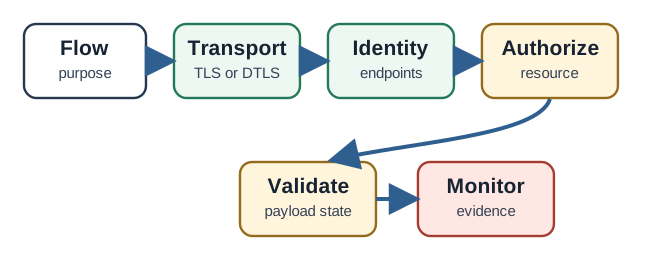
Rather than scanning Figure 18.1 as decoration, interrogate Transport, Authorize, and Monitor in turn. Their distinct roles are why protocol security is layered: transport protection, endpoint identity, authorization, message validation, and operations evidence each answer a different question. The result ties Overview: A Protocol Name Is Not a Security Claim to a named test or record later in the narrative.
The One-Minute View
Encryption is one layer
TLS and DTLS protect the channel against reading and tampering. They do not decide who may act across it.
Identity is not permission
Authentication says who connected. Authorization says what they may publish, subscribe to, read, or invoke.
Validate and watch
Reject malformed or unexpected messages, and keep logs of denied actions, so a misconfiguration cannot fail silently.
Beginner Examples
Taken together, these checks make the section reviewable. That order prevents a control name from being treated as proof and connects the visual to the chapter's evidence-led review sequence.
Overview Knowledge Check
If you can separate the channel from the rules, you have the core idea. Continue to Practitioner to run a per-flow review with evidence.
18.4 Practitioner: Review One Data Flow at a Time
This section: Practitioner: Review One Data Flow at a Time — Protocol security is reviewed per data flow, not per product.
Protocol security is reviewed per data flow, not per product. For each flow, identify the endpoints and purpose, then walk the layers in order and attach evidence. The goal is configuration-specific findings, never the blanket claims "uses TLS, therefore secure" or "uses MQTT, therefore unsafe."
Keep the evidence record narrow enough that another reviewer could repeat it. Record the producer identity, broker or gateway, destination topic or resource, transport mode, credential type, allowed operation, denied operation, validation rule, and log source. Then state the residual risk in the same narrow scope. For example, "telemetry publish is accepted for this device identity, but wildcard subscribe is denied and logged" is stronger than "broker access looks locked down." The wording matters because protocol controls often fail at boundaries: retained messages, wildcard topics, shared credentials, unauthenticated observe relationships, oversized payloads, and policy changes made outside the deployment record. When one layer depends on another, name that dependency instead of assuming it silently holds.
The Review Sequence
MQTT and CoAP Ask Different Questions
MQTT (broker model)
Are anonymous connections restricted? Does each device have a distinct identity? Which topics may each identity publish to and subscribe to? Are broad wildcard subscriptions limited? Are retained and last-will messages reviewed for the real data flow?
CoAP (request-response over UDP)
Is the appropriate security mode in place, such as DTLS or object security? Which resources and methods may each identity use? Are observe relationships authorized and cleaned up? Are responses bounded so the endpoint is not usable as a traffic reflector?
The Layer-by-Layer Evidence Record
Before recording a conclusion for The Layer-by-Layer Evidence Record, inspect the mechanism behind it. In Figure 18.2, the central claim is that the record follows a message from identity through broker or gateway policy, validation, destination authorization, and monitoring evidence.
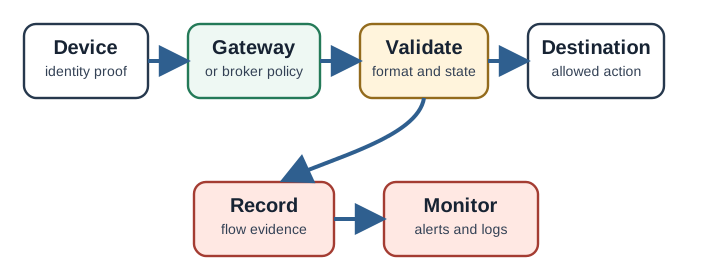
Inspect Figure 18.2 by testing the hand-off from Gateway to Destination, then checking what alerts and logs preserves or reports. The hand-off gives substance to the record follows a message from identity through broker or gateway policy, validation, destination authorization, and monitoring evidence. It also links The Layer-by-Layer Evidence Record to the operational evidence expected later.
Practitioner Knowledge Check
If you can review a flow layer by layer and keep claims configuration-specific, you can use this in practice. Continue to Under the Hood for what each mechanism actually guarantees.
18.5 Under the Hood: What Each Mechanism Really Guarantees
This section: Under the Hood: What Each Mechanism Really Guarantees — The deeper layer explains the mechanisms behind the layers so you can tell a real guarantee from an assumed one.
The deeper layer explains the mechanisms behind the layers so you can tell a real guarantee from an assumed one. The recurring theme is precision: each mechanism provides specific properties and explicitly does not provide others.
TLS, DTLS, and Why the Peer Check Matters
TLS provides confidentiality and integrity for a connection and authenticates at least the server, and both parties when mutual authentication is configured. DTLS provides the same kinds of protection for datagram transports such as the UDP that CoAP commonly uses. The subtle point is that encryption without verifying the peer's identity protects only against a passive eavesdropper. If a device negotiates an encrypted channel but never validates the certificate or key of the other side, an active attacker can sit in the middle, terminate the encryption on both sides, and read or alter everything. So a transport claim has two parts: the channel is protected, and the peer is verified.
Why Plaintext and Weak Ciphers Are Dangerous
A plaintext path exposes unprotected data to reading and, unless a separate message-level security mechanism is used, to modification, replay, and impersonation. Obsolete or weak cipher suites and deprecated protocol versions are dangerous for a related reason: an attacker who can influence the negotiation may force a downgrade to the weakest option both sides will accept. Defensive configuration disables known-weak ciphers and old versions so a downgrade has nowhere to land.
Wi-Fi's Own Downgrade History: WEP to WPA3
Wi-Fi's link-layer encryption is a real-world case of exactly this downgrade pattern, one layer below TLS or DTLS. WEP (1997) tried to hide data by XOR-ing it with an RC4 keystream seeded from a 24-bit initialization vector; because that IV was short and sent in the clear, an attacker who collected enough traffic could recover the key within minutes. WPA's TKIP fix kept RC4 but added per-packet keys and periodic rekeying, which was stronger but still had a 64-bit message-integrity check that could be forced open in under 20 minutes. WPA2 replaced RC4 with AES and moved authentication to a pre-shared key or an EAP-based enterprise exchange, and held up for roughly fifteen years before the 2017 KRACK attack showed that a sound protocol can still fail in implementation: a replayed handshake message could force some clients, notably on Linux and Android, to reinstall an all-zero session key. WPA3-Personal uses Simultaneous Authentication of Equals, a password-authenticated key exchange that derives a fresh session key and resists passive offline password guessing without an enterprise authentication server; a device without a keyboard still needs a secure way to receive its Wi-Fi credential.
The review lesson is the one this chapter already applies above the link layer: name the exact mechanism in use, such as "WPA2-PSK" or "WPA3-SAE," instead of the unfalsifiable claim "the network is encrypted," and treat the Wi-Fi credential as one more authentication layer that needs its own evidence. A device that trusts its Wi-Fi link as a substitute for the peer verification and per-device identity this chapter requires above it has not removed that requirement, only hidden it one layer down.
Authentication Versus Authorization, Precisely
Authentication answers "who is this?" using credentials such as certificates, pre-shared keys, or tokens. Authorization answers "what may they do?" using a policy. In MQTT this policy is usually per-topic publish and subscribe rules; in CoAP or HTTP-style APIs it is usually per-resource and per-method rules. The two are independent: a correctly authenticated identity with no authorization policy can do anything the server exposes. This is why per-device identity matters for both attribution and revocation: shared credentials make it impossible to revoke one device or to prove which device sent a message.
Replay, Freshness, and Gateway Trust
Even on a protected channel, an attacker who can capture and resend a valid message may cause an action to repeat. DTLS includes anti-replay handling at the record level, but security-relevant commands often also need application-level freshness, such as sequence numbers, timestamps within a window, or nonces, so a re-sent command is recognized and refused. A second subtle boundary is the gateway. When a gateway terminates a secure channel, the message becomes plaintext inside it, and downstream systems must not assume end-to-end identity unless it is re-established. For protection that survives intermediaries, some CoAP deployments use object security that protects the message itself rather than only the hop.
Freshness defends against replay, not relay. A nonce or timestamp check proves a message is new; it does not prove the two endpoints are actually close together. In a relay attack, two colluding relay devices forward a genuine, still-fresh challenge and response between a legitimate credential and a distant reader in real time, so every freshness check still passes — the same weakness that lets a relay pair unlock a car or approve a contactless payment while the real key or card stays in the owner's pocket. Any IoT design that reuses proximity-based unlock or pairing logic should ask a different review question than "does the challenge expire in time?" It should ask whether the protocol also bounds the round-trip time or otherwise proves physical proximity. Distance-bounding and a second corroborating factor are the established defenses; a freshness window alone provides neither.
Common Pitfalls
Under-the-Hood Knowledge Check
At this depth, secure IoT protocols are a stack of precise guarantees: a protected and verified channel, per-device identity, scoped authorization, validated content, freshness against replay, and clear gateway trust boundaries. A trustworthy review names which guarantee each mechanism provides and which it does not.
18.6 Summary
This section: Summary — For each flow, check the protected link and device identity.
For each flow, check the protected link and device identity. Test scoped rights, message validation, replay defense, and logs.
Protocol security review should cover a protected and verified channel, per-device identity, scoped authorization, message validation, replay protection, and operational logging, each tied to evidence for the specific data flow.
18.7 See Also
This section: See Also
Secure Data Software Vulnerabilities
Connect protocol controls to the input handling and parsing behind each endpoint.
IoT Security Network Segmentation
See how segmentation and gateways contain flows when devices cannot enforce every control locally.
IoT Security Fundamentals
Revisit the asset, boundary, and evidence model that every protocol layer serves.
Find help
3 reviewed answers.
Where should I start in a module?
Open the module page from the sidebar to see its chapters in order. Use the module map to return to a topic you need.
Modules and pathsReviewed
What can I try when a project does not work?
Check the symptom, then work through the diagnostic steps. Keep the error message and the smallest example that reproduces it.
When you are stuckReviewed
How do interactive examples work?
Use the interactive guide to check how examples and simulations work before changing your project.
Interactive examples guideReviewed