3  IoT Security Fundamentals
3.1 IoT Security Fundamentals

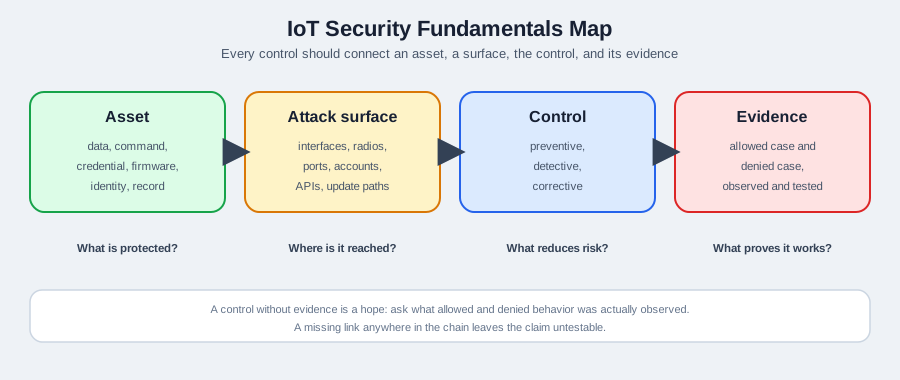
This chapter introduces the foundational concepts of IoT device and network security, including the seven-layer security model, Cisco’s critical requirements, and why IoT security differs from traditional IT security.

What is IoT Device and Network Security? IoT device and network security involves protecting both individual IoT devices (sensors, cameras, smart appliances) and the communication networks they use from unauthorized access, attacks, and compromise. Device security focuses on hardening the device itself through secure boot, firmware signing, and tamper detection, while network security protects data as it travels between devices, gateways, and cloud services using encryption, firewalls, and network segmentation.

Why does it matter? IoT devices are particularly vulnerable because they often have limited processing power for security features, remain deployed for 10-20 years without updates, use default passwords, and are physically accessible in public spaces. A single compromised IoT device can serve as an entry point to attack entire networks—the 2016 Mirai botnet exploited default credentials on 600,000+ IoT devices to launch massive DDoS attacks taking down major websites. Securing IoT requires protecting both the device hardware and the network infrastructure.

Key terms: | Term | Definition | |——|————| | Secure Boot | Cryptographic verification that firmware hasn’t been tampered with before device starts up | | Hardware Trojan | Malicious modification to integrated circuits during manufacturing enabling backdoor access | | Network Segmentation | Isolating IoT devices into separate network zones (VLANs) preventing lateral movement of attacks | | Side-Channel Attack | Extracting secrets by analyzing physical properties like power consumption or electromagnetic emissions | | Defense in Depth | Layering multiple independent security controls so compromise of one doesn’t breach entire system | | TPM (Trusted Platform Module) | Dedicated hardware chip providing secure key storage and cryptographic operations |

3.2 Learning Objectives

By the end of this section, you will be able to:

  • Diagram the seven-layer IoT security model and map controls to each layer
  • Evaluate Cisco’s 10 critical IoT security requirements against real deployment scenarios
  • Analyze why IoT security differs from traditional computing across resource, lifespan, and scale dimensions
  • Contrast the two pillars of IoT security – device protection and network protection – and justify why both are required
In 60 Seconds

IoT security fundamentals establish the principles and vocabulary for protecting connected devices, their communications, and the data they generate — starting from the premise that billions of resource-constrained devices create an attack surface unlike anything in traditional enterprise IT. The CIA triad (Confidentiality, Integrity, Availability) provides the organising framework, but IoT adds unique challenges: physical accessibility, constrained resources, long deployment lifetimes, and safety-critical consequences.

3.3 Getting Started (For Beginners)

3.3.1 What is Device & Network Security? (Simple Explanation)

Analogy: Think of IoT security as “protecting your home AND the roads leading to it”.

Security Type Home Analogy IoT Equivalent What It Protects
Device Security Locks on doors, alarm system, safe Secure boot, firmware encryption, tamper detection The device itself from being hacked or physically compromised
Network Security Gated community, security checkpoint, traffic cameras Firewalls, VPNs, encrypted Wi-Fi The communication between devices from being intercepted or hijacked

Both are needed!

  • Strong locks (device security) are useless if criminals can intercept your key while you’re transmitting it (weak network security)
  • Encrypted network traffic is useless if the device itself is compromised and leaking data

3.3.2 Why Is IoT Security Harder Than Traditional Computer Security?

Challenge Traditional Computer IoT Device Why It’s Harder
Updates Windows Update every week Firmware update once a year (or never) IoT devices may be inaccessible (buried in walls, on poles, in vehicles)
Lifespan Replace every 3-5 years Operate 10-20 years Security standards from 2025 may be obsolete by 2035
Resources 16GB RAM, 8-core CPU 64KB RAM, single-core CPU Not enough power to run advanced security algorithms
Physical Access In your home/office On light poles, in factories, outdoors Attackers can physically access and tamper with devices
Diversity Windows/Mac/Linux 100+ different OSes and protocols No standard security model across all devices
Scale 1-10 devices per person Billions of devices globally One vulnerability = millions of devices hacked

3.3.3 Real-World Device Security Failures

3.3.3.1 The Jeep Hack: Network Security Bypass (2015)

What happened:

  • Researchers hacked a Jeep Cherokee from 10 miles away while it was driving on the highway
  • They exploited the Uconnect entertainment system (the screen in the dashboard)
  • The system had a cellular connection for features like navigation and music streaming

The vulnerability:

  • No authentication required to send commands to the car over the internet
  • No network segmentation (entertainment system could control brakes and steering)
  • No firmware verification (attackers uploaded malicious code)

Result:

  • 1.4 million vehicles recalled
  • Proof that network security (internet → car) and device security (entertainment system → brakes) both failed

Lesson: Even if the brakes themselves are secure, if the network path to them isn’t protected, attackers can still control them.

3.3.3.2 The Smart Lock That Could Be Opened by Anyone (2019)

Device: Certain Bluetooth smart locks

The vulnerability:

  • The lock had good encryption (AES-128)
  • BUT: The encryption key was hardcoded in the device firmware
  • Attackers could:
    1. Buy one lock ($200)
    2. Extract the firmware from the chip
    3. Reverse-engineer the hardcoded key
    4. Unlock ALL locks of that model using the same key

Lesson: Device security (protecting the key stored on the device) is just as important as network security (encrypting the unlock command).

Network Security is like having guards, secret codes, and safe tunnels to protect your messages!

Imagine you want to send a secret note to your best friend across the playground. Bad kids might try to: - Read your note (spying!) - Change your note to say something different (trickery!) - Pretend to be you and send fake notes (impostor!)

Network security is like having special ways to keep your messages safe from all these sneaky tricks!

3.3.4 The Sensor Squad Adventure: The Mystery of the Stolen Password

It was a peaceful day at Smart Home Headquarters until Sammy the Sensor noticed something strange. “Someone is trying to guess our secret password!” Sammy announced, detecting hundreds of wrong password attempts.

“Oh no!” worried Lila the LED, flickering nervously. “What if they get in and turn all the lights on and off? Or mess with the thermostat?” The team knew they needed to protect their home network from these digital villains.

Max the Microcontroller sprang into action. “First, let’s build a FIREWALL!” Max explained this was like a big wall with a guard at the gate. “The firewall will only let in messages from people we trust, and block all the strangers trying to sneak in.” Within seconds, the bad password attempts stopped - the firewall was working!

But Bella the Battery had another idea. “What about when we need to send messages outside? We should use ENCRYPTION!” Encryption was like writing in a secret code that only friends could read. Even if someone caught the message, it would look like gibberish: “HELLO” became “X7#mK9!” to anyone without the secret key.

“And one more thing,” added Sammy the Sensor wisely. “Let’s put our IoT devices on a separate network - like having a special playground just for smart devices!” This way, even if a sneaky device got hacked, it couldn’t reach the important family computers.

The Sensor Squad had built three layers of protection: a firewall guard, secret encryption codes, and separate network playgrounds. The hackers gave up and the Smart Home stayed safe! The end!

3.3.5 Key Words for Kids

Word What It Means
Firewall A digital guard that blocks bad messages and only lets good ones through
Encryption Turning your message into a secret code that only your friends can read
Password A secret word that proves you’re really you
Hacker Someone who tries to break into computers without permission
Network The invisible roads that messages travel on between devices
Segmentation Splitting networks into smaller, safer sections (like separate playgrounds)

3.3.6 Try This at Home!

Create Your Own Secret Code!

  1. Write the alphabet: A B C D E F G H I J K L M N O P Q R S T U V W X Y Z
  2. Below it, write it shifted by 3: D E F G H I J K L M N O P Q R S T U V W X Y Z A B C
  3. Now encode a message! “HELLO” becomes “KHOOR”
  4. Give your friend the code key and see if they can decode it!

This is how real encryption works - computers use much more complicated codes, but the idea is the same. Without the secret key, the message is just scrambled letters! That’s why even if hackers catch your message, they can’t read it!

Diagram illustrating a Man-in-the-Middle (MITM) attack on an IoT fitness tracker ecosystem: A fitness tracker communicates via BLE (Bluetooth Low Energy) to a tracker mobile app on a smartphone. The smartphone connects through Wi-Fi to a MITM Proxy device which intercepts all traffic. The MITM Proxy uses a fake CA Certificate to decrypt HTTPS traffic before forwarding it to the Internet and ultimately to the Remote Server. This shows how attackers can intercept and modify data between IoT devices and cloud services.

MITM Attack on IoT Fitness Tracker

Source: University of Edinburgh - IoT Systems Security Course

This diagram shows a Man-in-the-Middle (MITM) attack against a typical IoT wearable ecosystem:

  1. Fitness Tracker → BLE → Mobile App: First communication hop (potentially encrypted)
  2. Mobile App → Wi-Fi → MITM Proxy: Attacker intercepts Wi-Fi traffic
  3. MITM Proxy → Internet → Remote Server: Attacker forwards (and potentially modifies) traffic

Attack Requirements:

  • Attacker installs fake CA certificate on victim’s phone
  • MITM proxy decrypts TLS traffic, reads/modifies data, re-encrypts
  • Victim sees valid HTTPS but all data is visible to attacker

Protection: Use certificate pinning in mobile apps to reject fake certificates.

3.3.6.1 The Pacemaker That Could Be Hacked (2017)

Device: St. Jude Medical pacemakers (465,000 implanted patients)

The vulnerability:

  • Pacemakers communicated wirelessly with doctors’ programmers for adjustments
  • No authentication (any device could send commands)
  • No encryption (commands sent in plaintext)
  • No access control (couldn’t limit who could program the device)

Potential attack:

  • Hacker could send commands to:
    • Drain the battery
    • Deliver incorrect shocks
    • Stop pacing entirely

Result:

  • FDA recall for firmware update (465,000 patients)
  • Patients had to visit clinics for wireless firmware updates to add encryption

Lesson: Medical IoT devices need rigorous, life-safety-grade security because lives depend on them.

From Theory to Practice

Each of these three real-world failures maps to a specific defensive technique:

Jeep Hack → Network Segmentation. The entertainment system could send CAN bus commands to the braking ECU because there was no boundary between infotainment and safety-critical networks. The fix is straightforward: place safety-critical controllers on an isolated network segment with a gateway that only allows whitelisted, authenticated commands to cross the boundary. See Network Segmentation for implementation patterns.

Smart Lock → Secure Key Storage. The hardcoded encryption key meant that compromising one device compromised all devices of the same model. The defense is per-device unique keys stored in a hardware secure element (TPM or ARM TrustZone). Even if an attacker extracts the key from one lock, it is useless against any other lock. See Cryptography for IoT for key management strategies.

Pacemaker → Mutual Authentication. The pacemaker accepted commands from any device because it performed no sender verification. The defense is mutual TLS or a challenge-response protocol where both the programmer and the pacemaker prove their identity before any command is accepted. See Authentication Methods for certificate-based device authentication.

3.4 The Two Pillars of IoT Security

3D block diagram from NPTEL showing the twelve fundamental technology pillars of IoT arranged in a grid. The blocks include: Security Privacy (highlighted as essential foundation), Future Internet, Knowledge Aggregation, Standards, Sensor Networks, Communication, Cloud Computing, Discovery Services, Nanoelectronics, Em Systems, Software, and System Integration. This visualization emphasizes that Security and Privacy is one of the core building blocks that must be present alongside networking, computing, and integration technologies for a complete IoT ecosystem. The 3D perspective shows how these pillars interconnect and support each other.

IoT Technology Building Blocks including Security/Privacy

Source: NPTEL Internet of Things Course, IIT Kharagpur - This diagram positions Security/Privacy as one of twelve essential IoT technology pillars, emphasizing that security is not an add-on but a foundational building block alongside networking, cloud computing, and embedded systems.

The network security pillar relies on cryptographic protocols to protect data in transit. The two most important protocols for IoT are TLS (for TCP-based connections like MQTT over TCP) and DTLS (for UDP-based protocols like CoAP):

TLS handshake sequence diagram showing ClientHello, ServerHello, certificate exchange, key exchange, and encrypted session establishment between IoT device and server
Figure 3.1: The TLS handshake establishes encrypted communication channels between IoT devices and servers. This multi-step protocol negotiates cryptographic parameters, authenticates endpoints, and generates session keys that protect all subsequent data exchange.
DTLS handshake for UDP-based IoT protocols showing cookie exchange, fragmentation handling, and retransmission mechanisms that adapt TLS security for unreliable transport
Figure 3.2: DTLS (Datagram TLS) adapts TLS security for UDP-based IoT protocols like CoAP. The handshake includes additional mechanisms for handling packet loss and reordering while maintaining the same cryptographic security guarantees as TLS.
Device Security + Network Security = Complete Protection
Pillar What It Protects How Example Technologies
Device Security The device itself from being compromised - Secure boot (verified startup)
- Firmware signing (authentic updates)
- Hardware encryption chips (TPM)
- Physical tamper detection
TPM 2.0, Secure Enclave, ARM TrustZone
Network Security Communication between devices - Encrypted protocols (HTTPS, TLS)
- Firewalls (block unauthorized traffic)
- VPNs (secure tunnels)
- Network segmentation (isolate devices)
WPA3 Wi-Fi, TLS 1.3, VLANs

Real-World Analogy:

  • Device Security = Locking your safe so thieves can’t steal its contents
  • Network Security = Encrypting the combination when you tell it to someone over the phone

3.5 The Seven Layers of IoT Security

IoT security is like protecting a tall building—you need security at every floor:

Layered security model diagram showing seven IoT security layers: Layer 1 Device Physical (tamper detection, secure elements), Layer 2 Device Logical (secure boot, firmware encryption), Layer 3 Communication (TLS, DTLS, network segmentation), Layer 4 Cloud (access control, encryption at rest), Layer 5 Application (input validation, secure APIs), Layer 6 Lifecycle (OTA updates, decommissioning), and Layer 7 Governance (policies, audits, compliance). Each layer builds on the one below it to provide defense in depth.
Figure 3.3: The Seven Layers of IoT Security

This view shows the specific attack vectors that threaten each security layer:

Diagram mapping specific attack vectors to each of the seven IoT security layers: physical attacks (chip probing, side-channel analysis) at the device layer, man-in-the-middle and eavesdropping at the communication layer, data breaches and API abuse at the cloud layer, injection attacks at the application layer, unpatched vulnerabilities at the lifecycle layer, and insider threats at the governance layer.
Figure 3.4: Attack Surface at Each IoT Security Layer

Understanding attack vectors at each layer helps prioritize security investments.

This view maps specific security technologies to each layer:

Diagram mapping specific defense technologies to each IoT security layer: physical tamper detection and secure elements at the device layer, TLS 1.3 and DTLS at the communication layer, IAM and encryption at rest at the cloud layer, WAF and input validation at the application layer, OTA update mechanisms at the lifecycle layer, and security policies and audits at the governance layer.
Figure 3.5: Defense Technologies per IoT Security Layer

A defense-in-depth strategy requires security technologies at every layer.

Security must work at ALL layers:

  • Floor 1 (Devices): If a hacker steals the sensor and extracts its keys → game over
  • Floor 2 (Network): If they intercept Wi-Fi and decrypt it → they see all data
  • Floor 3 (Edge): If they hack the local server → they control all connected devices
  • Floors 4-7: Cloud, app, and business layer attacks (SQL injection, phishing, etc.)

One weak layer = entire system compromised.

3.6 Quick Self-Check Quiz

Test Your Understanding

Question 1: A smart thermostat uses WPA3 Wi-Fi encryption (strongest Wi-Fi security available). Is this system secure?

Click to reveal answer

Answer: Not necessarily! Network security (WPA3) is only ONE layer.

What else needs to be checked:

  • Device security: Is the thermostat’s firmware signed and verified?
  • Physical security: Can someone press a reset button and take over the device?
  • Application security: Does the mobile app have vulnerabilities?
  • Cloud security: Are the cloud servers secure?

Lesson: WPA3 protects your Wi-Fi network (Floor 2), but you still need security on Floors 1, 3, 4, 5, 6, and 7.

Question 2: You’re deploying 1,000 outdoor temperature sensors. They’ll be mounted on public light poles and send data via LoRaWAN. What’s the BIGGEST security concern?

Click to reveal answer

Answer: Physical security (device tampering) is the biggest concern.

Why?

  • Devices are in public, uncontrolled locations (anyone can access them)
  • Attackers can:
    • Steal devices and extract encryption keys
    • Open the case and connect to debug ports
    • Replace sensors with malicious ones
    • Install hardware keyloggers

Mitigations:

  • Tamper-evident seals (show if device was opened)
  • Tamper detection circuits (erase keys if case is opened)
  • Hardware security modules (keys stored in secure chip)
  • Unique per-device keys (stealing one doesn’t compromise all)

Lesson: If attackers have physical access, even strong encryption can be defeated.

Question 3: Which is more dangerous: a vulnerability in ONE smart lock, or a vulnerability in the Wi-Fi router that ALL smart devices connect to?

Click to reveal answer

Answer: Wi-Fi router vulnerability is more dangerous (single point of failure).

Why?

Compromised Device Impact
One smart lock Attacker can unlock that one door
Wi-Fi router Attacker can:
- Intercept ALL device traffic
- Man-in-the-middle attacks
- Access ALL devices on network
- Pivot to computers, phones, etc.

Lesson: Network infrastructure (routers, switches, access points) is a critical choke point. If the network is compromised, ALL connected devices are at risk.

Best practice: Network segmentation (put IoT devices on separate Wi-Fi network from computers/phones).

3.7 IoT Security Architecture

Time: ~15 min | Level: Intermediate | Unit: P11.C12.U01

Key Concepts

  • CIA triad: The three core security properties: Confidentiality (data accessible only to authorised parties), Integrity (data has not been tampered with), and Availability (system operates when needed) — the fundamental framework for IoT security analysis.
  • Threat actor: An individual, group, or organisation that poses a security threat to an IoT system — ranging from script kiddies exploiting known vulnerabilities to nation-state actors conducting targeted intrusions.
  • Attack surface: The sum of all potential entry points through which an attacker could gain access to an IoT system — physical ports, wireless interfaces, network services, firmware update mechanisms, and management APIs.
  • Threat landscape: The current set of active threats, attack techniques, and malicious actors targeting IoT systems, derived from incident analysis, vulnerability research, and threat intelligence.
  • Security by obscurity: A discredited approach to security relying on hiding system details rather than implementing robust controls — ineffective because attackers can discover hidden details through reverse engineering and intelligence gathering.
  • Secure by design: A development philosophy integrating security requirements, threat modelling, and security testing into the design process from the start, rather than adding security as an afterthought.

3.7.1 Cisco’s 10 Critical IoT Security Requirements

Cisco has defined 10 essential security requirements for IoT deployments. These provide a comprehensive checklist for evaluating and implementing IoT security.

# Requirement Description IoT Example
1 Physical Security Tamper-resistant hardware with intrusion detection Epoxy-sealed sensor enclosures with tamper switches
2 Device Authentication Unique identity verification for every device X.509 certificates per device, not shared credentials
3 Data Encryption Protect data in transit and at rest TLS 1.3 for MQTT, AES-256 for stored sensor data
4 Network Segmentation Isolate IoT traffic from corporate networks Separate VLANs for sensors, actuators, and management
5 Access Control Role-based permissions for users and devices MQTT topic ACLs limiting per-device publish/subscribe
6 Monitoring & Analytics Continuous visibility into device behavior SIEM integration detecting anomalous traffic patterns
7 Firmware & Software Updates Secure OTA update mechanisms Signed firmware images with rollback capability
8 API Security Protect management and data interfaces OAuth 2.0 for cloud APIs, rate limiting, input validation
9 Visibility & Control Inventory and lifecycle management of all devices Automated asset discovery and decommissioning workflows
10 Secure Development Security built into device design from the start Threat modeling during design, secure coding practices

This visualization shows security controls as concentric protective layers:

Concentric rings diagram showing defense-in-depth security architecture for IoT: innermost ring contains the protected IoT device and data assets, surrounded by successive defensive rings for device hardening, network segmentation, intrusion detection, access control, and governance policies. Attackers must breach multiple rings to reach the core assets.
Figure 3.6: Defense-in-Depth Concentric Rings

Attackers must breach multiple defensive rings to reach core assets.

Building on the IoT vs traditional IT differences discussed earlier, each gap has direct implications for Cisco’s requirements:

IoT Challenge Cisco Requirement Affected Security Implication
Infrequent updates #7 Firmware Updates Must support secure OTA with rollback capability
Limited compute #3 Data Encryption Need lightweight crypto (ChaCha20, hardware AES)
Physical exposure #1 Physical Security Tamper detection and secure elements are mandatory
10-20+ year lifespan #10 Secure Development Must plan for crypto-agility (algorithm migration)
Protocol diversity #4 Network Segmentation Protocol translation gateways need security policies
Millions of identities #2 Device Authentication Certificate-based auth with automated provisioning
Billions of endpoints #6 Monitoring & Analytics Automated anomaly detection, not manual log review

Understanding these mappings helps prioritize which of Cisco’s requirements to implement first based on your specific deployment constraints.

Diagram of the secure boot process showing ROM bootloader verifying first-stage bootloader signature, first-stage verifying second-stage, and second-stage verifying application firmware. Each stage uses cryptographic signatures stored in secure memory to ensure only authenticated code runs on the device.
Figure 3.7: Secure Boot Process - Cryptographic verification chain from power-on to application execution
Diagram of Secure Element architecture showing isolated secure processor with hardware cryptographic accelerator, secure key storage in tamper-resistant memory, and protected communication channel to main MCU. The Secure Element provides hardware-based protection for credentials and cryptographic operations.
Figure 3.8: Secure Element Architecture - Hardware-based credential protection for IoT devices
Diagram of Trusted Platform Module architecture showing Platform Configuration Registers (PCRs) for measured boot, RSA/ECC cryptographic engine, secure key hierarchy with Storage Root Key, and NVRAM for persistent secure storage. The TPM provides a hardware root of trust for IoT device security.
Figure 3.9: TPM Architecture - Hardware root of trust enabling measured boot and secure key storage

Scenario: You’re deploying 500 environmental sensors across a 10-story office building. Each ESP32-based sensor monitors temperature, humidity, and occupancy using PIR motion sensors. Sensors transmit data every 60 seconds via Wi-Fi to a central MQTT broker running on a Raspberry Pi 4 gateway.

Initial Security Assessment (7-Layer Model):

  1. Device Layer: ESP32 has 4MB flash, 520KB RAM, supports TLS 1.2
  2. Network Layer: Building Wi-Fi (WPA2-Enterprise with RADIUS authentication)
  3. Edge Layer: Raspberry Pi 4 running Mosquitto MQTT broker
  4. Cloud Layer: AWS IoT Core for data storage and analytics
  5. Application Layer: Web dashboard for facility managers
  6. Data Layer: PostgreSQL database on AWS RDS
  7. Business Layer: GDPR compliance required (occupancy = personal data)

Security Implementation (Defense in Depth):

Device Security:

  • Secure Boot: Enable ESP32’s eFuse-based secure boot. Flash the RSA-3072 public key hash to eFuse block. Bootloader verifies firmware signature on every startup using esp_secure_boot_verify_signature().
  • Firmware Encryption: Use ESP32’s flash encryption feature. AES-256 key derived from eFuse hardware random number generator. Encrypted firmware stored at 0x10000, decrypted in hardware during execution.
  • Unique Credentials: Each sensor provisioned with unique X.509 client certificate during manufacturing. Private key stored in ESP32’s encrypted NVS partition. Certificate CN format: sensor-building-A-floor-3-zone-12.

Network Security:

  • mTLS for MQTT: Configure ESP-IDF MQTT client with transport = MQTT_TRANSPORT_OVER_SSL, cert_pem (client cert), client_key_pem (private key), server_cert_pem (CA cert for broker verification). Port 8883 only, port 1883 blocked by firewall.
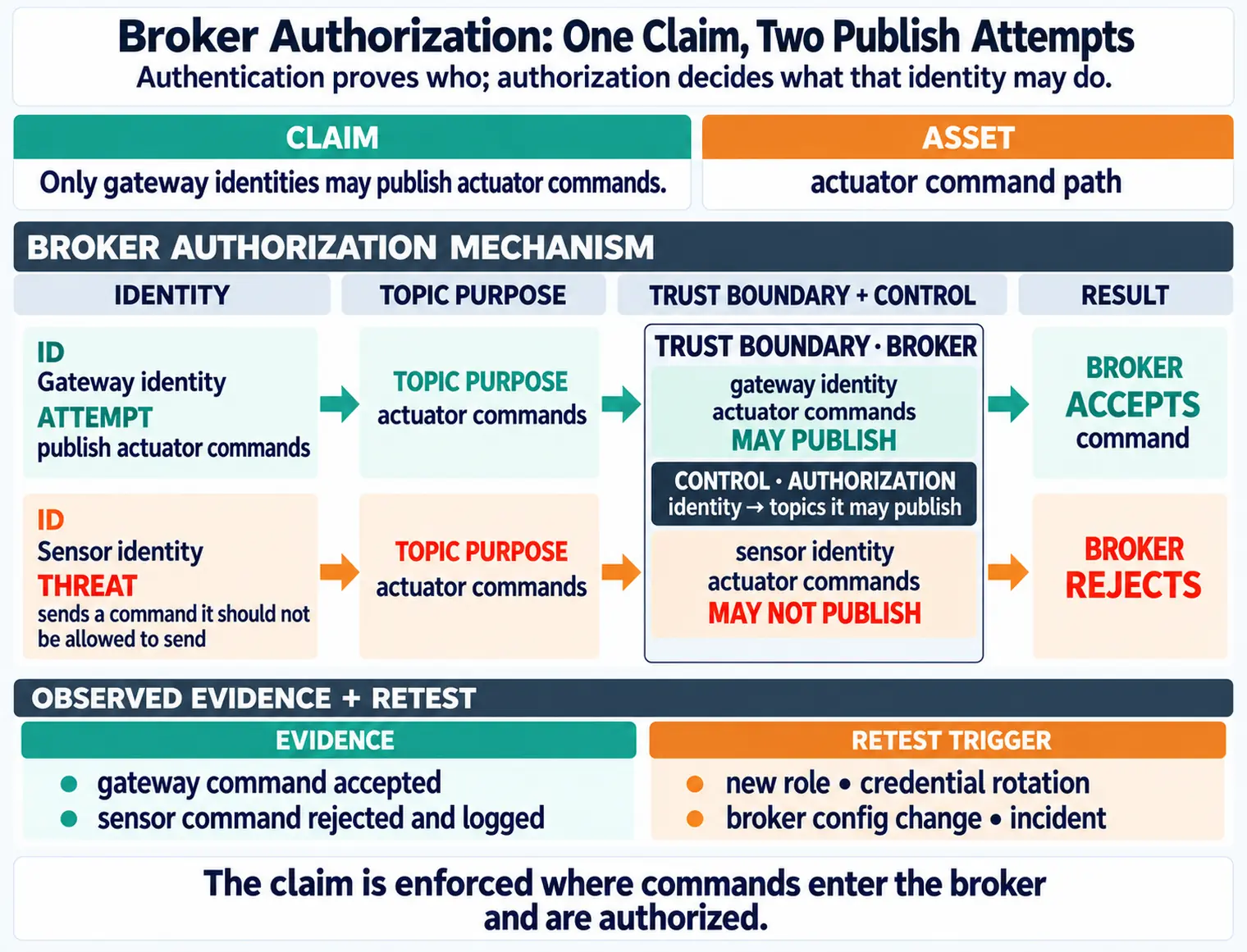
  • Topic ACLs: Mosquitto ACL file restricts each sensor to publish-only on building/floor-N/zone-N/sensor-ID/data and subscribe-only to building/floor-N/zone-N/sensor-ID/commands. Wildcard subscriptions (#, +) denied.

Edge Security:

  • Broker Hardening: Mosquitto runs in Docker container with read-only root filesystem. Persistent data on encrypted volume. allow_anonymous false, require_certificate true in config. Failed authentication attempts logged to syslog and forwarded to SIEM.
  • Gateway OS: Raspberry Pi OS Lite (minimal attack surface). Unattended-upgrades enabled for automatic security patches. SSH disabled, serial console access only via physical UART (requires building access).

Cloud Security:

  • AWS IoT Core Policies: Each device’s certificate attached to IoT policy restricting publish to building/+/+/${iot:ClientId}/data and subscribe to building/+/+/${iot:ClientId}/commands. Policy uses iot:Connection.Thing.ThingName for dynamic authorization.
  • Data Encryption: S3 buckets use AES-256 server-side encryption. RDS PostgreSQL has Transparent Data Encryption (TDE) enabled. Backups encrypted with KMS customer-managed key.

Implementation Cost Analysis:

  • Certificate generation scripts: 8 hours engineering time
  • ESP32 secure boot setup: 4 hours per firmware build pipeline
  • mTLS configuration: 2 hours per sensor type × 3 sensor types = 6 hours
  • Mosquitto ACL generation: 4 hours (scripted from sensor inventory)
  • Total: ~22 engineering hours (~$4,400 at $200/hour)
  • Per-sensor cost: $8.80 additional security overhead (amortized development cost)

Risk Reduction: Without these controls, default-credential attacks (Mirai-style) could compromise all 500 sensors. With layered defenses, an attacker must: (1) physically access a sensor to extract encrypted firmware, (2) reverse-engineer secure boot to forge signatures, (3) extract per-device certificate, (4) bypass network-level mTLS, (5) evade topic ACLs. Defense in depth increases attack cost from $0 (automated scan) to $50,000+ (nation-state capability).

Not all IoT devices require military-grade security. This framework helps select appropriate security measures based on risk profile.

Criteria Low Security (SL1) Medium Security (SL2) High Security (SL3) Critical Security (SL4)
Use Case Smart home demo, prototyping Commercial IoT (smart building) Industrial IoT (factory) Critical Infrastructure (power grid, medical)
Data Sensitivity Non-sensitive (room temperature) Moderate (occupancy patterns) High (production metrics) Critical (patient vitals, grid control)
Physical Access Controlled environment Semi-public (office) Restricted facility Highly restricted + monitored
Update Frequency Manual updates acceptable Monthly automatic updates Weekly security patches Real-time emergency patches
Lifespan 1-3 years 3-5 years 5-10 years 10-20+ years
Budget per Device $1-5 $5-20 $20-100 $100-500+
Device Authentication Pre-shared key (PSK) Device password (unique) X.509 certificate X.509 + hardware TPM
Network Encryption Optional (local only) TLS 1.2 (Wi-Fi WPA2) TLS 1.3 (mutual TLS) TLS 1.3 + VPN + network isolation
Secure Boot No Optional Required (RSA-2048) Required (RSA-4096 + TPM attestation)
Firmware Encryption No Optional Required (AES-256) Required (AES-256 + signed metadata)
Monitoring None Weekly log review 24/7 SIEM monitoring 24/7 SOC + anomaly detection
Compliance None Industry best practices ISO 27001, NIST CSF IEC 62443-4-2 SL4, FDA premarket
Example Devices DIY weather station Smart thermostat PLC controller Pacemaker, SCADA RTU

Selection Process:

  1. Assess Impact: If device compromise could cause physical harm or regulatory penalty → SL3 minimum
  2. Evaluate Lifetime: Devices deployed >5 years without updates → SL3 (forward secrecy, crypto-agility)
  3. Check Regulations: HIPAA/FDA/IEC 62443 compliance required → SL4
  4. Calculate ROI: Security cost must not exceed 10× the replacement cost of compromised device
  5. Default Rule: When uncertain, use SL2 (medium security). Over-engineering SL4 for demos wastes budget; under-engineering SL1 for commercial products creates liability.

Best For Each Level:

  • SL1: Education labs, Hackathons, Personal projects (never production)
  • SL2: Smart home products, Retail IoT, Non-critical sensors (90% of commercial IoT)
  • SL3: Industrial sensors, Building automation, Fleet tracking (critical business operations)
  • SL4: Medical devices, Power grid, Water treatment, Automotive safety (life-safety systems)

Answer these questions about your IoT deployment to receive a recommended security level.

Common Mistake: Relying Solely on Network Security While Ignoring Device Security

The Mistake: Many IoT deployments invest heavily in network security (firewalls, VPNs, TLS) but fail to implement device-level protections like secure boot, firmware encryption, or tamper detection. The reasoning is: “If the network is secure, attackers can’t reach the devices.”

Why This Fails:

  1. Physical Access Bypass: Network security assumes all attacks come over the network. In IoT, attackers often have physical access to devices. A smart meter on the outside of a house, a sensor on a light pole, or a camera in a parking lot can be physically accessed, opened, and attacked directly via UART, JTAG, or SPI interfaces.

  2. Insider Threats: Network security doesn’t protect against malicious insiders who already have authorized network access. Without device-level security, an insider can reflash firmware on a sensor from within the “trusted” network perimeter.

  3. Supply Chain Attacks: A device compromised during manufacturing or shipping arrives on your network already backdoored. Network TLS protects data in transit, but the device itself is the threat.

  4. Firmware Extraction and Reverse Engineering: Attackers extract firmware via physical debug interfaces (JTAG), reverse-engineer to find hardcoded credentials or encryption keys, then use those credentials to compromise other devices over the network. Network security can’t prevent this because the attack starts at the device level.

Real-World Example: The Verkada Camera Breach (2021)

Verkada security cameras had strong network security (HTTPS, cloud authentication) but weak device security. Attackers gained access through a support account with overly broad privileges. Because the cameras had no secure boot or firmware signing, attackers could: - Access 150,000 cameras across hospitals, prisons, schools, Tesla factories - View live feeds and historical recordings - No device-level controls prevented lateral movement once network access was obtained

The Correct Approach (Two-Pillar Security):

Pillar 1: Network Security

  • TLS 1.3 for all communications (confidentiality + integrity in transit)
  • Mutual TLS (mTLS) so devices authenticate servers and servers authenticate devices
  • Network segmentation (IoT VLAN separate from corporate network)
  • Firewall rules restricting device-to-device communication

Pillar 2: Device Security

  • Secure Boot: Devices verify firmware signature before executing (prevents malicious firmware)
  • Firmware Encryption: Flash memory encrypted with device-unique key (prevents extraction/cloning)
  • Tamper Detection: Sensors detect case opening and erase secrets (prevents physical attacks)
  • Hardware Root of Trust: TPM or Secure Enclave stores keys in tamper-resistant hardware

Why Both Are Needed: Network security protects data “on the roads between houses” (in transit). Device security protects “inside the house itself” (at rest, during boot, against physical access). A house with strong locks but windows open is insecure. A house with windows locked but doors unlocked is equally insecure. Both layers must be present.

Implementation Priority: If budget constraints force a choice, prioritize based on threat model: - Public deployments (outdoor sensors, smart city) → Device security first (physical access likely) - Data center deployments (controlled facility) → Network security first (physical access unlikely) - Commercial IoT (smart buildings, industrial) → Equal investment in both (neither can be ignored)

Failing to secure devices because “the network is protected” is the IoT equivalent of installing a vault door on a tent. The 2016 Mirai botnet compromised 600,000+ devices that had weak device security (factory-default Telnet/SSH credentials, no secure boot, no credential rotation). Even devices behind firewalls were vulnerable because the default credentials were publicly known and management interfaces were exposed. Network security alone is necessary but not sufficient.

3.8 Mathematical Foundation: Defense-in-Depth Security Investment Model

Formal Definition: In a defense-in-depth architecture with \(n\) independent security layers, the probability \(P_{breach}\) that an attacker successfully compromises the system is:

\[ P_{breach} = \prod_{i=1}^{n} p_i \]

where \(p_i\) is the probability that layer \(i\) fails to stop the attack. System security improves multiplicatively, not additively.

Worked Calculation (Smart Building with 4 Security Layers):

Given security layers with individual failure probabilities: 1. Device authentication (certificate-based): \(p_1 = 0.10\) (10% bypass rate via stolen certs) 2. Network segmentation (VLAN + firewall): \(p_2 = 0.15\) (15% bypass via misconfigurations) 3. Intrusion detection (signature + anomaly): \(p_3 = 0.20\) (20% false negative rate) 4. Application access control (RBAC): \(p_4 = 0.12\) (12% privilege escalation rate)

Single-layer deployment (authentication only): \[ P_{breach} = p_1 = 0.10 \text{ (10% breach probability)} \]

Four-layer deployment (defense-in-depth): \[ \begin{align} P_{breach} &= p_1 \cdot p_2 \cdot p_3 \cdot p_4 \\ &= 0.10 \cdot 0.15 \cdot 0.20 \cdot 0.12 = 0.00036 \text{ (0.036% breach probability)} \end{align} \]

Cost-Benefit Analysis (for 2,000-device deployment): - Layer 1 (auth): $45,000 → reduces risk from 100% to 10% - Layer 2 (segmentation): $30,000 → 10% to 1.5% - Layer 3 (IDS): $65,000 → 1.5% to 0.3% - Layer 4 (RBAC): $25,000 → 0.3% to 0.036%

Result: Four layers provide 278× better security than single layer (10% vs 0.036%), at 3.7× cost ($165k vs $45k). Each additional layer has diminishing returns but compounds overall security.

Defense-in-Depth Layer Economics: Marginal Cost per Risk Reduction

Calculate the marginal cost-effectiveness of each additional security layer for a 2,000-device IoT deployment:

Layer-by-Layer Analysis: \[\text{Marginal Effectiveness} = \frac{\Delta P_{breach}}{\Delta C_{layer}}\]

  • Layer 1 (Authentication): \(\Delta P = 90\%\), \(\Delta C = \$45K\)\(2.0\%\) risk reduction per $1K
  • Layer 2 (Segmentation): \(\Delta P = 8.5\%\), \(\Delta C = \$30K\)\(0.28\%\) per $1K
  • Layer 3 (IDS): \(\Delta P = 1.2\%\), \(\Delta C = \$65K\)\(0.018\%\) per $1K
  • Layer 4 (RBAC): \(\Delta P = 0.264\%\), \(\Delta C = \$25K\)\(0.011\%\) per $1K

Optimal Investment Threshold: Layers 1-2 provide 98.5% of total risk reduction for 45% of total cost ($75K of $165K). Diminishing returns kick in after Layer 2, but residual risk from zero-day exploits (unaddressed by Layers 1-2) justifies Layers 3-4 for critical systems. For non-critical IoT (smart building sensors), stopping at Layer 2 maximizes ROI. For critical IoT (medical devices), all 4 layers are mandatory despite lower marginal efficiency.

Why This Matters for IoT: Single-layer security (e.g., “we have a firewall”) provides false confidence. Attackers bypass individual controls routinely. Only defense-in-depth provides resilience against zero-day exploits and insider threats.

Adjust the failure probability of each security layer to see how defense-in-depth reduces overall breach risk. The combined breach probability is the product of all individual layer failure probabilities.

3.9 Concept Relationships

How the Seven Security Layers Interconnect
Layer Protects Against Requires Enables Example Failure
1. Device (Physical) Hardware tampering, chip extraction Tamper detection, secure element Trusted hardware foundation Pacemaker: no auth → anyone can send commands
2. Device (Logical) Malicious firmware, key extraction Secure boot, encrypted storage Verified code execution Smart lock: hardcoded key → all locks compromised
3. Communication Eavesdropping, MITM Encryption (TLS/DTLS) Confidential data transfer Jeep hack: no network auth → remote control
4. Cloud Data breaches, unauthorized access Access control, encryption at rest Scalable data storage Verkada: weak cloud auth → 150K cameras accessed
5. Application SQL injection, XSS Input validation, secure coding User interfaces Many IoT dashboards vulnerable to injection
6. Lifecycle Unpatched vulnerabilities OTA updates, decommissioning Long-term security 60% of IoT devices never receive updates
7. Governance Insider threats, compliance failures Policies, training, audits Risk management Target: vendor had excessive access

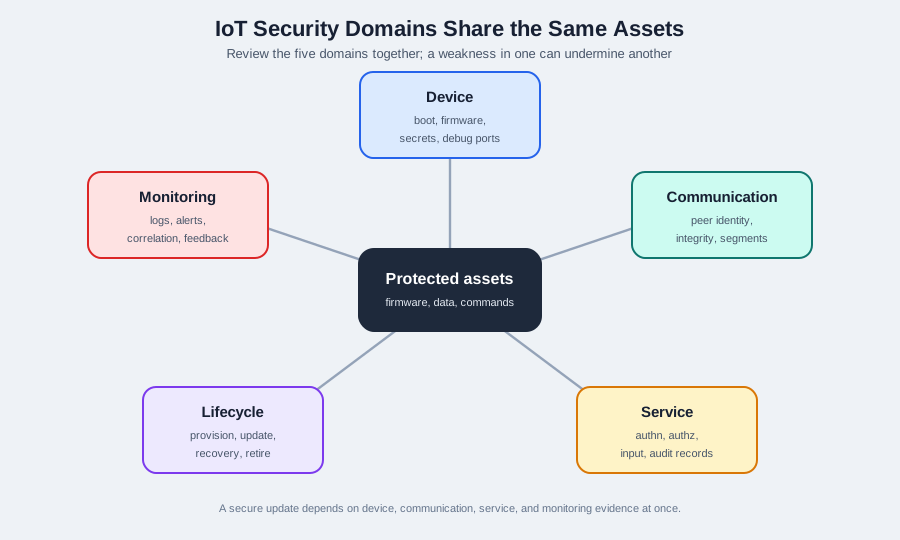
Critical Insight: Layers are dependent. Layer 3 (encryption) requires Layer 2 (secure key storage). Layer 6 (updates) requires Layer 3 (secure delivery). Breaking any one layer doesn’t necessarily breach the system (defense-in-depth), but neglecting multiple layers guarantees failure.

3.10 See Also

Foundation Concepts:

Device Security Deep Dives:

Network Security:

Lifecycle and Governance:

Common Pitfalls

NIST 800-53, ISO 27001, and similar enterprise frameworks assume general-purpose computers with full OS environments. Apply their principles but adapt every control to IoT constraints: limited memory, no display, physical accessibility, long deployment lifetimes.

Technical controls protect the device; operational controls protect the system. Poorly managed credentials, undocumented architectures, and lack of incident response plans undermine even technically excellent device security.

Security certifications (UL, CE, FCC, IEC 62443) validate a snapshot of security at certification time. Vulnerabilities discovered after certification require ongoing management through the vulnerability disclosure and patching process.

Unlike enterprise IT breaches that primarily cause data loss, IoT security failures in industrial control, healthcare, and building automation can cause physical harm. Safety and security must be co-designed, not treated as separate concerns.

3.11 Summary

This chapter introduced the foundational concepts of IoT security:

  • Two Pillars: Device security (secure boot, firmware signing, tamper detection) and network security (encryption, firewalls, segmentation) work together
  • Seven-Layer Model: Security must be implemented at every layer from physical devices to business policies
  • IoT vs Traditional IT: IoT faces unique challenges including limited resources, long lifespans, physical accessibility, and massive scale
  • Defense in Depth: Multiple independent security controls ensure that breaching one layer doesn’t compromise the entire system

3.12 Knowledge Check

3.13 What’s Next

With the fundamentals established, the next chapter explores Secure Boot and Firmware Security where you’ll learn how to implement cryptographic verification of firmware, manage signing keys, and protect the boot process from tampering.

Continue to Secure Boot and Firmware Security


← IoT Devices and Network Security Secure Boot and Firmware →