41 Security Visual Gallery
Learning Objectives
After reviewing this visual gallery, you will be able to:
- Classify IoT attack patterns from visual diagrams including device compromise, network interception, and botnet architectures
- Differentiate DDoS, man-in-the-middle, and side-channel attack flows in IoT system diagrams
- Map visual attack scenarios to the STRIDE threat model categories
- Evaluate security architecture diagrams to pinpoint trust boundaries and potential attack surfaces
Key Concepts
- Security architecture diagram: A visual representation of an IoT system’s security controls across all layers, showing how physical, network, transport, application, and management security measures collectively address the identified threat model.
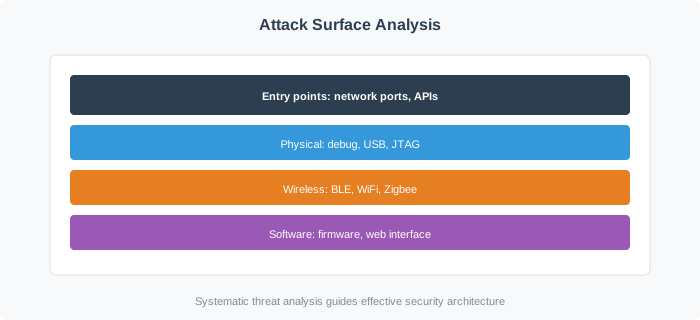
- Attack surface map: A visual inventory of all interfaces and entry points through which an attacker can interact with an IoT system, colour-coded by protection level and attack surface size.
- Risk heat map: A matrix plotting security risks by likelihood (x-axis) and impact (y-axis), providing an immediate visual prioritisation of which threats require urgent mitigation.
- Kill chain diagram: A visual model showing the sequential stages of a cyberattack overlaid on an IoT system architecture, identifying at which stage each defence mechanism can detect or block the attack.
- Threat model data flow: A Data Flow Diagram annotated with STRIDE threats at each component and flow boundary, connecting the threat model to the system architecture it analyses.
For Beginners: Security Visual Gallery
IoT security threats are the various ways that connected devices and their data can be compromised. Think of your IoT system as a house – you need to understand how burglars might try to get in before you can choose the right locks, alarms, and security cameras. This chapter helps you understand the threats so you can build effective defenses.
Sensor Squad: Attack Pictures Worth a Thousand Words!
“Welcome to the security art gallery!” Lila the LED said, dimming her lights for dramatic effect. “Each picture here shows a different type of attack on IoT systems. By studying these diagrams, you can see exactly how hackers work their way into devices.”
Sammy the Sensor pointed to the first diagram. “This one shows device compromise – an attacker gets physical access to a device, extracts the firmware, finds hardcoded passwords, and then uses those passwords to break into the entire network. You can literally follow the arrows to see each step of the attack!”
“The DDoS diagrams are my favorite,” Max the Microcontroller said. “They show thousands of compromised IoT devices all sending traffic to a single target at the same time, like a huge crowd trying to squeeze through one tiny door. The target cannot handle the flood and crashes. These visuals make it really clear why botnets are so dangerous.”
“Study these diagrams carefully and try to match each one to a STRIDE category,” Bella the Battery encouraged. “Is the attack spoofing an identity? Tampering with data? Causing denial of service? Being able to read and understand security diagrams is a crucial skill for anyone working with IoT systems.”
41.1 Visual Reference Gallery
This chapter provides visual references and diagrams for understanding IoT threats, attacks, and security concepts.
Concept Relationships
| Concept | Relates To | Nature of Relationship |
|---|---|---|
| Botnet Architecture | DDoS Attacks | Botnets coordinate distributed attacks against targets |
| Attack Diagrams | STRIDE Categories | Visuals map to specific STRIDE threat types |
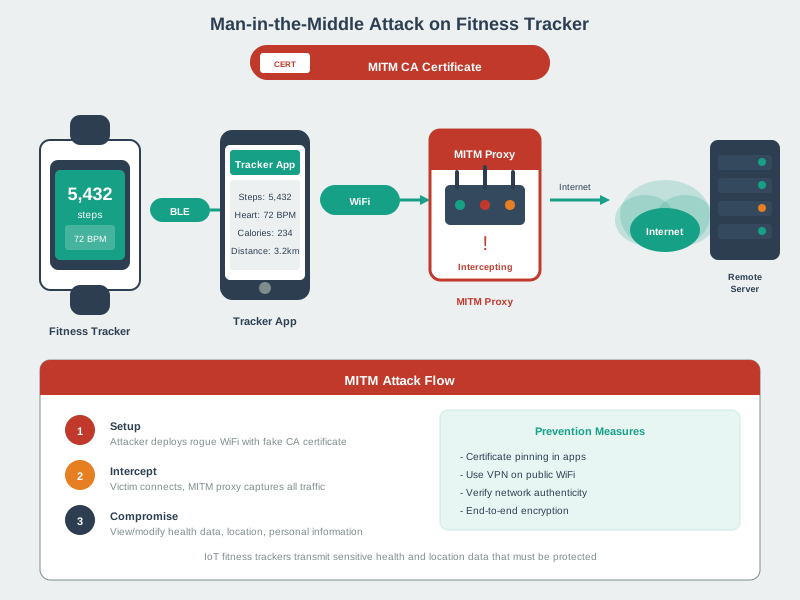
| Man-in-the-Middle | Information Disclosure | MITM attacks intercept and expose confidential data |
| Side-Channel Attacks | Hardware Security | Physical phenomena leak cryptographic secrets |
| Network Diagrams | Trust Boundaries | Visuals show where security contexts transition |
| Attack Surface Visualization | Entry Point Mapping | Diagrams identify all potential vulnerability points |
See Also
Attack Analysis:
- STRIDE Framework - Connect visuals to threat categories
- OWASP IoT Top 10 - Common attack patterns
- Attack Scenarios - Real-world breach examples
Threat Modeling:
- Threat Modeling Fundamentals - Process overview
- Worked Examples - Complete threat analyses
Practical Application:
- Interactive Tools - Attack surface visualizer
- Practice Exercises - Apply diagram analysis
- Threat Detection Lab - Hands-on attack simulation
Security Implementation:
- Device Security - Hardening techniques
- Encryption - Cryptographic defenses
41.2 Source Figures
Attack Scenario 1: Device Compromise
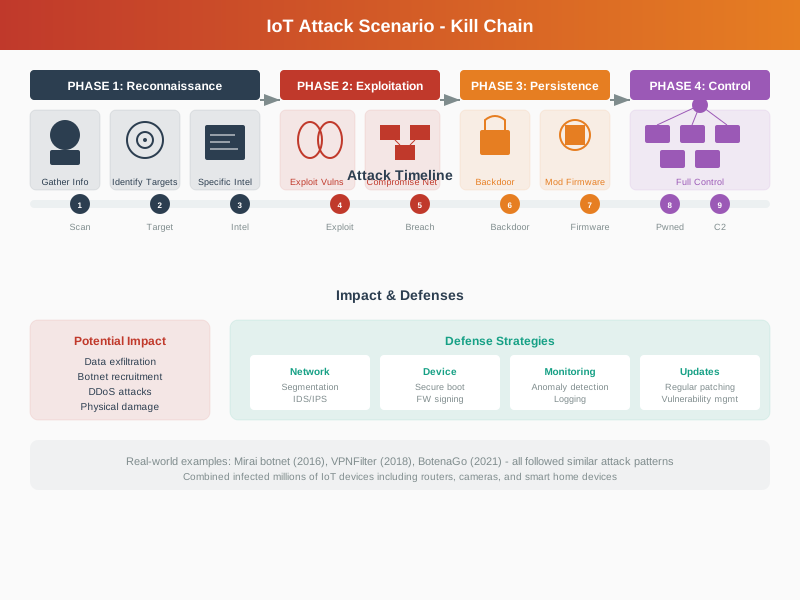
Source: CP IoT System Design Guide, Chapter 6 - Security & Privacy
Attack Scenario 2: Network Interception
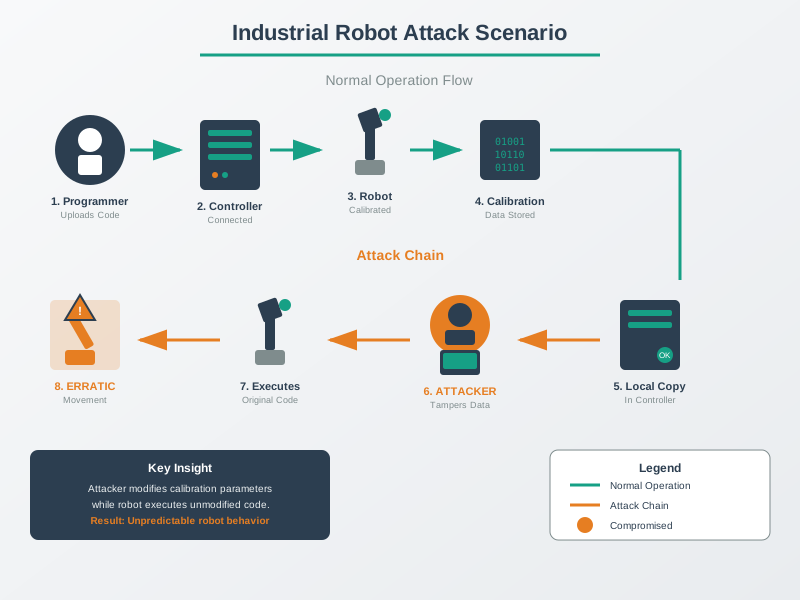
Source: CP IoT System Design Guide, Chapter 6 - Security & Privacy
Botnet Attack Architecture
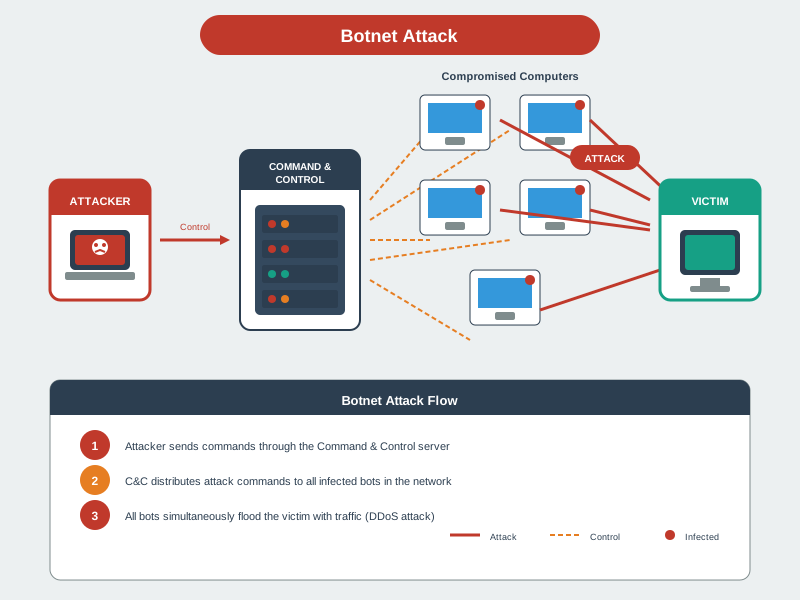
Source: CP IoT System Design Guide, Chapter 6 - Security & Privacy
DDoS Attack Flow
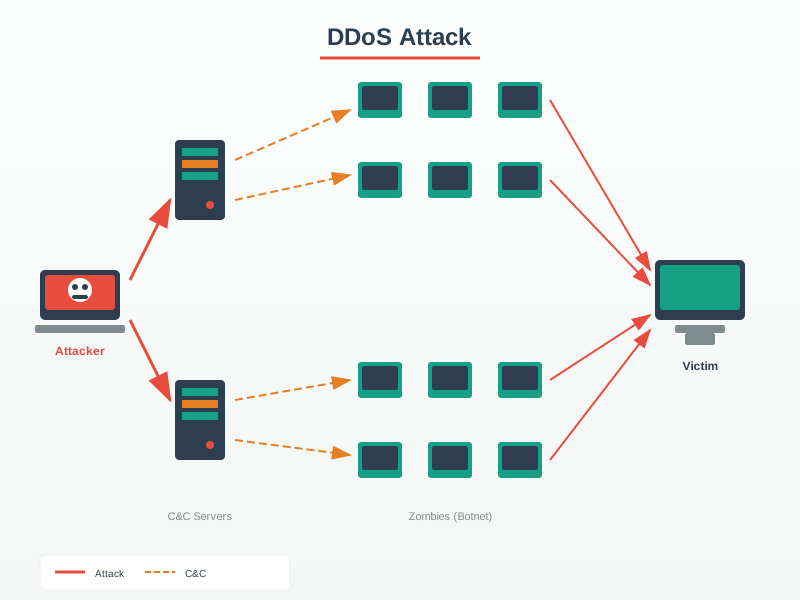
Source: CP IoT System Design Guide, Chapter 6 - Security & Privacy
Man-in-the-Middle Attack
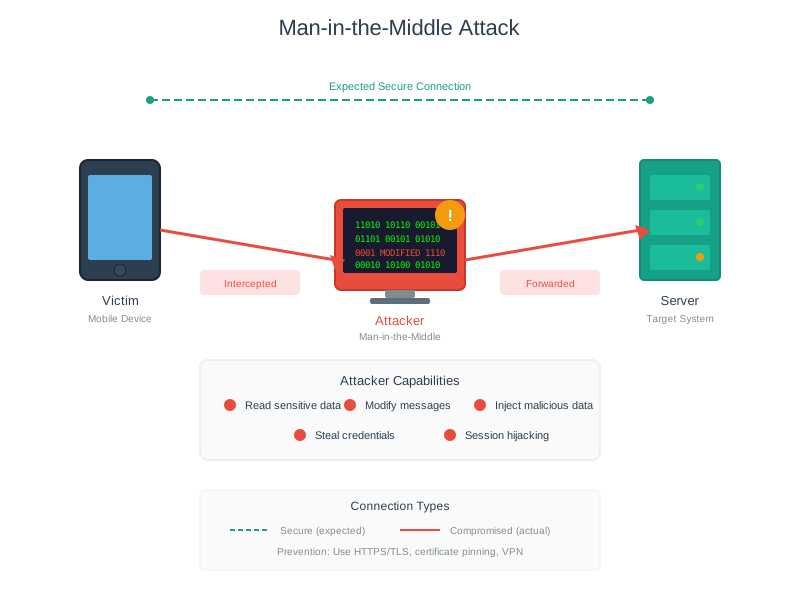
Source: CP IoT System Design Guide, Chapter 6 - Security & Privacy
IP Protocol Vulnerabilities
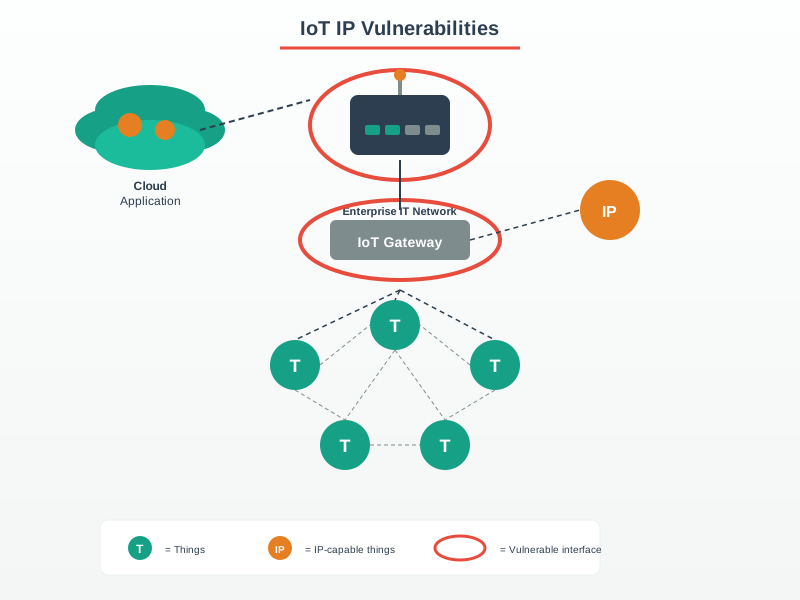
Source: CP IoT System Design Guide, Chapter 6 - Security & Privacy
TCP SYN Flood Attack
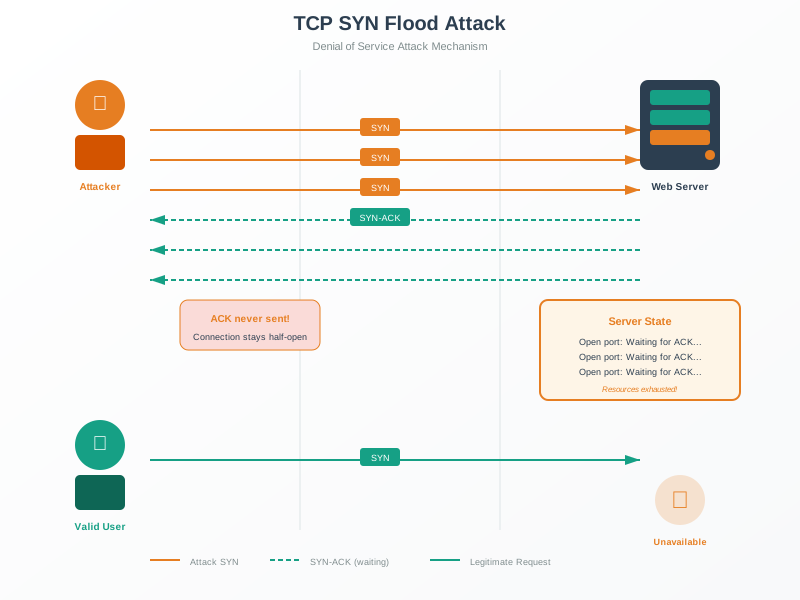
Source: CP IoT System Design Guide, Chapter 6 - Security & Privacy
Hardware Trojan Types
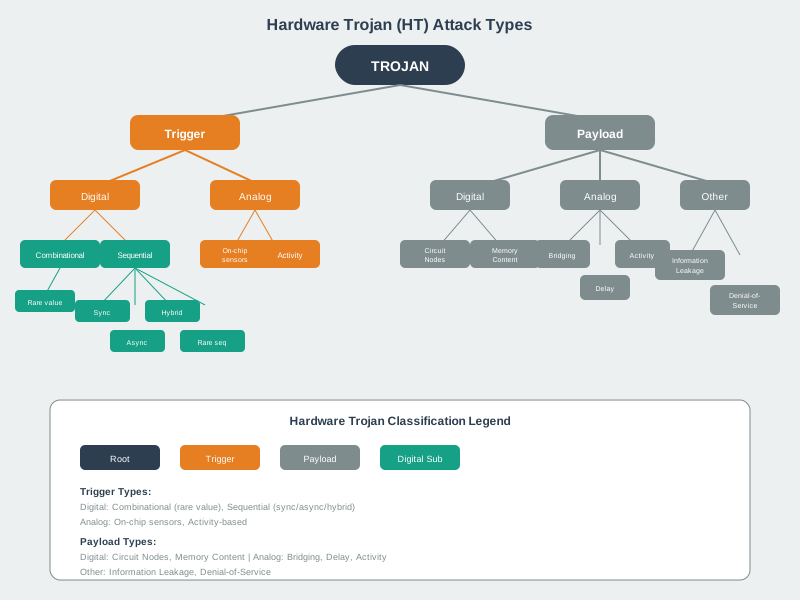
Source: CP IoT System Design Guide, Chapter 6 - Security & Privacy
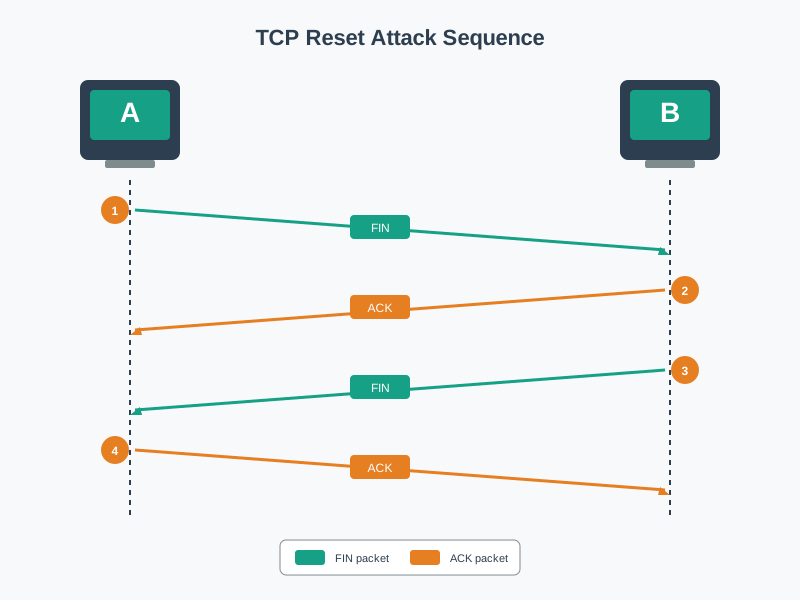
TCP Connection Termination
Source: CP IoT System Design Guide, Chapter 6 - Security & Privacy
Security Context: TCP Reset (RST) injection attacks exploit knowledge of this termination sequence by forging RST packets with valid sequence numbers to forcibly disconnect legitimate IoT device sessions.
41.3 Additional Security Visualizations
SQL Injection Attack
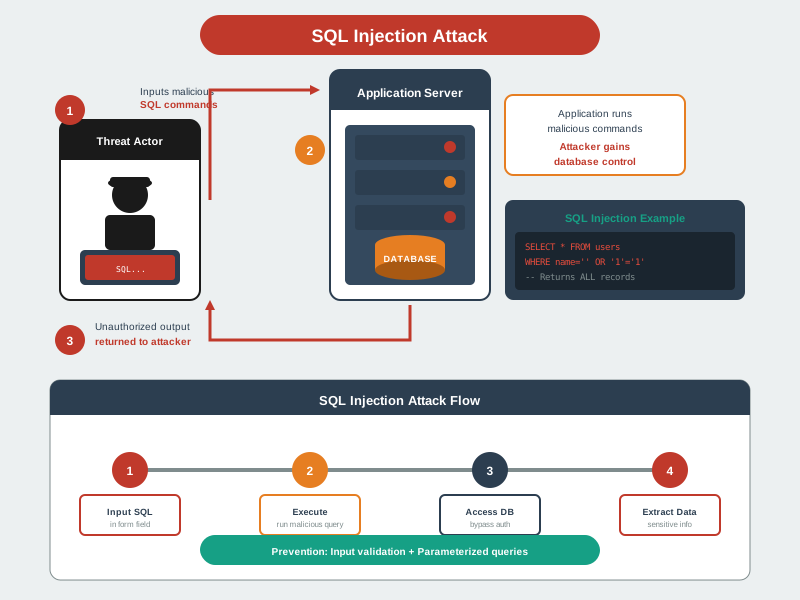
SQL injection remains one of the most dangerous web vulnerabilities, allowing attackers to read, modify, or delete database contents.
Side-Channel Power Analysis
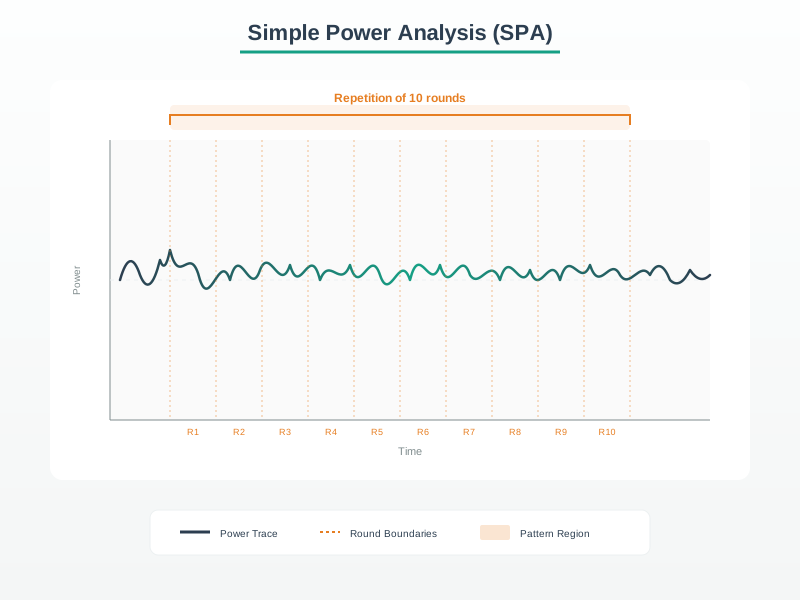
Side-channel attacks exploit physical characteristics like power consumption, electromagnetic emissions, or timing to extract secrets from otherwise secure cryptographic implementations.
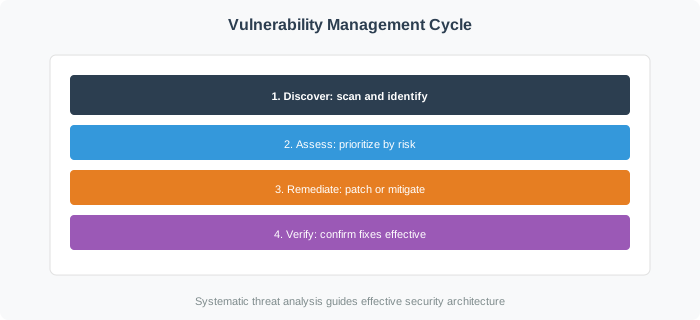
Vulnerability Lifecycle
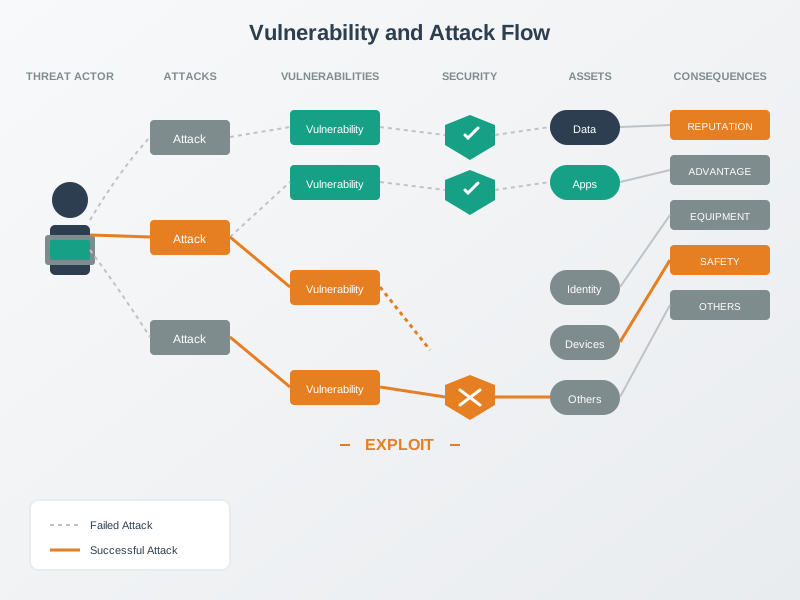
Vulnerability Management Framework
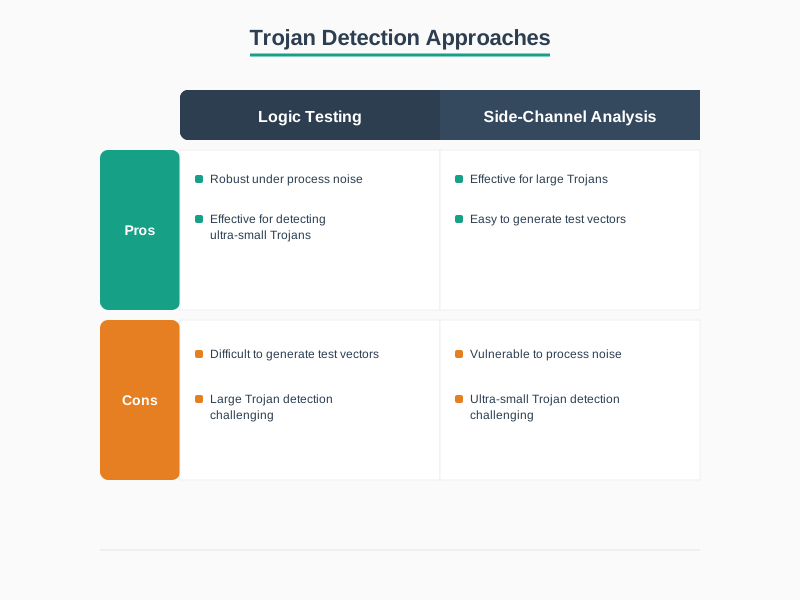
Hardware Trojan Detection
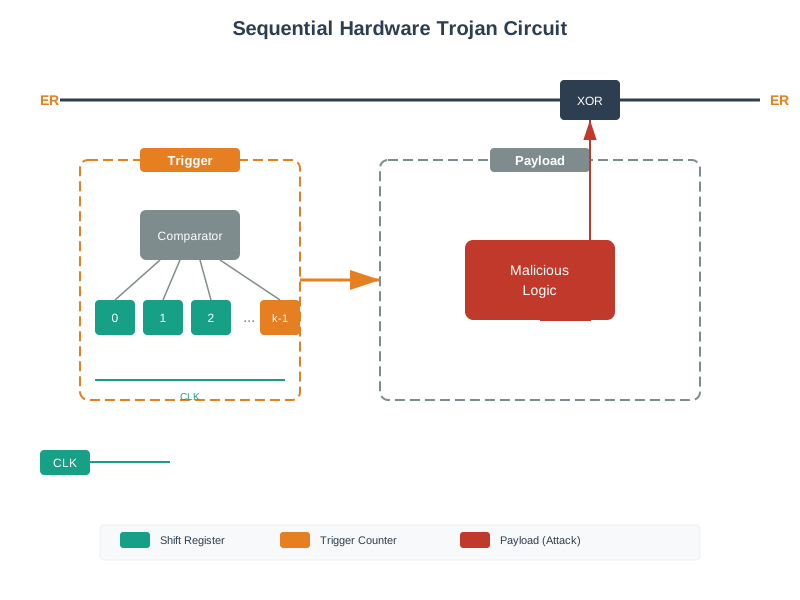
Sequential Hardware Trojan Circuit
MITM Fitness Tracker Attack
Attack Surface Analysis
41.4 Side-Channel Attack Analysis for IoT
Putting Numbers to It
Differential Power Analysis (DPA) Attack Success Probability
Side-channel attacks extract cryptographic keys by analyzing power consumption patterns:
\[\text{SNR} = \frac{\mu_{\text{signal}}}{\sigma_{\text{noise}}}\]
where SNR is signal-to-noise ratio, \(\mu_{\text{signal}}\) is mean power difference between key bit 0 and 1, and \(\sigma_{\text{noise}}\) is measurement noise.
DPA attack requirements: \[N_{\text{traces}} = \left(\frac{Z_{\alpha} \times \sigma}{\Delta P}\right)^2\]
where \(Z_{\alpha} = 1.96\) (95% confidence), \(\sigma\) is noise standard deviation, and \(\Delta P\) is power difference.
Example: Unprotected AES implementation
- Power difference: \(\Delta P = 50\mu W\) (default in calculator above)
- Measurement noise: \(\sigma = 100\mu W\)
- Required traces: 16 traces — an attacker recovers the AES key in seconds!
Protected implementation with masking:
- Power difference reduced: \(\Delta P = 2\mu W\) (adjust slider to see impact)
- Required traces: 9,604 traces
- Hardware countermeasures increase required traces by 620×, making attacks economically infeasible for most IoT threat actors. This demonstrates why FIPS 140-3 Level 3+ certification matters for security-critical IoT deployments.
Deep Dive: Side-Channel Attacks
Side-channel attacks bypass cryptographic security by observing physical phenomena during computation. For IoT devices deployed in physically accessible locations, these attacks represent a critical threat.
41.4.1 Power Analysis Attacks
Simple Power Analysis (SPA): Directly observes power consumption during cryptographic operations. Different instructions consume different power levels, revealing secret key bits.
Differential Power Analysis (DPA): Statistical attack requiring thousands of traces but works even with noisy measurements. With 1,000-10,000 traces, DPA recovers AES keys from unprotected implementations.
41.4.2 Electromagnetic Analysis (EMA)
EM emissions reveal more localized information than power analysis:
- Can target specific chip areas (isolate crypto unit)
- Works through device enclosures
- Higher signal-to-noise for targeted captures
41.4.3 Timing Attacks
Execution time variations leak secret-dependent information. Vulnerable implementations include early-exit password comparisons where timing differences reveal correct characters.
41.4.4 Defense Strategies
| Attack Type | Hardware Defense | Software Defense |
|---|---|---|
| SPA | Shielding, dummy ops | Balanced algorithms |
| DPA | Masking, secure MCU | Higher-order masking |
| EMA | Faraday cage, noise injection | Same as DPA |
| Timing | Constant-time hardware | Constant-time code |
| Cache | Cache partitioning | Flush cache before crypto |
Key Takeaways:
- Assume physical access: Field-deployed devices cannot rely on physical security
- Use certified hardware: FIPS 140-3 Level 3+ includes side-channel resistance
- Limit crypto operations: Rate-limit authentication attempts
- Defense in depth: Combine hardware countermeasures with intrusion detection
Worked Example: Analyzing a DDoS Attack Diagram to Calculate Required Bandwidth
Scenario: The DDoS attack diagram shows a botnet of compromised IoT cameras targeting a single web server. You are the security architect for an e-commerce site and need to size your DDoS mitigation service.
Default Scenario (100,000 device botnet):
- Requests per second: 100,000 devices × 10 req/sec = 1,000,000 requests/second
- Bandwidth: 1,000,000 req/sec × 500 bytes = 500,000,000 bytes/sec = 4 Gbps
- Connection overhead: Each request opens new TCP connection = 1M connections/sec
Your Infrastructure Capacity (before attack): - Web servers: 4 instances, 5,000 req/sec each = 20,000 total capacity - Bandwidth: 1 Gbps connection - Load balancer: 100,000 concurrent connections max
Mitigation Recommendations:
- DDoS scrubbing service (Cloudflare, Akamai): Must handle 5 Gbps minimum (4 Gbps attack + 1 Gbps legitimate traffic margin)
- WAF rules: Rate limiting per IP (10 req/sec), CAPTCHA challenges, geographic blocks
- Auto-scaling: Expand to 200 web server instances during attack (absorb excess if partial mitigation)
Lesson from Diagram: The visual shows individual devices contributing small amounts (10 req/sec each is nothing), but aggregated across 100,000 devices, it creates devastating 1M req/sec flood. This is why IoT security matters - your $20 camera contributes to taking down Twitter.
Decision Framework: Choosing Between Network-Layer vs. Application-Layer DDoS Protection
Attack Type A: Volumetric (Network Layer)
- Examples from diagrams: SYN flood, UDP flood, DNS amplification
- Characteristics: High bandwidth (10-100+ Gbps), simple packets, targets network capacity
- Mitigation: DDoS scrubbing service with large capacity (100+ Gbps)
- Cost: $5,000-50,000/month depending on capacity
- Best For: Sites with predictable application behavior
Attack Type B: Application Layer (Diagram shows HTTP flood)
- Examples: HTTP GET flood, Slowloris, API abuse
- Characteristics: Lower bandwidth (1-10 Gbps), complex requests, targets application logic
- Mitigation: Web Application Firewall (WAF) with rate limiting, CAPTCHA, JavaScript challenge
- Cost: $2,000-20,000/month
- Best For: Sites with user interactivity (logins, forms)
Option C: Hybrid Protection (Recommended)
- Layer 3/4 scrubbing (network) + Layer 7 WAF (application)
- Example: Cloudflare Pro ($200/mo base + bandwidth overages) provides both
| Your Risk Profile | Network Attack | App Attack | Recommended Solution | Estimated Cost |
|---|---|---|---|---|
| Small blog | Rare | Rare | DNS-based (Cloudflare Free) | $0 |
| E-commerce | Occasional | Frequent | Hybrid (Cloudflare Pro + CDN) | $200-2,000/mo |
| Financial services | Targeted | Targeted | Dedicated scrubbing + WAF | $10,000+/mo |
| Gaming | Constant | Constant | Always-on 100Gbps+ scrubbing | $50,000+/mo |
Decision factors:
- Diagram analysis: Which attack types are you seeing? Network-layer diagrams (SYN flood) need bandwidth; app-layer diagrams (HTTP flood) need WAF.
- Attack frequency: Occasional = on-demand scrubbing; constant = always-on
- Application complexity: Static site = simple scrubbing; dynamic app = WAF required
- Budget: <$1K/mo = DNS-based; <$10K = hybrid; >$10K = dedicated
The diagrams in this chapter show both attack types - use hybrid protection to defend against full spectrum.
Common Mistake: Assuming On-Premise DDoS Mitigation Is Sufficient
What practitioners do wrong: Installing DDoS mitigation appliances (Arbor Networks, Radware) at their data center perimeter and assuming they can handle attacks shown in the botnet diagrams.
Why it fails: The diagrams show attacks saturating your internet connection before traffic even reaches your mitigation appliances.
Real-world example: E-commerce site with 10 Gbps internet connection installs $200,000 on-premise DDoS appliance rated for 20 Gbps mitigation. Mirai-style attack (diagram shows 600 Gbps peak) completely saturates the 10 Gbps upstream link. The appliance sees nothing - attack traffic never reaches it because the ISP’s router is overwhelmed first.
The problem visualized (using diagram concepts):
[Internet: 600 Gbps attack] → [ISP router: 10 Gbps capacity] ⚠️ SATURATED
                                        ↓
                            [Your DDoS appliance: 20 Gbps capacity] ← Never sees attack
                                        ↓
                                [Your servers: 1 Gbps] ← Offline
Correct approach - Cloud-based scrubbing (shown in DDoS diagram): 1. Attack traffic goes to scrubbing center first (100+ Gbps capacity) 2. Scrubber filters malicious traffic 3. Only clean traffic reaches your servers
Comparison:
| Protection Type | Attack Capacity | Upstream Saturation | Cost | Best For |
|---|---|---|---|---|
| On-premise appliance | 20-40 Gbps | Not protected | $50-200K upfront | Small attacks (<10 Gbps) |
| Cloud scrubbing | 1-10 Tbps | Protected (reroutes to scrubber) | $3-20K/month | Large attacks (100+ Gbps) |
| Hybrid | Gbps on-prem, Tbps cloud | Failover to cloud when saturated | Both | Defense in depth |
Lesson: On-premise appliances defend against attacks smaller than your connection. For botnet-scale attacks (diagrams show 100K+ devices), only cloud-based scrubbing with terabit capacity works. The DDoS diagram is showing an attack that exceeds any single organization’s internet capacity - you cannot absorb it locally.
Common Pitfalls
1. Creating security diagrams without a defined audience
A detailed STRIDE-annotated data flow diagram is appropriate for a security engineering review but overwhelming for executive risk reporting. Design each visual for its intended audience and decision, not as a universal diagram.
2. Using colours inconsistently across security diagrams
Red for critical threats in one diagram and red for ‘currently implemented controls’ in another creates confusion. Define and document a consistent colour coding convention for all security visualisations in a project.
3. Presenting point-in-time diagrams as representing the current state
Security architectures change as systems evolve. A diagram dated 2023 may not reflect the current 2025 system. Date all security diagrams and establish a review schedule to keep them current.
41.5 Summary
IoT threats come from diverse actors using various attack vectors. Key visual concepts:
- STRIDE Model: Spoofing, Tampering, Repudiation, Information Disclosure, DoS, Elevation of Privilege
- Attack Vectors: Physical, network, web/API, firmware, side-channel
- Botnet Architecture: C2 servers directing compromised device networks
- DDoS Patterns: Volumetric, protocol, and application-layer attacks
- Side-Channel: Power, EM, and timing attacks on cryptographic operations
41.6 Knowledge Check
41.7 What’s Next
Continue exploring IoT security topics:
- Threat Modeling and STRIDE - Apply systematic threat identification
- OWASP IoT Top 10 - Understand critical vulnerabilities
- Interactive Security Tools - Use risk calculators
- Practice Exercises - Apply your knowledge
| Previous | Current | Next |
|---|---|---|
| IoT Security Visual Resources | Security Visual Gallery | Interactive Security Tools |