17 Network Segmentation for IoT

More
Depth: Practitioner
Progress saves as you read. Mark sections complete as you go; your progress appears in the sidebar.
A lobby camera needs to reach its recorder and time service, but it does not need a route to payroll laptops. Network segmentation turns that physical role into a small allowed reachability set. The useful proof is an allowed flow plus a denied path tested from the actual device zone.
Firmware is software installed on the camera. A gateway is a device that joins its zone to another network, and a protocol is the rule used to exchange messages.
17.1 Trace the Camera Across Zone Boundaries
This section: Trace the Camera Across Zone Boundaries — Begin with Figure 17.1.
Begin with Figure 17.1. Read the camera or IoT zone, gateway or firewall boundary, required service zone, management path, and protected business network. Zone names are only labels until controls restrict traffic between them.
Figure 17.2 narrows the diagram to source identity or subnet, destination, protocol, port, direction, purpose, owner, and decision. Follow one allowed record end to end. Then read Figure 17.3, which checks observed traffic, exceptions, denied trials, logging, and release status.
For camera C12, allow outbound video to recorder R2 on the approved service, time synchronization to the named server, and management only from the administration zone. Deny camera-initiated access to user laptops, other camera management pages, and the public internet unless a documented update route is required. “IoT VLAN” does not express these individual flows.
Segmentation limits blast radius when a device is compromised. It does not fix weak camera credentials, vulnerable firmware, or malicious traffic along an allowed recorder path. Combine it with device hardening, authentication, monitoring, and update control. Review broad DNS, web, and cloud exceptions because they can reopen reachability that the zone boundary was meant to close.
Discovery and operations need design too. Broadcast-dependent setup may not cross a routed boundary. Administrators may need a controlled jump host. Monitoring should identify denied scans without flooding logs with expected noise. Emergency access should be time-limited and removed after the incident.
Predict the policy evidence. From C12, expect successful video to R2 and time service. Attempt a payroll laptop and expect a logged denial. From an ordinary office laptop, attempt camera management and expect another denial; repeat from the authorized administration host and expect success. Finally compromise a test camera and verify that it cannot pivot to a peer zone. Record exact source, destination, time, and result.
Inventory and segmentation must agree. An unknown device appearing in the camera zone should receive no broad default access. A moved or repurposed device needs a reviewed role change rather than retaining old routes. Compare switch, wireless, address, identity, and controller records to detect a device attached through the wrong path.
Test stateful return traffic and name resolution. An outbound camera session may need replies without allowing an office host to begin a new inbound session. DNS can reveal or redirect destinations, so define which resolver is allowed and what happens if it fails. Avoid a rule such as “camera to any HTTPS” when the recorder and update endpoints can be named more tightly.
Review changes as code or another versioned policy form where possible. Tie each rule to purpose, owner, expiry if temporary, and an allowed plus denied test. Remove shadowed and unused entries. A temporary commissioning rule that remains for years can defeat the intended zone boundary.
During an outage, keep the boundary closed by default and preserve local recording if that is the camera’s safe mode. A firewall restart should restore the approved policy before general forwarding begins. Capture boot-time tests so a short open interval is not missed by a later steady-state scan.
17.2 Start With the Story: One Camera Should Not Reach Everything
This section: Start With the Story: One Camera Should Not Reach Everything — Picture a camera that needs one route for event data but can also open a peer sensor page.
Prove One Allowed Path and Four Denied Paths
Picture a camera that needs one route for event data but can also open a peer sensor page. A zone label has not limited the camera until the needless path fails and the failure can be seen.
Inspect the story panels and ask which one useful path should work while four needless paths fail visibly.
-
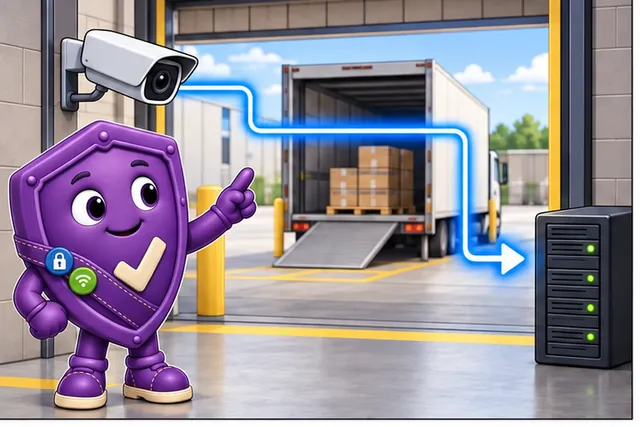
A loading-bay camera needs one route for event data.
-
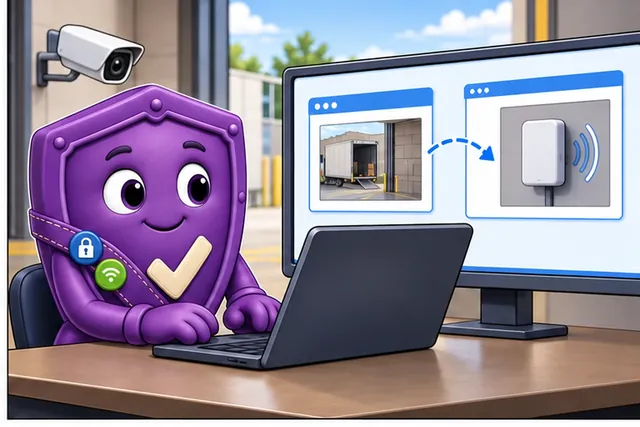
It can also open a peer sensor page that it does not need.
-
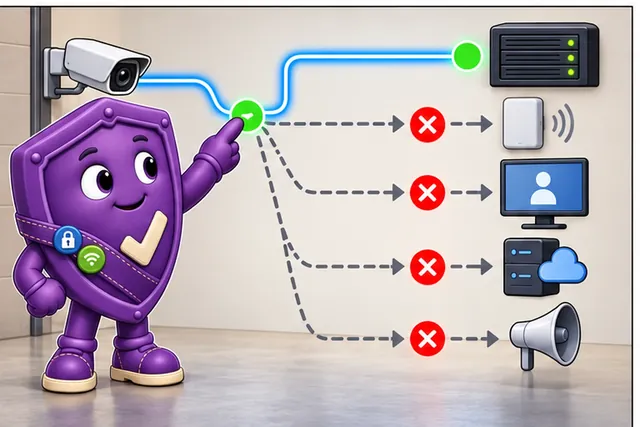
Allow the event, then try a peer, admin page, other service, and public address.
-
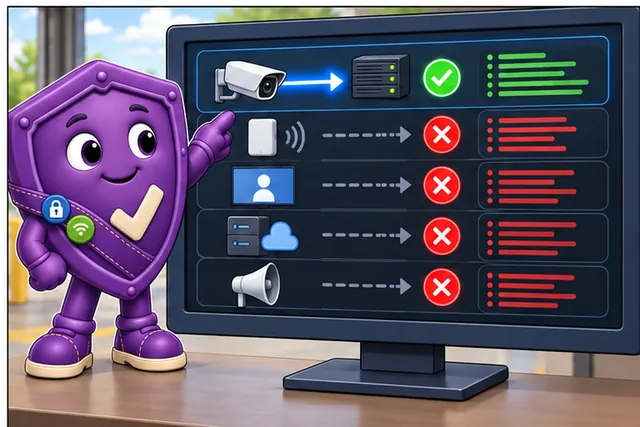
One useful path works while four needless paths fail with visible records.
Read the panels from the required loading-bay event path to the unnecessary peer-sensor access. The test then allows the event while attempting a peer device, management page, unrelated service, and public address. The last panel requires one successful result and four visible denials, turning a zone label into observed policy behavior. That evidence also keeps the chapter’s limitation clear: segmentation constrains reachability, but it does not prove that the camera or the permitted destination is trustworthy.
A broker means a service that receives and forwards named messages. A gateway means a device or service that joins two message paths. Segmentation limits which of these systems a device can reach; it does not prove trust.
Send the allowed event, then try a peer device, unrelated service, management page, and public address. Record source, target, rule, time, allow or deny result, alert, exception owner, and retest trigger.
This runway does not prove the camera or allowed service is safe. The deeper sections explain zones, flows, firewall rules, identity-aware controls, monitoring, exceptions, and change evidence.
A facilities team connects a new camera so operators can watch a loading bay. The camera only needs to send video metadata to a gateway and receive updates from a management service. If its password leaks, the first defense question is simple: can it also reach peer sensors, a building controller, the broker admin page, or the public internet?
This chapter starts from that single camera because segmentation is easiest to review when the allowed path and the forbidden paths are concrete. A good design names the zone, the flow, the denial, the exception, the monitoring point, and the retest trigger. Once that record exists, VLANs, firewall rules, microsegmentation, and zero trust boundaries become implementation choices that can be checked against evidence.
17.3 Overview: Segmentation Limits Reachability
This section: Overview: Segmentation Limits Reachability — Network segmentation limits which systems an IoT device can reach and which systems can reach it.
Network segmentation limits which systems an IoT device can reach and which systems can reach it. A useful segmentation design is not just a diagram with zones. It is a set of named device groups, allowed flows, denied paths, management routes, monitoring points, exceptions, and retest triggers.
The review question is practical: if one device is compromised or misconfigured, what other systems can it reach, what evidence proves that, and what happens when the allowed path changes? Segmentation answers reachability, not trustworthiness.
The strongest beginner test is a denied-path test. Pick a device that should only send telemetry to a gateway, then try the paths it should not have: peer device, unrelated service, management interface, and internet destination. A passing test records both sides of the policy: the allowed telemetry path works, and the unnecessary paths fail in a way the monitoring system can see. Without that negative evidence, a zone label may only describe intent. Record the test date, source, target, rule owner, and retest trigger so the proof survives later network changes.
If you only need the intuition, this layer is enough: segmentation reduces unnecessary reachability. It is strong when it shows both what is allowed and what is denied, proven by rules, configuration, traffic evidence, and monitoring, not by a diagram alone.
Think of the watertight compartments in a ship's hull. A breach in one compartment does not sink the ship because bulkheads seal it off from the others. A flat network is one large hold: a single leak floods everything. Segmentation is the set of bulkheads, and the allowed-flow records are the controlled doors between them.
Inspect Figure 17.1 and ask which paths camera C12 may cross at the controlled boundary.
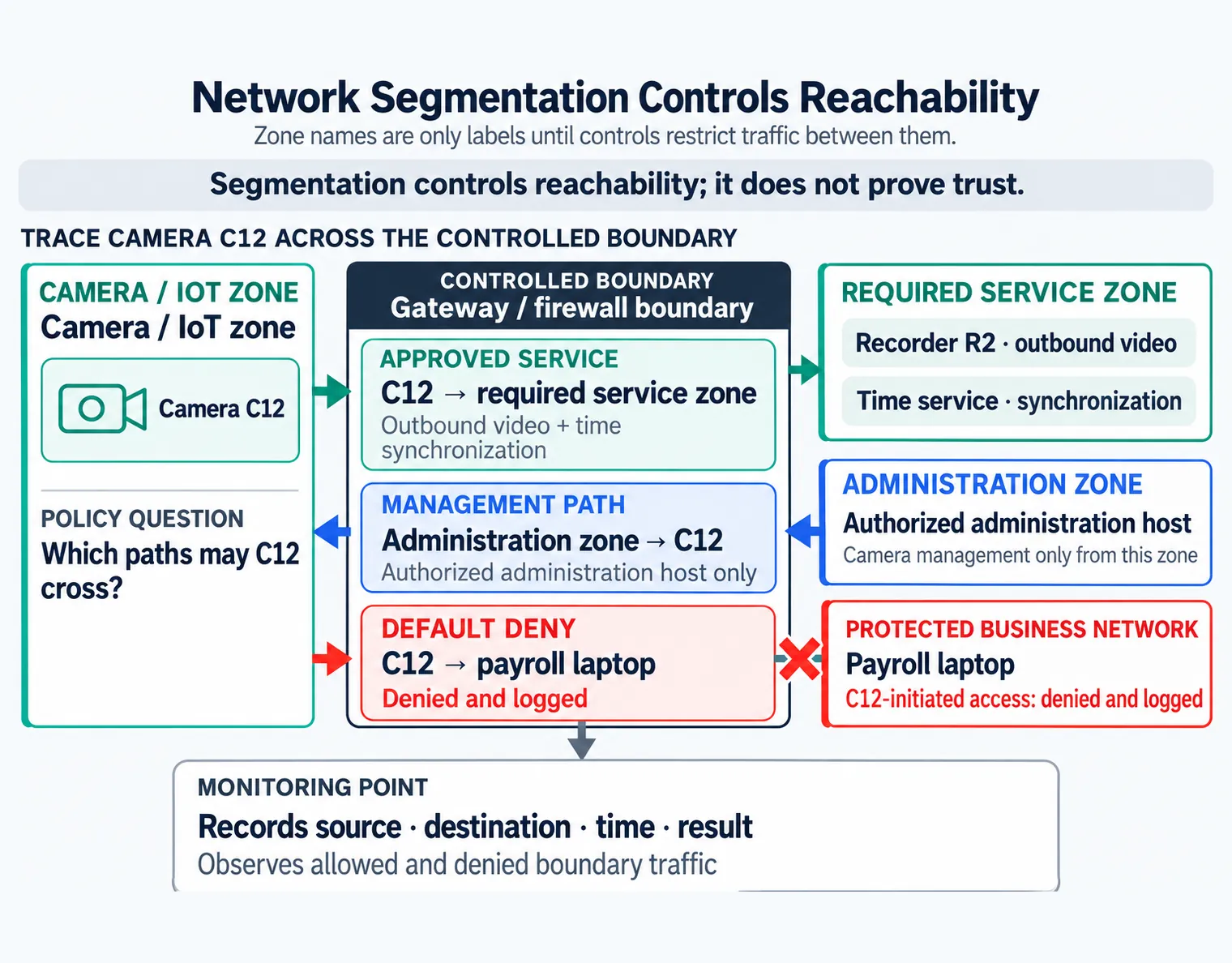
Read Figure 17.1 from camera C12 to the gateway or firewall. Outbound video and time synchronization may reach the required service zone, while management is allowed only from the authorized administration zone. C12-initiated access to the payroll laptop is denied and logged. The monitoring point records source, destination, time, and result for those decisions. The diagram supports the chapter’s limit: a zone label organizes policy, but only enforced and observed boundaries control reachability, and reachability alone does not prove trust.
The One-Minute View
It controls reachability
A segment is useful only when traffic between segments is controlled, not merely labeled.
It is not trust
A device inside a zone can still be compromised. Segmentation limits where that compromise can spread.
Prove the denied path
Default deny plus denied-path evidence is the proof. "IoT is isolated" must say isolated from what, except which path.
Beginner Examples
Taken together, these checks make the section reviewable. That order prevents a control name from being treated as proof and connects the visual to the chapter's evidence-led review sequence.
Overview Knowledge Check
If you can state that segmentation bounds reachability and needs denied-path evidence, you can stop here. Continue to Practitioner to review zones and flows.
17.4 Practitioner: Zones, Allowed Flows, and Default Deny
This section: Practitioner: Zones, Allowed Flows, and Default Deny — A segmentation review names zones that match real communication needs, turns each allowed path into a short record, and tests that everything else is denied.
A segmentation review names zones that match real communication needs, turns each allowed path into a short record, and tests that everything else is denied. Avoid broad claims such as "IoT is isolated." Isolation must be specific: isolated from what, except which path, proven by which evidence.
Walkthrough: The Acceptance Loop
The Zone Model
A simple IoT design often needs separate device, gateway, management, service, and monitoring areas. Device zones hold devices with similar function and risk; the gateway or broker zone mediates telemetry and commands; the management zone handles configuration, update, and administration; the service zone receives approved application traffic; and a monitoring point observes allowed and denied boundary traffic. The diagram is not the evidence; the rule set, VLAN or subnet assignment, routing behavior, access-control policy, packet trace, and monitoring record are.
Industrial IoT deployments rarely invent zones from nothing; many start from a named reference architecture such as the Purdue Enterprise Reference Architecture used in ISA-95-aligned networks. That model separates an enterprise zone for business systems, a demilitarized zone mediating IT-to-OT traffic, a manufacturing zone covering process, basic-control, supervisory, and site-operations levels, and a safety zone for safety-critical functions, with a firewall enforced at each boundary. The specific level numbers matter less than the discipline behind them: each zone is named by function, not location, and every boundary is a place where an allowed-flow record and a denied-path test are due.
Inspect Figure 17.2 and ask which fields make one camera-to-recorder exception narrow, owned, and retestable.
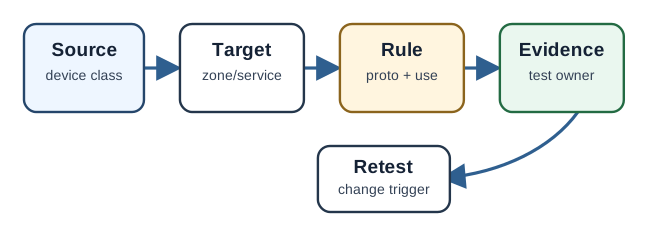
Read Figure 17.2 from source identity or subnet to the recorder destination, then the outbound protocol, port, and video purpose. The allow decision is incomplete without a rule owner and a test at an exact time showing successful video. A retest trigger records which later network change invalidates that proof. These fields turn “allow the camera” into one bounded exception whose reach, business use, accountability, and freshness can be reviewed independently.
Allowed-Flow Records and Default Deny
Each allowed path should become a short record: source zone or device class, destination zone or service, protocol and port, operational purpose, approving owner, evidence that the path works and the alternatives fail, and a retest trigger. Exceptions belong here too: a temporary rule states its expiry, and a broad rule states the compensating monitoring and the plan to narrow it. Default deny is a review discipline, not just a firewall phrase: the reviewer starts from no trust between zones and accepts only named paths.
Segmentation Review Fields
Inspect Figure 17.3 and ask whether the evidence proves both required communication and denied lateral movement.
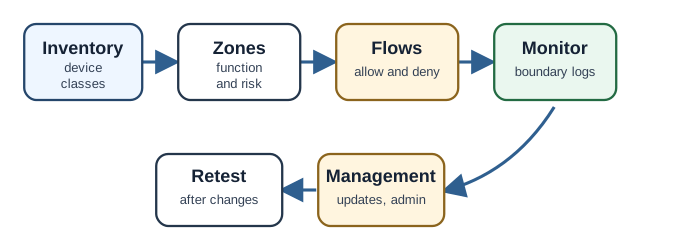
Follow Figure 17.3 from the asset list to zone choice. Then run both allow and deny tests. Camera traffic to the recorder and time service must pass. Camera traffic to payroll must fail and leave a log. An office host must not reach camera control unless it uses the approved staff path. A test camera with a known fault must not move into a peer zone. The review then records source, target, time, result, owner, status, and retest trigger. Both the allowed and blocked paths prove the zone design.
Worked Review
A building network has environmental sensors, camera devices, and access-control readers. A weak design says: "All IoT devices are on the IoT VLAN," which can still let a compromised camera probe sensors or readers.
Function-based flows
Sensors send telemetry to the gateway; cameras send media to the video service; readers send events to the access service. Each is a named allowed flow.
Denied lateral paths
Device-to-device traffic is denied unless a specific local function requires it; management workstations reach the gateway service, not every device directly.
Scoped conclusion
"Accepted for device-to-gateway telemetry and management isolation, provided flow records and deny-path tests are repeated after any gateway, VLAN, firewall, or management-role change."
Practitioner Knowledge Check
If you can review zones, flows, and denied paths, you can stop here. Continue to Under the Hood for VLANs, microsegmentation, and zero trust.
17.5 Under the Hood: VLANs, Microsegmentation, and Zero Trust
This section: Under the Hood: VLANs, Microsegmentation, and Zero Trust — Default deny can be implemented with firewall rules, access-control lists, software-defined network policy, broker or gateway authorization, or a combination.
The deeper layer explains the mechanisms behind a zone model and why "we have a VLAN" is not the same as "lateral movement is controlled."
Enforcement Mechanisms
Default deny can be implemented with firewall rules, access-control lists, software-defined network policy, broker or gateway authorization, or a combination. One distinction matters for accuracy: a VLAN separates a broadcast domain at the data-link layer, and devices in different VLANs need Layer 3 routing to communicate. When that routing is enabled, access-control lists or a firewall can restrict the permitted inter-VLAN flows, and traffic within a single VLAN is typically unrestricted unless an additional control (such as private VLANs or host firewalls) is applied. This is why "all devices share one IoT VLAN" can still allow free peer-to-peer reachability. The implementation matters less than the evidence that unwanted paths are actually blocked.
East-West Traffic and Lateral Movement
North-south traffic crosses between the IoT environment and external networks; east-west traffic moves between devices and services inside it. A flat zone may control north-south traffic while leaving east-west traffic open, which is exactly the path a compromised device uses to reach peers. Reviewing only the internet edge misses this entirely. Segmentation evidence should test east-west denied paths between device classes, not only the boundary to the outside. For camera C12, blocking payroll access while leaving peer-camera management reachable closes only one of the denied paths.
Microsegmentation
Microsegmentation applies policy at a finer grain than a subnet or VLAN, often per device, workload, or identity, so that even devices in the same area are allowed only their specific flows. It reduces blast radius further than zone-level segmentation but adds more policy to define, test, and maintain. The trade-off is granularity against operational cost, and the same evidence discipline applies: each fine-grained flow still needs a record and a denied-path test.
The Zero-Trust Principle
Zero trust removes implicit trust based on network location: being inside a zone is not enough, and each flow is authorized using verified identity. Segmentation supports zero trust by limiting reachability, but a zone boundary alone is not zero trust if anything that reaches the boundary is trusted by default. In practice, segmentation and identity-based authorization reinforce each other: the network limits what an identity can reach, and the identity check decides whether the reachable action is allowed.
Pairing With Device-Side Controls
Segmentation limits reachability, but it works best paired with device-side controls, and the review should connect each pair to evidence:
Common Mistakes
Under-the-Hood Knowledge Check
At this depth, segmentation is a layered claim: enforcement that actually blocks east-west paths, granularity chosen against operational cost, identity-based authorization that does not trust network location alone, and device-side controls paired to the boundary, all proven by allowed and denied evidence and a retest trigger.
17.6 Summary
This section: Summary — Segmentation proof records which device flows are allowed or blocked and checks the result against the policy, not the zone label.
Segmentation proof records which device flows are allowed or blocked and checks the result against the policy, not the zone label.
Network segmentation is effective when policy boundaries, allowed flows, enforcement points, monitoring, and exception handling are explicit and evidenced, and when east-west reachability is controlled, not just the boundary to the outside.
17.7 See Also
This section: See Also
Intrusion Detection for IoT
Boundary sensors need known zones and expected paths to make alerts interpretable.
Cyber Security Defense in Depth
Segmentation limits the damage when a device-side control fails, as one of several layers.
Common IoT Security Mistakes
Flat reachability, broad allow rules, and unreviewed exceptions are recurring segmentation failures.
Find help
3 reviewed answers.
Where should I start in a module?
Open the module page from the sidebar to see its chapters in order. Use the module map to return to a topic you need.
Modules and pathsReviewed
What can I try when a project does not work?
Check the symptom, then work through the diagnostic steps. Keep the error message and the smallest example that reproduces it.
When you are stuckReviewed
How do interactive examples work?
Use the interactive guide to check how examples and simulations work before changing your project.
Interactive examples guideReviewed