23 Secure OTA Updates
More
Depth: Practitioner
Progress saves as you read. Mark sections complete as you go; your progress appears in the sidebar.
23.1 Start With the Update That Does Not Install
This section: Start With the Update That Does Not Install — Picture a smart lock offered a new software package overnight.
Prove Refusal as Carefully as Success
Picture a smart lock offered a new software package overnight. Firmware is the software stored on a device. The update service can deliver the right bytes and still offer them to the wrong model, send an older version, or lose power during the first start.
Write the full update record. Name the device class, current version, approved new version, signer, package check, allowed move, spare install slot, health test, return rule, rollout group, report, and owner.
Test a bad signature, a wrong model, an old version, a changed package, a cut download, lost power during install, a failed first start, a full device, and a paused rollout. Check that the last working version survives and that the reason is visible. A completed download is not proof of a safe update.
Keep the device’s urgent safe behavior available during failure and recovery. A remote service may guide the rollout, but it must not erase the local known-good path.
This opening does not choose one signing system or slot layout. Practitioner reviews the release and device path. Under the Hood examines version policy, stored state, first-start proof, return cases, staged rollout, key change, and negative tests.
Imagine a fleet update arriving overnight. Most devices accept it, but one device sees a wrong target, a bad signature, or a version lower than policy allows. The important security story is not only the successful install. It is whether the device refuses the bad candidate, keeps the current working firmware, records the reason, and gives the operator enough evidence to act.
Start simple: track one firmware package from release approval to device decision. The signed manifest says what the package is, the inactive slot keeps the old image safe, the first boot health check decides whether to accept or revert, and the rollout record explains what happened. Without that chain, “OTA is secure” is only a slogan.
23.2 Overview: An Update Is Only as Safe as Its Path
Over-the-air updates are a security control only when the update path is itself controlled. A device should not install new firmware merely because it was downloaded from the expected service. It should verify that the update is meant for that device class, that the package matches the signed manifest, that the version policy allows it, and that recovery remains possible if the candidate firmware fails its first health checks.
The review goal is practical: can another reviewer trace an update from release approval to device acceptance and then find evidence that the device either accepted the update safely or rejected it without losing the last known working firmware?
If you only need the intuition, this layer is enough: secure OTA needs both authenticity (the right, signed, targeted firmware) and recovery (a way back to known-good firmware if the update fails). Authenticity without recovery can still leave a device unusable.
An OTA update crosses several boundaries: build approval, signing, storage, delivery, device verification, installation, restart, and reporting. A protected transport path helps, but it does not prove the update is authorized, targeted to the correct device class, or safe to install. The package store can make files available, but the signed manifest and device-side verification decide whether a package is accepted.
The best review evidence covers both success and refusal. A release team should be able to show a normal update, a bad-signature rejection, a wrong-target rejection, a rollback-policy rejection, and a recovery decision after a failed health check.
The decision in Overview: An Update Is Only as Safe as Its Path becomes concrete only when “The pipeline: build record, signing, signed manifest, package store, device verification, and a reviewable result report” is explicit in the diagram. Pause at Figure 23.1: its labels turn that requirement into something the reader can test.
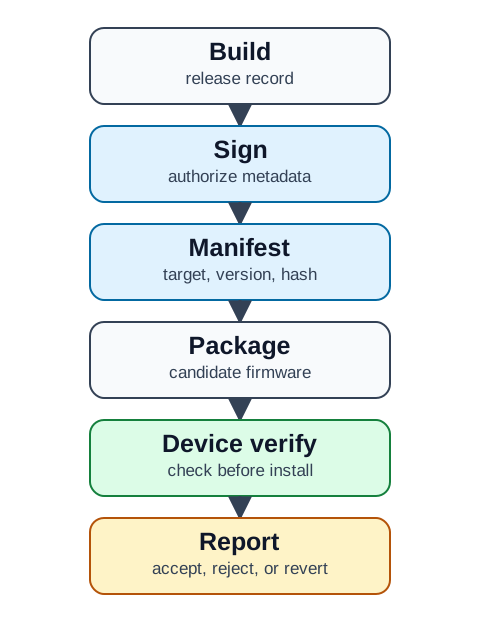
In Figure 23.1, begin with Sign, check candidate firmware next, and finish at accept, reject, or revert. Those named elements make the claim concrete rather than merely directional. Their relationship shows “The pipeline: build record, signing, signed manifest, package store, device verification, and a reviewable result report” is explicit in the diagram; that evidence is what Overview: An Update Is Only as Safe as Its Path contributes to the chapter’s running decision.
23.2.1 The One-Minute View
Verify, do not trust the source
The delivery path is not the root of trust; the device verifies a signed manifest before writing any firmware.
Preserve known-good
Install into an inactive slot so the last working firmware survives an interrupted or faulty update.
Prove the outcome
Record accept, reject, revert, retry, and pause decisions, not just that a download completed.
23.2.2 Beginner Examples
Taken together, these checks make the section reviewable. That order separates cryptographic validity from device acceptance and healthy operation, preserving the chapter's chain-of-trust argument.
23.2.3 Overview Knowledge Check
If you can state why authenticity and recovery are both required, you can stop here. Continue to Practitioner to review a real update flow.
23.3 Practitioner: Review a Candidate Update End to End
A secure OTA design normally separates the manifest from the firmware package. The manifest is small enough to verify first and should describe everything the device needs to decide before installing anything.
23.3.1 Walkthrough: From Manifest to Decision
23.3.1.1 Wrong-model smart-lock failure walkthrough
A signature proves that an authorized release process signed some bytes. It does not prove that those bytes belong on this physical product. Consider a fleet with lock models L100 and L200. Both trust the same release key, but their motor driver, flash layout, bootloader contract, and safe output polarity differ. If the L200 image is accurately signed and delivered to an L100, signature and hash checks can both pass while installation still bricks the actuator or leaves the lock in an unsafe state.
Walk the decision in the order the device must enforce it:
| Gate | Device-side check | Failure response | Evidence to retain |
|---|---|---|---|
| Exact target | Manifest product id, hardware revision range, board id, and required bootloader/partition schema equal locally fused or read-only identity | Reject before erasing any slot | Manifest target tuple and local identity tuple |
| Compatibility | Required peripherals, minimum bootloader, flash layout, and migration preconditions are supported | Reject and keep current image | Compatibility result and failing predicate |
| Authenticity and integrity | Approved signing key verifies the manifest; computed image hash matches its signed digest | Reject package | Key id, signature result, expected and computed digest |
| Candidate install | Write only the inactive slot; verify the written bytes before changing boot selection | Keep known-good slot selected | Slot, byte count, post-write hash, power status |
| Trial boot | Mark the candidate pending, limit attempts, and start a health-confirmation deadline | Revert automatically after failed boot or deadline | Boot reason, reset count, health deadline |
| Functional health | Exercise storage mount, network join, actuator-driver initialization, position sensing, and a safe lock-state self-test | Revert or enter the defined safe state | Per-check result and actuator state |
| Staged rollout | Release to a small hardware-homogeneous cohort, hold, then expand only while health and recovery metrics remain inside bounds | Pause promotion and investigate | Cohort inventory, failure rate, recovery time |
The target tuple belongs inside signed metadata and must also be checked locally; a cloud-side fleet label alone can be stale or wrong. The candidate remains a trial until it reports health from the new image. Only then may the bootloader commit it as known-good. This distinction prevents a device that merely reached main() from being counted as a healthy lock.
Recovery time is a release gate, not a support afterthought. Measure time from failed candidate boot to the last known-good image controlling the actuator again, including retry limits, bootloader timeout, network-independent rollback, and any required user action. If safe recovery depends on the same network path or application image that just failed, the design has not preserved an independent recovery route.
Finally, separate fleet rollout evidence by hardware model. A successful L200 cohort says nothing about L100 compatibility, even when the application feature and signing key are shared. Model, revision, bootloader, and partition changes are explicit retest triggers.
23.3.2 What a Signed Manifest Should Bind
A useful manifest review asks whether the signed metadata includes the target device class or hardware revision, the candidate version and the minimum version policy, a cryptographic hash of the package, the signing authority and key identity, locally checkable install requirements, and a clear rejection behavior when any check fails. The package can move over an ordinary delivery path, but the device compares it with the signed manifest before writing it to an install slot. Transport protection still matters, but it is a separate control, not a replacement for manifest and package verification.
When this evidence is missing, reviewers should avoid accepting vague phrases such as "released by the cloud" or "downloaded securely." The device is the final enforcement point, so the record must show what the device checked locally before it changed the boot choice. Record timestamps make that enforcement auditable.
23.3.3 Install Slots and Recovery
Before recording a conclusion for Install Slots and Recovery, inspect the mechanism behind it. In Figure 23.2, the central claim is that install layout: the current slot stays known-good while the candidate is written, verified, and health-checked.
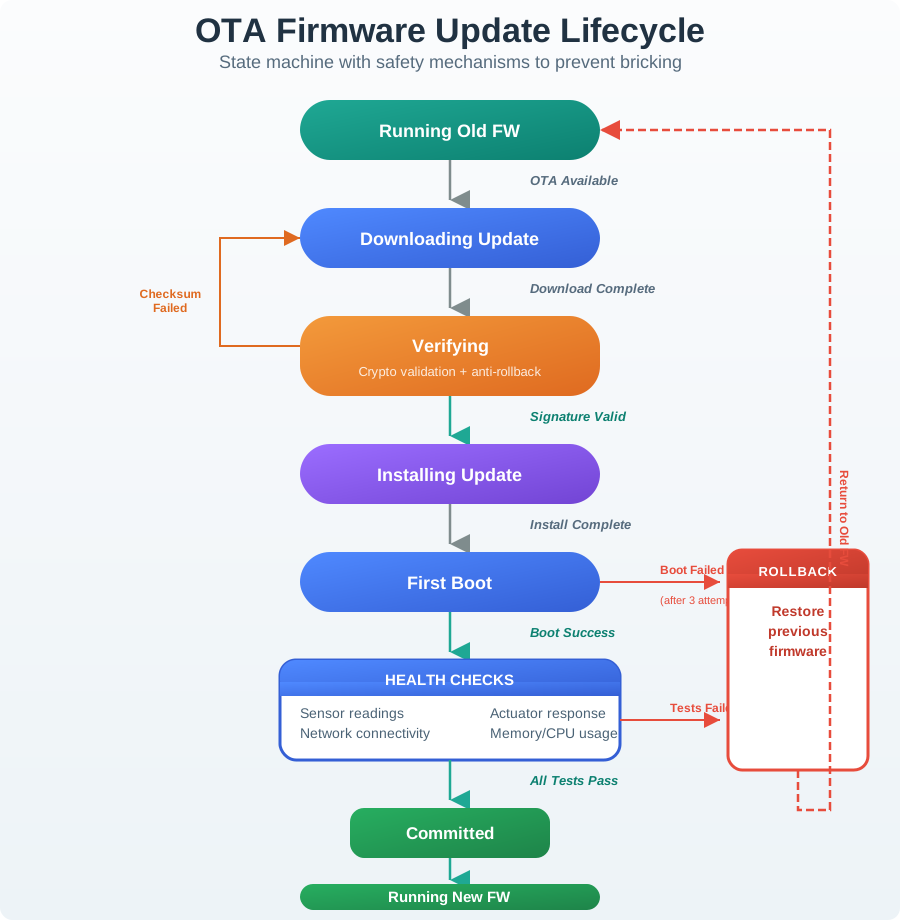
Inspect Figure 23.2 by testing the hand-off from Running Old FW to Boot Success, then checking what Old FW fallback preserves or reports. The hand-off gives substance to install layout: the current slot stays known-good while the candidate is written, verified, and health-checked. It also links Install Slots and Recovery to the operational evidence expected later.
Current slot preserved
The known working firmware remains intact while the candidate slot is written.
Boot only after verify
The boot choice changes only after the candidate passes signature, hash, and version checks.
Revert on failure
A failed health check returns to the known working slot when recovery is allowed, and the result is reported.
23.3.4 Rollback Policy: Two Different Cases
Recovery revert returns to the last known working slot because the candidate failed health checks; this is desirable. Downgrade attack installs an older signed firmware to reopen a fixed weakness; this must be blocked. A sound policy allows defined recovery while blocking unsafe downgrade, and the minimum accepted version should be device-enforced rather than only checked by a service.
This part of the narrative asks for an evidence-backed choice. Figure 23.3 provides the necessary view by showing how “The review workflow: scope, manifest verification, package check, candidate install, health check, decision, and retest” is explicit in the diagram.
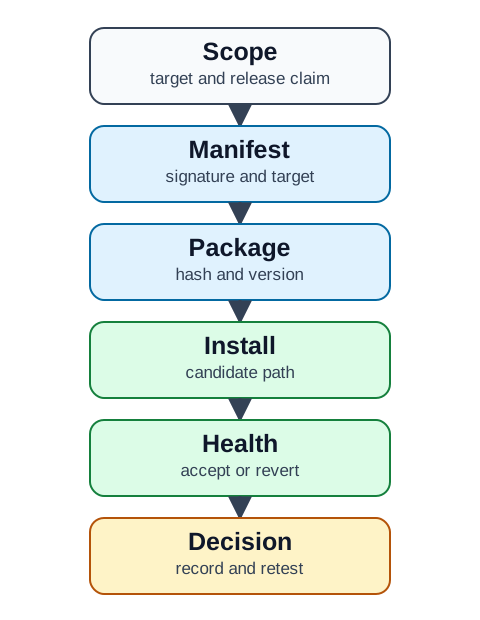
Figure 23.3 rewards a label-first reading. Manifest identifies one side of the problem, candidate path names the controlling distinction, and record and retest reveals the resulting state. Together they show “The review workflow: scope, manifest verification, package check, candidate install, health check, decision, and retest” is explicit in the diagram and complete the role of Rollback Policy: Two Different Cases in this chapter.
23.3.5 Worked Review
A gateway receives a firmware update through a management service. A weak review says "the update is secure because it is signed." A stronger review separates the claim into manifest, install, and rollout evidence.
23.3.6 Practitioner Knowledge Check
If you can review manifest, install, and rollout evidence, you can stop here. Continue to Under the Hood for install-state vocabulary and negative-case testing.
23.4 Under the Hood: Install-State Vocabulary and Negative Tests
The deeper layer makes the rollout reviewable across systems. Secure OTA review does not end at signature verification: a release can be authentic and still fail health checks, so the device, gateway, and update service must describe the same states with the same names.
23.4.1 Install-State Labels
The exact naming varies by system, but a consistent vocabulary lets reviewers confirm that the update service, gateway logs, and device reports use matching state names.
If state names vary between the update service, gateway records, and device logs, a review gap exists: a reviewer cannot tell which state the device was in when a failure occurred. In the L100/L200 example, record a wrong-target rejection rather than download success, even if the file arrived intact.
23.4.2 Require a Negative-Case Test
Require at least one controlled negative-case test: a deliberately invalid package, tampered hash, or version-policy violation that the device should reject before install. Without a rejection record, the verification claim is supported only for the allowed case. The same logic applies to recovery: a tested revert after a failed health check is what supports the availability claim.
23.4.3 Rollout and Monitoring Evidence
A rollout should provide evidence for acceptance, rejection, revert, retry, and pause decisions, including the manifest signature and package-hash results, the target and version-policy results, the slot-write and boot-choice results, the health-check result after startup, the device or gateway status report, a monitor signal that can pause rollout when rejection or revert behavior is abnormal, and a retest trigger for changes to signing keys, manifest format, boot logic, storage, or health checks. Avoid accepting a rollout claim that reports only download completion.
23.4.4 Common Mistakes
23.4.5 Under-the-Hood Knowledge Check
At this depth, secure OTA is a traceable record: a signed manifest verified before trust, a package checked against it, a candidate installed without destroying the known-good image, named install states shared across systems, a tested rejection and a tested revert, and rollout evidence for every decision.
23.5 Summary
This section: Summary — A signature alone is not enough.
A signature alone is not enough. Check the target and candidate slot on the device. Check rollback, telemetry, and recovery before you call it healthy.
OTA security depends on signed, targeted packages verified on the device, safe candidate-slot installation, device-enforced rollback policy, rollout telemetry, and a tested recovery path for failed updates, not on download success alone.
23.6 See Also
This section: See Also
See how startup verification reinforces firmware trust after an update is installed.
IoT Security Network Segmentation
Limit how update and management paths are exposed across the network.
IoT Security Intrusion Detection
Monitor failed update checks and unexpected management behavior.
Find help
3 reviewed answers.
Where should I start in a module?
Open the module page from the sidebar to see its chapters in order. Use the module map to return to a topic you need.
Modules and pathsReviewed
What can I try when a project does not work?
Check the symptom, then work through the diagnostic steps. Keep the error message and the smallest example that reproduces it.
When you are stuckReviewed
How do interactive examples work?
Use the interactive guide to check how examples and simulations work before changing your project.
Interactive examples guideReviewed