14 E3-E4: Transport Encryption
More
Depth: Practitioner
Progress saves as you read. Mark sections complete as you go; your progress appears in the sidebar.
Think of a field gateway as a mailroom. E4 locks the mailroom’s network connection to the cloud, while E3 seals selected letters so the mailroom can route them but cannot read them. This page is about choosing which envelopes stay opaque, which metadata stays visible, and which session identity proves the mailroom reached the right cloud endpoint.
14.1 Learning Objectives
This section: Learning Objectives
By the end of this chapter, you will be able to:
- Separate E3 opaque payload protection from E4 transport session protection.
- Decide whether a gateway should decrypt, forward opaque payloads, or only terminate transport.
- Define object-security evidence for nonce or sequence freshness, associated data, payload integrity, and key ownership.
- Define TLS/DTLS evidence for certificate validation, service identity, mutual authentication, version policy, and downgrade rejection.
- Identify common failures such as disabled certificate checks, accepting any hostname, replayable early data, plaintext fallback, and embedded secrets.
14.2 Prerequisites
This section: Prerequisites
- Encryption: Architecture and Levels for E1-E5 plaintext ownership.
- E2: Device-to-Gateway Encryption for trusted gateway plaintext.
- Public Key Cryptography for certificates, signatures, and key agreement.
- TLS/DTLS Transport Security for IoT for protocol-specific TLS and DTLS details.
14.3 Keep Payload Secrecy Separate From Transport Security
This section: Keep Payload Secrecy Separate From Transport Security — If the gateway must not read the payload, use E3 object or device-to-cloud protection.
Start with two questions:
- Should the gateway be able to read this payload?
- Which network session needs authenticated transport protection?
If the gateway must not read the payload, use E3 object or device-to-cloud protection. If the gateway is sending data to the cloud over the Internet, use E4 transport protection for that session. Many systems use both. Inspect Figure 14.3 to see why the two controls can coexist without making the same claim.
Inspect Figure 14.1 from peer identity toward the encrypted records and fail-closed tests that justify accepting the session.
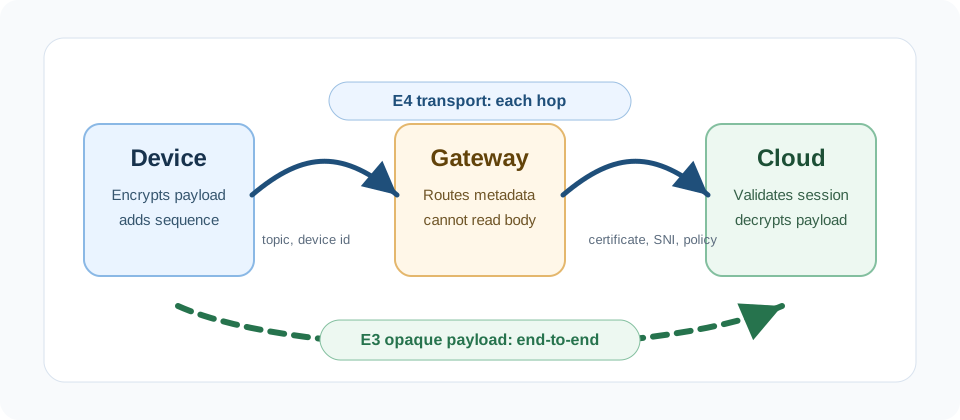
Read Figure 14.3 along both protection paths. The E3 inner payload remains ciphertext while the gateway routes it because the gateway lacks the payload key. The E4 session begins at the gateway and protects that gateway-to-cloud leg with authenticated transport, so it cannot retroactively hide plaintext the gateway already received. Layering both protects different boundaries. This distinction drives the rest of the chapter: choose E3 for plaintext ownership and E4 for session peer identity and record protection. Read Figure 14.1 in that order.
Opaque payload protection
The gateway routes ciphertext but does not have the payload key or plaintext authority.
Transport session protection
TLS or DTLS authenticates peers and protects a session such as gateway-to-cloud MQTT, HTTPS, or CoAP.
Defense by boundary
E3 can keep sensitive fields opaque inside an E4-protected transport session.
E4 is not E3
Transport security does not erase plaintext exposure at a gateway that decrypts or receives data first.
This book uses E3 for device-to-cloud or object-level payload protection that remains opaque to gateways, and E4 for authenticated transport sessions such as gateway-to-cloud TLS or DTLS.
14.4 Use E3 When Gateways Should Only Route
This section: Use E3 When Gateways Should Only Route — E3 is appropriate when an intermediary should route, buffer, translate, or broker messages without reading selected payload fields.
E3 is appropriate when an intermediary should route, buffer, translate, or broker messages without reading selected payload fields. E3 can be implemented with a protocol such as OSCORE, COSE-based object protection, an application envelope, or a platform-approved device-to-cloud protection scheme. The important property is key ownership: the gateway does not have the payload decryption key.
Inspect Figure 14.2 to see which visible fields remain useful to the gateway and what the endpoint must verify.
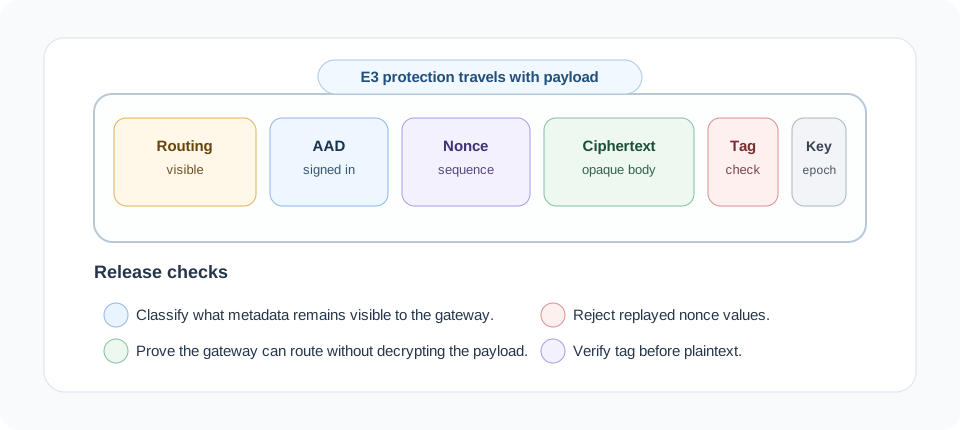
Read Figure 14.2 from visible routing metadata into the protected payload, nonce, key epoch, and authentication tag. The gateway may use approved outer fields to forward or queue the object, but it lacks the payload key and cannot release the protected fields. The endpoint checks freshness, key version, authenticated context, and tag before accepting plaintext. This separation connects E3’s plaintext-ownership goal to a packet form that intermediaries can carry without becoming trusted readers.
E3 is not automatically “encrypt everything.” A practical design may leave routing metadata visible while protecting sensitive fields. The review requirement is to state which fields are visible, which are authenticated, and which are confidential.
14.5 Use E4 to Authenticate the Transport Session
This section: Use E4 to Authenticate the Transport Session — E4 protects a session between endpoints.
E4 protects a session between endpoints. The endpoints might be a gateway and cloud service, a device and cloud service, or a local controller and gateway. The key review question is whether the session authenticates the expected peer identity and rejects downgrade, expired credential, wrong-name, wrong-issuer, and revoked-credential cases. Before selecting TLS or DTLS, trace Figure 14.1 to see the identity and failure checks that make an encrypted session trustworthy. Read Figure 14.3 in that order.
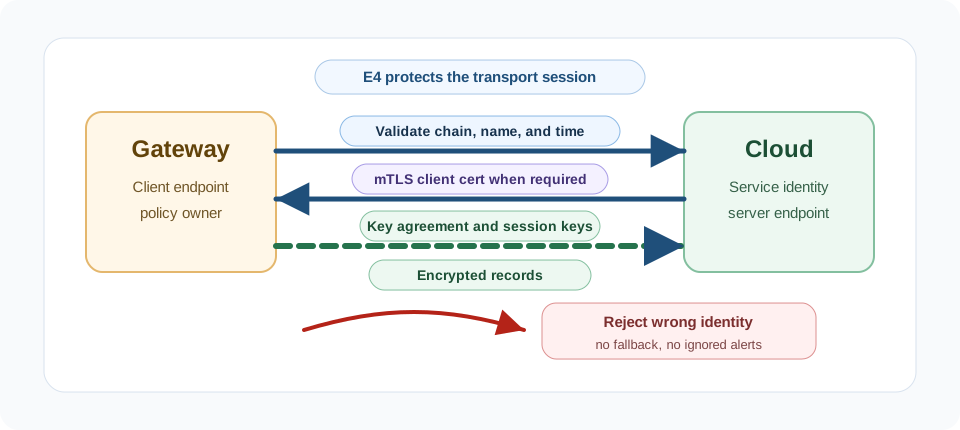
Read Figure 14.1 from peer validation through authenticated key agreement and protected records to the fail-closed rejection branch. That order is the evidence for accepting the session. Read Figure 14.3 in that order.
In Figure 14.1, begin with server identity validation and, where the profile requires it, mutual client identity. Authenticated key agreement then creates fresh session keys, and those keys protect transport records. Finish at the negative-test branch: a wrong name, expired or revoked credential, downgrade, or plaintext fallback must fail closed. This order connects the transport choice to the chapter’s larger boundary rule: encrypted bytes are useful only when they arrive from the intended peer under the approved policy.
Use TLS for reliable streams and DTLS for datagram protocols where the application profile requires UDP.
Check the certificate chain, service name, validity period, key usage, and trust anchor.
Use mutual TLS or another approved client authentication method when the cloud must identify the gateway or device.
Let the protocol key schedule derive traffic keys from authenticated key agreement.
Block plaintext ports, obsolete protocol versions, wrong identities, and insecure debug bypasses.
This section:
A gateway that accepts any certificate, ignores the expected service name, disables expiry checks, or trusts a self-signed test certificate in production has lost the main protection that TLS and DTLS are meant to provide.
This section:
14.6 Prove the TLS Session Has the Right Peer
This section: Prove the TLS Session Has the Right Peer — “Using TLS” is not one security decision.
“Using TLS” is not one security decision. The release evidence needs to show which peer identity was verified, which key exchange created the traffic keys, which authenticated encryption protected the records, and which failure cases were rejected.
TLS 1.3 raises the baseline by using authenticated encryption and removing static RSA key transport. Its (EC)DHE modes provide forward secrecy; PSK-only mode does not. Certificate-based deployments still need certificate validation. A gateway can negotiate modern cryptography and still build a private session to the wrong endpoint if it accepts the wrong name, wrong issuer, expired certificate, or unapproved trust anchor.
14.7 Keep Old Sessions Safe After Key Theft
This section: Keep Old Sessions Safe After Key Theft — Forward secrecy means the session uses ephemeral key agreement, such as ECDHE, so fresh traffic keys are created for that session and discarded afterward.
Forward secrecy means the session uses ephemeral key agreement, such as ECDHE, so fresh traffic keys are created for that session and discarded afterward. If the server’s long-term private key is stolen later, old packet captures should still remain sealed because there is no reusable transport key that decrypts them.
Certificate validation is the matching identity control. The client checks that the presented certificate chains to an approved trust anchor, names the expected service, is within its validity period, has the right key usage, and has not been rejected by revocation or local policy. Parsing a certificate is only syntax; validation is the decision to accept or reject the endpoint.
Without forward secrecy:
  Attacker records traffic today, steals the server key later,
  and may decrypt old sessions if the protocol used static key transport.

With ephemeral ECDHE:
  Each session derives fresh keys and discards them.
  Later server-key theft does not unlock previously recorded sessions.
This is why TLS 1.3 removed static-RSA key transport. For IoT releases, the proof should include positive configuration evidence and negative tests that obsolete protocol versions, static key transport, wrong names, wrong issuers, and expired certificates fail closed.
14.8 Manage Trust Roots, Early Data, and Mutual TLS
This section: Manage Trust Roots, Early Data, and Mutual TLS — The hardest E4 failures are often trust failures rather than cipher failures.
The hardest E4 failures are often trust failures rather than cipher failures. A client that disables certificate validation, accepts any certificate, or trusts an unapproved test root creates an encrypted channel to whoever intercepted the connection. The traffic may be private, but it is private with the wrong party.
PKI also has a trust-root problem. A compromised or mis-issuing certificate authority can make a certificate look valid unless the deployment has governance around approved roots, certificate transparency monitoring where applicable, and a rotation plan for any certificate pinning. Pinning can reduce exposure to unexpected issuers, but it must not strand deployed devices when certificates rotate.
TLS 1.3 also changes deployment evidence. Its normal handshake typically needs fewer round trips than a full TLS 1.2 handshake, and 0-RTT resumption can send early data with even less latency. Early data can be replayed, so send only operations safe under replay; idempotence alone may not protect against the cost of repeated requests. Reject state-changing commands unless the application has an explicit replay defense. For service-to-service E4 hops, mutual TLS adds client identity proof so both sides present certificates and each peer maps the other to an enrolled service, gateway, or device record.
14.9 Select the Layer by Who May Read
This section: Select the Layer by Who May Read
14.10 Selection Workflow: Practical Rule
- Use E2 when the gateway is trusted and needs plaintext.
- Use E3 when the gateway should route data but not read selected payloads.
- Use E4 for authenticated transport sessions regardless of whether the payload is already E3-protected.
- Use E5 so the design can rotate, revoke, and recover credentials without insecure bypass modes.
14.11 Check Identity Before Trusting the Session
This section: Check Identity Before Trusting the Session — TLS and DTLS are protocol frameworks.
TLS and DTLS are protocol frameworks. Production security depends on the certificate and identity policy you actually enforce.
Connect to the intended service
Validate the expected service name and issuer chain. Do not accept a certificate merely because it is syntactically valid.
Authenticate gateway or device
Mutual TLS can bind a gateway or device certificate to an enrolled identity and authorization policy.
Handle expiry and revocation
Define how constrained devices handle clock uncertainty, expiry, revocation evidence, and renewal failure.
Treat replay as a design issue
Session resumption can reduce setup cost, but replayable early data must not carry unsafe commands or non-idempotent actions.
14.12 Build the Third-Party Field Gateway Case
This section: Build the Third-Party Field Gateway Case
A utility operator deploys field sensors that report equipment condition through a third-party gateway service. The gateway provider is trusted to route packets and maintain availability, but it should not inspect detailed readings or control commands.
14.12.1 Step 1: Classify Plaintext Ownership
14.12.2 Step 2: Approve the Layer Set
Work through the sequence from the first action to the final observation. Begin with Use E1 for local wireless or local network access control. Then Use E3 for condition reports and commands that the gateway should not inspect. Then Use E4 for the gateway-to-cloud transport session with strict service identity validation. Then Use E5 for device payload-key rotation, gateway certificate renewal, revocation, and recovery. End by Do not rely on E4 alone to hide fields from a gateway that has already received plaintext.
14.12.3 Step 3: Define Release Evidence
Release evidence must cover both object and transport protection. The gateway cannot decrypt a sample E3 condition report. The cloud rejects modified ciphertext, modified associated data, a replayed authenticated sequence value, and the wrong key epoch. The sender does not reuse a nonce under the same key. The gateway can route only the visible metadata approved by the data classification. Gateway-cloud TLS or DTLS rejects the wrong service name, wrong issuer, expired certificate, and obsolete version. Mutual authentication maps the gateway certificate to the enrolled gateway record when required. Plaintext fallback ports and insecure debug endpoints are blocked before release. Session resumption and early data policies are tested for replay-safe behavior. Credential rotation and revocation do not require accepting unknown certificates or disabling validation.
14.13 Avoid the E3-E4 Mistakes That Leak Payloads
This section: Avoid the E3-E4 Mistakes That Leak Payloads
Calling TLS end-to-end
TLS is end-to-end only between its session endpoints. If a gateway terminates TLS and forwards plaintext, the gateway saw the data.
Disabling certificate validation
Accepting any certificate turns encrypted transport into an encrypted connection to whoever is intercepting the traffic.
Leaving plaintext fallback open
Blocked TLS configuration is not enough if devices silently retry over an unencrypted port or debug endpoint.
Protecting payload but not metadata
Visible metadata can still leak sensitive patterns or allow tampering unless it is classified and authenticated.
Unsafe early data
Replayable early data should not carry state-changing commands unless the application has explicit replay defenses.
No trust-anchor update path
A device that cannot replace trust anchors or renew certificates eventually forces insecure emergency bypasses.
14.14 Knowledge Check
This section: Knowledge Check
14.15 Release Evidence Checklist
This section: Release Evidence Checklist — Review the evidence as an ordered release decision.
Before production, the E3-E4 design should be reduced to evidence:
Review the evidence as an ordered release decision. First verify Every payload field is classified as visible metadata, authenticated metadata, or confidential payload. Then verify Gateway plaintext ownership is stated for each payload, not assumed. Then verify E3 payloads remain opaque to gateways, brokers, queues, and proxies that are not plaintext owners. Then verify E3 verification rejects modified ciphertext, modified associated data, replayed authenticated sequence values, wrong keys, and wrong epochs, while senders prevent nonce reuse. Then verify E4 sessions validate certificate chain, expected service identity, key usage, validity period, and trust anchor. Then verify Mutual authentication maps gateway or device certificates to enrolled identities where required. Then verify Plaintext fallback, insecure debug ports, and obsolete protocol versions are blocked. Then verify Session resumption and early data behavior is documented and replay-safe for the application. Then verify Trust anchors, certificates, and object keys can be rotated, revoked, and recovered without disabling validation. Finally verify Logs distinguish identity failure, replay, object-verification failure, transport failure, downgrade, and policy rejection.
14.17 What’s Next
This section: What’s Next — Continue with Elliptic Curve Cryptography for IoT for the public-key choices behind compact key agreement and signatures used by TLS, DTLS, certificates, and firmware trust.
Continue with Elliptic Curve Cryptography for IoT for the public-key choices behind compact key agreement and signatures used by TLS, DTLS, certificates, and firmware trust.
| Next Chapter | Use it for |
|---|---|
| Elliptic Curve Cryptography for IoT | ECDH, ECDSA, EdDSA, curve selection, and constrained-device tradeoffs |
| E5: Key Renewal and Asymmetric | Rotation, revocation, trust-anchor update, and recovery |
| TLS/DTLS Transport Security for IoT | Detailed transport protocol configuration and failure tests |
14.18 Summary
This section: Summary — Transport and application encryption protect IoT data beyond the local link.
Transport and application encryption protect IoT data beyond the local link. TLS, DTLS, and application payload encryption address different paths depending on whether data terminates at gateways, brokers, cloud endpoints, or end applications.
14.19 Key Takeaway
This section: Key Takeaway — Choose the encryption level by where plaintext is allowed to exist.
Choose the encryption level by where plaintext is allowed to exist. If gateways or brokers are not fully trusted, add application-layer protection instead of relying only on transport security.
Find help
3 reviewed answers.
Where should I start in a module?
Open the module page from the sidebar to see its chapters in order. Use the module map to return to a topic you need.
Modules and pathsReviewed
What can I try when a project does not work?
Check the symptom, then work through the diagnostic steps. Keep the error message and the smallest example that reproduces it.
When you are stuckReviewed
How do interactive examples work?
Use the interactive guide to check how examples and simulations work before changing your project.
Interactive examples guideReviewed