Explain the “never trust, always verify” principle and its importance in IoT security
Contrast traditional perimeter-based security with zero trust architecture
Describe why IoT systems amplify the failures of perimeter security
Apply the three core principles of zero trust: verify explicitly, least privilege, assume breach
In 60 Seconds
Zero trust security applies the principle ‘never trust, always verify’ to IoT networks where the traditional perimeter has dissolved. Rather than trusting devices inside the network, every device and every connection is continuously authenticated and authorized. This is especially critical for IoT where thousands of devices with varying security levels connect to the same infrastructure.
Key Concepts
Never Trust, Always Verify: Core zero trust principle rejecting implicit trust for any entity regardless of network location; every access request is explicitly authenticated and authorized.
Assume Breach: Zero trust security posture treating all systems as potentially compromised and designing controls assuming attackers have already gained initial access.
Verify Explicitly: Zero trust practice using all available data (identity, location, device health, service, workload, data classification, anomalies) for every authorization decision.
Least Privilege Access: Zero trust principle granting minimum required permissions for specific functions; prevents privilege escalation and limits attack blast radius.
Perimeter Security Failure: Traditional castle-and-moat security’s inability to protect modern IoT environments where devices connect from everywhere and attackers who breach the perimeter have free movement.
Zero Trust Network Access (ZTNA): Implementation approach providing identity-based access to specific applications rather than broad network access; replaces VPN for secure remote IoT management.
Identity-Based Security: Zero trust shift from network location (IP address, VLAN) to verified identity as the primary security control plane.
25.2 Introduction
⏱️ ~8 min | ⭐ Foundational | 📋 P11.C02.U01
In December 2013, Target Corporation experienced one of the largest retail data breaches in history. Attackers stole 40 million credit card numbers and 70 million customer records. The entry point? Network credentials stolen from a third-party HVAC (heating, ventilation, and air conditioning) vendor. The vendor’s network access, trusted because it connected to the “inside” of the corporate network, became the gateway for a devastating breach that cost Target over $200 million.
This incident exemplifies the fundamental failure of perimeter-based security: once an attacker crosses the outer defenses, they can move laterally through the network with minimal resistance. For IoT systems, this problem is amplified exponentially. A smart building might contain 50,000 connected devices, a manufacturing plant 100,000 sensors, and a smart city millions of endpoints. Each device represents a potential entry point, and traditional castle-and-moat security cannot scale to protect them.
Zero Trust Security offers a fundamentally different approach: never trust, always verify. Every device, every user, every network flow is continuously authenticated and authorized. There is no implicit trust, no “inside” versus “outside.” This chapter explores how zero trust principles transform IoT security from perimeter defense to comprehensive, continuous verification.
For Beginners: What is Zero Trust?
Imagine traditional network security as a medieval castle. Once you get past the moat and walls (the firewall), you can walk freely through every room. Guards at the gate checked you once, and now you’re trusted.
Zero Trust is like a modern high-security office building. You need your badge to enter the building, but you also need it for every floor, every restricted area, and sometimes individual rooms. Security cameras constantly monitor your movements. If you try to access areas you don’t need for your job, alarms trigger. And if your badge shows unusual behavior (accessing the server room at 3 AM when you’re normally a 9-to-5 accountant), security investigates immediately.
In IoT terms: your smart thermostat doesn’t automatically get access to your security cameras just because they’re on the same Wi-Fi network. Each device must prove its identity, request specific permissions, and be continuously monitored to ensure it’s behaving normally.
For Kids: Meet the Sensor Squad!
Zero Trust Security is like a school where EVERYONE needs to show their hall pass for EVERY classroom, EVERY time - even the teachers!
25.2.1 The Sensor Squad Adventure: The Hall Pass Heroes
The Sensor Squad lived in a smart school building, and they thought they had great security. Sammy the Temperature Sensor watched the main entrance. “I checked everyone’s ID when they came in this morning,” Sammy said proudly. “We’re totally safe now!”
But then something strange happened. A sneaky raccoon had slipped in through a window in the library! Since the raccoon was already “inside” the school, nobody stopped it from walking into the cafeteria, the computer lab, and even the principal’s office. The raccoon ate all the snacks and made a huge mess!
“This is terrible!” cried Lux the Light Sensor. “We trusted everything inside the building, but we shouldn’t have!” That’s when Motio the Motion Detector had a brilliant idea called ZERO TRUST.
“From now on, EVERYONE needs a hall pass - not just to enter the building, but for EVERY room they want to visit!” Motio explained. Now each member of the Sensor Squad became a checkpoint:
Sammy checked hall passes at the entrance AND at the library door
Lux verified passes for the computer lab - “Do you really need to be here right now?”
Pressi the Pressure Sensor monitored who sat in which chairs - “Is this YOUR desk?”
Motio watched for anyone acting suspiciously - “Why are you running to the supply closet 50 times today?”
The next time a sneaky critter tried to cause trouble, it got stopped right away. Even if it somehow got past Sammy, it couldn’t go ANYWHERE else without the right hall pass!
25.2.2 Key Words for Kids
Word
What It Means
Zero Trust
A rule that says “never automatically trust anyone” - always check and verify first
Hall Pass
In computers, this is like a special permission slip that proves you’re allowed to be somewhere
Verify
To double-check that someone really is who they say they are
Micro-segmentation
Dividing a building into many small areas, each with its own security checkpoint
Least Privilege
Only giving people permission to go exactly where they NEED to go - nowhere else
25.2.3 Try This at Home!
Create a Zero Trust Treasure Hunt!
Set up “security zones” in your house (living room, kitchen, bedroom, etc.)
Make different colored passes for each zone using paper and crayons:
Red pass = Kitchen access
Blue pass = Living room access
Green pass = Backyard access
Hide a small treasure (like candy or stickers) somewhere in your house
Give family members ONLY the passes they need to find the clue in their zone
Play “Security Guard”: Before anyone enters a zone, they must show the RIGHT colored pass!
The challenge: Work together, sharing clues (but NOT passes!) to find the treasure
What did you learn? Even people you trust completely (like family!) should only have access to what they need. That way, if someone makes a mistake or loses their pass, the damage is limited to just ONE area!
Think About It: Why is it safer to check passes at EVERY room instead of just the front door? (Hint: What if someone sneaks in through a window, or borrows someone else’s pass?)
Key Takeaway
In one sentence: Zero trust assumes no implicit trust—verify every request regardless of source, location, or previous authentication.
Remember this rule: Never trust, always verify; grant least privilege by default; assume breach will occur and design to contain damage.
Cross-Hub Connections
Learning Resources:
Knowledge Gaps Hub - Common zero trust misconceptions and authentication failures
Quizzes Hub - Self-assessment: Zero trust principles and implementation
Videos Hub - Watch: Zero trust architecture case studies and NIST 800-207 overview
Knowledge Map: Explore the Knowledge Map to see how zero trust security connects to encryption (cryptographic foundations), device identity (hardware security), and continuous monitoring (behavioral analytics).
Interactive: Zero Trust vs Perimeter Security
25.3 The Problem with Perimeter Security
⏱️ ~10 min | ⭐⭐ Intermediate | 📋 P11.C02.U02
25.3.1 Castle-and-Moat Failure
Traditional network security operates on a simple model: strong perimeter defenses (firewalls, VPNs, intrusion detection) protect a trusted internal network. Resources inside the perimeter can communicate freely, while external threats are blocked at the boundary.
This model made sense when networks were smaller and primarily accessed from within corporate buildings. But multiple factors have rendered perimeter security obsolete:
Cloud Migration: Resources no longer live behind a single firewall. Data and applications are distributed across AWS, Azure, Google Cloud, and SaaS platforms.
Mobile Workforce: Users access systems from coffee shops, airports, and home networks. The “inside” of the network is everywhere and nowhere.
Lateral Movement: Research shows that 60-70% of successful breaches involve lateral movement - attackers compromise one system, then spread through the internal network. Once inside, attackers encounter minimal resistance.
Insider Threats: Not all attacks come from outside. Malicious insiders or compromised credentials account for 30% of data breaches.
25.3.2 IoT Amplifies the Problem
IoT systems face unique challenges that make perimeter security particularly ineffective:
Scale and Diversity
A single smart building might contain 50,000 connected devices
Devices range from $5 sensors to $100,000 industrial equipment
Multiple vendors, protocols, and security capabilities
Many devices lack basic security features (encryption, authentication, update mechanisms)
Safety systems must function even if network connectivity fails
Let’s visualize the difference between perimeter and zero trust models:
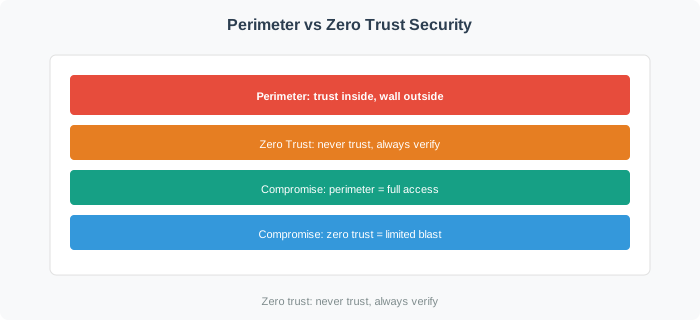
Figure 25.1: Perimeter Security vs Zero Trust Model: Impact of Device Compromise
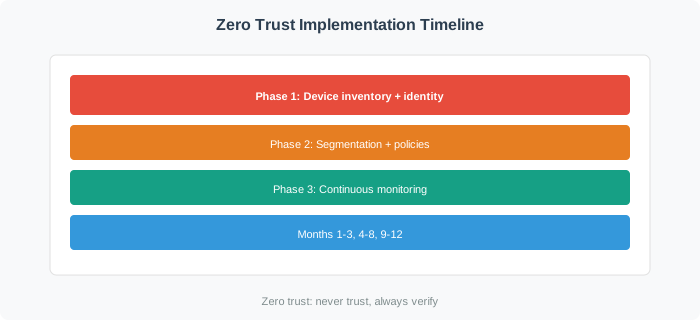
25.3.3 Zero Trust Implementation Timeline
Figure 25.2: Zero trust implementation timeline showing three phases: foundation (device inventory, identity, segmentation), control (policy, authentication, enforcement), and monitoring (analytics, anomaly detection, automated response). Each phase builds on the previous to create comprehensive IoT security.
The diagram above contrasts perimeter and zero trust approaches to device compromise.
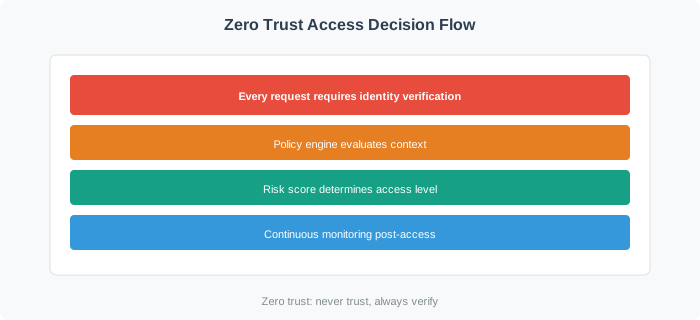
Figure 25.3: Zero Trust access decision flow: Every request requires identity verification, policy evaluation, and continuous monitoring
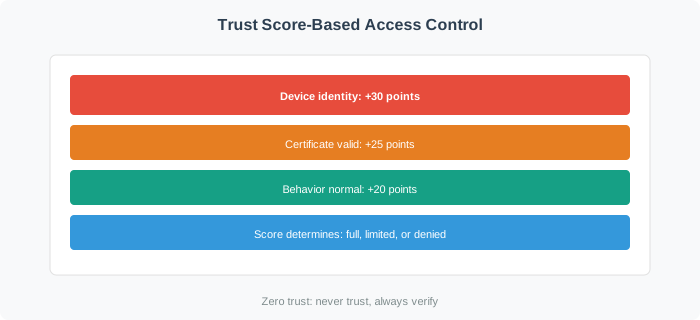
Figure 25.4: Trust score-based access control: Multiple factors combine to determine access level from full access to complete block
The diagram illustrates the critical difference: in perimeter security, compromising one device grants access to the entire internal network. In zero trust, each device can only access explicitly authorized resources.
Additional Visuals: Zero Trust Architecture
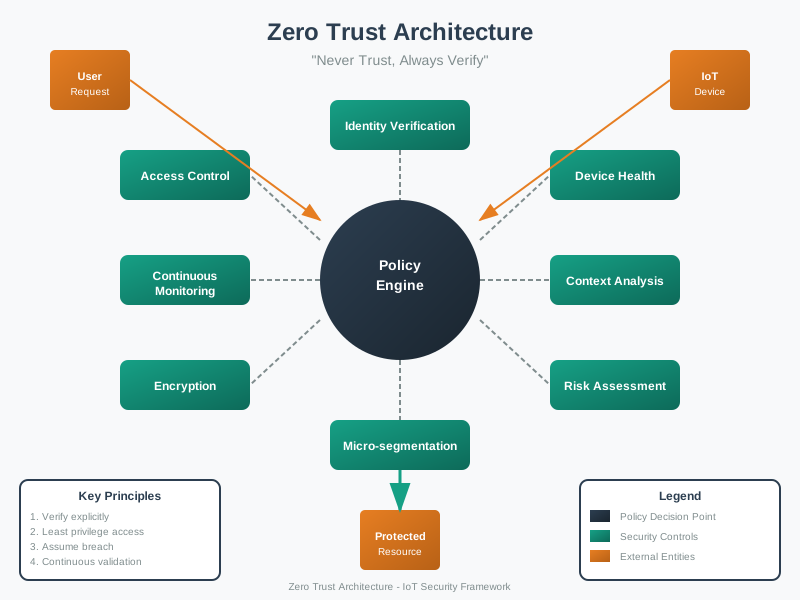
Figure 25.5: Zero Trust Model - Continuous verification architecture
The visualization above emphasizes the paradigm shift from perimeter-based trust to resource-level verification, where every access request is treated as potentially hostile regardless of source location.
Figure 25.6: NIST 800-207 Zero Trust Architecture - Core components
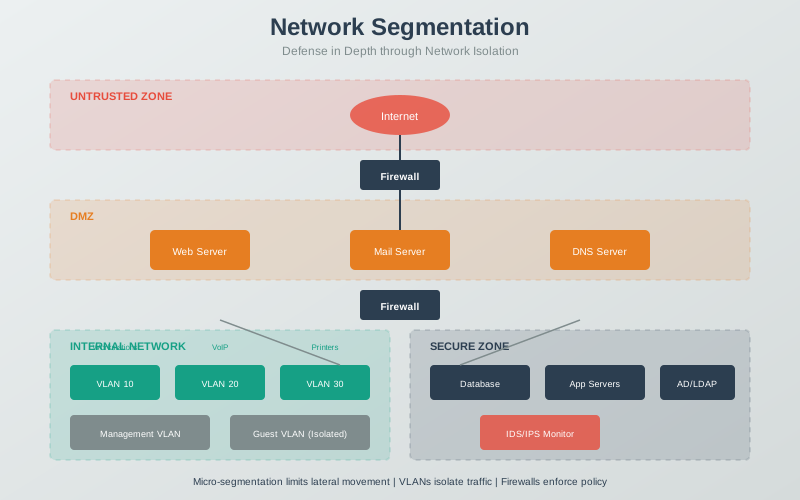
Figure 25.7: Network Micro-Segmentation - Limiting blast radius through zone isolation
25.4 Zero Trust Principles for IoT
⏱️ ~15 min | ⭐⭐ Intermediate | 📋 P11.C02.U03
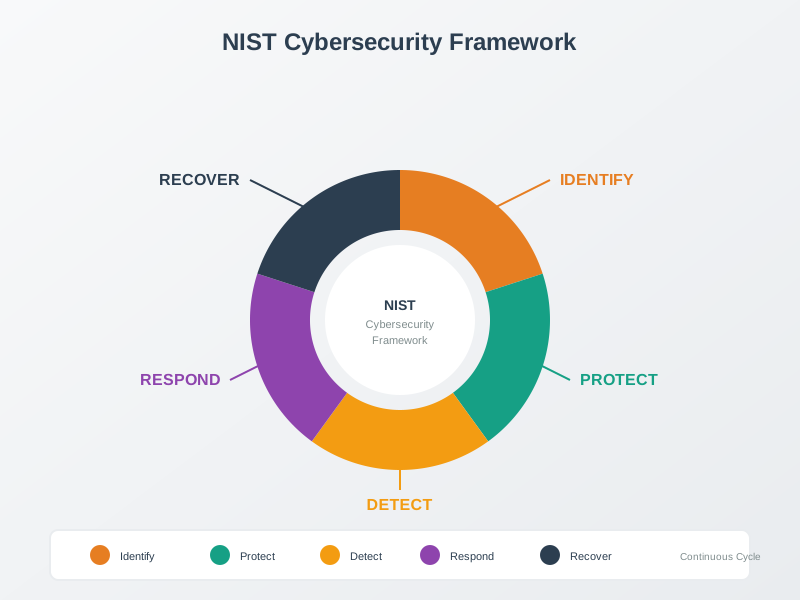
Zero Trust Architecture (ZTA) is built on three core principles, originally defined by John Kindervag at Forrester Research and later standardized by NIST in Special Publication 800-207.
25.4.1 Verify Explicitly
Never assume trust based on network location. Every access request must be authenticated and authorized based on all available data points:
Device Identity
Cryptographic device certificate (X.509)
Hardware-backed identity (TPM, secure element)
Device fingerprint (MAC address, serial number)
User Identity (if applicable) - Human operator credentials - Multi-factor authentication - Role-based access control
Context
Geographic location (is the device where it should be?)
Time of access (unusual for 3 AM?)
Network path (expected route to resource?)
Device Health
Firmware version up to date?
Security patches applied?
No known vulnerabilities?
Resource Sensitivity
Accessing public data vs. PII vs. safety-critical controls
Adjust authentication strength accordingly
Example: A temperature sensor in a smart building requests access to upload data:
REQUEST:
  Device ID: temp-sensor-042
  Certificate: [X.509 cert signed by building CA]
  Location: Floor 3, Zone B
  Timestamp: 2025-12-15 14:30:00 UTC
  Destination: https://building.example.com/api/temperature
  Data: {"temperature": 72.3, "humidity": 45.2}

VERIFICATION:
  ✓ Certificate valid and not revoked
  ✓ Device in expected location
  ✓ Time within normal operation hours
  ✓ Firmware version 2.1.4 (latest)
  ✓ Destination authorized for this device
  ✓ Data size within normal range (41 bytes vs. typical 40 bytes)

DECISION: ALLOW
25.4.2 Least Privilege Access
Grant the minimum access necessary for a device to fulfill its function, and nothing more. This principle limits the blast radius if a device is compromised.
Principle Application:
A temperature sensor should access only the temperature data API, not the building access control system
A security camera should upload video to designated storage, not browse the corporate file server
A smart light bulb should receive commands from the lighting controller, not access the internet
Implementation Strategies:
Network-Level Segmentation - VLANs separate device types (sensors, cameras, controllers) - Firewall rules restrict inter-VLAN communication - ACLs (Access Control Lists) allow only necessary ports/protocols
Application-Level Authorization - API tokens scoped to specific endpoints - OAuth2 scopes limit permissions - JWT claims specify allowed actions
Time-Based Access - Credentials expire frequently (hours, not months) - Refresh tokens require re-authentication - Temporary access for maintenance windows
Example: A smart thermostat in a commercial building:
ALLOWED:
- Read temperature sensors on same floor
- Write heating/cooling setpoints
- Read occupancy sensors for smart scheduling
- Upload operational logs to building management system

DENIED:
- Access to other floors' systems
- Access to security cameras
- Access to employee databases
- Outbound internet connections
- Access to building access control
25.4.3 Assume Breach
Design your system assuming attackers are already inside. Focus on limiting damage, detecting anomalies, and responding rapidly.
Defense in Depth:
Multiple layers of security controls
If one layer fails, others still protect critical assets
Compromise of one device doesn’t compromise the entire system
Micro-Segmentation:
Divide the network into small zones with separate access controls
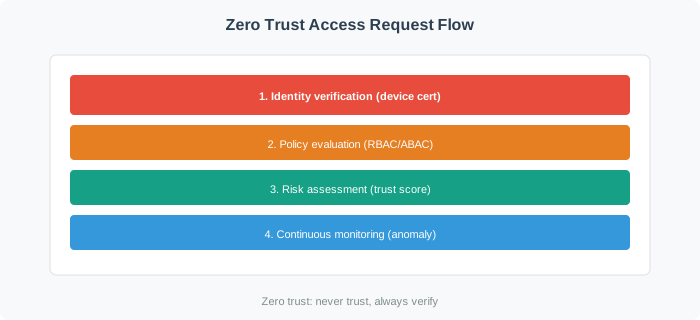
Figure 25.8: Zero Trust Access Request Flow: From Identity Verification to Continuous Monitoring
This flowchart shows how zero trust continuously verifies and monitors every access request, with multiple decision points and fail-safes.
Common Misconception: “Zero Trust Means Zero Network Security”
The Myth: Organizations often believe that implementing zero trust means they can eliminate firewalls, VPNs, and network segmentation entirely, replacing them with identity-based controls only.
The Reality: Zero trust is additive, not a replacement. It adds identity, context, and continuous verification on top of network security, not instead of it.
Real-World Evidence:
Google BeyondCorp: Despite pioneering zero trust, Google maintains multiple security layers including network segmentation, thousands of firewall rules, and DDoS protection. Zero trust identity controls complement–rather than replace–these network-layer defenses.
Industry Benchmarks: Analysis of large-scale IoT deployments consistently shows that organizations combining identity controls with network segmentation experience significantly lower breach rates than those relying on identity controls alone. Network segmentation dramatically reduces attack surface even when zero trust identity controls are in place.
NIST SP 800-207 (2020): The official zero trust standard explicitly calls for defense in depth with multiple enforcement points, network segmentation and micro-segmentation, and network-layer controls that complement identity controls.
Why Both Are Essential:
Network segmentation limits lateral movement (contains breaches to a small fraction of the network)
Identity controls prevent unauthorized access (blocks compromised or spoofed credentials)
Together: defense in depth provides far greater protection than either approach alone
The Correct Approach: Zero trust = Strong Identity + Micro-Segmentation + Continuous Verification. All three layers work together for defense in depth.
Common Misconception: “Zero Trust = No Trust”
The Misconception: Zero trust means nothing is trusted and everything is blocked.
Why It’s Wrong:
Zero trust means “verify always,” not “deny always”
Trust is earned through continuous authentication
Access is granted based on context and identity
More secure AND more usable (no VPN needed)
Name is misleading - it’s really “earned trust”
Real-World Example:
Traditional: VPN connects you to corporate network → trusted
Zero Trust: Every request verified regardless of network
Result: Work from coffee shop as securely as office
Not “blocked everywhere” but “verified everywhere”
The Correct Understanding: | Principle | Traditional Security | Zero Trust | |———–|———————|————| | Trust model | Network perimeter | Per-request | | Verification | Once (at VPN login) | Continuous | | Access scope | Broad (full network) | Minimal (just needed resources) | | User experience | VPN required | Works anywhere | | Lateral movement | Easy once inside | Blocked |
Zero trust = continuous verification + least privilege. It enables secure access, not denial.
25.5 Worked Example: Perimeter Security vs Zero Trust for a Smart Factory
Scenario: A manufacturing plant has 2,000 IoT sensors on the factory floor, 50 PLCs controlling robotic arms, and 200 employee workstations. Currently, all devices share a flat network behind a perimeter firewall. An attacker compromises one temperature sensor via a known firmware vulnerability. Compare the outcome under perimeter security vs zero trust.
Perimeter Security (Current State):
Attack chain after compromising 1 temperature sensor:
  Minute 0: Attacker exploits CVE on temperature sensor (port 80 open)
  Minute 1: Sensor is on flat network -- ARP scan discovers 2,250 devices
  Minute 3: Attacker finds 50 PLCs with default credentials (admin/admin)
  Minute 5: Attacker accesses PLC management interface
  Minute 8: Attacker modifies robotic arm parameters (speed, force limits)
  Minute 10: Modified parameters cause product quality defects

Blast radius: 2,250 devices (100% of network)
Time to critical impact: 10 minutes
Detection: None (all traffic is "trusted internal")
Damage: $2.4M (production stoppage + defective product recall)
Zero Trust Architecture (Proposed):
Same attack -- attacker compromises temperature sensor:
  Minute 0: Attacker exploits CVE on temperature sensor
  Minute 1: Sensor is micro-segmented -- can ONLY talk to its data collector
  Minute 1: ARP scan blocked by micro-segmentation (no L2 visibility)
  Minute 2: Sensor attempts connection to PLC -- DENIED (policy violation)
  Minute 2: Policy violation triggers alert to SOC
  Minute 3: Anomaly detection flags unusual sensor behavior (port scan attempt)
  Minute 5: SOC isolates compromised sensor automatically
  Minute 5: Attacker has access to: 1 temperature sensor only

Blast radius: 1 device (0.04% of network)
Time to detection: 2 minutes
Time to containment: 5 minutes
Damage: $0 (sensor replacement cost: $45)
Cost Comparison:
Investment
Perimeter Only
Zero Trust
Firewall
$15,000
$15,000
Network switches (VLAN-capable)
$0 (existing)
$35,000 (managed switches)
Identity infrastructure (PKI)
$0
$25,000
Policy engine (micro-segmentation)
$0
$40,000/year
Monitoring/SIEM
$0
$20,000/year
Total Year 1
$15,000
$135,000
Expected breach cost/year
$480,000
$900
Net annual cost
$495,000
$135,900
ROI: Zero trust saves $359,100/year net. The additional investment of $120,000 ($135,000 - $15,000) is recovered in approximately 3 months given the $479,100/year reduction in expected breach costs.
Key lesson: Perimeter security creates a binary trust model – once inside, everything is trusted. For IoT environments where devices are physically accessible and firmware vulnerabilities are common, this means one $45 sensor can provide a pivot point to $2.4M in damages. Zero trust’s per-device micro-segmentation ensures that the blast radius of any single compromise is limited to that one device.
Interactive: Zero Trust ROI Calculator
Adjust the parameters below to estimate ROI for your own deployment scenario.
Result: Micro-segmentation reduces attack surface from 49.9M to 995K connections–a 98.0% reduction. A compromised device can reach only 199 other devices (same VLAN) instead of 9,999.
In practice: Attack surface reduction quantifies zero trust value. A 98% reduction means lateral movement difficulty increases approximately 50 times. Each additional layer (device authentication, encryption) compounds the reduction multiplicatively.
Try It Yourself: Use the calculator below to explore how the number of devices, segments, and cross-segment connections affect attack surface reduction.
Zero trust fundamentals represent a paradigm shift in security thinking:
Traditional perimeter security has failed for IoT systems due to scale, device diversity, long lifecycles, and physical accessibility.
Zero trust eliminates implicit trust based on network location, requiring continuous verification of every device and request.
Three core principles guide zero trust implementation: verify explicitly (authenticate everything), least privilege (minimum necessary access), and assume breach (design for containment).
Zero trust is additive – it enhances network security with identity and context rather than replacing it.
Zero trust minimizes blast radius and enables faster breach detection, but it doesn’t prevent all attacks. Nation-state attackers with compromised credentials can still navigate a zero trust architecture. Zero trust makes breaches harder to execute and faster to detect — it doesn’t make them impossible.
2. Implementing Zero Trust Principles Without Changing Culture
Zero trust requires security teams to move from “the inside is trusted” to “nothing is trusted.” Organizations that implement zero trust technology without changing the security mental model find teams creating exceptions and workarounds that undermine the architecture.
3. Applying Zero Trust Only to New Deployments
Legacy IoT devices that can’t support modern authentication are often excluded from zero trust architectures, creating security gaps. Develop compensating controls (network proxies, legacy device isolation zones) to apply zero trust principles to legacy devices.
4. Not Measuring Zero Trust Effectiveness
Zero trust architectures without metrics can’t demonstrate improvement or identify gaps. Measure mean time to detect (MTTD), percentage of access requests requiring re-authentication, unauthorized lateral movement attempts blocked, and policy exception counts to track zero trust effectiveness.
25.9 What’s Next
Now that you understand the core principles of zero trust security, continue to Zero Trust Implementation to learn the practical steps for deploying zero trust in IoT networks, including the IoT-specific challenges and a phased implementation approach.