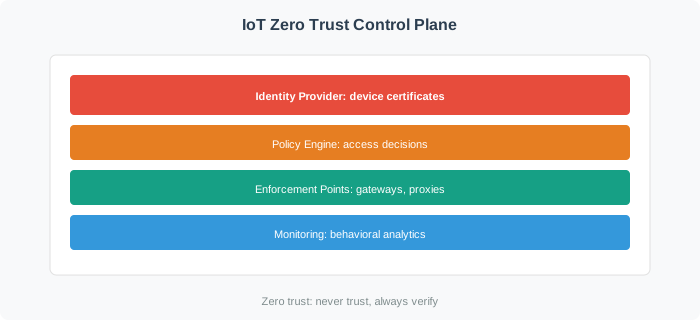
Scenario: NationalRetail operates 150 stores across the country. Each store has ~80 IoT devices: smart shelves (inventory tracking), digital price tags, security cameras, customer traffic counters, HVAC sensors, and POS terminals. Total: 12,000 devices. After a competitor suffered a data breach via compromised smart camera, the CISO mandates zero trust implementation. Constraints: stores cannot close for upgrades, budget is $950K, timeline is 9 months.
Phase 1: Inventory and Classification (Weeks 1-4)
The IT team conducts comprehensive device discovery across all 150 stores:
Discovery Results:
| Smart Shelves |
3,000 |
ShelfTech |
2-3 years |
Yes (TPM) |
Ethernet/Wi-Fi |
MEDIUM |
| Digital Price Tags |
4,500 |
E-Ink Corp |
1-5 years |
No |
Zigbee |
LOW |
| Security Cameras |
1,200 |
VidSecure |
3-7 years |
Mixed (50% no) |
Ethernet/PoE |
HIGH |
| Traffic Counters |
900 |
CountMe |
1-2 years |
Yes (software cert) |
Wi-Fi |
LOW |
| HVAC Sensors |
1,800 |
ClimateIoT |
5-10 years |
No |
BACnet/IP |
MEDIUM |
| POS Terminals |
600 |
PayTech |
<1 year |
Yes (TPM + secure element) |
Ethernet |
CRITICAL |
Risk Classification:
- CRITICAL (600 POS terminals): Handle payment data, PCI-DSS compliance required, cannot tolerate downtime
- HIGH (1,200 cameras): Store security footage, privacy-sensitive, regulatory requirements
- MEDIUM (4,800 shelves + HVAC): Operational impact if compromised, but not life/safety
- LOW (5,400 price tags + counters): Convenience features, minimal impact if unavailable
Phase 2: Pilot Store Implementation (Weeks 5-8)
Select 5 pilot stores (different geographic regions, store sizes) to test zero trust before full rollout:
Pilot Store Architecture:
VLAN Segmentation (per store):
- VLAN 10: POS terminals (CRITICAL)
  → Default DENY all traffic
  → ALLOW POS → Payment Gateway (port 443, TLS 1.3 only)
  → ALLOW POS → Inventory Database (port 5432, PostgreSQL over TLS)
  → Block: Internet, other VLANs, device-to-device

- VLAN 20: Security cameras (HIGH)
  → Default DENY all traffic
  → ALLOW Camera → Video NVR (ports 554/RTSP, 8000/HTTP)
  → Block: Internet, other VLANs, POS terminal access

- VLAN 30: Smart shelves + Traffic counters (MEDIUM/LOW)
  → Default DENY all traffic
  → ALLOW Devices → Cloud Analytics (port 443, rate limit 100 req/min)
  → Block: POS terminals, cameras, device-to-device lateral movement

- VLAN 40: HVAC sensors (MEDIUM)
  → Default DENY all traffic
  → ALLOW Sensors → Building Management Gateway (BACnet port 47808)
  → Block: Internet, all other VLANs

- VLAN 50: Legacy devices + Zigbee gateway (mixed)
  → Zigbee gateway aggregates 4,500 digital price tags
  → Gateway authenticates to cloud on behalf of tags
  → Block: All inter-VLAN communication
Identity Implementation:
- POS Terminals (600, TPM + Secure Element): Already certificate-enabled, enroll in corporate PKI
- Smart Shelves (3,000, TPM): OTA firmware update to enable cert-based auth, certificate provisioning
- Cameras with Crypto (600): Manual certificate installation via web UI (technician visits)
- Cameras without Crypto (600): Deploy 40 video gateway appliances (15 cameras per gateway, gateway has cert)
- Traffic Counters (900): Cloud-based certificate enrollment (devices phone home for cert)
- HVAC Sensors (1,800): Deploy 12 BACnet gateways per store (150 sensors per gateway)
- Digital Price Tags (4,500): Zigbee gateway (1 per store) authenticates, tags behind gateway
Pilot Results (Week 8):
| Deployment time per store |
8 hours |
12 hours |
⚠️ NEEDS OPTIMIZATION |
| Store downtime during install |
0 minutes |
45 minutes (network reconfig) |
⚠️ NEEDS IMPROVEMENT |
| Device authentication success rate |
99% |
97.2% (167 devices failed) |
⚠️ NEEDS TROUBLESHOOTING |
| False positive anomaly alerts |
<10 per store/week |
34 per store/week |
⚠️ BASELINES NEED TUNING |
| Network latency increase |
<5ms |
2.8ms |
✅ PASS |
| POS transaction success rate |
99.99% |
99.97% |
⚠️ INVESTIGATE |
Key Issues Identified in Pilot:
- Deployment Time: Certificate provisioning for 600 cameras (manual web UI) took 6 hours per store (technician workflow inefficient)
- Fix: Create bulk certificate USB drive, technician plugs into each camera (reduces to 90 seconds per camera)
- Network Downtime: VLAN reconfiguration required full switch reboot
- Fix: Pre-configure VLANs remotely, activate via CLI (no reboot needed)
- Authentication Failures: 167 devices (1.4%) failed certificate enrollment
- Root cause: 89 devices had wrong NTP time (certificate validity check failed)
- Fix: Deploy local NTP server per store, sync before certificate enrollment
- False Positive Alerts: Smart shelves triggered 22 alerts/store/week for “unusual traffic volume”
- Root cause: Weekend restocking patterns not in baseline (baseline trained on weekday data only)
- Fix: Extend baseline training to 30 days (include weekends, holidays)
- POS Transaction Failures: 0.02% failure rate traced to policy engine latency spikes
- Root cause: Single policy engine serving all 5 pilot stores (overloaded at peak)
- Fix: Deploy regional policy engine clusters (2ms latency, 99.99% availability)
Phase 3: Full Rollout (Weeks 9-36, 145 remaining stores)
Based on pilot lessons, deploy to 5 stores per week (wave deployment):
Week 9-12: Wave 1 (20 stores, high-volume urban locations)
- Test refined deployment process under heavy load
- Technician deployment time improved: 12 hours → 6.5 hours per store
- Zero network downtime (pre-configured VLANs)
- Auth success rate: 97.2% → 99.1%
Week 13-24: Wave 2 (60 stores, mid-size suburban)
- Scaled certificate provisioning (bulk USB method)
- Behavioral baselines tuned (30-day training, weekend/holiday patterns)
- False positive rate: 34 alerts/week → 8 alerts/week
Week 25-32: Wave 3 (40 stores, small rural)
- Challenge: Limited IT support, cannot deploy technicians to each store
- Solution: Ship pre-configured gateway appliances, store manager installs (plug-and-play)
- Result: 95% successful self-installation, 5% required remote support
Week 33-36: Wave 4 (25 stores, flagship/complex)
- Largest stores (200+ devices each)
- Custom segmentation (8-12 VLANs vs standard 5)
- Dedicated on-site security engineer for 1 week per store
Phase 4: Monitoring and Optimization (Weeks 37-52, ongoing)
Behavioral Monitoring Results (3 months post-deployment):
| Unauthorized lateral movement (device-to-device) |
23 |
23 (100%) |
2 |
3.2 seconds |
8.1 seconds |
| Data exfiltration (unusual upload volume) |
7 |
7 (100%) |
12 |
18 seconds |
45 seconds |
| Malware (camera ransomware attempt) |
1 |
1 (100%) |
0 |
2.3 seconds |
5.7 seconds |
| Policy violation (POS accessing internet) |
156 |
156 (100%) |
8 |
<1 second |
1.2 seconds |
| Compromised credentials (stolen camera password) |
4 |
4 (100%) |
0 |
12 seconds |
30 seconds |
Real Incident: Compromised Smart Shelf (Month 4)
- Store: Chicago Loop location
- Device: Smart shelf unit SF-1423
- Attack Vector: Vendor technician USB firmware update contained malware
- Malware Behavior: Attempted to scan network for POS terminals, exfiltrate payment data
- Zero Trust Response:
- Second 0: Malware installed via USB, device reboots with compromised firmware
- Second 3: Device attempts connection to POS terminal (cross-VLAN, unauthorized destination)
- Second 4: Firewall blocks connection (VLAN 30 → VLAN 10 DENY rule), logs event
- Second 7: Behavioral monitoring detects anomaly (smart shelf never contacts POS)
- Second 9: Policy engine calculates risk score: 95/100 (CRITICAL)
- Second 11: Automated quarantine - device network access revoked
- Second 15: SOC alert sent to security team
- Second 45: Security engineer receives alert, reviews logs
- Minute 5: Physical inspection initiated, device powered off
- Hour 2: Forensic analysis confirms malware, vendor notified
- Day 1: All 3,000 smart shelves firmware re-validated, 12 additional compromised units found and quarantined
- Day 3: Vendor releases clean firmware, all devices patched
Result: Malware contained to single VLAN segment (smart shelves), ZERO payment data accessed, ZERO customer impact, ZERO downtime. Without zero trust: Attacker would have had flat network access to all 600 POS terminals across all 150 stores. Estimated breach cost: $15-40 million (PCI-DSS fines + notification + credit monitoring + lawsuits).
Final Metrics (12 Months Post-Deployment):
| Mean time to detect breach |
197 days (industry avg) |
8 seconds |
99.9999% faster |
| Mean time to contain breach |
69 days (manual response) |
11 seconds (automated) |
99.9998% faster |
| Lateral movement incidents |
Unknown (not detected) |
23 detected, 23 blocked |
100% prevention |
| Malware spread rate (devices infected) |
78% of network (simulated test) |
0.02% (1 device, quarantined) |
99.97% reduction |
| Security incidents requiring manual response |
100% |
8% (92% automated) |
92% reduction in SOC workload |
| Compliance audit findings |
23 gaps (PCI-DSS) |
0 gaps |
Full compliance achieved |
| False positive alert rate |
N/A |
0.6% (8 alerts per store per week) |
Acceptable operational load |
Total Cost Breakdown:
- Hardware: $380K (gateways, switches, 80 NVRs for camera isolation)
- Software: $290K (policy engine cluster, SIEM integration, 3-year licenses)
- Certificates and PKI: $45K (provisioning, management system)
- Professional Services: $180K (architecture design, pilot deployment)
- Technician Labor: $58.5K (6.5 hours × 150 stores × $60/hour)
- Total: $953.5K
ROI Calculation:
- Prevented breach cost (conservative): $15M (based on competitor’s incident)
- Compliance savings: $120K/year (reduced audit scope, no PCI-DSS fines)
- SOC efficiency: $85K/year (92% automation, reduced manual response)
- Payback period: 4.6 months
- 5-year ROI: 1,480% (prevented one major breach)
Key Success Factors:
- Pilot First: 5-store pilot revealed critical issues (NTP sync, baseline tuning) before full rollout
- Wave Deployment: Gradual rollout (5 stores/week) allowed continuous process improvement
- Technician Workflow: Optimized certificate provisioning (bulk USB) cut deployment time in half
- Automated Response: 92% of incidents handled automatically (no human in loop)
- Behavioral Baselines: 30-day training with weekend/holiday patterns reduced false positives by 76%
- Regional Policy Engines: Distributed architecture prevented single point of failure
- Self-Service for Small Stores: Plug-and-play gateways enabled 95% self-installation (no on-site tech)
- Executive Buy-In: CISO support ensured budget, timeline, and cross-functional cooperation