5 IoT Frequency Bands and Licensing

More
Depth: Practitioner
Progress saves as you read. Mark sections complete as you go; your progress appears in the sidebar.
5.1 Start With the Wireless Story
This section: Start With the Wireless Story — BLE is a short-range low-power radio system.
BLE is a short-range low-power radio system. A payload is the useful data inside a message. A protocol is a shared set of message rules. Zigbee is a low-power radio network system often used for nearby devices.
Picture a sensor in a concrete basement. Start with the message size, distance, walls, power source, country, and nearby radios. Then choose a frequency range that is legal and has a fair chance of carrying that traffic.
Check the installed trade-off. Lower frequencies can often travel farther, but may offer less data and different local rules. Higher frequencies can carry more data, yet walls and busy channels can reduce useful reach.
This basement story cannot pick a product from a band name. It does not prove antenna fit, shared-channel behavior, roaming, or approval in every market. Those need device and field evidence.
Use the Practitioner sections to build the band choice and region record. Use Under the Hood for path loss, channel width, shared use, and antenna limits. The deeper work adds numbers to the simple scene; it does not make a famous radio the default.
Walk the basement job. Name the sensor. Name the message. Name the send rate. Name the alarm. Name the power source. Name the country. Name the service life. Name the repair owner.
Map the path. Mark each wall. Mark each floor. Mark metal. Mark water. Mark the case. Mark the antenna place. Mark moving stock. Mark nearby radios. Mark the nearest safe radio point.
Check local rules. Find the allowed band. Find the allowed power. Find the allowed send time. Find the allowed channel use. Keep the rule source. Keep its date. Repeat for every sale country. Do not copy one region into another.
Test a low band. Use the final case. Use the final antenna. Send near. Send far. Add walls. Add other users. Measure useful delivery. Measure delay. Measure battery cost. Repeat at the busy time.
Test a higher band. Keep the same message. Keep the same place. Keep the same pass rule. Check the shorter path. Check the higher data rate. Check wall loss. Check busy channels. Compare whole service, not one number.
Check the antenna. Keep clear space. Keep the right ground. Keep it away from metal. Turn the device. Hold the device. Wet the case. Fit the final battery. Fit the final cable. Repeat the radio test.
Check shared use. Start a nearby network. Start a phone. Start a headset. Start a video link. Send the sensor alarm. Watch wait time. Watch lost work. Change the channel. Change the place. Keep the result from the real scene.
Check an outside service. Remove local cover. Change the mobile operator. Enter a weak building. Cross a border. Lose the service. Restore it. Check old messages. Check fees. Check who answers a fault. A licensed band adds an owner, not a guarantee.
Check power. Measure sleep. Measure one send. Measure one retry. Measure one scan. Measure one join. Measure a weak-link send. Measure a burst. Build the day from those acts. Do not claim battery life from send power alone.
Close the band record. Keep the legal proof. Keep the path map. Keep the antenna state. Keep the traffic case. Keep the busy test. Keep the energy test. Keep the service owner. Keep the retest trigger. State what the band name cannot prove.
A frequency band is a contract with physics and regulators. Start by asking who is allowed to transmit, how often, at what power, through what obstacles, and with what neighbors nearby before choosing licensed, license-exempt, or shared spectrum.
5.2 In 60 Seconds
This section: In 60 Seconds — An IoT frequency-band decision is not a preference for a famous protocol.
An IoT frequency-band decision is not a preference for a famous protocol. It is an evidence record that shows the selected band fits the payload, range, antenna, enclosure, region, coexistence environment, and operating model.
Most IoT designs use one or more of these spectrum families:
- sub-GHz shared bands for lower-rate links that need longer practical reach
- 2.4 GHz shared spectrum for globally common local radios such as BLE, Zigbee, Thread, and Wi-Fi
- 5 GHz and 6 GHz Wi-Fi spectrum for higher local throughput and shorter practical range
- licensed cellular bands for operator-managed wide-area service
- specialized higher-frequency or ultra-wideband systems for short-range ranging, sensing, or high-throughput links
The review goal is to prove that the band choice is allowed in the target region and works in the installed environment.

5.3 Learning Objectives
This section: Learning Objectives
By the end of this chapter, you will be able to:
- compare major IoT frequency-band families without relying on one-size-fits-all range claims
- distinguish licensed, unlicensed, and shared spectrum responsibilities
- identify why regional band plans affect hardware, firmware, certification, and deployment records
- review 2.4 GHz, 5 GHz, 6 GHz, sub-GHz, and cellular choices using evidence
- build a coexistence and measurement record for a band-selection decision
- reject unsupported band claims before they become product or deployment defects
5.4 What A Band Decision Must Prove
This section: What A Band Decision Must Prove — A frequency band controls more than radio range.
A frequency band controls more than radio range. It affects antenna size, allowed transmit behavior, channel availability, receiver filtering, coexistence, certification, provisioning, and service operations.
A review-ready band decision answers these questions:
- What exact radio technology and frequency band are being used?
- Which countries or regulatory regions are in scope?
- Is the band licensed, unlicensed, shared, operator-managed, or site-licensed?
- What payload size, latency, reporting interval, and mobility assumptions drive the choice?
- Can the antenna and enclosure support the selected band?
- What nearby systems already use the same or adjacent spectrum?
- What power, duty-cycle, channel-access, and certification constraints apply in each target region?
- What site measurements prove that the installed link has enough margin?
- What firmware, SKU, or configuration controls prevent a device from using the wrong regional settings?
If the answer is only “this protocol usually works,” the review is not complete.
5.5 IoT Spectrum Families
This section: IoT Spectrum Families — Before comparing spectrum families, inspect Figure 5.1 to organise licensed status, frequency, bandwidth, range, device support, and operating responsibility.
Before comparing spectrum families, inspect Figure 5.1 to organise licensed status, frequency, bandwidth, range, device support, and operating responsibility.
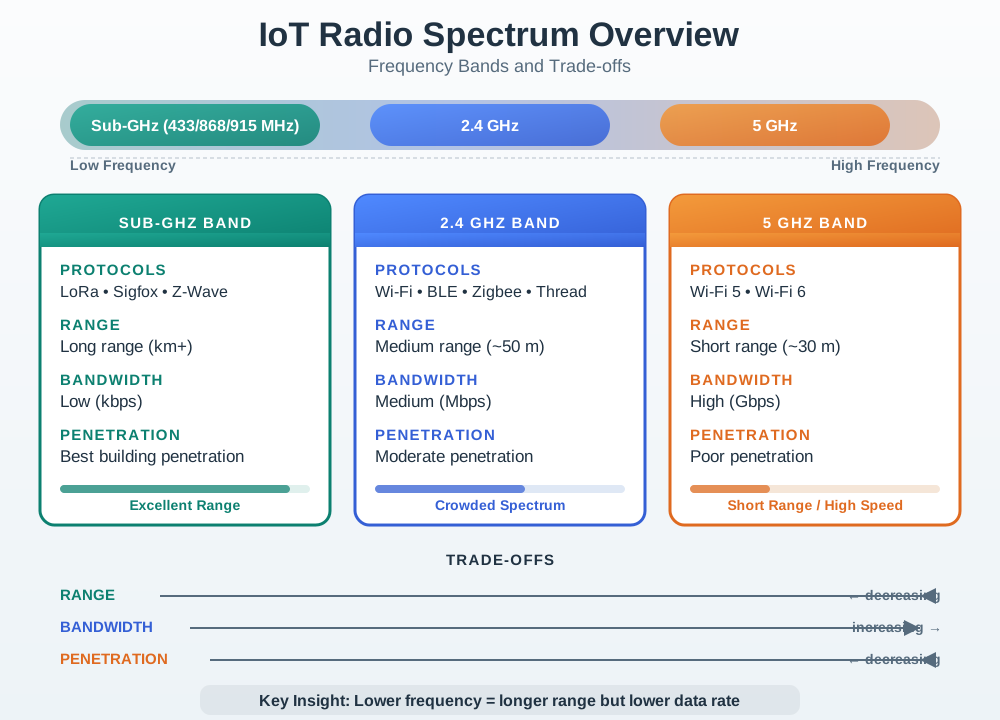
Read Figure 5.1 across the spectrum families, then follow the service requirement into the candidate whose legal, hardware, propagation, and capacity evidence aligns. The overview prepares the later band-selection flow.
Use Figure 5.1 to keep the band families separate during review. The same payload can sometimes be carried by several technologies, but each candidate needs different evidence.
5.5.3 5 GHz And 6 GHz Wi-Fi Spectrum
Higher Wi-Fi bands can provide more local capacity and more channel options than 2.4 GHz. They also tend to have shorter practical reach through walls and may involve region-specific access rules, dynamic frequency selection, power limits, indoor-only conditions, or coordination mechanisms.
Review questions:
- Does the IoT device actually need Wi-Fi throughput, or only small status messages?
- Are all target client devices and access points compatible with the selected band?
- Are DFS, indoor-only, low-power, or other regional operating conditions relevant?
- Does the design still work from representative installed positions?
- Does fallback to another band change latency, battery use, or roaming behavior?
Avoid “higher band means better” reasoning. Higher frequency may help capacity, but it may also reduce installed margin.
5.5.4 Licensed Cellular Bands
Cellular IoT uses spectrum assigned to mobile operators. NB-IoT, LTE-M, LTE, 5G RedCap, and other cellular services can provide managed wide-area coverage, mobility support, SIM or profile management, and operator network operations.
Review questions:
- Which operator, service type, and supported band set are in scope?
- Does the module support the necessary regional cellular bands?
- Is coverage measured where the product will actually operate?
- Are roaming, provisioning, data plan, firmware update, and fallback assumptions documented?
- Does the application tolerate operator coverage gaps, network changes, and service constraints?
Licensed cellular can simplify wide-area connectivity, but it adds dependency on operator service, certification, subscription, and coverage evidence.
5.5.5 Specialized Higher-Frequency Systems
Some IoT systems use UWB, mmWave-style links, radar, or optical wireless links for ranging, sensing, localization, or high-throughput short-range communication. These are not replacements for every sensor network.
Review questions:
- Is the system trying to communicate, locate, sense, or stream high-rate data?
- Is line of sight or room-scale coverage assumed?
- Are obstruction, orientation, body blocking, enclosure, and installation constraints measured?
- Are regulatory and certification requirements different from the main product radio?
- Does the system have a fallback path when the specialized link is unavailable?
Specialized bands should be approved for a specific job, not because they sound newer.
5.7 Regional Configuration Is A Product Requirement
This section: Regional Configuration Is A Product Requirement — Regional spectrum differences are not a late documentation detail.
Regional spectrum differences are not a late documentation detail. They can affect hardware variants, antenna matching, firmware defaults, install procedures, provisioning, labels, and support tooling.
Review questions:
- Does the product know its allowed operating region before transmitting?
- Can installers accidentally choose a region that is not permitted for the site?
- Are test, manufacturing, and demo modes prevented from transmitting with unsafe settings?
- Are firmware updates allowed to change radio behavior without a compliance review?
- Is there a record showing which region, channel plan, power setting, and firmware version were used?
For multi-region products, region control belongs in the product design and release process, not only in a deployment note.
5.8 Coexistence And Channel Planning
This section: Coexistence And Channel Planning — Frequency selection is incomplete without coexistence review.
Frequency selection is incomplete without coexistence review. A band may be legally allowed and still fail because nearby systems dominate the channel.
Strong coexistence evidence includes:
- inventory of nearby radio systems and their likely channels
- measurements from representative locations and busy periods
- channel or spreading plan for gateways, access points, and sensor radios
- retry, backoff, duty behavior, and packet success records
- installed antenna orientation and enclosure checks
- retest triggers after access-point changes, gateway moves, firmware updates, or building changes
In dense buildings, the useful question is not “is this band common?” It is “what happens to packet success when the real site is busy?”
5.9 Band Selection Review Flow
This section: Band Selection Review Flow — Before selecting a frequency band, inspect Figure 5.2 to make the evidence sequence explicit.
Before selecting a frequency band, inspect Figure 5.2 to make the evidence sequence explicit.
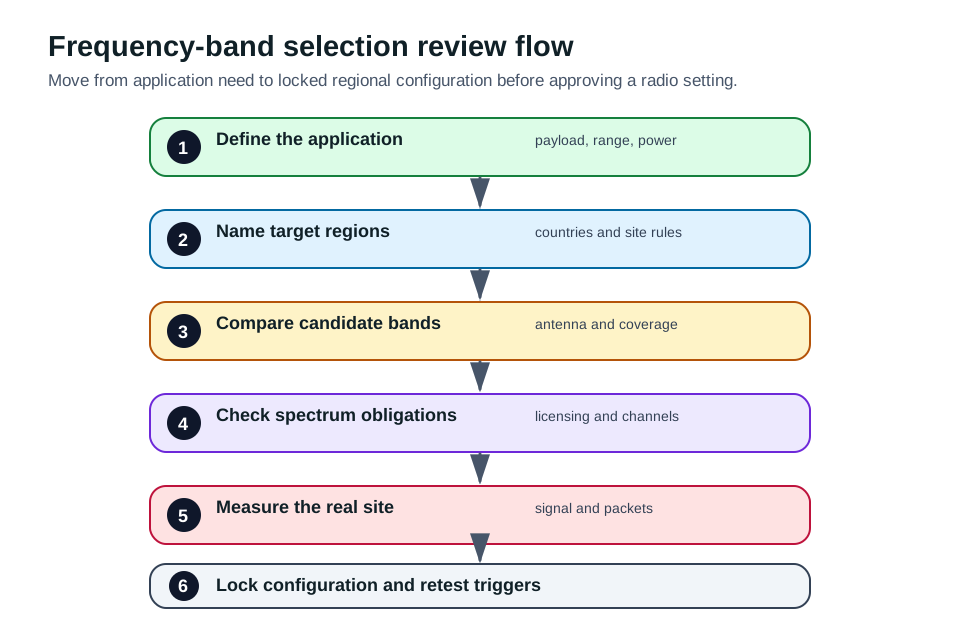
Read Figure 5.2 from workload and site constraints through regulation, device support, propagation, capacity, power, and operational ownership. The final branch connects a band choice to the measurements and retest conditions that justify it.
Use Figure 5.2 when a project proposes a band because it is familiar, convenient, or already supported by a module. Familiarity is useful, but approval needs a repeatable evidence path.
5.10 Worked Review: Building Sensor Mix
This section: Worked Review: Building Sensor Mix
Prompt: “Use 2.4 GHz for every building sensor because the prototype already supports it.”
Review path:
- Split the devices by payload, latency, power state, mobility, and installed location.
- Identify which devices need local Wi-Fi throughput and which only need small sensor updates.
- Survey existing Wi-Fi, BLE, Zigbee, Thread, and gateway traffic in representative areas.
- Check antenna placement and enclosure detuning for each device class.
- Test packet success during busy periods, not only during a quiet lab run.
- Decide whether one band is acceptable or whether the system needs multiple radios or separate channel plans.
- Record channel settings, firmware defaults, gateway placement, and retest triggers.
Accepted answer: “2.4 GHz may be suitable for some devices, but the approval depends on coexistence and installed-link evidence for each device class.”
5.11 Worked Review: Multi-Region Asset Tracker
This section: Worked Review: Multi-Region Asset Tracker — Accepted answer: “Sub-GHz is not one global setting.
Prompt: “Use one sub-GHz configuration for the global tracker because sub-GHz has long range.”
Review path:
- List the countries and regions where the tracker will ship, roam, or be demonstrated.
- Check whether the proposed module, antenna, and firmware support each region’s allowed bands.
- Identify any region-specific power, access, channel, or certification constraints.
- Decide whether the product needs separate SKUs, region-locked firmware, provisioning controls, or an operator-managed cellular fallback.
- Test the final enclosure and antenna for each supported band.
- Record the approved region configuration and block unsafe transmit modes.
Accepted answer: “Sub-GHz is not one global setting. A multi-region product needs region-aware hardware, firmware, provisioning, and compliance evidence.”
5.12 Common Mistakes
This section: Common Mistakes
- treating a protocol name as proof that the frequency band is suitable
- quoting exact range numbers without environment, antenna, payload, and measurement context
- using a region-specific sub-GHz setting in a different market
- assuming unlicensed means unregulated
- assuming licensed cellular removes coverage, roaming, or certification review
- selecting 5 GHz or 6 GHz because it has more capacity when the sensor needs coverage and low energy
- ignoring antenna gain when checking radiated-power limits
- approving channel plans without measuring the real RF environment
- forgetting retest triggers after access-point changes, gateway moves, enclosure changes, or firmware updates
5.13 Knowledge Check: Frequency-Band Review
This section: Knowledge Check: Frequency-Band Review
5.14 Match The Spectrum Term To The Review Evidence
This section: Match The Spectrum Term To The Review Evidence
5.15 Order The Band Selection Review
This section: Order The Band Selection Review
5.16 Review Checklist
This section: Review Checklist
Before approving a frequency-band decision, confirm that the record includes:
- exact radio technology, band, channel plan, and operating mode
- target countries, regulatory regions, operators, or site spectrum rules
- licensed, unlicensed, shared, or operator-managed responsibility model
- antenna, enclosure, ground-plane, orientation, and installed-placement evidence
- payload size, reporting interval, latency, mobility, and power assumptions
- coexistence survey and packet measurements from busy representative conditions
- regional firmware or SKU controls that prevent unsafe settings
- certification, provisioning, service, and support responsibilities
- retest triggers after firmware, antenna, enclosure, gateway, access-point, operator, or site changes
5.17 Two Regimes — Licensed and License-Exempt
This section: Two Regimes — Licensed and License-Exempt — Radio spectrum is a shared, regulated resource, and IoT technologies split across two access regimes.
Radio spectrum is a shared, regulated resource, and IoT technologies split across two access regimes. Licensed spectrum is assigned to an operator or license holder — the cellular LTE/5G bands behind NB-IoT and LTE-M. License-exempt spectrum (including the 2.4 GHz ISM band and region-specific U-NII/SRD allocations) is available to compliant devices without an individual spectrum license — the 2.4 GHz and 5 GHz Wi-Fi bands, 6 GHz for Wi-Fi 6E, and sub-GHz 868 MHz (Europe) and 915 MHz (Americas) used by Zigbee, LoRaWAN, and friends.
The choice is a bargain. Licensed operator service buys managed access, paid for with a subscription; a private licensed network is also possible where authorized. License-exempt spectrum is self-deployable, but you share the air with everyone else and must obey power and, in some bands, duty-cycle limits.
Worked fit check. Suppose a building sensor sends a 30-byte state update every five minutes from behind two walls. A 2.4 GHz design may reuse existing gateways, but it must share the channel with Wi-Fi, BLE, Zigbee, and phones; the review needs packet success during busy periods. A sub-GHz design may gain range and wall margin, but the antenna is larger and the exact regional band plan matters. A cellular design may avoid local gateway planning, but it depends on operator coverage, module band support, provisioning, and service continuity. The same payload can fit all three families; the evidence record decides which one is acceptable.
The first review calculation is usually simple. Name the target region, list candidate bands, convert each to an antenna-scale expectation, and mark the operating responsibility. A 915 MHz quarter-wave antenna is about 8.2 cm; a 2.4 GHz quarter-wave antenna is about 3.1 cm. To organize those facts into a decision, use Figure 5.3 as a map of which access regime and operating constraints accompany each family.
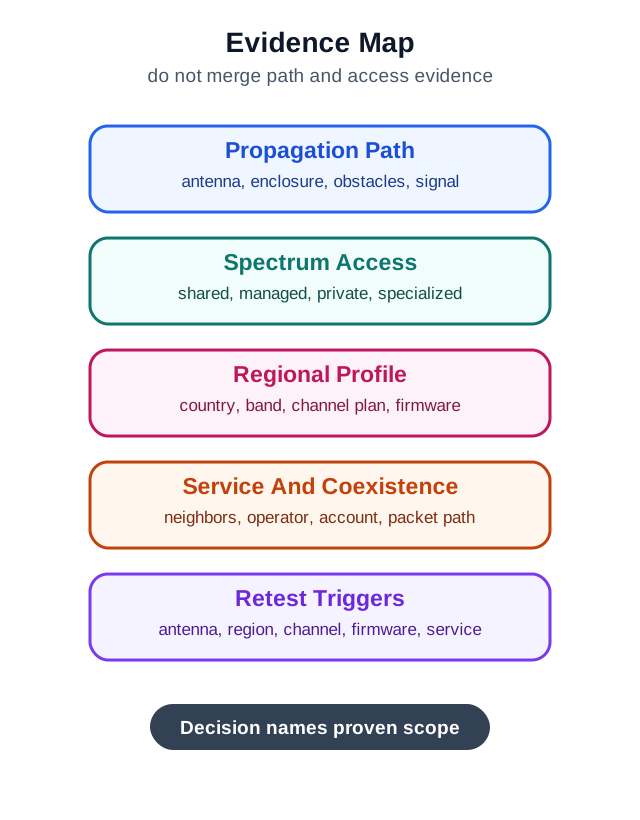
Read Figure 5.3 from the physical path through spectrum access and regional profile, then across service, coexistence, and retest evidence to the bounded decision. Licensed versus license-exempt changes who controls access, but it does not answer the other columns. The map therefore connects the two regimes to the chapter’s running rule: approve a band only for the region, installation, service model, and measured conditions actually reviewed.
Frame the decision: licensed = paid, managed, operator-controlled; license-exempt = self-deployed, shared, rule-bound. Private licensed networks can also be self-deployed where authorized. Coverage, cost, and control push you toward one or the other.
5.17.1 Overview Knowledge Check
5.18 Bands, EIRP Caps, and Duty Cycle
This section: Bands, EIRP Caps, and Duty Cycle — Two rule types shape what you can do in license-exempt bands: an EIRP limit (maximum radiated power) and, in several sub-GHz bands, a duty-cycle limit (the fraction of each hour a device may transmit).
Two rule types shape what you can do in license-exempt bands: an EIRP limit (maximum radiated power) and, in several sub-GHz bands, a duty-cycle limit (the fraction of each hour a device may transmit). For example, the European 868 MHz band under ETSI splits into sub-bands with caps such as 1% or 0.1% duty cycle and 25 mW ERP (effective radiated power, the dipole-referenced measure ETSI uses for these sub-bands — about 41 mW EIRP), while 2.4 GHz Wi-Fi in Europe is capped near 100 mW (20 dBm) EIRP.
| Regime / band | Access | Notable rule |
|---|---|---|
| LTE Band 20 (800 MHz) | Licensed | No duty-cycle cap; operator-scheduled |
| 2.4 GHz ISM | Exempt | ~100 mW EIRP (EU); shared with BLE/Zigbee |
| 868 MHz (EU) | Exempt | Sub-band duty cycles (e.g. 1% / 0.1%) |
| 6 GHz (Wi-Fi 6E) | Exempt | Power classes (LPI/VLP); often indoor-only |
Worked example. A LoRaWAN sensor in an EU 868 MHz 1%-duty sub-band may transmit at most about 36 seconds per hour within that constrained sub-band; changing channels within it does not reset the budget (LoRa Alliance, RP002 regional parameters). A chatty firmware update would exceed that budget and must be spread out or use another permitted sub-band. An NB-IoT sensor on licensed Band 20 has no such duty-cycle cap — the operator schedules its access — but it needs a SIM and a data plan. The regime, not the radio, sets these constraints.
The arithmetic becomes useful when firmware behavior is reviewed. At a 1% duty cycle, the hourly airtime budget is 0.01 × 3600 = 36 seconds. If one uplink takes 900 ms on air, a device can send at most 40 such uplinks per hour on that constrained sub-band before protocol overhead, downlinks, retries, or regional sub-band details are considered. A firmware plan that sends one status frame per minute already consumes about 54 seconds per hour at that airtime, so the design must reduce payload, lower airtime, spread traffic across permitted channels, change the reporting interval, or choose another regime.
EIRP needs the same discipline. A conducted-power setting alone is not enough; radiated power includes antenna gain and losses. If a radio outputs 14 dBm into a 2 dBi antenna with negligible cable loss, the rough EIRP is 16 dBm. If a region or band plan allows only 14 dBm EIRP for that mode, the implementation is not compliant even though the radio setting looks acceptable. Review the configured power table, antenna variant, region lock, manufacturing test mode, and firmware update path as one control surface.
5.18.1 Practitioner Knowledge Check
5.19 Why the Rules Exist, and the Middle Ground
This section: Why the Rules Exist, and the Middle Ground — Duty-cycle and EIRP limits are not bureaucracy for its own sake — they are how a commons stays usable.
Duty-cycle and EIRP limits are not bureaucracy for its own sake — they are how a commons stays usable. If every device in an unlicensed band could transmit at full power all the time, the band would saturate and nobody’s link would close. Capping airtime and power forces sharing, which is exactly why unlicensed technologies (Wi-Fi’s CSMA/CA, LoRaWAN’s duty cycle, listen-before-talk) build politeness into the protocol.
Between the two regimes sits a middle ground: shared or light-licensed spectrum such as CBRS at 3.5 GHz in the US, where a coordinator (a spectrum-access system) manages grants across priority tiers. The protection depends on the user’s tier; general authorized access has no guarantee against interference from other compliant users. This can support private industrial IoT networks without a nationwide license.
Worked example. A factory wants managed wireless for AGVs but cannot buy a national cellular license. It deploys a private network on CBRS: a spectrum-access system coordinates its channels and protects higher-priority incumbents. Protection for the factory’s own use depends on its access tier and grant, so the review must check that tier and the site’s interference plan.
Think of a band as a contract between devices. In an unlicensed commons, each device must limit how much energy and airtime it contributes so other compliant devices can still operate. In licensed cellular, the operator’s scheduler, power control, and network planning coordinate that contract. In shared access, a database or coordinator may decide who may transmit where and with what priority. The engineering review should identify which party enforces the contract: device firmware, local gateway planning, the mobile operator, a site administrator, or a spectrum coordinator.
That ownership question changes failure handling. If a shared 2.4 GHz site becomes congested, the product team may need channel planning, retries, more gateways, or a different radio. If an operator-managed cellular deployment loses coverage in a basement, the fix may involve antenna placement, an alternate operator profile, a gateway, or a different service. If a light-licensed campus network loses its grant, the operational response is a spectrum-management issue, not just a radio-driver bug. The band decision therefore belongs in product requirements, deployment records, and support playbooks.
5.19.1 Under-the-Hood Knowledge Check
5.20 Summary
This section: Summary — Frequency-band selection connects wireless physics to product responsibility.
Frequency-band selection connects wireless physics to product responsibility. Sub-GHz, 2.4 GHz, 5 GHz, 6 GHz, licensed cellular, and specialized higher-frequency systems each solve different problems and create different obligations. A strong chapter-level review avoids brittle numeric shortcuts and instead documents the region, radio behavior, antenna, coexistence environment, measurements, configuration controls, and retest plan.
5.21 Key Takeaway
This section: Key Takeaway — IoT Frequency Bands and Licensing should tie mobile wireless fundamentals to spectrum, propagation, link budget, coverage planning, licensing, power, and deployment evidence.
IoT Frequency Bands and Licensing should tie mobile wireless fundamentals to spectrum, propagation, link budget, coverage planning, licensing, power, and deployment evidence.
5.22 Concept Relationships
This section: Concept Relationships
- EM waves and spectrum basics explain why frequency affects wavelength, antenna size, path loss, and propagation.
- Cellular spectrum applies band-selection evidence to operator-managed IoT services.
- Propagation design turns band choice into coverage, link margin, and placement evidence.
- Wi-Fi fundamentals show how 2.4 GHz, 5 GHz, and newer Wi-Fi bands behave in local networks.
- LPWAN technologies use band plans, low data rates, and gateway placement to trade throughput for reach.
5.23 What’s Next
This section: What’s Next
- EM Waves and Spectrum Basics reviews the wave physics behind frequency choice.
- Cellular Spectrum for IoT focuses on licensed cellular bands and operator-managed IoT services.
- Propagation and Design extends band selection into coverage, link budget, and site evidence.
- Wi-Fi Fundamentals explains how Wi-Fi uses shared local spectrum.
- LoRaWAN Overview shows one common sub-GHz LPWAN approach.
Find help
3 reviewed answers.
Where should I start in a module?
Open the module page from the sidebar to see its chapters in order. Use the module map to return to a topic you need.
Modules and pathsReviewed
What can I try when a project does not work?
Check the symptom, then work through the diagnostic steps. Keep the error message and the smallest example that reproduces it.
When you are stuckReviewed
How do interactive examples work?
Use the interactive guide to check how examples and simulations work before changing your project.
Interactive examples guideReviewed