Practice: Coverage Planning
More
Depth: Practitioner
Progress saves as you read. Mark sections complete as you go; your progress appears in the sidebar.
This lab belongs to Propagation and Link Budgets
Start With the Wireless Story
This section: Start With the Wireless Story — Picture a door sensor in the far corner of a school.
Picture a door sensor in the far corner of a school. A mark on a sales map says it should work. The final wall, case, and mounting point may say otherwise. The lab must test the real job in the real place.
Start with a plain promise. Name the rooms or outdoor points that need service. Mark the final device spots on the plan. Use the real antenna and case. Record each test point, time, device, and result. A radio reading is only one clue. Also send the same kind of data the product will send. Check the reply path when the job needs one.
Walk the site in a fixed order:
- Mark each planned device point.
- Mark walls, doors, lifts, and metal.
- Note people and moving machines.
- Test a clear point first.
- Test each likely weak point.
- Keep the device height the same.
- Keep its case and antenna the same.
- Record a radio reading.
- Record whether data arrived.
- Record whether a reply returned.
- Repeat a failed point.
- Change only one thing at a time.
- Move the device if that is safe.
- Move or add network gear if needed.
- Narrow the service promise when proof is weak.
A good result applies only to the tested setup. A new wall, case, channel, antenna, software build, or network plan can reopen the test. Practitioner covers the lab record, map, options, and release choice. Under the Hood explains link budget, radio bands, weak-signal modes, and capacity. Those details help explain a gap. They cannot replace a field test at the final point.
Retell the walk before using the full lab. Start at a known good point. Keep the test unit fixed. Keep its case fixed. Keep its antenna fixed. Mark the device height. Send a real message. Check that it arrives. Check the reply when needed. Move to the next point. Mark each wall crossed. Mark each large metal object. Note a closed door. Note a busy channel. Repeat a weak result. Save the time and place. Change one cause. Run the same test again. Keep failures in the map. Give each gap an owner. Choose a safe repair. Test the repair. State what remains unproved.
Coverage planning begins with a floor plan and a promise: every device location needs enough signal for its job. The lab story is how assumptions, measurements, obstacles, gaps, and retest decisions become a coverage record.
In 60 Seconds
This section: In 60 Seconds — Coverage planning is a deployment evidence exercise.
Coverage planning is a deployment evidence exercise. The goal is not to prove a perfect radio range from a formula. The goal is to define the service area, record the radio assumptions, collect signal observations at meaningful locations, connect weak areas to likely causes, and document what must be retested before installation is accepted.
This lab keeps the workflow bounded:
- define the coverage claim before measuring anything
- mark the planned devices, gateways, access points, or cellular test locations
- record floor-plan, enclosure, antenna, mounting, and obstruction assumptions
- collect signal and service observations at repeatable points
- separate coverage gaps from interference, registration, power, and backhaul problems
- decide whether to move equipment, add infrastructure, change antennas, or narrow the deployment scope
- save the evidence and retest triggers

Learning Objectives
This section: Learning Objectives
By the end of this lab, you will be able to:
- create a coverage-planning record that separates assumptions from measurements
- choose measurement points that represent real device locations and likely weak areas
- interpret weak-signal evidence without overclaiming precision
- connect obstacles, antennas, enclosures, channels, and service availability to coverage results
- document a retest plan after placement, antenna, enclosure, firmware, or site changes
Lab Scope
This section: Lab Scope — Use this lab when a wireless design needs a deployment-ready coverage decision.
Use this lab when a wireless design needs a deployment-ready coverage decision. It can apply to Wi-Fi, cellular, IEEE 802.15.4, Bluetooth, LoRaWAN, or another radio system, but the evidence fields must match the technology under review.
The lab should produce one concise record:
- coverage claim: the rooms, areas, routes, cabinets, shelves, vehicles, or outdoor positions the deployment must support
- radio context: technology, band, channels or operator/service context, antenna type, enclosure state, and mounting assumptions
- measurement plan: locations, heights, orientations, device states, and repeatability notes
- observations: signal quality, attachment or association status, packet-service readiness where relevant, interference clues, and failure symptoms
- decision: accepted, accepted with limits, retest required, or redesign required
Coverage Evidence Flow
This section: Coverage Evidence Flow — The coverage planning workflow should move from scope to evidence before making an infrastructure decision.
The coverage planning workflow should move from scope to evidence before making an infrastructure decision.
Before collecting readings, use Figure 1 to see why a coverage walk is a controlled comparison rather than a tour with a signal app. The route fixes the claim and locations before measurement so the later retest can be compared fairly.
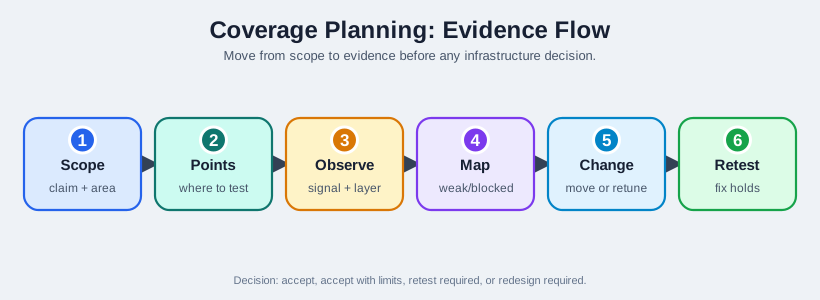
Follow Figure 1 from scope to marked test points, then through radio observations and the weak-area map. Only after those observations does the route permit one change, followed by a retest at the same points. That order preserves causality: the chapter’s planning record can link an improvement to the chosen antenna, placement, band, or gateway change instead of to a different measurement route.
Equipment And Setup
This section: Equipment And Setup — Record substitutions explicitly.
Use equipment that is close enough to the intended deployment to make the result useful:
- the target IoT device or a representative radio module
- the intended antenna or a clearly documented substitute
- the planned enclosure or a note that enclosure effects are still unknown
- a repeatable power source
- a site map, sketch, photo set, or coordinate list
- a log sheet for measurement point, orientation, height, and observations
- a scanner, modem query, access-point controller, gateway log, or field tool appropriate to the radio
Record substitutions explicitly. A bench antenna, open enclosure, temporary gateway, or different mounting height can help exploration, but it should not be silently treated as final deployment evidence.
Define The Coverage Claim
This section: Define The Coverage Claim — Start with the claim the design must support.
Start with the claim the design must support. A useful claim is bounded and testable:
- “Sensors on these shelves must reach the gateway from their installed orientation.”
- “The cellular modem must register and send data from the mounted enclosure at the planned site.”
- “The maintenance tablet must stay connected along this route.”
- “The outdoor node must remain observable from the gateway position after the enclosure is closed.”
Avoid vague claims such as “the whole building has coverage” unless the building has a measurement grid, acceptance rule, and retest plan. A vague claim creates false confidence and makes later failures hard to diagnose.
Mark Measurement Points
This section: Mark Measurement Points — For each point, record the point name, device orientation, antenna state, enclosure state, height, nearby obstacles, and whether the point is final, temporary, or exploratory.
Choose points that represent the real deployment:
- planned device positions
- far corners and shielded areas
- places near metal, water, machinery, storage, concrete, glass, or people traffic
- boundaries between access points, gateways, or cells
- installation heights and orientations that differ from bench testing
- locations where maintenance, commissioning, or recovery work must happen
For each point, record the point name, device orientation, antenna state, enclosure state, height, nearby obstacles, and whether the point is final, temporary, or exploratory.
Collect Radio Observations
This section: Collect Radio Observations — The exact fields depend on the technology, but the record should answer three questions.
The exact fields depend on the technology, but the record should answer three questions.
Can the device hear and be heard?
Record signal quality using the tool available for the technology. For Wi-Fi, this may include access point identity, channel, RSSI, noise or retry clues. For cellular, record signal quality and registration or packet-service state. For mesh or low-power networks, record neighbor, parent, route, join, or gateway evidence.
Is the result stable enough for the claim?
Repeat weak or borderline points. Note movement, doors, people, machinery, enclosure closure, antenna orientation, and device sleep or transmit state. Do not promote a single good reading into a final acceptance decision when the site is changing.
What layer failed first?
A failed data test is not always a coverage failure. The first failing layer may be association, registration, parent selection, channel conflict, power reset, gateway reachability, account/service scope, or application setup. Keep the coverage record tied to the first failing evidence layer.
Review The Coverage Map
This section: Review The Coverage Map — A coverage map can be a floor-plan overlay, a grid, a photo-marked route, or a list of named points.
A coverage map can be a floor-plan overlay, a grid, a photo-marked route, or a list of named points. The map should make decisions easier, not more decorative.
Use the map to group observations:
- clean points: the radio attaches or associates and the signal evidence supports the claim
- weak points: the radio attaches but has low margin, retries, unstable readings, or weak service evidence
- blocked points: the radio cannot attach, associate, register, join, or keep a usable link
- ambiguous points: another layer failed before coverage could be judged
Ambiguous points need a separate diagnosis before the map can become an acceptance record.
Troubleshooting Map
This section: Troubleshooting Map — When a coverage point fails, isolate the first failing layer before moving hardware.
When a coverage point fails, isolate the first failing layer before moving hardware.
When a test point fails, consult Figure 2 before moving hardware. It separates absence of service from weak signal, interference, obstruction, and device-state changes so one symptom does not trigger several uncontrolled fixes.
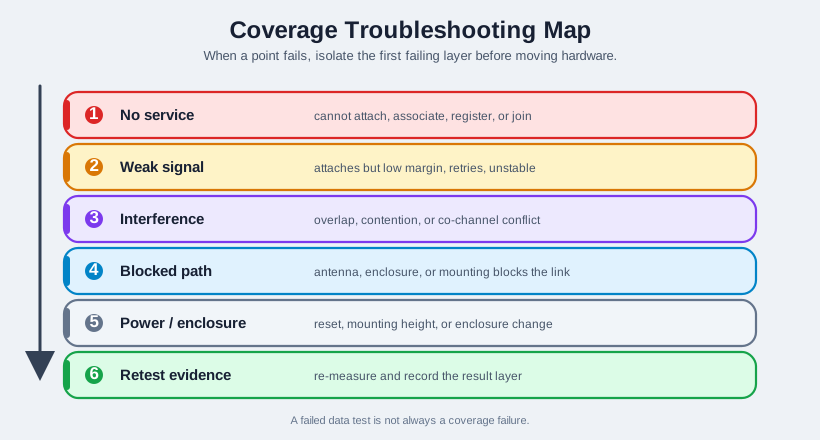
Read Figure 2 from the observed failure into the first matching branch. “No service” sends the review toward availability and provisioning; weak signal toward path and placement; good signal with poor delivery toward interference or service-path evidence; a changed enclosure or supply toward the device itself. Each branch returns to a bounded retest, connecting diagnosis to the chapter’s evidence loop rather than ending with a plausible story.
Decision Options
This section: Decision Options — Do not make several changes at once unless the record clearly says the result is exploratory.
Each weak or blocked point should lead to a bounded decision:
- Move the device when the device location is flexible and the coverage problem is local.
- Move the gateway or access point when several weak points share the same coverage boundary.
- Change antenna or enclosure placement when the radio works in open bench tests but fails in the installed form.
- Reduce transmit power or change channel planning when the issue is overlap, contention, or co-channel interference rather than weak signal.
- Add infrastructure when the claim is valid, the area is real, and the evidence shows one placement cannot cover it.
- Narrow the coverage claim when the requested area is outside the practical radio design or service footprint.
- Retest another layer when attachment, registration, power, backhaul, account, or application evidence failed before coverage could be judged.
Do not make several changes at once unless the record clearly says the result is exploratory. Multiple simultaneous changes make it hard to know what actually fixed the issue.
Step 1: Bound the coverage claim
- On the site map or named-point list, mark only the device positions and routes the deployment must support.
- Write the technology, band, gateway or service context, enclosure, antenna, and success rule beside the claim.
- The expected output is a testable set of points, not a broad statement that the whole site has coverage.
- Record whether equipment matches the intended installed form; substitutions make the result exploratory.
- Keep this claim fixed during the first measurement pass so later changes have a fair baseline.
Step 2: Mark repeatable points
- On your own site, number each final, boundary, shielded, and maintenance point on the same map.
- At each point note height, orientation, enclosure state, obstacles, and nearby site activity.
- Include at least one apparently clean comparison point near the weak area.
- The expected record lets another technician stand at the same point and repeat the observation.
- This physical walk was not run here; a local three-point fixture is used below to practice classification.
Step 3: Collect radio and service observations
- On your own hardware, read signal and association, registration, or join state at each marked point.
- Save the real scanner, modem terminal, gateway log, or controller window with point and timestamp.
- Repeat weak points in the same orientation and note doors, people, machinery, and transmit state.
- Keep link evidence separate from packet service and application delivery; a data failure may occur after coverage.
- No site radio was measured here, so the fixture values in Step 4 must not be used as deployment evidence.
Step 4: Classify the sample record
- In a local Python terminal, classify the sample points using attachment, signal, and retry evidence together.
- The fixture run returned
point=A ... class=clean,point=B ... class=weak, andpoint=C ... class=blocked. - Its input was A
-54 dBm/1 retry/attached, B-70 dBm/4 retries/attached, C-74 dBm/11 retries/not attached. - These thresholds are an exercise rule, not acceptance limits for Wi-Fi, cellular, or another radio.
- Copy the classification method to the real site record only after choosing technology-specific acceptance criteria.
Step 5: Isolate the first failed layer
- On the map, flag points with good signal but failed data as ambiguous until service and power are checked.
- Use the troubleshooting map above to distinguish no service, weak path, interference, and device-state changes.
- For the weak-corner review, compare enclosure open and closed at the same named point.
- For a failed data attempt, check attach or join, power, backhaul, and account before changing placement.
- Record the first failing layer and the observation that supports it, not only a proposed fix.
Step 6: Change one variable and retest
- Choose one antenna, placement, gateway, channel, or claim change justified by the point record.
- On your own site, repeat the same points at the same height and orientation after that change.
- Put before and after signal, attachment, retry, and delivery results side by side.
- If several changes were made together, label the trial exploratory and do another controlled retest.
- End with accepted, accepted with limits, retest required, or redesign required and name the owner.
Lab Record Template
This section: Lab Record Template — Keep the record searchable.
For each measurement point, record:
- point name and map reference
- technology, band, channel or service context
- device, firmware, antenna, enclosure, mounting, and power state
- gateway, access point, cell, router, or parent identity when available
- signal observation and tool used
- association, registration, join, route, or packet-service state
- nearby obstacles and site activity
- failure layer, if any
- decision and next action
- retest trigger
Keep the record searchable. Screenshots are useful supporting evidence, but text notes make later review and comparison much faster.
Worked Review: Weak Corner
This section: Worked Review: Weak Corner — Scenario: a sensor point in a storage corner sometimes attaches to the gateway but has inconsistent readings after the enclosure is closed.
Scenario: a sensor point in a storage corner sometimes attaches to the gateway but has inconsistent readings after the enclosure is closed.
Good review sequence:
- Confirm the point, orientation, height, enclosure state, antenna state, and gateway identity.
- Repeat the observation with the enclosure open and closed.
- Record nearby storage, metal surfaces, doors, and people or equipment movement.
- Compare the weak point with nearby clean points.
- Change one variable, such as antenna orientation or gateway placement, then retest the same point.
- Record whether the result supports acceptance, limited acceptance, or redesign.
Accepted answer: “This is not just a formula problem. The evidence points to an installed-form coverage issue, so the record must show enclosure and placement retest before acceptance.”
Worked Review: Good Signal But Failed Data
This section: Worked Review: Good Signal But Failed Data — Scenario: a device reports usable signal at a measurement point, but the application test does not send data.
Scenario: a device reports usable signal at a measurement point, but the application test does not send data.
Good review sequence:
- Do not mark the point as a coverage failure yet.
- Check association, registration, join, route, packet-service, account, or gateway evidence for the selected technology.
- Check power stability during active transmit.
- Check backhaul or controller reachability if the radio link itself is clean.
- Record the first failing layer and retest only the relevant layer.
Accepted answer: “Coverage planning should not hide protocol, account, power, or backhaul failures inside the coverage map. Mark the point as ambiguous until the first failing layer is proven.”
Common Mistakes
This section: Common Mistakes
- accepting a coverage claim before defining the area and device orientation
- using a bench antenna or open enclosure as final installed evidence
- measuring only easy points and skipping corners, cabinets, route edges, or shielded areas
- changing placement, antenna, channel, and power in the same retest
- treating a failed cloud or application test as automatic proof of weak coverage
- ignoring interference when the symptom is retries, contention, or unstable throughput
- ignoring registration, join, route, or parent evidence for non-Wi-Fi technologies
- saving only screenshots without searchable notes
- omitting retest triggers after site, antenna, enclosure, firmware, channel, gateway, or operator changes
Knowledge Check: Coverage Planning
This section: Knowledge Check: Coverage Planning
Match The Evidence To The Review Question
This section: Match The Evidence To The Review Question
Order The Coverage Planning Lab
This section: Order The Coverage Planning Lab
Review Checklist
This section: Review Checklist
Before accepting the coverage plan, confirm that the record includes:
- the bounded coverage claim
- representative measurement points and skipped areas, if any
- radio technology, band, channel, gateway, cell, parent, or service context
- device, firmware, antenna, enclosure, mounting, and power state
- signal observations tied to exact points
- attachment, association, registration, join, route, or packet-service evidence where relevant
- obstacle and site-activity notes
- classification of clean, weak, blocked, and ambiguous points
- one-variable retest evidence for changed placements, antennas, gateways, channels, or enclosure states
- decision, limitations, and retest triggers
Plan Where Every Device Has Enough Signal
This section: Plan Where Every Device Has Enough Signal — Coverage planning asks a concrete question: at each place a device will live, will its RSRP be strong enough to work reliably?
Coverage planning asks a concrete question: at each place a device will live, will its RSRP be strong enough to work reliably? Inspect Figure 3 before drawing a smooth coverage boundary, because NB-IoT and LTE-M can trade speed, repetitions, and battery energy for service at a weak point.
Read Figure 3 from installed location and cell behavior through repetitions and payload proof to the remediation action. The route makes service conditional: a street-level meter may be comfortable, while the same design in a basement pit may require deeper enhancement, longer radio-on time, and a different battery or placement decision. That connection turns a signal reading into the chapter’s real approval question: what does reliable service cost at each named location?
The depth issue is that each band changes the operating cost of the fleet. A comfortable point can send a short report, release the radio, and return to sleep. A marginal point may still report, but needs extra repetitions, longer receiver windows, and more retries after small site changes. A deep-coverage point may be valid only if the service plan, battery model, and cell capacity can absorb that cost. The map should therefore show both where service exists and what service costs.
Keep the overview record tied to named locations rather than a smooth heat-map promise. Point names, enclosure state, antenna orientation, and gateway or cell identity make later retests comparable. Without that context, an RSRP number cannot explain whether the weak result came from the link, the installed enclosure, a changed gateway, a blocked route, or a non-radio service failure.
Coverage planning in a line: predict RSRP everywhere, then budget the cost of the worst locations — because deep-coverage devices are far more expensive in airtime and battery.
Overview Knowledge Check
RSRP Bands and NB-IoT Coverage-Enhancement Levels
This section: RSRP Bands and NB-IoT Coverage-Enhancement Levels — NB-IoT sorts a device into a Coverage Enhancement (CE) level by comparing its measured RSRP against operator-configured thresholds.
NB-IoT sorts a device into a Coverage Enhancement (CE) level by comparing its measured RSRP against operator-configured thresholds. Higher levels generally permit more repetitions to reach devices in worse signal. The thresholds below are an example configuration, not values fixed by the standard:
| Example RSRP threshold | CE level | Effect |
|---|---|---|
| ≥ ~ -105 dBm | CE 0 (normal) | Few/no repetitions - fast, efficient |
| ~ -105 to -115 dBm | CE 1 | Moderate repetitions |
| ≤ ~ -115 dBm | CE 2 (deepest) | Many repetitions - slow, power-hungry |
Use those bands as engineering prompts, not universal acceptance limits. Operators configure exact thresholds, modules expose different field names, and firmware may report RSRP, RSRQ, SINR, registration state, and packet-service state through different commands. A useful lab record therefore stores the raw reading, the tool or AT command used, the cell or service identity when available, and the decision rule applied for that deployment.
Under an ideal independent-combining model, repetition can buy up to ~10 log₁₀(N) dB, so 32 repeats have a theoretical ~15 dB gain. Real coverage gain is lower when copies are correlated or combining, channel estimation, interference, and implementation losses dominate; the same message also occupies far more airtime and drains more battery per report.
Worked example. A metering rollout finds 80% of meters at street level (RSRP −95 dBm, CE 0) and 20% in basements (RSRP −123 dBm, CE 2). If each CE 2 report takes many times the airtime and energy of a CE 0 report, that smaller group can dominate total reporting airtime and its devices’ battery drain. Good planning examines those 20% first — better antennas, relocating off metal risers, or an external antenna at street level — then checks whether they move to CE 1/0.
That is why the practitioner decision should name the remedy and the retest condition. “Install external antenna and retest point B-17 with the enclosure closed” is actionable. “Coverage weak in basement” is not, because it does not say whether the next pass should change antenna placement, gateway position, operator service, measurement height, enclosure material, or the deployment claim.
Practitioner Knowledge Check
Capacity Is the Hidden Coverage Cost
This section: Capacity Is the Hidden Coverage Cost — It is tempting to treat coverage as a pass/fail line, but the deeper truth is that coverage and capacity trade against each other.
It is tempting to treat coverage as a pass/fail line, but the deeper truth is that coverage and capacity trade against each other. A cell has a fixed amount of airtime. A CE 0 device might complete a report in a fraction of a second; a CE 2 device repeating 64–128 times can hold the channel for many seconds. Fill a cell with deep-coverage devices and you exhaust its airtime long before you exhaust its address space.
This reframes the planner’s job. Adding “just enough” RSRP is not only about closing the link — it is about keeping devices in low CE levels so each consumes little airtime, which is what lets a single cell support thousands of them. The link-budget lever (antenna, siting, band choice) and the capacity lever are the same lever.
Worked example. Two identical basements each hold 50 sensors. In one, an external antenna at ground level lifts RSRP from −123 to −100 dBm, moving the sensors from CE 2 to CE 0. If the measured airtime per report drops by an order of magnitude, the cell has more capacity for both basements; whether it comfortably carries them depends on their reporting load and other users. Coverage planning is capacity planning.
The arithmetic does not need a proprietary network model to be useful. If one design assumption says “every device sends one report per hour” and another says “the worst 15% require dozens of repetitions,” the planner can compare those assumptions before deployment. The point is not to publish a universal cell-capacity number; it is to prevent the field plan from hiding a small group of expensive locations inside an average signal score.
For that reason, deep coverage records should preserve uncertainty. Seasonal stock, parked vehicles, wet walls, closed cabinets, maintenance doors, and battery voltage can all move a borderline point across the CE boundary. A defensible plan names the boundary cases and retest triggers so a future site change reopens the coverage decision instead of silently invalidating it.
Under-the-Hood Knowledge Check
Summary
This section: Summary — Coverage planning converts a radio design into a testable deployment claim.
Coverage planning converts a radio design into a testable deployment claim. A good lab record shows the intended service area, the assumptions behind the map, the measured evidence at meaningful points, the first failing layer for weak or blocked areas, and the retest conditions that would reopen the decision. The outcome is not a decorative heat map. It is a defensible acceptance or redesign decision.
Key Takeaway
This section: Key Takeaway — Lab: Coverage Planning should produce deployment evidence for spectrum assumptions, coverage, antenna placement, link budget, modem behavior, fallback paths, and validation limits.
Lab: Coverage Planning should produce deployment evidence for spectrum assumptions, coverage, antenna placement, link budget, modem behavior, fallback paths, and validation limits.
Concept Relationships
This section: Concept Relationships
- Propagation design explains why obstacles, antennas, enclosure materials, mounting, and multipath change coverage evidence.
- Frequency bands explains why band and channel choice affect range, interference, and service availability.
- Cellular modem labs show how registration and packet-service evidence can separate coverage problems from modem setup problems.
- Wi-Fi spectrum labs provide shared-spectrum measurement practice that can feed a coverage record.
- Mobile wireless review compares coverage evidence across different wireless technologies.
What’s Next
This section: What’s Next
- Wireless Propagation and Design reviews the RF evidence behind coverage decisions.
- Frequency Bands and Licensing explains why band and service context matter in a coverage plan.
- Lab: Cellular Modem Bring-Up connects coverage observations to modem registration and data readiness.
- Mobile Labs: Wi-Fi Spectrum Analysis practices shared-spectrum measurement and channel review.
- Mobile Wireless Comprehensive Review compares coverage evidence across wireless options.