20 Wi-Fi 6E and Wi-Fi 7 for IoT

More
Depth: Practitioner
Progress saves as you read. Mark sections complete as you go; your progress appears in the sidebar.
20.1 Start With the Wireless Story
This section: Start With the Wireless Story — Use a simple upgrade review.
Use a simple upgrade review. Keep the current system as the baseline. List every device type. Check which types support the new band. Mark the rooms they use. Test one busy hour. Test one quiet hour. Compare both results.
Look past top speed. A sensor may send very little. It may care more about battery life. A camera may need steady capacity. A moving unit may care about handoff. Give each class its own pass rule.
Keep weak areas visible. Keep old clients visible too. Note any new support burden. Price the change. Name the benefit. Stop when the evidence shows no gain. Recheck after device or building changes.
Picture a school adding new wireless gear. One room is fast. The next room is not. Some laptops see the new band. Older sensors do not. A newer label has not fixed the whole site.
Begin with the job. Name the devices that must connect. Mark where they will sit. Note which ones move. Ask how much data each one sends. Ask how soon an answer must return. Record how long each battery should last. These facts matter more than the number on the box.
Wi-Fi 6E adds a new place for Wi-Fi signals. That place is the 6 GHz band. It can offer cleaner space in some buildings. It can also lose more strength through walls. Both the client and the building equipment must support it. Local rules must allow it too.
Wi-Fi 7 adds more ways to share and combine that space. A capable device may gain speed or a steadier path. A simple sensor may gain little. Wide channels can help one use case and reduce choices for another. Test the real device in the real room.
This first view treats the upgrade as a fit check. It does not predict every signal change. Keep the old path when the new path has no clear benefit. Keep mixed-device support in the plan. The Practitioner layer turns these questions into a site record. Under the Hood explains channel sharing, link choices, and the limits behind the headline speeds.
Wi-Fi 6E and 7 are useful only when the deployment can use their new assumptions. Start with client and AP support, 6 GHz coverage, channel width, OFDMA or multi-link fit, operations readiness, and proof that the upgrade solves a real IoT problem.
20.2 In 60 Seconds
This section: In 60 Seconds — Wi-Fi 6E extends Wi-Fi 6 into the 6 GHz band where local rules and device support allow it.
Wi-Fi 6E extends Wi-Fi 6 into the 6 GHz band where local rules and device support allow it. Wi-Fi 7 adds features such as Multi-Link Operation, wider channel options, more flexible channel use, and higher modulation for capable links. For IoT, the decision is not “newer Wi-Fi is always better.” The decision is whether the device class, AP design, channel plan, power mode, coverage, backhaul, and operations evidence justify using these capabilities.
Use this chapter to review Wi-Fi 6E and Wi-Fi 7 claims without drifting into peak-rate marketing or one-size-fits-all deployment rules.

20.3 Learning Objectives
This section: Learning Objectives
By the end of this chapter, you will be able to:
- explain what Wi-Fi 6E and Wi-Fi 7 change for IoT deployments
- separate 6 GHz spectrum evidence from ordinary Wi-Fi upgrade claims
- decide when Target Wake Time, OFDMA, Multi-Link Operation, wider channels, and preamble puncturing matter
- identify why 6 GHz coverage and client support must be tested in the installed environment
- write bounded recommendations for mixed IoT networks using Wi-Fi 6, Wi-Fi 6E, Wi-Fi 7, or another wireless path
20.4 What Changed
This section: What Changed — For most IoT reviews, the important question is not the headline generation number.
Wi-Fi 6E:
- uses the Wi-Fi 6 feature set where 6 GHz operation is allowed and supported
- can reduce legacy contention in the 6 GHz band because older 2.4 GHz and 5 GHz clients do not operate there
- can offer more channel-planning room, but the available spectrum and power class depend on local regulation
- often needs a denser or more carefully placed AP layout than a similar 5 GHz design because higher-frequency links are more sensitive to path and material loss
Wi-Fi 7:
- builds on Wi-Fi 6 and Wi-Fi 6E with Multi-Link Operation for capable AP/client pairs
- can use wider channels where 6 GHz spectrum and local rules permit them
- improves how a channel can remain useful when part of it is affected by interference
- can improve peak rate for high-quality links, but only when signal quality, client capability, channel plan, and wired backhaul support it
For most IoT reviews, the important question is not the headline generation number. The important question is which feature solves a measured deployment problem.
20.5 Evidence Route
This section: Evidence Route — Use Figure 20.1 to keep Wi-Fi 6E/7 decisions tied to proof instead of release names.
Use Figure 20.1 to keep Wi-Fi 6E/7 decisions tied to proof instead of release names.
Before comparing advanced Wi-Fi features, inspect Figure 20.1 to keep the review ordered by requirement, compatibility, and observable outcome.
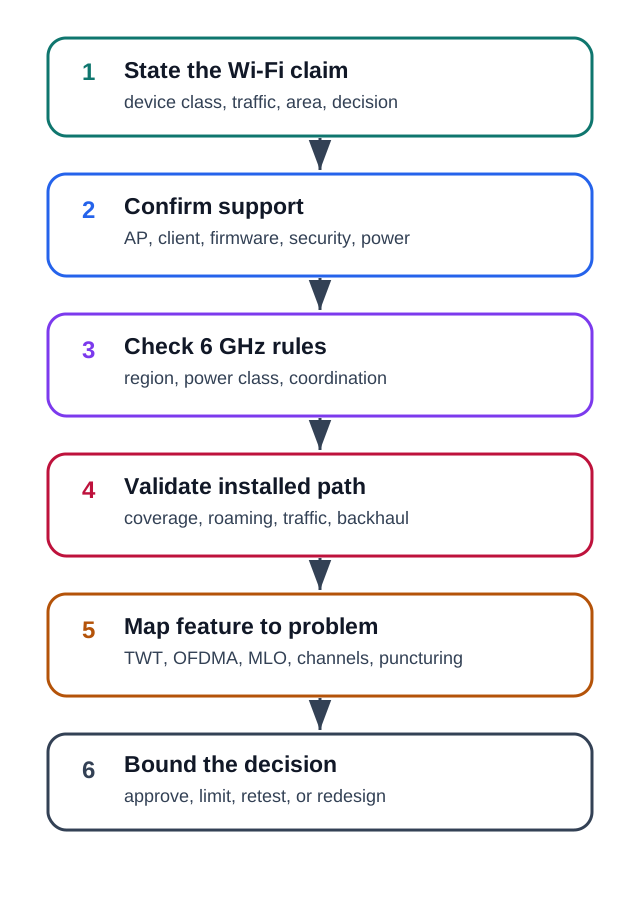
Read Figure 20.1 from the service need through client, access-point, spectrum, and feature checks, then finish with failure and operations evidence. The route prevents a feature name from substituting for an end-to-end result.
The walkthrough begins with the client, because an access-point feature provides no benefit to a device that lacks the required band, security mode, or scheduling capability. It then checks the access-point radios, channel plan, wired uplink, power budget, controller, and firmware policy as one system. Local 6 GHz power and location rules constrain which design can be installed. Only then does the review measure coverage with final enclosures, antennas, walls, and moving equipment. The named feature is accepted last, after a controlled comparison shows that it improves the original service or power problem under those installed conditions.
The checks below summarize that route:
- the device class and whether it really supports the required Wi-Fi generation, band, security mode, and power behavior
- the AP model, radio layout, channel plan, wired uplink, PoE budget, controller behavior, and firmware policy
- local 6 GHz rules, indoor or outdoor limits, power class, and whether coordination is required
- installed coverage with final enclosures, antennas, mounting, walls, equipment, and moving objects
- whether the feature being cited actually maps to the problem being solved
20.6 Feature Evidence Map
This section: Feature Evidence Map — Use Figure 20.2 when a design cites a feature name as the reason for approval.
Use Figure 20.2 when a design cites a feature name as the reason for approval.
Before claiming a Wi-Fi 6E or Wi-Fi 7 benefit, inspect Figure 20.2 to match each feature with compatible clients, spectrum, and measured service behaviour.
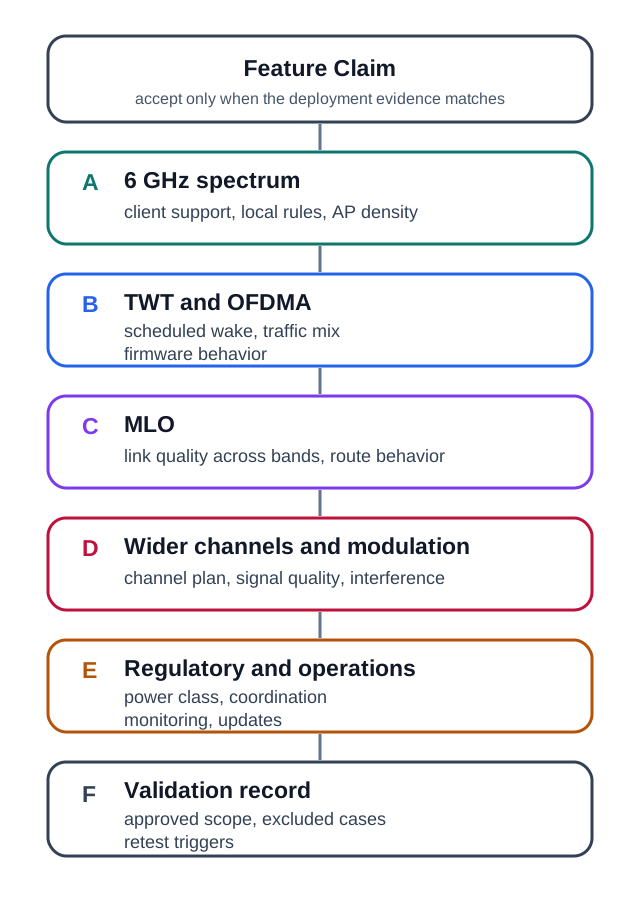
Read Figure 20.2 from requirement through device and access-point support to band, feature, failure, and operations evidence. This turns a standards feature into a bounded deployment claim that can be retested.
The map is walked feature by feature. For 6 GHz, begin with compatible clients and a validated coverage plan. For TWT and OFDMA, follow the claim into client firmware, access-point scheduling, and the real traffic pattern. For MLO, verify capable endpoints and useful link quality on every participating band. Wider channels and higher modulation are then tested against interference, signal quality, and wired backhaul rather than assumed to raise application capacity. Regulatory coordination and power class remain gates throughout. The resulting validation record states the measured benefit, limits, failure behaviour, and configuration that produced it.
The points below summarize that evidence:
- 6 GHz helps only devices that support it and are inside a validated 6 GHz coverage plan
- TWT helps only when the AP, client, firmware, and application can use scheduled wake behavior safely
- OFDMA and multi-user scheduling help only when the client mix and traffic pattern actually use them
- MLO helps only capable Wi-Fi 7 clients and APs, and its value depends on link quality across the participating bands
- wider channels and higher modulation improve peak capacity only when channel plan, signal quality, interference, and backhaul are adequate
- regulatory coordination or power-class constraints must be verified before installation, especially for outdoor or higher-power plans
20.7 Scenario 1: Battery Sensors In A Building
This section: Scenario 1: Battery Sensors In A Building — Claim: upgrading the building to Wi-Fi 7 will automatically improve all battery-powered sensors.
Claim: upgrading the building to Wi-Fi 7 will automatically improve all battery-powered sensors.
Evidence already available:
- most sensors send small periodic readings
- several sensors are inside cabinets, risers, and equipment rooms
- many clients do not support 6 GHz or Wi-Fi 7 features
- the existing AP placement was designed for laptops and phones
- firmware update and commissioning workflows are still being documented
Best review response:
Do not approve the claim as written. A Wi-Fi 7 AP upgrade may improve parts of the network, but small battery sensors need their own evidence: client support, TWT behavior if used, cabinet coverage, roaming or reconnect behavior, commissioning, and update handling. Some sensors may remain better on 2.4 GHz or 5 GHz; others may need a different low-power network or a gateway.
20.8 Knowledge Check: Battery Sensor Claim
This section: Knowledge Check: Battery Sensor Claim
20.9 Scenario 2: Video And Vision Gateways
This section: Scenario 2: Video And Vision Gateways — Claim: Wi-Fi 6E should be used for machine-vision gateways because cameras need more capacity.
Claim: Wi-Fi 6E should be used for machine-vision gateways because cameras need more capacity.
Evidence already available:
- the gateways are powered and send high-rate bursts to local compute
- the devices support 6 GHz, but only some APs do
- the wired uplink and switch capacity have not been checked
- the site has metal shelving and moving equipment
- the team has not decided whether cameras share a network with low-rate sensors
Best review response:
Wi-Fi 6E or Wi-Fi 7 may fit powered vision gateways, but approval needs a complete path test. Validate 6 GHz coverage with the final mounting, check AP and client support, confirm wired backhaul and switch capacity, and separate high-rate video traffic from low-rate control or sensor traffic when needed. Do not treat the radio upgrade as proof of end-to-end capacity.
20.10 Knowledge Check: High-Rate Gateway
This section: Knowledge Check: High-Rate Gateway
20.11 Scenario 3: Mobile Robot Control
This section: Scenario 3: Mobile Robot Control — Claim: Wi-Fi 7 MLO is enough to approve wireless control for mobile robots.
Claim: Wi-Fi 7 MLO is enough to approve wireless control for mobile robots.
Evidence already available:
- robots move through aisles, charging bays, and service areas
- some locations have strong 5 GHz but weak 6 GHz coverage
- control traffic is latency sensitive, but video upload is bandwidth sensitive
- roaming, reconnect, interference, and failure behavior have not been tested
- the operations team has not defined fallback behavior when a link degrades
Best review response:
MLO is a useful candidate feature, not an approval by itself. The review must test each robot route with the real AP layout, traffic mix, motion pattern, and failure behavior. If the control loop needs bounded latency under faults, the recommendation may require a separate control network, wired safety layer, private cellular path, or application-level fallback in addition to Wi-Fi.
20.12 Knowledge Check: MLO And Control
This section: Knowledge Check: MLO And Control
20.13 Comparison Guidance
This section: Comparison Guidance
Use Wi-Fi 6 when:
- device support is broad and 2.4 GHz or 5 GHz coverage is already validated
- OFDMA, TWT, BSS coloring, segmentation, and normal enterprise operations solve the problem
- the client class does not support 6 GHz or cannot benefit from it
Use Wi-Fi 6E when:
- the client class supports 6 GHz and needs cleaner spectrum or wider channel-planning options
- installed coverage and AP density have been tested for the actual environment
- local rules, power class, and security requirements are clear
Use Wi-Fi 7 when:
- capable clients and APs are available for the device class
- MLO, channel puncturing, wider channels, or higher modulation solve a measured problem
- wired uplinks, switching, power, controller policy, and monitoring are ready for the traffic profile
Use another wireless path when:
- the device is too power constrained for Wi-Fi duty cycles
- the application needs wide-area mobility outside local AP coverage
- the control loop requires safety behavior that cannot depend on best-effort Wi-Fi alone
- installation, certification, or operating ownership makes Wi-Fi the wrong boundary
20.14 Match Features To Review Questions
This section: Match Features To Review Questions
20.15 Order The Review
This section: Order The Review
20.16 Common Mistakes
This section: Common Mistakes — Corrective action: tie every feature claim to the device class and measured path.
Approving from peak rate:
- headline rates assume ideal clients, channels, signal quality, and backhaul
- most IoT decisions are limited by coverage, airtime, duty cycle, roaming, segmentation, and operations
Corrective action: tie every feature claim to the device class and measured path.
Ignoring client support:
- older clients cannot use 6 GHz
- many sensors may not implement the power or multi-link feature cited in the design
- AP support alone does not prove client behavior
Corrective action: record AP and client capabilities together, then test them as a pair.
Using 6 GHz without a coverage plan:
- 6 GHz can provide cleaner spectrum, but the installed path is often more demanding than lower bands
- cabinets, walls, racks, vehicles, and device enclosures can change the result
Corrective action: test final mounting and production enclosures before accepting the deployment boundary.
Treating regulation as static:
- 6 GHz rules, power classes, outdoor allowances, and coordination requirements differ by region and can change
- a product that is acceptable in one market may need a different plan elsewhere
Corrective action: require a current local-regulation check in the release record.
20.17 Review Checklist
This section: Review Checklist
Before accepting a Wi-Fi 6E or Wi-Fi 7 IoT recommendation, confirm that it:
- names the device class, traffic pattern, mobility state, and deployment area
- identifies the exact feature being used and why that feature matters
- verifies AP and client support for the band, feature, firmware, and security mode
- checks local 6 GHz rules and power or coordination constraints
- validates installed coverage with production enclosure, antenna, mounting, and traffic mix
- includes wired backhaul, switch capacity, PoE, monitoring, and update ownership
- states what is approved, what remains excluded, and what change triggers retest
20.18 A New Band and Two New Generations
This section: A New Band and Two New Generations — Wi-Fi 6E extends Wi-Fi 6 (802.11ax) into the 6 GHz band where local rules allow it.
Wi-Fi 6E extends Wi-Fi 6 (802.11ax) into the 6 GHz band where local rules allow it. In a market allowing the full 5.925–7.125 GHz range, that is 1200 MHz of spectrum and up to seven non-overlapping 160 MHz channels. Legacy 802.11b/g/n/ac clients cannot operate there, so their 2.4/5 GHz traffic is absent; other 6 GHz users and interference still matter.
Wi-Fi 7 (802.11be) is the next step on the same bands, chasing extreme throughput and low latency with wider channels, denser modulation, and the ability to use several links at once. For IoT the headline is not peak speed but the room to breathe: cleaner 6 GHz spectrum and more efficient multiplexing reduce legacy-client contention for dense sensor fleets.
The installed decision still starts with the same evidence discipline as any other wireless choice. A 6 GHz-capable product must be paired with AP radios, firmware, security policy, and local rules that allow the band in the intended deployment. It must also be measured in the real enclosure and mounting position, because a clean band does not remove path loss through cabinets, racks, walls, bodies, vehicles, or equipment.
For a low-rate sensor fleet, the upgrade may be valuable because scheduling and cleaner airtime reduce contention, not because every device suddenly needs a wider channel. For a powered gateway or robot, Wi-Fi 7 may be valuable because multiple links, channel puncturing, or wider 6 GHz channels solve a measured capacity or latency problem. The recommendation should name that problem, the feature being used, and the cases that remain on Wi-Fi 5/6, another band, or another network.
Two ideas: 6E = Wi-Fi 6 on a cleaner 6 GHz band; Wi-Fi 7 = wider channels, 4096-QAM, and multi-link on 2.4/5/6 GHz.
20.18.1 Overview Knowledge Check
20.19 OFDMA and Resource Units
This section: OFDMA and Resource Units — The efficiency feature Wi-Fi 6/6E brought for many small devices is OFDMA (orthogonal frequency-division multiple access).
The efficiency feature Wi-Fi 6/6E brought for many small devices is OFDMA (orthogonal frequency-division multiple access). Instead of giving one station a whole channel per transmission, the AP subdivides a channel into resource units (RUs) and serves several stations at once. Scheduling airtime is only half the IoT story, so inspect Figure 20.3 next to see how a station coordinates when it will be awake to use that scheduled service.
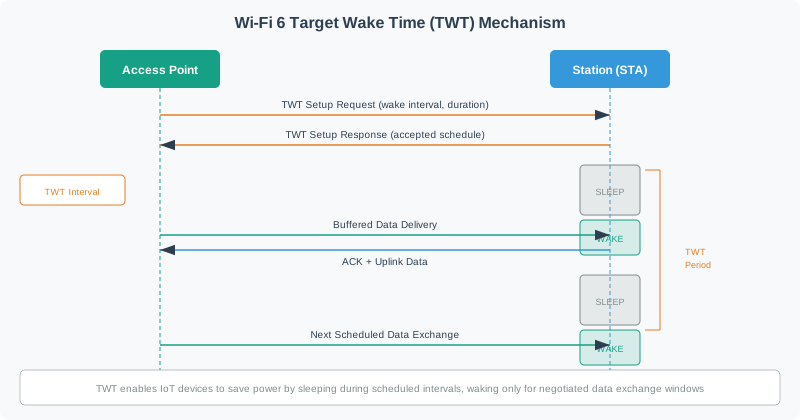
Read Figure 20.3 from the AP-station negotiation into the sleep interval, then the scheduled wake, buffered-data exchange, acknowledgement, and return to sleep. Target Wake Time bounds when the client should contend or receive, while OFDMA can divide the available transmission opportunity among several clients. Together they connect dense-fleet airtime efficiency to the chapter’s power evidence; neither benefit exists unless AP policy, client firmware, traffic timing, and recovery behavior agree.
Target Wake Time is the matching power-side record. It is useful only when the station, AP, application duty cycle, and buffering behavior agree about the wake window. The field record should state the negotiated interval, expected exchange duration, retry behavior, and what happens when the device misses a wake window after roaming, sleep-clock drift, firmware update, or AP restart.
When you approve OFDMA or TWT for a device class, do not approve the feature name alone. Capture a representative AP model, client firmware, channel width, traffic interval, measured airtime, power state, and failure condition. That record keeps a successful bench result from being misapplied to a different firmware build, a different controller policy, or a mixed-client production WLAN.
Worked example. Twenty temperature sensors wake together to report 40 bytes each. Without OFDMA they contend for separate transmission opportunities, and the overhead (backoff, preamble, ACK) can dwarf the 40-byte payloads. On a 20 MHz Wi-Fi 6 channel, with one 26-tone RU per sensor, one uplink OFDMA opportunity can serve nine sensors, so the AP needs at least three triggered opportunities to serve twenty: 9 + 9 + 2 = 20. Scheduling several reports at once can reduce contention and airtime overhead, subject to AP and client support and the actual traffic pattern.
20.19.1 Practitioner Knowledge Check
20.20 Wi-Fi 7’s 320 MHz, 4096-QAM, and Multi-Link
This section: Wi-Fi 7’s 320 MHz, 4096-QAM, and Multi-Link — Wi-Fi 7 (802.11be) pushes three levers.
Wi-Fi 7 (802.11be) pushes three levers. 320 MHz channels (available only in the wide 6 GHz band) double Wi-Fi 6’s 160 MHz maximum. 4096-QAM packs 12 bits per symbol versus 1024-QAM’s 10, a ~20% peak-rate gain — but only where SINR is high enough to keep those 4096 constellation points distinct, so it helps close-in devices, not distant ones. Preamble puncturing lets an AP still use a wide channel when a slice of it is occupied, by “punching out” the busy sub-channel instead of abandoning the whole width.
The most novel feature is Multi-Link Operation (MLO): a device associates over several links (e.g., 5 GHz and 6 GHz) at once and can either aggregate them for throughput or use one as a hot standby for reliability and lower latency. For an industrial controller, MLO’s reliability mode — sending on two bands so a hit on one does not stall the flow — can matter more than raw speed, when supported and measured.
That benefit is conditional. Each participating link needs a measured RSSI, noise, retry, roaming, and interference record along the actual route; otherwise the second link may only add complexity. A design that aggregates links for video throughput should also prove wired backhaul, switch capacity, and airtime isolation. A design that duplicates control frames should prove the failure behavior: which traffic is duplicated, how duplicates are handled, what latency tail was measured, and what fallback occurs when one band disappears.
Channel width and modulation need the same boundary. A 320 MHz channel can be a poor choice in a crowded or partially blocked environment if it reduces reuse or hides a backhaul limit. 4096-QAM is a close, clean-link feature; it is not an argument for distant battery nodes. Preamble puncturing is useful only when the interference pattern is known and the remaining channel still meets the application requirement.
Worked example. A robot on a busy 5 GHz channel suffers occasional latency spikes when the channel is grabbed by video traffic. With Wi-Fi 7 MLO it also links on 6 GHz; the controller duplicates latency-critical frames across both links, so a spike on 5 GHz is masked by the 6 GHz copy. The win is not a bigger number — it is a tighter latency tail from using two links at once. Confirm that latency tail on the route.
20.20.1 Under-the-Hood Knowledge Check
20.21 Summary
This section: Summary — Wi-Fi 6E and Wi-Fi 7 are valuable IoT tools when their features solve a measured problem.
Wi-Fi 6E and Wi-Fi 7 are valuable IoT tools when their features solve a measured problem. 6 GHz can provide cleaner spectrum and more planning room for capable clients. Wi-Fi 7 can improve multi-link behavior, channel flexibility, and high-quality link capacity. Those benefits are not automatic.
A strong review names the device class, proves client and AP support, checks local rules, validates installed coverage, and connects each feature to a deployment problem. If the evidence does not match the claim, limit the recommendation or use another wireless path.
20.22 Key Takeaway
This section: Key Takeaway — Wi-Fi 6E and Wi-Fi 7 for IoT should match Wi-Fi standard, band, channel plan, airtime, density, security, power profile, and deployment evidence to the IoT use case.
Wi-Fi 6E and Wi-Fi 7 for IoT should match Wi-Fi standard, band, channel plan, airtime, density, security, power profile, and deployment evidence to the IoT use case.
20.23 What’s Next
This section: What’s Next — Continue with Wi-Fi Fundamentals and Standards if you need the broader Wi-Fi generation route.
Continue with Wi-Fi Fundamentals and Standards if you need the broader Wi-Fi generation route.
Use Wi-Fi Architecture and Mesh when the issue is AP placement, roaming, mesh backhaul, or local network design.
Use Wi-Fi Deployment Planning when you need a complete site-survey and operations plan.
Return to Mobile Wireless Technologies Basics when the design may be better served by Bluetooth, LPWAN, cellular, RFID, NFC, UWB, or a hybrid architecture.
Find help
3 reviewed answers.
Where should I start in a module?
Open the module page from the sidebar to see its chapters in order. Use the module map to return to a topic you need.
Modules and pathsReviewed
What can I try when a project does not work?
Check the symptom, then work through the diagnostic steps. Keep the error message and the smallest example that reproduces it.
When you are stuckReviewed
How do interactive examples work?
Use the interactive guide to check how examples and simulations work before changing your project.
Interactive examples guideReviewed